Posts in Featured

TV Show Tracker 2.1 Giveaway: You’re Gonna Need More Shows to Watch

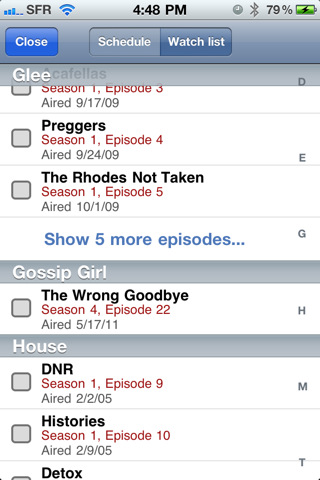
If you watch a lot of TV, live on the Internet, and can’t remember when House airs, then you’re probably already using TV Show Tracker right? We’ve been covering the big updates all along, and I gotta say that there’s lots of new goodies to chew on. Take the Watch List for example. Everything you missed watching will be stored in one convenient place so you can check it off once you get down mowing down the bag of half baked doritos in front of the TiVo. Those unwatched episodes will also show up as application badges (because it’s pretty critical if you miss out on the first episode of The Office). Tapping on a show in your favorites list now takes you directly to their show page, and in the preferences you have the app open into the schedule so you don’t miss a thing. Combine that with a new icon, and the latest update to TV Show Tracker just makes finding dramas on the boob tube pretty easy.

So how much does it cost? It’s on sale for $0.99 until Saturday evening — it’s super useful to see when your favorite two political comedians are coming back from vacation as well.

But we’re giving away five copies to you delightful, handsome (beautiful for the lady-girls out there) MacStorians, so you’ll want click past the break for the full rundown.

Read more

Access Extra Content and Perks

Founded in 2015, Club MacStories has delivered exclusive content every week for nearly a decade.

What started with weekly and monthly email newsletters has blossomed into a family of memberships designed for every MacStories fan.

Learn more here and from our Club FAQs.

Club MacStories: Weekly and monthly newsletters via email and the web that are brimming with apps, tips, automation workflows, longform writing, early access to the MacStories Unwind podcast, periodic giveaways, and more;

Club MacStories+: Everything that Club MacStories offers, plus an active Discord community, advanced search and custom RSS features for exploring the Club’s entire back catalog, bonus columns, and dozens of app discounts;

Club Premier: All of the above and AppStories+, an extended version of our flagship podcast that’s delivered early, ad-free, and in high-bitrate audio.

Learn more here and from our Club FAQs.


Steve Jobs Resigns, Tim Cook Named New CEO of Apple

With a press release that just went out, Steve Jobs has announced he’s stepping down as CEO of Apple. Former COO Tim Cook will take the role of new CEO. Steve Jobs will stay involved as Chairman of the Board, and Tim Cook will obviously join the Board, too, effective immediately. In a letter to the Board and the Apple community, Steve Jobs explains he’s no longer capable of meeting his duties and expectations as Apple CEO, strongly recommending the Board to name Tim Cook as new CEO. Jobs also states “Apple’s brightest and most innovative days are ahead of it”.

On January 17, Apple’s Board granted Steve Jobs a medical leave of absence, and the former CEO said he would remain involved with major strategic decisions, with Tim Cook filling in for day-to-day operations at Apple. Since then, Steve Jobs made two appearances at a media event in March and the WWDC ‘11 keynote to announce the iPad 2, iOS 5 and new iCloud features. Speculation has surrounded Steve Jobs’ health conditions since January, although the company preferred to keep such conditions private and out of the community and press daily rumors.

Steve Jobs co-founded Apple in 1976 with Steve Wozniak and Ronald Wayne. He left the company in 1985, only to return from NeXT (another company he started) to Apple in 1997 and ignite the digital revolution by laying the groundwork of modern Mac OS X, iTunes and the iLife suite, and later the iPhone in 2007, and the iPad in 2010. From Apple’s official bio of the Steve Jobs (which hasn’t been updated to reflect the new Chairman role yet):

Steve Jobs is the CEO of Apple, which he co-founded in 1976. Apple is leading the consumer technology world with its revolutionary iPhone and App Store, its family of iPod media players and iTunes media store, and its Mac computers and iLife and iWork application suites. Apple recently introduced the iPad, a breakthrough Internet and digital media device, plus the iBookstore, alongside iTunes and the App Store.

Steve also co-founded and was the CEO of Pixar Animation Studios, which created some of the most successful and beloved animated films of all time including Toy Story, A Bug’s Life, Monsters, Inc., Finding Nemo, The Incredibles, Cars and Ratatouille. Pixar merged with The Walt Disney Company in 2006 and Steve now serves on Disney’s board of directors.

Steve grew up in the apricot orchards which later became known as Silicon Valley, and still lives there with his family.

Tim Cook, former COO of Apple, was responsible for the company’s worldwide sales and operations, reporting directly to Steve Jobs and managing Apple’s supply chain overseas. He’s regarded as the man who made possible building and shipping millions of iOS devices in four years thanks to exclusive supplier agreements and deals, including pre-payments to get stable access to important components such as the LCD displays used in Apple’s iPhone, iPad, and iPod touch.

Before joining Apple, Cook was vice president of Corporate Materials for Compaq and was responsible for procuring and managing all of Compaq’s product inventory. Previous to his work at Compaq, Cook was the chief operating officer of the Reseller Division at Intelligent Electronics.

Wikipedia provides a brief timeline of Cook’s roles at Apple:

  • He initially served as Senior Vice President for Worldwide Operations
  • In January 2007, Cook was promoted to COO.
  • Cook served as Apple CEO for two months in 2004, when Steve Jobs was recovering from pancreatic cancer surgery. Cook also serves on the Board of directors of Nike.
  • In 2009 Cook again served as Apple CEO for several months while Steve Jobs took a leave of absence for a liver transplant.
  • In January 2011, Apple’s Board of Directors approved a third medical leave of absence, requested by Steve Jobs. During that time, Tim Cook was responsible for most of Apple’s day-to-day operations while CEO Steve Jobs made most major decisions.

Steve Jobs is widely regarded as the “visionary genius” behind many of Apple’s best inventions and innovations such as the refined graphical user interface, the Mac’s attention to detail and beautiful typography, and iOS’ focus on multitouch and natural user experience. To get an idea of the man behind the company, check out this collection of Steve Jobs quotes we collected two years ago.

Below, you’ll find the press releases from Apple, Steve Jobs’ commencement address at Stanford University in 2005, and the video of the official “iCEO” announcement in 2000. As for our thoughts on Apple without Steve Jobs, we’ll take our time to elaborate on today’s (huge) news for the company, but overall, this article from January 2011 still holds true: During Steve’s Absence, Apple Will Be Just Fine. Read more

Access Extra Content and Perks

Founded in 2015, Club MacStories has delivered exclusive content every week for nearly a decade.

What started with weekly and monthly email newsletters has blossomed into a family of memberships designed for every MacStories fan.

Learn more here and from our Club FAQs.

Club MacStories: Weekly and monthly newsletters via email and the web that are brimming with apps, tips, automation workflows, longform writing, early access to the MacStories Unwind podcast, periodic giveaways, and more;

Club MacStories+: Everything that Club MacStories offers, plus an active Discord community, advanced search and custom RSS features for exploring the Club’s entire back catalog, bonus columns, and dozens of app discounts;

Club Premier: All of the above and AppStories+, an extended version of our flagship podcast that’s delivered early, ad-free, and in high-bitrate audio.

Learn more here and from our Club FAQs.


A Trusted System

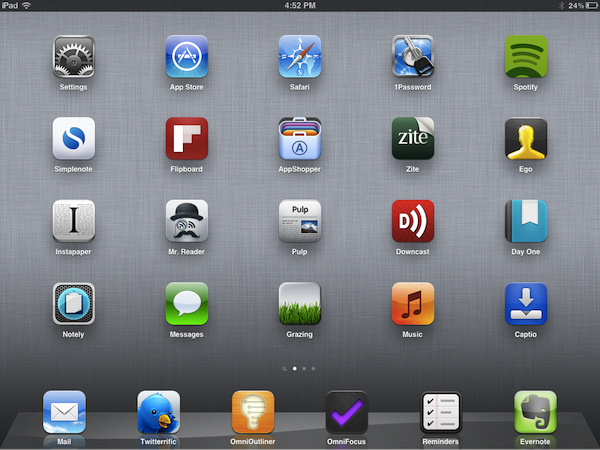
Over the past few months, I’ve noticed a trend emerging in my daily app consumption and workflow: as the App Store gets populated by thousands of new applications every day and developers struggle to get noticed in the sea of iPhone and iPad releases and “promotions”, I increasingly tend to rely on “a trusted system”, rather than constantly tweaking my home screen or dock to accommodate new apps from “indie devs” to try out, and perhaps replace with something else entirely the week after.

More than a trend, people who know me well might argue that I have a problem: I switch between apps less, and thus I am becoming that kind of guy that doesn’t care about what’s new in spite of my professed interest for innovation and good software.

But that’s my point exactly, and there’s an important difference between caring about new apps and trusting only a few selected ones for my work that I’d like to point out in this article.

Why should I buy the latest to-do app for iPhone or the next RSS reader for the iPad? Why should I constantly tweak and fiddle when the trusted system I’ve built is serving me so well? Some people, including me, are big advocates of App Store discovery and innovation: you never know what hidden gem the Productivity category might hide beneath hundreds of “wallpaper customizers”, and therefore it is an app lover’s job to navigate the App Store with the sole purpose of discovery in mind. With half a million apps to choose from, those who set out to explore the intricate App Store maze are the Magellans of the digital distribution era. Yet, I believe app discovery should be the reason behind good information and curiosity, not the ultimate goal towards getting things done or simply enjoying iOS devices.

We, as geeks, want to be – or at least “feel” – productive with our iPhones and iPads. Whereas we look at “the average user” and justify our expenses saying that unlike those people, we actually do stuff with Apple devices, the other end of the spectrum is equally true in my opinion, but we often don’t see it: all kinds of people (“the users”) are now serious about iOS, and whilst for some buying an iPhone will always be related to the status symbol, more customers than we, as geeks, usually think of are starting to look at iPhones and iPads as productivity platforms. It’s not just for the nerds or the fashion victims anymore. And as people get serious about iOS, they develop the “trusted system awareness” in that they start looking for apps to rely on without hesitation on a daily basis.

For me, the trusted system has become a synonym of great software developed by people that are serious about the bits and Xcodes they work with. Software from people that have something to lose if things go south. Apps from developers that are deeply invested in the platform – apps from people that often do this for a living but that are also users of their own creations. And this synonym has led me to trust the smaller, indie devs less, because I always fear the app I’m showing interest in will be discontinued tomorrow and never come back to support my needs.

It’s not like this hasn’t happened before. Too many times I’ve decided to fit an app in my workflow, only to find out months later the developer had no willingness whatsoever to maintain it or at least come clean and say “look, it was just an experiment”. And I can understand that point of view, really. I’m not saying garage developers and seven year-olds shouldn’t take their first steps in iOS development and see what’s like to gain popularity in the App Store. Not at all. I’m looking at us, the users who are serious about iOS, and deconstructing the difference between being curious, which is legitimate, and not getting anything done because of the constant tweaking, which is poisonous.

We need to separate work from leisure and app discovery. If we’re really committed to proving that iOS devices can be fantastic replacements for trucks, we need to get serious and understand that switching between apps and feverishly mining for the latest productivity goldmine won’t make you smarter or “more productive”. On the other hand, developers need to understand that just because they’ve released a new Google Reader client or GTD app, they shouldn’t expect thousands of users to jump on board and hit Buy.

iOS users have come to the point where the trusted system is more important. They know what developers and “names” to follow in the long term, and they’re happier when said developers provide an ecosystem for their apps that will make spending money on three different platforms less painful.

From personal experience, I see myself “trusting” people like The Omni Group, Evernote, The Iconfactory, Agile Bits, Edovia, Smile, Acrylic Apps or Tapbots more and more every day. I know I can get actual work done by using their apps, I know I can look forward to great customer support and shoot them a tweet when I’ve got a question – I can spend $50 bucks knowing that the work and enjoyment I’ll get in return will be greater.

But that’s not to say I’ve stopped giving the benefit of the doubt to “new kids on the block”, or that I’ve given up on trying to find the hidden gems in the App Store caves. Those who read this site know that I’ve started using Mr. Reader and Grazing Browser on my iPad and iPhone – apps from two relatively less-known developers that, however, have showed outstanding support, commitment to their software and a steady flow of software updates in the past weeks. To me, these seem like people who are serious about what they do. And I’m willing to trust them even if they haven’t been around for 10 years like others in this industry. More apps like Prowl, Notesy and Notely also come to mind.

iOS devices are now playing an important role in our lives, and we shouldn’t stop exploring all the ways to make them better with new apps, and different workflows. But I believe no one can blame us for choosing the trusted system when it’s time to work, and stop tinkering.

Access Extra Content and Perks

Founded in 2015, Club MacStories has delivered exclusive content every week for nearly a decade.

What started with weekly and monthly email newsletters has blossomed into a family of memberships designed for every MacStories fan.

Learn more here and from our Club FAQs.

Club MacStories: Weekly and monthly newsletters via email and the web that are brimming with apps, tips, automation workflows, longform writing, early access to the MacStories Unwind podcast, periodic giveaways, and more;

Club MacStories+: Everything that Club MacStories offers, plus an active Discord community, advanced search and custom RSS features for exploring the Club’s entire back catalog, bonus columns, and dozens of app discounts;

Club Premier: All of the above and AppStories+, an extended version of our flagship podcast that’s delivered early, ad-free, and in high-bitrate audio.

Learn more here and from our Club FAQs.


Evernote Updates iOS App With New iPad UI, Rich Text, Shared Notebooks

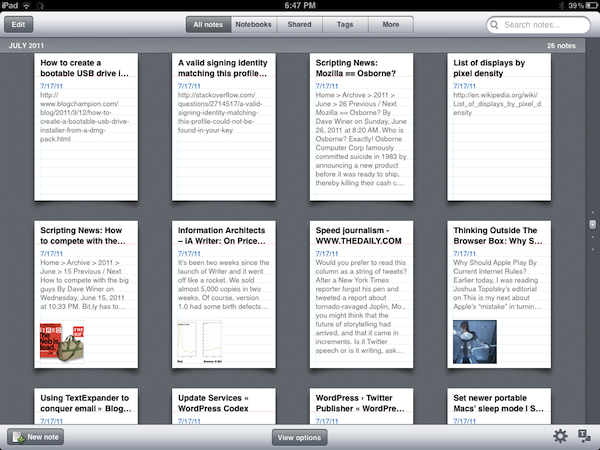
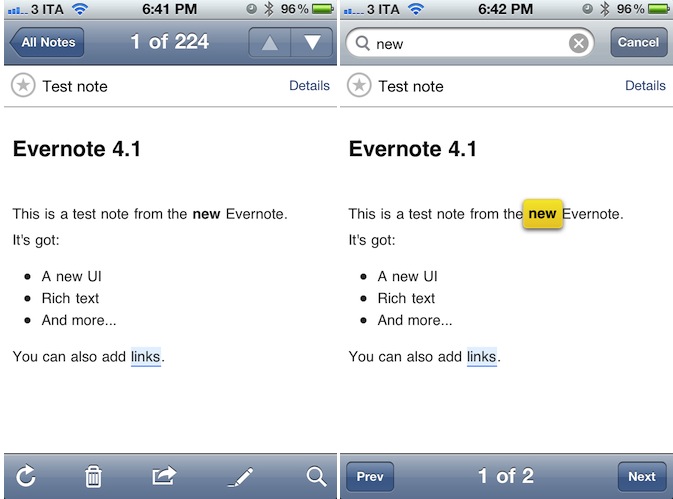
Teased at the first Evernote Trunk Conference last week, the long-awaited new version of Evernote for iPhone and iPad has been released today on the App Store, bringing much requested features to the iOS platform such as rich text styles, new iPad UI, support for shared notebooks and more. Evernote 4.1 for iOS is available for free here, whilst the Mac version’s publicly available beta still reports “beta 4” as the latest one.

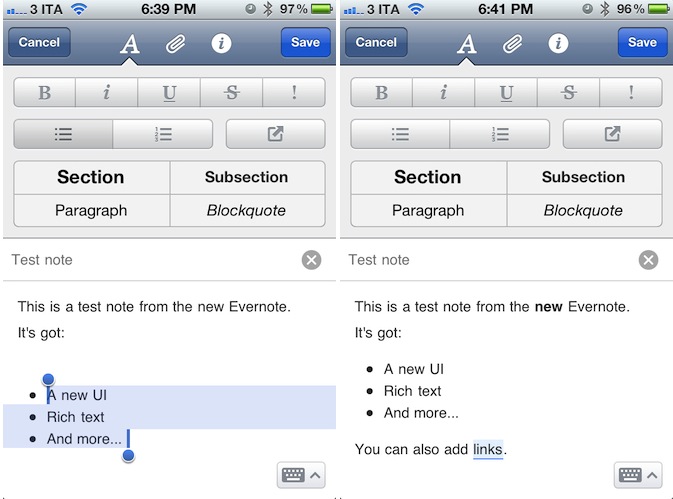
Evernote’s biggest change on iOS is the possibility of creating and editing notes with rich text styles. Whereas previous versions of the mobile app forced users to always edit notes in plain text – thus breaking styles coming from the desktop app – Evernote 4.1 allows basic creation of numbered and bulleted lists, as well as sections, paragraphs and blockquotes straight from an iPhone or iPad. Obviously, users can now also select text to make it bold, italic or underlined, with more options such as strikethrough and highlight available in a new formatting bar. To create or edit styles, Evernote uses a new tabbed toolbar on the iPhone that enables users to switch between styles (the uppercase A button),  attachments (images, audio notes, new photos), and note information such as notebook, tags, and location.

The Evernote team explains some of the limitations of rich text editing on iOS:

This update dramatically increases the creation and editing capabilities of Evernote for iOS. You will be able to edit any note that contains rich text that was created on the device. You will also be able to edit any note that contains styles available on iOS. There are some limitations to be aware of. You won’t be able to make direct changes to notes that contains more complex styles than what can be made in Evernote for iOS. These may include web clips, other typefaces or tables.

If you try to edit a complex note, you’ll be presented with new options: Append or Simplify. Append will add your additions to the end of the note. If you choose Simplify, Evernote will simplify the styles in the note to ones that are editable, which means that some complex styles may disappear. If you want to get back to the original, you can fish it out of the trash.

Evernote updated its iPhone app with a cleaner UI for note creation months ago, but admittedly this new version feels much nicer in comparison thanks to a clever usage of screen space, and elegant design. To edit a note and append rich text styles, users have to tap on the “edit” button when viewing a note, then manually select the text they wish to style – it works similarly to any desktop app in that you select text and then press a button to style it. Read more

Access Extra Content and Perks

Founded in 2015, Club MacStories has delivered exclusive content every week for nearly a decade.

What started with weekly and monthly email newsletters has blossomed into a family of memberships designed for every MacStories fan.

Learn more here and from our Club FAQs.

Club MacStories: Weekly and monthly newsletters via email and the web that are brimming with apps, tips, automation workflows, longform writing, early access to the MacStories Unwind podcast, periodic giveaways, and more;

Club MacStories+: Everything that Club MacStories offers, plus an active Discord community, advanced search and custom RSS features for exploring the Club’s entire back catalog, bonus columns, and dozens of app discounts;

Club Premier: All of the above and AppStories+, an extended version of our flagship podcast that’s delivered early, ad-free, and in high-bitrate audio.

Learn more here and from our Club FAQs.


Square Launches “Card Case” App for iPhone

Officially announced by Square in May, the company’s first Card Case app for iPhone is now available for free on the App Store, alongside an update to the official Square app that brings improved transaction speed, new tipping interface, and no signatures for transactions less than $25. Square, the mobile payment service that based its success on iOS apps and a mobile “card reader” that plugs directly into iOS devices’ headphone jack, detailed its plans to take over traditional wallets, credit cards and receipts with two new products, the aforementioned Card Case and Register for merchants.

Card Case is a digital wallet, a separate app available exclusively on the iPhone, that allows users to easily pay at their favorite local merchants with a few taps. By eliminating the need for cash, or real credit cards to carry around in a physical wallet, Card Case lives on the iPhone and collects different tabs associated to a user’s name and currently open at selected merchants. When it’s time to pay, instead of using cash or a credit card, merchants using Square can ask customers for their names, and have the Card Case app take care of the rest. Card Case lets you explore new and nearby places, keeps a list of recent transactions and paperless receipts which are automatically emailed after a transaction. Read more

Access Extra Content and Perks

Founded in 2015, Club MacStories has delivered exclusive content every week for nearly a decade.

What started with weekly and monthly email newsletters has blossomed into a family of memberships designed for every MacStories fan.

Learn more here and from our Club FAQs.

Club MacStories: Weekly and monthly newsletters via email and the web that are brimming with apps, tips, automation workflows, longform writing, early access to the MacStories Unwind podcast, periodic giveaways, and more;

Club MacStories+: Everything that Club MacStories offers, plus an active Discord community, advanced search and custom RSS features for exploring the Club’s entire back catalog, bonus columns, and dozens of app discounts;

Club Premier: All of the above and AppStories+, an extended version of our flagship podcast that’s delivered early, ad-free, and in high-bitrate audio.

Learn more here and from our Club FAQs.


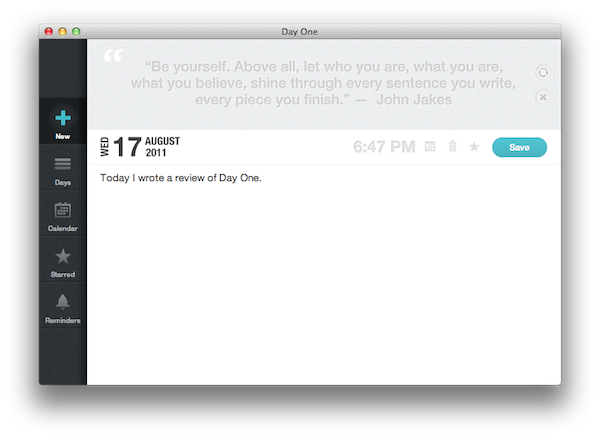
Archiving Thoughts with Day One

For me, the best way to remember things has always been to write them down somewhere. When I was in high school, I was that kind of student always taking notes on his notebook - furiously jotting down stuff fearing I might forget some important detail. With MacStories today, I try to keep my to-do list neatly organized in OmniFocus by quickly entering anything I have to do at any given time of the day or the week – OmniFocus makes it incredibly easy to enter tasks with a few keystrokes, and I “trust” the system to remember, collect and sort tasks for me so my brain can focus on getting those tasks done or something else entirely. I try to keep my memory in good shape, but when information becomes too much to handle I know I can rely on OmniFocus, Evernote and Dropbox to store all my tasks, notes and documents – the great thing about apps nowadays is that I’m not forced to exercise my brain for this kind of activity.

There’s one thing I never really considered storing in a digital archiving app – memories. I’m talking about things like “what did I enjoy doing today” or “I decided to take a walk with my girlfriend” – specific moments that matter in life, that are important, but which our brains often blur and forget after some time to make room for new data to process and maintain. Let’s be honest: do you remember the exact day and context when you ate that fantastic Italian pizza seven months ago? You probably have a vague recollection of what it tasted like and maybe you even remember the restaurant owner’s Italian accent, but you can’t quite get your mind around every single detail that made that moment so special. Either that, or you were busy tweeting a photo of your pizza while you were eating it.

I try to enjoy every moment, but there’s so much the human brain can remember and it’s perfectly normal something will get lost in the process of assimilating thoughts and processing them to turn them into memories and experiences. Read more

Access Extra Content and Perks

Founded in 2015, Club MacStories has delivered exclusive content every week for nearly a decade.

What started with weekly and monthly email newsletters has blossomed into a family of memberships designed for every MacStories fan.

Learn more here and from our Club FAQs.

Club MacStories: Weekly and monthly newsletters via email and the web that are brimming with apps, tips, automation workflows, longform writing, early access to the MacStories Unwind podcast, periodic giveaways, and more;

Club MacStories+: Everything that Club MacStories offers, plus an active Discord community, advanced search and custom RSS features for exploring the Club’s entire back catalog, bonus columns, and dozens of app discounts;

Club Premier: All of the above and AppStories+, an extended version of our flagship podcast that’s delivered early, ad-free, and in high-bitrate audio.

Learn more here and from our Club FAQs.


OS X 10.7.1 Now Available

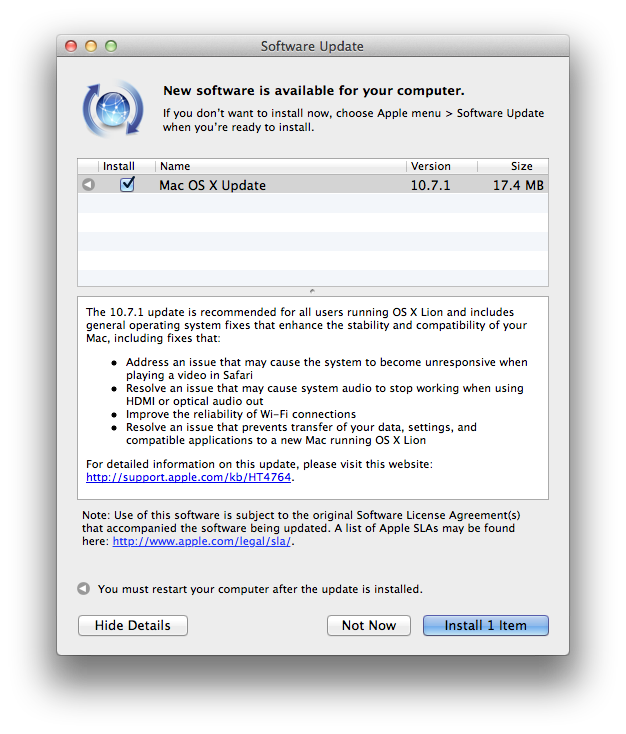
A few minutes ago, Apple released the first update to OS X Lion, which reaches version 10.7.1 and adds a number of fixes to the operating system. These fixes address video unresponsiveness in Safari, WiFi reliability, as well as audio issues with HDMI and migration of old data to a new Lion installation. The update is only 17.4 MB from Software Update, and we’ll post direct links as soon as Apple makes them available. The new version is currently available on Software Update, with the Mac App Store reporting the original OS X 10.7 that was released last month.

The 10.7.1 update is recommended for all users running OS X Lion and includes general operating system fixes that enhance the stability and compatibility of your Mac, including fixes that:

  • Address an issue that may cause the system to become unresponsive when playing a video in Safari
  • Resolve an issue that may cause system audio to stop working when using HDMI or optical audio out
  • Improve the reliability of Wi-Fi connections
  • Resolve an issue that prevents transfer of your data, settings, and compatible applications to a new Mac running OS X Lion

For detailed information on this update, please visit this website: http://support.apple.com/kb/HT4764.

OS X  10.7.1 is the first update to OS X Lion, which was released on the Mac App Store on July 20. Earlier today Apple also released the official OS X Lion Thumb Drive, allowing users without a broadband connection to buy the new OS from Apple as a USB key. Apple is already working on OS X 10.7.2, which has been seeded to developers and will be released this fall to add iCloud compatibility on OS X.

Meanwhile, Apple has posted the following direct links for the MacBook Air and Mac mini 2011:

OS X Lion 10.7.1 Update for MacBook Air and Mac mini 2011 (Client)

The Mac mini and MacBook Air 10.7.1 update includes a few more fixes:

  • Resolve an issue where MacBook Air may boot up when MagSafe Adapter is attached
  • Resolve an issue causing intermittent display flickering on MacBook Air
  • Resolve an issue that causes the SD card slot in Mac mini to run at reduced speed with SD and SDHC media

Furthermore, Lion Server 10.7.1 has also been posted:

  • Improves reliability of the Apple File Service.
  • All other improvements delivered in the client OS X Lion v10.7.1 Update.

Update: OS X 10.7.1 direct links below.

OS X Lion Update 10.7.1 (Client)

OS X Lion Update 10.7.1 (Server)

Access Extra Content and Perks

Founded in 2015, Club MacStories has delivered exclusive content every week for nearly a decade.

What started with weekly and monthly email newsletters has blossomed into a family of memberships designed for every MacStories fan.

Learn more here and from our Club FAQs.

Club MacStories: Weekly and monthly newsletters via email and the web that are brimming with apps, tips, automation workflows, longform writing, early access to the MacStories Unwind podcast, periodic giveaways, and more;

Club MacStories+: Everything that Club MacStories offers, plus an active Discord community, advanced search and custom RSS features for exploring the Club’s entire back catalog, bonus columns, and dozens of app discounts;

Club Premier: All of the above and AppStories+, an extended version of our flagship podcast that’s delivered early, ad-free, and in high-bitrate audio.

Learn more here and from our Club FAQs.


Tweetbot 1.5: Muting is Forever


Well, it’s finally here. You asked for it — you wagged your finger about it — you hate the people you follow on Twitter so much that you don’t want to hear another peep out of them, yet deep down you don’t really want to get in one of those uncomfortable, “Why did you unfollow me!?” moments. Or maybe someone’s had a little too much caffeine and you just need a break. With Tweetbot 1.5, you can mute those pesky over-tweeters and keep meme-esque hashtags from cluttering your #pantsfree timeline. Although I hear there’s a self desctruction mechanism built in if you ever mute #tweetbot.

Read more

Access Extra Content and Perks

Founded in 2015, Club MacStories has delivered exclusive content every week for nearly a decade.

What started with weekly and monthly email newsletters has blossomed into a family of memberships designed for every MacStories fan.

Learn more here and from our Club FAQs.

Club MacStories: Weekly and monthly newsletters via email and the web that are brimming with apps, tips, automation workflows, longform writing, early access to the MacStories Unwind podcast, periodic giveaways, and more;

Club MacStories+: Everything that Club MacStories offers, plus an active Discord community, advanced search and custom RSS features for exploring the Club’s entire back catalog, bonus columns, and dozens of app discounts;

Club Premier: All of the above and AppStories+, an extended version of our flagship podcast that’s delivered early, ad-free, and in high-bitrate audio.

Learn more here and from our Club FAQs.


Apple Highlights Apps “Enhanced for OS X Lion”

OS X Lion has been out for less than a month, and Apple is now starting to promote apps that take advantage of some of the new features of the OS on the front page of the Mac App Store. As noted by Stephen Hackett at Forkbombr, Apple has included the “Enhanced for OS X Lion” tagline in the banners pointing to applications that have recently been updated with Lion-exclusive features such as Versions, Full-Screen, or multi-touch gestures. These banners can be seen on the front page of the Mac App Store, both in the top section (Screenflow 3.0 and Touchgrind) or in the lower part of the page, where currently there are promotional images for Fantastical, swackett x, and Scrivener. Fantastical is indeed one of the apps that has been updated in the past month with “Lion compatibility” and Lion-only gestures for navigation in the calendar view.

This is not the first time Apple has taken special interest in apps updated to take advantage of new functionalities introduced by the company in a new version of their OSes. For example, Apple went as far as creating a dedicated section for apps updated with AirPlay support soon after the release of iOS 4.2 back in November 2010. In April, Apple showcased subscription-based magazines in the App Store’s homepage. The “Enhanced for OS X Lion” tagline doesn’t have its own category just yet, but it wouldn’t be a surprise as more customers upgrade to Lion, and developers start releasing Lion-specific app updates.

With over 250 new user features and 3,000 new developer APIs, Lion is opening a whole range of possibilities for developers willing to rewrite or update their applications to trigger the new OS. Such features and APIs include the aforementioned full-screen mode and Versions support, as well as desktop notifications, In-App Purchases, new UI controls, Resume, and Auto-Save. This Fall, developers will also be able to integrate their apps with iCloud, which will allow them to store documents and data in the cloud, enabling seamless synchronization of content between devices.

In November, Apple will also start requiring developers to update their apps with Lion’s Sandboxing APIs – you can  read more about this in John Siracusa’s OS X Lion review. By highlighting apps that have already been updated for Lion, Apple is both encouraging other developers to do the same in the next few weeks, and showcasing great software for new customers that have installed Lion and are looking for new apps to try out. Apple itself updated several apps ahead of Lion’s launch to enable new functionalities exclusive to 10.7, such as Safari 5.1 – which comes pre-installed on Lion – and the iWork suite.

Access Extra Content and Perks

Founded in 2015, Club MacStories has delivered exclusive content every week for nearly a decade.

What started with weekly and monthly email newsletters has blossomed into a family of memberships designed for every MacStories fan.

Learn more here and from our Club FAQs.

Club MacStories: Weekly and monthly newsletters via email and the web that are brimming with apps, tips, automation workflows, longform writing, early access to the MacStories Unwind podcast, periodic giveaways, and more;

Club MacStories+: Everything that Club MacStories offers, plus an active Discord community, advanced search and custom RSS features for exploring the Club’s entire back catalog, bonus columns, and dozens of app discounts;

Club Premier: All of the above and AppStories+, an extended version of our flagship podcast that’s delivered early, ad-free, and in high-bitrate audio.

Learn more here and from our Club FAQs.