Posts in Featured

Apple Posts New iPad 2 Advert: “Learn”

Apple has today uploaded a new iPad advert to their YouTube Channel. Like previous iPad adverts, it has a central theme - in this case it is “Learn”, which is also the title of the advert. The entire advert is dedicated to showcasing some standout apps that help people learn. As usual there is nothing related to price or specification, just clips of people experiencing the iPad and the apps that make it great.  Some of those apps shown include the TED talks app, Chinagram, iBooks and GarageBand, but in total there are 10 that are shown.

Are you curious about new ideas, do you want to learn a new language, or just a new word? Maybe you want to know more about anatomy, or astronomy. You could master something new, or uncover a hidden talent. There’s never been a better time to learn.

Jump the break to see the advert for yourself and jump over to the Apple YouTube Channel to see more of the iPad adverts.
Read more

Access Extra Content and Perks

Founded in 2015, Club MacStories has delivered exclusive content every week for nearly a decade.

What started with weekly and monthly email newsletters has blossomed into a family of memberships designed for every MacStories fan.

Learn more here and from our Club FAQs.

Club MacStories: Weekly and monthly newsletters via email and the web that are brimming with apps, tips, automation workflows, longform writing, early access to the MacStories Unwind podcast, periodic giveaways, and more;

Club MacStories+: Everything that Club MacStories offers, plus an active Discord community, advanced search and custom RSS features for exploring the Club’s entire back catalog, bonus columns, and dozens of app discounts;

Club Premier: All of the above and AppStories+, an extended version of our flagship podcast that’s delivered early, ad-free, and in high-bitrate audio.

Learn more here and from our Club FAQs.


App Journal, Episode 1: Writron, Tempus, BillMinder

App Journal is a new series aimed at showcasing apps we have enjoyed using on our iPhones, iPads, and Macs, but decided not to feature in a standalone, lengthy review here on MacStories. Sometimes, an app is so simple, so focused on one task that a full review in our typical format would be unnecessary. But at the same time, we felt like we needed a way to get the word out about these little gems, other than a quick tweet or footnote on #MacStoriesDeals.

Think of App Journal as a mix of classic reviews, weekly app recommendations, and a diary of our experiences with apps that still deserve a proper mention. Because after all, that’s what we love: talking about great software.

In Episode 1 of App Journal, I take a look at Writron for iPhone, Tempus and BillMinder. Stay tuned for new App Journal episodes in the next weeks.

Writron

Writron is an app I found on the App Store last week and bought because of its simple, elegant icon and price tag. Admittedly, these are two factors that contribute to impulsive app-buying when iTunes credit is available, and curiosity takes over. Writron is a “text input tool” that can forward text to other apps and online services. That’s it. Once you’ve written some text using the app, you can tap & hold the sharing button to send it to Mail, Twitterrific, or other services supported with Mobile Safari such as Google, Evernote, Twitter, and Wikipedia. You can edit the “send to” menu to include options like Maps, Google Translate, Wikipanion, Wiktionary, and Twitter for iPhone. Additional templates will be added periodically and can be downloaded within the app.

Writron achieves two goals: it’s a text input tool with a heavy sharing component. And whilst sharing isn’t too dissimilar from what other apps like Note & Share offer, the writing experience is quite different. Writron comes with a toolbar between the keyboard and the text field; this toolbar has buttons to share, paste, cut, undo and redo, increase/decrease font size and move the iOS’ default cursor. Whereas tapping on these buttons triggers their basic functionality, Writron’s full potential is unlocked when you “tap, hold, and slide”. Here’s an example: tapping and holding the undo button will get you access to a scrollable timeline of words you typed, which you can control by sliding your finger across the toolbar itself. You don’t see a list of previously typed words and letters when you do so – instead, Writron directly manipulates text as you slide you finger back and forth through history, letting you know when you’re “out of undos and redos”. The same sliding concept applies to the “move cursor” action: you can tap on it to select a word, an entire sentence, or move to the beginning of your text, but it’s when you begin sliding that you’ll notice Writron can freely move the cursor between letters according to your finger’s movement. It’s seriously cool.

Writron may not revolutionize your workflow but it’s a neat little app that I’m sure will have its own passionate niche of aficionados. Writron is only $0.99 on the App Store. Read more

Access Extra Content and Perks

Founded in 2015, Club MacStories has delivered exclusive content every week for nearly a decade.

What started with weekly and monthly email newsletters has blossomed into a family of memberships designed for every MacStories fan.

Learn more here and from our Club FAQs.

Club MacStories: Weekly and monthly newsletters via email and the web that are brimming with apps, tips, automation workflows, longform writing, early access to the MacStories Unwind podcast, periodic giveaways, and more;

Club MacStories+: Everything that Club MacStories offers, plus an active Discord community, advanced search and custom RSS features for exploring the Club’s entire back catalog, bonus columns, and dozens of app discounts;

Club Premier: All of the above and AppStories+, an extended version of our flagship podcast that’s delivered early, ad-free, and in high-bitrate audio.

Learn more here and from our Club FAQs.


Giveaway: Foliozo, The Stunning Digital Portfolio App For iPads

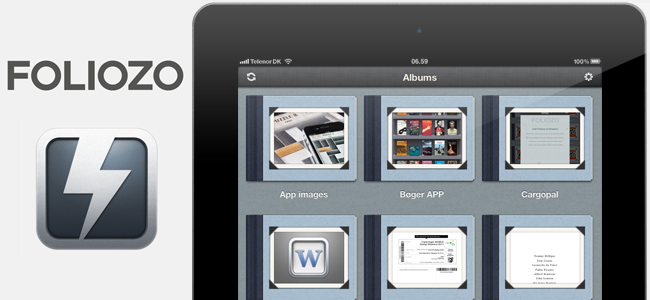
Last Friday we reviewed Foliozo, a new digital portfolio app that had hit the iPad App Store earlier in the week. This week we’ve been given ten promotional codes for Foliozo from the app developers and we’re running a giveaway. In our review we noted how Foliozo kept things simple unlike many of their competitors - something we thought was an advantage for a digital portfolio app.

You can read our full review of Foliozo but if you really like the sound of Foliozo don’t be afraid to help the developers and purchase the app which is available on the iPad App Store for $4.99. Jump the break for all the Foliozo giveaway details but don’t forget about our Saver giveaway which we started yesterday and look out for yet another giveaway this week!

Read more

Access Extra Content and Perks

Founded in 2015, Club MacStories has delivered exclusive content every week for nearly a decade.

What started with weekly and monthly email newsletters has blossomed into a family of memberships designed for every MacStories fan.

Learn more here and from our Club FAQs.

Club MacStories: Weekly and monthly newsletters via email and the web that are brimming with apps, tips, automation workflows, longform writing, early access to the MacStories Unwind podcast, periodic giveaways, and more;

Club MacStories+: Everything that Club MacStories offers, plus an active Discord community, advanced search and custom RSS features for exploring the Club’s entire back catalog, bonus columns, and dozens of app discounts;

Club Premier: All of the above and AppStories+, an extended version of our flagship podcast that’s delivered early, ad-free, and in high-bitrate audio.

Learn more here and from our Club FAQs.


Apple’s Bold Move: iTunes Match and Streaming

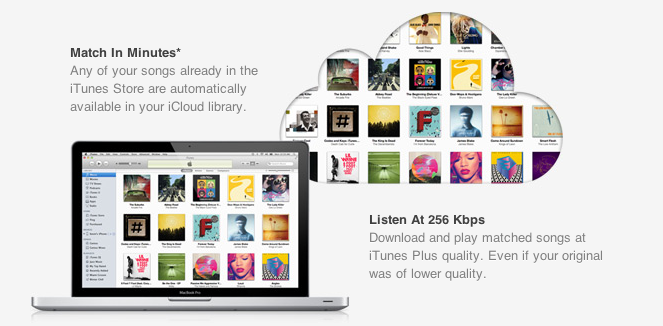
With the launch of the first iTunes Match beta for developers last night, Apple unveiled the last piece of the iCloud puzzle that was originally previewed at the WWDC in June, when Steve Jobs announced that iTunes Match would be available this Fall at $24.99 per year for 25,000 songs, allowing customers to download songs stored in their iCloud accounts. Because iTunes Match scans a user’s iTunes library before uploading files, songs compatible with Apple’s iTunes Store catalogue are automatically upgraded to 256 Kbps (even if the original copy was of lower quality) and “matched” with the copy on the server, whilst the ones not found on Apple’s servers are manually uploaded to iCloud. This happens for two reasons: first, Apple cut deals with several music labels and publishers to enable this “scan & match” technology that compares songs on a computer versus the higher quality copy on the servers, and doesn’t upload the original file; second, Apple wanted to eliminate the need of having to wait days for large uploads to finish – something that has affected “cloud locker” services from Google, Amazon, and many others.

The iTunes Match that was announced back in June, however, and promoted on Apple’s website up until today, made no specific mention of “streaming” songs matched/uploaded to iCloud; the way Apple originally explained it, Match was a clever way to fill an iCloud account with songs and albums to later download on iOS devices or a Mac. For as much as the technology behind it seemed intriguing, many were disappointed to find out that Apple couldn’t find a way around streaming songs without having to download the full copy first. Other services like Rdio and Spotify allow users to stream songs they don’t own by hitting “play” and waiting a few seconds for the stream to start (depending on the Internet connection’s speed). iTunes Match is actually a service for songs users own and decide to store in iCloud at $24.99 per year, so many assumed streaming required a different kind of licensing deal that Apple couldn’t make in time for WWDC.

Last night, as developers started subscribing to the first beta of iTunes Match, it turned out that, even in this first version, Apple is allowing for both downloading and streaming of songs, both on the Mac and iOS devices. The interface makes it easy to match and listen: once a music collection is built in iCloud (e.g. iTunes has scanned, matched, and uploaded songs to your account), music will be available on the Mac in iTunes’ Music tab, and on iOS 5 in the new Music app. Once iTunes Match is enabled on iOS it replaces the local music library, and you can tell the difference by a small iCloud icon next to each song.

Whereas Apple’s announcement at WWDC implied users would have to push a button to download songs, and build a music library off a master collection in the cloud, this first beta actually delivers more: users can still hit the button and download songs locally, but they can also tap on songs and start streaming them without a download.

The process is detailed in two videos posted by Insanely Great Mac. Streaming can occur both on the desktop and iOS, and it doesn’t look any different from a local iTunes library except for the aforementioned iCloud library. With this first beta, Apple isn’t accepting iTunes LPs and Extras, some file types aren’t supported and, for testing purposes, Apple will periodically delete developers’ iCloud music libraries to increase iTunes’ performances and reliability.

Streaming is a big deal for Apple, and not just because it increases iTunes’ functionalities to avoid manual downloads and waiting times. With iTunes Match streaming, Apple could directly compete with services like Spotify (recently landed in the U.S.) and Rdio, which let users stream songs over WiFi and 3G and even cache them for offline access. However, as of this beta, Apple’s iTunes Match comes with a unique spin on streaming: it doesn’t need downloads, and it’s based on music libraries made from songs users own. With the combination of local copies (the library), scan & match, iCloud, downloads and streaming, Apple could build a music service like no other in that it’s a combination of “owning your music”, and paying a yearly fee to get online access to it. Spotify is often criticized for being a streaming service that doesn’t let you “own” your library; most recently, the company added the possibility of importing local files and playing them in Spotify, but it’s not the same of being able to take local files and mirror them to the cloud. Reports citing streaming with “iTunes in the cloud” from May are now starting to make more sense, and let’s not forget Apple has patented a technology to make streaming effortless and faster by syncing small bits of data locally.

Still, many questions are left unanswered with this week’s iTunes Match beta. Was iTunes Match supposed to get only song downloads, with the current streaming implementation being just a glitch? Or are we in for a streaming surprise come Apple’s next keynote? Moreover, will Apple further tweak iTunes and iOS 5 to put the focus on streaming, allowing for advanced iCloud-based playlist creation? And how will music labels react to the news that iTunes Match is capable of streaming, too? Perhaps this is already part of Apple’s grand iCloud plan, and music labels knew all along that iTunes Match would stream songs, as Businessweek suggested in May. Or, streaming came unexpected to them as it did to everyone else in this first beta. But more importantly, will iTunes Match be available outside the U.S. once iOS 5 and iCloud are publicly released? Early signs pointed to “no”, with sources claiming the UK wouldn’t see iTunes Match until 2012. Currently, iTunes Match is a developer-only beta (closed at the moment with more openings “over the next days”) that requires a U.S. credit card (not just regular iTunes credit – e.g. promo codes and gift cards) for automatic billing. It’s unclear whether or not Apple will open the final version of iTunes Match to any kind of U.S. iTunes account, or if they’ll keep it exclusive for U.S. iTunes customers with a credit card on file.

As usual with betas, things can change before the final release. There’s a fragmented market out there, and Apple has a chance to disrupt it with iCloud and iOS 5. As it stands now, iTunes Match looks like Apple’s boldest move in the online music space since 2003.

Update: AllThingsD now weighs in writing that, according to an Apple spokesperson, iTunes Match still isn’t streaming. What looks like a stream is actually a simultaneous listen and download, although Apple isn’t providing additional details on the technology behind iTunes Match. AllThingsD speculates that Apple may be using some sort of caching mechanism for when users don’t “download” songs from iCloud, though that’s just an “educated guess”. From the videos posted this morning, indeed it looked like an iPhone was capable of streaming songs off iCloud.

AllThingsD also reports that Apple has the licensing rights to streaming, but they’re not implementing it due to a design choice – Apple apparently doesn’t believe mobile networks are advanced enough to allow for streaming of large music libraries. Check out the full report here.

Read more

Access Extra Content and Perks

Founded in 2015, Club MacStories has delivered exclusive content every week for nearly a decade.

What started with weekly and monthly email newsletters has blossomed into a family of memberships designed for every MacStories fan.

Learn more here and from our Club FAQs.

Club MacStories: Weekly and monthly newsletters via email and the web that are brimming with apps, tips, automation workflows, longform writing, early access to the MacStories Unwind podcast, periodic giveaways, and more;

Club MacStories+: Everything that Club MacStories offers, plus an active Discord community, advanced search and custom RSS features for exploring the Club’s entire back catalog, bonus columns, and dozens of app discounts;

Club Premier: All of the above and AppStories+, an extended version of our flagship podcast that’s delivered early, ad-free, and in high-bitrate audio.

Learn more here and from our Club FAQs.


Adobe Releases CreatePDF for iOS

Earlier today Adobe added another application to its iOS portfolio with the release of CreatePDF for iOS, a $9.99 universal app aimed at letting users easily create PDFs on their iPhones or iPads. According to Adobe, “CreatePDF brings the same high-quality PDF creation as Adobe Acrobat” to iOS devices, with PDF documents that look “exactly” like the original files they were generated from; the app uses Adobe’s online services for performance and quality, creating PDFs that preserve quality and accessibility standards with the inclusion of links, images, footnotes, and more.

The app supports the following formats:

  • MS Word (docx, doc), Excel(xlsx, xls), PowerPoint (pptx, ppt)
  • Adobe Illustrator (ai), Photoshop (psd) and InDesign (indd)
  • Images – JPEG, BMP, PNG, GIF, TIFF
  • RTF, Text and WordPerfect
  • OpenOffice and StarOffice documents

CreatePDF works through iOS’s default “Open In…” menu, which allows third party apps to communicate with each other by sending documents to other applications that support specific file types, such as PDF, .doc, or plain text. For instance, the feature was recently introduced in the Omni Group’s OmniOutliner, letting the app export outlines as plain text or OPML to other iOS software installed on device. CreatePDF registers as an app capable of opening (and converting) the file types listed above, and in my first tests it’s proven to be a fast and reliable solution to convert plain text documents, images and PSDs to the PDF format. From any app that supports sending files, you can choose CreatePDF from the “Open In…” menu, and wait for the app to finish the conversion process to PDF. For reference, the app took a few minutes to convert a 12 MB PSD to PDF, with good results. Similarly, a .docx document forwarded to me via email and sent from the iPad’s Mail app to CreatePDF took less than 30 seconds to become a PDF.

CreatePDF looks like a solid solution to convert files to PDFs, although I wouldn’t mind having more sharing options inside the app itself. Currently, CreatePDF can only “open in” other apps, send via email, or print. It’d be nice to have, say, direct Dropbox integration or more online exporting options in the future. The $9.99 price tag might be a little steep for the average iOS users, but quality of converted documents looked superior to me than other apps I tried in the past, and support for Illustrator, Photoshop and InDesign documents is also very welcome.

You can get CreatePDF at $9.99 on the App Store. Read more

Access Extra Content and Perks

Founded in 2015, Club MacStories has delivered exclusive content every week for nearly a decade.

What started with weekly and monthly email newsletters has blossomed into a family of memberships designed for every MacStories fan.

Learn more here and from our Club FAQs.

Club MacStories: Weekly and monthly newsletters via email and the web that are brimming with apps, tips, automation workflows, longform writing, early access to the MacStories Unwind podcast, periodic giveaways, and more;

Club MacStories+: Everything that Club MacStories offers, plus an active Discord community, advanced search and custom RSS features for exploring the Club’s entire back catalog, bonus columns, and dozens of app discounts;

Club Premier: All of the above and AppStories+, an extended version of our flagship podcast that’s delivered early, ad-free, and in high-bitrate audio.

Learn more here and from our Club FAQs.


Tweetbot 1.6 Gets Tweet Marker Timeline Sync

Following the muting features and improvements introduced in version 1.5, everyone’s favorite Twitter client from Tapbots, Tweetbot, has been updated to 1.6 to include timeline sync through Manton Reece’s Tweet Marker. For those unaware of such system, Tweet Marker is a fantastic free web service that allows developers to turn on a feature in their Twitter clients to enable timeline sync for users. Best showcased in the Iconfactory’s Twitterrific for Mac and iOS, Tweet Marker lets users effortlessly switch between apps or platforms (such as the iPad and Mac) while retaining the last-read tweet position. In Twitterrific, as we detailed in our coverage, Tweet Marker integration means the app can either “show the marker”, or automatically scroll to it.

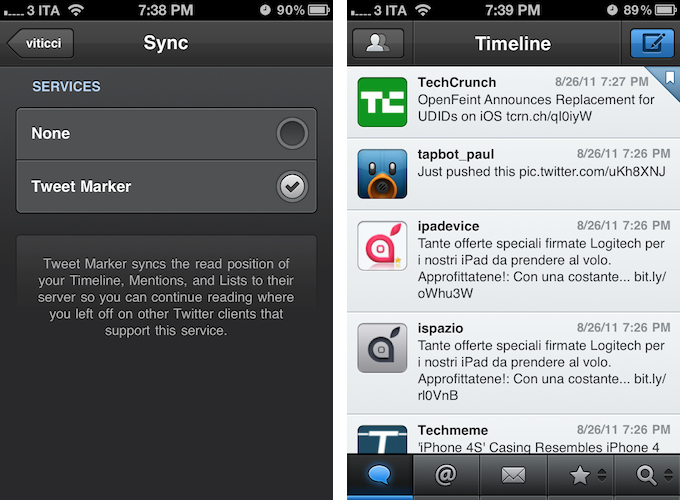
Because Tweet Marker is cross-platform, your timeline position from Twitterrific (or any other app that will soon support the service) can be synced to Tweetbot, and vice versa. Tweetbot will automatically scroll to the last synced tweet in your timeline, and display a “marker” next to it. To enable Tweet Marker in Tweetbot a quick trip to the Settings is required, so you can activate “Sync” under Account Settings -> Services. Furthermore, Tweetbot syncs mentions and lists as well through Tweet Marker, so future applications that will integrate this technology will have the opportunity to get further syncing besides the main timeline. As usual, Tweet Marker’s sync is invisible, and fast. You won’t even notice it once it’s active, and it works really well combined with Twitterrific (which I’m a big fan of).

Tweetbot 1.6 also brings various improvements to username search in the compose view, which now uses your following list, and location. The latter has been refined to “stick” your location including POI across multiple tweets if you haven’t moved. It’s a nice touch.

The latest update to Tweetbot is nice, but it becomes a must-have if you’re already hooked to Tweet Marker’s usefulness and simplicity. Get it now on the App Store at $2.99.

Access Extra Content and Perks

Founded in 2015, Club MacStories has delivered exclusive content every week for nearly a decade.

What started with weekly and monthly email newsletters has blossomed into a family of memberships designed for every MacStories fan.

Learn more here and from our Club FAQs.

Club MacStories: Weekly and monthly newsletters via email and the web that are brimming with apps, tips, automation workflows, longform writing, early access to the MacStories Unwind podcast, periodic giveaways, and more;

Club MacStories+: Everything that Club MacStories offers, plus an active Discord community, advanced search and custom RSS features for exploring the Club’s entire back catalog, bonus columns, and dozens of app discounts;

Club Premier: All of the above and AppStories+, an extended version of our flagship podcast that’s delivered early, ad-free, and in high-bitrate audio.

Learn more here and from our Club FAQs.


iPhone 5, iPhone 4S - A Rumor Roundup and Retrospective

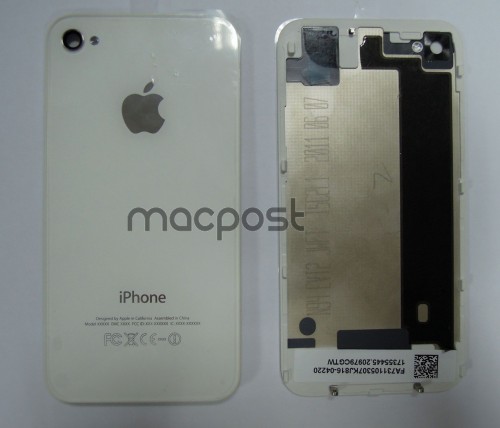
According to new shots showing alleged leaked parts for the upcoming iPhone 5, website MacPost.net (via MacRumors) shows a white back cover from an Apple internal prototype iPhone dated June 7, 2011, labeled N94 and EVT (Engineering Verification Test). In Apple’s prototype design cycle, the EVT monicker is one step ahead of DVT, which stands for Design Verification Test. As you can see from the purported leaked part, the design of the back cover is largely similar (if not the same) to the current-gen iPhone 4, adding more speculation to the rumors suggesting the next-generation iPhone, dubbed iPhone 5, will share the same design of the existing iPhone, only adding a new processor, better camera, and other minor speed bumps.

There’s been a bit of confusion in the past months regarding rumors floating around Apple’s next iPhone. Whereas the N94 and N93 codenames found in the iOS 5.0 SDK (actually, N94 showed up in iOS 4.3) clearly referred to a device running the same A5 processor of the iPad 2 (the iPhone 4 has an A4 processor), multiple sources couldn’t agree on whether Apple was on track to deliver one iPhone this Fall – the iPhone 5 – with a major redesign, a new iPhone with the same design but better specs, or two iPhones aimed at different markets and users.

For this reason, in the most recent weeks a differentiation in rumors has arisen to separate the iPhone 5 from an alleged “iPhone 4S”. The “4S” name, used as an unofficial monicker for the first time by 9to5mac in April, was initially used in regards to a prototype iPhone 4 with an A5 chip reportedly sent to developers for testing – thus not necessarily representing a final product – but has evolved with time into a widely-accepted rumor indicating a second product from Apple that could also refer to a cheaper iPhone the company is working on for pre-paid markets.

Again, there is a lot of confusion around the terms “iPhone 5”, “next-generation iPhone”, and “iPhone 4S”. However, sticking to SDK findings and reliable photographs of unreleased models – not just rumors without evidence – might be the best chance to guess what’s coming in October.

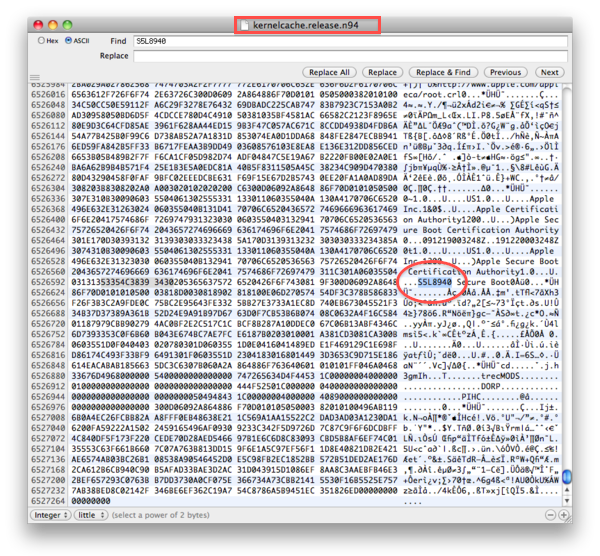
First off, N94 refers to an iPhone carrying the A5 processor, an obvious choice for Apple. With increased performances, low-power consumption and a huge leap forward in terms of graphics rendering, the A5 has been a success on the iPad and there’s no reason why Apple wouldn’t use it in a future iPhone. For reference, the current-gen iPhone 4 was codenamed N90 and N92 for its GSM and CDMA variations, respectively. N93 and N94 might be related to carrier variations of the same iPhone model or two new entirely different products – this can’t confirmed. However, N94 isn’t only present in the iOS 5 SDK: aside from today’s MacPost pictures, BGR showed photos of an unreleased iPhone model running on T-Mobile’s 3G bands back in April. The iPhone was white, like today’s back cover shots, and it was codenamed N94, running a test version of iOS with several Apple-only apps and utilities. Furthermore, MacRumors is now associating those photos from April to a new part leak that seems to depict a redesigned antenna for the iPhone 4-like new iPhone, whatever it may be. The iPhone 4 antenna design was behind the so-called Antennagate media debacle last year, so it would make sense for Apple to redesign it only to avoid further discussion.

Rounding up the evidence about N94 – again, one of the two unreleased iPhone models mentioned by the iOS SDK – it appears that this model will have an iPhone 4-like design, a slightly redesigned antenna, an A5 processor, and it’s been tested on T-Mobile.

However, it’s still not clear whether what we call “iPhone 5” is actually a tweaked iPhone 4 (thus N94), or an all-new model that hasn’t surfaced in the SDK and leaked parts just yet. For as much as new cables and connectors suggest Apple is tweaking the internal specs of an iPhone, they don’t offer confirmation of the device’s design and external look.

To bring some clarity to this whole iPhone 4S/iPhone 5/two iPhones debate we’ve collected the most notable rumors from the past months, in order to see, now that a possible release date is nearing, how speculation evolved and changed over time. Read more

Access Extra Content and Perks

Founded in 2015, Club MacStories has delivered exclusive content every week for nearly a decade.

What started with weekly and monthly email newsletters has blossomed into a family of memberships designed for every MacStories fan.

Learn more here and from our Club FAQs.

Club MacStories: Weekly and monthly newsletters via email and the web that are brimming with apps, tips, automation workflows, longform writing, early access to the MacStories Unwind podcast, periodic giveaways, and more;

Club MacStories+: Everything that Club MacStories offers, plus an active Discord community, advanced search and custom RSS features for exploring the Club’s entire back catalog, bonus columns, and dozens of app discounts;

Club Premier: All of the above and AppStories+, an extended version of our flagship podcast that’s delivered early, ad-free, and in high-bitrate audio.

Learn more here and from our Club FAQs.


Tim Cook, Apple CEO

Yesterday afternoon brought the big news that Steve Jobs had resigned from the position of Apple CEO (he is now Chairman of Apple’s Board), along with that came the news that Tim Cook will now permanently take over as Apple CEO. Cook had been acting CEO since January this year when Jobs went on medical leave – Cook now has to step up and officially lead Apple, which recently became the most valuable company in the world.

But unlike Jobs who is known to a sizeable proportion of general society and has quite a reputation, Cook is fairly unknown. As Cook today begins his first official day as the CEO of Apple we’ve written this post to give you, our readers, a little bit of background of Tim Cook and what he is like. Be sure to jump the break to read our succinct biography of him along with some fascinating additional reading and videos.

Read more

Access Extra Content and Perks

Founded in 2015, Club MacStories has delivered exclusive content every week for nearly a decade.

What started with weekly and monthly email newsletters has blossomed into a family of memberships designed for every MacStories fan.

Learn more here and from our Club FAQs.

Club MacStories: Weekly and monthly newsletters via email and the web that are brimming with apps, tips, automation workflows, longform writing, early access to the MacStories Unwind podcast, periodic giveaways, and more;

Club MacStories+: Everything that Club MacStories offers, plus an active Discord community, advanced search and custom RSS features for exploring the Club’s entire back catalog, bonus columns, and dozens of app discounts;

Club Premier: All of the above and AppStories+, an extended version of our flagship podcast that’s delivered early, ad-free, and in high-bitrate audio.

Learn more here and from our Club FAQs.


Times and Titles

[image via]

We all knew today’s news of Steve Jobs resigning as CEO of Apple was coming. Sooner or later, we – geeks, Apple watchers, fans, journalists, the Apple community as a whole – knew that Apple would announce a change of roles that would see Jobs go, initiating the execution plan that has been carefully planned internally for a long time. And that day has come. But it shouldn’t be seen for what it’s not: a change within the company. It is a change, technically, with Steve Jobs becoming Chairman of the Board, director, and Apple employee, and Tim Cook elected as new CEO. But it’s not a change in perspective – the spirit that has driven Apple’s innovation, attention to detail and need for great products won’t disappear as Tim Cook takes the reins.

There’s no denying reading the initial Reuters Twitter headline about Jobs resigning brought my heart to a full stop. But as I quickly rationalized and processed the news, later confirmed by a series of press releases, I realized that was the turning point I was expecting all along. The change that we, the community, feared and filed away in the imaginary drawer of things that are too far away to even consider as a fact. Yet, in spite of many people’s best hopes, it is a fact. And I’ll say this again – it is sad to see a man slowly taking steps back from the company he built because he’s no longer capable of meeting others’ expectations.

So let’s look at history in the eyes. Steve Jobs won’t be replaced iconically, he will be replaced as a company executive. Steve Jobs’ vision, charisma, stubbornness, willingness to build products people love and engage with on a personal level – these things will live on within Apple no matter the title the Board gives him. Steve is not Apple, but Apple stems from Steve’s ideals. And ideals, history has taught us, don’t die. No matter the bureaucracy, the speculation, the market strategies, the corporate espionage – no matter from what angle you look at it, true ideals live on. They are symbols of evolution, but they survive change.

This is what we believe. Technology alone is not enough. And from my personal angle, this is the mantra that CEO Steve Jobs has best implanted since 1997 in Apple as a company, a team of executives and designers and engineers and employees – Apple as a vision and a statement. A hundred years from now, people will look back at Jobs’ career as CEO of Apple, and wonder how he did. In this very moment of time, we do know how he did. And we applaud Steve Jobs for his achievements in the past decade.

But at the same time, we also applaud his team and we look forward to more great products born under and developed with Steve Jobs’ taste as a Chairman, and Apple employee. Once again, let’s look at the facts – Jobs is still there, only taking a different role and executing the “succession plan” any respectable company that operates at Apple’s levels has. Those who predict the premature demise of Apple and speculate on the failures of future products due to Jobs’ change of title clearly don’t understand how Apple works. I don’t either, but at least I’m not looking into a crystal ball. It will be interesting to keep an eye on Apple’s operations in the next two years for sure, but saying the company without Jobs the CEO is now doomed is a long stretch.

A change of titles – a new Chairman here, a CEO there – won’t transform the way today’s Apple works and makes money. Yet we, the community, are inclined to taking this on a personal level, because let’s face it – a little part of the Apple fan in us died today. Not because of the sadness, the desperation, or the aforementioned predictions of Apple’s upcoming “problems”. Not even strictly because Steve Jobs is a geek’s favorite hero and it’s sad to see him “go”. It’s a much more subtle feeling running through the veins of the Apple community. It’s that feeling of times changing, of you and your friends growing older and perhaps with a better understanding of things – it’s watching what you took for granted be upgraded to something new you think will be fine eventually, but you’re still not completely used to.

Steve Jobs’ greatest accomplishment is not the iPad, the App Store, the iPhone 4 and the device coming out next year. It’s not even the company taken as a bunch of executives and employees around the world, for as much as that’s an impressive work of management and planning. Rather, Steve Jobs the CEO should be proud of the philosophy he’s instilled in Apple’s vision of a product maker for all kinds of people. Because, really, that’s what Steve Jobs the CEO set as a goal for Apple: making people happy using their products.

In these past 14 years, Apple’s former CEO turned around an industry, changed its face, and taught us that technology alone is not enough.

And we thank you for that, Steve.

Access Extra Content and Perks

Founded in 2015, Club MacStories has delivered exclusive content every week for nearly a decade.

What started with weekly and monthly email newsletters has blossomed into a family of memberships designed for every MacStories fan.

Learn more here and from our Club FAQs.

Club MacStories: Weekly and monthly newsletters via email and the web that are brimming with apps, tips, automation workflows, longform writing, early access to the MacStories Unwind podcast, periodic giveaways, and more;

Club MacStories+: Everything that Club MacStories offers, plus an active Discord community, advanced search and custom RSS features for exploring the Club’s entire back catalog, bonus columns, and dozens of app discounts;

Club Premier: All of the above and AppStories+, an extended version of our flagship podcast that’s delivered early, ad-free, and in high-bitrate audio.

Learn more here and from our Club FAQs.