Posts in Featured

Tweet Library 2.0 Review

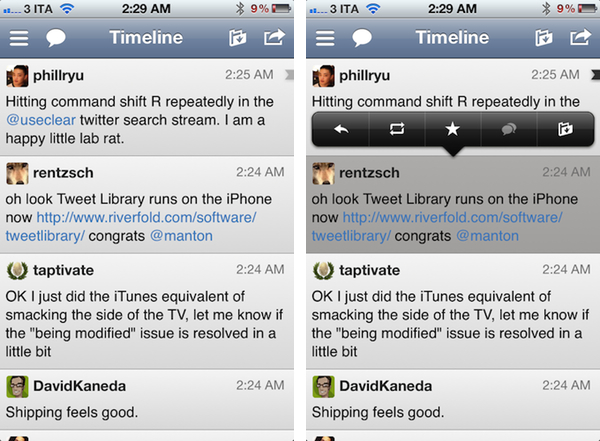
The last time I wrote about Twitter clients, I noted how I’d rather settle with a single app for power users, and have other developers innovate on top of Twitter and the technologies offered by Apple to provide a unique take on the standard Twitter experience. Unfortunately, until today very few developers seem to have believed in the market potential for innovative Twitter clients that go beyond refreshing your timeline and catching DMs, with Riverfold Software’s Tweet Library being the best example of what’s possible to do by leveraging the Twitter API, focusing on another kind of experience.

I initially reviewed Tweet Library when it hit version 1.0 on iPad. I wrote:

Tweet Library is a searchable local archive of your Twitter activity, with promising online functionalities that show good room for improvement. At $9.99 in the App Store it might not be an app for everyone, but if Twitter curation is your thing, this is the best you can have on the iPad right now.

Released earlier today, Tweet Library 2.0 offers some fantastic improvements for those who began using the app on the iPad last year, adding a completely new iPhone interface as part of the free, universal update that will have Twitter curation nerds drooling in new functionalities. Read more

Access Extra Content and Perks

Founded in 2015, Club MacStories has delivered exclusive content every week for nearly a decade.

What started with weekly and monthly email newsletters has blossomed into a family of memberships designed for every MacStories fan.

Learn more here and from our Club FAQs.

Club MacStories: Weekly and monthly newsletters via email and the web that are brimming with apps, tips, automation workflows, longform writing, early access to the MacStories Unwind podcast, periodic giveaways, and more;

Club MacStories+: Everything that Club MacStories offers, plus an active Discord community, advanced search and custom RSS features for exploring the Club’s entire back catalog, bonus columns, and dozens of app discounts;

Club Premier: All of the above and AppStories+, an extended version of our flagship podcast that’s delivered early, ad-free, and in high-bitrate audio.

Learn more here and from our Club FAQs.


VLC 2.0 for Mac Final Design Previewed, Coming This Week

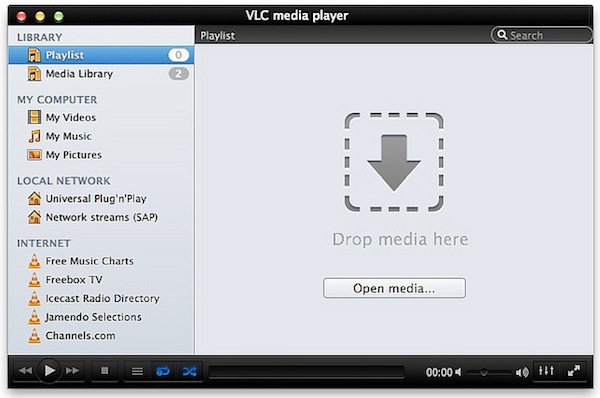
Popular media player VLC is about to reach version 2.0 final and Felix Kühne, current lead developer of VLC’s Mac OS X port, has posted a series of screenshots detailing the final user interface design that we’ll see in the 2.0 update once it goes public “later this week”. The screenshots, available over at Kühne’s blog, show a dramatic change from VLC’s current design on the Mac, with a new sidebar for your playlists, Internet sources, and media on your computer and local network. The new design was created by Damien Erambert, and the first concepts date back to 2008. The interface of VLC 2.0 for Mac will offer a series of advantages over the older version from a functionality standpoint as well:

VLC 2.0’s interface for Mac is dramatically different from its previous revision, both technically and usage-wise. Playlist and video output share the same window, service discovery modules can be easily accessed through a sidebar and various audio + video filters are available through the respective panels. Besides that, the interface is noticeably faster and easily expandable. Speaking of that, we also added support for VLC’s lua-based extensions, which allow you to get info about the current movie from Allociné, post to Twitter, fetch subtitles automatically, etc.

Previously known as VLC 1.2, VLC 2.0 is a major rewrite of the application, which now includes several bug fixes, new features, and a redesigned interface. Alongside improved performances and optimizations for Lion, VLC 2.0 comes with many new features including initial support for Blu-Ray Discs, new subtitle management and blending in video outputs, support for multiple files inside RAR archives, and an all-new 64-bit version for Windows users (VLC 2.0 for Windows won’t feature a new interface as seen on OS X). A complete list of changes from VLC 1.x to VLC 2.0 is available here; the developers didn’t mention anything specific about the “mobile port” for iOS and Android devices.

VLC 2.0 will be available later this week at VideoLAN’s website. More screenshots of the final Mac UI have been posted on Flickr.

Access Extra Content and Perks

Founded in 2015, Club MacStories has delivered exclusive content every week for nearly a decade.

What started with weekly and monthly email newsletters has blossomed into a family of memberships designed for every MacStories fan.

Learn more here and from our Club FAQs.

Club MacStories: Weekly and monthly newsletters via email and the web that are brimming with apps, tips, automation workflows, longform writing, early access to the MacStories Unwind podcast, periodic giveaways, and more;

Club MacStories+: Everything that Club MacStories offers, plus an active Discord community, advanced search and custom RSS features for exploring the Club’s entire back catalog, bonus columns, and dozens of app discounts;

Club Premier: All of the above and AppStories+, an extended version of our flagship podcast that’s delivered early, ad-free, and in high-bitrate audio.

Learn more here and from our Club FAQs.


Instagram 2.1 Released: Updated UI, Lux, New Sierra Filter

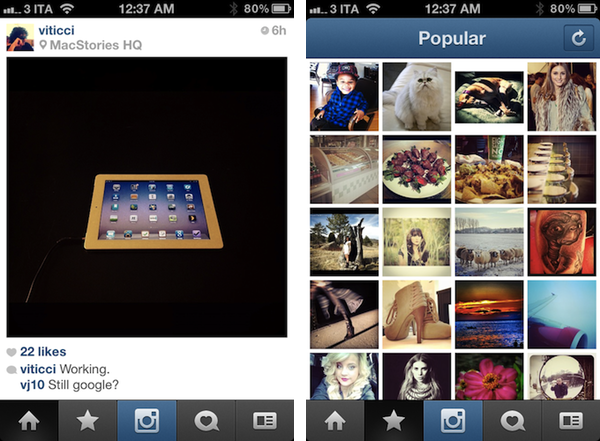
A major update to photo-sharing application Instagram was released today, and for the first time it includes new interface element designed by the extremely talented (and recently hired by Instagram) Tim Van Damme. Whilst the original Instagram launched a trend of “apps with a large action button in the bottom toolbar”, Instagram 2.1 has been refreshed to include a more standard – yet beautiful to look at – toolbar with icons to browse your feed, liked items, profile, and of course take a new picture. You can see more of Instagram’s new pixels over at Tim’s Dribbble.

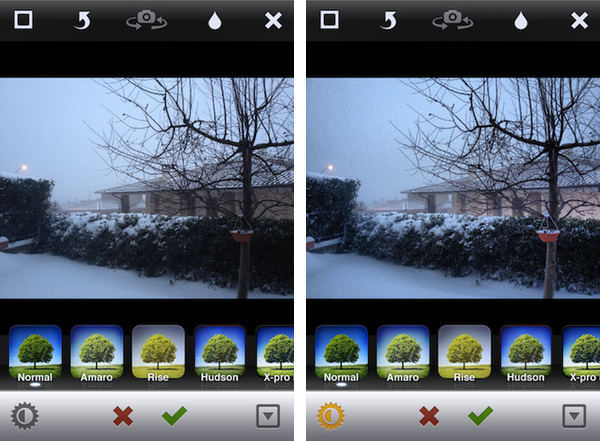
The new Instagram also features a new filter, Sierra, and a photo enhancing system called Lux that, according to the company, will enable you to make your photos more vibrant with just one touch. This functionality reminds me of Camera+’s Clarity effect, and it’s interesting to see how Lux is meant to enhance the original look of a photo, not apply a vintage effect. I wonder if this will signal a change in the Instagram community’s overall trend towards heavily modified photos.

We’ve given you a new way to instantly transform the look and feel of your photos. In just one tap, Lux works its magic by making your photos more vibrant and bringing out details you couldn’t see before. Use it with a filter or without.

I’ve played around with the update, and it’s solid. The app seems a little faster, the new UI is very elegant, and I think the Lux effect is very promising in that it will help users avoid the need of applying effects to photos just to make them look “different” – I like how Lux focuses on making an iPhone’s default output simply better. Other improvements in this update include the possibility of tapping on a push notification to get directly to a photo, and an option to change your profile photo from your profile page.

Instagram 2.1 is available on the App Store.

Access Extra Content and Perks

Founded in 2015, Club MacStories has delivered exclusive content every week for nearly a decade.

What started with weekly and monthly email newsletters has blossomed into a family of memberships designed for every MacStories fan.

Learn more here and from our Club FAQs.

Club MacStories: Weekly and monthly newsletters via email and the web that are brimming with apps, tips, automation workflows, longform writing, early access to the MacStories Unwind podcast, periodic giveaways, and more;

Club MacStories+: Everything that Club MacStories offers, plus an active Discord community, advanced search and custom RSS features for exploring the Club’s entire back catalog, bonus columns, and dozens of app discounts;

Club Premier: All of the above and AppStories+, an extended version of our flagship podcast that’s delivered early, ad-free, and in high-bitrate audio.

Learn more here and from our Club FAQs.


Greed and Entitlements

Nate Boateng has published a very good explanation of why App Store users aren’t entitled to free, universal upgrades of iOS apps:

The thought that a small development team is expected to do months work for free is insane to me. Yes, there are tons of successful apps that are universal (see Instapaper, Due, and Twitteriffic), but the perception that we are entitled to that is not only selfish, it’s just plain wrong. Universal app updates that come for free should be considered a bonus, not a right. A while back Iconfactory developer Craig Hockenberry gave a ballpark on Twitteriffic’s development. He estimated that it cost around $250,000 to develop Twitterrific. Think about that for a second. Still think you’re entitled to free universal updates for the lifetime of an app? I sure don’t.

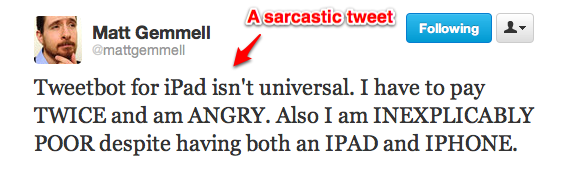
Today’s Tweetbot releases are just another example of a subset of users that think developers should keep on updating their apps, even adding completely new iPad versions, for free, forever. This kind of controversy seems to take place every time a major iPhone app is released as standalone on the iPad, or vice versa. So I’d like to formulate a quick thought on the subject.

I understand those who say “I would have preferred it to be universal”. Sure, sounds reasonable. I would have preferred my iPhone 4S to come for free in the mail, too, but it didn’t. Stuff isn’t free in this world (even when they give you the illusion of free, you’re the one being sold). What I can’t accept is people getting angry and offensive at third-party developers that decide, you know, to make people pay three bucks for an app that’s been in the works for months. Unfortunately, the App Store doesn’t allow for paid upgrades, so if these people’s rhetoric is that it’s not about the price, it’s about the convenience of a universal binary, well, there isn’t much developers can do about it. Ask Apple.

More importantly, I’m baffled when I see people really getting angry because of a standalone app that was always meant to be that way. So here’s a tip for these people: next time you’re about to send a tweet to a developer, claiming that he promised a free and universal update and he’s now “stealing your money”, do your homework. Because if I can’t argue on economics, I sure think I’m pretty good at Google Search, which brought me to this page (screenshot). From the old Tweetbot FAQ, when the iPhone app was first released in 2011:

Will there be an iPad/Mac version?

It’s a possibility, but we have no plans for it at this time. We are focusing on the iPhone version for now. If we do an iPad version, it will not be universal.

Don’t be greedy. Support indie developers and great software.

Access Extra Content and Perks

Founded in 2015, Club MacStories has delivered exclusive content every week for nearly a decade.

What started with weekly and monthly email newsletters has blossomed into a family of memberships designed for every MacStories fan.

Learn more here and from our Club FAQs.

Club MacStories: Weekly and monthly newsletters via email and the web that are brimming with apps, tips, automation workflows, longform writing, early access to the MacStories Unwind podcast, periodic giveaways, and more;

Club MacStories+: Everything that Club MacStories offers, plus an active Discord community, advanced search and custom RSS features for exploring the Club’s entire back catalog, bonus columns, and dozens of app discounts;

Club Premier: All of the above and AppStories+, an extended version of our flagship podcast that’s delivered early, ad-free, and in high-bitrate audio.

Learn more here and from our Club FAQs.


Tweetbot for iPad Review

Since its release two years ago, the iPad has always needed a better Twitter client. Tweetbot for iPad is the better Twitter app I have been waiting for, and it sets a new standard that future Twitter clients will have to be compared with.

From a Twitter power user’s perspective, the iPad came at an interesting point in the history of the platform. Twitter clients for iPhone and Mac had reached a kind of maturity and complexity that enabled users like me to demand a certain grade of efficiency from new Twitter apps for the tablet; Twitter itself was beefing up its first-party app portfolio with acquisitions and a fresh strategy based on making the official clients the go-to apps for the average Twitter user. Some notable Twitter clients came out on the iPad throughout 2010, including the excellent Twitterrific, which we have reviewed several times on MacStories.

In 2010, Twitter also released its very own application for the iPad; developed by Loren Brichter, the man behind Tweetie, Twitter for iPad launched to a (still ongoing) controversy as to whether iPad interfaces should adopt more courageous designs in displaying information and sections to the user. Taking the best features of Twitter for iPhone (fluidity, clean design, pull to refresh) and mixing them up with new interaction schemes such as panels and pinch gestures, Twitter for iPad collected rave reviews and considerable disapprovals because of its interesting use of classic Twitter elements (vertical timeline, separate section for Mentions) alongside a new model for driving users’ taps around the app in the form of sliding panels, modal menus, and popovers. You can read more about it in my original review from 2010.

The problem with Twitter for iPad, I believe, is that it failed to appeal power users in the long term, stalling on the same feature set it had at launch without adding substantial improvement over what could have been a fantastic application. I, for one, used the official Twitter iPad app for months, but then I came at a point where I couldn’t stand seeing decent third-party apps staying on top of new Twitter functionalities and “unofficial” services, and Twitter’s own app left behind with Brichter gone and seemingly no interest from Twitter’s mobile team in keeping it up to date – fixing the bugs and annoyances that were reported on day one. Some improvements and new features eventually found their way to the app, and word is that we are waiting for a major 4.0 redesign of the client which, I believe, will put the app on par with the disastrous iPhone version. Tweetbot for iPad thus arrives in a landscape with no clear leader, but with some very good apps that have caught the attention of both power and average users in the past two years.

I wrote about this before. I wish third-party developers would accept Tweetbot as the de-facto app for power users and move on to innovate on other areas of the service. I’m biased: I love Tweetbot, I use it every day on the iPhone, and I couldn’t wait for an iPad version to be released. Today is kind of a dream come true for a Twitter nerd, but the question is – was it worth the wait? Not just good – is Tweetbot the great app the iPad was waiting for? Let’s dive in. Read more

Access Extra Content and Perks

Founded in 2015, Club MacStories has delivered exclusive content every week for nearly a decade.

What started with weekly and monthly email newsletters has blossomed into a family of memberships designed for every MacStories fan.

Learn more here and from our Club FAQs.

Club MacStories: Weekly and monthly newsletters via email and the web that are brimming with apps, tips, automation workflows, longform writing, early access to the MacStories Unwind podcast, periodic giveaways, and more;

Club MacStories+: Everything that Club MacStories offers, plus an active Discord community, advanced search and custom RSS features for exploring the Club’s entire back catalog, bonus columns, and dozens of app discounts;

Club Premier: All of the above and AppStories+, an extended version of our flagship podcast that’s delivered early, ad-free, and in high-bitrate audio.

Learn more here and from our Club FAQs.


Tweetbot 2.0 Review

How do you improve something that’s already great? You keep working on it, trying to look at your product from as many perspectives as possible. If you believe in it, you can make something great an even greater product. Last year, I reviewed Tweetbot 1.0 for iPhone, the Twitter client many of us had been impatiently waiting for:

Tweetbot is the app I’ve been waiting for: an excellent innovator of the Twitter platform. My new favorite Twitter client.

Tweetbot is everything I’ve ever wanted from a Twitter app: it looks great, it’s fast on WiFi and 3G, it innovates in several aspects that have been regarded as “standards” from both users and developers for too long. Could Tweetbot be any better? Maybe. The developers could work on improving the speed of animations and refresh times as much as possible, or implement support for Readability and other URL shortening services. But as far as the Twitter experience goes, Tweetbot has got everything I’m looking for.

I have tried many Twitter apps in the past years, as you may know, and I’ve never seen a third-party developer as committed to making their client great as Tapbots did with Tweetbot for iPhone. Iteration. Tapbots listened to feedback, and managed to pull the old trick of implementing features without turning your original vision into a piece a software it wasn’t meant to be. With version 2.0 of Tweetbot for iPhone, Tapbots has improved almost every aspect of the original experience, adding features, bug fixes, and refinements that still make Tweetbot the finest Twitter client available on the iPhone. Now faster, smoother, and more intuitive. Read more

Access Extra Content and Perks

Founded in 2015, Club MacStories has delivered exclusive content every week for nearly a decade.

What started with weekly and monthly email newsletters has blossomed into a family of memberships designed for every MacStories fan.

Learn more here and from our Club FAQs.

Club MacStories: Weekly and monthly newsletters via email and the web that are brimming with apps, tips, automation workflows, longform writing, early access to the MacStories Unwind podcast, periodic giveaways, and more;

Club MacStories+: Everything that Club MacStories offers, plus an active Discord community, advanced search and custom RSS features for exploring the Club’s entire back catalog, bonus columns, and dozens of app discounts;

Club Premier: All of the above and AppStories+, an extended version of our flagship podcast that’s delivered early, ad-free, and in high-bitrate audio.

Learn more here and from our Club FAQs.


On iPads and Personal Computers: A Post-PC Retrospective

There’s been a debate lately as to whether the iPad can fit into the so-called PC category. Following the release of several estimates and market research studies showing much different results when the iPad is included in the overall PC sales of the entire industry, a number of people have voiced once again their opinions on the matter, producing a variegate mix of diverging points. Our writer Graham Spencer chimed in as well, analyzing the reasons behind certain people’s assertion that the iPad can’t be a PC because it can’t fully replace a personal computer.

I, however, would like to take a different route and look at this issue from a broader perspective that includes data, Apple’s history, the current market’s situation, and the tech community’s change of direction on the “iPad as a PC” debate over the past two years.

The starting point, I believe, lies in the words Steve Jobs used to introduce the iPad back in 2010:

Everybody uses a laptop and a smartphone. And a question has arisen lately: is there room for a third category of device in the middle? Something that’s between a laptop and a smartphone. And of course we’ve pondered this question for years as well. The bar’s pretty high. In order to really create a new category of devices, those devices are going to have to be far better at doing some key tasks. Better than a laptop. Better than a smartphone. Now, some people have thought…that’s a netbook. The problem is, netbooks aren’t better at anything. They’re slow, they have low quality displays and they run clunky old PC software. So, they’re not better than a laptop at anything. They’re just cheaper. They’re just cheap laptops. We don’t think they’re a new category of device.

In the few minutes that led to the iPad’s introduction, Jobs carefully set the tone and Apple’s position for the upcoming discussions on the true nature of the device: the iPad is meant to be a “third category” that executes “key tasks” better than a laptop, and better than a smartphone. He didn’t compare the iPad to a PC, but he did mention that Apple wouldn’t follow the trend of releasing cheap “netbooks” that “aren’t better at anything”. Of course, Steve Jobs iterated on his statements regarding the nature of the iPad a few months later at D8 Conference. This is where Jobs famously compared PCs to trucks:

When we were an agrarian nation, all cars were trucks, because that’s what you needed on the farm,” Jobs said at D8 last month. “But as vehicles started to be used in the urban centers, cars got more popular. Innovations like automatic transmission and power steering and things that you didn’t care about in a truck as much started to become paramount in cars….PCs are going to be like trucks. They’re still going to be around, they’re still going to have a lot of value, but they’re going to be used by one out of x people.

As you can see, Jobs’ public definition and positioning of the iPad slightly changed in the months between January and June 2010. I believe the more intimate setting of D8 got Jobs into a talking mood which helped him express what he truly felt about the iPad and PCs; I also believe Apple itself was (is) still trying to understand what the iPad ultimately is, thus definitions and public statements might change and evolve over time. Tim Cook stated numerous times that, whilst excited about the opportunities opened by iPad, Apple still has to fully understand just how much market there is behind it. Furthermore, keep in mind how Apple initially touted the iPad as a productivity machine (2010 keynote), then an entertainment platform (iPad 2 keynote) and subsequently as an educational machine (January 2012). Apple still has to fully grasp the potential of the iPad, and is firing on all cylinders to gain as much share as possible before the market is too crowded. That’s not to say Apple doesn’t have a strategy; in fact, they have multiple ones and they are trying to optimize the proper sequence for the company to put them in place.

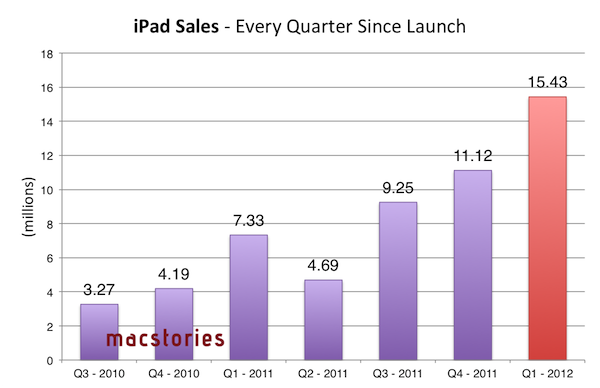
Strategies, typically, are based on patterns, and Apple wouldn’t have gotten to exceed $46 billion in revenue if these patterns hadn’t been associated with the numbers and data coming in after the launch of the original iPad. The numbers speak clearly for Apple: of all iOS devices, the iPad has the most rapid trajectory in every quarter since launch with an impressive growth from 3.27 million units (first quarter) to 15.43 million units sold (last quarter). Horace Dediu has put together a nice chart showing the penetration of the iPad in terms of shipments and growth.

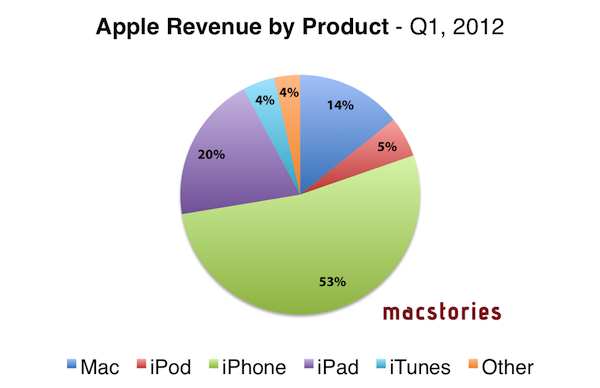
Numbers help establishing patterns that define strategies and business models. Sure enough, the early success of the iPad has allowed Apple to turn a product that represents a good 20% of revenue into a category worth focusing on for the future. As I explained in this article, if the source is to be believed, Tim Cook hinting at the iPad being a better alternative than a possible ARM-based, iPad-like MacBook Air is interesting for a number of reasons. First off, it sort of implies that tasks that can be accomplished with an iPad-inspired MacBook Air (that is, regular PC tasks with instant-on and a slimmer form factor) could be easily, if not better executed by the iPad itself. Indeed, the same report goes on to note that Tim Cook believes the iPad ”satisfies—or will soon satisfy—the needs of those who might have been interested in such a product”. More importantly, assuming an ARM-based MacBook Air has ever been in testing within Apple and that such a machine would be positioned as an ultra-portable, fast and durable low-end Mac, it means Apple sees the iPad as the portable and lightweight personal computer for the masses seeking a high-quality product in the low end. Read more

Access Extra Content and Perks

Founded in 2015, Club MacStories has delivered exclusive content every week for nearly a decade.

What started with weekly and monthly email newsletters has blossomed into a family of memberships designed for every MacStories fan.

Learn more here and from our Club FAQs.

Club MacStories: Weekly and monthly newsletters via email and the web that are brimming with apps, tips, automation workflows, longform writing, early access to the MacStories Unwind podcast, periodic giveaways, and more;

Club MacStories+: Everything that Club MacStories offers, plus an active Discord community, advanced search and custom RSS features for exploring the Club’s entire back catalog, bonus columns, and dozens of app discounts;

Club Premier: All of the above and AppStories+, an extended version of our flagship podcast that’s delivered early, ad-free, and in high-bitrate audio.

Learn more here and from our Club FAQs.


Apple, China, and Doing The Right Thing

There is an assumption currently making the rounds that the workers laboring in Chinese factories under terrible conditions are a direct result of Apple’s actions. Some people almost seem to think that Apple is literally enslaving people to work on its products. Needless to say, this is not true.

The fact is that these workers have a choice, albeit a limited one, about where to work. And they are working at factories like Foxconn —which, I remind you, is a wholly separate entity from Apple— because they are better than the alternatives: no job at all, or a job that pays far worse with even harsher conditions.

Think about that. As bad as the stories that we’ve heard about working there are —and make no mistake, they are horrid and no one should have to work under such conditions— the fact that Foxconn has a six-month waiting list of people hoping to become employees seems to suggest that they are still much better than any other opportunity these workers have available.

Given all that, is Apple being ethical by working with a company like Foxconn? A company that, for all its problems, still provides a significantly better alternative to the people clamoring to be hired? I would argue yes.

If Apple were to abandon their involvement with Foxconn and other abusive Chinese suppliers like these boycotts are calling for, what would happen to these workers? The boycotters apparently believe that they would be set free to find safe, well-paid work elsewhere. But if working at Foxconn was already one of the best opportunities they had, that outcome seems unlikely at best.

In reality, they would likely be forced to take a job at another factory with even worse pay and worse conditions. Or perhaps have no choice but to perform peasant work for a fraction of the money they were earning before. Worst case, they may not even be able to find another job at all.

If the goal of a boycott is to assuage the guilt of first-world citizens for buying Apple products made under harsh conditions, Apple leaving China would certainly accomplish that. But if the goal is to make things better for the workers themselves, the only realistic option I can see is for Apple to continue what they’re doing: work with these companies, demand better conditions, conduct audits, and have the workers paid as well as possible for people in their position. 1

Yes, the conditions these workers labor under are terrible. They may have no better choices in their economy, but that doesn’t mean what’s happening there is okay. If first-world companies are going to continue to do business with China and Chinese companies, the only ethical thing for these companies to do is demand continual improvement. And we too should demand as much of those companies whose products we buy.

But the fact remains that as of now, these people will be exploited no matter what we do. Ceasing to provide them better employment opportunities will not help them. Quite the opposite: it will only leave them subject to even worse alternatives. Given that, I believe the best thing we can do is support companies that are taking responsibility for improving conditions and wages for the people that make their products. And right now, the company that is taking the most responsibility…is Apple.


  1. Unfortunately I’m not sure how legally or economically feasible it is for Apple to reduce their margins and pass along the profits to the workers directly even if they wanted to. But if it is, they should be doing so as much as possible.

Access Extra Content and Perks

Founded in 2015, Club MacStories has delivered exclusive content every week for nearly a decade.

What started with weekly and monthly email newsletters has blossomed into a family of memberships designed for every MacStories fan.

Learn more here and from our Club FAQs.

Club MacStories: Weekly and monthly newsletters via email and the web that are brimming with apps, tips, automation workflows, longform writing, early access to the MacStories Unwind podcast, periodic giveaways, and more;

Club MacStories+: Everything that Club MacStories offers, plus an active Discord community, advanced search and custom RSS features for exploring the Club’s entire back catalog, bonus columns, and dozens of app discounts;

Club Premier: All of the above and AppStories+, an extended version of our flagship podcast that’s delivered early, ad-free, and in high-bitrate audio.

Learn more here and from our Club FAQs.


To Be Or Not To Be, Is The iPad A PC?

A few hours ago I listened to the latest episode of Shawn Today (a daily podcast from Shawn Blanc available to members of his site), and in it he discussed the issue of whether the iPad is a Personal Computer.  This follows an article by Matthew Panzarino on The Next Web yesterday, titled “Look, tablets are PCs, get over it”. In fact I could point to quite a few articles and discussions about this question of whether tablets (specifically the iPad) are PCs. But Shawn’s episode and Matthew’s post have inspired me to also weigh in on the discussion today, with why I believe the iPad should legitimately be counted within the PC market.

I’ll just start with this question: what computer is more personal than an iPad? The tablet form factor and iOS software combine together to make using the iPad a far more personal computing device than a traditional PC desktop or laptop, where you have to interact with the software from an arm’s length away, using a mouse or trackpad and a keyboard.

So the iPad is personal device, but is it a fully functional computer? John Mello at PCWorld says no, because in his opinion people don’t use it for content creation. Matthew’s article on TNW does a great job at dismantling this oft-quoted “complaint” about the  iPad and I recommend reading his entire argument. When the iPad first came out I must admit I had the same thoughts about the device, but as time has gone on I have increasingly used it for content-creation — whether it be annotating PDFs for studying, writing, and even some (very average) efforts at using iMovie. Content-creation on the iPad will continue to become more common as people adjust to the device and as app developers continue to adapt to creating great software for the iPad – just look at how productivity apps have improved and advanced in the past year on the iPad.

Sure, some content-creation tasks may never be as easy to do on an iPad compared to a more traditional PC – things like advanced video editing or long stretches of writing. But by the same token, a small netbook isn’t good for those tasks either and yet it is counted as a PC. I know I would always choose an iPad over a netbook for virtually any task because in my opinion it is a far more capable personal computer. On the flip side, I think the iPad is actually a better computer for things like annotating PDFs with apps such as PDF Expert. Then for things like advanced video or audio editing it’s only inevitable for those apps to transition to iOS, in fact just today Avid Studio was released – it may be a distilled version of the advanced desktop version, but it will evolve and become increasingly powerful for most tasks that an average user and even “pro-sumer” will need. The iPad is personal and (in my opinion) it is also a functional computing device.

So if you are excluding the iPad from the personal computer category, does that mean there is some checklist of requirements for a device to be a PC? Does it need a keyboard, or perhaps a trackpad or a mouse, or does it just have to be able to install any application you want (without the approval of a gatekeeper such as Apple)? All of these ‘requirements’ are completely arbitrary - with no practical reason as to why they are required to be on a PC. You can still connect a keyboard to the iPad if you need one for extended periods of writing, your finger is the “mouse” and Apple’s App Store has mostly protected consumers from nefarious apps or excessively useless/buggy apps – virtually everything I need is on the App Store (in fact there are over 170,000 apps just for the iPad). You may not like this policy (I can understand that, even if I don’t agree with it), but is it really a reason to bar the iPad from being counted as a PC? Again, that’s completely arbitrary.

Arbitrary: Based on random choice or personal whim, rather than any reason or system.

If you are still thinking that the iPad doesn’t count as a PC, what will all those Windows 8 computers in tablet/slate form be counted as? You can’t bar them from being “a PC” because they will be able to “morph” into what is essentially a Windows 8 laptop with a traditional Windows desktop, use a keyboard (and even mouse) and yet you can use it like them as tablets with a different, touch-based UI.

But if you do count them as a PCs, you surely have to count the iPad as a PC too then. They will be virtually identical devices from a functionality and experience point of view, unless you say the Windows 8 tablet is a PC because it will still have the traditional Windows desktop, and then I go back to the fact that it is an arbitrary requirement. One might actually argue (from what we know at the moment), that the iPad is more functional and will provide a better experience because it has two years of developer support with apps that have been specifically designed for the touch interface, whereas any Windows 8 tablet may be handicapped with the Windows desktop because it isn’t designed for touch-input and Metro may lack many apps at launch. The reality is that both should be counted as PCs: it is the only logical solution.

But…but…..but….

You might now point to the fact that Apple has touted the iPad as a Post-PC device, so surely if Apple themselves aren’t calling it a PC, it shouldn’t then be counted in any PC marketshare analysis. It’s a decent point, but I think Apple did that as more of a marketing move, to point out that it is a different, unique device. In fact, it is the next evolution (if not revolution) of the personal computer. Maybe the solution is just calling the “traditional” PC category something different (Desktops & Laptops perhaps?) that would make much more sense than trying to arbitrarily force the iPad out of the PC category.

One other decent rebuttal may be to then ask, if you are including the iPad, why not also include the iPhone. It’s a very good point, because I think it is also a personal computing device to some degree. I think the reason why it’s legitimate to leave the iPhone and other smartphones out of most PC market analysis is because there are enough points of differentiation between the traditional PC/iPad and the smartphone in the way it is used and experienced. These include the fact that smartphones have a distinct use case of being always-on communication devices, time management devices (Calendar/To-Do apps, etc), time-wasters (Angry Birds in a long queue, anyone?), and are occasionally used for content-creation or content consumption. They are also devices you spend using for a few minutes at a time (typically), multiple times a day — rather than PCs (including iPad), which you use for longer periods of time.

You might claim these are arbitrary reasons and, yes, to some degree they are, but that’s because the line between whether a smartphone can also be counted as a PC is a far blurrier line than that of iPads as PCs. In my opinion at least, it would be OK to include smartphones as PCs in a market analysis if there is a good reason as to why it’s an important conclusion - such as an analysis of trends. A good example of this is Horace Dediu, who included smartphones as PCs in the final graph of his article entitled “The rise and fall of personal computing”.

So as Matthew Panzarino said yesterday in a very succinct title and what I completely agree with, “tablets are PCs, get over it”.

Access Extra Content and Perks

Founded in 2015, Club MacStories has delivered exclusive content every week for nearly a decade.

What started with weekly and monthly email newsletters has blossomed into a family of memberships designed for every MacStories fan.

Learn more here and from our Club FAQs.

Club MacStories: Weekly and monthly newsletters via email and the web that are brimming with apps, tips, automation workflows, longform writing, early access to the MacStories Unwind podcast, periodic giveaways, and more;

Club MacStories+: Everything that Club MacStories offers, plus an active Discord community, advanced search and custom RSS features for exploring the Club’s entire back catalog, bonus columns, and dozens of app discounts;

Club Premier: All of the above and AppStories+, an extended version of our flagship podcast that’s delivered early, ad-free, and in high-bitrate audio.

Learn more here and from our Club FAQs.