Posts in Featured

Read It Later Reborn: Pocket Saves Everything “For Later”

In the past five years, reading on the web has fundamentally changed. Read It Later, the first popular service to pioneer a certain kind of “bookmarking” for web articles, is reborn today as Pocket, and it promises to change the way users think of web content to “save for later”. Most importantly, Pocket wants to address what has become the scarcest resource of web citizens: time.

Read Later

People never had time to check out all the cool stuff that happens on the Internet every day. As blogging platforms started taking off in the past decade, sometime during 2006 some people began to realize they didn’t have time to read every article that was posted online. The digital publishing revolution had already happened, but the explosion of blogging was just starting to produce high-quality, journalistic and well-informed pieces that, due to a simple scarcity of time and intuitive tools, people didn’t have time to read in their entirety. Whilst the act of “bookmarking” something on the Internet goes back to several years ago, the more focused, practical act of “saving an article for later” can actually be traced back in the form of popular consumer software to somewhere in between late 2006 and 2007.

Nate Weiner was one of the first developers (and avid web readers) to understand that the bookmarking systems in place at the time (Delicious, magnolia, or simple browser bookmarks) weren’t cutting it, from a technical and psychological perspective, for those users that just wanted to put off an article for later.

The difference between “bookmarking” and “saving for later” is both practical and conceptual: a regular bookmark is usually archived for good, as bookmarking services place great emphasis on letting users store bookmarks – links to webpages – forever in their accounts. There are some exceptions today, but the underlying philosophy has pretty much stayed the same. The action of “saving an article for later”, on the other hand, takes a more pragmatical approach: an article a user wants to read today or tomorrow isn’t necessarily representative of a webpage he wants to store and archive for eternity. The terminology itself – “for later” – indicates that something is going to happen ”later”. Once an article is read, most users tend to go on with their lives and forget about it. Like I said, it’s different today, and there are some specific use cases in which someone might want to archive articles – but the original concept lives on. People don’t have time to read every web article ever published.

Back in 2007, Nate Weiner set out to create a simple Firefox extension that would allow him to keep articles he found at work (and wanted to “read later”) in a different place than its browser bookmarks. On August 6, 2007, he launched the aptly-named Read It Later, a Firefox extension that did one thing well: it kept articles in a cozy little extension, saved for later. Users could hit a button to quickly save an article, and they could even save multiple browser tabs at once. As the extension started taking off, Nate began adding more features to Read It Later, such as offline support in December 2007.

Meanwhile, Marco Arment, developer at Tumblr, was facing a similar problem himself in 2007. He was constantly coming across news or blog articles he didn’t have time to read at the moment, and he needed something to read while on the bus or waiting in line. Arment discovered that there was no easy way to save links from a computer and access them later from the iPhone – we’re talking mid-2007 here, when the iPhone was getting in the hands of the first millions of customers, and when there was no SDK for developers to build native apps. So Arment decided, as he would later explain, to build just the service for that: Instapaper, a webpage that collected links saved from a bookmarklet, was launched publicly in January 2008. Like Read It Later, Instapaper solved a twofold issue: it allowed users to quickly save articles, and retrieve them later. Unlike Weiner’s app, though, Instapaper saved links in a webpage that could be easily accessed from the iPhone – mobile reading, in fact, seemed to be one of Instapaper’s primary features from the get-go. As Arment’s service became popular, he also went back to the drawing board – or in his case, programming tools – to implement new functionalities for Instapaper. The service’s hallmark feature, a text mode that strips unnecessary content out of web articles, was released in April 2008.

The rest is history. As Apple kept improving its mobile ecosystem with new devices, OS upgrades, and the App Store, Read It Later and Instapaper evolved, and iteratively became two fantastic services that serve millions of users every month. Over the years, we have followed both Instapaper and Read It Later closely at MacStories. Read more
Access Extra Content and Perks

Founded in 2015, Club MacStories has delivered exclusive content every week for nearly a decade.

What started with weekly and monthly email newsletters has blossomed into a family of memberships designed for every MacStories fan.

Learn more here and from our Club FAQs.

Club MacStories: Weekly and monthly newsletters via email and the web that are brimming with apps, tips, automation workflows, longform writing, early access to the MacStories Unwind podcast, periodic giveaways, and more;

Club MacStories+: Everything that Club MacStories offers, plus an active Discord community, advanced search and custom RSS features for exploring the Club’s entire back catalog, bonus columns, and dozens of app discounts;

Club Premier: All of the above and AppStories+, an extended version of our flagship podcast that’s delivered early, ad-free, and in high-bitrate audio.

Learn more here and from our Club FAQs.


Samuel L. Jackson and Siri Star in New iPhone 4S Commercial (Update: Zooey Deschanel Too)

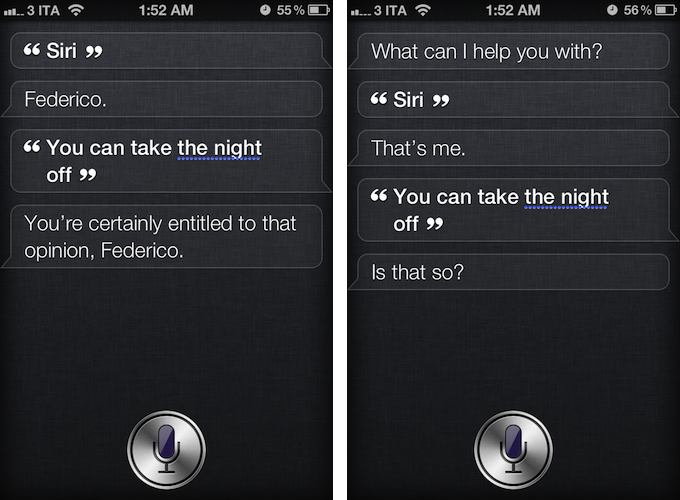
As noted by The Next Web, U.S. carrier Verizon Wireless aired a new iPhone 4S commercial featuring actor Samuel L. Jackson and Siri, the company’s virtual assistant for the iPhone 4S. Remarkably similar to Apple’s own ads in terms of style and message, the ad places Siri front and center, showcasing various functionalities of the software. Samuel L. Jackson asks his assistant to cancel appointments, create reminders, look up locations, and convert units to prepare for his “date night”. At the end of the commercial, the actor ironically asks Siri to take the night off, to which Siri replies “if you say so”.

Even more ironically, as depicted in the screenshots above, Siri really does reply to that command with a series of different answers.

Verizon Wireless’ official YouTube channel hasn’t been updated yet with the new commercial, and it’s not clear whether Apple’s official ad agency Chiat\Day may have been involved in the creation of the ad. You can check out an official embed after the break.

Update: It appears a full “Siri and celebrities” ad campaign is going live today. Another ad featuring actress Zooey Deschanel just aired as well, for carrier Sprint. It also seems like the same ads are airing with different carriers logo at the end, confirming the Samuel L. Jackson ad wasn’t simply a Verizon Wireless commercial, as initially suggested.

Update 17/4: Apple just posted the official versions of the ads on its website and YouTube channel. Find them below, or on Apple’s website (Date Night, Rainy Day).
Read more

Access Extra Content and Perks

Founded in 2015, Club MacStories has delivered exclusive content every week for nearly a decade.

What started with weekly and monthly email newsletters has blossomed into a family of memberships designed for every MacStories fan.

Learn more here and from our Club FAQs.

Club MacStories: Weekly and monthly newsletters via email and the web that are brimming with apps, tips, automation workflows, longform writing, early access to the MacStories Unwind podcast, periodic giveaways, and more;

Club MacStories+: Everything that Club MacStories offers, plus an active Discord community, advanced search and custom RSS features for exploring the Club’s entire back catalog, bonus columns, and dozens of app discounts;

Club Premier: All of the above and AppStories+, an extended version of our flagship podcast that’s delivered early, ad-free, and in high-bitrate audio.

Learn more here and from our Club FAQs.


iCloud’s First Six Months: The Developers Weigh In

On October 12th, 2011, iCloud launched to millions of iOS users impatiently waiting to start getting their devices to sync with Apple’s new platform, which CEO Tim Cook went on to call the company’s next big insight for the next decade. Six months and 85 million customers later, iCloud has proven to be a substantial improvement to sync a user’s email, contacts, address book, and other data accessed by Apple apps. With third-party developers, however, adoption of iCloud sync and storage features has turned out to be a bit tricker, and possibly less intuitive than Apple’s own implementation due to the early nature of the platform. Read more

Access Extra Content and Perks

Founded in 2015, Club MacStories has delivered exclusive content every week for nearly a decade.

What started with weekly and monthly email newsletters has blossomed into a family of memberships designed for every MacStories fan.

Learn more here and from our Club FAQs.

Club MacStories: Weekly and monthly newsletters via email and the web that are brimming with apps, tips, automation workflows, longform writing, early access to the MacStories Unwind podcast, periodic giveaways, and more;

Club MacStories+: Everything that Club MacStories offers, plus an active Discord community, advanced search and custom RSS features for exploring the Club’s entire back catalog, bonus columns, and dozens of app discounts;

Club Premier: All of the above and AppStories+, an extended version of our flagship podcast that’s delivered early, ad-free, and in high-bitrate audio.

Learn more here and from our Club FAQs.


It’s Time To Change iTunes

Jason Snell makes the case for a new, better iTunes over at Macworld:

If Apple’s going to embrace the cloud wherever possible, it needs to change iTunes too. The program should be simpler. It might be better off being split into separate apps, one devoted to device syncing, one devoted to media playback. (And perhaps the iTunes Store could be broken out separately too? When Apple introduced the Mac App Store, it didn’t roll it into iTunes, but gave it its own app.)

In March 2010, a few days ahead of the original iPad’s release, I wrote:

iTunes is obsolete,and so is the concept to use iTunes as a centralized hub for music, videos, photos, settings, backups, calendars – basically, everything. Think about it: all the stuff you have on your iPhone was either created on the iPhone itself or synced via iTunes. You can’t transfer information from your computer to the iPhone without iTunes. And thus I think Apple has been very lazy in these past years, not willing to update iTunes or finding another solution for our needs.

To which I followed-up in September 2010 after the introduction of Ping:

iTunes is a bloat. Slow. Unresponsive. Clunky. A huge piece of software with thousands of features in it, a couple of online Stores and now a social network, too. A few times in the past I wrote that Apple needed to move this stuff out of iTunes, or at least re-imagine the whole purpose of the app. Many said that would happen with the 10 version. Not so fast. Apple doesn’t want to change iTunes. Thus, the feature creep. Not only they left the Stores, apps, books and sync options in iTunes – they thought that adding a completely new layer of social networking would be a good idea. Again, I’m not criticizing Ping: I’m talking about iTunes as an outdated container of features.

I’ll tell you what’s wrong with iTunes: in the age of iCloud, iTunes is a weirdly old-fashioned desktop software to organize media and manage devices in the same way we did 10 years ago. Only with more features and content types. iTunes is the epitome of old interfaces and interactions trying to hold onto the present.

iTunes works, but it doesn’t work simply. It’s not just complex, it’s complicated and not intuitive: I can’t tell you how many times I was asked by less tech savvy friends about backups, syncing apps, music playlists, video conversions, iOS folders, Address Book contacts, and even software updates. Jason makes some great points in his article – it’s time to simplify. People don’t “get” iTunes anymore. Is it a music app or a media manager? Or is it a device management tool? A Store? A social network? A horse? A radio?

iTunes tries to do so much while doing so little to help users understand its features and differentiate between computer content, cloud content, and device content. Worse, because iTunes is so full of preferences and dialogs, sometimes it’s not clear what it is trying to do, and this often leads to deleted apps, corrupted music libraries, and ever-downloading podcasts. It’s not that Apple hasn’t educated users over the years; but there’s just so much help documents and subtle UI refreshes can do once hundreds of features have users confused and frustrated.

More importantly, iCloud has shown that a better way to manage media and apps for Apple’s devices is possible. And that is, no management: songs and movies downloaded from the iTunes Store are stored in the cloud and they don’t have to be converted; apps are stored in your Purchases and they are downloaded instantly on all your configured devices. Third-party podcast apps that have implemented iCloud sync are infinitely better than podcast support in Apple’s apps. iCloud keeps your bookmarks, notes, contacts, and emails in sync. iTunes Match even keeps your entire music library in the cloud, available at any time. iCloud is the future of Apple’s ecosystem.

So why are we still using iTunes? This is the question we should be asking. And admittedly, the majority of us are doing so for the extra convenience of media on our desktop computers. iOS devices aren’t always connected to a WiFi network, and they are limited in storage. It’s more convenient to keep large libraries of songs, movies, TV Shows, apps, and books on a computer. At least for now.

Is a world without iTunes possible? Maybe, but not today. People still need to be able to keep all their apps locally, alongside their music and movie files. In an ideal world, everyone is buying music and movies from iTunes, but in the real world people use web browsers to download media, and they want iTunes for that. Not to mention the features that iTunes sports on the desktop, which still haven’t been brought back to iOS. The way forward, however, clearly brings us to iCloud: with time, people will get used to iCloud even more, and Apple will improve its infrastructure in terms of reliability and functionalities. The fact that Apple is drifting away from a centralized desktop hub to a persistent hub in the cloud is also confirmed by the direction Apple is taking with Mountain Lion: aside from general iOS resemblances, the Notes app will be coming to the desktop, syncing its content with iCloud, no need for iTunes. And if the “iTunes in the cloud” initiative is of any indication, perhaps iCloud will really become the fundamental backbone of media management and syncing in the future – because, in theory, it needs no management.

But until that day, the stopgap solution to manage and sync content locally needs to be better than iTunes. Maybe it’s about splitting iTunes into multiple apps that execute their functions clearly, naturally, and reliably. Maybe it’s about offering a dedicated App Store app outside of iTunes that lets you easily switch between iPhone, iPad, and Mac apps. iBooks for Mac might help in getting the books out of iTunes. Perhaps separating media playback from device management, while making everything easier to use would come in handy, too.

I hope that iCloud, as the company’s next big insight for the next decade, will help Apple provide a better solution for its users, so that in 10 years today’s iTunes will be a distant memory.

Access Extra Content and Perks

Founded in 2015, Club MacStories has delivered exclusive content every week for nearly a decade.

What started with weekly and monthly email newsletters has blossomed into a family of memberships designed for every MacStories fan.

Learn more here and from our Club FAQs.

Club MacStories: Weekly and monthly newsletters via email and the web that are brimming with apps, tips, automation workflows, longform writing, early access to the MacStories Unwind podcast, periodic giveaways, and more;

Club MacStories+: Everything that Club MacStories offers, plus an active Discord community, advanced search and custom RSS features for exploring the Club’s entire back catalog, bonus columns, and dozens of app discounts;

Club Premier: All of the above and AppStories+, an extended version of our flagship podcast that’s delivered early, ad-free, and in high-bitrate audio.

Learn more here and from our Club FAQs.


Everyme Review

Oliver Cameron thinks there’s something special, intriguing, about the address book. As a personal list that smartphone users have curated over several years, one could wonder about the stories, the people, and the interactions that are part of the creation and curation of an address book. But what can software developers do to leverage the data of our address books to redefine the way we get in touch with our closest friends?

Over the years, digital address books have exponentially increased the amount of data associated with names and phone numbers. First came dedicated fields for email addresses and contact pictures; then, when smartphones gained decent networking and data connections, the address book turned into a richer solution to store people’s information, rather than just addresses, and keep it always accessible on multiple devices through the cloud. Either through Gmail, Exchange, iCloud, or something else, it’s very likely that your address book contains names and phone numbers, but also email addresses, Twitter and Facebook usernames, location data, birthdays, family relationships, and various notes. The address book is, in fact, a people database that’s exclusive to each person. There is no address book like each other.

While the composition of an address book differs from user to user, some interactions and relationships are reflected on multiple instances of the address book, and the cloud can sometimes access a portion of these interactions to create lists of people “you may already know”. If I have you in my address book as a “friend”, maybe I also have your email address, and perhaps you have my information on your address book as well. With the right privacy settings, services like Facebook, Twitter, and just about any app with a social component these days allow us to look up friends that are already signed up by simply matching email addresses. This is a way to leverage the information stored in our address books to facilitate the sign up process for new services. They make it easier for us, using the address book we have been curating over the years.

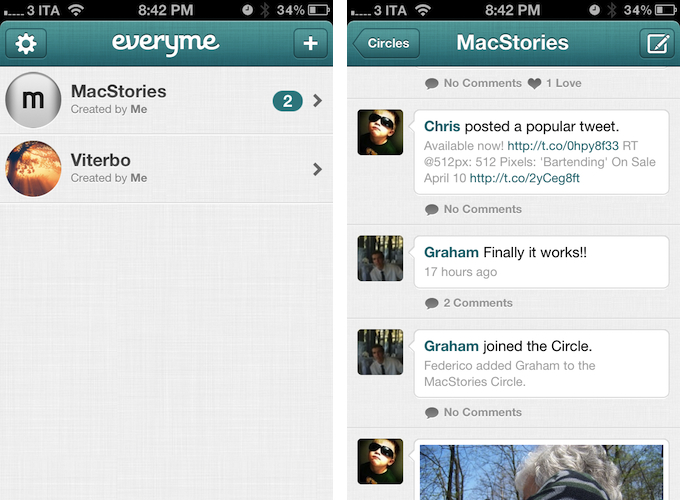
Sometimes, however, people don’t want social apps that force them to share with everyone. Services like Twitter and Google+ are the polar opposites when it comes to determining how users engage with each other: whereas Twitter’s model of following/unfollowing may result overly simplistic to some people, Google’s insistence on Circles has found users confused by the plethora of options Google+ comes with. And then there’s Facebook, which has been experimenting for years with the concept of private groups, albeit they never really took off, and so Facebook preferred implementing deeper privacy settings, rather than forcing people to manage groups and names and lists. But is there a sweet spot between Twitter’s simplicity, Google’s circle management, and Facebook’s wide adoption both on desktop and mobile? Something that can leverage the data from our address books and social networks we’re already using to build a new platform to bring us closer to the people we know “in real life”? That’s what Oliver Cameron and his team are trying to build with Everyme. Read more

Access Extra Content and Perks

Founded in 2015, Club MacStories has delivered exclusive content every week for nearly a decade.

What started with weekly and monthly email newsletters has blossomed into a family of memberships designed for every MacStories fan.

Learn more here and from our Club FAQs.

Club MacStories: Weekly and monthly newsletters via email and the web that are brimming with apps, tips, automation workflows, longform writing, early access to the MacStories Unwind podcast, periodic giveaways, and more;

Club MacStories+: Everything that Club MacStories offers, plus an active Discord community, advanced search and custom RSS features for exploring the Club’s entire back catalog, bonus columns, and dozens of app discounts;

Club Premier: All of the above and AppStories+, an extended version of our flagship podcast that’s delivered early, ad-free, and in high-bitrate audio.

Learn more here and from our Club FAQs.


The Obvious Ending Of Instagram’s Tale

Earlier today, Facebook announced it has “agreed” to acquire Instagram, the popular photo sharing service that recently launched an Android app, adding 1 million users in 12 hours to its existing 30 million iPhone users. Here’s Instagram’s announcement, Zuckerberg’s post on Facebook, and some nice numbers for context. Both companies say Instagram “isn’t going away”, though they will be working on expanding the network while keeping the Instagram “we know and love”. If it sounds confusing on a practical level, here’s how we can put this announcement in perspective.

Unlike Flickr, Facebook didn’t miss out on mobile (its iPhone app is the most popular free app on the App Store, ever), but unlike Flickr, Facebook is also many experiences in one. Facebook is the social network, not just the photo network or the bookmark network. Facebook is none of them and all of them at the same time. And as such, Facebook understands that the mobile photo sharing aspect of the social network could be done better.

How better? Instagram better. Even without a business model – something the company has been criticized for not figuring out on day one – Instagram amassed more than 30 million users in roughly 2 years, and it has somehow redefined the way we think of photos shot quickly, modified, and shared on the go on multiple social networks. Photos that don’t require a sign up to be seen, but that do require registered users to “like” and comment. Photos that, even if not of the highest quality, still appeal to the mobile user who wants to touch up his picture of food or a concert with some nice, vintage-like filters. Instagram is fast, intuitive, and free to use for anyone.

Some are already comparing Instagram’s acquisition to Google buying YouTube years ago. I can see the similarities, but there are some differences to keep in mind. Whilst Google’s publicized core product, search, hasn’t directly benefitted from YouTube, Google’s real business, advertising, certainly has in some way. With the Instagram acquisition, I do believe Facebook knows the app is fascinating because it is an app, separate and fun to use, rather than a complicated interface for the big, large network with thousands of features. And I think Facebook could figure out a way to keep the essence of Instagram alive, at least from an interaction perspective, while altering the network in ways to bring tighter integration with Facebook profiles.

The obvious hypothesis is that Instagram could remain a separate product – maybe just rebranded “Instagram by Facebook” – to become the Facebook app for photos. Facebook already has a dedicated Messenger app for messages; they understand that Facebook is so complex and rich now, people want some experiences of it to become standalone, more intuitive products. Photos are perhaps the biggest experience of Facebook – well, aside from the concept of “friending” itself – and Facebook must have figured out mobile users want to be able to shoot, edit, and share in seconds. They also must have noticed how users liked Instagram’s self-contained approach to a feed of photos that tell stories without necessarily using text captions. So perhaps Facebook could leverage its most visual experience yet – the Timeline – to integrate Instagram in a way to ensure photos are automatically saved in a dedicated album, nicely laid out on Facebook.com, but also available as a separate, still Facebook-made feed that only displays photos.

The “Facebook app for photos”, indeed: allow users to easily migrate Instagram accounts to Facebook, turn old Instagram comments and likes into Facebook’s versions of the same things, allow users to enjoy Instagram as a way to a) post photos, b) share them publicly, and c) have a feed of photos from friends or people you follow. It helps that Facebook has already enabled Subscriptions, which could be translated to Instagram followers. The transition should be simple, technically speaking; Facebook could benefit from a product that already has some users that are sharing to Facebook anyway, and that seemingly like the whole idea of filters.

Facebook was already playing around with that idea, too.

But will the transition be simple from a conceptual perspective? As with most popular acquisitions these days, nerds – who tend to be early adopters of social products – react with outrage and disbelief to news like today’s one.

There are five stages of web grief:

  • Disbelief
  • Outrage
  • Data exporting
  • Account deletion
  • “Five best alternatives to [x]”

In two hours, we have already seen all these headlines. You can love or profoundly hate Facebook, and I’m no judge of your criticism for Zuckerberg’s company. I am just trying to make some sense out of this.

There are some people who fell in love with Instagram, and now don’t accept the fact the company “sold out” to Facebook. It’s an understandable sentiment, as Facebook clearly will try to do something to connect its network with Instagram, otherwise they wouldn’t spend $1 billion. These are the people that liked Instagram because it was a social, but intimate, fun experience to share photos. A separate network with very few features, a focus on photos, and a general feel of “independence” that contributed to its rise to 30 millions. We all root for the small guys to succeed in this era of recession and corporate acquisitions. These people don’t simply fear Instagram will lose its “cool” – they are genuinely concerned their data is going to be acquired by Facebook. That’s why Facebook must be careful in how they figure out a migration from Instagram to its large network. But as for the factors above, there’s no doubt Instagram will lose its product independence eventually.

Some people, however, are more judgmental. They seem to think that every business is a mission, and that we’re all in this intricate, complex Web labyrinth to change the world one app at a time. We are not. A very few people, the Steves and Bills of this modern age, are in for the long haul – to change the way we think, and the way we live through technology. But the majority of founders – even the most passionate ones – run businesses as they should: like a business. With real money, not just ideals, to administer at the end of each month. With employees to take care of and investors to respond to. With privacy concerns, legal departments, offices, salaries, support teams, and families waiting at home, wondering why you’re sweating so much for a website anyway. Instagram is a startup with 10 employees, two co-founders, a lot of users, and no business model to start making money. Facebook comes in and offers $1 billion. What is Instagram going to say, no?

I am not saying what Instagram did was “right”. Let’s get real, it’s not about “right” or “wrong”. It’s a business. And if the solution to this business happens to be a huge social network with lots of money in the bank, and possibly a decent existing structure to migrate our product without screwing our users too much, even better. Facebook and Instagram did the obvious thing: they understood they needed each other and got together. The outcome of this choice is more blurry for now, because while Instagram gets the money, Facebook will have to do things right and figure what makes Instagram great, keep it alive, and improve on it while further connecting it to Facebook. I do hope Instagram will be kept around for the long term.

As usual, the users decide. If you are using Instagram on a daily basis, and you are sending all your photos to Facebook, then maybe this announcement won’t change anything, and perhaps you’ll enjoy some new Facebook-only perks too. If you are concerned about privacy, think Instagram has no way to work as a Facebook product, or generally don’t like the idea of a “Facebook owned” service, then you are perfectly justified to delete your account.

But we should stop thinking about web services as experiences bound to stay independent to change the world, because that is a bubble. The obvious ending is what’s best for the business.

Access Extra Content and Perks

Founded in 2015, Club MacStories has delivered exclusive content every week for nearly a decade.

What started with weekly and monthly email newsletters has blossomed into a family of memberships designed for every MacStories fan.

Learn more here and from our Club FAQs.

Club MacStories: Weekly and monthly newsletters via email and the web that are brimming with apps, tips, automation workflows, longform writing, early access to the MacStories Unwind podcast, periodic giveaways, and more;

Club MacStories+: Everything that Club MacStories offers, plus an active Discord community, advanced search and custom RSS features for exploring the Club’s entire back catalog, bonus columns, and dozens of app discounts;

Club Premier: All of the above and AppStories+, an extended version of our flagship podcast that’s delivered early, ad-free, and in high-bitrate audio.

Learn more here and from our Club FAQs.


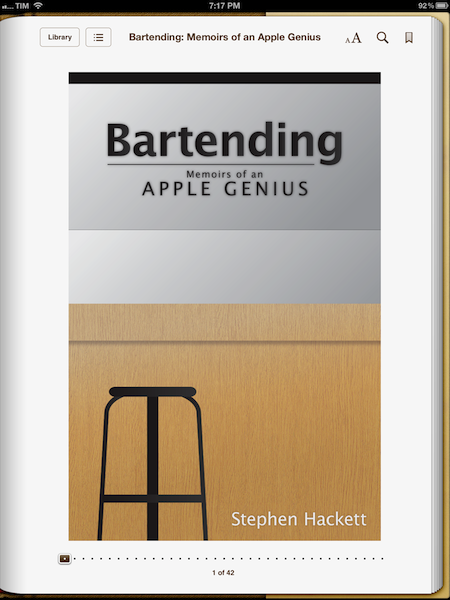
“Bartending” by Stephen Hackett Shows The Human Side of Apple Retail

In the past months, I’ve read a lot of books about Apple, and in particular about Steve Jobs. Bartending by Stephen Hackett, however, is the only one that struck me as being completely honest and real in the subject it covers: Apple’s retail stores as a genuine, living collection of stories and people. Not just a business.

Bartending: Memoirs of an Apple Genius, is short, direct, and entertaining. You can probably finish it in 40 minutes if you’re in the mood of reading about Apple’s retail employees and the stories of customers who happen to swing by the Genius Bar every day. And if you like a style that’s fun, cuts to the point, and isn’t ashamed of recollecting the real thoughts of an Apple Genius who sees all kinds of customers on a daily basis, I bet you will devour Bartending from cover to cover in less than an hour. It is a pleasure to read Stephen narrate how he helped a woman recover the precious photos of her children after her hard drive failed, or how the iPhone represented a major shift both in terms of audience, and at the Bar.

I like to think of Bartending as more than “a book about the Genius Bar”. Whether or not you are aware of how Apple’s retail behemoth works behind the scenes, Bartending provides a fun and enlightening look at the interactions that occur every day on both sides of the business. In front of and behind the Genius Bar. I think Stephen’s greatest accomplishment with this book is that he explains with a human, friendly tone that, in spite of the gadgets and dollars involved with the business, the people ultimately define the stories we remember. And if the rules can be bent a little for the good of the customer – to “surprise and delight” – even better. That’s what makes this book a story of its own that fits in the Apple Community so well.

Bartending is a must-read. Get it today at $8.99 on Amazon (iBooks-friendly ePub version also available here).

Access Extra Content and Perks

Founded in 2015, Club MacStories has delivered exclusive content every week for nearly a decade.

What started with weekly and monthly email newsletters has blossomed into a family of memberships designed for every MacStories fan.

Learn more here and from our Club FAQs.

Club MacStories: Weekly and monthly newsletters via email and the web that are brimming with apps, tips, automation workflows, longform writing, early access to the MacStories Unwind podcast, periodic giveaways, and more;

Club MacStories+: Everything that Club MacStories offers, plus an active Discord community, advanced search and custom RSS features for exploring the Club’s entire back catalog, bonus columns, and dozens of app discounts;

Club Premier: All of the above and AppStories+, an extended version of our flagship podcast that’s delivered early, ad-free, and in high-bitrate audio.

Learn more here and from our Club FAQs.


Tweetbot Gets iCloud Sync for Timelines, DMs, and Mute Filters

Two months ago, I took a look at the state of iCloud-enabled apps for Mac and iOS, sharing somewhat unsurprising results that showed few applications successfully were using iCloud sync across devices (not to mention platforms), and that developers were frustrated for the lack of extensive documentation by Apple. In these past 60 days, very little has changed on Apple’s side – if anything, we’ve only seen more third-party developers trying to figure out ways to properly use iCloud and make it work in their apps. Tapbots, makers of Tweetbot (our reviews for iPhone and iPad versions of the app), are releasing today an update to their Twitter client, which brings iCloud sync for various Twitter functionalities to the iPhone and iPad.

I have been able to test iCloud sync in Tweetbot for a few weeks now, and whilst I was initially skeptical about the service, I am pleased to report that Tapbots has come up with a solid, clever system that might just convince you switch from Tweet Marker – the only third-party solution to sync Twitter timelines that’s been widely adopted to date – if you’re planning to use Tweetbot as your main client.

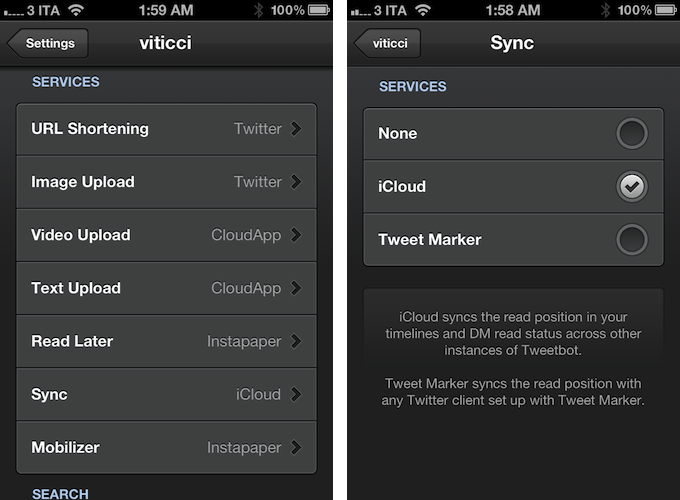
iCloud sync, unlike Tweet Marker, works exclusively inside Tweetbot across its iPhone and iPad versions. You won’t be able to start iCloud sync on Tweetbot for iPhone and, say, find your timeline synced on Twitterrific. If you’re still looking for a real cross-platform syncing solution for Twitter, Tweet Marker remains your best option. If you, however, are you using the two Tweetbots as your default Twitter apps anyway and happen to be intrigued by iCloud sync, you might want to consider giving this new option in version 2.2 a try. Once enabled in the Sync settings, iCloud integration will sync mute filters, timeline positions, and DM read status across all instances of Tweetbot. This means that, if you’re using iCloud on your iOS devices running Tweetbot, the app will keep your position in the Twitter timeline synced similarly to how Tweet Marker works, only it will also sync your direct messages’ read status (if you read a DM on your iPhone, it will also be automatically marked as read on the iPad) and mute filters set in the app’s Preferences. In my tests, both Tweet Marker and iCloud have worked reliably when syncing timelines, but I switched to iCloud full-time for the added convenience of syncing DMs and filters across Tweetbot, and because of the lack of Tweet Marker-enabled apps (that I like) on my desktop. In fact, at least for the time being, I’m still using Twitter’s official client on my Mac. With iCloud sync, I can keep more data synced across Tweetbot for iPhone and Tweetbot for iPad, which I use on a daily basis. Please note that, while iCloud is supposed to be “invisible” to the user, working all the time in the background, there may be a short delay of 10-15 seconds when syncing the timeline position across clients, although I have noticed this sporadically. I suggest you use Tweetbot as you normally would, switching from one client to another when you really need to, avoiding keeping both apps open at the same time just to see if iCloud is working.

Version 2.2 of Tweetbot also brings other improvements and bug fixes throughout the app; most notably, images can now be closed with a pinch gesture on the iPad (similarly to how you can close images in Photos) and both iTunes and YouTube links have gained thumbnail previews in the timeline.

For the past months, I have been increasingly using my iPad as my primary computer, and thus Tweetbot has become the Twitter client I spend the most time using on my iOS devices. This newest update increases the overall stability and performances of the app, but more importantly it brings a native, consistent way to sync data across platforms that, at this point, can only get better in the future – and it’s already working admirably now.

You can get Tweetbot 2.2 on the App Store today.

Access Extra Content and Perks

Founded in 2015, Club MacStories has delivered exclusive content every week for nearly a decade.

What started with weekly and monthly email newsletters has blossomed into a family of memberships designed for every MacStories fan.

Learn more here and from our Club FAQs.

Club MacStories: Weekly and monthly newsletters via email and the web that are brimming with apps, tips, automation workflows, longform writing, early access to the MacStories Unwind podcast, periodic giveaways, and more;

Club MacStories+: Everything that Club MacStories offers, plus an active Discord community, advanced search and custom RSS features for exploring the Club’s entire back catalog, bonus columns, and dozens of app discounts;

Club Premier: All of the above and AppStories+, an extended version of our flagship podcast that’s delivered early, ad-free, and in high-bitrate audio.

Learn more here and from our Club FAQs.


When It Comes to 7.85” iPad, The Question Is “Why”

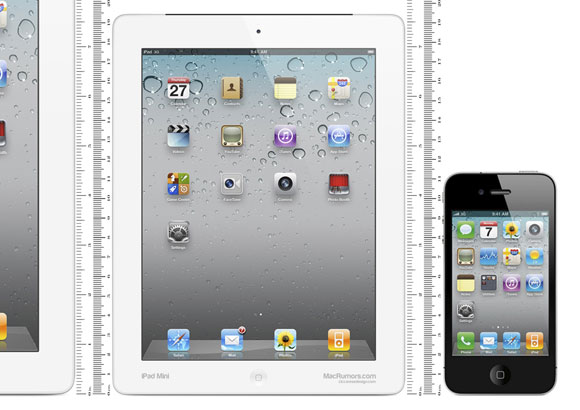
(MacRumors’ mockup of a 7.85-inch iPad)

In the latest episode of his weekly podcast with Dan Benjamin, The Talk Show, Daring Fireball’s John Gruber suggested he has heard from “numerous” sources within Apple about a 7.85-inch iPad being tested in the company’s labs.

MacRumors offers a transcript:

Well, I don’t know. What I do know is that they have one in the lab…a 7.85 inch iPad that runs at 1024×768… it’s just like the 9.7” iPad shrunk down a little bit. Apps wouldn’t need to be recompiled or redesigned to work optimally on it. It’s just the iPad smaller.

First off, I haven’t listened to the show yet, as I’d like to reflect upon some ideas I’ve been saving for the past months when rumors about this “smaller iPad” kept coming out. As for why 7.85 inches would be the ideal size for a smaller iPad, AppAdvice’s A.T Faust had a good explanation a few weeks back.

When it comes to this fabled smaller iPad, I don’t think the question we should be asking is “really?”. Of course Apple has a smaller iPad in their labs. Of course it has a 4:3 ratio to maintain existing resolution schemes. I’m more doubtful about the rumors of partners in China mass-producing these units, but I’m sure there are all kinds of neat product prototypes at Cupertino. For the same reason, do you think Apple hasn’t tested all the possible combinations of iPhone form factors? Bigger MacBook Airs? Different Apple TV designs? Do you really believe the world’s most valuable company…no, any sufficiently successful tech company gets an electronic device “just right” on their first try? Of course there are prototypes and iterations. And that a smaller iPad is one of them should be no surprise.

The question that we should be asking is: why would Apple want to release a smaller iPad? Now that’s an interesting discussion, as there are a number of factors worth considering in regards to expanding the iPad line to smaller versions.

Let’s start with the simple one: Apple won’t release a smaller iPad to “respond” to Samsung and the likes. Please note the difference between “consider” and “release” here. Because even if we agree that the rumor of prototypes in the labs is no surprise, then we’d argue on a reason for releasing such product, and I think competition is not a valid one. Apple won’t release a smaller iPad because it feels threatened. Apple is an engineering company at heart, they look at the data, and data suggests there is no need to feel threatened. Sure, Amazon’s Kindle Fire is rumored to be fairly successful, but I bet it’s not that profitable for the company. Amazon didn’t build it with iPad-quality components. So if people would like a first-class smaller iPad, this brings me to the next point: hardware.

Retina

There are two popular assumptions going on these days: that a smaller iPad would be perfect for portable eBook reading, and that it would have the resolution of older iPads – 1024x768 pixels. Here’s my problem with this discussion: I don’t see Apple as the company going backwards in terms of specs. I don’t see them coming out with an iPad that’s new and smaller, more portable and lightweight, but carrying the resolution of last year’s iPad. The Retina display isn’t just a display for Apple, it’s a standard that sets the bar higher. Why did the iPod touch gain a Retina display (even if not of the same quality as the iPhone’s)? Because Retina was the new standard in 2010, and Apple had to bring it over to the other 3.5-inch device, the iPod touch. The way I see it, the same reasoning applies, both in terms of philosophy and product concept, to the iPad: the third generation’s iPad Retina display has set the bar higher and I don’t see Apple coming out with a new iPad that shows its pixels once again. With a 7.85-inch screen and the same resolution of older gen iPads, 163ppi wouldn’t look nearly as good as the new iPad’s 264ppi (the original iPad had 132ppi). Apple is a company that iterates, slowly, but inexorably, and the Retina revolution is now indeed impossible to prevent.

So let’s assume Apple does have a smaller iPad with a Retina display. That would make for incredible image quality at 326ppi, but it would create a series of new problems from a software perspective. A 7.85-inch iPad with a 2048x1536 “Retina” display, in fact, would come at 326 ppi – the same as Retina iPhones and iPods. Whilst that would play well in terms of keeping the math unified across the board, it could pose a question for developers. Even without having to update graphics for the new resolution (and maintaining the same size of tap targets), a physically smaller device will inevitably make the user interface run on a more physically constrained display, and what makes sense on a 10-inch display doesn’t necessarily work just as fine on a 7.85-inch one. Apps will run with their existing designs, but there’s the possibility some developers would still want to optimize some graphical elements for the new size.

And then, of course, there is the hardware side of this debate. If Apple had to put a bigger battery (1mm thicker) in the new iPad to compensate for the resources required by more processing power and the Retina display, what makes us think that consumer technology is “already there” to power a Retina display on an even smaller iPad? Batteries small enough and capable of powering a Retina display may already exist, but I assume they wouldn’t be ready for mass production on a large scale. More importantly, if they don’t exist yet, it wouldn’t be a surprise either, as Apple had to make its existing battery bigger (something they don’t usually do) to power its new iPad. For as much as miniaturization is one of Apple’s big focuses, I don’t think we have the right technology to make such a device usable for a long period of time (keep in mind it would supposedly be used a lot for reading). The smaller a device gets, the harder it becomes to balance factors like battery life, temperature, and thickness, and that explains why Apple had to wait until the fourth iteration of the iPhone to implement a high-resolution display.

Now, considering all the points I have mentioned above, we have a plethora of alternative theories and combinations as to why Apple could still figure out a way to produce a smaller iPad. Of all them, I find this idea by Odi Kosmatos particularly interesting because it plays well with the math described above: Odi makes the case for a smaller iPad (7-inch as opposed to the rumored 7.85-inch model) that carries a 1920x1080 resolution that could allow for 326ppi and Retina iPhone apps running at native size on the device. While I find the numbers fascinating, I believe Apple would never do an “iPad” that doesn’t run iPad apps – that’s just absurd. But a device that “sits” in the middle, like the original iPad did for smartphones and computers? A device in between iPhones and iPads? Now that’s an intriguing theory which goes back to the old eBook-reading device rumor: I don’t think the market is so saturated yet that there’s a real need for a new savior that sits in the middle of existing options, but we’ll see.

Smaller?

The other big theory is that, assuming a smaller iPad with Retina display would be unfeasible in the short term, a 7.85-inch iPad with 1024x768 resolution would still be good enough for portability, gaming, kids, and education. Some notes about these possibilities: let alone the fact that I still have to hear of people not buying iPads because they really hate the 9.7-inch form factor, is the existing iPad really not that portable? You can picture the rumored device by looking at the iPad’s display and imagining a smaller iPad inside it. Is that a considerable difference in terms of portability?

Is there really a market of consumers not buying iPads because they want a smaller iPad, or are the nerds simply excited about the rumors? Let’s get real: what would a 7.85-inch iPad do incommensurably better than a regular iPad to give it a reason to exist? You can immediately tell the difference between an iPod nano and an iPod classic, a 13-inch MacBook Air and the 15-inch MacBook Pro (one of the reasons why I think the 13-inch MacBook Pro is a weird choice). Would the 7.85-inch iPad be a product that can stand out on its own, making the few inches less a reason for potential consumers to choose it?

About the “gaming, kids, and education” theory: when I think of all the possible explanations, this is the one that makes some sense, although I still don’t see it as the reason to release a smaller iPad. Apple is a consumer electronics company, and with their iOS devices they have made sure every possible market segment can benefit from them. From doctors and pilots to writers and teachers, iPhones and iPads can appeal to everyone. Why? Because it’s the software that makes the difference. By releasing a smaller iPad, Apple would put the focus on dedicated hardware, rather than software, for the first time in years. Oh, but you can argue Apple did make an iMac for education. Fair enough, but I’ll argue that the Mac market is nowhere near the size of the iOS market. Is it worth producing and releasing a smaller iPad specifically aimed at certain market segments? Personally, I don’t think so – but I could be wrong. What I am certain of is that the Retina display is inarguably better than old displays in every way, and textbooks and games benefit from it. Would a smaller, non-Retina iPad meant for textbooks and games be as appealing as the bigger iPad with a Retina display running the same apps?

Why?

As you can see, I am not saying Apple will never release a smaller iPad, because I don’t know, and because saying “never” when it comes to Apple rumors is always a big bet. My point is, when rumors are getting out of hand, it is always better to shift the conversation away from the “what” and back to the “why” to understand if what we are arguing about does even make sense. And in the case of the 7.85-inch iPad, there are a series of technological issues, software questions, and market debates that leave me skpetical as to whether Apple may release such a product this year.

Access Extra Content and Perks

Founded in 2015, Club MacStories has delivered exclusive content every week for nearly a decade.

What started with weekly and monthly email newsletters has blossomed into a family of memberships designed for every MacStories fan.

Learn more here and from our Club FAQs.

Club MacStories: Weekly and monthly newsletters via email and the web that are brimming with apps, tips, automation workflows, longform writing, early access to the MacStories Unwind podcast, periodic giveaways, and more;

Club MacStories+: Everything that Club MacStories offers, plus an active Discord community, advanced search and custom RSS features for exploring the Club’s entire back catalog, bonus columns, and dozens of app discounts;

Club Premier: All of the above and AppStories+, an extended version of our flagship podcast that’s delivered early, ad-free, and in high-bitrate audio.

Learn more here and from our Club FAQs.