Federico Viticci

10766 posts on MacStories since April 2009

Federico is the founder and Editor-in-Chief of MacStories, where he writes about Apple with a focus on apps, developers, iPad, and iOS productivity. He founded MacStories in April 2009 and has been writing about Apple since. Federico is also the co-host of AppStories, a weekly podcast exploring the world of apps, Unwind, a fun exploration of media and more, and NPC: Next Portable Console, a show about portable gaming and the handheld revolution.

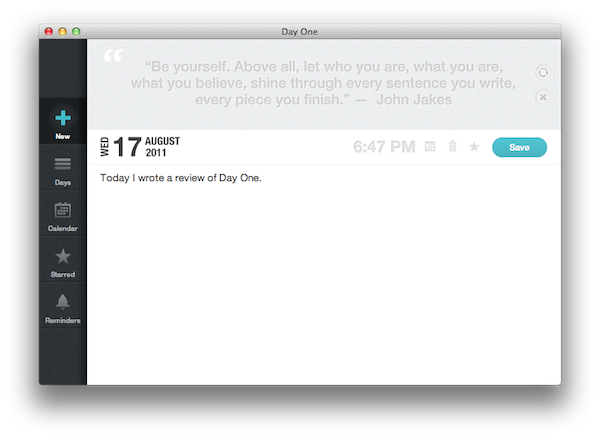
Archiving Thoughts with Day One

For me, the best way to remember things has always been to write them down somewhere. When I was in high school, I was that kind of student always taking notes on his notebook - furiously jotting down stuff fearing I might forget some important detail. With MacStories today, I try to keep my to-do list neatly organized in OmniFocus by quickly entering anything I have to do at any given time of the day or the week – OmniFocus makes it incredibly easy to enter tasks with a few keystrokes, and I “trust” the system to remember, collect and sort tasks for me so my brain can focus on getting those tasks done or something else entirely. I try to keep my memory in good shape, but when information becomes too much to handle I know I can rely on OmniFocus, Evernote and Dropbox to store all my tasks, notes and documents – the great thing about apps nowadays is that I’m not forced to exercise my brain for this kind of activity.

There’s one thing I never really considered storing in a digital archiving app – memories. I’m talking about things like “what did I enjoy doing today” or “I decided to take a walk with my girlfriend” – specific moments that matter in life, that are important, but which our brains often blur and forget after some time to make room for new data to process and maintain. Let’s be honest: do you remember the exact day and context when you ate that fantastic Italian pizza seven months ago? You probably have a vague recollection of what it tasted like and maybe you even remember the restaurant owner’s Italian accent, but you can’t quite get your mind around every single detail that made that moment so special. Either that, or you were busy tweeting a photo of your pizza while you were eating it.

I try to enjoy every moment, but there’s so much the human brain can remember and it’s perfectly normal something will get lost in the process of assimilating thoughts and processing them to turn them into memories and experiences. Read more

Luminance Is An Elegant Photo Editor for iOS

On the Mac, there’s no shortage of photo editors: from Aperture and Lightroom for those users who want more control over how their photos are processed and organized to more lightweight and user-friendly solutions like FX Photo Studio or The Iconfactory’s Flare, one can stay assured photos imported on a Mac will always find a proper companion app to be edited, sorted in collections, and shared online on Facebook or Flickr. On iOS, the situation is quite different: because the iPhone is a portable camera itself, there’s been a surge of apps like Instagram or Camera+, which allow users to shoot, edit, and upload photos using a single interface to do it all. Whereas the insanely successful Instagram has managed to gain millions of users because of its simple approach to lightweight photo editing and one-tap uploading, others apps like the aforementioned Camera+ or Camera Genius give users more options and functionalities such as advanced image filter adjustments, effects, and presets. And with iOS 5 on the horizon, it looks like developers of photo taking/editing apps for the iPhone and iPad will have even more tools and APIs to play with in order to natively integrate their software with new built-in image editing functions offered by iOS.

Being able to shoot a photo, quickly edit it and upload it in seconds from your iPhone is fine, but sometimes you want to sit down, check out all the photos you’ve taken, and take your time to process them, adjust them to your liking, and file them away onto a collection or social network of choice. That’s what desktop image editing tools are for – they give you the peace of mind to go through hundreds of photos without needing to quickly fire them off to your Instagram followers. You could argue that image editors are meant for a desktop computer (you sit down with your laptop, connect your camera, and start editing), but why avoid the fact that iPhones and iPads are powerful devices capable of doing just about anything nowadays? PhotoForge 2, an image editor I’ve reviewed before here on MacStories, proved that it’s possible to work with a full-featured image editing environment on iOS without feeling constrained by real screen estate and lack of mouse cursor.

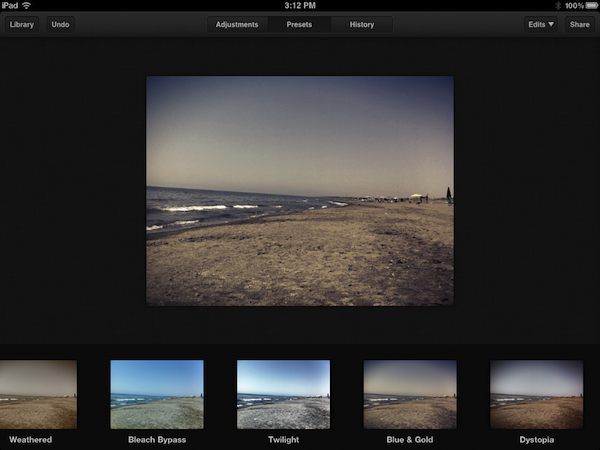
Luminance, a new image editing app for the iPhone and iPad available at $0.99 on the App Store, provides a more streamlined alternative to PhotoForge and other image editors I’ve tried on iOS, offering an interesting set of effects, presets and basic versioning system that makes it easy to import photos from a device’s camera roll, and start editing in a focused space right away. Read more


Google’s Photovine App Now Open for All

Back in July we covered the release of Photovine for iPhone, an image sharing app developed by Google’s internal Slide team that, among other things, is also responsible for Disco, a group messaging app, and Pool Party. Powered by a slick design and attention to detail, the Photovine app that was released last month didn’t allow everyone to sign up and start sharing photos as the system was invite-only without an open sign-up. With an update pushed last night on the App Store, Photovine has revamped Facebook and Twitter integration from within the app and finally opened registrations without the need of a beta invite.

Unlike the popular photo sharing app and iPhone-based social network Instagram, Photovine doesn’t revolve around the simple concept of photos uploaded to a user stream and shared with followers. Rather, Photovine is based on “vines” – photos connected by a caption and contributed by you, your friends, and other people using Photovine. So, for example, say you’d like to share a photo about your newly acquired MacBook Air, you can start a vine called “My new MacBook” and your friends will be able to let the vine “grow” with new photos related to the caption, and the photo you originally posted. This is best explained by Photovine’s promo video, which we’ve embedded after the break.

Photos in a vine can obviously be liked and commented on, each user has its own dedicated page with a profile picture and followers/following/likes counts, and an Inbox tab in the bottom toolbar allows you to check on messages you’ve received from other users, or notifications such as new followers, comments, and likes. This is not too dissimilar from Instagram’s implementation of “activity”. Users can add new photos to an existing vine (or even “watch” a vine if they’re interested in it) or create a new one from scratch – Photovine comes with a beautiful custom camera interface that lets you snap your own photo, or pick one from the Camera roll. Indeed the whole app sports a gorgeous and clean design that makes it easy to jump through vines, user profiles, and comment on photos shared by others.

Photovine for iPhone is an interesting concept with a good-looking interface and additional social functionalities to forward photos to Twitter and Facebook, and find friends on those social networks as well. You can download Photovine for free on the App Store. Read more


OS X 10.7.1 Now Available

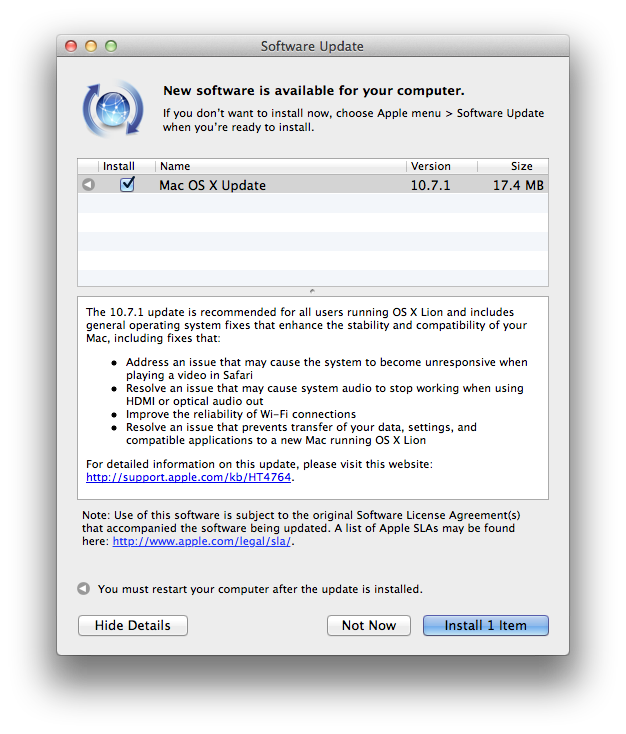
A few minutes ago, Apple released the first update to OS X Lion, which reaches version 10.7.1 and adds a number of fixes to the operating system. These fixes address video unresponsiveness in Safari, WiFi reliability, as well as audio issues with HDMI and migration of old data to a new Lion installation. The update is only 17.4 MB from Software Update, and we’ll post direct links as soon as Apple makes them available. The new version is currently available on Software Update, with the Mac App Store reporting the original OS X 10.7 that was released last month.

The 10.7.1 update is recommended for all users running OS X Lion and includes general operating system fixes that enhance the stability and compatibility of your Mac, including fixes that:

  • Address an issue that may cause the system to become unresponsive when playing a video in Safari
  • Resolve an issue that may cause system audio to stop working when using HDMI or optical audio out
  • Improve the reliability of Wi-Fi connections
  • Resolve an issue that prevents transfer of your data, settings, and compatible applications to a new Mac running OS X Lion

For detailed information on this update, please visit this website: http://support.apple.com/kb/HT4764.

OS X  10.7.1 is the first update to OS X Lion, which was released on the Mac App Store on July 20. Earlier today Apple also released the official OS X Lion Thumb Drive, allowing users without a broadband connection to buy the new OS from Apple as a USB key. Apple is already working on OS X 10.7.2, which has been seeded to developers and will be released this fall to add iCloud compatibility on OS X.

Meanwhile, Apple has posted the following direct links for the MacBook Air and Mac mini 2011:

OS X Lion 10.7.1 Update for MacBook Air and Mac mini 2011 (Client)

The Mac mini and MacBook Air 10.7.1 update includes a few more fixes:

  • Resolve an issue where MacBook Air may boot up when MagSafe Adapter is attached
  • Resolve an issue causing intermittent display flickering on MacBook Air
  • Resolve an issue that causes the SD card slot in Mac mini to run at reduced speed with SD and SDHC media

Furthermore, Lion Server 10.7.1 has also been posted:

  • Improves reliability of the Apple File Service.
  • All other improvements delivered in the client OS X Lion v10.7.1 Update.

Update: OS X 10.7.1 direct links below.

OS X Lion Update 10.7.1 (Client)

OS X Lion Update 10.7.1 (Server)


iPhone 5 Pre-Orders Starting on September 30, October 7 Launch?

According to a new report by 9to5mac, Apple might launch the next-generation iPhone – so far unofficially dubbed “iPhone 5” by the press – on October 7, with pre-orders likely starting on September 30, a week before launch. With the iPad 2, released earlier this year, Apple didn’t accept online pre-orders, leading to long lines to get a device from a local Apple Store. The October 7 date was originally reported by TiPB last week – the site claimed an October 14 U.S. launch could also be possible, but October 7 was starting to sound more likely according to their sources. 9to5mac reiterates this rumor, adding some interesting tidbits on the pre-order timeframe:

Apple currently plans to begin pre-orders for their next-generation smartphone in the final days of September. The company has still not finalized the pre-order start date, but is debating between Thursday, September 29th and Friday, September 30th. The 30th seems more likely at this point according to one of our sources.

With pre-orders allegedly scheduled for September 30, Apple would need to unveil the new iPhone in September – a piece of information that doesn’t fall in line with All Things D’s claim of an October announcement and release for the iPhone 5. Much has been said about Apple’s traditional Fall media event: whereas the company has usually preferred September to hold a music event to announce new iPods and new versions of iTunes (and an updated Apple TV last year), this year’s rumor mill has failed to pinpoint an exact date for the announcement, with well-connected Apple journalists like Jim Dalrymple over at The Loop denying reports of a September 7 iPhone 5 event.

As Apple didn’t release a new iPhone this summer, the company is expected to unveil the device as its usual event in the Fall, with iCloud, OS X 10.7.2 and iOS 5 also believed to drop by then. Speculation around the iPhone 5 has seen different rumors citing a completely redesigned device with teardrop design and thinner form factor, as well as a minor update with iPhone 4-like shape and spec bump, or again two different devices targeting the high-end market segment and pre-paid customers with a “cheaper” iPhone to sell off-contract. Apple itself confirmed at the Q3 earnings call that a major product transition was planned for the September quarter.


Footnotify Safari & Chrome Extension Turns Footnotes into Popovers

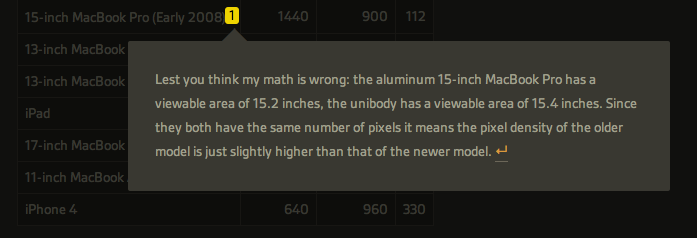
As an avid reader of John Gruber’s Daring Fireball, Ben Brooks and Shawn Blanc, I often find myself scrolling entire articles to reach the end and read the footnotes the authors decided to include. Anchor-linked footnotes are often used online as an alternative to the more classic parenthesis to elaborate on thoughts or data that won’t fit the main article’s body, but are still relevant to its context. Because I want to know immediately what these guys are referring to with a footnote, and because the only way to read footnotes is by interrupting the flow of an article and manually “jumping” to them, I’m forced to click on an anchor-linked note, read it, and scroll back to where I left off.

Footnotify, an extension for Safari and Google Chrome, makes the entire process of quickly reading footnotes faster, more intuitive and good-looking by displaying a footnote inside a popover that will overlay the page you’re reading without automatically scrolling to the end of the article, thus “disrupting” your reading flow. Once installed, Footnotify will fade in footnotes keeping the original style of the website, allowing you to click outside the popover to dismiss a footnote.

Footnotify can be downloaded over at Ideon Open Ideas, and it worked very well with every website from my RSS subscription list that used footnotes in blog posts. You can try it now here, or here.


Firefox 6 Officially Released

Firefox 5 was released less than two months ago and work on Firefox 7 is already underway, and to keep up with their “fast release cycle” promise Mozilla has officially released Firefox 6 today, making the browser 20% faster than Firefox 5 and improving the behavior of tab groups in Panorama, the functionality that allows users to get a quick glance at open tabs from an elegant bird’s eye view. With Firefox 6, released nearly five months after Firefox 4, Panorama comes with faster start-up times as tab groups are only loaded when selected; another noticeable improvement – bug fixes and speed optimizations aside – can be seen in the address bar, which now highlights domain names to give you a better idea of the website you’re on.

The new Firefox also brings important changes for developers:

The new “Web Developer” menu in Firefox provides easy access to tools that help developers build and debug websites directly in the browser. Developers will enjoy the new Scratchpad tool, which makes it simple to quickly enter, execute, test and refine JavaScript snippets in Firefox without needing to work in a one-line console. The Web Console is improved with an auto-complete feature and the ability to customize the console’s location to save developers time.

Whilst Mozilla is busy keeping up with three major releases in testing in their Aurora, Beta and Stable channels, recently posted mockups have shown that the company is interested in updating the browser’s interface in the future to fully take advantage of OS X Lion. The current versions of Firefox (in all the three channels available) don’t come with native Lion features such as full-screen or popover menus, though Mozilla’s Product Visual Designer Stephen Horlander suggested the Firefox team is experimenting with (or at least discussing) new interaction methods and graphical elements for Firefox on the Mac.

You can read more about changes in Firefox 6 here, and download the latest update from Mozilla’s website. Check out more screenshots after the break. Read more


The Size Of Apple’s New “Spaceship” Campus in Cupertino

The Size Of Apple’s New “Spaceship” Campus in Cupertino

Ever since Apple CEO Steve Jobs first explained to the Cupertino City Council the company’s intention to build a new “spaceship-like” campus on the area Apple bought from HP last year, Mayor Gilbert Wong said “there’s no chance” the city of Cupertino would say no to Apple’s proposed plan – Apple is the biggest taxpayer in Cupertino, and the project is admittedly impressive with a 4-story building hosting 13,000 employees, a 1,000 seat new auditorium, its own power center and a slew of modern architectural advancements built with green technologies in mind. Beautiful renderings aside, Apple even went as far as promising they would restore the area’s native vegetation by teaming up with Stanford University.

But just how big would Apple’s new headquarters be? John Martellaro over at The Mac Observer did some math based on official drawings, Google Maps and scale marks and came away with the conclusion that the whole building is big. Very big. According to Martellaro, Apple’s spaceship would cover the Pentagon with a diameter of 492 meters:

Given that comforting sanity check, I measured the diameter of the Apple spaceship as 1615 ft, plus or minus a few ft., depending on where one places the ruler. That’s a radius of 807.5 ft.

So, if one could magically fly the future Apple spaceship to Arlington, VA and hover over the Pentagon, it would just slightly cover it.

Martellaro also compared the campus’ size to a nuclear aircraft carrier and WWII battleship in an interesting image you can check out here. Progress on Apple’s proposal to the Cupertino City Council can be tracked here.

[image via Cupertino.org]

Permalink

Google Launches Catalogs App for iPad

In an effort to make shopping “more engaging, social and creative” and, at the same time, connected and interactive in the digital era, Google is launching Google Catalogs for iPad today, a brand new (and free) app to browse and interact with shopping catalogs from popular brand directly on the iPad’s screen. Said to be coming to Android tablets as well, Google Catalogs is now exclusive to the iPad and it offers access to hundreds of different catalogs slightly reworked to take advantage of the iPad with tags, photo albums and videos, as well as the possibility of zooming on product shots, and a button to see whether an item is available in a nearby shop.

Users can organize items they find interesting in Favorites, or create a “collage” with custom themes and resizable photographs to share with fellow Google Catalogs users. Google is touting this feature as a way to shop digitally using the iPad’s intuitive gesture-based system, and be creative.

For the launch of the Catalogs app, Google has partnered with the following brands:

  • Anthropologie
  • Bare Escentuals
  • Bergdorf Goodman
  • Crate and Barrel
  • L.L. Bean
  • Lands’ End
  • Macy’s
  • Neiman Marcus
  • Nordstrom
  • Pottery Barn
  • Saks Fifth Avenue
  • Sephora
  • Sundance
  • Tea Collection
  • Urban Outfitters
  • Williams-Sonoma

Google says more brands will be added soon, and merchants with a shopping catalog can contact the Google Catalogs team right away to apply for inclusion in the app. From the promo video embedded below, you can see how Google Catalogs seems to heavily rely on sliding animations, pop-ups and links placed directly on a product’s photo or description – rather than forcing users to navigate to a specific page like printed catalogs often do, the app enables them to have more information quickly available in a new window.

Google Catalogs for iPad is available for free on the App Store.

Read more