Federico Viticci

10763 posts on MacStories since April 2009

Federico is the founder and Editor-in-Chief of MacStories, where he writes about Apple with a focus on apps, developers, iPad, and iOS productivity. He founded MacStories in April 2009 and has been writing about Apple since. Federico is also the co-host of AppStories, a weekly podcast exploring the world of apps, Unwind, a fun exploration of media and more, and NPC: Next Portable Console, a show about portable gaming and the handheld revolution.

Apple Releases Standalone Flashback Malware Removal Tool

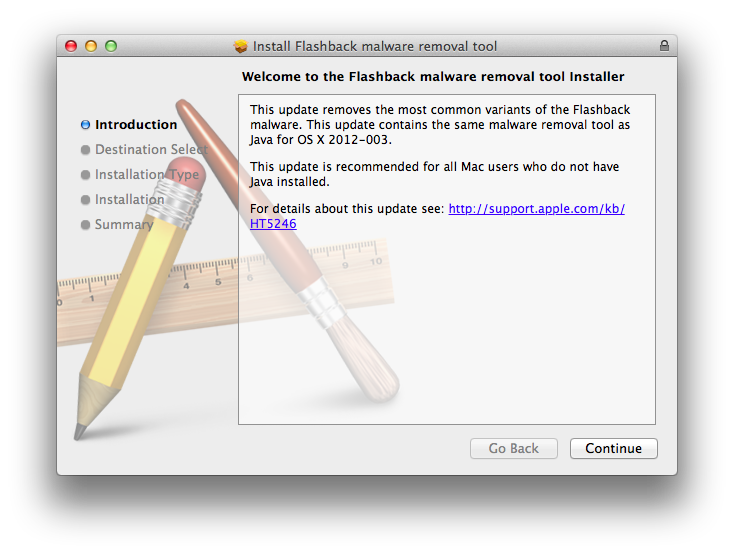
Yesterday, Apple released an update to Java on OS X to include a removal tool for common variants of the Flashback malware. A few minutes ago, Apple also released a standalone version of the Flashback malware removal tool, which contains the same code found in ”Java for OS X 2012-003”.

The removal tool has also been released in a standalone package installer for those users who don’t have Java installed on their computers. Once installed, if malware is found, ”a dialog will be presented notifying the user that malware was removed”. In some cases, completely deleting the Flashback malware might require a system restart.

Apple’s Flashback malware removal tool can be downloaded here. In the past week, a number of third-party removal tools have also surfaced online.


iCloud’s First Six Months: The Developers Weigh In

On October 12th, 2011, iCloud launched to millions of iOS users impatiently waiting to start getting their devices to sync with Apple’s new platform, which CEO Tim Cook went on to call the company’s next big insight for the next decade. Six months and 85 million customers later, iCloud has proven to be a substantial improvement to sync a user’s email, contacts, address book, and other data accessed by Apple apps. With third-party developers, however, adoption of iCloud sync and storage features has turned out to be a bit tricker, and possibly less intuitive than Apple’s own implementation due to the early nature of the platform. Read more


The (Big) Numbers Of The App Store Platform

Today’s news that Paper, a sketching app for iPad, has been downloaded over 1.5 million times in two weeks made me think about the size of the App Store platform and ecosystem of devices. Launched in 2008, the App Store now extends across the iPhone, iPad, and Mac, and distributes over half a million apps to customers (588964 apps per AppShopper). Last month, Apple reached the impressive milestone of 25 billion apps downloaded from the App Store – an important number that tops a history of exponential growth and adoption.

Below, I have compiled a list of noteworthy milestones reached by App Store developers in order to put Paper’s numbers in better perspective. For more App Store-related numbers, check out Wikipedia’s milestones table and our Mac App Store: Year One overview.

On January 24th, 2012, Apple announced the company paid over $4 billion to developers since the App Store’s launch in 2008. Over 315 million iOS devices have been sold to date; with these numbers, an average of 79 apps has been downloaded for every iOS device.

App Downloads: A History of Numbers

2009

July: Dictionary.com reaches 2.3 million iPhone app downloads.

2010

March: Doodle Jump for iPhone sells 3 million copies since launch.

June: Skype announces 5 million iPhone app downloads in four days.

June: Angry Birds for iPhone has been downloaded over 5 million times since its launch on December 2009.

September: Gameloft announces 20 million paid app downloads of its iOS games since the App Store’s launch.

2011

January: Pixelmator grosses $1 million in under 20 days.

January: Autodesk announces Sketchbook Pro for the Mac App Store has sold twice as many copies as the regular app in a year.

February: Fruit Ninja for iPhone hits 6 million paid downloads in 10 months.

May: Talking Tom 2 hits 1 million downloads in a single day.

June: Game publisher Chillingo announces 140 million downloads for its iOS apps since the App Store’s launch in 2008.

June: Gameloft announces 200 million iOS app downloads in 3 years.

October: Autodesk announces 3 million downloads of AutoCAD WS for iOS and Android.

October: Discovr announces 1 million downloads.

December: Flipboard for iPhone gets 1 million downloads in its first week.

2012

January: World of Goo downloaded over 1 million times by App Store and Mac App Store customers in 13 months.

February: Scribblenaut Remix sells 1 million copies since its launch in October 2011.

March: Camera+ sells 7 million copies in 1.5 years on the App Store (previously: 6 million copies in January 2012; 3 million copies in June 2011)

March: Angry Birds Space reports 10 million downloads in 10 days (the app is available on multiple platforms and devices, including iPhone, iPad, and Mac).

March: iPhoto for iOS downloaded by over 1 million unique users in under 10 days.

April: Draw Something hits 50 million downloads in under 2 months.

April: Paper for iPad is downloaded 1.5 million times in two weeks.

April: MLB.com At Bat 12 reports 3 million downloads. The app was released at the end of February 2012 on multiple platforms (including Android) and its developers also reported over 800,000 live streams per day.


Apple Increasing Security of Apple ID Accounts on iOS

Apple Increasing Security of Apple ID Accounts on iOS

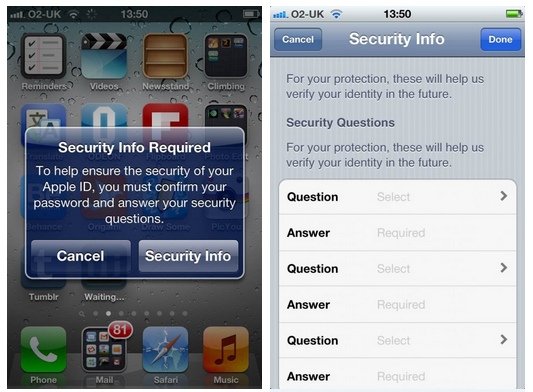
The Next Web reports Apple has begun enhancing the security of Apple ID accounts on iOS devices and iTunes by asking users to pick three security questions.

In the past 24 hours, Apple appears to have started prompting iOS devices owners and those with Apple IDs within iTunes to make their accounts more secure, requiring them to pick three security questions and enter their answers when they download a new app.

The company is also asking users to enter a backup email address, in order to better protect their device but also their account (which is tied to Apple’s Retail website and all of its media services).

Apple’s motivation to educate users on security by urging them to enable security questions is laudable, especially considering the many cases of phishing and hacked App Store accounts reported in the past years. However, it is worth noting how, on the other hand, several users have been asking Apple to be more flexible with entering an account’s password on the iOS App Store, letting users download free apps and updates without asking for a password after periods of inactivity.

Permalink

iPad GUI PSD for Retina Display Now Available

iPad GUI PSD for Retina Display Now Available

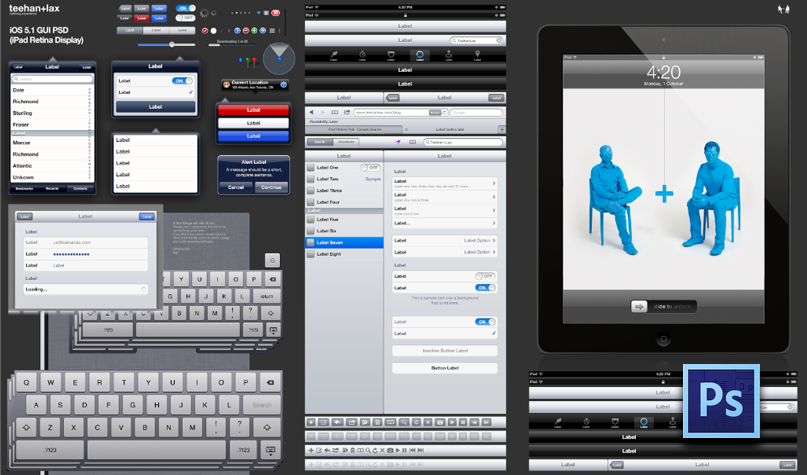
It has become a tradition for design studio Teehan+Lax – the minds behind beautifully designed software like Readability for iOS – to release a free iOS GUI PSD on every major iOS or device release from Apple. The PSDs, downloaded millions of times in the past few years, have helped designers and developers mock up their apps and iOS designs using Photoshop, while relying on graphic assets that look just like interface elements and controls of iPhones and iPads.

Today, Teehan+Lax released its updated iPad GUI PSD, updated for the Retina display:

We’re really proud to be releasing our latest version today. It’s based on iOS 5.1 and includes hundreds of retina assets available natively on the platform. In addition to the GUI assets, you’ll find perfectly scaled ‘New’ iPads to help you create the apps we’ll come to love in the future.

This time, the file has been made for Adobe Photoshop CS6, which is available for free while in beta. Weighing at 35MB, you can download the iPad GUI PSD here.

Permalink

Adobe Updates Revel with Retina Support, Better Photo Management

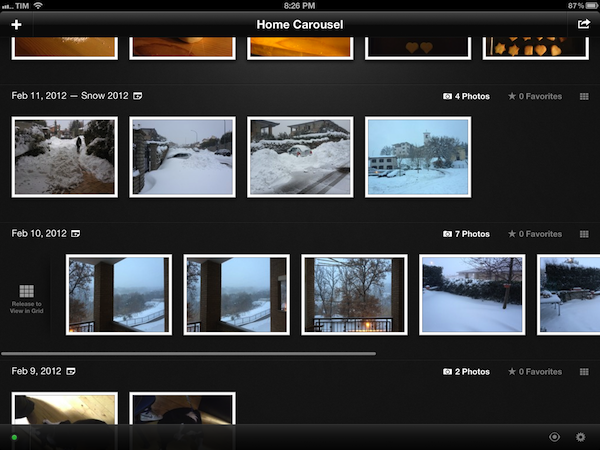
Revel, Adobe’s cloud-based application for iOS and OS X to store photos online and have them synced across devices, was updated today to include several new features and Retina graphics for the new iPad. As I outlined in my original review of the app (when Revel was still called Carousel), Revel stands as a mix between Apple’s Photo Stream – a feature of iCloud that automatically transmits new photos taken on iOS devices to the cloud – and more traditional lightweight photo editors; with options to quickly crop and rotate photos, filters, and adjustments, Revel allows users to store, sync, and edit photos across devices by paying a monthly or yearly fee.

Revel, however, wasn’t perfect in its first version, and Adobe promised they would add more functionalities for better file management – admittedly limited and overly simplified in Revel 1.0 – to enhance the capabilities of the software. Revel, in fact, simply provided a stream of photos in chronological order, without enabling users to sort these photos in events, simply giving them an option to create and share “carousels”. Aside from supporting the Retina display, today’s major update to Revel brings several new options to organize, browse, and share photos imported from an iOS device’s photo library.

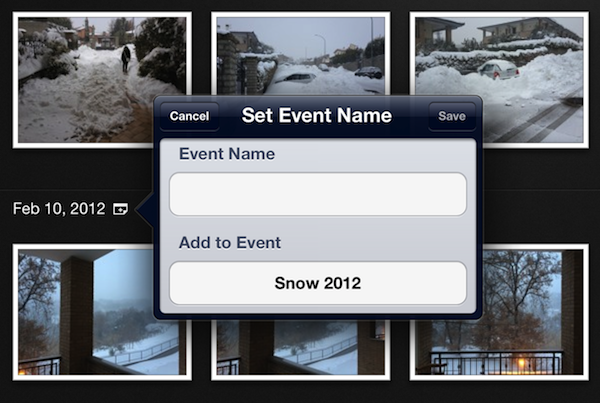
Revel 1.2 lets you organize photos in events. When photos are imported and organized by day, Revel displays an icon next to the date’s label to set an event name, or a different date and time. While in edit mode, this button allows you to quickly select or deselect photos from a specific day. Retaining the same horizontally-scrolling interface, Revel 1.2 also adds shortcuts to view the favorite items from a set, and browse a day in a more convenient grid mode that you can activate with a button, or by swiping to the right across a day’s photos. Photos can be assigned to an event, and photos from a different day – Revel is still largely based on a chronological visualization of your photo library – can be merged into an existing event. While updating the app with new events for my old photos, I noticed that, whilst graphics and images look better on the Retina display, photo thumbnails look slightly pixellated.

Viewing modes have been revamped as well. You can now view all photos, events by date or name, or photos that haven’t been uploaded yet. On the sharing’s side, you can now select multiple photos at once, and choose to share them, save them back to the Camera Roll, or delete them.

While still lacking several of the functionalities seen in desktop photo managers like iPhoto (you can’t sort people’s faces, view locations, and create albums), Revel offers a very intuitive and reliable sync mechanism that makes sure all your photos and changes are always kept in sync across devices, something even Apple’s own iPhoto doesn’t do yet. Revel 1.2 is a free download on the App Store, with monthly subscriptions starting at $5.99 through iTunes. Adobe Revel 1.2 has also been released for OS X, and it’s available on the Mac App Store.


Shigeru Miyamoto: “I Wish I Had Designed Angry Birds”

Shigeru Miyamoto: “I Wish I Had Designed Angry Birds”

Simon Parkin of HookShot writes about their interview with legendary Nintendo game designer Shigeru Miyamoto:

When we asked him what games he has been enjoying on his smartphone of late, he replied: “There aren’t many games that I’ve played recently that have been truly convincing to me. But that said, I have very much enjoyed Angry Birds, especially the way in which it combines traditional and new game elements in exciting ways. Angry Birds is a very simple idea but it’s one of those games that I immediately appreciated when I first started playing, before wishing that I had been the one to come up with the idea first.

In the interview, Miyamoto also offers his take on the game’s control scheme, and how it could have been better on his company’s portable console, the DS. Nintendo’s guru, the mastermind behind an incredible number of successes and milestones in the videogame history, announced his intention to go back to creating new, fresh games to find the company’s next big hit. I previously discussed the position of Nintendo in today’s highly mobile gaming ecosystem here, and here.

Permalink

The iPad As A GPS Speedometer with Speed

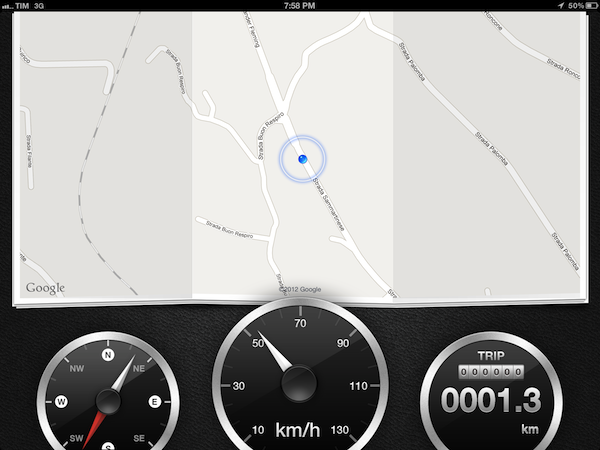
Developed by High Caffeine Content, Speed is one of those apps that wouldn’t have been possible – or at least, nearly as enjoyable – ten years ago. Built for simplicity, elegance, and extreme practicality, Speed is a GPS speedometer that uses the iPad’s location data to tell you how fast you’re traveling. It works with iPads that have GPS available, and it has been designed to take full advantage of the Retina display. With a combination of Google Maps and beautifully represented compass, speedometer, and tripmeter laid out against a lusty black leather texture, Speed won’t replace all the functions of your car’s dashboard, but it also offers a glimpse into the future of car interfaces.

I have always believed that, in the future, car manufacturers and designers would opt for more driver-friendly touch interfaces and displays. Whilst not fully there yet, Speed is a great example of what the basics of this concept may look like a few years from now. A large display, a good-looking interface and menus, touch controls, built-in GPS and data polled directly from Google Maps. More importantly, all packaged into a consumer product that also happens to run an app that looks like a minimal car dashboard. Several car makers have already experimented with modular setups to allow for iOS devices to become a central part of the automobile experience; Speed shows that, with modern technologies, even third-party developers can produce something functional and pleasant.

I actually gave Speed a try in my Polo, driving around Viterbo and up to San Martino al Cimino. Once I switched from mph to kmh (just touch the speedometer), the app started updating my location on the map as I was driving, and it started tracking my speed and trip length. The app is surprisingly fast at detecting changes in speed: I have noticed it takes less than 2 seconds to detect sudden braking or stop. The developers say Speed offers a “a near-accurate representation”, and I can attest that’s absolutely the case here. Even better, because of this slight delay, if you’re keeping a constant speed it’ll seem as if the app really knows how fast you’re driving. The technology and implementation are quite impressive.

Some may deem Speed as a nice demo, but useless. While that’s certainly the case if you’re only looking for a full-time replacement for your car’s dashboard – and honestly, how can you expect an iPad to be 100% ready for that yet? – I think the app is worth checking out for its elegance and solid feature set alone. There are even some settings to adjust to magnetic north, use analog/digital speedometers, and use a speed limiter. On a more practical level, these features and settings make for, say, a pretty sweet solution to monitor trip lengths or check just how fast the local bus driver is traveling. It’d be nice to see the app gaining richer data representations (average speed, mileage history, speed patterns) in a future update.

The opportunity for Post-PC devices to improve existing technologies and appliances is huge. Speed is one of the many examples, and a very well-built one. Get the app here, and check out a video below. Read more


Scanner Pro Combines “Post-PC” and “Paperless” In A Single App

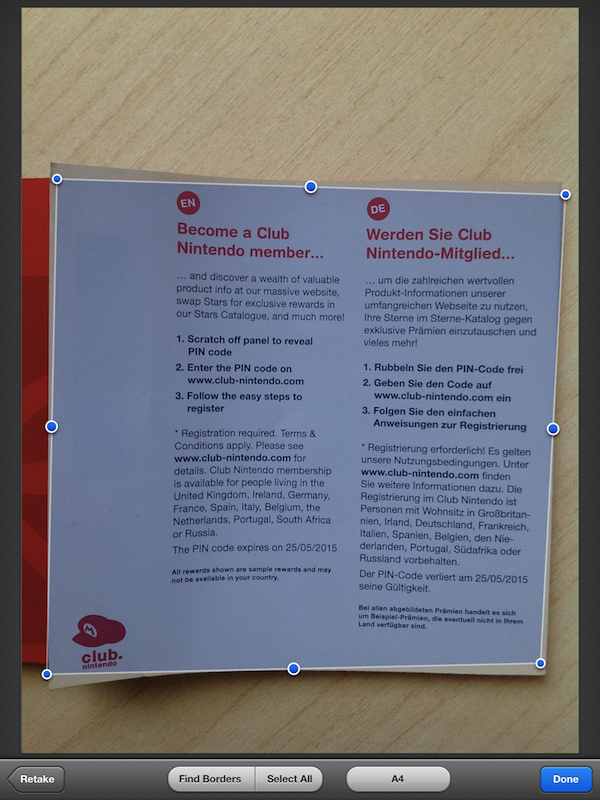
Scanner Pro, a camera-based scanning application for iOS devices by Readdle, has been updated to version 4.0, which adds a number of engine optimizations and new features, as well as support for the iPad. I was able to test the latest update to Scanner Pro, and I’m thoroughly impressed by the degree of independence and reliability Readdle achieved with Scanner Pro 4.0.

Let me explain. Until today, I have exclusively relied on a large, heavy wireless printer/scanner or my portable Doxie Go to scan, manage, and organize documents. In order to achieve a seamless paperless setup that required zero, or at least very minimal effort to be maintained and consistently used, I thought that the Doxie Go would be the solution for all my needs, as it offers a portable and lightweight device that outputs images at great quality in PDF. More often than not, however, the new devices and apps we have available nowadays bring new questions for issues we thought we had already figured out; as I began using the iPad as my primary computer, I realized how the Doxie, albeit well-designed and extremely usable, would still require me to use a computer to import scans, organize them, delete the ones I didn’t like, and upload the rest to Evernote.

I asked myself whether the iPad could even become a scanner. After all, the new iPad got a solid camera update in its latest version, and whilst not on par with the iPhone 4S’ camera, an iPhone 4-like lens – I assumed – could probably be a decent alternative to physical scanners, even the portable ones. The difference was mainly in the software: I wasn’t looking for an iPad accessory to turn the device into a scanner, I was scouting around for great scanner apps that would a) work reliably on the new iPad and Retina display, and b) support various online services, have basic document management features, and an “Open In” menu. Fortunately, Scanner Pro 4.0 by Readdle fits all these requisites, and it does so in a way that allows me to say this is the scanner app to try if you own a new iPad, and plan on going paperless using it. Read more