Federico Viticci

10762 posts on MacStories since April 2009

Federico is the founder and Editor-in-Chief of MacStories, where he writes about Apple with a focus on apps, developers, iPad, and iOS productivity. He founded MacStories in April 2009 and has been writing about Apple since. Federico is also the co-host of AppStories, a weekly podcast exploring the world of apps, Unwind, a fun exploration of media and more, and NPC: Next Portable Console, a show about portable gaming and the handheld revolution.

iOS 6 and Media Integration
iOS 6 and Media Integration

At Applingua, Tom Klaver argues that Apple shouldn’t provide a separate “Files.app” in iOS 6:

I completely see this improved integration happen throughout iOS 6. There won’t be yet another separate app — a collection library of all possible files a user can interact with will do. Would you want yet another icon on your Homescreen? Remember one of Apple’s (Sir Jony Ive’s) undisclosed philosophies: you shouldn’t see something unless you need it.

You say you want to add a photo from Hipstamatic while composing this email? No problem. Tap “Attach”, pick the Photos category, tap Hipstamatic, and you’ll see all your photos from Hipstamatic.

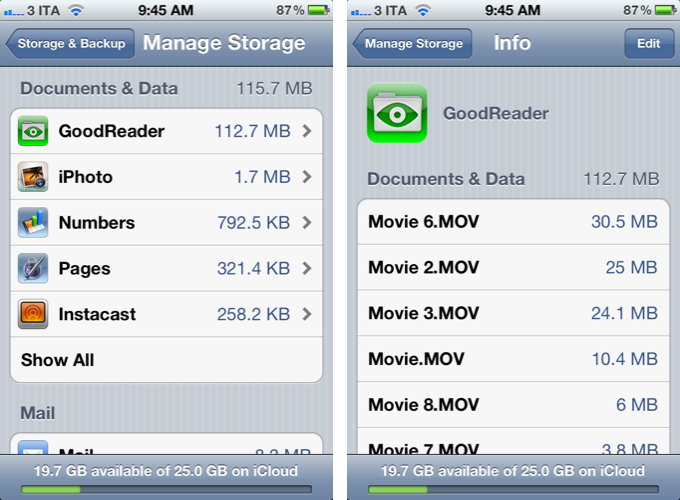
I don’t know if iOS 6 will feature a revamped document picker for better file management across apps, but Klaver’s proposed solution isn’t too dissimilar from what I envisioned two weeks ago. Rather than providing a separate app just to manage files, I think it’d be interesting to see Apple leveraging the existing iCloud interface (pictured above) to seamlessly let third-party access each other’s documents and data. Klaver thinks this menu could be organized by media type, such as “Photos”; as I have previously written, I believe the key point will be providing a simple, yet reliable way to work with documents across apps without creating duplicates. We’ll see at WWDC next week.

As an aside, Ole Begemann recently dug up an interesting quote by Steve Jobs from 2005:

Now, e-mail, there’s always been a better way to find stuff. You don’t keep your e-mail on your file system, right? The app manages it. And that was the breakthrough, as an example, in iTunes. You don’t keep your music in the file system, that would be crazy. You keep it in this app that knows about music and knows how to find things in lots of different ways. Same with photos: we’ve got an app that knows all about photos. And these apps manage their own file storage.

Permalink

vjay: Impressive, Fun Real-Time Video Mixing On iPad

In late 2010, German software maker Algoriddim released djay for iPad, a powerful portable audio mixing solution that went on to win an Apple Design Award at last year’s WWDC. With a combination of advanced features, intuitive UI design, and a care for attention to detail, djay became one of the most well-known DJ solutions with seamless interoperability across the Mac and iOS. However, because I am no audio professional, I sometime found myself slightly overwhelmed by the feature set of djay – the app certainly requires a bit of basic audio knowledge to get the most out of its settings such as visual mixing with waveforms, beat-matched looping, and pre-cueing.

For the past week, I have been testing Algoriddim’s new iPad app, vjay, and not only I haven’t found myself scratching my head in front of some complex setting or obscure audio terminology – I had fun using the app, taking advantage of the complex tech that the developers embedded in a $9.99 package to, ultimately, provide an engaging experience for the users. vjay is powerful, but, in a way, more accessible than djay.

As the name suggests, vjay works with videos. And perhaps it is the app’s focus on visuals, rather just waveforms, that increases its “wow” factor and accessibility to users who, like me, aren’t exactly mixing and syncing tempos on a daily basis. Furthermore, I also believe that, from a mere technological standpoint, vjay’s video capabilities offer a more tangible, visibly outstanding showcase of the iPad’s engine. More than djay, I found vjay to be a perfect mix – no pun intended – of powerful technology and user-friendliness.

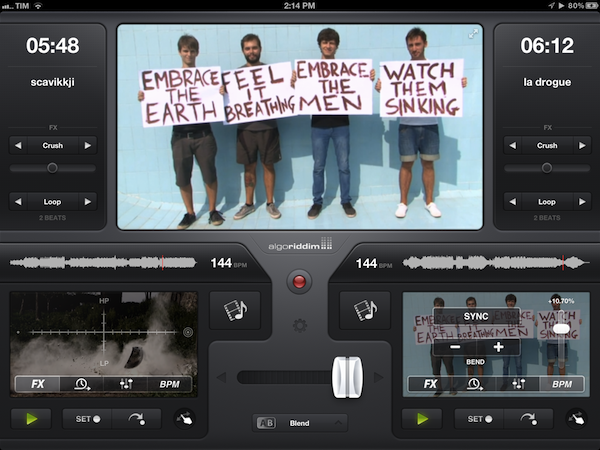
vjay can mix videos in real-time. Taking the underlying concept of djay and bringing it to a different type of media, vjay comes with a split interface displaying two content sources at the bottom, and a large, central visual preview at the top. At the bottom, you can pick videos (and even audio) from two separate “add media” buttons that are directly connected with your Camera Roll, video and music library, iTunes Store, and pre-bundled content offered by Algoriddim as a demo to get you started. In my tests, I decided to pick two .mp4 videos from my friends @AldrinBand that I had previously synced to my iPad, and see what vjay would allow me to do with them. Read more


Apple Starts Decorating Moscone West with WWDC 2012 Banners

A few days earlier than expected, Apple has started decorating the Moscone West in San Francisco for its upcoming WWDC 2012, which kicks off on Monday, June 11. Last year, with WWDC 2011 set for June 6, Apple started decorating Moscone on June 2, famously showing the previously unseen iCloud logo ahead of the event.

Like last year, our friend @SteveStreza has managed to capture a series of photos of the work in progress at Moscone West. Right now, it appears only a large banner has been put in place, highlighting the focus on third-party apps with a “Where great ideas go on to do great things” tagline. The first banner, using the same colorful background seen on the official WWDC website, shows icons for various third-party apps and games including Tweetbot, Foursquare, Path, Hulu+, Instagram, SpellTower, Twitter, TED, Evernote, Facebook, CNN, and StockTouch.

We have received the first photos of Moscone West, and included them after the break.We will update this post with more photos as we receive them throughout the day.

Read more


Favs for iPhone

I don’t normally begin articles with puns, but Favs has become one of my new favorite apps. Developed by Dirk Holtwick, Favs is “an app for your Internet favorites” – it collects items you’ve liked, starred, or marked as favorite on a variety of social networks and online services. In my review of the Mac version, I wrote:

Services like Instapaper and Pinboard empower you to “read later” and “bookmark” the things you like. Favs runs at a higher level, collecting favorites from other services that already enable you to save favorites. As I said, this kind of app is a web nerd’s dream come true for me.

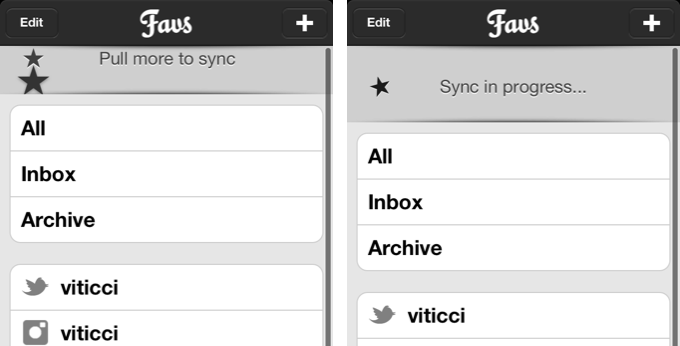
Released yesterday, Favs for iPhone is a $2.99 mobile companion that serves the same purpose of Favs for Mac – it offers a unified interface to browse favorite items from multiple sources. The main screen features three general tabs for All items, Inbox, and Archive. However, I never use Favs’ own read/unread indicators, because I don’t want to “feel the guilt” of having too many favorites in my accounts. For this reason, I am glad Favs for iPhone lets me hide unread counts from the Settings, which also reveal iCloud sync will be coming soon to keep account information synced across Mac and iOS devices. I very much prefer to browse favorites by their original source.

The main screen of Favs also reveals a custom “pull to refresh” implementation that uses two stars that need to be aligned to initiate a new sync session. This action will refresh all your sources and check for new favorite items (single sources can be refreshed as well).

Like the Mac app, Favs for iPhone supports the following services:

  • Delicious
  • Dribbble
  • Facebook
  • Flattr
  • Flickr
  • GitHub
  • Google Reader
  • Instagram
  • Instapaper
  • Pinboard
  • Pocket
  • Readability
  • StackOverflow
  • Twitter
  • Vimeo
  • YouTube
  • Zootool

Tapping on items containing links will open an embedded web view in the lower portion of the screen. An option to load the Readability version of an article is present, as well as buttons to email a URL, tweet it, copy it, or launch it in Safari.

The app’s performances are good, but not perfect. I found Favs to be slightly slowed down when scrolling through thousands of Twitter favorites, though I recognize I may be an edge case here. However, after the initial refresh, the app was quite smooth at switching between Twitter, Google Reader, Facebook, and the main view. The sync animation could use some further optimizations.

If you already use Favs on the Mac, there’s no question you’ll want to take a look at the iPhone version. Favs for iPhone has a clean design, works with a lot of services, and, overall, leverages the convenience of having all your Internet favorites always with you. Favs is $2.99 on the App Store.


Instapaper’s Background Update Locations

Instapaper’s Background Update Locations

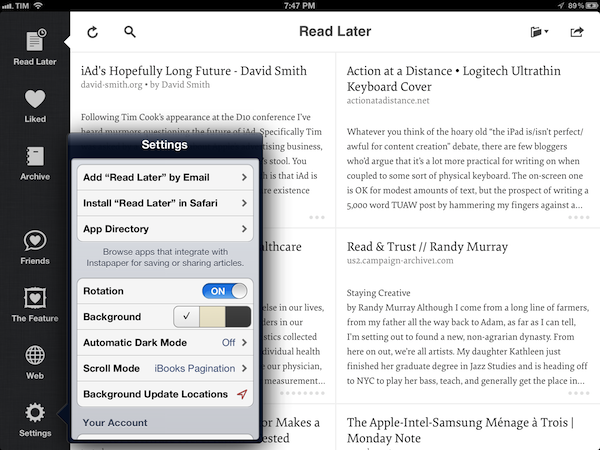
Last night, Instapaper was updated with a major new feature: Background Update Locations. Here’s how it works:

Now, with Background Update Locations, Instapaper can automatically download new articles whenever you enter or leave locations such as your home or workplace. Visit the Settings panel to set it up. (Requires an iPhone or 3G/4G-equipped iPad.)

I have been testing the feature this afternoon, and while I couldn’t get it to work initially, I think I have figured it out. Basically, Instapaper uses iOS geofencing to determine when you enter or leave a location (you can store up to 10 locations inside Instapaper). The geofencing, however, isn’t really precise, as granularity may vary, and it could be based on a combination of cell tower strength and triangulation. Having tried geofencing with Apple’s own Reminders, I can attest that location-based alerts were already problematic in my town; so my guess is that today, when I couldn’t get Instapaper to download items in the background, the issue was with geofencing in Viterbo – definitely not with Instapaper. I have noticed that some locations in my town just won’t fire off the geofence; I have no idea why this is happening, and I hope Apple fixes it in iOS 6 (perhaps through their new fancy mapping service).

Fortunately, Instapaper’s Background Update Locations are now working with the place I care about – my house. I was able to leave, drive around town, and then I found articles waiting in my list, already downloaded. It’s a really nice option to have, and I’m glad Marco was inspired by News.me to implement it.

Get Instapaper 4.2.2 from the App Store.

Permalink

iOS 6 Mockups

iOS 6 Mockups

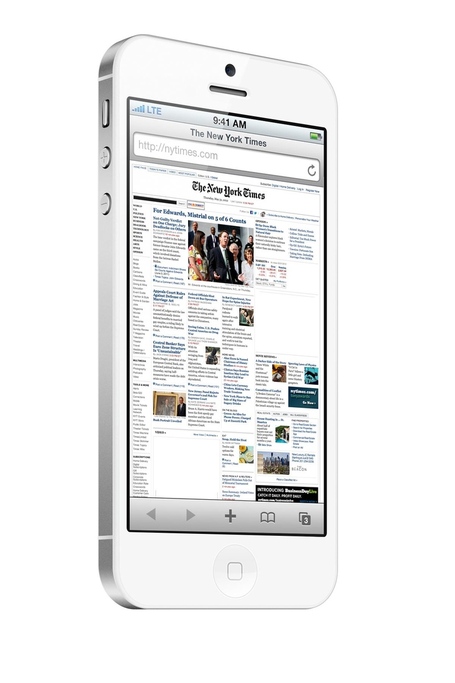
The Verge Forums member ”gizmosachin” created some nice mockups of iOS 6 and the next-generation iPhone based on recent rumors.

Well this week we saw the “composite” image of the new iOS 6 Maps app, the blurrycam photos of the new iPhone, and with the WWDC 2012 app it seems that iOS 6 will make most UI elements silver like their counterparts on the iPad. Thought I’d make some mockups of the new iPhone running Safari and the supposed new Maps app just for fun. I couldn’t find any high res C3 Tech images so I just used the OpenStreetMap maps that Apple currently uses in iPhoto.

According to speculation surrounding the next major version of iOS, Apple will switch to a “silver” theme – roughly the same that has been used on the iPad since iPhone OS 3.2. Marco Arment believes the iPhone UIKit widget styling (the stock blue element) is out of style. Cult of Mac thinks that the recently released WWDC app and iPhoto for iOS set the stage for silver coming to the iPhone soon.

In theory, apps that use stock UI items provided by Apple would work “out of the box” with an updated color scheme. However, developers who relied on custom icons, colors, and other patterns would still need to optimize their apps for the new UIKit – and that’s exactly why Apple “previews” new version of iOS at WWDC before their Fall release.

Composite mockups of iOS 6 Maps based on “leaked” screenshots of the software first surfaced last week. Check out more mockups at The Verge.

Permalink

The Siri API

The Siri API

Samuel Iglesias has written an excellent post detailing the (possible) challenges developers will have to cope with if Apple decides to release a Siri API.

The second half of Siri integration, Semantics, is the tricky part: something that most iOS developers have never dealt with. Semantics will attempt to capture the various ways a user can ask for something, and, more importantly, the ways Siri, in turn, can ask for more information should that be required. This means that developers will need to imagine and provide “hints” about the numerous ways a user can ask for something. Sure, machine learning can cover some of that, but at this early stage Siri will need human supervision to work seamlessly.

This is exactly what I have been wondering since speculation on the Siri API started last year. How will an app be capable of telling Siri the kinds of input (read: natural language) it accepts? Will developers have to do it manually? Will Apple provide a series of automated tools to associate specific features (say, creating a task in OmniFocus) with common expressions and words? And how is Apple going to look into the natural language processing developers will implement in their apps?

Of course, the Siri API is still at the speculation stage, but it does make sense to greatly expand upon Siri’s capabilities as an assistant capable of working with any app. The TBA sessions at WWDC are intriguing, and Tim Cook said we’ll be pleased with the direction they’re taking with Siri. Right now, I’d say integrating with third-party software would be a fantastic direction.

Permalink

Mac App Store vs Buying Direct

Mac App Store vs Buying Direct

Wolf Rentzsch has published a good piece outlining the pros and cons of buying software through Apple’s Mac App Store, or directly from a developer’s website.

Some developers are going out of their way to allow seamless cross-grading from Mac App Store versions of their apps to direct apps, which is commendable and helps alleviate somewhat the situation Apple has created. Sandboxing is just the latest App Store rule change, I’m sure there’s more to come. All things being equal, it’s safer to buy directly instead of being cut off from your own software based on an arbitrary Apple policy change.

Sandboxing may be the latest requirement to get apps on the Mac App Store, but the trade-off involved with selling software through Apple’s channel has stayed the same since 2011: exposure vs. risk of change due to Apple’s policy. Because the environment is controlled and actively promoted by Apple, a developer gets all the perks of a store pre-installed on every Mac: millions of potential customers whose buying decision is just a click away, and nicely designed sections to showcase new apps (though Apple has to do more). On the other hand, because Apple gets to decide which apps and which functionalities are safe for the App Store, changes happen, like Sandboxing.

For the user, the convenience of the Mac App Store is obvious. Purchases are tied to an Apple ID, updates are easy, and the ecosystem is integrated with an existing structure (iTunes). Unlike John Gruber, I don’t think Sandboxing will be compelling for typical users, as I don’t see Apple showcasing Sandboxing-enabled apps the way they did for iCloud-enabled apps or apps updated with Lion features. It’s too technical, but Apple may figure out a way to market it (perhaps again the “Apps Enhanced for OS X Lion” section with new additions).

For developers, the Mac App Store means exposure to millions of eyeballs but also to Apple’s ever-changing strategies and technologies. The problem with Sandboxing, I believe, is that it introduced a change that is forcing developers of existing apps to reconsider functionalities that are not compatible with the Mac App Store anymore. If this will lead to serious fragmentation of Mac software with a proliferation of deeply different Mac App Store and “website versions” of the same apps, we’ll see.

Also worth reading: Lex Friedman’s story at Macworld on the first day of Sandboxing in the Mac App Store.

Permalink

MG Siegler: Facebook Integration Coming To iOS 6

MG Siegler: Facebook Integration Coming To iOS 6

According to MG Siegler at TechCrunch, Apple’s upcoming new version of iOS – set to be unveiled at WWDC – will feature Facebook integration, similarly to how Twitter was integrated into iOS 5 last year.

It’s important to note that Apple being Apple, something could change in the next week and a half (see again: Facebook/Ping). But as of right now, Facebook is a go in iOS “Sundance”. One thing still being hammered out according to our sources is how sharing will work. Sharing is the other big part of the iOS/Twitter integration, and will be important for iOS/Facebook integration as well. But Facebook is significantly more complicated than Twitter in that there are all kinds of permissions for what you can post where and who can see what. And Open Graph adds another layer of complexity to all of this.

It is unclear for now how Facebook integration could work at a system level on iOS, presumably allowing users to share status updates, photos, and videos. Taking Twitter integration as a reference, it is worth noting how Apple doesn’t let users casually tweet at any time from iOS, having enabled the “tweet sheet” only in specific applications such as Safari and Photos. Facebook is more complex than Twitter in terms of privacy controls and functionalities, and we can only assume the system integration Apple has worked on will still strive for simplicity and intuitiveness when communicating with the service.

There are a series of factors as to why Apple could add Facebook integration to iOS. Firstly, such integration was spotted years ago into an unreleased build of iOS 4. Then, recent remarks by Apple CEO Tim Cook confirmed the two companies have mutual respect for each other, and that they are working closer together to provide the “best experience” with Facebook to iOS users. Tim Cook himself said to “stay tuned” about it. Last, Facebook’s own apps for iOS (including the recently released Facebook Camera) and the plethora of third-party Facebook-connected apps could incredibly benefit from direct integration on iOS.

Apple’s WWDC kicks off on June 11 in San Francisco.

Permalink