Posts tagged with "music"

Digital Downloads Drive A Music Industry Recovery

Well it looks as though things may be looking up for the music industry again, after its decade long slide in sales. A Nielsen Soundscan report yesterday said that US music sales (by unit) have increased by 1.6% over the course of this year.

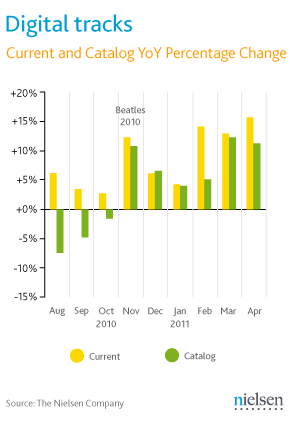
The report gives the credit for the rise, unsurprisingly, to digital music sales, which in terms of albums was up 16.8% and in terms of individual tracks was up 9.6%. As for physical media, CDs were down by 8.8%, but Vinyl increased by 37%, although they only account for 1.2% of sales.

No one is exactly sure why digital is up dramatically this year, although Nielsen interestingly suggests the arrival of the Beatles on iTunes as a key reason, pointing to a dramatic increase starting from when it was released on iTunes (see graph above) – although this seems a bit of a stretch. That said, catalogue music sales have been on the rise by 5.4%, whilst current music is down 7%. As for the most popular genre’s, Rock had the greatest market share in album sales whilst Pop was the most popular for digital tracks.

[Via AllThingsD]


Angry Birds’ Theme Song Recreated with Real Instruments [Video]

Sure, you can play Angry Birds on multiple devices, install all the possible versions and spin-offs from the App Store – heck, I’ll even go on to say it’s fine if you bought some of those shady guides to get the most out of the game. But can you play the official theme song like those indie Pomplamoose folks did? As noted by TUAW, the duo seems to enjoy the world of Angry Birds quite a lot, and even if there’s some Samsung advertising weirdness going on in the video, the overall result for your viewing pleasure is undoubtedly nice.

Video is embedded below. As for anyone else willing to recreate his own version of the Birds’ song, I’m pretty sure GarageBand for iPad has a share button somewhere. [via YouTube]
Read more


My Artists Levels Up and Becomes A Real iPod.app Replacement

My Artists, a nifty iPod-integrated app for the iPhone I first reviewed last year, just received a major update to version 1.2 which, among several improvements to the interface and speed optimizations, turns the app into the ultimate iPod replacement the developer was aiming for since the first release. My Artist, in fact, used to provide a beautiful alternative view for the standard iPod.app installed on every iPhone, but that was nothing more than a custom extra layer that still relied on iPod.app for music playback and controls. Like most “iPod.app controllers” in the App Store, My Artists added a lot of functionalities but was unable to directly control and play music already synced on your device. This changes today, as My Artists 1.2 finally ditches iPod.app dependence, being able to directly play your music. This means you’ll see a My Artists icon in the multitasking tray when using the app, not the iPod app’s one, and yet you won’t have to give up on standard iOS features like AirPlay – which works just fine even without using the native iPod software. I don’t know how Top Drawer Apps did it, but it works – music is now both recognized and played by my Artists.

Version 1.2 also brings Last.fm integration for those willing to scrobble music to the service, but that will cost you $1.99 as in-app purchase. A little last.fm icon in the playing screen will allow you to activate or disable the feature at any time. Speaking of which, the Now Playing view got some interesting updates as well, namely an icon in the upper right to quickly jump to more albums or tracks from the artist you’re already listening to. Alternatively, you can open the (improved) Bio section, which uses Wikipedia to display artist and album info.

My Artists was a great app before this update, now it’s just a must have for heavy mobile music listeners and general music lovers who would like an app focused on artists, albums, and information coming from the web. My Artists can be downloaded at $1.99 from the App Store.


Labels Hoping Apple’s Music Service Will Launch at WWDC

According to a new report by Cnet, multiple “music industry sources” have told the publication the four major music labels in the US (Warner Music Group, EMI, Sony, Universal) are hoping Apple’s rumored cloud music service will launch next month during the WWDC. The labels, Cnet reports, are counting on Apple to provide a full-featured music service with iTunes Store integration that would force competitors like Amazon and Google to start paying licensing fees for their “music locker” services, which allow users to upload songs to the cloud, but have in no way official support or backing from the labels. The labels are seemingly unhappy with Amazon and Google services as users might be able to upload songs they illegally downloaded from the Internet, and it also appears that Google transcodes some uploads to a new format (making a copy), thus raising some questions on copyright issues as well.

Apple is in a strong position to deliver a cloud service that allows for both uploading and streaming of songs thanks to deals negotiated with the labels. Last month, it was indeed reported that Apple had inked a deal with the Warner Music Group, with more labels to follow soon or already signed according to other rumors.

But the services offered by Amazon and Google are not all that they can be because those companies had to tippy-toe around copyright issues. Since neither company was either able or willing to obtain licenses from the four major labels, neither of them could deliver the same range of options that Apple will be able to offer with its upcoming cloud service, according to multiple music industry sources.

Lots of people at the four major labels, however, now hope the service launch at Apple’s Worldwide Developer Conference on June 7. The risk for the record labels is that the services from Amazon and Google could prove good enough for most music consumers and that the companies don’t feel compelled to upgrade.

The WWDC ‘11 kicks off on June 6 in San Francisco, and previous speculation suggested it would be a software-focused event with on-stage demoes of iOS 5 and OS X Lion. iOS 5 has been in the middle of a debate recently, mainly as to whether Apple will really showcase its new cloud offerings revolving around a revamped MobileMe or other functionalities such as voice recognition, postponing the launch of all cloud services to this Fall. Reuters reported a few weeks ago that work on Apple’s new music service had been finalized on the technical side, and Apple was simply completing the process of signing deals with music labels to offer both upload features and streaming of songs you don’t own, likely through a subscription system. Google launched its new “Music Beta” service yesterday and, similarly to Amazon’s Cloud Player, it allows users to upload songs and albums to an online locker, but doesn’t provide any sort of subscription à la Spotify to enable users to listen to music without uploading it first.


Music Beta by Google: Mac Uploader, Flash, iOS Safari Playback

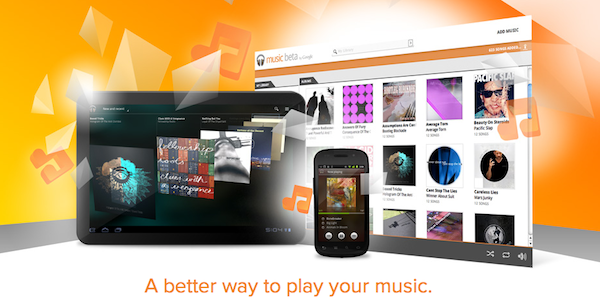
At its I/O conference earlier today, Google officially announced a new cloud service called “Music Beta” which, similarly to Amazon’s Cloud Player, allows users to upload their music collections and playlists to the company’s servers, and play them back anywhere on a web browser, tablet or smartphone. Like Amazon, Google’s service has a few limitations for now: it doesn’t come with a native iOS app as it’s only got an Android app for compatible smartphones and tablets, it requires Flash in some sections of the website and it’s restricted to US access only. Music Beta is, well, a beta product by Google, and it’s free for now – Google didn’t mention how much uploading and streaming 20,000 songs once the service hits stable status will cost you.

As detailed by MG Siegler at TechCrunch, Music Beta comes with a native Mac uploader that can look through your iTunes library and playlists or hard drive contents to find songs and albums to upload. On desktop browsers, MG Siegler says Flash is required for playback as indeed a screenshot of a technical error seems to prove, whilst Cnet claims Music Beta can stream songs on iOS devices as well, without Flash, using Mobile Safari. It was discovered a few days ago that Amazon’s Cloud Player quietly rolled out iOS Safari support, and it’s unclear at this point whether Music Beta really works on iPhones or iPads, meaning Flash is only required for some transitions and animations. As more users are invited to try the product, we’ll make sure to check Mobile Safari compatibility. Read more


Rdio Launches API for Mobile Devices

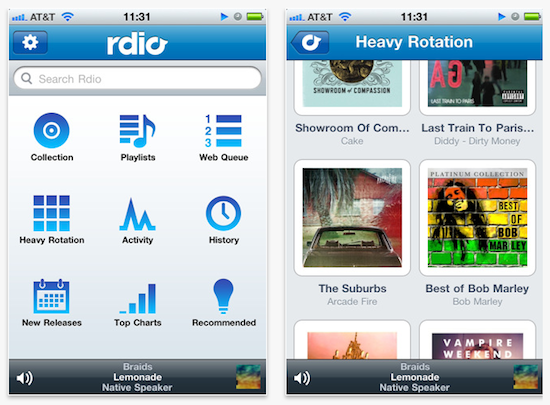
Music streaming service Rdio, quite popular in the US and Canada but currently unavailable due to regional restrictions in the rest of the world, announced yesterday the release of an API for iOS and Android devices that will allow developers to build apps that are integrated with Rdio’s music and social functionalities. The API – documentation available here and here – will let third-party devs build apps that search “all the artists, songs, albums, playlists, and top charts in Rdio’s catalog of over 8.5 million songs.” On top of that, the API will also bring playlist creation and editing outside of the official Rdio app, as well as the possibility to show a user’s Heavy Rotation, collections or follow other people. For a first release, it sounds like a solid API for iOS and Android.

Attending Google I/O 2011? Take a closer look at our Mobile API on Android devices at Rdio’s Developer Sandbox at Moscone Center in San Francisco. If you won’t be there or want to see the API in action yourself, download the Rdio Music Quiz from the iPhone App store.

While our Mobile API doesn’t yet support our affiliate program, it will soon. So make sure to sign up for it now and start building that incredible mobile app you always wanted to make.

The current API and service terms won’t let developers create paid apps that directly plug into Rdio. Still, with Spotify struggling to launch in the US and an impressive userbase and app selection after a few months, Rdio has the chance to maintain a healthy ecosystem for music streaming apps in the US, and take it from there to Europe. Rdio has big plans for sure, and it’ll be interesting to follow its developments in the next months, especially after Apple will unveil its rumored cloud music service with full labels’ support.


Amazon Cloud Player Now Works with iOS Safari

Back in late March, Amazon launched Cloud Player for the web and Android devices, an online interface that, relying on music uploaded to your Amazon account via Cloud Drive, allowed you to stream music from the cloud via a web browser or the native Android application, built into the OS with direct connection to Amazon’s servers to fetch and stream songs on the go. The service, however, wasn’t working with iOS devices, and it wasn’t a Flash issue: somehow, the website itself didn’t want to cooperate with Mobile Safari on iPhones, iPod touches and iPads. We noted that there was a way to make it work by using an alternative browser like iCab Mobile and changing the app’s user agent, but it was convoluted and far from being a reliable alternative to playing music locally in the iPod app, or from third-party services like MOG and Spotify, which do have native iOS apps. The lack of iOS compatibility for Cloud Player left many wondering whether the company intentionally decided to block the service, betting exclusively on the Android platform – which is the foundation for Amazon’s new app marketplace.

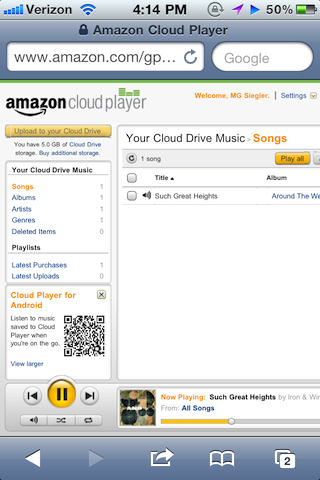
As noted by TechCrunch today, however, Cloud Player seems to be working in the iOS browser now. Songs stream just fine, and they even pause automatically during an incoming phone call or if a Push Notification is received. It’s unclear how Amazon exactly “unlocked” the feature and why it went online so quietly without any major announcement, but my guess is the Cloud Player team simply added a string to allow Mobile Safari to start a QuickTime streaming session within the browser.

You might think this had to due with Flash or another technology that iOS wasn’t compatible with, but it wasn’t. It looked like something else was simply blocking it from working. Well, good news. That’s no longer the case.

If you visit Amazon’s Cloud Player through the Safari web browser on an iOS device, you’ll see that it does in fact now work. You’ll first hit a warning page telling you that your browser is not supported, but just ignore that. Click into the music in your drive and it will begin playing.

MG Siegler notes the implementation is still far from perfect (uploading requires Flash, but you wouldn’t be able to upload files from iOS anyway) and the solution implies listening to music in a regular browser window. Still, it’s a start for Amazon, and it reignites speculation of a native Cloud Player app for iOS coming in the near future. The website, for now, is restricted to US access only.

Rumors in the past months pointed at Apple building a full-featured music streaming service based on iTunes, wrapped inside the upcoming iCloud infrastructure for Mac and iOS devices. There’s little doubt at this point Apple hasn’t at least considered the possibility of letting users upload their music collection or subscribe to an à la carte service for streaming songs off the cloud. With the WWDC roughly a month away, we should know more about Apple’s cloud plans and new music options soon.


AirServer Brings AirPlay For Everything to OS X

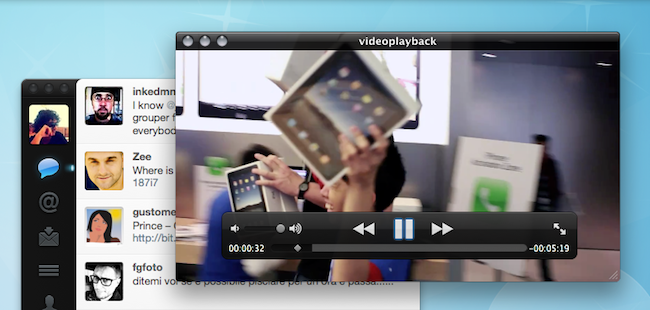
During the past months, I’ve stumbled upon several Mac apps that enable to turn your computer into an AirPlay receiver. None of them, however, provided the same amount of stability and functionality I’ve found today in AirServer, a $3 app that easily turns your Mac into an AirPlay device for audio, photos and videos. Since Apple introduced AirPlay with iOS 4.2 back in November, many have wondered whether it’d be possible to use the streaming features of the protocol (for music and other kinds of media) on a Mac, rather than on iPhones, iPads, and Apple TVs. The number of Mac apps that came out promising to bring AirPlay on the desktop was quite overwhelming: from simple utilities to stream music to more complex solutions like Banana TV, developers didn’t even refrain from creating similar alternatives for iOS devices, turning an iPad into a receiver for video. And if that’s not enough, remember a few weeks ago a hacker cracked the encryption keys used by Apple in the AirPort Express station – opening the door to even more apps with AirPlay / AirTunes integration.

AirServer brings some clarity and unification with a $3 purchase and a simple package that runs in the menubar. That’s it, no UI. Heck, the icon can be removed from the menubar, if you want. What AirServer does is simple: it turns a Mac into an AirPlay receiver for anything. Provided you have an iOS device (or another Mac) to start a streaming session, you’ll be able to listen to music (or any other audio) or watch videos and photos coming from AirPlay on your Mac’s big screen. I have an iMac at home, and AirServer is just perfect on it: I can fire up Instacast on my iPhone and listen to my favorite podcast on better speakers (pardon me if I don’t have external speakers); I can find a cool YouTube video and instantly beam it to my Mac without sharing any link; I can take my entire Camera Roll and show photos of my last vacation to my (poorly sighted) parents on the iMac. Now we’re talking.

As for quality, I have tested AirServer on two different local networks with pretty good results. Videos stored on device start playing almost instantly; music quality was great, with a couple of lags on my slower home network in a 2-hour playing time; photos stream just fine with responsive touch controls as you swipe. AirServer takes a minimal footprint on your Mac, and I’ve also noticed it reproduces the fading effect you get on the iPhone when you change your audio source. Overall, the app is stable and I was pleased to see an update was issued a few hours after I bought the app.

To sum up: at $3 you get an AirPlay receiver for Mac that supports audio, videos (even from Youtube and other apps) and photos. If you love AirPlay, get AirServer.


Spotify 0.5 Goes Live with iPod Sync, New UI

Officially announced yesterday, Spotify began rolling out the promised 0.5 update for the desktop client a few minutes ago, featuring an updated UI and the much anticipated playlist and MP3 sync for iPod Classic, Shuffle, and Nano, alongside wireless sync for iOS and Android devices running the Spotify mobile application. The updated desktop client, available now for download here, comes with a slightly redesigned user interface that’s inspired by the latest iOS and OS X Lion builds: there’s lots of “linen background” going on, redesigned toolbar icons with a more flat look, new translucent buttons to reveal and expand the album artwork, as well as a general polish that clearly brings OS X graphical elements to mind. If you’re familiar with iOS and the latest Lion developer builds, you’ll feel right home with the new Spotify. I like the app’s new look.

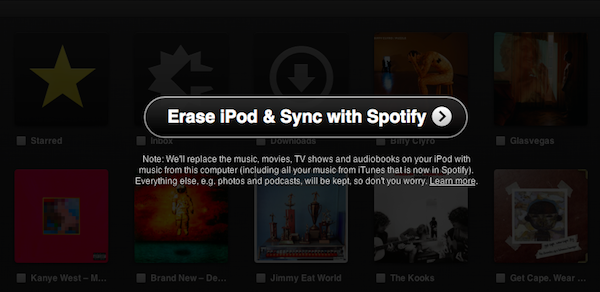
Spotify 0.5 can sync playlists, local files and purchased tracks to an iPod (non-iOS) via USB or iOS device wirelessly. The interface to manage sync is quite simple and intuitive, as there’s a new Devices tab in the sidebar that lists all the iPhones or iPods you’ve connected to Spotify. Once connected, the app will display all your playlists, starred items and local files in a new window, allowing you to choose whether you want to sync “all music” to a device, or only specific playlists. Whilst iPhones and iPod touches get the possibility to sync anything as they’ll be able to stream songs later using the mobile app, classic iPods can only receive local files – meaning MP3s Spotify has found on your computer or songs you’ve purchased through the service’s new store. Songs and playlists that are not found will display a “Get Missing” button that takes you to the embedded web store. Tracks start at 50p, but Spotify is also offering MP3 bundles at a higher price.

Overall, Spotify 0.5 looks like a really solid update that shows the path the company has taken: becoming the ultimate music player on the desktop and mobile thanks to a combination of streaming, cache, purchases and sync. Check out more screenshots below. Read more