Posts tagged with "iOS"

Captionista: Simple, Flexible Video Subtitling for the iPhone and iPad

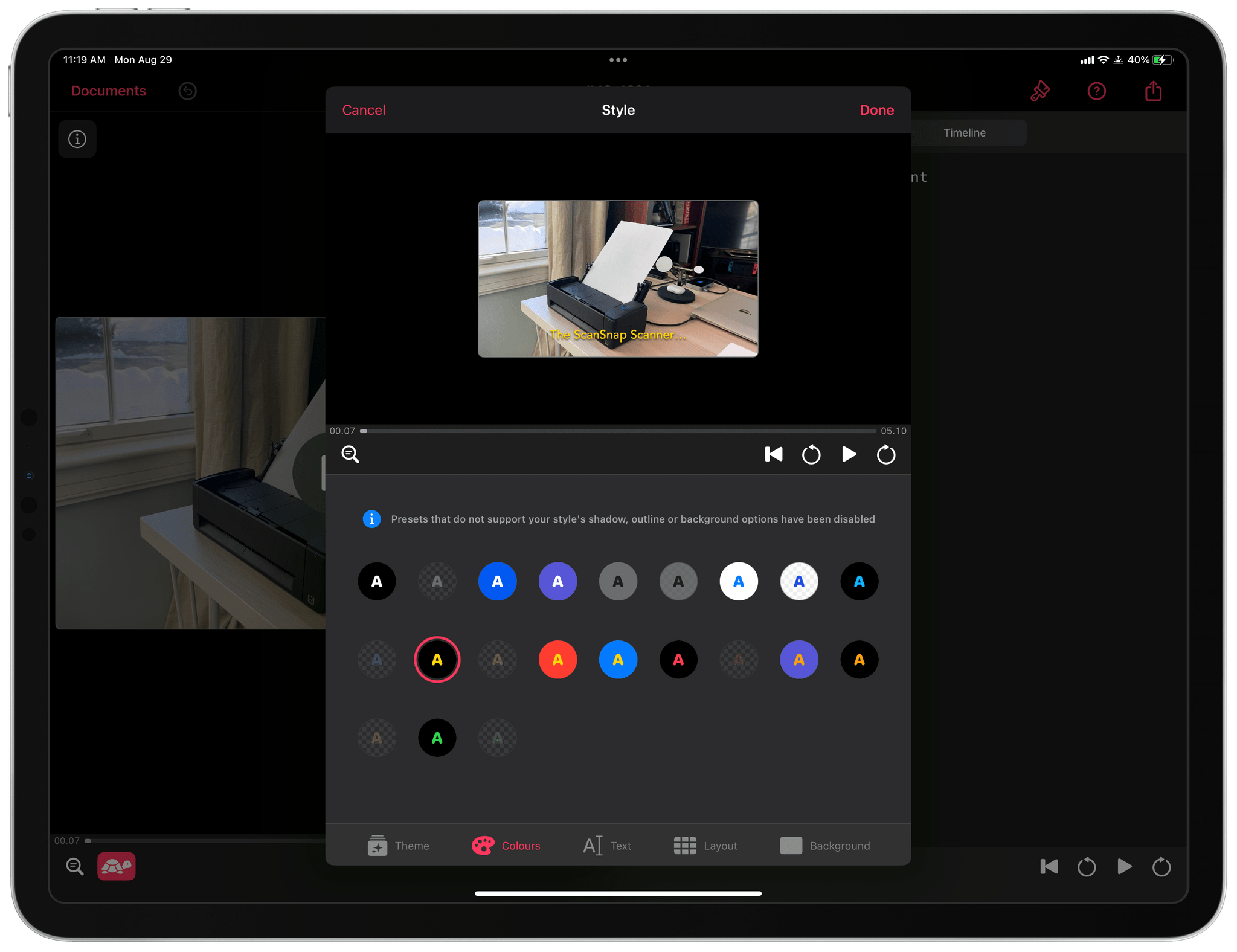
One of the tradeoffs I see a lot in the apps we cover is between simplicity and flexibility. Simplicity has its virtues, but often apps designed to make things as easy as possible for users end up being inflexible, resulting in cookie-cutter output. The flip side is that maximum flexibility can get out of hand fast, leading to a steep learning curve. Striking the right balance is hard, but the apps that do are always among my favorites because they work so well for a wide audience. That’s exactly how I feel about Captionista, an iPhone and iPad app for adding text to video. It’s simple to understand but includes the kind of depth that epitomizes what it means to do one thing well.

I don’t work with video a lot, and when I do, my needs are pretty simple. Often, I want to demonstrate something with a screen recording, which isn’t always easy to follow without some sort of explanation. That’s where Captionista comes in.

Read more


Pixelmator Photo Switches to Subscription Pricing and Provides a Sneak Peek at the App’s Upcoming Mac Version

Source: Pixelmator.

Source: Pixelmator.

The Pixelmator team announced today that its iPhone and iPad photo editor, Pixelmator Photo, has moved to subscription pricing, and a Mac version of the app is on the way.

Existing Pixelmator Photo users won’t have to subscribe to continue using the app and should be able to add the Mac version at a discount when it’s released. New customers can subscribe for $4.99 per month or $23.99 per year after a 7-day free trial. There’s also a lifetime purchase option that costs $54.99. Pixelmator says that the subscription pricing will increase for new subscribers when the Mac app is released, so now is a good time to subscribe if you were hoping that the team would add a Mac version.

Pixelmator Photo for iPad.

Pixelmator Photo for iPad.

There are a lot of reasons for Pixelmator Photo’s move to a subscription model, which are explained in detail in the team’s blog post. As with any move from paid-up-front to a subscription, some users will be left behind, which is a shame, but I’m not surprised by Pixelmator’s move. I’m more surprised that the switch didn’t occur earlier. Pixelmator Photo is a top-notch, high-quality app that is continuously developed to keep up with advances in Apple’s photo editing frameworks and hardware updates. That’s not the sort of app that can be offered for a set price indefinitely, as demonstrated by the many other sophisticated apps, including other photo editing apps, that have made the leap to a subscription model. Hopefully, the switch to subscriptions will allow the Pixelmator team to continue to develop Photo for a long time to come.

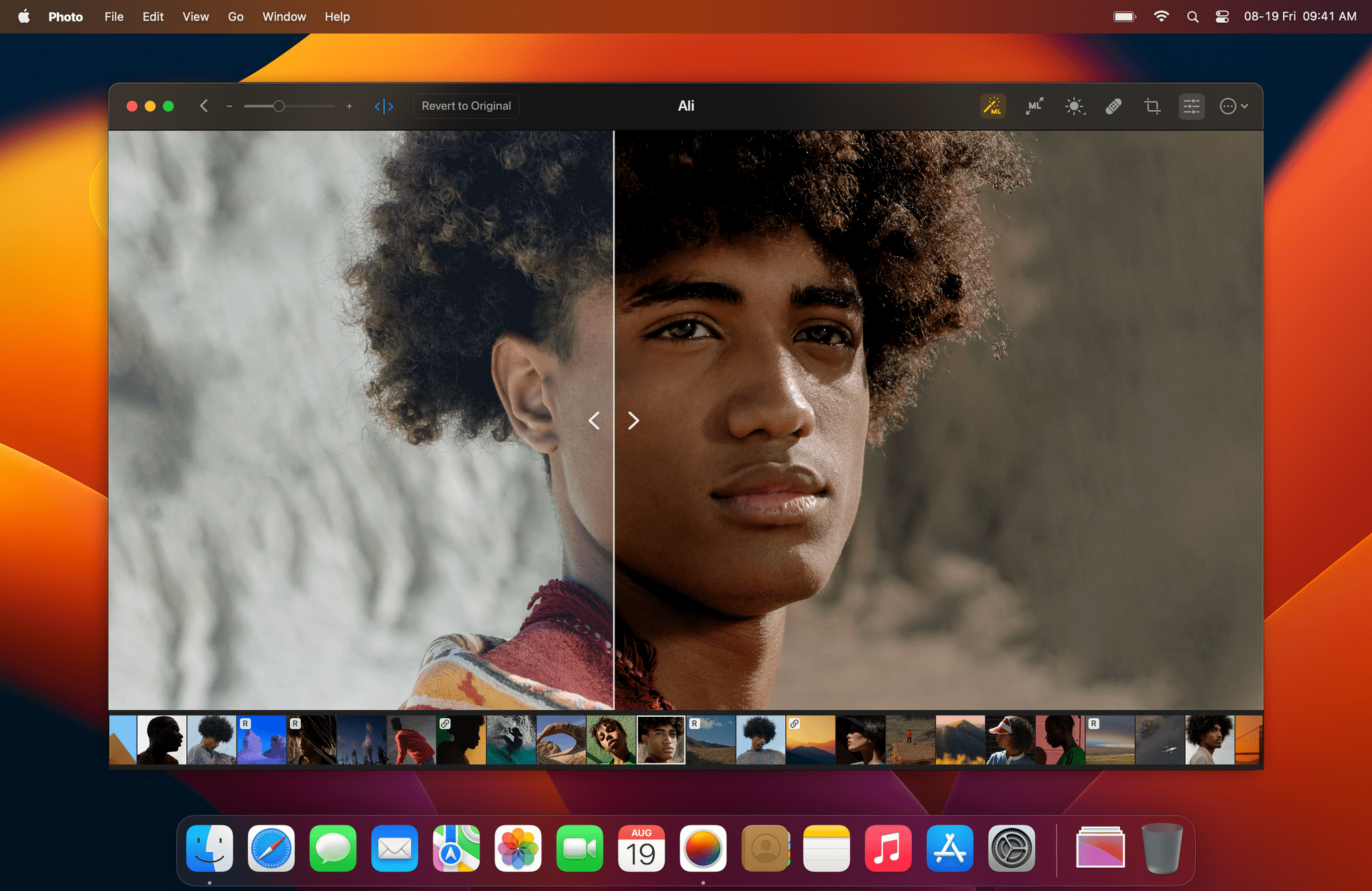
There aren’t many details about the Mac version of Pixelmator Photo to share except for the image at the top of this story, but I like what I see. If you’ve used the iPad version of Pixelmator Photo, the Mac app will be immediately familiar with its spare UI and focus on the image being edited. There’s no word yet on when the Mac version might be released, but when it is, we’ll have a complete review.

The Pixelmator Photo update that adds its new subscription pricing model is available on the App Store now.


Safari Extension Noir Adds Theming and Deeper Keyboard Shortcut Support

Last year, we awarded Noir Best New App of 2021 as part of the MacStories Selects Awards. Jeffrey Kuiken’s Safari extension for the iPhone, iPad, and Mac, which can apply a custom dark mode to websites that don’t offer their own, is a fantastic example of an app that implements a new technology – the native Safari extensions introduced with iOS and iPadOS 15 and earlier on the Mac – in a way that is simple to use but also provides advanced customization for users who want that. Noir immediately became a MacStories favorite on launch, and it remains an app that I rely on every day.

The latest update to Noir takes the app’s original concept a step further with new theming options, theme sharing, and extensive keyboard shortcut support. It’s an excellent update that anyone who likes to tweak the colors used in their apps will appreciate. Let’s take a closer look.

Read more


Pestle 1.2: The MacStories Review

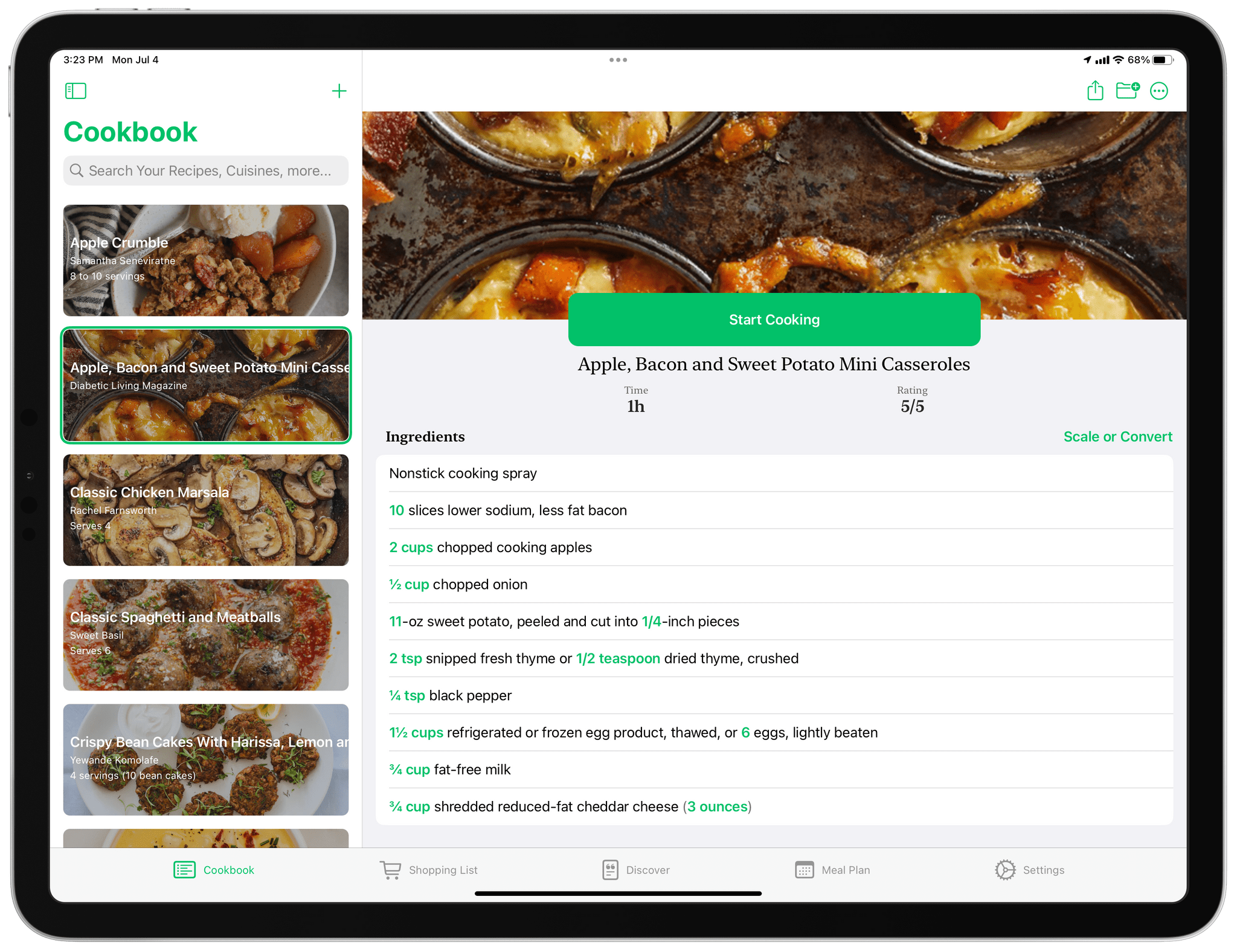
One of the greatest strengths of the App Store is its abundance of choice. For every app category, there are always multiple excellent options from which to pick. That’s never been more true for the recipe app category. Paprika was my long-time personal favorite until Mela came along, but there are other great options like Grocery and Crouton too. Another app that belongs on that list is Pestle, an iPhone and iPad app by Will Bishop.

At its core, Pestle is a recipe manager, but it also integrates with Reminders to create shopping lists, offers a way to discover new dishes, and integrates meal planning, making it a well-rounded solution. The app also features a modern design that works well in the kitchen and some clever details like hands-free voice control for moving between recipe steps while cooking, making it worth a closer look.

Read more


Android Users Can Now Migrate Their WhatsApp Data to iPhone

WhatsApp announced beta support today for migrating the app’s data from Android devices to the iPhone using Apple’s Move to iOS app, which is available on the Google Play store. Move to iOS is an Android app that could already move contacts, messages, photos, videos, email accounts, and calendars.

With WhatsApp’s update, which is being released as a beta to a limited number of users to start, users with Android devices will be able to use Move to iOS to transfer their WhatsApp message history to iOS. Losing your message history in apps like WhatsApp has been one of the biggest downsides of jumping from one mobile device platform to another. By adding a way to migrate WhatsApp’s message history to iOS, it should be significantly easier for users of the messaging service to switch to iOS going forward.

WhatsApp has also added a support page to its website to walk users through the process of moving their message history from Android to iOS and a help document for anyone who has trouble with the process.


WorldWideWeb: A Simple Web Server Utility for Mac, iPad, and iPhone

Early today The Iconfactory released their latest app, a simple web server utility called WorldWideWeb. Solidly developer-focused in scope, the app serves files from a local directory to an automatically generated URL, making these files available to any device on your local network. While there are sure to be more inventive use cases for such a utility, its general purpose is for testing simple websites built on the Web’s greatest primitive: HTML.

WorldWideWeb’s killer feature is simplicity. The app’s entire main interface consists of two tiny sections: in the first you select a folder, and in the second you start or stop the web server. When the server is activated, a URL is generated. The app uses Bonjour to make the address available to any device on the same Wi-Fi network as the host. Just copy and paste the URL or press the ‘Open in Browser’ button to view the website natively in a web browser.

Read more


Grocery 3.0 Introduces App-Wide Redesign and New Inventory Features

It’s been fun to watch Grocery by Conrad Stoll evolve over the years. The app started as a relatively simple shopping list app on the iPhone but has transformed into something much deeper. Today, Grocery is available on the iPhone, iPad, Mac, and Apple Watch and offers a comprehensive feature set that also covers meal planning, recipes, and inventory tracking. This week’s release of version 3.0 of Grocery takes the app’s formula further with a fresh, modern design, tighter integration between inventory management and shopping lists, and other new inventory features for better tracking of what you have on hand. It’s an excellent update that takes advantage of the latest features of Apple’s OSes to offer a broad-based approach to grocery shopping.

I’m going to focus this review on what’s new in Grocery 3.0, but you can read more about the app’s core features in my past reviews.

Read more


Apple Marks Global Accessibility Awareness Day by Announcing Upcoming Accessibility Features

Thursday is Global Accessibility Awareness Day. To mark the occasion, Apple has announced a long list of accessibility features coming to its products later this year and shared other ways it is celebrating the day through its apps and services.

Apple’s press release sums up the features coming to the iPhone, iPad, Mac, and Apple Watch as follows:

Using advancements across hardware, software, and machine learning, people who are blind or low vision can use their iPhone and iPad to navigate the last few feet to their destination with Door Detection; users with physical and motor disabilities who may rely on assistive features like Voice Control and Switch Control can fully control Apple Watch from their iPhone with Apple Watch Mirroring; and the Deaf and hard of hearing community can follow Live Captions on iPhone, iPad, and Mac. Apple is also expanding support for its industry-leading screen reader VoiceOver with over 20 new languages and locales. These features will be available later this year with software updates across Apple platforms.

Door Detection will be part of the Magnifier app later this year. The feature helps blind and low vision users find and navigate doors when they arrive somewhere. The feature will judge the distance to the door using LiDAR, describe the door’s attributes, like whether it opens by pushing or using a doorknob, and read signs and symbols next to doors.

Apple Watch Mirroring.

Apple Watch Mirroring.

The Apple Watch will add several Physical and Motor accessibility features too. Apple Watch Mirroring, which is built on AirPlay in part, will allow users with physical and motor disabilities to control their Watches from an iPhone using Voice Control, Switch Control, voice commands, sound actions, head tracking, and Made for iPhone switches. The Apple Watch will also add a new double pinch gesture for controlling, like answering and ending phone calls and taking photos.

Apple Watch will add a new double pinch gesture.

Apple Watch will add a new double pinch gesture.

For Deaf and hard of hearing users, Apple will add Live Captions on the iPhone, iPad, and Mac. Apple says captioning will work with video calling apps like FaceTime, streaming video services, video conferencing apps, and in-person conversations. Live Captions occur on-device to preserve privacy, and on the Mac, users will be able to type a response that will be spoken aloud.

VoiceOver will get an update, too, adding the following languages:

  • Arabic (World)
  • Basque
  • Bengali (India)
  • Bhojpuri (India)
  • Bulgarian
  • Catalan
  • Croatian
  • Farsi
  • French (Belgium)
  • Galician
  • Kannada
  • Malay
  • Mandarin (Liaoning, Shaanxi, Sichuan)
  • Marathi
  • Shanghainese (China)
  • Spanish (Chile)
  • Slovenian
  • Tamil
  • Telugu
  • Ukrainian
  • Valencian
  • Vietnamese

VoiceOver on the Mac will also gain Text Checker that will discover formatting issues.

Additional upcoming accessibility features.

Additional upcoming accessibility features.

Apple previewed several other upcoming accessibility features across its products, including:

  • Buddy Controller, the ability for someone to use a second game controller to assist with playing a game as though the two controllers were one
  • Siri Pause Time, which will allow users to customize the period Siri waits before responding to a user
  • Voice Control Spelling Mode, for dictating words letter-by-letter
  • Customizable sound recognition of the sounds in your environment
  • New themes and text adjustments in the Books app for a more accessible reading experience
Apple apps and services are celebrating Global Accessibility Awareness Day, too.

Apple apps and services are celebrating Global Accessibility Awareness Day, too.

Also, Apple has announced that Global Accessibility Awareness Day is being celebrated with Apple Store sessions, an Accessibility Assistant shortcut in the Shortcuts app, special Fitness+ sessions and Time to Walk or Push episodes, an accessibility-oriented Maps guide, and highlighted content on the App Store and in Apple Books Apple Podcasts, Apple Music and Apple TV.

We’ve seen Apple announce accessibility features coming to future versions of its OSes before, but today’s announcement is unique given the number of features revealed. I’m eager to try these features out. Based on what Apple has said, there seems to be a lot here that will make meaningful impacts on a lot of users’ everyday lives.


Runestone: A Streamlined Text and Code Editor for iPhone and iPad

Runestone is the latest app from Simon Støvring, the developer behind Scriptable, Jayson, and Data Jar. Støvring’s apps tend to be focused on developer or automation use cases, filling holes in the iOS and iPadOS ecosystem to aid power users. Runestone mostly falls into the same category, although it also has some wider potential appeal for general purpose writing.

The new app functions as an excellent plain text editor for anyone who needs to write on their iPhone or iPad. It’s simple and thoughtfully designed, and includes a variety of excellent themes to improve your writing experience. Runestone’s marquee feature, however, is its syntax highlighting. For Markdown writers, the app will use simple color schemes (which can be altered to your liking using the theme settings) and subtle style changes to highlight your links, bold and italic words, footnotes, and more. The result is a very simple, essentially plain-text approach which still makes it easy to see your markup at a glance.

Read more