EGOTextMateFullScreen

EGOTextMateFullScreen

This plugin adds native full screen app support to TextMate in Mac OS X Lion.

This one is for the developers. Thanks to Shaun Harrison, we have a bundle for TextMate that brings native full-sreen compatibility to Lion (via Nik Fletcher for pointing out this fantastic addition). In the meantime, MacroMates should be busy updating TextMate for Lion compatibility, and have posted a wiki detailing the bugs the developer is currently aware of.

Permalink

nvALT 2.1 Update Adds Auto-pairing, Simplenote Tag Sync, and More

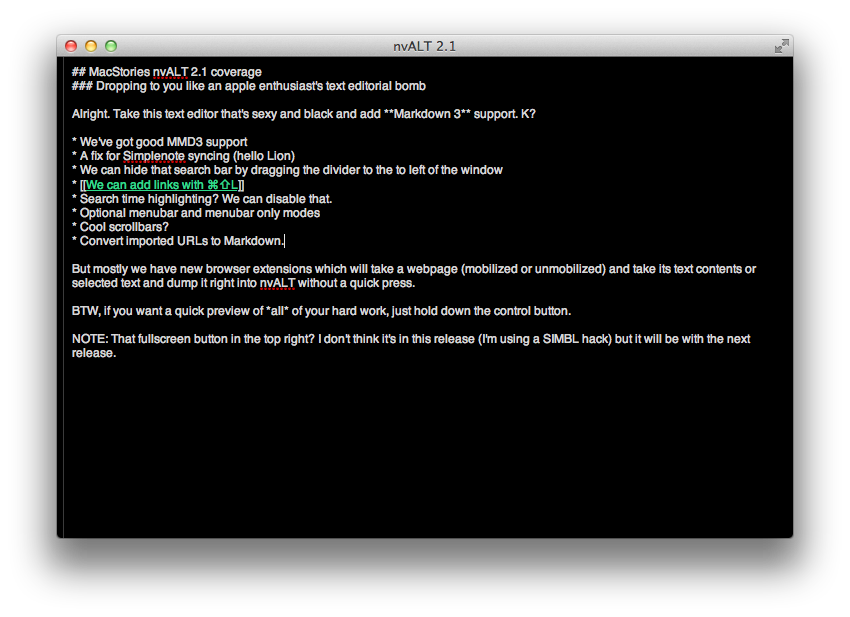
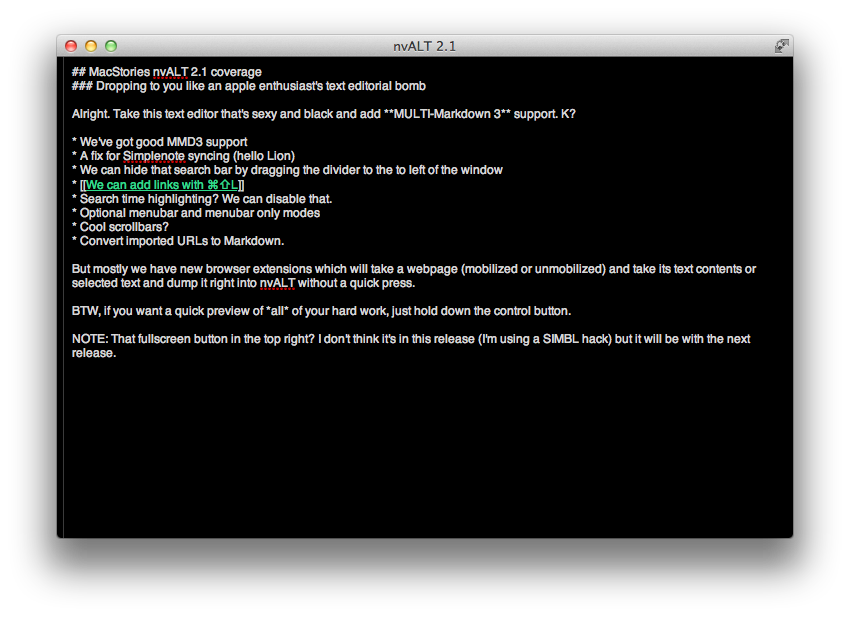
A lot of hard work has gone into the latest release of nvALT, including better Multi-markdown 3 support (MMD3 has to be installed locally of course), a shortcut (⇧⌘L) for inserting links, Simplenote tag sync (which the author notes may choke on large note collections), the ability to pin the preview window when moving across apps (^⌘P then click the pin at the bottom of the window), and Textmate-like auto-pairing that will complete brackets for you as you type. (Pretty nice eh?)

Also available are browser extensions for Safari and Chrome that can get webpages and text into nvALT. The extensions allow you to interact with webpages and links to dumps its textual contents or selection into the text editor — nvALT can run text through Instapaper’s mobilizer to clean up the results as text splashes into view. Personally I’m not so big about dumping webpages into nvALT, but the extensions are available to download from elastic threads.

In nvALT’s future, Terpstra promises better Lion support for fullscreen mode (shown in my screenshot but I’m using a SIMBL hack which you can find here),  bouncy scrolling, and more.

You can download nvALT 2.1 and read about all of its features here!


Mac App Store Is Slow? Try This “Fix”

Mac App Store Is Slow? Try This Fix

On Tuesday, I received the new MacBook Air (13-inch, base model) I bought from the Apple online store last week. After I booted it up and entered my personal information, I immediately launched the Mac App Store to re-install all my apps (and I also happened to get free iLife apps in the process). However, I noticed something: the Mac App Store was terribly slow, unusually unresponsive when compared to the same Mac App Store running on my 2008 MacBook Pro and 2009 iMac. I asked on Twitter, and lots of people seemed to share my frustrations with “beachballs”, slow loading times, and general bugginess of the program.

It was strange, because as I said the Mac App Store used to run okay on my two old machines. Apple’s App Stores have never been the fastest or most stable applications for the Mac, but they were acceptable. On my new MacBook Air, the Mac App Store displayed a beachball on launch, quit, and everything in between (including simple actions like loading a new Category). That was until 10 minutes ago, when reader Stu Helm sent me this tip from his personal blog that almost magically fixed my issues with the Mac App Store.

Stu writes:

  • Quit the Mac App Store with Command + Option + Q
  • Open Keychain Access from Applications > Utilities

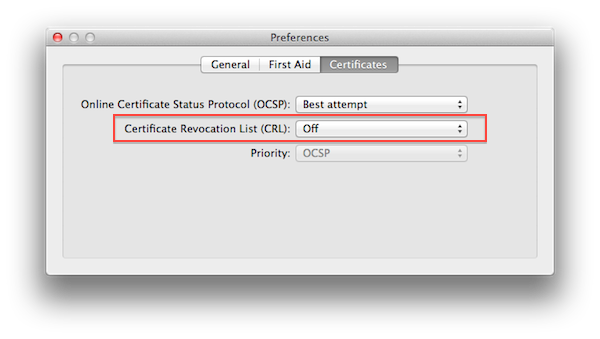
  • Go to Keychain Access > Preferences > Certificates

  • Set ‘Certificate Revocation List (CRL)’ to ‘Off’

  • Quit Keychain Access

  • Relaunch the Mac App Store and you should be set

From a quick search online, I can see this is a rather old fix – I didn’t know about it. Like I said, it worked perfectly on my machine, and now the App Store’s slowness only depends on the speed of my Internet connection. The ‘Certificate Revocation List (CRL)’ was originally set to “Best Attempt” on my MacBook Air, though I have MobileMe Keychain syncing enabled, so I can’t confirm on the default settings in OS X Lion. As for CRL itself, you can read more on Wikipedia.

If your Mac App Store is acting weird, try this fix. Here’s a video of what it looked like before I set CRL to “off”.

Update: Obviously, you’re changing Keychain Access preferences at your own risk. Our only intention is to point out that, security issues aside, changing this preference “fixes” the problem for several users. Other readers are reporting that you can also set Keychain Access’ CRL back to “Best Attempt” after the first Mac App Store launch, and the app will stay “fixed” in the future. Nate Silva posted more information about CRL and the Mac App Store back in April.

Permalink


Add NFC Payment to Your iPhone 4

Add NFC Payment to Your iPhone 4

Jealous of Nexus S users with NFC built into their phones? Want to be able to pay with your iPhone just by tapping it onto those new fancy credit card terminals? If your bank provides smaller credit cards with NFC chips, you can seamlessly add one to your iPhone 4

The current iPhone 4 doesn’t have NFC built in, but you add it via a small modification that’s compatible with your bank of choice. Some banks can issue you an NFC card (with an embedded chip and radio antenna) that can be used to make payments, and if we were as savvy as Unplggd’s Vivian Kim, we’d be placing these cards in-between the battery and the glass back in your iPhone. The hack is “impressive and fun” she writes, and can be a great way to impress your non-geek friends or that gal behind the counter. Even more impressive is the great photo she took showing off just how this works — you’ll have to click through to see how she pulls this great trick off.

Permalink

Your Order Status on the Apple Store Got Prettier Overnight

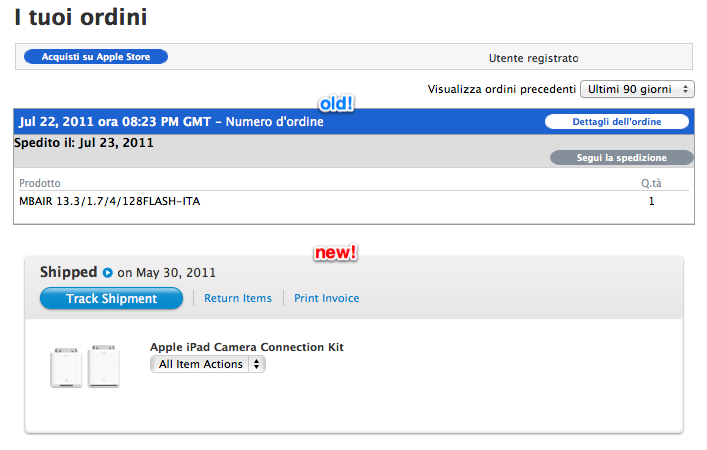
We didn’t have any luck with getting the new order status UI in Italy, but it might be a good thing: we can show you what’s changed overnight in the Apple Store as it went down for a couple of hours. If you haven’t already noticed, Apple has spruced up their order pages to make navigation easier; important buttons are more noticeable (tracking and pre-signing for delivery are big and pushable); orders are accompanied with pictures and full products names instead of weird model identifiers; and now you have access to a drop-down menu so you can return items (but why would you?) and print invoices.

As noted by AppleInsider,

More specifically, the previously-schedule maintenance saw upgrades to the Online Order Status component for the Apple online stores in the U.S., Canada, and Mexico, according to people familiar with the matter. An internal memo regarding the matter distributed on Friday stated that the improvements were designed to “enhance the overall look, feel, and functionality for a better customer experience.”

Just like the update to the support pages, Apple is improving navigation and bringing their site up to speed for 2011.

[via AppleInsider]


Report Claims No New Apple TV In Third Quarter

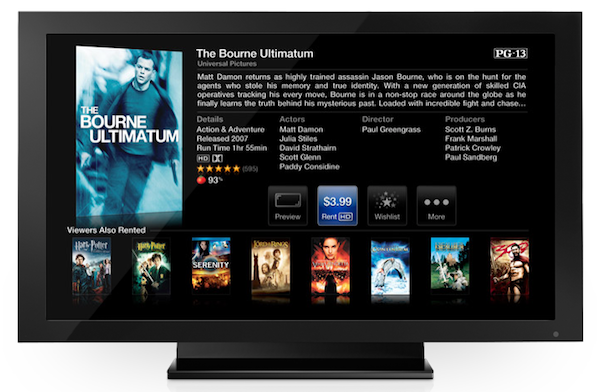
According to a report by Concord Securities analyst Ming-Chi Kuo relayed by AppleInsider, Apple may not release an updated model of the Apple TV in the third quarter, instead focusing on software updates to extend the AirPlay features of the device and make it compatible with the upcoming next-generation iPhone. Earlier this month, AppleInsider reported they had been hearing rumors of a new HD+ format for movie content set to bring full 1080p capabilities to a version of the Apple TV. Such new Apple TV, according to “people familiar with the matter”, would run Apple’s latest A5 chip to bring the necessary horsepower to play 1080p movies without playback issues. However, if Ming-Chi Kuo’s industry checks are to be believed, it appears Apple may instead roll out new version of iOS for the Apple TV, rather than a hardware refresh.

Looking ahead to the second half of the year, Kuo said his industry checks have turned up no evidence that Apple plans push a hardware revision to the Apple TV into production during the third quarter. Instead, the Cupertino-based company will reportedly take a more measured approach to advancing the platform in 2011, relying instead on an Apple TV Software Update this fall that will allow devices such as the iPad 2 and upcoming iPhone 5 to beam their content to the big-screen.

Apple doesn’t disclose exact sales numbers of iPod touches and Apple TVs, but Ming-Chi Kuo believes the company sold approximately 480,000 units in the second quarter. In the past months, the second-generation Apple TV has proven to be a successful “hobby” for the company: whilst Tim Cook at the Q3 earnings call said they still don’t consider the Apple TV “another leg of the stool”, in the first three months of availability the Apple TV sold over 1 million units, with allegedly 2 million units placed by April 2011. Meanwhile, similar Internet-connected devices failed to capture the attention of the market partly because of non-competitive prices and lack of streaming features – whereas the Apple TV can stream movies and TV shows using iTunes, and can be integrated with iOS devices thanks to AirPlay. Apple is indeed baking a new feature into iOS 5 that will allow users to beam the full contents of an iPad’s screen to the Apple TV, thus making it an interesting solution for wireless gaming and business presentations. Most recently, Netflix CEO Reed Hastings said the Apple TV was “more important” for them as Netflix keeps expanding to new devices, and an experiment by Mac Mini Vault successfully managed to host a webpage on a jailbroken Apple TV 2nd gen.


New Macs Give Users iPhoto, iMovie, GarageBand For Free On All Macs

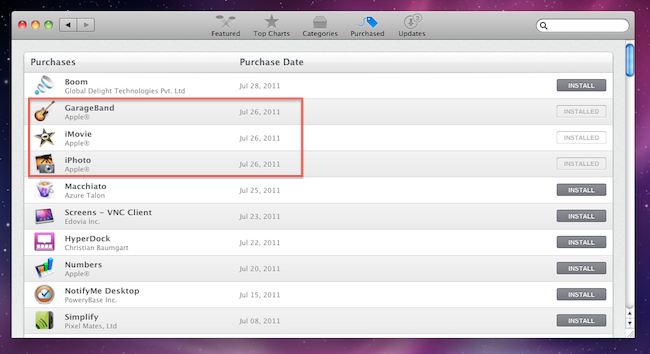
When I received my new MacBook Air three days ago, I immediately launched the Mac App Store to re-download all my apps with a few clicks thanks to Apple’s unified solution that makes it easy to get all the software you already own on a new machine. As I headed over the Purchased tab, however, I noticed downloads for three iLife ‘11 apps – iPhoto, iMovie, and GarageBand – automatically started in the background. With new Mac purchases, in fact, it turns out Apple is giving away the iLife suite as standalone apps available on the Mac App Store. Normally, these apps would set you back $14.99 each – instead, I got them for free on my new MacBook Air with OS X Lion pre-installed.

As reported by Macworld, the new Mac Minis and MacBook Airs released on July 20th come with the latest versions of OS X and iLife bundled for free. Owners of Macs purchased between June 6 and July 20 can request a copy of OS X Lion through Apple’s Up-to-Date program, whilst the Minis and Airs released two weeks ago already have Lion, but don’t have a physical copy or backup of the OS in the box. This is because Apple will start selling a Lion USB Thumb Drive at $69 in August, and Lion automatically creates a Recovery HD partition that, among other things, allows you to re-install the operating system via an online system that, through a series of security, hardware and Apple ID checks, pulls Lion directly from Apple’s servers.

The iLife apps users will receive with a new Mac, however, can easily be “ported” to an old Snow Leopard installation through the Mac App Store. Once the apps are downloaded and tied to your account, the usual Mac App Store licensing terms apply: apps can be downloaded on any of your Macs authorized with your Apple ID. And because these apps are not exclusive to Lion, they’ll appear in the Purchased tab on a Snow Leopard’s Mac App Store.

The iLife license you get when you set up one of the latest Macs is no different. Which means that if you haven’t yet gotten around to upgrading to iLife ’11, buying a new Mac mini or MacBook Air essentially gets you iPhoto, iMovie, and GarageBand for all your Macs running OS X 10.6.6 or later (since you need at least that version of Snow Leopard to run the Mac App Store). And this isn’t sneaky or dishonest—it’s right there in the Mac App Store’s software license.

Obviously, these free downloads won’t include digital versions of iWeb and iDVD, which are not available on the Mac App Store. Apple had previously announced its intention to discontinue iWeb, suggesting existing users to find an alternative solution to host their iWeb-designed websites.


Apple Using Smaller, Cheaper Thunderbolt Controller In New MacBook Airs

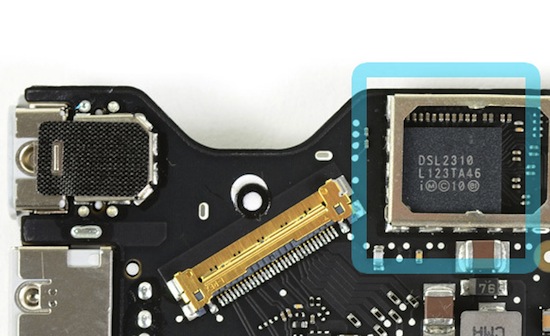
As noted by AnandTech, Apple is using smaller and cheaper Thunderbolt controllers in the new MacBook Airs released on July 20th alongside new Mac Minis, OS X Lion, and the Thunderbolt Cinema Display. The website notes, whereas the 2011 MacBook Pros, iMacs and Mac Minis use Thunderbolt controllers codenamed “Light Ridge” with four bi-directional channels at 10 Gbps (thus achieving 80 Gbps aggregate bandwidth), the smaller chip implemented in the MacBook Air, called Eagle Ridge, is a scaled-down version with access to two channels. Furthermore, whilst Light Ridge comes with up to two DisplayPort outputs, the MacBook Air’s Thunderbolt controller has only one DisplayPort output.

Eagle Ridge is available in two form factors (normal and SFF) and is effectively half of a Light Ridge chip. That means you only get two Thunderbolt channels and one DP output.

Presumably to cut down costs, save motherboard space and have a better impact on battery life, Apple decided to use a smaller version of the Thunderbolt controller that made its first appearance in February on the new MacBook Pros, first to feature the Thunderbolt technology co-developed by Apple and Intel and originally named Light Peak. It was previously reported high production costs of Thunderbolt ports could be the reason behind relatively slow adoption by third-party accessory makers. Currently only a series of high-end RAID configurations are available on the Apple online store and Apple’s own Thunderbolt Display is set to ship sometime next month. You can read more about Thunderbolt here.

[via AnandTech - image: iFixit]