
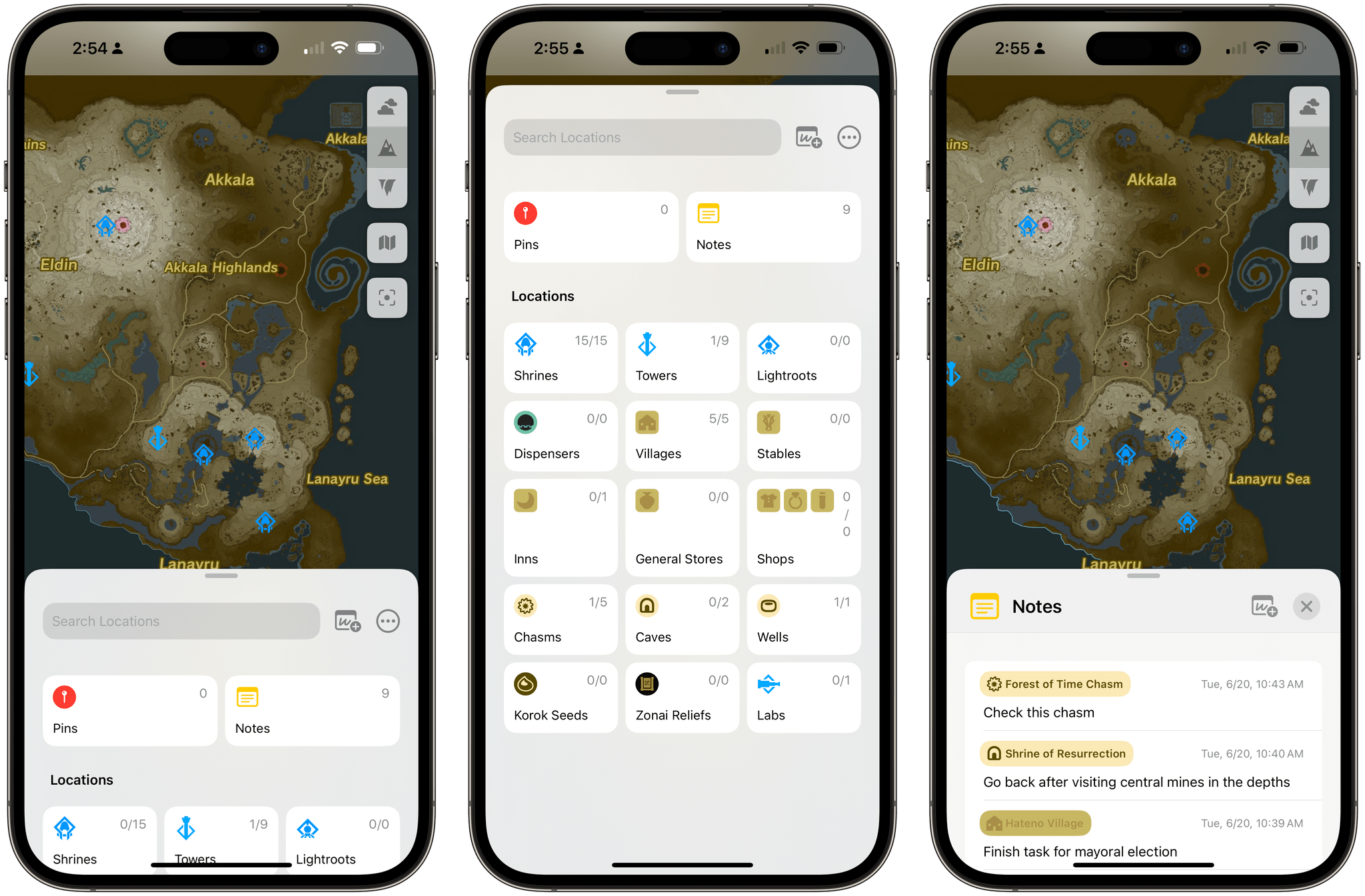
If your summer’s going to be anything like mine, some of these things should sound familiar: you’re going to play around with the iOS and iPadOS 17 betas and get on some TestFlights for third-party apps; you’re going to spend some time at the beach or perhaps even travel abroad; and you’ll still be playing through The Legend of Zelda: Tears of the Kingdom, which is a ridiculously massive game well worth waiting six years for. If the latter scenario applies to your life right now and in the near future, you’ll want to install TotK Travel Guide, which came out earlier this week for iPhone and iPad.
Posts in reviews
Tears of the Kingdom Travel Guide Is the Ideal iPhone and iPad App to Keep Track of Your Zelda Adventures

Access Extra Content and Perks
Founded in 2015, Club MacStories has delivered exclusive content every week for nearly a decade.
What started with weekly and monthly email newsletters has blossomed into a family of memberships designed for every MacStories fan.
Club MacStories: Weekly and monthly newsletters via email and the web that are brimming with apps, tips, automation workflows, longform writing, early access to the MacStories Unwind podcast, periodic giveaways, and more;
Club MacStories+: Everything that Club MacStories offers, plus an active Discord community, advanced search and custom RSS features for exploring the Club’s entire back catalog, bonus columns, and dozens of app discounts;
Club Premier: All of the above and AppStories+, an extended version of our flagship podcast that’s delivered early, ad-free, and in high-bitrate audio.
Detail Duo and Detail for Mac: A Modern, Machine Learning-Powered Approach to Video
It’s harder than ever to push Apple devices to their limits. Sure, some apps and workflows will do it, but for everyday tasks, Apple silicon has opened a gap between hardware and software that we haven’t seen in a while.
The transformation was gradual with the iPhone and iPad compared to the sudden leap the Mac took with the M1, but the result is the same. There are fewer and fewer apps that push Apple’s chips to the max.
That’s beginning to change with the focus on machine learning and Apple silicon’s Neural Engine. While pundits fret over Apple’s lack of an AI chatbot, developers are building a new class of apps that use local, on-device machine learning to accomplish some pretty amazing feats on all of Apple’s devices.
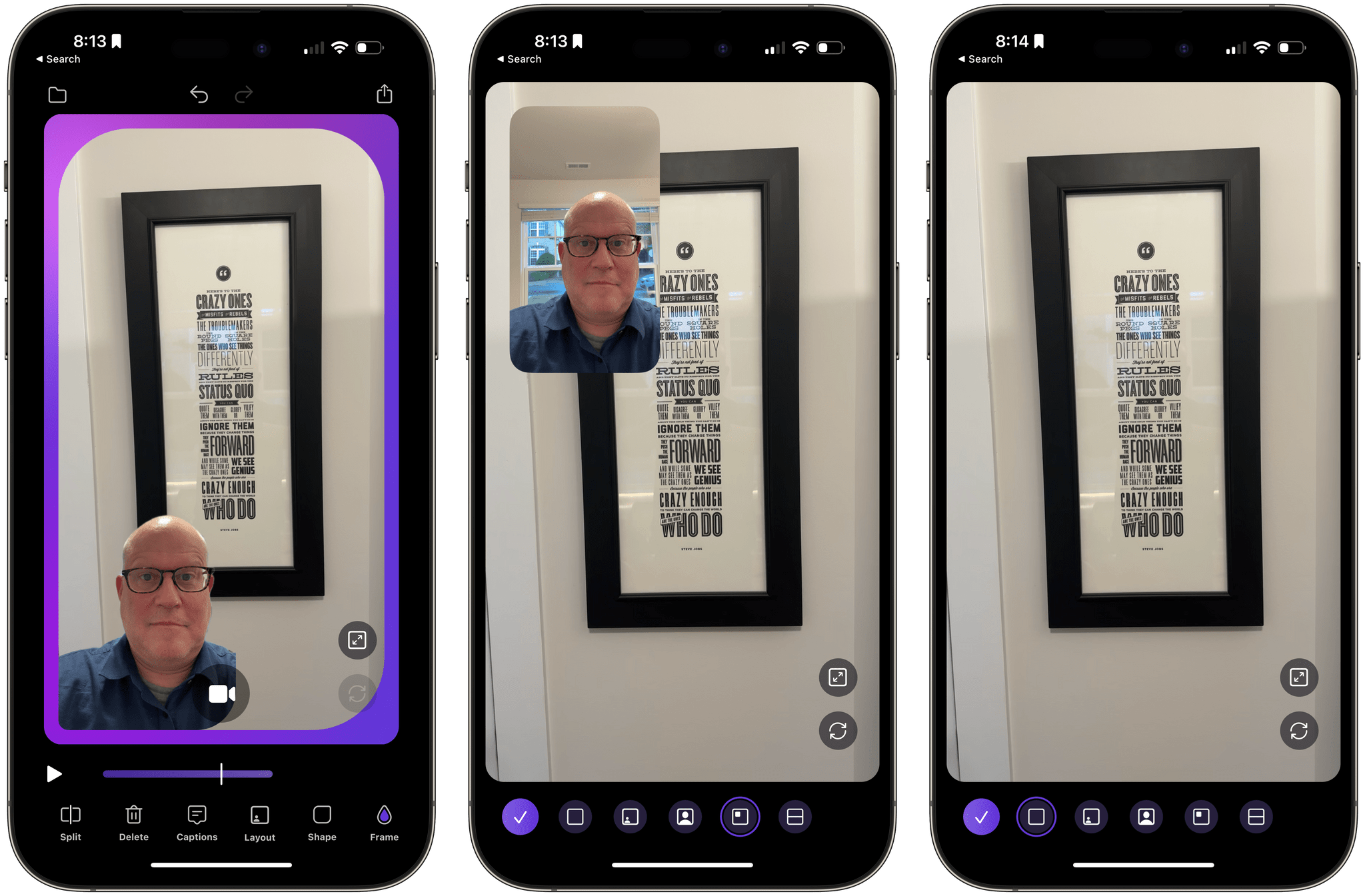
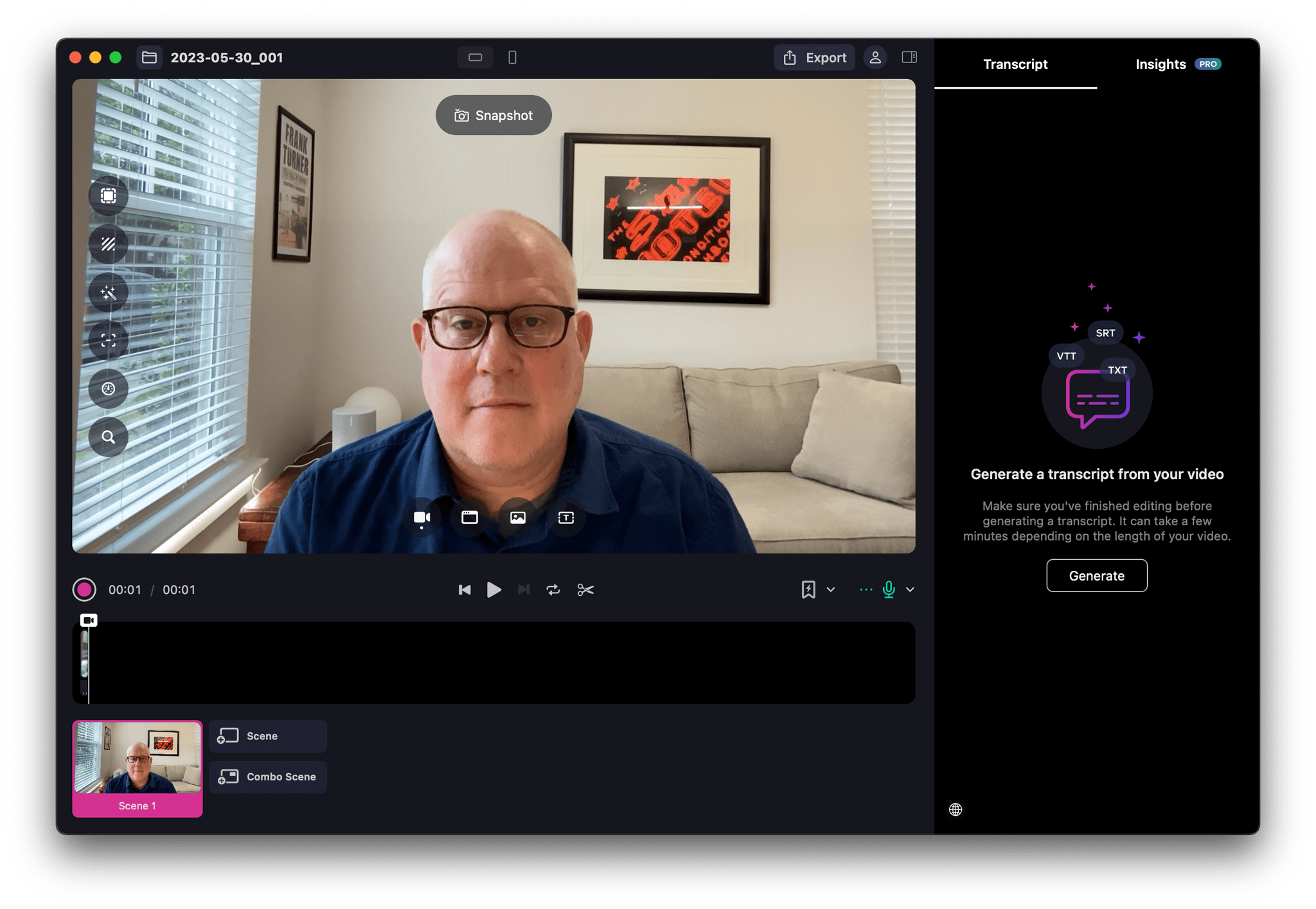
Great examples of this are the apps by Detail, an Amsterdam-based startup. Detail has two apps: Detail Duo, an iPhone and iPad video production app, and Detail for Mac, which does something similar but with a focus on multi-camera setups more suitable to a desktop environment.
As I explained in my Final Cut Pro for iPad first impressions story last week, I don’t work with much video. However, I’ve been dabbling in video more, and I’ve discovered a story as old as personal computers themselves.
Every hardware advance that creates a huge amount of performance headroom is eventually consumed by the ever-growing demands of apps. That’s just as true with Apple silicon as it was for other chip advances. What seemed like more power than average consumers would ever need quickly becomes a necessity as apps like Detail Duo and Detail push that hardware to its limits.
It’s these sorts of advances that I find incredibly exciting because when they’re coupled with intuitive, well-designed apps, they open up entirely new opportunities for users. For Detail, that means simplifying and democratizing video production that would have been out of reach of most users not that long ago, expanding access to video as a creative outlet.
Before digging into these apps further, though, you should know that my son Finn is on the team building Detail and Detail Duo. That’s one of the reasons I’ve known about and followed these apps for a long time now. I figured that’s context readers should know.
Access Extra Content and Perks
Founded in 2015, Club MacStories has delivered exclusive content every week for nearly a decade.
What started with weekly and monthly email newsletters has blossomed into a family of memberships designed for every MacStories fan.
Club MacStories: Weekly and monthly newsletters via email and the web that are brimming with apps, tips, automation workflows, longform writing, early access to the MacStories Unwind podcast, periodic giveaways, and more;
Club MacStories+: Everything that Club MacStories offers, plus an active Discord community, advanced search and custom RSS features for exploring the Club’s entire back catalog, bonus columns, and dozens of app discounts;
Club Premier: All of the above and AppStories+, an extended version of our flagship podcast that’s delivered early, ad-free, and in high-bitrate audio.
Mimestream: The Perfect Email App for Gmail Users on the Mac
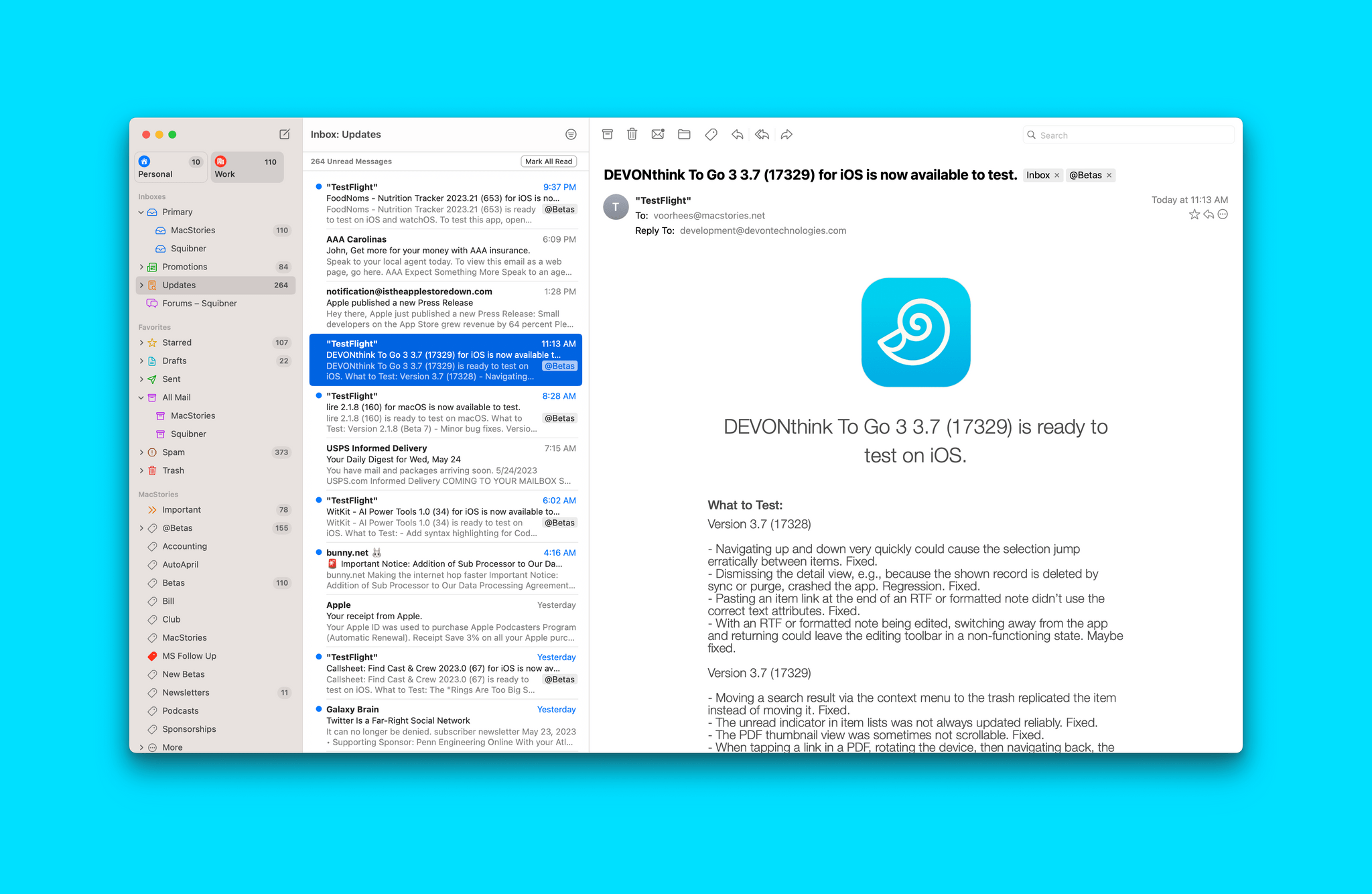
I’m going to straight-up spoil this review for you at the top. If you primarily use Gmail and work on a Mac, you should try Mimestream now. It offers the core Gmail experience wrapped in a thoughtfully designed native Mac app. If you spend a lot of time on other devices or have non-Gmail accounts, the call is tougher, but that’s exactly my situation, and I think Mimestream is still the best Mac email choice for most people. Here’s why.
I have four primary email accounts. Two are work-related, and two are personal. All but my iCloud email are connected to Gmail, which makes me a pretty strong candidate for Mimestream, which launched this week after a couple years in beta.
I’ve been using Mimestream on and off for over a year, returning to it in late January after briefly trying Missive. What drew me back to Mimestream was the app’s native design, tight integration with Gmail, and open roadmap. The app doesn’t have everything I want from an email client. However, because I handle most of my email on the Mac and most of what I’d like to see Mimestream incorporate is planned or under consideration for future updates, it’s become how I manage most of my email.
Access Extra Content and Perks
Founded in 2015, Club MacStories has delivered exclusive content every week for nearly a decade.
What started with weekly and monthly email newsletters has blossomed into a family of memberships designed for every MacStories fan.
Club MacStories: Weekly and monthly newsletters via email and the web that are brimming with apps, tips, automation workflows, longform writing, early access to the MacStories Unwind podcast, periodic giveaways, and more;
Club MacStories+: Everything that Club MacStories offers, plus an active Discord community, advanced search and custom RSS features for exploring the Club’s entire back catalog, bonus columns, and dozens of app discounts;
Club Premier: All of the above and AppStories+, an extended version of our flagship podcast that’s delivered early, ad-free, and in high-bitrate audio.
Ivory for Mac Review: Tapbots’ Superb Mastodon Client Comes to Apple Desktops and Laptops
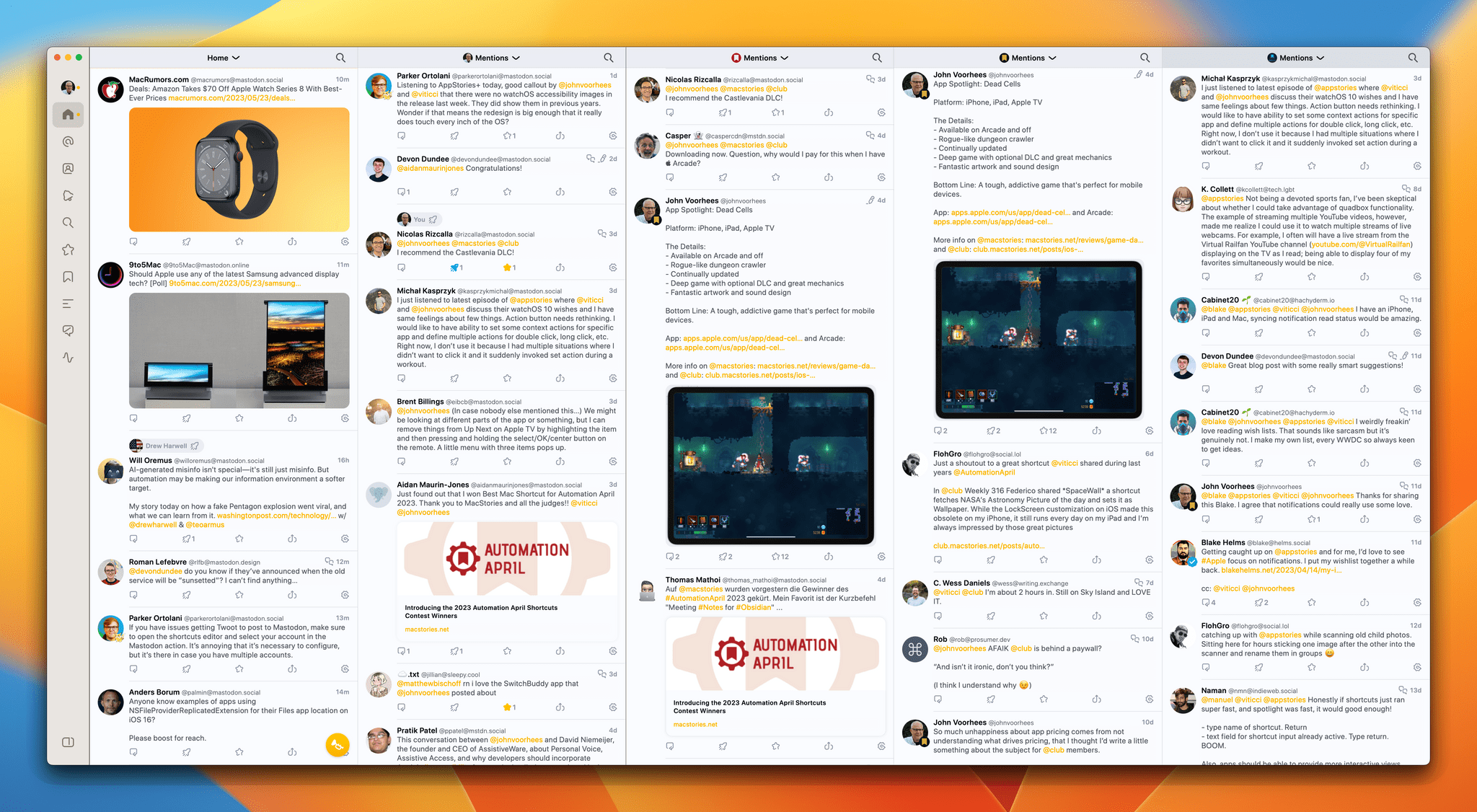
Ivory, Tapbots’ Mastodon client, is now available on the Mac, and like its iOS and iPadOS counterparts that Federico reviewed in January, Ivory for Mac is every bit as polished.
A lot has changed since Ivory was released on the iPhone and iPad. At the time, there were hardly any native Mastodon apps for the Mac, so I was using Elk in a pinned Safari tab. That’s changed. There are several excellent native apps now, including Mona, which I reviewed earlier this month. What Ivory brings to the growing field of native apps is what we saw with iOS and iPadOS: impeccable taste and snappy performance that few other apps can match.
By now, most MacStories readers are probably familiar with the table stakes features for Mastodon clients. Ivory ticks all of those boxes. Also, if you’ve already tried Ivory for iOS or iPadOS, you’ve got a big head start on the Mac app because they’re very similar. However, if you’re new to Ivory, I encourage you to check out Federico’s review of Ivory for the iPhone and iPad because I’m not going to cover that same ground again. Instead, I want to focus on the Mac version’s unique features and the details that make it such a compelling choice for Mac users.
Access Extra Content and Perks
Founded in 2015, Club MacStories has delivered exclusive content every week for nearly a decade.
What started with weekly and monthly email newsletters has blossomed into a family of memberships designed for every MacStories fan.
Club MacStories: Weekly and monthly newsletters via email and the web that are brimming with apps, tips, automation workflows, longform writing, early access to the MacStories Unwind podcast, periodic giveaways, and more;
Club MacStories+: Everything that Club MacStories offers, plus an active Discord community, advanced search and custom RSS features for exploring the Club’s entire back catalog, bonus columns, and dozens of app discounts;
Club Premier: All of the above and AppStories+, an extended version of our flagship podcast that’s delivered early, ad-free, and in high-bitrate audio.
MusicSmart 2.0: Dig Into Music Discovery
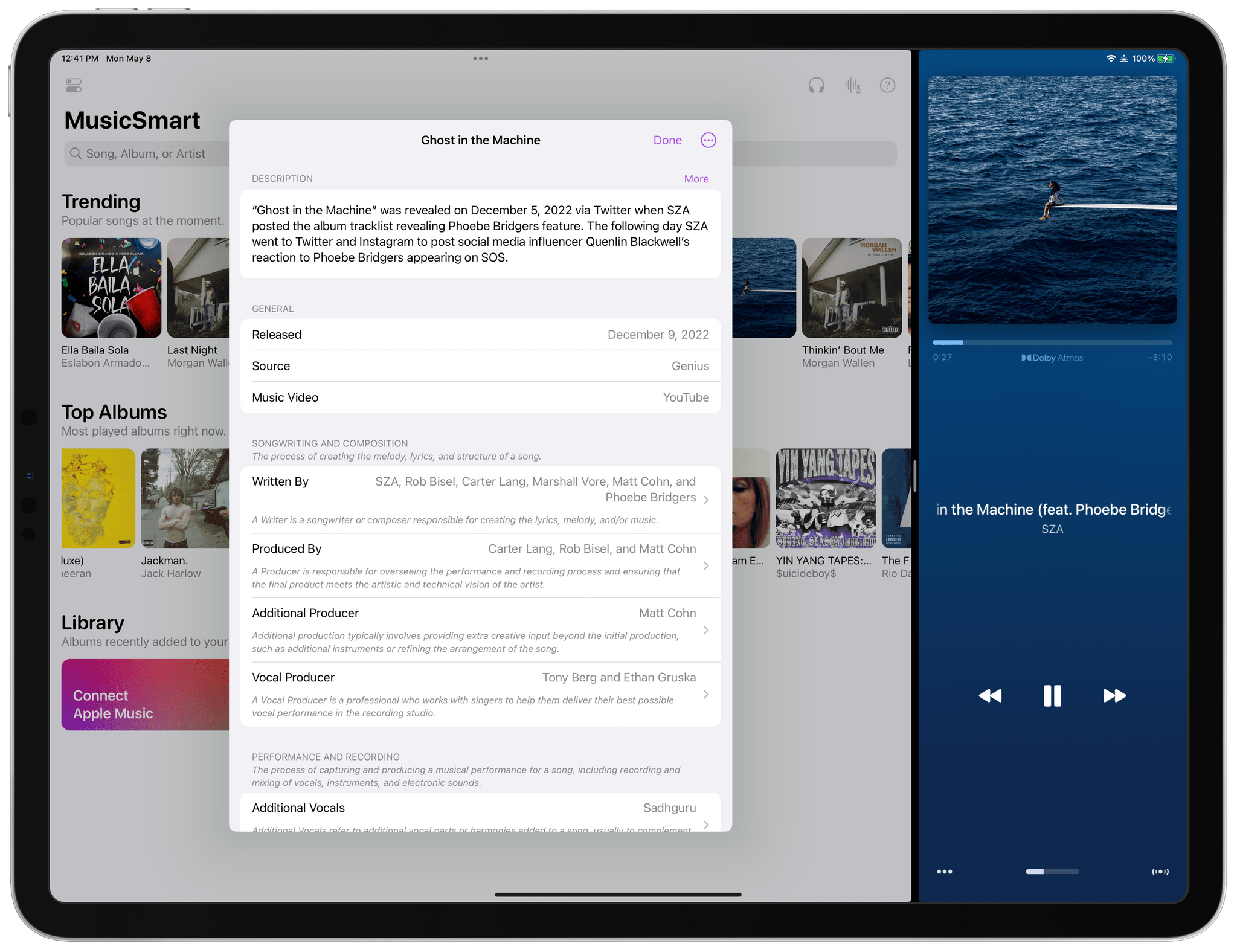
It’s no secret that we’re big fans of Marcos Tanaka’s music apps at MacStories. MusicHarbor makes keeping up with new and upcoming releases a breeze, and MusicBox ensures you won’t lose track of music that you don’t have time to enjoy until later. The apps are indispensable for music fans who follow a long list of artists.
MusicSmart, which is available for the iPhone, iPad, Mac, and Apple TV, is a little different than Tanaka’s other apps. Instead of casting a broad net to track the entire range of your musical tastes, the app is about digging deeper into individual songs, albums, or artists’ catalogs. But follow the threads offered by MusicSmart, and the narrow focus that sets it apart from Tanaka’s other apps will paradoxically lead to new musical discoveries and, ultimately, broaden your tastes.
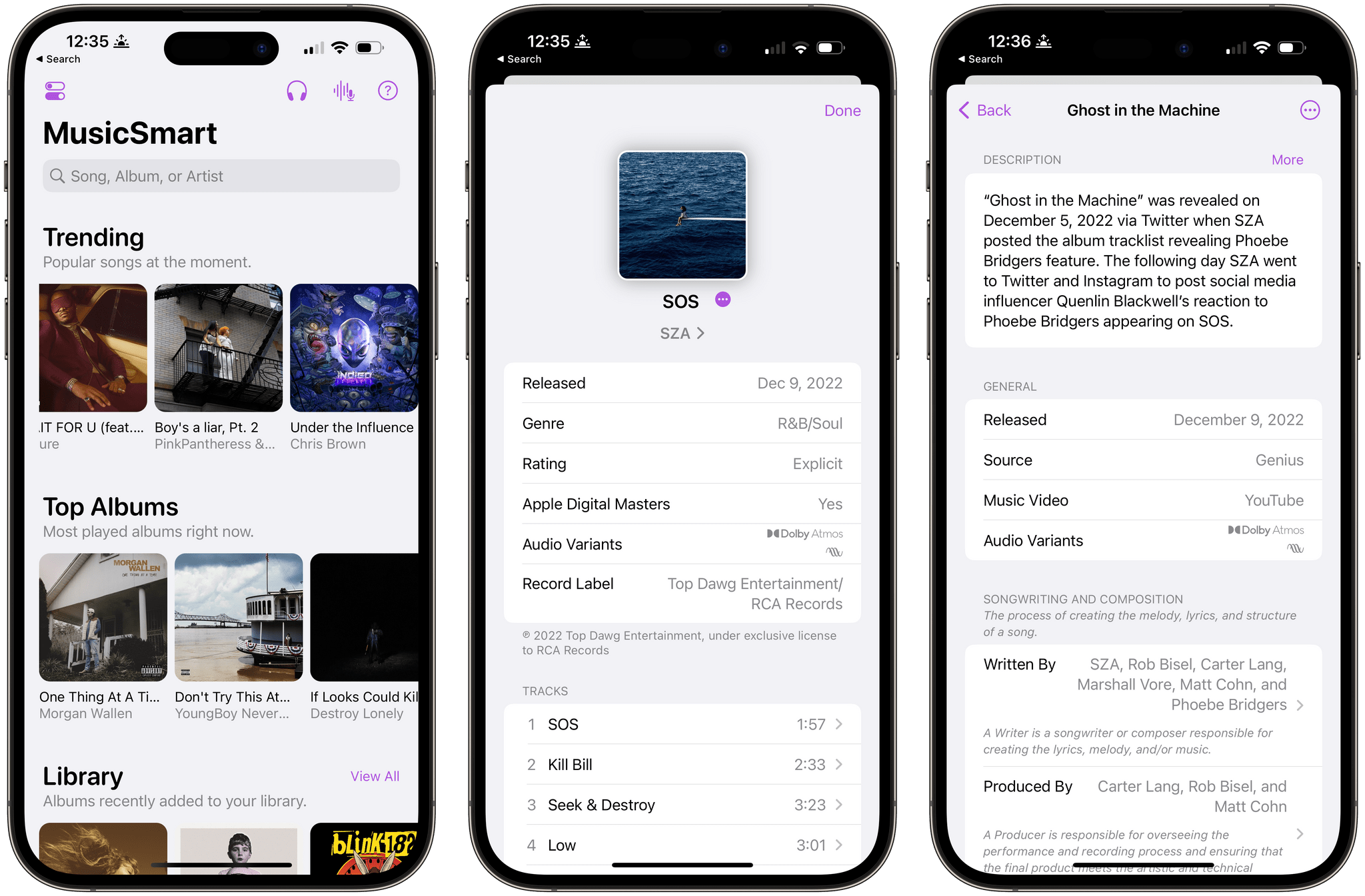
As Federico explained in his review of MusicSmart’s debut:
Whether by design or as a byproduct of our new habits, metadata and credits don’t play a big role in modern music streaming services. We’re frustrated when a service gets the title of a song wrong or reports the incorrect track sequence in an album, but we don’t consider the fact that there’s a world of context and additional information hidden behind the songs and albums we listen to every day. That context is entirely invisible to us because it’s not mass-market enough for a music streaming service. There have been small updates on this front lately, but by and large, credits and additional track information are still very much ignored by the streaming industry. And if you ask me, that’s a shame.
Despite stiff competition among music streaming services, the state of liner notes hasn’t improved since Federico wrote that. Fortunately, though, MusicSmart has only gotten better, adding new data sources, better organization, and more polish with each release. However, version 2.0 of the app combines its existing strengths with new features and an improved design in a way that transcends earlier versions, making this version 2.0 of MusicSmart feel more fully realized than ever before.
Access Extra Content and Perks
Founded in 2015, Club MacStories has delivered exclusive content every week for nearly a decade.
What started with weekly and monthly email newsletters has blossomed into a family of memberships designed for every MacStories fan.
Club MacStories: Weekly and monthly newsletters via email and the web that are brimming with apps, tips, automation workflows, longform writing, early access to the MacStories Unwind podcast, periodic giveaways, and more;
Club MacStories+: Everything that Club MacStories offers, plus an active Discord community, advanced search and custom RSS features for exploring the Club’s entire back catalog, bonus columns, and dozens of app discounts;
Club Premier: All of the above and AppStories+, an extended version of our flagship podcast that’s delivered early, ad-free, and in high-bitrate audio.
Snowman’s Laya’s Horizon Takes Flight
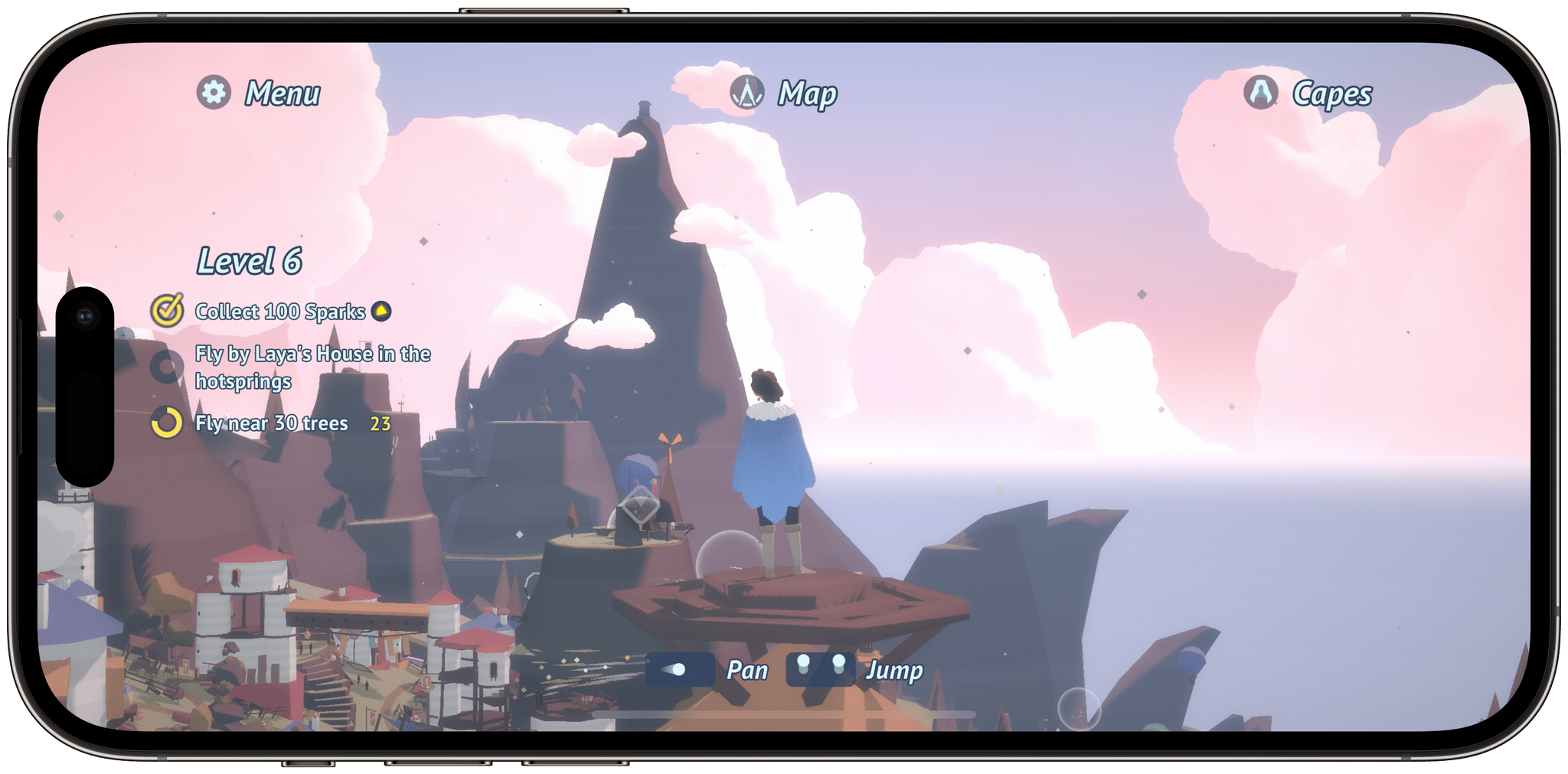
There’s a lot to like about Laya’s Horizon, the brand-new mobile game from Snowman that’s available today on iOS, iPadOS, and Android via Netflix. However, it’s the game’s control scheme that elevates it to unique heights. Laya is by no means the first game to employ a simple two-finger control scheme. But, it’s the best I’ve tried, enabling a surprisingly deep and intimate gaming experience. Combined with Snowman’s excellent taste and attention to detail, Laya’s Horizon is incredibly fun and a game you won’t want to miss.
I got an early glimpse of Laya’s Horizon in early 2019, sitting on the floor of a Marriott in San Francisco during the Game Developer Conference. That feels like a lifetime ago, but it should give you a sense of how much work has gone into the game. What I saw in 2019 was a very early demo, but even watching someone else control the game, the sense of flight was palpable. With the game in my own hands, that sense became tangible instantly.
Laya’s Horizon is played in landscape orientation. You’re Laya, who has just earned her first cape for flying. The game kicks off with a tutorial that walks you through the mechanics of flying around its 3D map from a third-person perspective. Slide your thumbs down together to climb, up to dive, together for a boost of speed, apart to parachute down, and one up and the other down to bank left and right. It takes a bit of practice to get good at flying, but the tutorial does a nice job of walking you through the basics without overdoing it and becoming boring. As you play, if you seem to be struggling with a maneuver, on-screen reminders appear to help you along the path to mastering flight.

Those simple on-screen controls coupled with haptic feedback on the iPhone create a connection with what’s happening on the screen that’s remarkable. Before long, I found myself flying high over forests, diving into ravines, buzzing along the island’s shoreline, and bouncing off hot air balloons. There’s a lot more to Laya’s Horizon, but I expect that the simple act of flying around the game’s island will be more than enough of a hook to bring players back for more.
Aside from the joy of soaring through the sky, Laya’s Horizon offers a variety of challenges, races, and missions to level up your skills, collect new capes, and meet new islanders known as Windfolk. Alternating those activities with flying around the island, taking in the diverse scenery and enjoying the game’s excellent sound design and music, creates a soothing, relaxing experience reminiscent of Snowman’s Alto’s Adventure.

What’s very different from a game like Alto’s Adventure is that Laya’s Horizon is an open, 3D environment. The island’s map is revealed in stages as you explore and complete missions, opening up areas like the top of a mountain from which you can reach any other point. There are no restrictions on where you can travel, but missions and other activities are clearly marked, so there’s always something to do within your field of view as you explore. In all, there are 50 missions, 40 levels, and over 100 collectibles to find along the way, which is more than enough to keep you enjoying Laya’s Horizon for quite a while.
Races are one of my favorite parts of Laya’s Horizon. You’re shown the path from the finish line to the start and then compete with NPCs. Along the way are checkpoints you need to fly through, which act as loose directional signposts to keep you on the correct path. Flying close to the ground, through tight spots, and other risky maneuvers lets you collect sparks, which can be used to temporarily boost your speed during races, rewarding you for doing more than just floating above the fray.

Laya’s Horizon is a real treat to play. The game maintains a careful balance that allows players to dip into it for a short mission or get lost in its beauty for longer stretches. The result is a delightfully relaxing, fun-filled experience that I expect a lot of people will enjoy.
Laya’s Horizon is free to download from the App Store and play for anyone with a subscription to Netflix.
Access Extra Content and Perks
Founded in 2015, Club MacStories has delivered exclusive content every week for nearly a decade.
What started with weekly and monthly email newsletters has blossomed into a family of memberships designed for every MacStories fan.
Club MacStories: Weekly and monthly newsletters via email and the web that are brimming with apps, tips, automation workflows, longform writing, early access to the MacStories Unwind podcast, periodic giveaways, and more;
Club MacStories+: Everything that Club MacStories offers, plus an active Discord community, advanced search and custom RSS features for exploring the Club’s entire back catalog, bonus columns, and dozens of app discounts;
Club Premier: All of the above and AppStories+, an extended version of our flagship podcast that’s delivered early, ad-free, and in high-bitrate audio.
Mona: A Unique Mix of Customization Options and Features You Won’t Find in Any Other Mastodon App
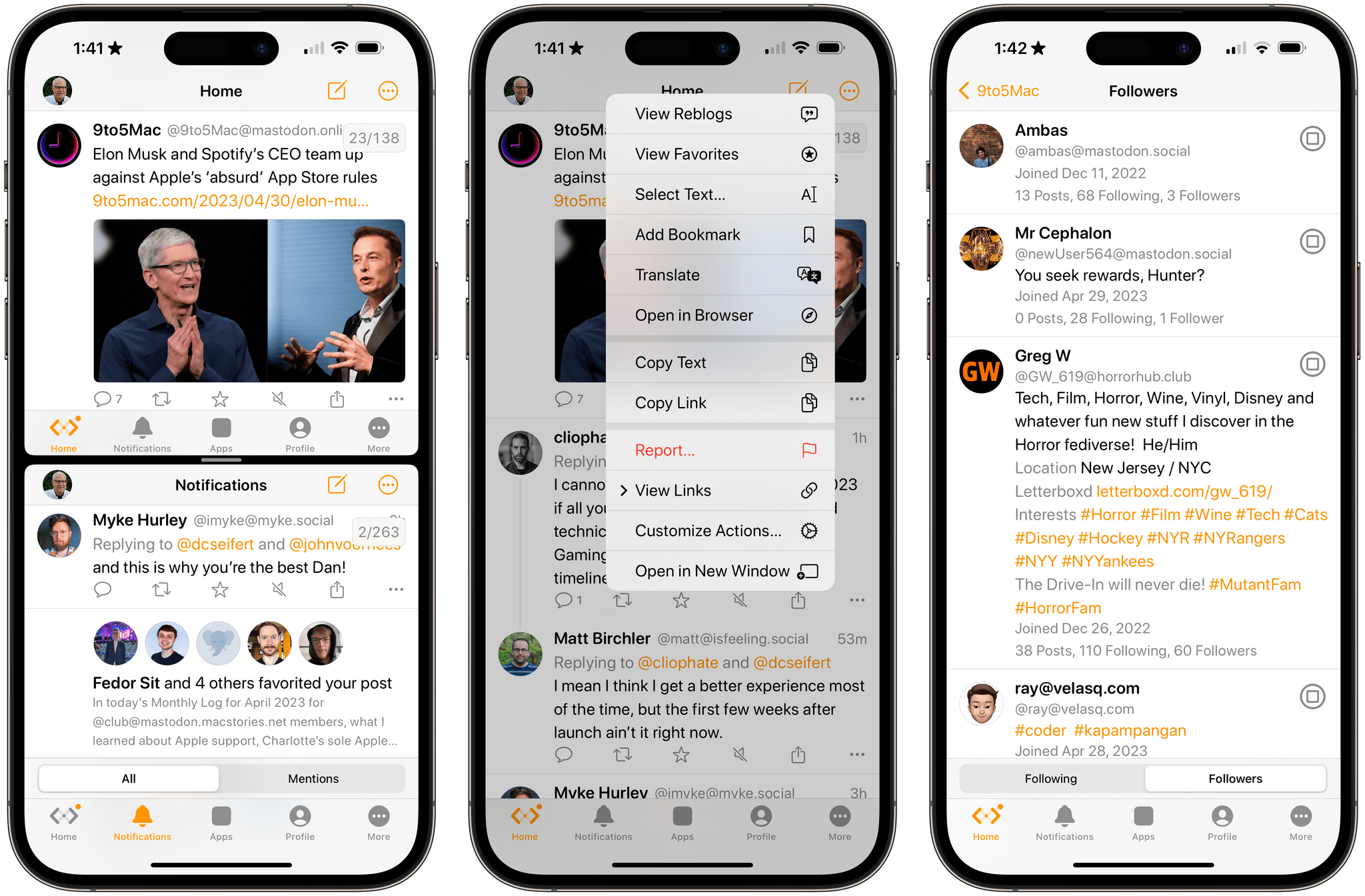
Mona is a brand new, highly customizable Mastodon client from Junyu Kuang, the developer of Spring, which is one of the few remaining third-party Twitter clients that still works and pioneered many of the features found in Mona. Mona, which is available on the iPhone, iPad, and Mac, is a power-user app through and through. The app has a dizzying array of settings for customizing the entire Mastodon experience. If, like me, you enjoy the sort of tinkering that Mona enables, you’ll absolutely love this app.
Access Extra Content and Perks
Founded in 2015, Club MacStories has delivered exclusive content every week for nearly a decade.
What started with weekly and monthly email newsletters has blossomed into a family of memberships designed for every MacStories fan.
Club MacStories: Weekly and monthly newsletters via email and the web that are brimming with apps, tips, automation workflows, longform writing, early access to the MacStories Unwind podcast, periodic giveaways, and more;
Club MacStories+: Everything that Club MacStories offers, plus an active Discord community, advanced search and custom RSS features for exploring the Club’s entire back catalog, bonus columns, and dozens of app discounts;
Club Premier: All of the above and AppStories+, an extended version of our flagship podcast that’s delivered early, ad-free, and in high-bitrate audio.
Automation April: Hyperduck Leverages the Power of URL Schemes to Control Your Mac from an iPhone or iPad
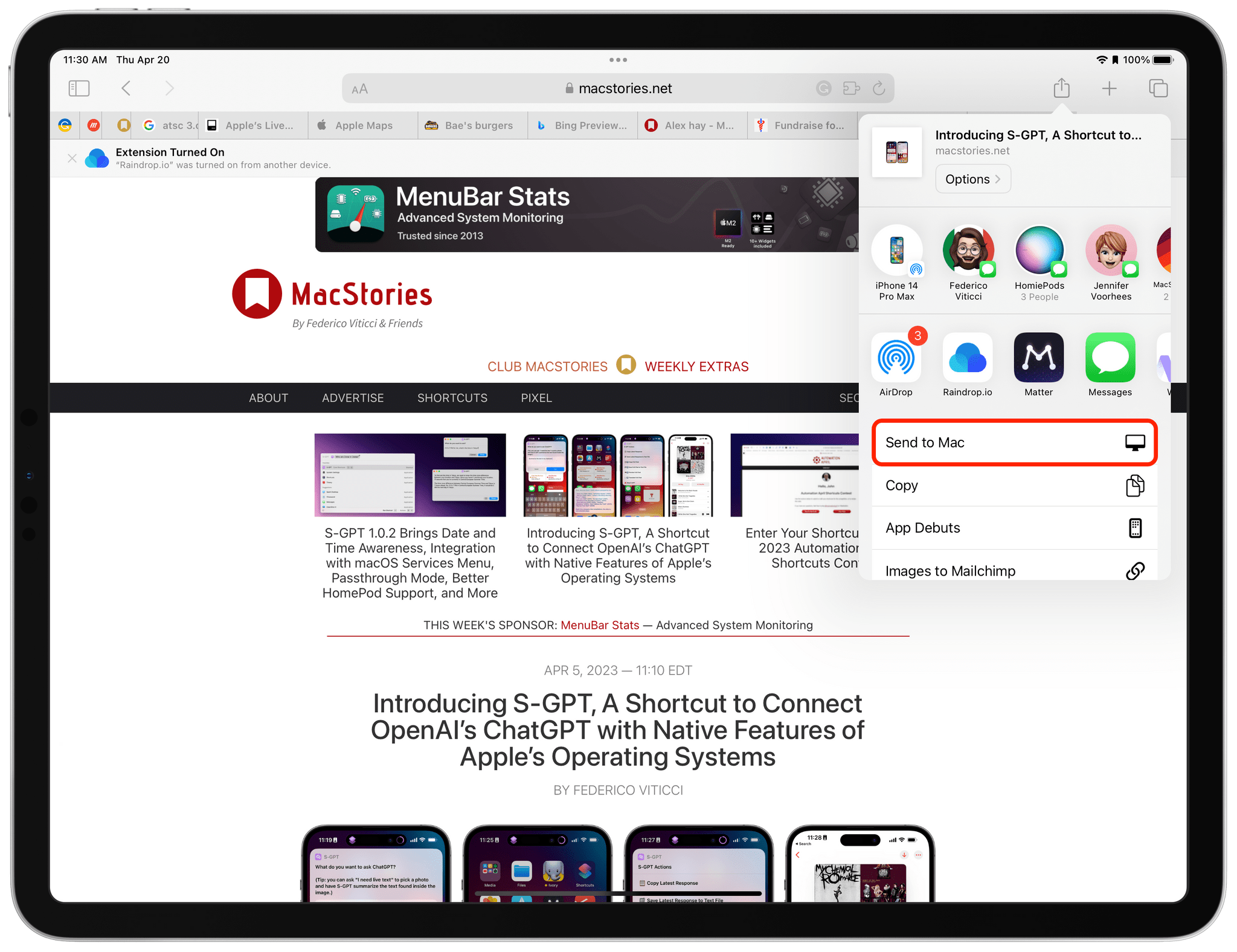
Hyperduck is a recent utility from Sindre Sorhus for sending URLs from an iPhone or iPad to your Mac that has some very interesting applications. Hyperduck hasn’t replaced my use of AirDrop, Handoff, and other Apple technologies that move data between devices, but it has extended those features in meaningful ways and has quickly worked its way into my everyday computing life.
Hyperduck does just one thing very well. It sends URLs from an iPhone or iPad to a Mac using iCloud. That’s different than how AirDrop works, which has some advantages.
Access Extra Content and Perks
Founded in 2015, Club MacStories has delivered exclusive content every week for nearly a decade.
What started with weekly and monthly email newsletters has blossomed into a family of memberships designed for every MacStories fan.
Club MacStories: Weekly and monthly newsletters via email and the web that are brimming with apps, tips, automation workflows, longform writing, early access to the MacStories Unwind podcast, periodic giveaways, and more;
Club MacStories+: Everything that Club MacStories offers, plus an active Discord community, advanced search and custom RSS features for exploring the Club’s entire back catalog, bonus columns, and dozens of app discounts;
Club Premier: All of the above and AppStories+, an extended version of our flagship podcast that’s delivered early, ad-free, and in high-bitrate audio.
Automation April: The Loupedeck Live S Is a More Portable and Affordable Automation Control Panel for the Mac

In 2021, I reviewed the Loupedeck Live, a programmable control panel for the Mac and Windows PCs for Club MacStories members as part of my Macintosh Desktop Experience column. It’s an excellent device, but its price put it at a disadvantage to a similarly-sized Elgato Stream Deck despite several other advantages that I explained in the review.
Last year, Loupedeck released the Loupedeck Live S, a smaller, more affordable Loupedeck that retains the core experience of the Loupedeck Live, but dispenses with a handful of physical buttons and dials. The new device retails for $189 compared to the Loupedeck Live, which is $269. That’s still $40 more than the 15-button Stream Deck MK.2, but a significantly narrower difference for a device that offers a wider range of functionality, making it worth another look if you were put off by the Loupedeck Live’s price.
Access Extra Content and Perks
Founded in 2015, Club MacStories has delivered exclusive content every week for nearly a decade.
What started with weekly and monthly email newsletters has blossomed into a family of memberships designed for every MacStories fan.
Club MacStories: Weekly and monthly newsletters via email and the web that are brimming with apps, tips, automation workflows, longform writing, early access to the MacStories Unwind podcast, periodic giveaways, and more;
Club MacStories+: Everything that Club MacStories offers, plus an active Discord community, advanced search and custom RSS features for exploring the Club’s entire back catalog, bonus columns, and dozens of app discounts;
Club Premier: All of the above and AppStories+, an extended version of our flagship podcast that’s delivered early, ad-free, and in high-bitrate audio.