Posts in news

JBL’s On Air Wireless AirPlay Speaker Dock Now Shipping

Unofficially revealed by the FCC in December 2010 and teased a few weeks ago by JBL itself with a signup product page, the On Air Wireless speaker dock with AirPlay functionalities is now shipping to Best Buy locations and Apple Stores. We’ve covered the On Air Wireless in the past, but here’s a quick recap: the device has built-in AirPlay support, meaning that it can receive audio from iOS devices, or Macs through iTunes; with the integration of an LCD display, it can also display artists’ information and album artwork for a richer wireless music experience; with the exclusive HALO radial design, it should guarantee an optimal audio quality to send music throughout your room. It is one of the first speakers (let alone speaker / dock) to display metadata coming from AirPlay, but there’s more: the thing has got playback control buttons, a clock with dual alarms to wake you at different times of the day, a digital FM radio and a USB port for firmware updates. It can be yours for $349 – it’s a premium product with lots of functionalities and deep AirPlay integration clearly meant for iOS and Mac users.

Press release below, order page available on the Apple online store. [via Engadget] Read more


Apple Hires Carbon Fiber Expert As Senior Composites Engineer

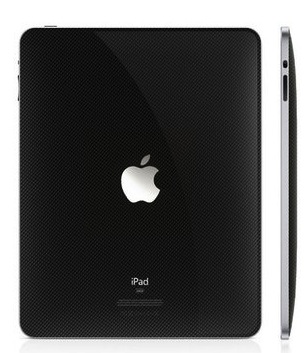
It was yesterday discovered that Apple has discreetly hired Kevin Keeney as a Senior Composites Engineer. What makes this hire interesting is that Keeney is the CEO of a carbon fiber bike designer, Kestrel Bicycles, and has previously worked with Apple on a carbon fiber shell patent in 2009.

There is potential that by making Keeney’s position a permanent one, Apple may be ramping up an effort to produce Apple products with carbon fiber. Like the evolution of using aluminum, which has become a staple in Apple products, the use of carbon fiber could further push its products to even lighter and thinner levels whilst maintaining the strength of aluminum. There are some issues that need to be resolved however, mainly dealing with the cost of carbon fiber compared to aluminum and the reduced ability for heat absorption, which could prove troubling.

Keeney has extensive experience with his 20 years of design work and supply chain management, both of which would be beneficial in any potential job of rolling out a mass-production of carbon fiber based products. It had been falsely rumoured in February that the iPad 2 could potentially replace the aluminum backing of the original with a carbon fiber based one.

[Via 9to5 Mac]


Cracked AirPort Express Key Could Allow AirPlay Streaming To Any Device

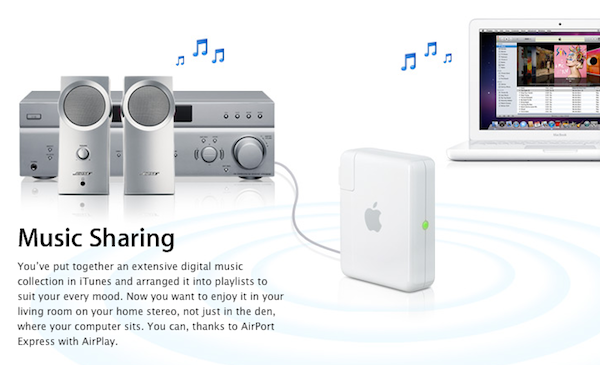
When Apple introduced AirPlay with iOS 4.2, they brought wireless streaming for music and video to iOS devices, as well as iTunes on the desktop thanks to the old AirTunes technology that allowed music streaming to an AirPort Express station connected to speakers with a simple audio jack. After the unification of streaming under the AirPlay name, several hacks in the past months allowed iOS and Mac users to enable streaming on unsupported devices such as iPhones or Macs. Developer James Laird, however, has achieved a different goal than simply activating audio and video receiving functionalities: by reverse engineering the AirPort Express (and thus AirTunes) private key used by Apple to stream audio to external music speakers, he released ShairPort, an open source AirPort Express emulator.

My girlfriend moved house, and her Airport Express no longer made it with her wireless access point. I figured it’d be easy to find an ApEx emulator - there are several open source apps out there to play to them. However, I was disappointed to find that Apple used a public-key crypto scheme, and there’s a private key hiding inside the ApEx. So I took it apart (I still have scars from opening the glued case!), dumped the ROM, and reverse engineered the keys out of it.

The concept behind ShairPort is very simple: instead of enabling streaming from an app to an official AirPlay device from Apple or third-party vendor, Shareport can turn any software or hardware into a wireless music receiver thanks to the cracked private key used by Apple. Being the project open source, virtually anyone could build a hardware receiver or application that streams music just like the AirPort Express station does through the AirTunes protocol.

While it’s very unlikely that manufacturers will adopt this hack to turn their devices into AirPlay receivers (why using the hack when you can just become an official AirPlay partner?), I’m sure we’ll see interesting things on the software end this week. ShairPort can be installed anywhere, opening to the possibility of gaming consoles, computers, or mobile devices gaining AirPlay functionalities previously reserved to the AirPort Express.

Go download ShairPort here. [via MacRumors]


Bloomberg BusinessWeek “Very Pleased” with Apple’s Terms, Releases iPad App with Subscriptions

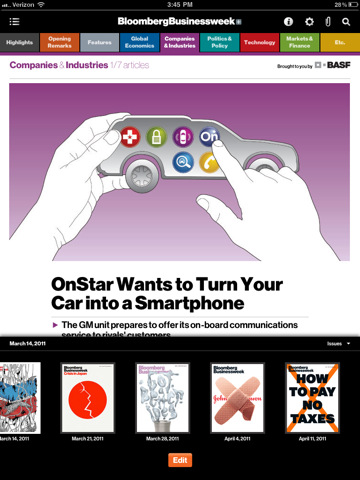
Amidst the debate surrounding Apple’s subscription system for the iTunes Store, Bloomberg BusinessWeek has released an iPad app that implements Apple’s new app subscriptions – and unlike many other publishers that agreed to test them, BusinessWeek’s ones are pretty cheap and attractive. New issues will be released every Thursday with in-app update, they weigh in at around 30 MB (very lightweight, considering other iPad magazines managed to achieve the 500 MB quota with hours of waiting for a download to finish) and they’re priced at $2.99. Print subscribers can get all the issues for free, but if you want to subscribe to the digital edition (with contains all the content of print, plus exclusive articles and rich interactive features) you’ll have to pay $2.99 – not a bad deal if you consider most app subscriptions have been priced at $4.99 and BusinessWeek’s own print edition costs $4.99 per issue. Finally, an iPad app that’s cheaper than its print counterpart, and has more content and automatic updates.

PaidContent reports BBW is also “pleased” with Apple’s subscription terms for publishers. From an interview with Oke Okaro, Bloomberg’s global head of mobile:

We are very pleased with Apple’s terms,” he said in a recent interview. As for being able to glean more information about their readers—something magazine publishers value highly, as it gives them more details with which to attract advertisers and build circulation—Okaro said that there will be a lot opportunities through things like reader surveys to get users to share information willingly.

We recognize that there is overlap among the audience for all versions of BBW and that’s reflected in this app. We’re simply looking at where our audience is going and we’re following.

The BBW iPad app features a video section with a “behind the scenes” look at the feature story from the cover of the magazine; interactive market information by simply tapping on a company’s name within each article; possibility to create a “personal archive” and manage  past issues without affecting the archive. More importantly, the BBW app also comes with a search feature and font resizing options – something that suggests the developers haven’t simply used images to provide static pages, but real text – thus the issues being available at 30 MB from the App Store.

The Bloomberg BusinessWeek app is available now for free in the App Store with in-app subscriptions. The app follows the magazines that implemented subscriptions in February, and anticipates a trend that should grow bigger come the June 2011 deadline – when developers of existing App Store publishing apps will have to enable subscriptions.


Authorized Biography of Steve Jobs Coming Early 2012

Publishing firm Simon & Schuster yesterday revealed that a biography of Steve Jobs is currently being written with an expected release date of early 2012, and unlike previous biographies of Steve Jobs this one has the blessing of Jobs himself. Being written by former Time executive Walter Isaacson and titled ‘iSteve: The Book of Jobs’, it will likely prove to be a fascinating and unprecedented look into the life and mind of Jobs.

Isaacson, who has also written biographies on Benjamin Franklin and Albert Einstein, has interviewed Jobs as well members of his family, co-workers and competitors for the book and was supposedly invited by Jobs for a tour of his childhood home. In a statement the publisher of Simon & Schuster, Jonathon Karp, said that “This is the perfect match of subject and author, and it is certain to be a landmark book about one of the world’s greatest innovators.”

A previously unwelcome biography, ‘iCon Steve Jobs: The Greatest Second Act in the History of Business’ led to Apple banning and removing all books by its publisher, John Wiley & Sons, from Apple’s retail stores.

[Via MacRumors, AppleInsider]


Adobe To Launch 3 New iPad Apps That Highlight Potential of Photoshop Touch SDK

Adobe today announced that it will release Creative Suite 5.5 (a “mid-cycle update”) on May 3 along with three new iPad apps that will complement the full-featured desktop version of Photoshop. The three apps are actually designed as a demo of how developers can take advantage of the new Photoshop Touch SDK (which was released today) and create their own apps that complement and add additional functionality to the desktop version of Photoshop but through an Android, BlackBerry or iOS app.

The three iPad apps; Adobe Color Lava, Adobe Eazel and Adobe Nav will all arrive on May 3rd on the same day as Creative Suite’s 5.5 update goes live.  Adobe Color Lava (priced at $2.99) is in simple terms a digital paint palette that will allow you to mix paints and generate a five-color palette that can be sent to the Photoshop color chip or swatch palette. Adobe Eazel ($4.99) is essentially a basic drawing program (similar to Brushes) that features a unique interface in which by placing 5 fingers on the screen a pop-up menu will appear above each finger, sliding up with the relevant finger will select that menu which will then let you to alter the relevant value (such as color or brush size) . Finally and perhaps most useful is Adobe Nav ($1.99), this app turns the iPad into a dedicated control that has the various tool palettes displayed, selecting a particular tool will select that tool on the desktop version of Photoshop, the app will also let you easily cycle between the various files you may have open in Photoshop.

UPDATE: Shawn Welch has already shown off his third party app that takes advantage of the new Photoshop Touch SDK. His app, Photoshop Remote, allows users to view a live preview thumbnail of any image that is open on a network connected Photoshop client and it can handle multiple clients at once. It even adds a dashboard that replicates a lot of the functionality of the Adobe Nav application including; “tool selection, color selection, filters, adjustment layers, and more.” Jump the break for his video demonstrating the app.

Also after the break is a video demonstrating Adobe Eazel and Adobe Nav apps and jump over to CNet where they wrote a short review of each of the 3 apps, also if you are a developer that is interested in implementing the Photoshop Touch SDK make sure to visit the Adobe Developer Center.

Read more


$200,000 Program Gets Kindergartens iPad 2s & Apps

In the past months, we’ve heard several stories about the iPad being deployed in education with pilot programs aimed at testing the device in educational contexts Apple perhaps didn’t think about in the first place as a possible main focus for the tablet. Many schools all over the world have shown interest in the iPad, mainly thanks to the large selection of software available that makes it easy for teachers to find exactly the apps they need, and for students to be engaged with a great digital experience. Singaporean schools added iPads to their teaching resources, and a $100,000 school program we mentioned last December got every 4th grader at two elementary schools in Hancock Count an iPad full of apps for reading books, doing math, and so forth. Overall, the biggest surprise wasn’t the iPad itself as a technological advancement: rather, it was about how student of every age interacted with it and was willing to learn more through software that impressed teachers, Apple, and bloggers.

Of course there’s more coming. The iPad 2 was released a few weeks ago, and those schools that didn’t have the chance to deploy it in their educational program last year now can have access to an overall better device, with a thinner and lighter design and better battery life. A new $200,000 program was approved in Auburn, Maine to give every kindergarten of the district access to this new teaching resource that is Apple’s iPad, complete with apps bought from the App Store and “insurance” (we assume it’s AppleCare). The district has bought 285 iPad 2s to use in the classroom; eventually, all elementary schools in Auburn will get an iPad as the program begins its rollout in May, and should be completed by the end of September. The 285 iPad 2s are only part of the initial rollout.

So why did the school board approve the program? Because teachers who owned an iPad saw an improvement in how kindergarten kids were learning the alphabet (always a difficult task) thanks to educational apps. So rather than buying new laptops (which are expensive), the district and the school board opted for iPads. Simple as that.

Maybe Apple didn’t expect this quick success in education, or maybe they saw this coming all along. I don’t know. What I do know, though, is that – once again – it’s not really about the specs, the RAM or the openness. These teachers could have asked for Xooms but they didn’t. It’s about the platform, the experience, the pleasure you get from using a device, the intersection of technology and liberal arts. There’s nothing more honest and genuine than a kid having real fun, and if educational software can do that whilst retaining its ultimate purpose of teaching stuff – then I think we have a winner here.

Check out the news video below. [via TUAW] Read more


Apple Looking Into Verizon iPad 2 3G Issues, Fix Likely Coming In Next iOS Update

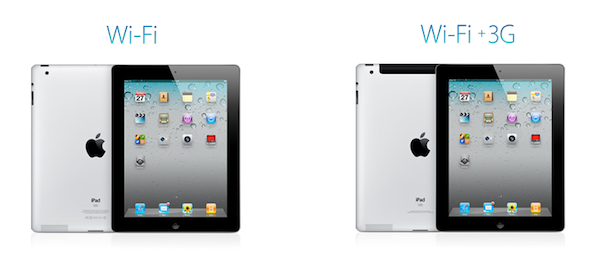
A thread on Apple Discussions detailing connectivity issues experienced by some users on the Verizon iPad 2 WiFi + 3G model caught the attention of the Internet today as more than 80 replies were posted on the original thread confirming that the issue occurred when turning on / off the 3G signal and trying to get it to work again. Other users reported tricks like temporarily activating Airplane mode on their iPad 2 to “kill” 3G and restart it didn’t work as a solution to re-enable connectivity on the device.

All Things Digital now reports an official statement from Apple, with the company confirming that they’re “investigating” the issues:

We are aware that a small number of iPad 2 customers have experienced connectivity issues with the Verizon 3G network and we are investigating it,” the company said in a statement to Mobilized. A Verizon representative did not immediately respond to a request for comment.

Apple has been rumored to be wrapping up the release of another iOS update, version 4.3.2, to make it available in the next two weeks. If Apple has confirmed their engineering team is looking into connectivity problems, there is the high chance these issues will be addressed in the aforementioned iOS update, which is going to be focused on bug fixes and performance enhancements for all iOS devices.


Cydia Tweak Activates Multitasking Gestures On iPhone

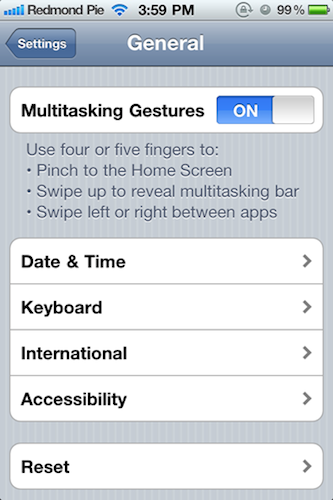
With iOS 4.3, Apple introduced the possibility for developers to activate “multitasking gestures”, a set of multitouch-based four and five-finger gestures that allow you to quickly switch between apps, go back to the homescreen, or invoke the multitasking tray. The gestures didn’t make it into the public version of iOS 4.3 (they were meant for dev test-only since the beginning), but they still can be enabled with a copy of Xcode, also sold in the Mac App Store at $4.99. Personally, I love multitasking gestures on my iPad and I use them all the time. Gestures are the future, and on the iPad they help me do things faster, in a much more intuitive process.

A new Cydia tweak called MT Gestures allows iPhone 4 and iPod touch 4g owners to turn on the multitasking gestures – with the same preference panel seen on the iPad. These settings have been there all the time, but they need to be manually enabled with an hack. This is exactly what MT Gestures does, for free. It’s available in ModMyi’s repository.

We don’t think, however, multitasking gestures are that great on the iPhone. If you want to be reminded why, check out the video below. [via Redmond Pie] Read more