Posts in news

Valve Releases Steam Mobile for iPhone

Back in March, we reported game developer Valve – best known for hits such as Half-Life and Portal – was “looking into” a Steam expansion for mobile devices.  Today, we can see the results with the official Steam Mobile app for iPhone now live in the App Store for free. You can read more about Steam Mobile on Valve’s website, too.

With the free Steam app for iOS, you can participate in the Steam community wherever you go. Chat with your Steam friends, browse community groups and user profiles, read the latest gaming news and stay up to date on unbeatable Steam sales.

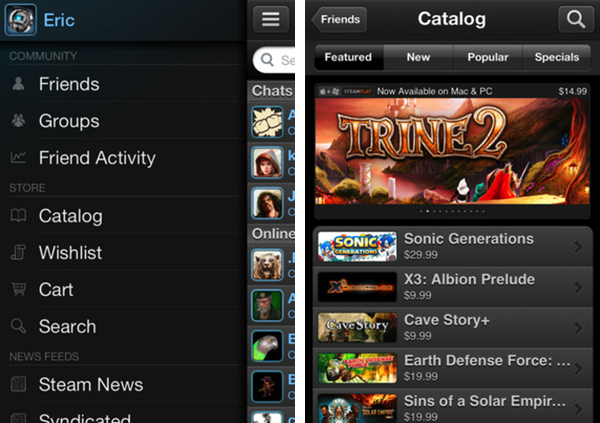
Steam Mobile for iPhone brings the Steam experience from the web to iOS, allowing users to check on their friends’ status, chat, browse the Steam game store and manage their wish list, and even add new items to the cart. Judging from the screenshots – we can’t try the app yet, as it’s in “closed beta” – it appears you can easily open a game’s page and check out its description, screenshots, add it to the wish list or your Steam cart; the Catalog section has tabs to browse Featured, New, Popular games and “Specials”, whereas other navigation options are located in a Facebook-like sidebar that contains links to Friends Activity, News Feeds, and more.

You can download Steam Mobile here, but it’s likely you won’t be able to use the app right away as you have to “express interest” in the beta first. Steam Mobile has also been released for Android today.


Launch Center 1.1 Adds Scheduled Launch Actions

We reviewed App Cubby’s Launch Center when the app was released back in December after Apple rejected an initial version based on Notification Center. Even without fancy Notification Center integration, Launch Center has become one of my new favorite apps, earning a spot in my iPhone’s dock because of its greatest achievement: allowing me to save an unlimited number of shortcuts for actions that I repeat every day (such as calling my mom or iMessaging my team) in a single place. I’d argue that I even prefer Launch Center without Notification Center support as it’s more focused.

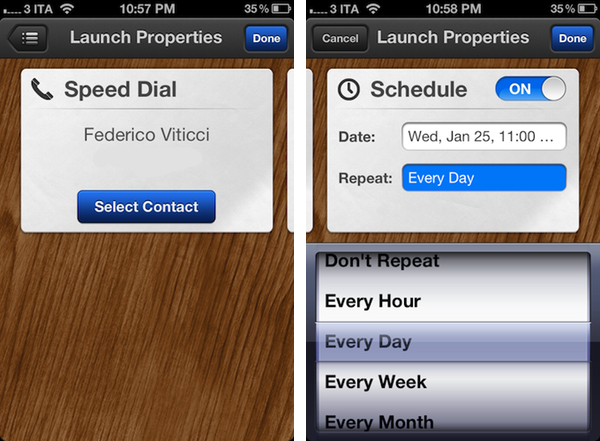
And today with version 1.1 it gets even better. Launch Center 1.o, in fact, allowed you to create shortcuts through custom URLs and activate them with a single tap. But you still had to remember you had to do something – you’ve got your nice action to call your dad, but what if you forget to call him? The shortcut becomes useless. Similarly, your iOS device comes with alarms, but you can’t associate actions to them; it’s easy to set an alarm in three hours for something “important”, and forget what it was all about. Launch Center’s new scheduled launch actions are a fantastic mix of shortcuts and alarms: you can now assign a custom alarm to each of your shortcuts. When the time comes, Launch Center will fire off a local iOS notification that will show up in Notification Center, and take you to the configured action…which will activate and call your dad with one tap, to finish the example above. It’s genius.

I use Launch Center every day and I can already see scheduled launch actions becoming an integral part of my workflow – imagine setting up alarms for emails, messages or just about any app you know you’re going to use at a certain point in time. Launch Center 1.1 combines the speed of custom URLs with local notifications to create smart alarms that have both context and the appropriate speed to feel immediate and intuitive.

Launch Center 1.1 is available in the App Store at $0.99.


Evernote Working On Todo List App Following Egretlist Acquisition

During the past year, note taking/memory management service Evernote set out to build a platform around its services, which span the web, iOS devices, OS X and Windows through a set of cross-platform tools and native applications. The company launched Trunk, a unified showcase of third-party applications that integrate with the Evernote API, and updated its iOS and Mac offerings with richer user interfaces and new functionalities. Furthermore, Evernote acquired image annotating service Skitch and released an iPad version of it; they also launched four standalone Evernote-based apps: Food and Hello, for remembering meals and people, respectively; Clearly, to read web articles in an elegant format; Peek, to help students learn more through Evernote’s visual presentation.

Whilst it sounds fairly obvious for Evernote to be considering new platforms and opportunities to expand upon the concept of preserving human memory – a subject that offers itself to a broad range of implementations – Alexia Tsotsis over at TechCrunch shares some juicy details behind Evernote’s various acquisitions that led to the dedicated Evernote apps we see today.

As it turns out, Evernote CEO Phil Libin has confirmed the company purchased four startups in the past year alone: among those, Readable became Evernote Clearly, Notable Meals became Evernote Food and an another one, called Minds Momentum, was acquired in order to get the assets for an upcoming Evernote todo list application. TechCrunch doesn’t share any more details, however a quick Google search confirms that Minds Momentum was the company behind Egretlist, an iPhone app to manage todos based off Evernote that we reviewed here.

We wrote:

This isn’t an application meant to replace Evernote with a prettier interface, but rather complement it. Egretlist is strictly focused on managing to-do lists with your various notebooks. On the surface, that might pretty tame. But when you combine to-do lists with Evernote, suddenly the functionality becomes stellar. As you read in the real-estate example, being able to just sync not only with yourself, but others using Evernote’s service, makes for an always online, always updateable task-list not dissimilar to Basecamp to-dos and milestones.

Basically, Egretlist provided an effortless way to create todos and format them in a native interface that would, however, sync back to Evernote’s main client to make those todos readable, and possibly editable as well, from your desktop computers. Interestingly, Minds Momentum also developed another paid Evernote-based app, Egretlinks, which ran universally on the iPhone and iPad and allowed users to manage web clippings from their Evernote notebooks. Both Egretlist and Egretlinks haven’t been updated in months, the developers’ Twitter account is silent, and the website is still showing iPhone 3GS screenshots for the apps.

Evernote isn’t new to this kind of acquisitions. iOS text editor Essay, for instance, was bought by Evernote to power their iOS rich text editor and few people knew about it until the developer published a blog post.

From my perspective, it only makes sense for Evernote to look forward to revamping the todo management aspect of the service. Note taking and memory management often overlap with todo creation and completion these days, and Evernote’s built-in checklist/todo support is stripped down to minimal functionality without really offering a compelling way to add tasks and reminders. I’m first to admit I’ve used Evernote to remember things to do more than a couple of times in the past.

Minds Momentum’s acquisition, I believe, also plays well with Evernote’s plan in the long term. Rather than supercharging the main client with hundreds of features, Evernote has taken the ecosystem approach in choosing to offer a centralized service with a main general purpose client and several different standalone apps for more specific purposes. The Evernote app itself isn’t the proverbial Swiss army knife: the whole service is. Honestly, I don’t want the Evernote app to incorporate a text editor and a task management tool and food diaries, and it appears that the company seems to be thinking the same thing – nurturing an ecosystem can be much more profitable and rewarding (both for the company and its users) than feature creep.

I look forward to Evernote’s “upcoming” todo list application, just as I can’t wait to get my hands on a public version of the latest Mac beta (which adds some sweet improvements in the text editing UI) and refreshed iOS clients. Expect more Evernote news soon.


Adam Lashinsky’s Inside Apple Is Now Available For Purchase On The iBookstore

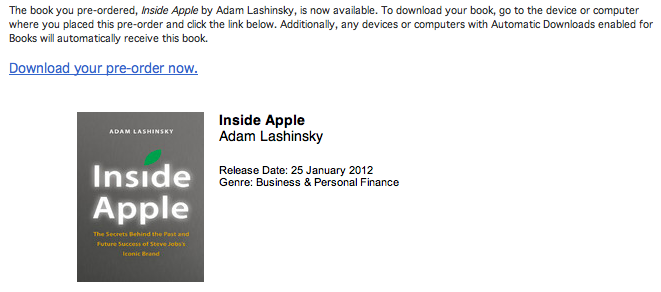
Adam Lashinsky’s new book Inside Apple is now available for purchase on the iBookstore and those who pre-ordered it can now download it. The book goes inside the secretive company, revealing a number of tactics, strategies and systems that has allowed Apple to “churn out hit after hit”.

Based on numerous interviews, the book offers exclusive new information about how Apple innovates, deals with its suppliers and is handling the transition into the Post Jobs Era. Lashinsky, a Senior Editor at Large for Fortune, knows the subject cold: In a 2008 cover story for the magazine entitled The Genius Behind Steve: Could Operations Whiz Tim Cook Run The Company Someday he predicted that Tim Cook, then an unknown, would eventually succeed Steve Jobs as CEO.

Inside Apple is available on the iBookstore for $12.99 and is also available on Amazon. We’ll be publishing a full review of Inside Apple sometime in the coming week, so stay tuned for that. A full description of the book is available below the break.

Read more


All The Statistics And Insights That Apple Revealed In Their Earnings Call

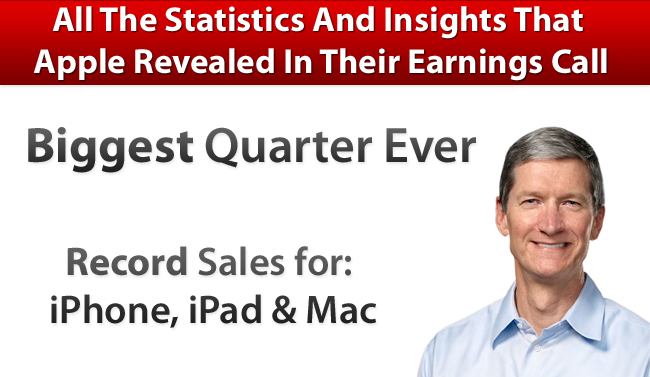
A few hours ago Apple released its Q1 2012 financial results and it saw Apple post its biggest quarter ever with revenue of $46.33 billion and see record sales of its Mac, iPhone and iPad product lines. We covered all the results in our Q1 2012 Results article earlier today so be sure to head over there if you haven’t already - it also includes a number of graphs that demonstrates Apple’s performance over the past 12 quarters and it paints a fascinating picture.

However, the earnings call itself is an interesting one hour, with Tim Cook (CEO) and Peter Oppenheimer (CFO) also answering a number of questions from select investors and analysts. In this Q&A section, a number of details are revealed - including additional statistics. We’ve re-listened to the call and have compiled the following post that highlights the more interesting aspects of this Q&A section and it is all below the break.

Further Reading:

MacStories: Apple Q1 2012 Results

MacStories: “Our Next Big Insight”

MacStories: More iPhones Than Babies Born Every Day

Apple’s Q1 FY12 Earnings Press Release

Audio Webcast of the Earnings Call

SeekingAlpha: Transcript of the Earnings Call

ReadWriteWeb: Apple’s Growth Rate Is Simply Incredible… And It’s Accelerating

Macworld: This is Tim: Apple’s CEO in his own words

Read more


Apple Q1 2012 Results: $46.33 Billion Revenue, 37.04 Million iPhones, 15.43 Million iPads Sold

Apple has just posted their Q1 2012 financial results. The company posted record-breaking revenue of $46.33 billion, with 15.43 million iPads, 37.04 million iPhones and 5.2 million Macs sold. Apple sold 15.4 million iPods, a 21 percent unit decline from the year-ago quarter. The company posted quarterly net profit of $13.06 billion, or $13.87 per diluted share. iPhone represented a 128 percent unit growth over the year-ago quarter, while iPad reported a 111 percent unit increase over the year-ago quarter.

We’re thrilled with our outstanding results and record-breaking sales of iPhones, iPads and Macs,” said Tim Cook, Apple’s CEO. “Apple’s momentum is incredibly strong, and we have some amazing new products in the pipeline.”

“We are very happy to have generated over $17.5 billion in cash flow from operations during the December quarter,” said Peter Oppenheimer, Apple’s CFO. “Looking ahead to the second fiscal quarter of 2012, which will span 13 weeks, we expect revenue of about $32.5 billion and we expect diluted earnings per share of about $8.50.

This is Apple’s best quarter ever. Until today, Apple’s most profitable quarter had been Q3 2011 with $28.57 billion revenue.

Estimates and Previous Quarters

Wall Street consensus’ estimate was earnings of $10.08 per share and revenue of $38.85 billion; six institutional/independent analysts polled by Fortune expected earnings per share of $11.57 and $41.87 billion revenue. In Q4 2011, Apple said they expected revenue of about $37 billion and diluted earnings per share of around $9.30 in the first fiscal quarter of 2012.

In Q4 2011, Apple posted revenue of $28.27 billion, with 11.12 million iPads, 17.07 million iPhones and 4.89 million Macs sold. The company posted quarterly net profit of $6.62 billion, or $7.05 per diluted share. iPhone represented a 21 percent unit growth over the year-ago quarter; iPod sales were down 27 percent from the year-ago quarter, and Apple reported the best iPad quarter to date with over 11 million units sold and a 166% increase over the year-ago quarter. In the year-go quarter, Apple posted revenue of $26.74 billion with 7.33 million iPads, 16.24 million iPhones and 4.13 million Macs sold.

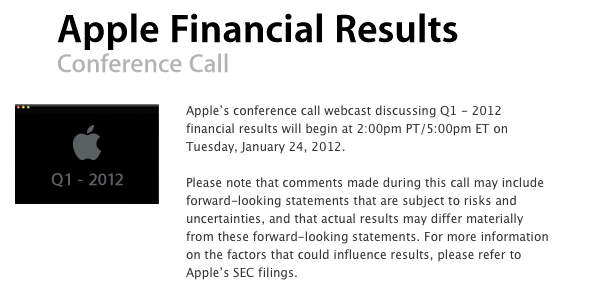
Apple will provide a live audio feed of its Q1 2012 conference call at 2:00 PM Pacific, and we’ll update this story with the conference highlights. You can find the full press release and a graphical visualization of Apple’s Q1 2012 after the break. A recap of estimates and product releases happened during the quarter is available here. Read more


Fantastical 1.2 Adds International Languages To Event Parsing Engine

Flexibits’ calendar companion app for Mac OS X, Fantastical, has been updated today to version 1.2 adding support for various languages that will allow international users to quickly write down new events in Italian, German, Spanish, and French.

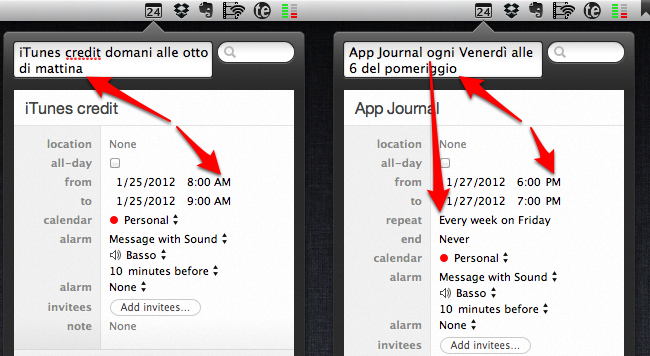
I have been able to test Fantastical’s natural language recognition (my original review) both in English and Italian, and the results are surprisingly well done. Whereas most apps that claim to feature “natural language input” fail miserably at parsing content from syntaxes other than plain English, Fantastical’s support for Italian has, indeed, turned out to be pretty fantastic. An event called “App Journal ogni Venerdì alle 6 del pomeriggio” (App Journal every Friday at 6 PM) was correctly recognized, processed and synced back to iCloud directly within the app thanks to Fantastical’s own calDAV engine. Without going into detail too much, I can say that Fantastical is able to recognize different variations of the same kind of input (such as “di mattina” and “di pomeriggio” for AM/PM switches) and definitely doesn’t stop at standard expressions for entering events but tries to understand common, real-life ways of telling an app to do something at a certain point in time. I can’t speak for French, German and Spanish support, but I assume it’s equally well done.

Version 1.2 comes with other bug fixes, performance and parsing improvements that make the app more stable and smoother in transitioning from text entry to event creation; the app can now automatically update subscribed calendars, and automatically hide calendars disabled in iCal. More importantly, Fantastical 1.2 brings better support for recurring events – such as my example above – and dims timed events that have already passed in “today” view. Those who often add URLs to events will appreciate the fact that Fantastical now correctly recognizes links and makes them clickable in event view.

Fantastical remains an amazingly lightweight yet powerful calendar companion that’s gradually getting more functionalities without becoming cluttered and confusing. You can get the app at $19.99 on the Mac App Store.


PDF Expert 3.2 Brings Full PDF Searching And Better Support For Bluetooth Keyboards

PDF Expert for iPad was updated last night to version 3.2, adding some nice new features to further improve the capabilities of the excellent PDF manager, viewer and annotation iPad app. The big new addition is full text search, allowing you to search through all your PDFs, rather than just their file names. I gave this new feature a quick try and whilst the initial indexing took a few minutes, I did have 535 files saved in PDF Expert. Furthermore, once it was indexed, subsequent searches worked virtually instantly.

A new sorting panel is also present in PDF Expert 3.2, now allowing you to reorder your files by name, date or modified date. If you use a Bluetooth keyboard with your iPad you can now use those “Tab” and arrow keys for faster data entry, particularly for PDF forms.

Readdle has also improved the Handwriting and Wrist Protection features in PDF Expert so they work better with less accidental annotation because you have rested your wrist on the iPad’s screen. Included in this is a new eraser tool for your handwriting, so if you do make a mistake it is now easy to erase just what you want. Finally, yesterday’s update included the use of data protection APIs, so all your PDFs are now stored securely inside the app.

PDF Expert for iPad is available for $9.99 on the App Store.


Virgin America Names Jet “Stay Hungry, Stay Foolish” After Steve Jobs

The saying that Steve Jobs made popular with his 2005 Stanford commencement address, “Stay Foolish, Stay Hungry” has now (literally) made its way onto a Virgin America plane.

An Airbus A320 plane (tail number N845VA) that Virgin America owns and runs, has been named “Stay Hungry, Stay Foolish”, with the quote emblazoned on the front of the plane, as seen above. A Virgin America spokesperson explained to MacRumors that the name was chosen after an internal naming competition.

The quote originated from the 1970’s magazine The Whole Earth Catalogue as Steve Jobs noted in his commencement address:

On the back cover of their final issue was a photograph of an early morning country road, the kind you might find yourself hitchhiking on if you were so adventurous. Beneath it were the words: “Stay Hungry. Stay Foolish.” It was their farewell message as they signed off. Stay Hungry. Stay Foolish. And I have always wished that for myself. And now, as you graduate to begin anew, I wish that for you.

[Via MacRumors]