This Week's Sponsor:

Dropzone 5

Improve your Drag-and-Drop Workflow


Posts in news

Apple Reveals Substantial Update to the 27-inch iMac with Smaller Updates to the 21.5-inch iMac and iMac Pro

Today, Apple revealed an update to the 27-inch 5K Retina iMac with faster processors, updated graphics, more storage, and new display features. Although the new 27-inch iMac’s design is identical to the existing model, this is still a significant update compared to the iMac it replaces.

According to Apple’s press release:

“Now more than ever, our customers are relying on the Mac. And many of them need the most powerful and capable iMac we’ve ever made,” said Tom Boger, Apple’s senior director of Mac and iPad Product Marketing. “With blazing performance, double the memory, SSDs across the line with quadruple the storage, an even more stunning Retina 5K display, a better camera, higher fidelity speakers, and studio-quality mics, the 27-inch iMac is loaded with new features at the same price. It’s the ultimate desktop, to work, create, and communicate.”

Last updated in March 2019, the new iMac features 6 and 8-core 10th generation Intel CPUs that can reach speeds of up to 5.0GHz with Turbo Boost. Storage is all SSD now with transfer speeds up to 3.4GB/s when launching apps and large files. There’s also an 8TB SSD option for the first time, which is four times the storage available in the previous model. Until today, the standard configurations of the 27-inch iMac came with Fusion drives.
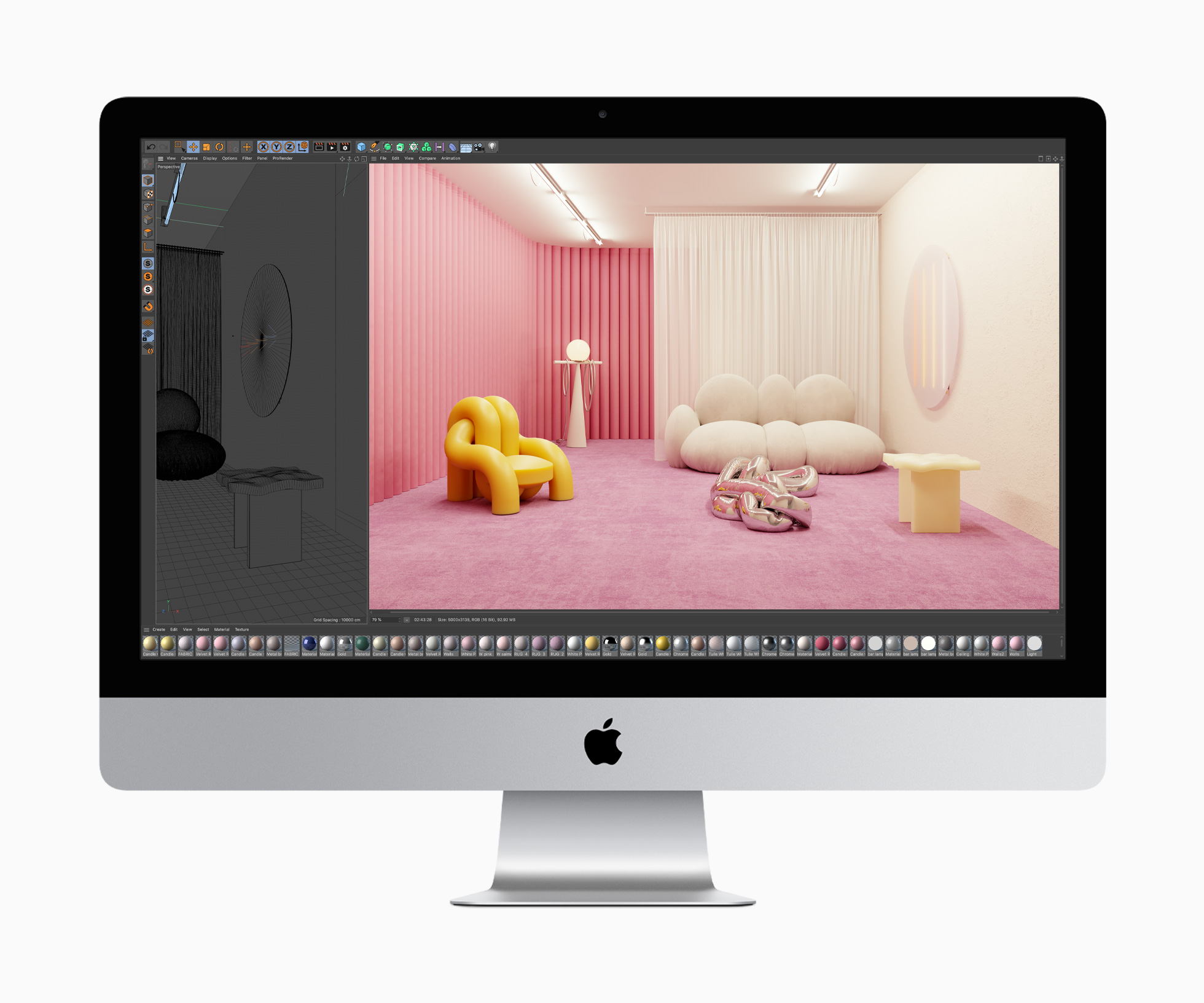
The new iMac has been upgraded to AMD Radeon Pro Series 5000 graphics. The display of the iMac is the same resolution as before, but now, it comes with a new nano-texture option first seen in the Pro Display XDR, which provides a low-reflection, matte finish, and it supports Apple’s True Tone technology. The new all-in-one desktop also includes a T2 chip for boot and data security, a 1080p FaceTime HD camera, and improved speakers and microphones.

Apple’s other iMacs received smaller updates today too. SSDs are now standard in the 21.5-inch model, although a Fusion Drive is still an option. Also, a 10-core Intel Xeon processor is now standard in the iMac Pro.

Today’s updates are in line with Apple’s statements during WWDC that the company had additional updates to Macs based on Intel CPUs in the pipeline. Although Macs with ARM processors are on the way later this year, Apple has not revealed which models will be converted to ARM first. Consequently, if you need a new desktop Mac, it’s still worth considering the Intel-based models, especially the new 27-inch iMac, which is substantially improved over its last iteration.



MacStories Unwind: Mac Catalyst, Due Reminders on Mac, and a Fiery Feeds Update

AppStories+ Deeper into the world of apps
0:00
35:00

AppStories+ Deeper into the world of apps


Sponsored by: Concepts – Sketch, Note, Draw

This week on MacStories Unwind:

MacStories

Club MacStories

  • Monthly Log
    • Federico explains how his use of MindNode has changed for his iOS and iPadOS 14 review
    • John imagines what a perfect cross-platform outlining app would look like
    • Ryan shares his favorite features from iPadOS, iOS, watchOS, and tvOS
  • MacStories Weekly
    • Federico explores the Apple Watch automation enabled by Shortcuts in the iOS and iPadOS 14 betas
    • Ryan covers the Nighthawk Twitter client
    • John explains why he’s returning to MindNode after a failed search for an outlining app
    • A GameClub subscription giveaway
  • Join Club MacStories

AppStories

Unwind Picks


Apple Q3 2020 Results - $59.7 Billion Revenue

Apple has just published its financial results for Q3 2020. The company posted revenue of $59.7 billion. Apple CEO Tim Cook said:

“Apple’s record June quarter was driven by double-digit growth in both Products and Services and growth in each of our geographic segments,” said Tim Cook, Apple’s CEO. “In uncertain times, this performance is a testament to the important role our products play in our customers’ lives and to Apple’s relentless innovation. This is a challenging moment for our communities, and, from Apple’s new $100 million Racial Equity and Justice Initiative to a new commitment to be carbon neutral by 2030, we’re living the principle that what we make and do should create opportunity and leave the world better than we found it.”

Estimates and Expectations for Q3 2020 and the Year-Ago Quarter (Q3 2019)

Due to the uncertainty caused by the global pandemic, Apple did not provide financial guidance for Q3 2020 during its last earnings call.

Going into today’s call, Yahoo Finance said that:

Much of the earnings focus, however, will be on whether Cook and company will provide guidance for fiscal Q4, which could offer a hint about any potential delays to the launch of the firm’s upcoming iPhone 12.

Despite the lack of guidance, Yahoo Finance says that Bloomberg’s research shows that analysts expect the following results:

Revenue: $52.2 billion expected versus $53.8 billion in Q3 2019.

Earnings per share: $2.06 expected versus $2.18 in Q3 2019.

Graphical Visualization

After the break, we’ve compiled a graphical visualization of Apple’s Q3 2020 financial results.

Read more


Concepts: Sketch, Note, Draw [Sponsor]

Concepts is a powerful creative tool to help you think, explore, and sketch your ideas. Stretch your mind past the limits on an infinite canvas using liquid pens and brushes in designer COPIC colors. Used by creative professionals for visual thinking, note-taking, drawing, storyboarding, graphic design, product iteration, and architectural planning, Concepts lets you sketch, communicate and present your ideas with a flexible, customizable toolset.

Built from the ground up for iPad’s touch sensitivity, Concepts combines vectors with natural finger gestures to enhance your creative workflow. Everything you draw can be edited, moved, and reorganized, allowing you to interact with your ideas at a deeper level. Drag+drop images and objects for fast ideating, use layers and grid layouts to organize your work, and apply real-world scale for professional design work.

Concepts comes with a built-in Presentation Mode that lets you connect to a large display for graphic discussion and live sharing during events. It works with apps like Zoom for instant virtual whiteboarding. Once your work is final, export and share standard, high resolution, and vector file types for flexible work between teams and apps.

The app comes free as a basic sketching tool, with the ability to unlock 200+ libraries of brushes, objects, and services via subscription or one-time purchase. Sketch, explore, and share your ideas infinitely with Concepts.

Download Concepts today for free and give it a try. To learn more about how Concepts can help you explore your ideas, visit concepts.app.

Our thanks to Concepts for sponsoring MacStories this week.


MacStories Unwind: Dark Noise, Soor, and Game Reviews, Plus a Developer Debrief

AppStories+ Deeper into the world of apps
0:00
27:07

AppStories+ Deeper into the world of apps


Sponsored by Overdrop Weather – Weather Simplified

This week on MacStories Unwind:

MacStories

Club MacStories

  • MacStories Weekly
    • iOS 14 tips from Federico
    • A Collection of John’s favorite first-gen Catalyst apps
    • Ryan on why the iPadOS update is a bigger deal than it appears
    • An interview with Spend Stack developer Jordan Morgan
  • Join Club MacStories

AppStories

Unwind Picks


MacStories Unwind: Pixelmator Pro and Ulysses Updates, Plus a HomeKit Camera

AppStories+ Deeper into the world of apps
0:00
37:08

AppStories+ Deeper into the world of apps


Sponsored by Magic Lasso Adblock – Block Ads, Trackers and Pop-Ups on Your iPhone, iPad, and Mac

This week, Federico and John celebrate World Emoji Day with big updates to Pixelmator Pro and Ulysses, a rundown of iOS 13.6 features, the Eve Cam, plus YouTube creator and movie Unwind picks.

MacStories

Club MacStories

  • MacStories Weekly
    • Favorite: GoodLinks
    • Shortcuts: Federico’s Reminders shortcuts
    • Extension Column: Ryan on Widgets
  • MacStories Unplugged, a Club-exclusive podcast
    • A porcupine story leads to bigger and better animal stories and Federico’s brush with the police for trespassing on an abandoned golf course. Plus, John provides an update on his macOS Big Sur review, including the apps he’s using as he finalizes his research and outlines the review.
  • Join Club MacStories

AppStories

Unwind Picks


Apple Shares Preview of Upcoming Emoji with Emojipedia

Source: Emojipedia.org

Source: Emojipedia.org

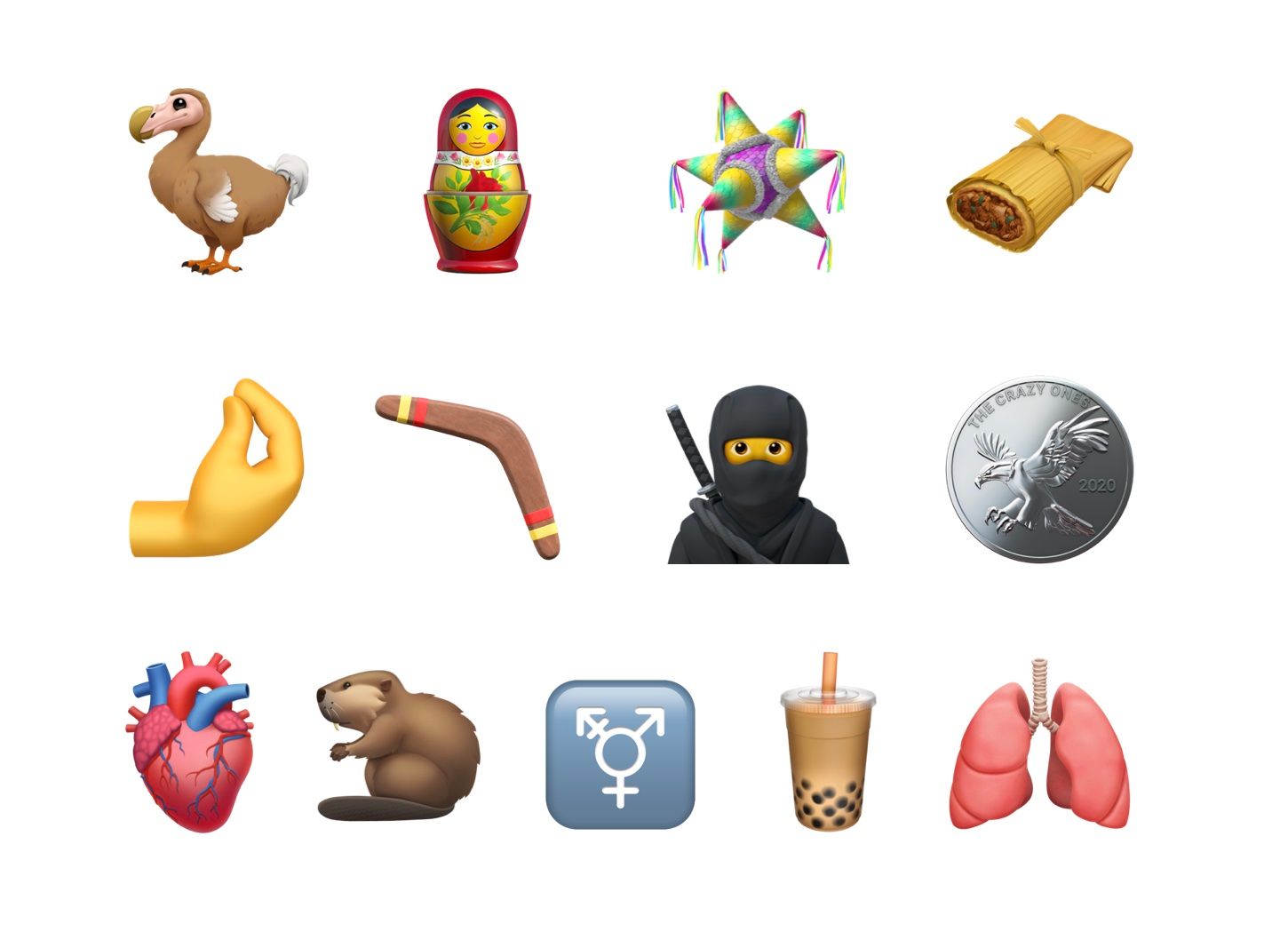
Back in January, the Unicode Consortium approved Emoji 13.0, which is used by companies like Apple to create new emoji designs. In Apple’s case, new emoji are expected to ship in a point update to the company’s OSes in the fall. In the meantime, though, Apple has shared a preview of its upcoming designs with Emojipedia.

The new designs include a wide variety of images including a ninja, a dodo bird, a boomerang, nesting dolls, pinched fingers, a tamale, bubble tea, and others. If past years are any indication, the new emoji will we released with iOS and iPadOS 14.1 or 14.2 and with a macOS update sometime in October.

For a run-down on all of the upcoming emoji, be sure to visit Emojipedia.

Permalink

Pixelmator Pro 1.7 Adds Type to Path, Canvas Rotation, and More

Source: Pixelmator.

Source: Pixelmator.

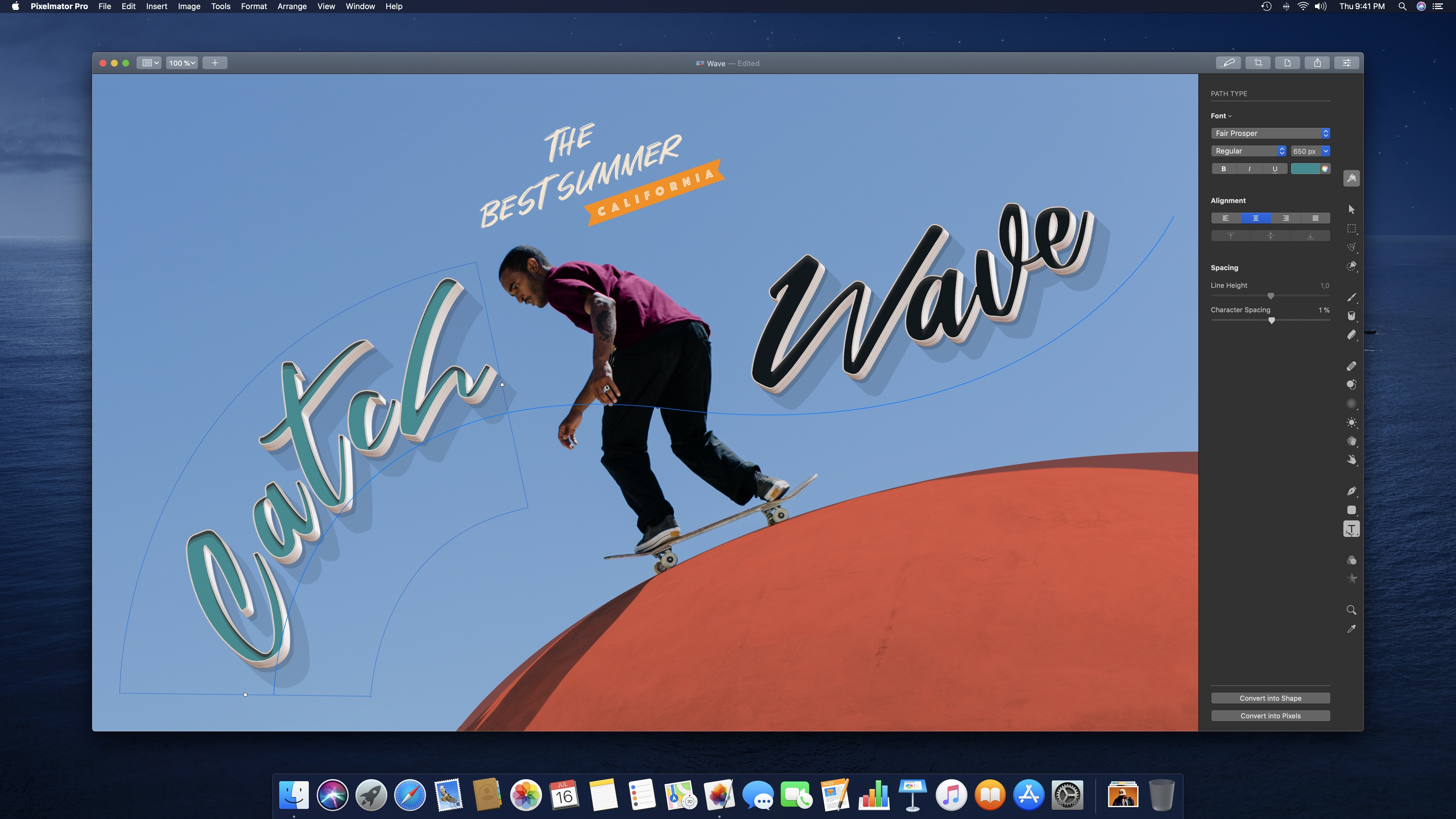
Version 1.7 of Pixelmator Pro was released today with support for placing text along a path, rotating the app’s canvas, a refinement of ML Super Resolution, and a new quick-start welcome screen.

The update, dubbed Sequoia, adds three type tools: Circular Type, Path Type, and Freeform Type. You can pick one of those tools to create a path for your text or click on an existing path in a project to type along it. With the text tool selected, your pointer switches as you approach the border of a shape in your project to the text path tool, indicating that you can begin typing along the shape with a click. The tool supports emoji and SVG fonts and can be converted to shapes too.

Source: Pixelmator.

Source: Pixelmator.

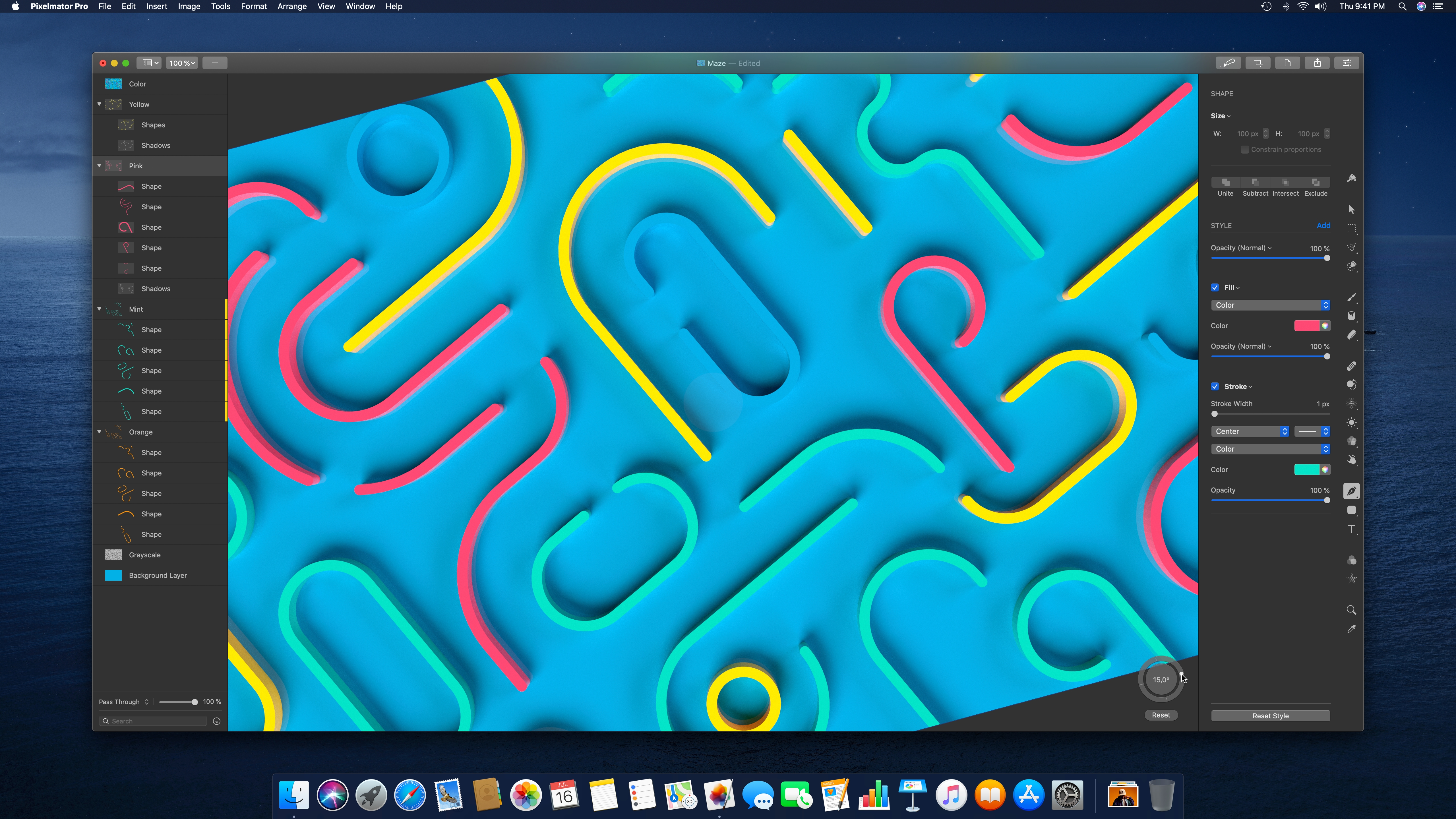
Canvas rotation is handled by a circular puck in the lower-right corner of Pixelmator Pro’s image viewer. You can enter a precise number of degrees to rotate the canvas, drag the dot along the circle’s perimeter, or use multi-touch on a trackpad to dial in the exact rotation you want. When using the trackpad to rotate, Pixelmator Pro provides haptic feedback in 90-degree increments, which is a nice touch. By default, the rotation tool appears when you begin a trackpad rotation, but you can set it to always or never be visible from the View menu too. Canvas rotation is a fantastic addition for anyone using Pixelmator Pro with Sidecar on an iPad.

Source: Pixelmator.

Source: Pixelmator.

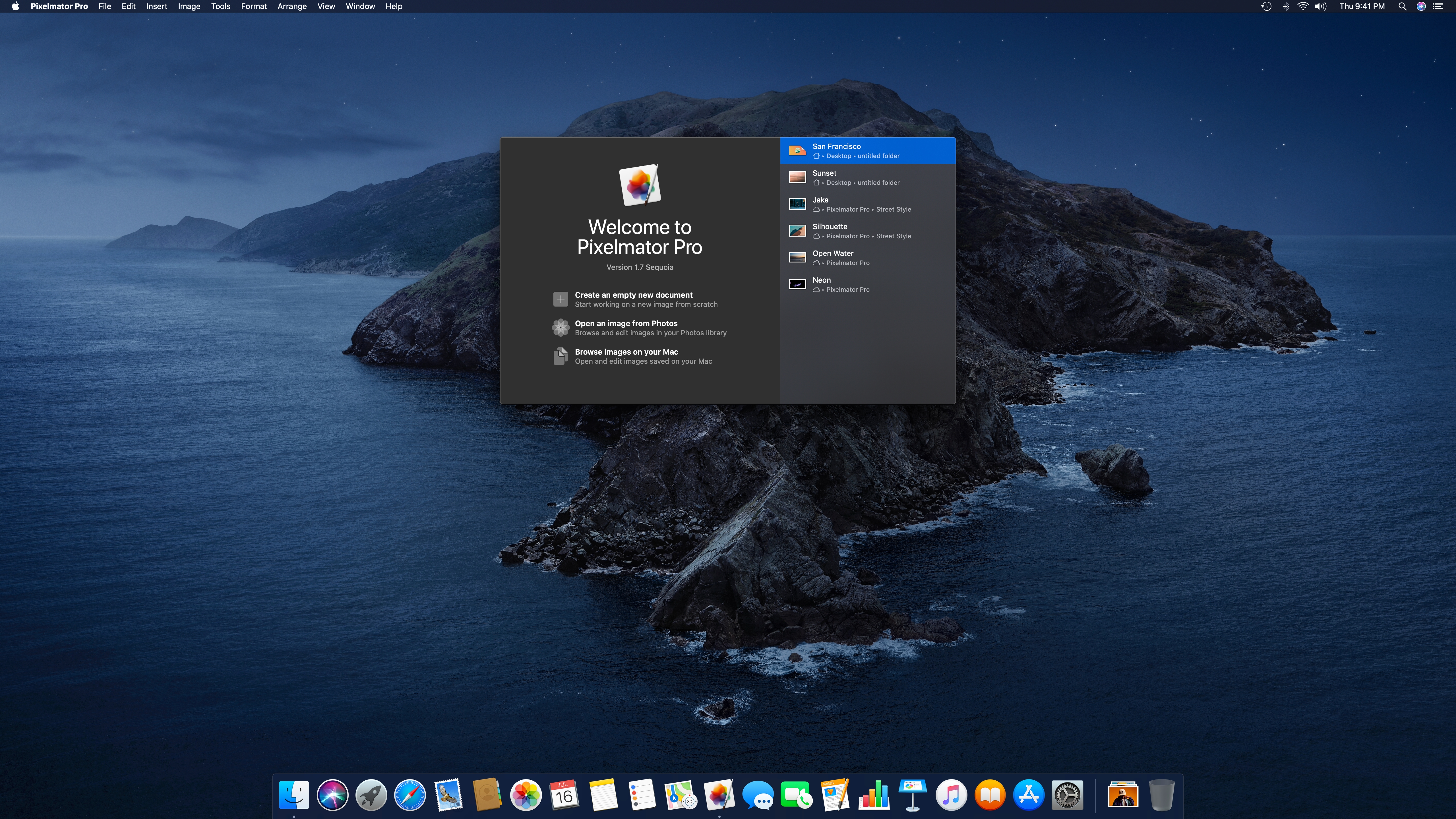
There have always been several entry points into Pixelmator Pro, but it’s easier to pick the one you want with the new welcome screen. The screen includes recent documents, the option to create a new empty document from one of the app’s many templates, and the ability to pick an image from Photos or anywhere in your Mac’s file system.

Finally, today’s update also adds improvements to ML Super Resolution. This feature refines images’ resolution to allow them to be displayed at bigger sizes with a minimum amount of blurring. It’s a handy feature that I’ve used in the past to upscale screenshots of standard definition video. In addition to working better than before with the latest update, MS Super Resolution has added support for RAW images and a progress bar.

Pixelmator Pro has long been one of my favorite image editors on the Mac. With each release, the app has gained additional functionality that makes it more than just a photo editor. With tools like typing along a path and canvas rotation, Pixelmator Pro should be far more capable than ever before in a designer’s hands.