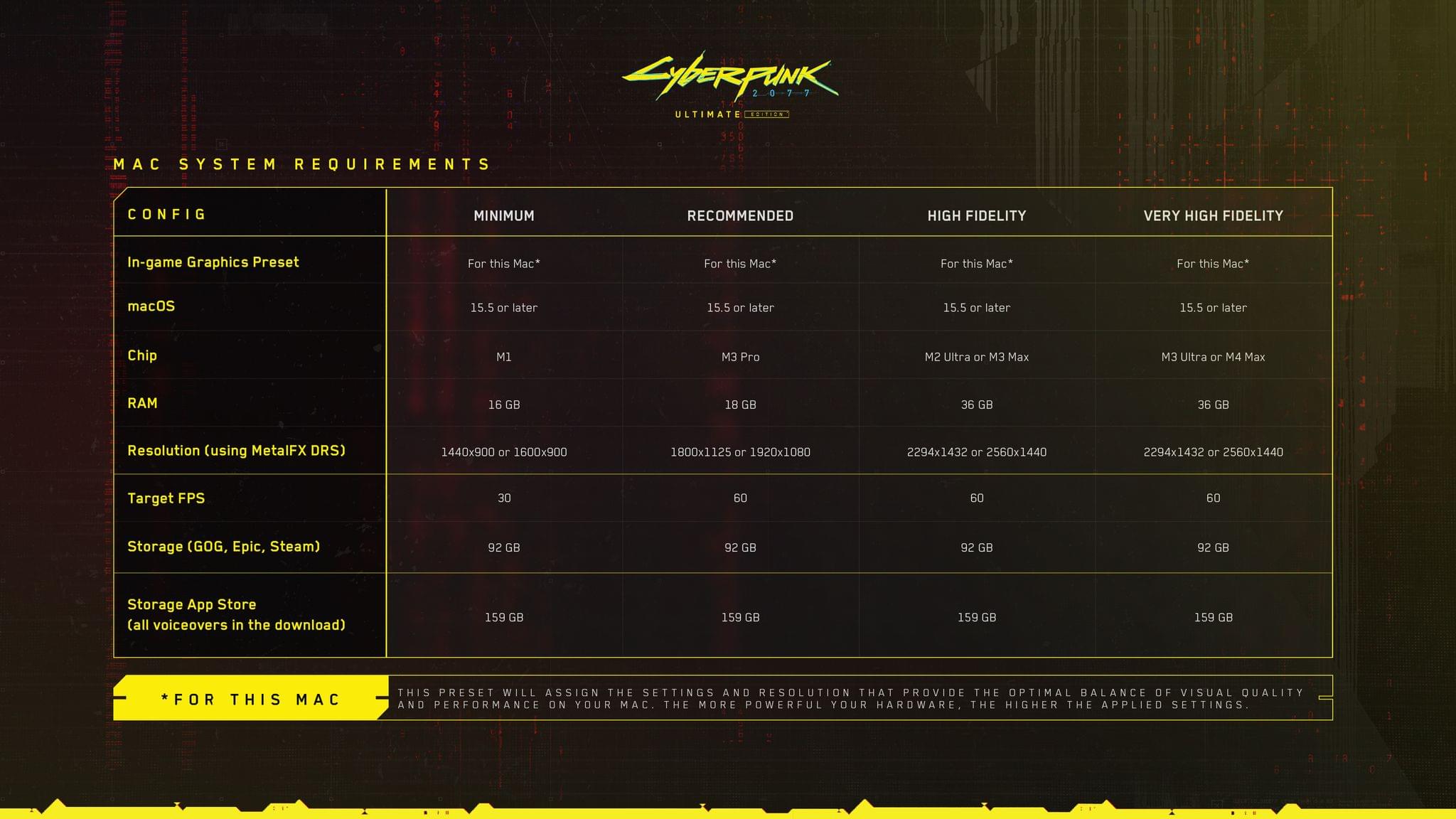
Yesterday, I wrote about the upcoming release of Cyberpunk 2077: Ultimate Edition on the Mac. Today, CD PROJEKT RED published a support document, listing the game’s Mac system requirements. As I wrote yesterday, the company says the game will work on all Apple silicon Macs; however, the beefier your CPU and memory, the better.
As reported by Tom Warren at The Verge today, the support document summarizes the game’s system requirements in four categories: Minimum, Recommended, High Fidelity, and Very High Fidelity. It’s worth checking out the support document and Warren’s coverage before buying Cyberpunk 2077, which still hasn’t shown up on the Mac App Store for pre-order, because if you want the Very High Fidelity experience, you’ll need at least an M3 Ultra or M4 Max with at least 36 GB of memory.
Retro Dodo, linking to the website Console Variations, has a story about the time Nintendo produced variants of the Game Boy Color that matched the iMac G3. All that seemingly remains of these color-matched Game Boys is the low-resolution image above from a 1999 issue of 64 Dream Magazine because Retro Dodo’s Sebastian Santabarbara went looking for the handhelds and was unable to find them anywhere online.
Nintendo wasn’t alone in copying the vibrant translucency of the iMac G3. In the late ’90s it seemed like every consumer product maker did something similar. Most of those products have been lost to time and forgotten, but Nintendo fans are an intrepid bunch. I wouldn’t be surprised if these iMac-themed Game Boy Colors turn up in an auction online eventually.
According to Mark Gurman, Apple executives are in the early stages of mulling an acquisition of Perplexity. My initial reaction was “that wouldn’t work.” But I’ve taken some time to think through what it could look like if it were to come to fruition.
He gets to the core of the issue with this acquisition:
At the end of the day, Apple needs a technology company, not another product company. Perplexity is really good at, for lack of a better word, forking models. But their true speciality is in making great products, they’re amazing at packaging this technology. The reality is though, that Apple already knows how to do that. Of course, only if they can get out of their own way. That very issue is why I’m unsure the two companies would fit together. A company like Anthropic, a foundational AI lab that develops models from scratch is what Apple could stand to benefit from. That’s something that doesn’t just put them on more equal footing with Google, it’s something that also puts them on equal footing with OpenAI which is arguably the real threat.
While I’m not the biggest fan of Perplexity’s web scraping policies and its CEO’s remarks, it’s undeniable that the company has built a series of good consumer products, they’re fast at integrating the latest models from major AI vendors, and they’ve even dipped their toes in the custom model waters (with Sonar, an in-house model based on Llama). At first sight, I would agree with Ortolani and say that Apple would need Perplexity’s search engine and LLM integration talent more than the Perplexity app itself. So far, Apple has only integrated ChatGPT into its operating systems; Perplexity supports all the major LLMs currently in existence. If Apple wants to make the best computers for AI rather than being a bleeding-edge AI provider itself…well, that’s pretty much aligned with Perplexity’s software-focused goals.
However, I wonder if Perplexity’s work on its iOS voice assistant may have also played a role in these rumors. As I wrote a few months ago, Perplexity shipped a solid demo of what a deep LLM integration with core iOS services and frameworks could look like. What could Perplexity’s tech do when integrated with Siri, Spotlight, Safari, Music, or even third-party app entities in Shortcuts?
Or, look at it this way: if you’re Apple, would you spend $14 billion to buy an app and rebrand it as “Siri That Works” next year?
Now this is what I call follow-up: six years after I linked to Jason Snell’s first experiments with podcasting on the iPad Pro (which later became part of a chapter of my Beyond the Tablet story from 2019), I get to link to Snell’s first impressions of iPadOS 26’s brand new local capture mode, which lets iPad users record their own audio and video during a call.
First, some context:
To ensure that the very best audio and video is used in the final product, we tend to use a technique called a “multi-ender.” In addition to the lower-quality call that’s going on, we all record ourselves on our local device at full quality, and upload those files when we’re done. The result is a final product that isn’t plagued by the dropouts and other quirks of the call itself. I’ve had podcasts where one of my panelists was connected to us via a plain old phone line—but they recorded themselves locally and the finished product sounded completely pristine.
This is how I’ve been recording podcasts since 2013. We used to be on a call on Skype and record audio with QuickTime; now we use Zoom, Audio Hijack, and OBS for video, but the concept is the same. Here’s Snell on how the new iPadOS feature, which lives in Control Center, works:
The file it saves is marked as an mp4 file, but it’s really a container featuring two separate content streams: full-quality video saved in HEVC (H.265) format, and lossless audio in the FLAC compression format. Regardless, I haven’t run into a single format conversion issue. My audio-sync automations on my Mac accept the file just fine, and Ferrite had no problem importing it, either. (The only quirk was that it captured audio at a 48KHz sample rate and I generally work at 24-bit, 44.1KHz. I have no idea if that’s because of my microphone or because of the iPad, but it doesn’t really matter since converting sample rates and dithering bit depths is easy.)
I tested this today with a FaceTime call. Everything worked as advertised, and the call’s MP4 file was successfully saved in my Downloads folder in iCloud Drive (I wish there was a way to change this). I was initially confused by the fact that recording automatically begins as soon as a call starts: if you press the Local Capture button in Control Center before getting on a call, as soon as it connects, you’ll be recording. It’s kind of an odd choice to make this feature just a…Control Center toggle, but I’ll take it! My MixPre-3 II audio interface and microphone worked right away, and I think there’s a very good chance I’ll be able to record AppStories and my other shows from my iPad Pro – with no more workarounds – this summer.
As detailed on 512 Pixels, Stephen Hackett managed to break into the beautiful ‘Macintosh’ screensaver and uncover the details of how it was constructed.
When looking for macOS Tahoe’s wallpapers, I was reminded of this project. I went digging through the SSD on my MacBook Pro, and my journey through Finder has yielded great fruit.
The screen saver is actually an Extension, residing at /System / Library / ExtensionKit / Extensions / WallpaperMacintoshExtension.appex (spaces added for legibility).
Right-clicking to “Show Package Contents” unveils a treasure trove:
The screensaver itself is not a video one, as evident by the way it randomly displays its designs when activated. Until now, it was somewhat of a mystery how this was dynamically created, so it’s great to peek behind the curtain.
I won’t spoil the details as they are pretty fun, and not really what you would have expected. Stephen has also collected all the image files in HiRes, should you wish to download them.
As someone who absolutely adores these designs to this day (so much so that I have not one but two of them as tattoos - the pixelated cursor and the smiling Mac), this was a delightful little discovery.
In the wake of U.S. District Judge Yvonne Gonzalez Rogers’ decision in Epic Games’ litigation against Apple, I commented on NPC: Next Portable Console that I expected Microsoft to enter the fray with its own web store soon. As reported by Tom Warren at The Verge, it looks like that’s exactly what Microsoft intends to do. Commenting on Judge Gonzalez Rogers’ contempt order in the context of Epic’s recent motion to return Fortnite to the App Store, Warren notes:
It’s a key ruling that has already allowed Fortnite to return to the App Store in the US, complete with the ability for Epic Games to link out to its own payment system inside the game. Microsoft has wanted to offer a similar experience for its Xbox mobile store prior to the ruling, but it says its solution “has been stymied by Apple.”
Ultimately, Microsoft wants its customers to be able to purchase and play its games from inside the Xbox app:
Microsoft started rolling out the ability to purchase games and DLC inside the Xbox mobile app last month, but it had to remove the remote play option to adhere to Apple’s App Store policies. You can’t currently buy an Xbox game in the Xbox mobile app on iOS and then stream it inside that same app. You have to manually navigate to the Xbox Cloud Gaming mobile website on a browser to get access to cloud gaming.
Developers continue to add options to link out to the web to purchase content, but as Microsoft’s court filing shows, the biggest players on the App Store are weighing the cost of setting up their own storefronts against the risk that Judge Gonzalez Rogers’ decision will be reversed on appeal.
The purchase — the largest in OpenAI’s history — will provide the company with a dedicated unit for developing AI-powered devices. Acquiring the secretive startup, named io, also will secure the services of Ive and other former Apple designers who were behind iconic products such as the iPhone.
The partnership builds on a 23% stake in io that OpenAI purchased at the end of last year and comes with what Bloomberg describes as 55 hardware engineers, software developers, and manufacturing experts, plus a cast of accomplished designers.
Ive had this to say about the purportedly novel products he and OpenAI CEO Sam Altman are planning:
“People have an appetite for something new, which is a reflection on a sort of an unease with where we currently are,” Ive said, referring to products available today. Ive and Altman’s first devices are slated to debut in 2026.
Bloomberg also notes that Ive and his team of designers will be taking over all design at OpenAI, including software design like ChatGPT.
For now, the products OpenAI is working on remain a mystery, but given the purchase price and io’s willingness to take its first steps into the spotlight, I expect we’ll be hearing more about this historic collaboration in the months to come.
On Sunday, Bloomberg’s Mark Gurman published a comprehensive recap of Apple’s AI troubles. There wasn’t much new in Gurman’s story, except quotes from unnamed sources that added to the sense of conflict playing out inside the company. That said, it’s perfect if you haven’t been paying close attention since Apple Intelligence was first announced last June.
What’s troubling about Apple’s predicament isn’t that Apple’s super mom and other AI illustrations looks like they were generated in 2022, a lifetime ago in the world of AI. The trouble is what the company’s struggles mean for next-generation interactions with devices and productivity apps. The promise of natural language requests made to Siri that combine personal context with App Intents is exciting, but it’s mired in multiple layers of technical issues that need to be solved starting, as Gurman reported, with Siri.
Apple, as an organization, simply doesn’t seem built correctly to operate in the age of AI. This technology, even more so than the web, moves insanely fast and is all about iteration. Apple likes to move slowly, measuring a million times and cutting once. Shipping polished jewels. That’s just not going to cut it with AI.
Having studied the fierce competition among AI companies for months, I agree with Siegler. This isn’t like hardware where Apple has successfully entered a category late and dominated it. Hardware plays to Apple’s design and supply chain strengths. In contrast, the rapid iteration of AI models and apps is the antithesis of Apple’s annual OS cycle. It’s a fundamentally different approach driven by intense competition and fueled by billions of dollars of cash.
I tend to agree with Siegler that given where things stand, Apple should replace a lot of Siri’s capabilities with a third-party chatbot and in the longer-term make an acquisition to shake up how it approaches AI. However, I also think the chances of either of those things happening are unlikely given Apple’s historical focus on internally developed solutions.
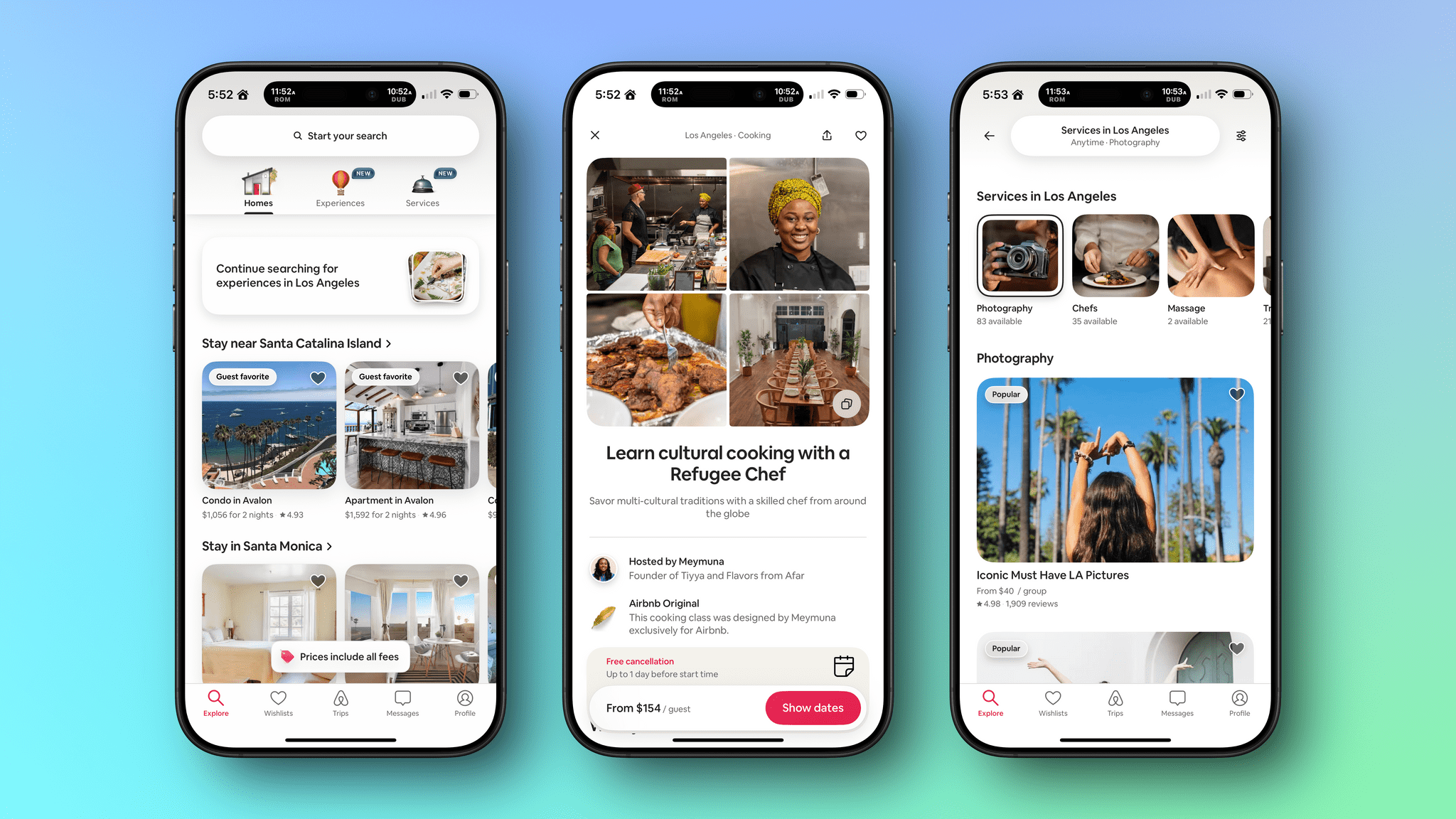
Last week, I was in LA for Airbnb’s 2025 Summer Release. As part of the day’s events, Federico and I interviewed Jud Coplan, Airbnb’s Vice President of Product Marketing, and Teo Connor, Airbnb’s Vice President of Design, for AppStories to talk about the new features and app the company launched. It was a great conversation that you can watch on YouTube:
or listen to the episode here:
Last week’s launch was a big one for Airbnb. The company debuted Services and reimagined and expanded Experiences. Services are the sort of things hotels and resorts offer that you used to give up when booking an Airbnb stay. Now, however, you can book a chef, personal trainer, hair stylist, manicurist, photographer, and more. Better yet, you don’t have to book a stay with an Airbnb host to take advantage of services. You can schedule services in your hometown or wherever you happen to be.
Experiences aren’t entirely new to Airbnb, but have been expanded and integrated into the Airbnb app in a way that’s similar to Services. Services allow you to get the most out of a trip from locals who know their cities best, whether that’s a cultural tour, dining experience, outdoor adventure, or something else.
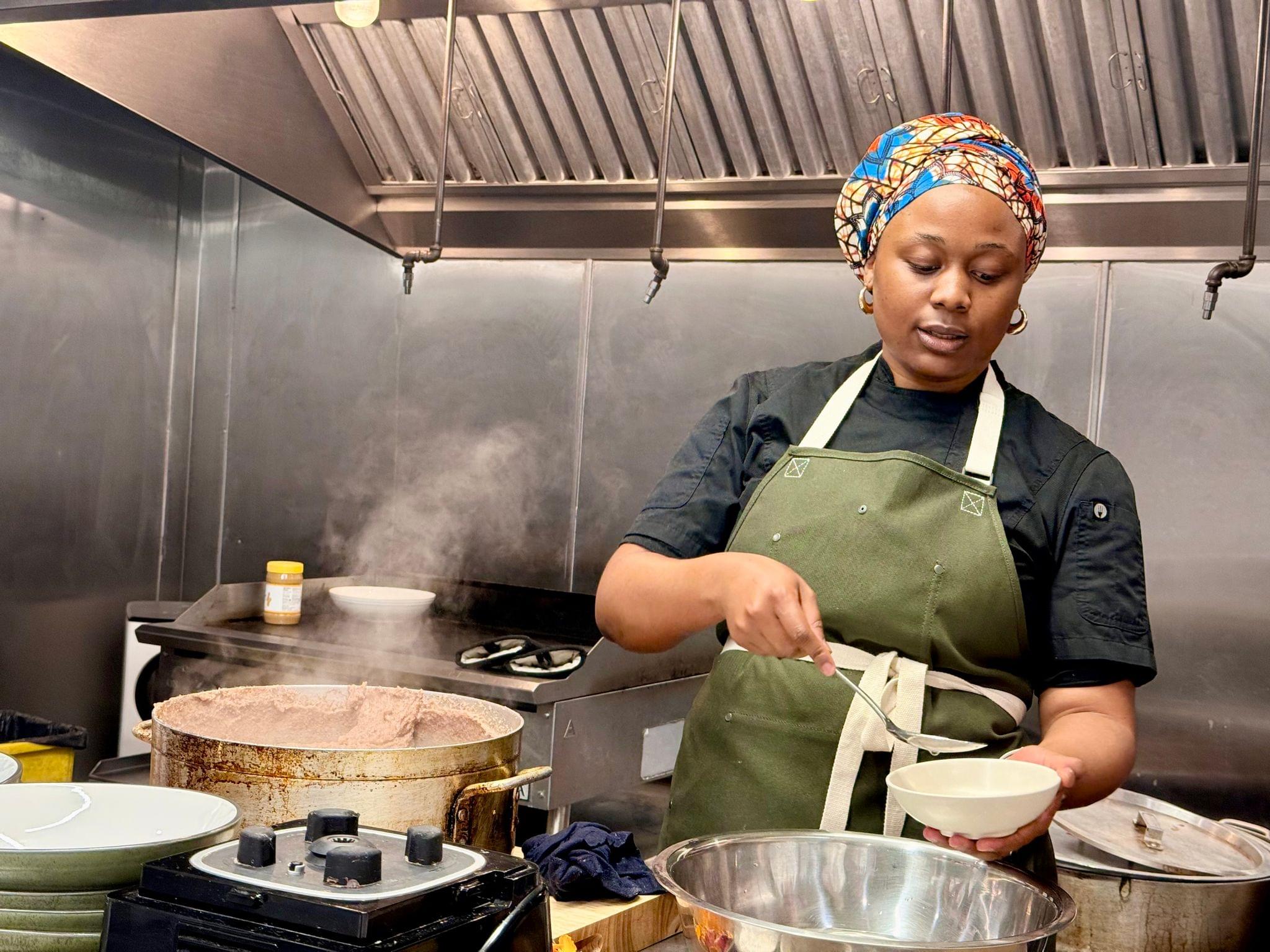
Chef Grace explaining how to serve sadza.
While I was in LA, I prepared a meal alongside several other media folks from around the world. Our instructor was Chef Kuda Grace from Zimbabwe at Flavors from Afar. We made sadza with peanut butter and mustard greens and then sat down together to compare notes from the day’s events, tell stories about our dining experiences, and get to know each other better.
The evening was a lot of fun, but what struck me most about it was something we touched upon in this week’s episode of AppStories. The goal of Airbnb’s redesigned app is to get you to leave it and go out into the world to try new things. It reduces the friction and anxiety of taking the plunge into something new and emphasizes social interactions in the real world instead of on a screen. In 2025, that’s unusual for an app from a big company, and it was fascinating to talk to Teo and Jud about how they and their teams set out to accomplish that goal.
I like Airbnb’s redesigned app a lot. It’s playful, welcoming and easy to use. What remains to be seen is whether Airbnb can pull off what it’s set out to accomplish. It isn’t the first company to try to pair customers with local services and experiences. Nor is it Airbnb’s first attempt at experiences. However, the app is a solid foundation, and if my experience at dinner in LA was any indication, I suspect Airbnb may be onto something with Services and Experiences.
Disclosure: The trip to LA to conduct my half of this interview was paid for by Airbnb.

.](https://cdn.macstories.net/imac-coloured-gameboys-1752253166234.jpg)