Posts in news

Screenwriting, Novels, Apps, and More with John August (Part 2)

Today on Dialog, we conclude our conversation with screenwriter and author John August.

Although August is a screenwriter and author, he’s also been involved in a wide variety of other related projects like the creation of Fountain markup syntax, which is a variant of Markdown designed specifically for screenwriters. He’s also the maker of Highland, a text editor for the Mac with special features for screenwriters and novelists, and Weekend Read, an iOS app for reviewing PDF-formatted screenplays. August even commissioned Courier Prime, and open source typeface that fixes many of the deficiencies found in standard Courier fonts.

You can find the episode here or listen through the Dialog web player below.

Sponsored by:

  • Astropad Studio – Turn your iPad into a professional graphics tablet. Get started today with a 30-day free trial.
  • HabitMinder – Change your habits, change your life! Your healthy habit reminder and tracker.

Next week, we’re going to speak to Carrie Patel, a narrative designer at Obsidian Entertainment, who has worked on games such as Pillars of Eternity and The Outer Worlds, which is coming this fall. Patel is also the author of the Recoletta trilogy, a Science Fantasy series set in an underground world. In next week’s first installment of the interview, we dive deep into the world-building, lore, character dialogue, and other elements of creating the narrative surrounding major video game releases.

Permalink


Apple Brings Back Texas Hold’em

When the App Store opened for business in 2008, Apple released Texas Hold’em, the company’s first and only iOS game and successor to an iPod version that debuted in 2006. The game, which Stephen Hackett profiled for MacStories last year was short-lived, disappearing from the App Store in 2011.

In the eight years since the game’s release, Apple has left the iOS game market to third-party developers, with the exception of Warren Buffett’s Paper Wizard. Today, however, the company released an updated version, which was spotted by an eagle-eyed 9to5Mac reader. Strangely, the game’s description says the release is meant to celebrate the App Store’s 10th Anniversary, which occurred last July 10th, not quite 11 years ago today.

In any event, Texas Hold’em is back with new graphics to support the resolution and screen sizes of modern iPhones along with new characters and ‘more challenging gameplay.’ The app, which originally sold for $4.99, is now free too.

Launching the game for the first time in many years, brought an instant wave of early App Store nostalgia. Even if card games aren’t your thing, Texas Hold’em is worth a look because so much of the original feel of one of the earliest iPhone games is preserved in this update.

Texas Hold’em is available as a free download on the App Store.


AppStories, Episode 118 – Reminders in iOS 13

On this week’s episode of AppStories, we continue our series of episodes on the new and updated apps coming from Apple in the fall with Reminders.

Sponsored by:

  • Direct Mail – Create and send great-looking email newsletters with Direct Mail, an easy-to-use email marketing app designed exclusively for the Mac.
  • Astropad Studio – Turn your iPad into a professional graphics tablet. Get started today with a 30-day free trial.

Permalink

Jony Ive to Leave Apple to Form New Design Firm and Sabih Khan Named SVP of Operations

Tim Bradshaw of the Financial Times dropped a bombshell: Jony Ive is leaving Apple to start his own design firm called LoveFrom, and Apple will be its first client. Ive told Bradshaw:

While I will not be an [Apple] employee, I will still be very involved — I hope for many, many years to come,” Sir Jonathan told the FT in an exclusive interview. “This just seems like a natural and gentle time to make this change.

Ive’s transition from his role as Apple Chief Design Officer where he oversees the design of both hardware and software to his new company will begin later this year with LoveFrom launching in 2020. Marc Newson who has collaborated with Ive in the past will join him as part of the LoveFrom design team. In addition to continuing ongoing projects for Apple, Ive told the Financial Times he would work on unspecified ‘personal passions.’

Ive has led Apple’s design team since 1996 and is responsible for the company’s iconic product designs like the iMac, iPod, and iPhone. He also guided the design and construction of Apple Park. In a press release issued by Apple, Tim Cook said:

Jony is a singular figure in the design world and his role in Apple’s revival cannot be overstated, from 1998’s groundbreaking iMac to the iPhone and the unprecedented ambition of Apple Park, where recently he has been putting so much of his energy and care,” said Tim Cook, Apple’s CEO. “Apple will continue to benefit from Jony’s talents by working directly with him on exclusive projects, and through the ongoing work of the brilliant and passionate design team he has built. After so many years working closely together, I’m happy that our relationship continues to evolve and I look forward to working with Jony long into the future.

Apple has not announced a replacement for Ive. Instead, the company’s press release says that design team leaders Evans Hankey, Vice President of Industrial Design, and Alan Dye, Vice President of Human Interface Design, will report to Apple’s Chief Operating Officer Jeff Williams. Of the design team, Ive had this to say:

After nearly 30 years and countless projects, I am most proud of the lasting work we have done to create a design team, process and culture at Apple that is without peer. Today it is stronger, more vibrant and more talented than at any point in Apple’s history,” said Ive. “The team will certainly thrive under the excellent leadership of Evans, Alan and Jeff, who have been among my closest collaborators. I have the utmost confidence in my designer colleagues at Apple, who remain my closest friends, and I look forward to working with them for many years to come.


Separately, Apple announced that it has named Sabih Kahn as joined the company’s executive team as Senior Vice President of Operations. In a press release, Apple said that Khan who has been at the company since the mid-90s:

will be in charge of Apple’s global supply chain, ensuring product quality and overseeing planning, procurement, manufacturing, logistics and product fulfillment functions, as well as Apple’s supplier responsibility programs that protect and educate workers at production facilities around the world.

According to Apple CEO Tim Cook and Williams:

Sabih leads our Ops team with heart,” said Tim Cook, Apple’s CEO. “He and his entire worldwide team are committed to delivering unmatched experiences to our customers, treating workers everywhere with dignity and respect, and protecting the environment for future generations.

I’ve been privileged to work with Sabih for more than 20 years, and you won’t find a more talented operations executive anywhere on the planet,” said Williams. “He is a world-class leader and collaborator, and I have no doubt that he will be the best leader of the Ops team in Apple’s history.

This is a surprising turn of events. Ive will continue to work with Apple, but it clearly won’t be his sole focus anymore. He’s left a lasting imprint on Apple over the course of almost three decades and is leaving behind design team led by Apple veterans, which leaves the company in good hands. Still, it’s a shame to see Ive go.

The addition of Kahn to the leadership team who, along with the company’s two design leads, will report to Jeff Williams is interesting too. I wouldn’t be surprised if Williams is being groomed to take over as CEO someday.



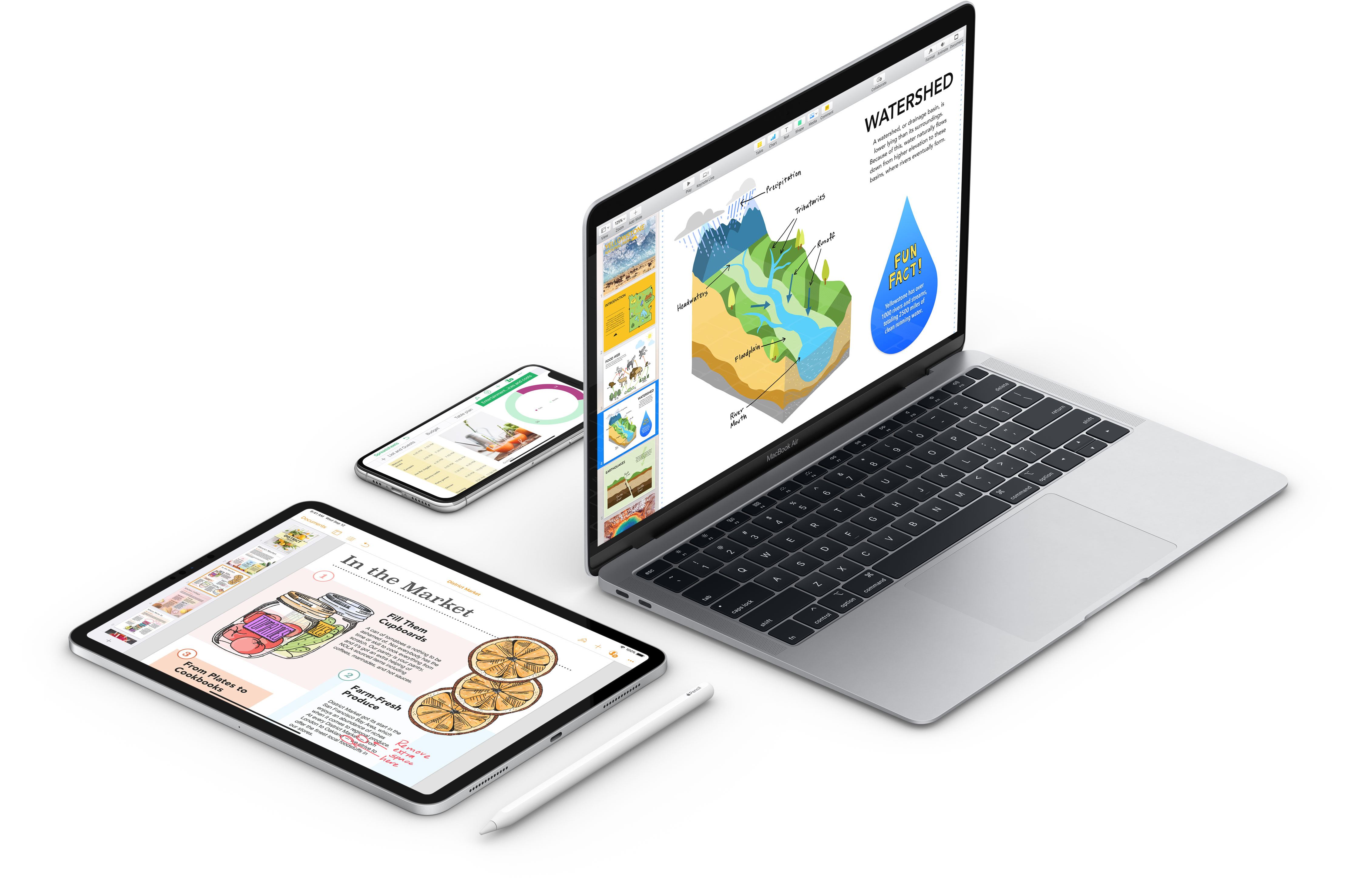
Pages, Numbers, and Keynote for the Mac and iOS Updated with Styling, Apple Pencil, and Other Features

All three of the apps in Apple’s iWork productivity suite received a substantial update this week. Changes varied by app and across platforms, but the lion’s share of the revisions improved the apps’ flexibility, text styling, and image handling capabilities, and, on iOS, Pencil integration.

The Mac versions of Pages, Numbers, and Keynote and their iOS counterparts now allow text to be styled with gradients and images. There are also new outline styles. Images, shapes, and equations can be placed inline in text boxes, which allows them to move with the text box when it’s moved, and the apps use face detection when photos are added to a document to determine where they should go intelligently.

In Pages, Numbers, and Keynote for iOS, a double-tap of the Apple Pencil toggles it between two modes: scrolling and selection, and drawing. The apps’ dictionaries can also be modified now using a new ‘Learn Spelling’ function. Altering the size and color of bullets, adding custom bullets, and changing indentation levels for bulleted lists is available in all three apps as is changing the borders of cells in tables. Finally, all three apps have new chart editing functionality for styling series, adjusting the spacing between columns, and adding trend lines, among other things.

Most of the remaining changes are to Pages and Numbers. Both iOS and Mac versions of Pages and Numbers have added the ability to link text to other pages of a Pages document or sheets in Numbers. Also, on both platforms, Pages can copy and paste pages of a document or sections of one between two different documents and reapply a master page to return a document to its default style state. There’s an English-language template for creating novels in Pages on iOS and the Mac too.

Finally, both versions of Numbers use a new, more powerful 128-bit calculation engine in its spreadsheets and add the ability to insert rows into filtered tables.

It’s great to see all versions of the iWork apps getting an update. I don’t use Pages or Keynote regularly, but Numbers has become an app that I rely on most days, and I appreciate the fact that Apple has kept the functionality of both the Mac and iOS versions close to each other even if it means maintaining two separate sets of code.


Apple News Debuts Candidate Guide for 2020 Democratic Hopefuls

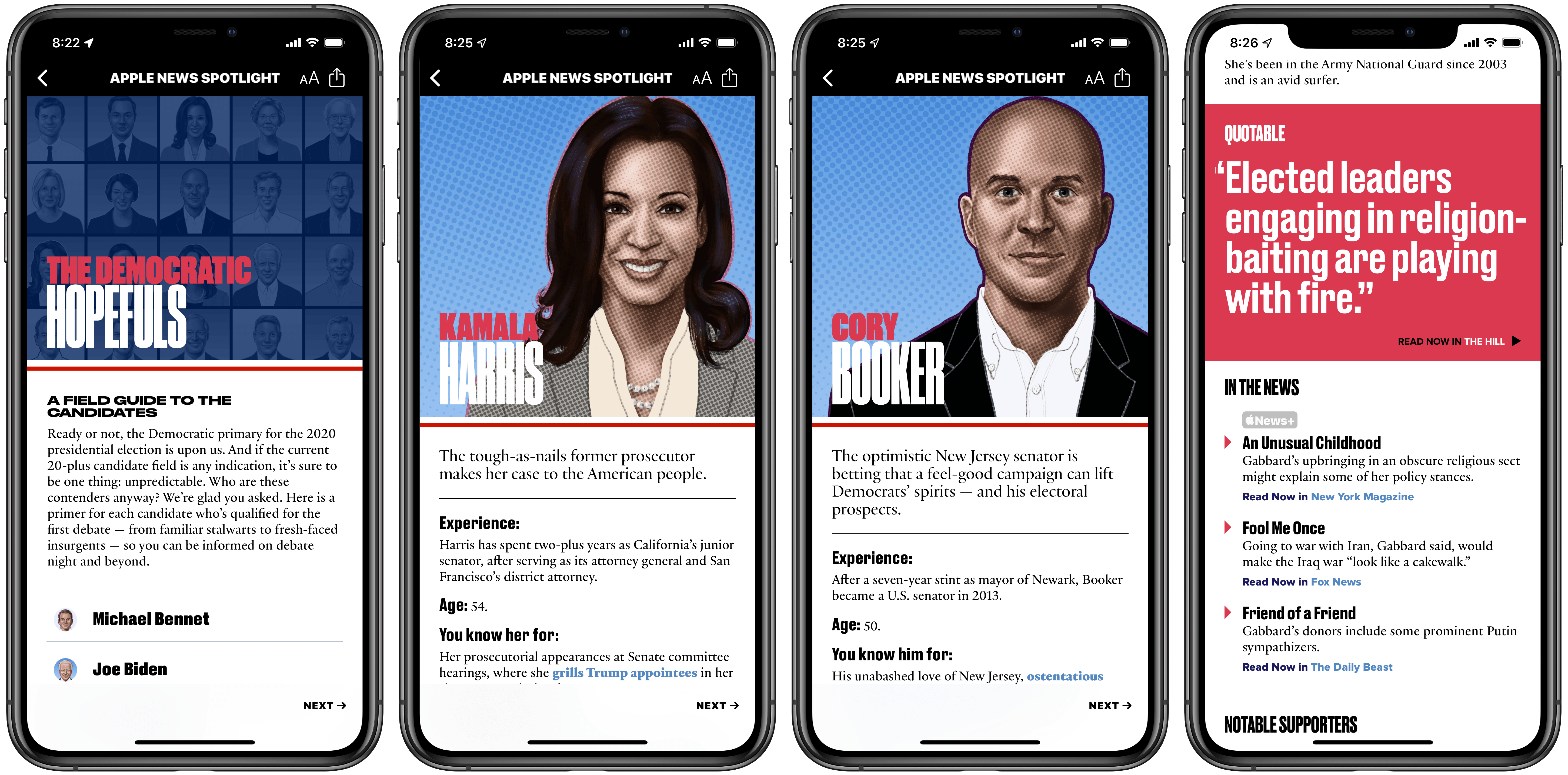
Ahead of the first 2020 Democratic debates, which take place over the next couple days, Apple News has launched a dedicated candidate guide pooling information about each presidential hopeful from a wide variety of sources. News has offered similar election-related hubs in the past, but nothing near as extensive as the candidate guide debuting today.

20 Democratic contenders are profiled in the candidate guide, and with each the News editorial team has assembled a swath of facts, key stances, quotes, and other relevant information meant to ensure future voters are informed amidst a crowded field of prospects.

One of the greatest values of News’ approach is that it summarizes key data in a brief, easy to read format. With minimal time investment you can find out a candidate’s experience, what they’re best known for, their breakout moment, and more. I especially appreciated the straight to the point “You’ll love her/him if you…” and “You’ll leave him/her if you…” factoids.

While there’s certainly a strong dose of editorial work done by Apple’s team in this guide, the key driving force behind each candidate profile is stories from other news sources. In Apple’s press release announcing the candidate guide, the following sources are referenced:

ABC News, Axios, CNN, Fox News, NBC News, Politico, The Hill, The New York Times, The Wall Street Journal, The Washington Post, TIME, USA Today, Vox and others

Each candidate profile is filled with links to stories from these sources and more, with practically every detail listed about a candidate tied directly to an outside link. This approach allows Apple’s editors to summarize key facts and make them easily digestible, all while putting news sources front and center so readers can go deeper on topics they’re interested in.

Besides the general profile information for candidates I’ve already outlined, Apple News also shares which issues are at the core of a candidate’s platform, how the fundraising landscape currently looks among candidates, recent standout news appearances, notable supporters, and more.

Apple News is positioning itself, with features like this candidate guide and other forthcoming 2020 US election coverage, as a trusted source for voters. Laura Kern, the Apple News editor-in-chief, wrote, “we want to offer Apple News readers a trusted place to learn more about candidates…The candidate guide in Apple News is a robust and reliable resource”. The message is clear: while pervasive fake news across other major news platforms was evident in the 2016 election, Apple believes it can offer a news source that’s trusted and reliable leading up to November 2020.

The Democratic candidate guide can be accessed in Apple News via the included link using an iPhone, iPad, or Mac.


Apple Launches First Public Betas for iOS 13, iPadOS 13, macOS Catalina, and tvOS 13

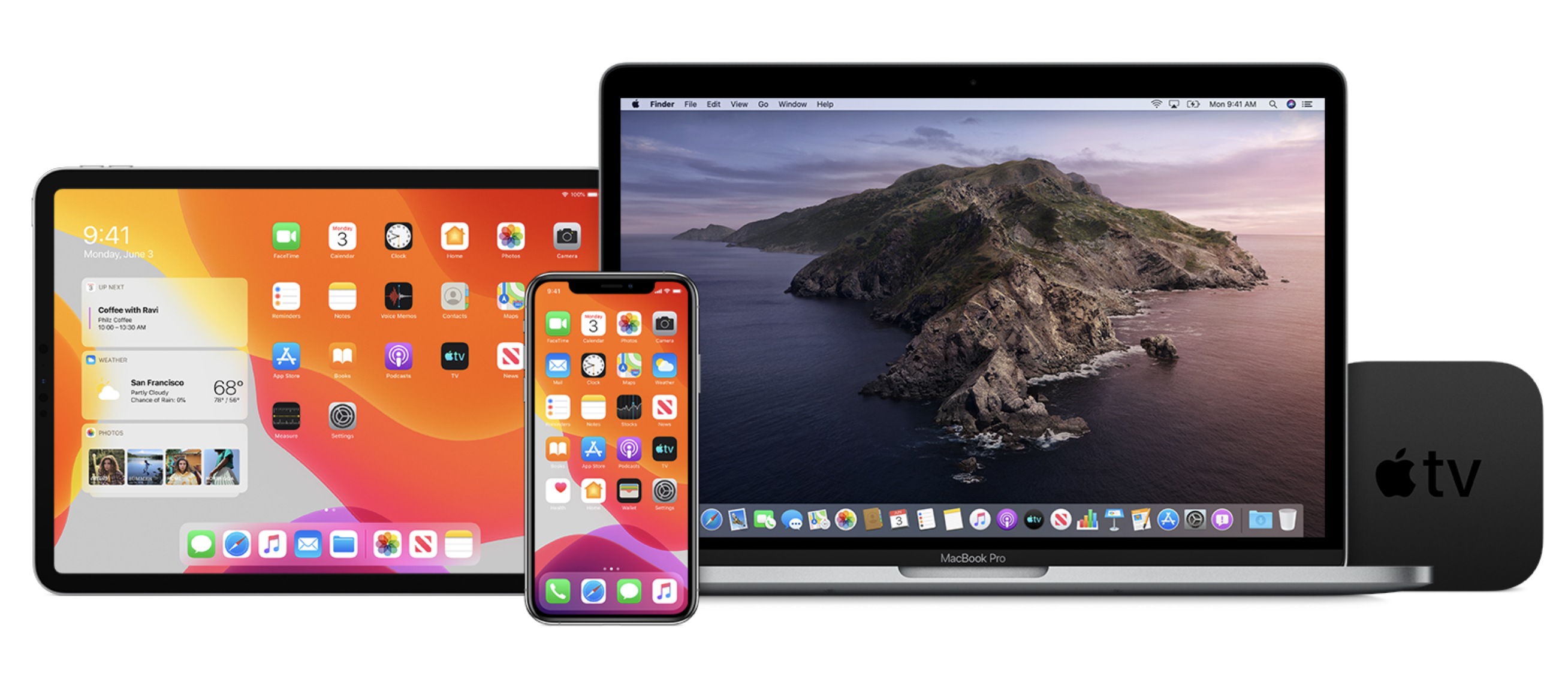
Today Apple has released its first public beta versions of its forthcoming software updates. iOS 13, iPadOS 13, macOS Catalina, and tvOS 13 are all available as public betas. As in years past, there is no public beta available for the Apple Watch or HomePod.

Users interested in trying out the latest versions of Apple’s software platforms can enroll in the beta program at beta.apple.com. However, this should only be done with appropriate caution and a willingness to endure buggy, unreliable software. These first public beta releases come a mere three weeks following the initial wave of developer betas, which themselves were especially unstable; as such, these releases are likely to be less reliable than even the public beta versions of years past.

If you’re wondering what all is new in these beta releases, you can read our full overviews of iOS 13, iPadOS 13, macOS Catalina, and tvOS 13. We’ll have continuing coverage of all the new features coming to Apple’s software platforms throughout the summer, leading up to their release this fall.


Harry Potter: Wizards Unite AR Game Launches on iOS

It was the summer of 2016 when Pokémon GO took the world by storm, and now, almost exactly three years to the day later, there’s a new AR game trying to capture the same magic. Harry Potter: Wizards Unite launched today in the US, UK, and select other countries from the same studio behind Pokémon GO, Niantic.

At the core of Wizards Unite is the same AR-based system employed in Pokémon GO, whereby you can explore a digital world that’s mapped to the real world around you, where different real-life locations are mapped to in-game hot spots for engaging with certain game elements. Special locations in the game, such as fortresses, are designed for teams of players to conquer together; combined with the AR world exploration mechanic, this encourages strong community engagement in the game. If Wizards Unite takes off in any way like Pokémon GO, expect to see bands of players roaming the streets with their phones at the ready.

Chronologically, Wizards Unite takes place following the original seven book Harry Potter series but still includes many of those original characters. In the game’s tutorial, for example, a slightly aged Harry Potter, now working as an auror, instructs you regarding a crisis the Ministry of Magic is currently facing that needs your assistance. This sort of tight integration with the world and characters Harry Potter fans know and love, combined with the community-centric element found in games like Pokémon GO, could make Wizards Unite a really special experience for anyone who loves J.K. Rowling’s wizarding world. As one of those people myself, even though I never got into Pokémon GO, I’m excited to spend some quality time trying out Wizards Unite.

You can download Harry Potter: Wizards Unite on the App Store now.