Posts in Featured

iTunes In the Cloud: Free, Or Scan Your Library and Match Songs at $24.99 Per Year

Once again, the rumors were real – Apple has just introduced iTunes In The Cloud at its WWDC keynote. The new system will allow you to get access to all your previously purchased songs on device from a new Purchased tab in the iTunes Store (similar to Purchased apps in the new App Store) and download items at any time. More importantly, the new cloud will allow you to push a single purchase to multiple devices at once – a first in the music industry, Steve Jobs said.

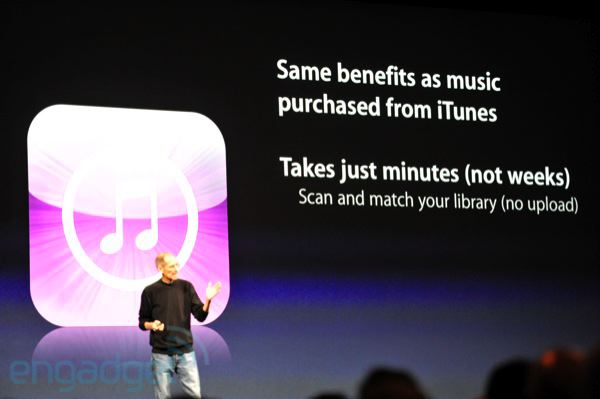
But the real new feature was unveiled on stage as a “one more thing” by Apple CEO. As previous rumors and speculation suggested, iTunes in the cloud would be more than simple pushing and updating of songs from the iTunes Store. Besides the usual sync (and the new WiFi one?) and iTunes Store, Apple will offer a new iTunes Match service that scans your music library, and matches it with Apple’s catalogue of 18 million songs in the cloud. iTunes Match comes at a price: $24.99 per year.

In additions, iTunes Match will upgrade the songs to 256k AAC DRM free. And it costs just $24.99 per year. So if you’ve got a bunch of music that you didn’t get from iTunes, you can get it in the cloud. Now if you look at some competitors, you’ll be surprised. We scan and match, the other guys you have to upload the whole collection. The other guys only have web apps. For 5000 songs, Amazon is $50. Even up to 20,000 songs, we’re one flat price.

The new iTunes in the cloud will be available as developer beta today.

Update: it looks like “some music features” of iCloud will be available in the US only while in beta. We assume the new iTunes Match service will be US-only during this period. From Apple’s official iCloud page:

Features are subject to change. Access to some services is limited to 10 devices. See www.apple.com/legal/itunes/ww/ for more information. Some features of iCloud require iOS 5 on iPhone 3GS, iPhone 4, iPod touch (3rd and 4th generation), iPad, or iPad 2, or a Mac computer with OS X Lion or a PC with Windows Vista or Windows 7 (Outlook 2007 or 2010 recommended). Some music features of iCloud are available in beta now in the U.S. only and require iOS 4.3.1 on iPhone 3GS, iPhone 4 (GSM model), iPod touch (3rd and 4th generation), iPad, or iPad 2, or a Mac or PC with iTunes 10.3.

Read more

Access Extra Content and Perks

Founded in 2015, Club MacStories has delivered exclusive content every week for nearly a decade.

What started with weekly and monthly email newsletters has blossomed into a family of memberships designed for every MacStories fan.

Learn more here and from our Club FAQs.

Club MacStories: Weekly and monthly newsletters via email and the web that are brimming with apps, tips, automation workflows, longform writing, early access to the MacStories Unwind podcast, periodic giveaways, and more;

Club MacStories+: Everything that Club MacStories offers, plus an active Discord community, advanced search and custom RSS features for exploring the Club’s entire back catalog, bonus columns, and dozens of app discounts;

Club Premier: All of the above and AppStories+, an extended version of our flagship podcast that’s delivered early, ad-free, and in high-bitrate audio.

Learn more here and from our Club FAQs.


Apple Unveils iCloud

UPDATE: You get access to iCloud when you upgrade or buy a new phone. Everyone gets 5GB of iCloud storage for Mail, but don’t worry because Apps, Books and Photo Stream do not count. Developers can try out iCloud from today.

Steve Jobs has just unveiled iCloud and it is a service that frees all your devices from having to connect to your Mac to get updated media and data. The Mac is being demoted, and in its place is the iCloud which will become “the hub of your digital life”. iCloud will be free!

We’ve got a solution for this problem. We’re going to demote the PC and the mac to just be a device. We’re going to move your hub, the center of your digital life, into the cloud.”

iCloud stores all your content, so that if you have something new on your iPhone it is sent to the cloud immediately, iCloud will then push it back to all your other devices.

And it’s completely integrated with your apps, and there’s nothing new to learn. It just all… works. It just works.

Whether it be new events on your calendar or a new message in your @me account (which will remain), all of it gets pushed to the cloud and then pushed back to all your devices. The App Store, which is integrated within iCloud will let you see all your purchased apps, even if they are from another device. The same will occur for iBooks

Now what about for devices you buy in the future. The cloud downloads it to all of your devices.

Backup too will be dealt with by iCloud, it will take daily backups of all your devices over WiFi including all the purchased music, apps and books, photos, videos and app data. If you ever lose your device or get a new one, it can all be restored from iCloud.

Access Extra Content and Perks

Founded in 2015, Club MacStories has delivered exclusive content every week for nearly a decade.

What started with weekly and monthly email newsletters has blossomed into a family of memberships designed for every MacStories fan.

Learn more here and from our Club FAQs.

Club MacStories: Weekly and monthly newsletters via email and the web that are brimming with apps, tips, automation workflows, longform writing, early access to the MacStories Unwind podcast, periodic giveaways, and more;

Club MacStories+: Everything that Club MacStories offers, plus an active Discord community, advanced search and custom RSS features for exploring the Club’s entire back catalog, bonus columns, and dozens of app discounts;

Club Premier: All of the above and AppStories+, an extended version of our flagship podcast that’s delivered early, ad-free, and in high-bitrate audio.

Learn more here and from our Club FAQs.


iOS 5 Gets Twitter Integration: Photos, Contacts, Direct Tweeting

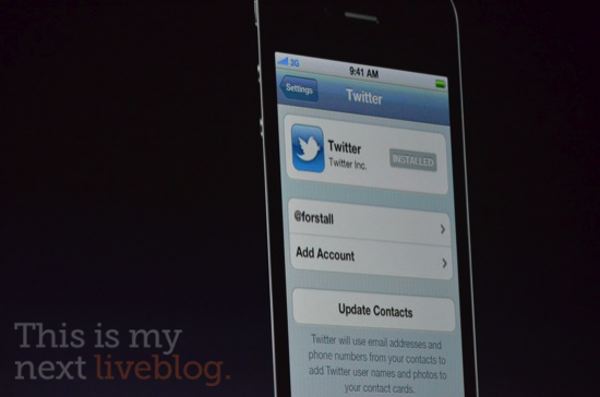
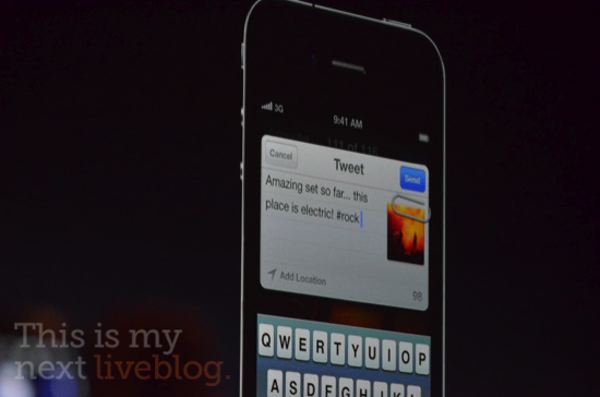
Rumors about iOS 5 getting “deep” Twitter integration were also true: the WWDC keynote revealed a few minutes ago that iOS 5 will indeed come with a new Twitter settings panel to authorize with your account on-device, and start tweeting pictures or web pages right away with the “Tweet Sheet”, a new system-wide popup menu used on the iPhone and iPad to send tweets. Twitter will also be integrated in the contacts to fetch profile pictures, as well as Maps, YouTube and Safari.


Official update from Twitter’s blog:

And today we’re working with Apple to make sharing on Twitter even easier: Twitter is built right into iOS 5, coming soon to iPhone, iPad and iPod touch devices worldwide.

This means that you’ll be able to sign in to your Twitter account once and then tweet with a single tap from Twitter-enabled apps, including Apple’s apps—Camera, Photos, Safari, Contacts, YouTube, and Maps. And developers of all of your favorite apps can easily take advantage of the single sign-on capability, letting you tweet directly from their apps too.

Photos courtesy of This is my Next.

Access Extra Content and Perks

Founded in 2015, Club MacStories has delivered exclusive content every week for nearly a decade.

What started with weekly and monthly email newsletters has blossomed into a family of memberships designed for every MacStories fan.

Learn more here and from our Club FAQs.

Club MacStories: Weekly and monthly newsletters via email and the web that are brimming with apps, tips, automation workflows, longform writing, early access to the MacStories Unwind podcast, periodic giveaways, and more;

Club MacStories+: Everything that Club MacStories offers, plus an active Discord community, advanced search and custom RSS features for exploring the Club’s entire back catalog, bonus columns, and dozens of app discounts;

Club Premier: All of the above and AppStories+, an extended version of our flagship podcast that’s delivered early, ad-free, and in high-bitrate audio.

Learn more here and from our Club FAQs.


Unconfirmed iOS 5 Photo Surfaces

TechCrunch posts a photo of what could be the Home screen of an iPhone running iOS 5, set to be officially introduced tomorrow at the WWDC keynote in San Francisco. TechCrunch doesn’t report the original source of the photo and says this might be a well-realized mockup based on recent rumors and speculation, but MG Siegler notes some interesting facts about the image may suggest it is genuine and not another Internet fake:

Could it be? Is this it? iOS 5?! I honestly have absolutely no clue. But it certainly seems like it at least could have the right idea.

Before you go yelling “fake” on the obvious things, a couple notes. First of all, yes, 11:54 PM is in the future — in the United States. But if the Weather app is to be believed, this is clearly a European version of iOS (note the 23 degree Celsius in the icon instead of 72 degree Fahrenheit as you would see in the U.S.). Second, the Camera app icon is totally different, and looks a little odd being all-black, but who knows, maybe it’s changing. The icons are in the “correct” default order. Finally, if the talk of deep Twitter integration into iOS 5 is to be believed (we heard a bit, others have heard a bit more), it’s entirely possible that these new-style Twitter notifications could be working in iOS 5 right out of the box.

It is true the photo above has the icons in the same default order every device comes out of the box with. Another detail: in the Utilities folder next to the iTunes Store, there seems to be another app right below Calculator. In Apple’s default configuration, there are only four apps in the stock Utilities folder. If the image is to believed, iOS 5 would come with the old iOS 4 default wallpaper (as the WWDC banners indicated) and a revamped camera icon. It wouldn’t be the first time Apple updated a stock app’s icon with the launch of a new version of iOS 5.

More importantly, the image shows the rumored Twitter integration with a new notification bar. Several reports in the past week claimed Apple was working on “deep” Twitter integration for iOS 5 with features such as native photo uploading and contact access from the Address Book.

TechCrunch has a pretty solid track record when it comes to Apple rumors and last-minute leaks, though there are always some questionable images showing up before every major Apple event. We don’t put much faith in the photo either, but we’re posting it for discussion as it seems to fall in line with rumors we’ve heard in the months leading up to WWDC 2011.

Update: TechCrunch now says they’re hearing this is the “right idea”. We’ll know more tomorrow.

Access Extra Content and Perks

Founded in 2015, Club MacStories has delivered exclusive content every week for nearly a decade.

What started with weekly and monthly email newsletters has blossomed into a family of memberships designed for every MacStories fan.

Learn more here and from our Club FAQs.

Club MacStories: Weekly and monthly newsletters via email and the web that are brimming with apps, tips, automation workflows, longform writing, early access to the MacStories Unwind podcast, periodic giveaways, and more;

Club MacStories+: Everything that Club MacStories offers, plus an active Discord community, advanced search and custom RSS features for exploring the Club’s entire back catalog, bonus columns, and dozens of app discounts;

Club Premier: All of the above and AppStories+, an extended version of our flagship podcast that’s delivered early, ad-free, and in high-bitrate audio.

Learn more here and from our Club FAQs.


Rumor: Lion To Launch On June 14th

In last year’s ‘Back to the Mac’ event, Apple publicly revealed that the next version of OS X, Lion, was scheduled for a summer 2011 release, but didn’t specify an exact launch date. 9to5 Mac today claims to have information that suggests Lion will launch on Tuesday, June 14th, less than two weeks away. It comes after Lion was said to have gone “live for internal testing” less than two weeks ago, suggesting a public release in the near future.

They claim to have heard chatter from several sources, suggesting the June 14th date is a “strong possibility”. Furthermore they report that Apple retail stores will revamp their storefront window to publicise the launch of Lion.

Apple is said to be planning one of their product launch-indicative “visual updates” for the morning of Tuesday, June 14th

The report also suggests that the launch of Lion will mark the beginning of reduced software presence within Apple stores, starting with the possible removal of Snow Leopard. In line with this, another source claims that the retail supplies of Snow Leopard are dwindling, solidifying the possibility of a mid-June launch of Lion. Earlier this year the appearance of several Lion manuals on Amazon had suggested a late-July launch based on their launch dates.

[Via 9to5 Mac]

Access Extra Content and Perks

Founded in 2015, Club MacStories has delivered exclusive content every week for nearly a decade.

What started with weekly and monthly email newsletters has blossomed into a family of memberships designed for every MacStories fan.

Learn more here and from our Club FAQs.

Club MacStories: Weekly and monthly newsletters via email and the web that are brimming with apps, tips, automation workflows, longform writing, early access to the MacStories Unwind podcast, periodic giveaways, and more;

Club MacStories+: Everything that Club MacStories offers, plus an active Discord community, advanced search and custom RSS features for exploring the Club’s entire back catalog, bonus columns, and dozens of app discounts;

Club Premier: All of the above and AppStories+, an extended version of our flagship podcast that’s delivered early, ad-free, and in high-bitrate audio.

Learn more here and from our Club FAQs.


Follow the 2011 WWDC Keynote Triple Play on MacStories

Lions? Check. Clouds that kind of look like modified iSync icons? Check. iOS 5? Check. Steve Jobs? Double check.

Our heads have been in the clouds for the last few months as Apple put the finishing touches on their Carolinian data center, convinced all four record labels to get onboard for iCloud, and Lion has been nothing but a leaky faucet when it comes to features, but iOS 5 and iCloud have been Apple’s best kept secrets to date. The big data center theory is that Apple will use iCloud for more than music, and I was happier than a clam when both the LA Times and CNet all but reaffirmed my suspicions about Apple’s desires for the new streaming technology.

On top of all the rumors, iCloud suddenly became the center star of speculation beyond the talks of media as AirPorts and Time Capsule supplies are beginning to run dry in Apple retail stores. Could iOS updates be cached on our wireless access points before installation? Could Apple be looking to distribute these updates without user intervention? Suddenly everything we know about iCloud, and Apple’s current odd child Mobile Me, has been turned on its head. What’s in store for Monday hasn’t yet made it into rumor-mongering hands. And that iSync-like icon? Highly suspicious.

We have a feeling that this WWDC is going to be the biggest we’ve seen in years, and we hope you’re certainly prepared for our caffeine-drip-fueled coverage starting Monday. Keep your eyes glued on MacStories for all the latest updates - we’ll be covering the Keynote with our friends from across the web (video or no-video), bringing you work-a-holics a consolidated text feed. We’re going to start early at 9:30 PDT for casual chit-chat, predictions, and maybe eat a donut or two before the show begins.

Until Monday, June 6th, PEACE!

Time Zones:

13:00 — New York, New York
10:00 — San Francisco, California
07:00 — Honolulu, Hawaii
03:00 — Sydney, Australia
02:00 — Tokyo, Japan
01:00 — Shanghai, China
10:30 — New Delhi, India
21:00 — Moscow, Russia
19:00 — Rome, Italy
18:00 — London, England

Don’t see your city? You can use this link to get your exact time. Read more

Access Extra Content and Perks

Founded in 2015, Club MacStories has delivered exclusive content every week for nearly a decade.

What started with weekly and monthly email newsletters has blossomed into a family of memberships designed for every MacStories fan.

Learn more here and from our Club FAQs.

Club MacStories: Weekly and monthly newsletters via email and the web that are brimming with apps, tips, automation workflows, longform writing, early access to the MacStories Unwind podcast, periodic giveaways, and more;

Club MacStories+: Everything that Club MacStories offers, plus an active Discord community, advanced search and custom RSS features for exploring the Club’s entire back catalog, bonus columns, and dozens of app discounts;

Club Premier: All of the above and AppStories+, an extended version of our flagship podcast that’s delivered early, ad-free, and in high-bitrate audio.

Learn more here and from our Club FAQs.


Currencies for Mac Makes Conversion Simple, iOS-like

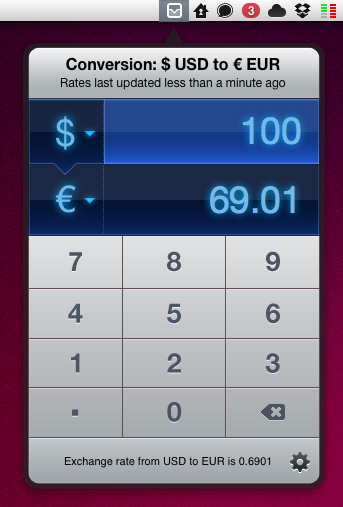
Being based in Italy, I have to deal with currency conversion on a daily basis. Most of my digital purchases are made on US websites, and either for work or personal purposes, more often that not I find myself going through my credit card billing statement to re-convert expenses from Euro to United States Dollars. As you can imagine, being able to easily and accurately convert currencies in seconds in the first place has become an essential part in my workflow. Currencies, a new app by Edovia released today on the Mac App Store, aims at making currency conversion super-simple from the OS X menubar with an interface design heavily inspired by iOS apps and multitouch.

In fact, Currencies for Mac comes from an iOS counterpart already available in the App Store. The app has been “converted” using The Iconfactory’s Chameleon engine, which allows developers to port the UIKit – the framework used to write apps for the iPhone and iPad – to the Mac. We’ve seen another example of Chameleon in action before, Carousel for Instagram. In a similar fashion, Currencies looks like an iPhone app inside an iPad popover menu running in the Mac menubar – a mix of interface schemes and devices that’s actually fun to use and once again hints at where the Mac platform is going. In the next few years, when Macs will be touch-enabled and even more similar to iOS devices, we’ll look back at this transition period, OS X Lion, iOS 5 and Chameleon.

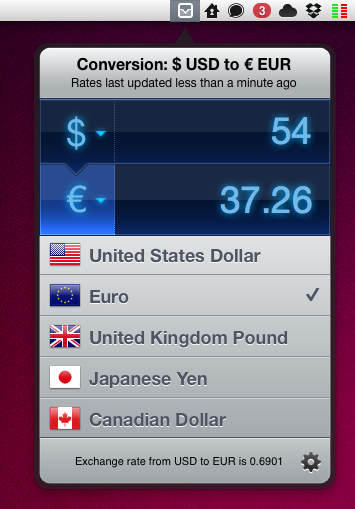
Currencies is very easy to use. One click on the menubar icon, and the app becomes visible to reveal two tabs for the currencies you’d like to convert. To type, you can either use the on-screen keyboard or your Mac’s one. To change currencies, hit the symbol and select a new one from the list – the design is nice and elegant. That’s it. The app has some preferences to choose a keyboard shortcut and a refresh time –  the app relies on Yahoo for its conversion rates, supports 130 currencies and dots / commas for decimal separation.

Should you buy Currencies when your web browser takes seconds to open a currency converter and do the job for free? There’s no doubt you’ll be just fine converting units on a website like Yahoo Currency Converter or Xe.com, but if you care about good design, usability and are intrigued by the whole concept of iOS apps running in the Mac’s menubar, you should give Currencies a try. Go download the app here at $2.99 – you can find the iPhone version at the same price here.

Access Extra Content and Perks

Founded in 2015, Club MacStories has delivered exclusive content every week for nearly a decade.

What started with weekly and monthly email newsletters has blossomed into a family of memberships designed for every MacStories fan.

Learn more here and from our Club FAQs.

Club MacStories: Weekly and monthly newsletters via email and the web that are brimming with apps, tips, automation workflows, longform writing, early access to the MacStories Unwind podcast, periodic giveaways, and more;

Club MacStories+: Everything that Club MacStories offers, plus an active Discord community, advanced search and custom RSS features for exploring the Club’s entire back catalog, bonus columns, and dozens of app discounts;

Club Premier: All of the above and AppStories+, an extended version of our flagship podcast that’s delivered early, ad-free, and in high-bitrate audio.

Learn more here and from our Club FAQs.


iCloud Detailed: Initially Free with iTunes Purchase, $25 a Year Subscription

The Los Angeles Times details the undisclosed features of iCloud, which has been reported by Apple to be a significant staple in Monday’s WWDC keynote. The LA Times reports that iCloud will initially be offered free with a purchase from the iTunes Store, meaning a digital download may fetch you free online storage or perhaps a free subscription, similar to Amazon’s current offering where they offer free cloud storage for a year with an album purchase (many took advantage of Lady Gaga’s $.99 album for this additional deal). Users will want to build their libraries relatively quickly, and the subscription is said to be available at as little as $25 per year. CNet previously suggested that the service wouldn’t be free, but could be around $20 a year. This looks like it’ll be a little of both as Apple introduces users to the service.

The LA Times says Apple initially plans to allow consumers to store their data on Apple’s servers, and would like to offer much more than music in the realm of movies, television, and and other digital content through iCloud’s publishing platform. Whether that storage involves uploading your own media or having iTunes scan your library is currently unknown, but we’re hoping for the latter.

The agreements, finalized this week, call for Apple to share 30% of any revenue from iCloud’s music service with record labels, as well as 12% with music publishers holding the songwriting rights. Apple is expected to keep the remaining 58%, said people knowledgeable with the terms.

The report comes when Apple’s network devices are reported to be ready for an upgrade, perhaps providing some form of iCloud caching for media playback. Apple just sealed the deal with Universal Music Group, and now with iCloud details leaking (as well as iCloud branding), it’ll be hard to keep the Lion in its cage over the weekend.

[via Los Angeles Times]

Access Extra Content and Perks

Founded in 2015, Club MacStories has delivered exclusive content every week for nearly a decade.

What started with weekly and monthly email newsletters has blossomed into a family of memberships designed for every MacStories fan.

Learn more here and from our Club FAQs.

Club MacStories: Weekly and monthly newsletters via email and the web that are brimming with apps, tips, automation workflows, longform writing, early access to the MacStories Unwind podcast, periodic giveaways, and more;

Club MacStories+: Everything that Club MacStories offers, plus an active Discord community, advanced search and custom RSS features for exploring the Club’s entire back catalog, bonus columns, and dozens of app discounts;

Club Premier: All of the above and AppStories+, an extended version of our flagship podcast that’s delivered early, ad-free, and in high-bitrate audio.

Learn more here and from our Club FAQs.


iCloud Logo Spotted at Moscone Center


Apple started the WWDC 2011 preparations at the Moscone Center a few days ago – we tweeted pictures of the Apple logo and outside banners going up, though we weren’t able to see what Apple was working on inside the conference building. As tweeted by @stop, the photo above shows the official logo / icon of iCloud that Apple will unveil at the WWDC keynote on Monday.

What do you think? Judging from a first photo, it looks like iCloud is going to replace MobileMe entirely – several rumors in the past weeks claimed iCloud would be a service within MobileMe, but from the looks of the icon it appears iCloud will simply replace Apple’s previous cloud offering.

We should receive more photos from Moscone Center later today and we’ll update this story with the new shots. Look past the break for more updates!

Read more

Access Extra Content and Perks

Founded in 2015, Club MacStories has delivered exclusive content every week for nearly a decade.

What started with weekly and monthly email newsletters has blossomed into a family of memberships designed for every MacStories fan.

Learn more here and from our Club FAQs.

Club MacStories: Weekly and monthly newsletters via email and the web that are brimming with apps, tips, automation workflows, longform writing, early access to the MacStories Unwind podcast, periodic giveaways, and more;

Club MacStories+: Everything that Club MacStories offers, plus an active Discord community, advanced search and custom RSS features for exploring the Club’s entire back catalog, bonus columns, and dozens of app discounts;

Club Premier: All of the above and AppStories+, an extended version of our flagship podcast that’s delivered early, ad-free, and in high-bitrate audio.

Learn more here and from our Club FAQs.