Posts in Featured

The App Store Turns Three After A Number Of Recent Milestones

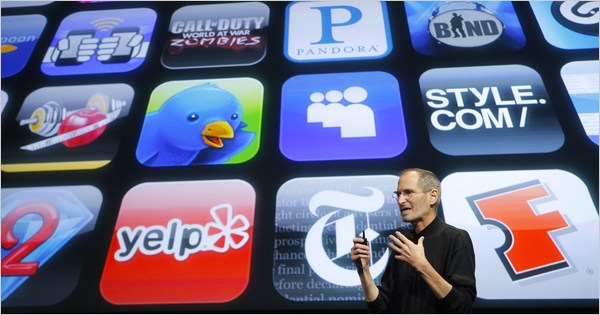
Today marks the third anniversary of the launch of the (iPhone) App Store which launched on July 10, 2008. It launched simultaneously with what was then called the iPhone OS 2.0 software (now dubbed iOS 2.0) and was subsequently followed by the release of the iPhone 3G the next day, which came with iOS 2.0 and thus the App Store pre-installed.

The availability of third-party applications and an ‘App Store’ on the iPhone was certainly one of the most demanded features of the iPhone after it was revealed and launched in 2007. Whilst it hasn’t been revealed when exactly Apple decided to open up the iPhone to third-party apps (or if they had always planned for it), Steve Jobs was quoted in the New York Times shortly after revealing the iPhone in January 2007, as saying:

We define everything that is on the phone. You don’t want your phone to be like a PC. The last thing you want is to have loaded three apps on your phone and then you go to make a call and it doesn’t work anymore. These are more like iPods than they are like computers.

Since the launch of App Store, it has become one of the defining successes for the iPhone and Apple more broadly – becoming a cornerstone feature being used in a number of advertising campaigns. Most notable is the ‘There’s an App for that’ ad campaign which highlighted the wide array of apps available to consumers (jump the break to relive the first of those).
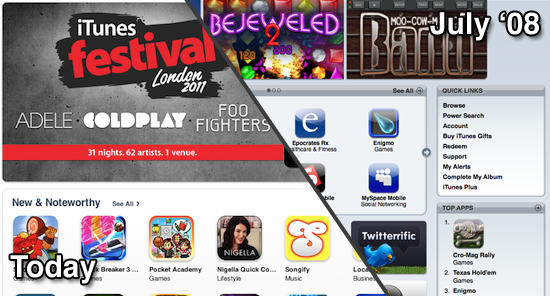
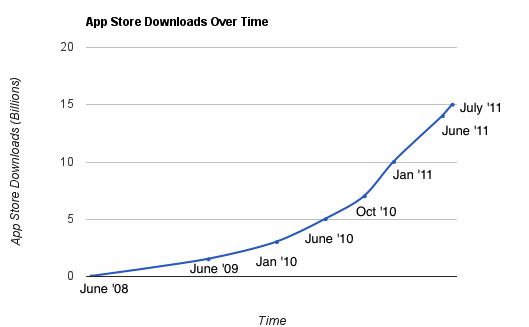
Over the past few months, the App Store has hit a number of milestones that reveals how successful it has been over the past three years. Just in the past week, Apple revealed that there had been 15 billion apps downloaded from the App Store. Recently it was also revealed that there are now over 500,000 apps available in the App Store (100,000 of which are iPad apps) – virtually a hundred-fold increase from the 500 apps that were available at the launch of the App Store in July of 2008. Apple has also been very keen to note at their WWDC conferences that they are paying out significant amounts of money to developers; at last count it was over $2.5 billion. The question is, where will the App Store be in a year from now, let-alone another three years? The pace at which it has grown is truly mind-boggling.

[Sources: New York Times, TechCrunch, Engadget, Wikipedia]
Read more

Access Extra Content and Perks

Founded in 2015, Club MacStories has delivered exclusive content every week for nearly a decade.

What started with weekly and monthly email newsletters has blossomed into a family of memberships designed for every MacStories fan.

Learn more here and from our Club FAQs.

Club MacStories: Weekly and monthly newsletters via email and the web that are brimming with apps, tips, automation workflows, longform writing, early access to the MacStories Unwind podcast, periodic giveaways, and more;

Club MacStories+: Everything that Club MacStories offers, plus an active Discord community, advanced search and custom RSS features for exploring the Club’s entire back catalog, bonus columns, and dozens of app discounts;

Club Premier: All of the above and AppStories+, an extended version of our flagship podcast that’s delivered early, ad-free, and in high-bitrate audio.

Learn more here and from our Club FAQs.


Simplify: A Spotify Music Controller and Artwork Widget for Mac

Spotify, the European music streaming service that has attracted millions of paying subscribers in the past two years, is finally launching in the United States, with some saying the big opening could happen as early as next week. For those not familiar with Spotify, the concept is very simple: instead of owning music, you stream it from the company’s servers that host a huge catalogue of songs from both major and less-known labels. You can build playlists, mark items as favorite, and pay to get unlimited access, higher quality bitrates, mobile apps and caching options for offline access. Whereas Apple’s upcoming iTunes Match service will scan songs you already own to mirror them online, Spotify lets you create your own online library of songs you don’t own (though a “buy” option has been recently introduced), but that you can stream at any time. It’s similar to other services like Rdio and MOG, but the company never managed to close a deal with US music labels and get the green light for launching its service until last week.

I’ve been a Spotify user for two years, and it’s completely revolutionized the way I listen to music. I still enjoy buying some music from iTunes, but Spotify’s biggest advantage over traditional marketplaces is that I can pay a monthly fee (or buy yearly access altogether with a gift card) to listen to just about anything I want, from any device. Spotify has a beautiful Mac client and an iPhone app that’s continually updated with new features; however, the company still hasn’t revealed its plans about an iPad app that would be much welcome one year after the iPad came out. Read more

Access Extra Content and Perks

Founded in 2015, Club MacStories has delivered exclusive content every week for nearly a decade.

What started with weekly and monthly email newsletters has blossomed into a family of memberships designed for every MacStories fan.

Learn more here and from our Club FAQs.

Club MacStories: Weekly and monthly newsletters via email and the web that are brimming with apps, tips, automation workflows, longform writing, early access to the MacStories Unwind podcast, periodic giveaways, and more;

Club MacStories+: Everything that Club MacStories offers, plus an active Discord community, advanced search and custom RSS features for exploring the Club’s entire back catalog, bonus columns, and dozens of app discounts;

Club Premier: All of the above and AppStories+, an extended version of our flagship podcast that’s delivered early, ad-free, and in high-bitrate audio.

Learn more here and from our Club FAQs.


MacStories Product Review: The Samson Meteor Mic

When it comes to podcasting, you shouldn’t have to be an audio expert like Dan Benjamin or Dave Hamilton. Audio equipment, mixers, those damn XLR cables — for someone who just wants to jump into garageband and hit record, there’s no need to buy $500 in equipment. You should, however, invest in an easy solution that’ll improve your game ten fold. Today, I’m looking at the Samson Meteor Mic, a $99 cardioid condenser microphone that’s perfect for podcasting on a budget.

Read more

Access Extra Content and Perks

Founded in 2015, Club MacStories has delivered exclusive content every week for nearly a decade.

What started with weekly and monthly email newsletters has blossomed into a family of memberships designed for every MacStories fan.

Learn more here and from our Club FAQs.

Club MacStories: Weekly and monthly newsletters via email and the web that are brimming with apps, tips, automation workflows, longform writing, early access to the MacStories Unwind podcast, periodic giveaways, and more;

Club MacStories+: Everything that Club MacStories offers, plus an active Discord community, advanced search and custom RSS features for exploring the Club’s entire back catalog, bonus columns, and dozens of app discounts;

Club Premier: All of the above and AppStories+, an extended version of our flagship podcast that’s delivered early, ad-free, and in high-bitrate audio.

Learn more here and from our Club FAQs.


Apple Reveals Over 15 Billion Apps Have Been Downloaded From The App Store

Apple just issued a press release that reveals over 15 billion apps have been downloaded from the App Store. Apple notes that it has more 425,000 apps, including 100,000 native iPad apps. It comes just six months after the App Store hit 10 billion downloads in January this year.

More than 15 billion apps have been downloaded from the revolutionary App Store and more than 425,000 apps are available, including more than 100,000 native iPad apps, to consumers in 90 countries. Users of the more than 200 million iOS devices around the world can choose from an incredible range of apps in 20 categories, including games, business, news, education, sports, health, reference and travel. Apple has paid developers over $2.5 billion to date.

In the press release, a few people who run some of the most popular apps are quoted singing the praises of the App Store and the opportunities it has allowed, including Ge Wang from Smule, Mark Rein of Epic Games and Nicholas Callaway of Callaway Digital Arts. Phil Schiller, Apple’s senior VP of Worldwide Product Marketing says in the press release:

In just three years, the revolutionary App Store has grown to become the most exciting and successful software marketplace the world has ever seen. Thank you to all of our amazing developers who have filled it with over 425,000 of the coolest apps and to our over 200 million iOS users for surpassing 15 billion downloads.

As Business Insider points out, these statistics reveal that, averaged out, each iOS device owner has download 75 apps - any way you cut it, that is an impressive figure. Similarly, AllThingsD notes that just last month at WWDC, Apple revealed that 14 billion apps had been downloaded, meaning roughly a billion apps have been download in just a month.

Read more

Access Extra Content and Perks

Founded in 2015, Club MacStories has delivered exclusive content every week for nearly a decade.

What started with weekly and monthly email newsletters has blossomed into a family of memberships designed for every MacStories fan.

Learn more here and from our Club FAQs.

Club MacStories: Weekly and monthly newsletters via email and the web that are brimming with apps, tips, automation workflows, longform writing, early access to the MacStories Unwind podcast, periodic giveaways, and more;

Club MacStories+: Everything that Club MacStories offers, plus an active Discord community, advanced search and custom RSS features for exploring the Club’s entire back catalog, bonus columns, and dozens of app discounts;

Club Premier: All of the above and AppStories+, an extended version of our flagship podcast that’s delivered early, ad-free, and in high-bitrate audio.

Learn more here and from our Club FAQs.


Growl 1.3 To Be Released on Mac App Store, Introduce Lion Support and Drop GrowlMail Support

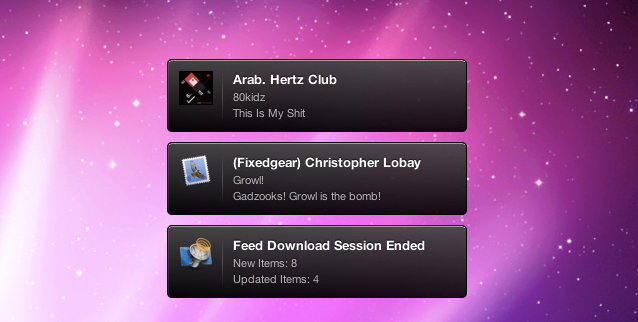
The developers of Growl, a popular notification system for OS X that’s been around for years and it’s completely free to use, have announced that the plugin is going to become a Mac App Store application through a complete rewrite with OS X Lion in mind, dropping support for older frameworks and “hacks” like GrowlMail and GrowlSafari that wouldn’t probably make it past Apple’s approval. For those not familiar with Growl, the notification system became popular among Mac users because of its highly customizable nature that enabled almost anyone with basic coding and design knowledge to create “themes” for it that changed the appearance and animations of the notification tickets displayed on screen. Growl is supported by hundreds of different applications for the Mac, including big names like Twitter and Dropbox. We have covered a handful of beautiful themes for Growl in the past, and the success of this plugin also inspired several iOS developers to create mobile apps capable of plugging into the desktop system to fetch or send remote notifications. Growl is the undiscussed king of notifications for OS X apps.

Yet the developers are willing to change everything about Growl to get it ready for the Mac App Store and turn it into an app as requested by Apple to developers submitting software to iTunes. In a post on Growl’s official Google Group [via Steve Streza], developer Christopher Forsythe has announced that the upcoming 1.3 release will bring important changes such as the aforementioned Store availability, as well as full support for Lion and a new “app” form that has the obvious advantage of allowing users to easily upgrade to new versions by simply checking on their Mac App Store purchase page. One of the common complaints about Growl, in fact, is that the app often requires the user to download and perform an upgrade. As the existing version comes with a .DMG file that contains an installer for a System Preferences panel, the current Growl 1.2.2 forces users to manually upgrade every time a new version is out. With the Mac App Store and Growl becoming “an app”, the developers want to eliminate the convoluted process of opening and mounting a disk image file, running an installer, and manually upgrading from System Preferences. Read more

Access Extra Content and Perks

Founded in 2015, Club MacStories has delivered exclusive content every week for nearly a decade.

What started with weekly and monthly email newsletters has blossomed into a family of memberships designed for every MacStories fan.

Learn more here and from our Club FAQs.

Club MacStories: Weekly and monthly newsletters via email and the web that are brimming with apps, tips, automation workflows, longform writing, early access to the MacStories Unwind podcast, periodic giveaways, and more;

Club MacStories+: Everything that Club MacStories offers, plus an active Discord community, advanced search and custom RSS features for exploring the Club’s entire back catalog, bonus columns, and dozens of app discounts;

Club Premier: All of the above and AppStories+, an extended version of our flagship podcast that’s delivered early, ad-free, and in high-bitrate audio.

Learn more here and from our Club FAQs.


Airfoil 4.5 Released: Extended AirPlay Support & Enhanced Remote Controls

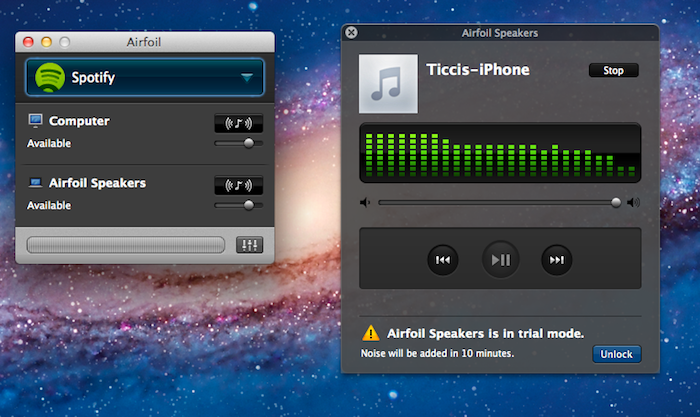
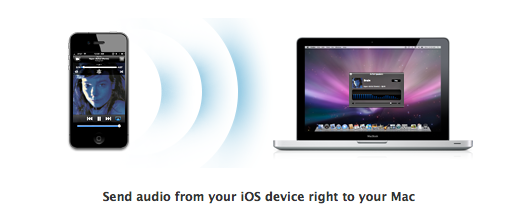
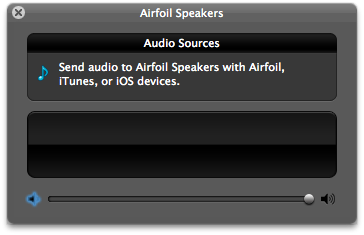
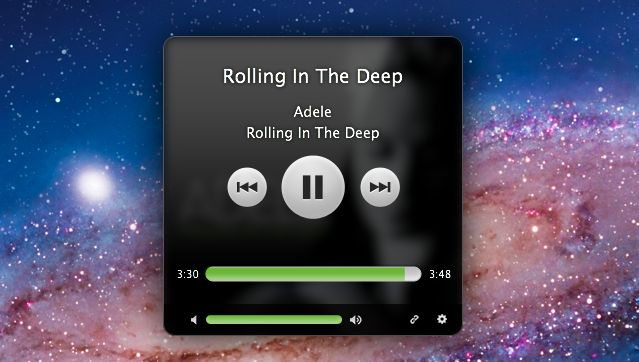
Back in December we reviewed Airfoil 4, an update to Rogue Amoeba’s powerful audio tool for OS X that streamlined the process of sending audio content from various applications to external speakers, computers or Apple TVs, also using the new AirPlay technology. Airfoil 4.5, a major update released today and free for existing customers, builds upon the excellent feature set of version 4 to deliver an even easier AirPlay integration that will allow iOS users to beam any kind of audio from any iOS app to the Airfoil Speakers app running on a Mac. This new functionality may sound very similar to other desktop AirPlay receivers like AirServer, and indeed it is, with the exception that Airfoil Speakers runs in its (beautiful) standalone window that, among other things, visualizes music controls and album artworks even during a wireless AirPlay session.

Rogue Amoeba explains:

First and foremost, Airfoil Speakers for Mac can now receive audio from your iOS device! Launch Airfoil Speakers, and it will appear in the list of AirPlay devices on iOS. When you play audio in an app on your iPhone, iPod Touch, or iPad, you can select Airfoil Speakers from the AirPlay list, and you’ll hear the audio right on your Mac.

The new, powerful Airfoil Speakers are now compatible with iTunes on any Mac or PC and MacStories favorite Radium as well. Similarly to The Iconfactory’s latest update to Take Five for Mac, Airfoil 4.5 can now control apps like Spotify, Rdio and Radium so you’ll see control buttons alongside album artworks and track titles when grabbing audio from these sources. This change is welcome as you won’t be forced to switch to the original application to see what’s playing anymore.

Last, Rogue Amoeba says they’ve added support for AirPlay devices “from companies like iHome, JBL, and many more”, and that AirPlay-enabled hardware will work with Airfoil out of the box with no further configuration needed.

Airfoil 4.5 is a free update for licensed owners of Airfoil 4, and a license key can be purchased here at $25 to unlock the full app (free trial is available). With the much improved Airfoil Speakers utility, at this point we can’t help but recommend Airfoil if you’re looking for a simple, good-looking and powerful solution to manage audio in your house, room or office, and integrate it with Apple’s AirPlay.

Access Extra Content and Perks

Founded in 2015, Club MacStories has delivered exclusive content every week for nearly a decade.

What started with weekly and monthly email newsletters has blossomed into a family of memberships designed for every MacStories fan.

Learn more here and from our Club FAQs.

Club MacStories: Weekly and monthly newsletters via email and the web that are brimming with apps, tips, automation workflows, longform writing, early access to the MacStories Unwind podcast, periodic giveaways, and more;

Club MacStories+: Everything that Club MacStories offers, plus an active Discord community, advanced search and custom RSS features for exploring the Club’s entire back catalog, bonus columns, and dozens of app discounts;

Club Premier: All of the above and AppStories+, an extended version of our flagship podcast that’s delivered early, ad-free, and in high-bitrate audio.

Learn more here and from our Club FAQs.


3 Column Reader Safari Extension Makes Google Reader Beautiful

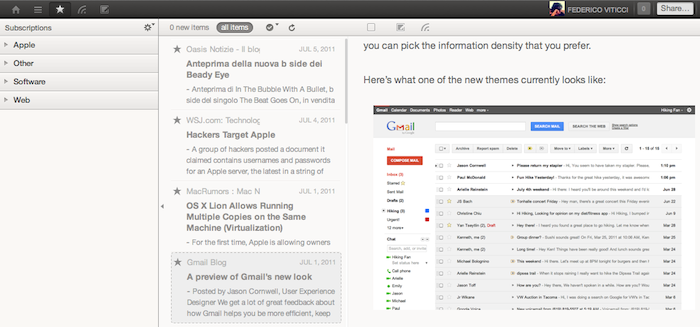
Based on the Pure Reader mod for Google Reader we covered back in December, 3 Column Reader is a new Safari extension released in June and updated last week that enables you to turn the Google Reader website into a beautiful, three-column reading experience for your RSS feeds. Developed by Zackary Corbett, 3 Column Reader is only compatible with Safari for now, and it’s got a minor glitch with the settings icon from Google’s new sharing toolbar launched alongside the Plus social network. However, the extension is being actively developed so we wouldn’t be surprised to see a fix for users logged into Google+ soon.

For everything else, 3 Column Reader looks great: the extension takes Pure Reader’s color scheme (which reminds us of Reeder’s sepia background and monochrome icons) to lay out a three-column setup perfect for widescreen monitors: folders and feeds are listed on the left, a mid panel visualizes the feeds’ titles and excerpts, and the full articles with images are displayed on the right. You can hide the source list by hitting an icon in the mid panel, and most of Google Reader’s web app functionalities are retained, such as popup menus to sort articles, or buttons to mark items as favorite. I didn’t encounter any other compatibility issues when using 3 Column Reader on Safari 5.1 for Lion GM. Read more

Access Extra Content and Perks

Founded in 2015, Club MacStories has delivered exclusive content every week for nearly a decade.

What started with weekly and monthly email newsletters has blossomed into a family of memberships designed for every MacStories fan.

Learn more here and from our Club FAQs.

Club MacStories: Weekly and monthly newsletters via email and the web that are brimming with apps, tips, automation workflows, longform writing, early access to the MacStories Unwind podcast, periodic giveaways, and more;

Club MacStories+: Everything that Club MacStories offers, plus an active Discord community, advanced search and custom RSS features for exploring the Club’s entire back catalog, bonus columns, and dozens of app discounts;

Club Premier: All of the above and AppStories+, an extended version of our flagship podcast that’s delivered early, ad-free, and in high-bitrate audio.

Learn more here and from our Club FAQs.


Capture: The Fastest App To Record Video On Your iPhone

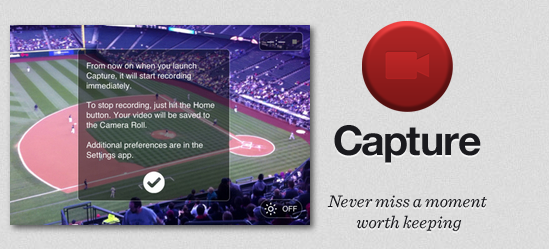
Released today at $0.99 on the App Store and created by the same developers of Canned, Capture is a minimal and simple utility for the iPhone that addresses a common issue with the iPhone’s Camera app: sometimes you need to capture a moment quickly, but the app takes too long to launch or switch to video recording. Brought to my attention by Ben Brooks, Capture is simply great at what it does: the developers describe it as “a record button for your home screen” and, really, that’s not too far from the truth. Capture starts recording a video as soon as you tap on its (beautiful) icon. You launch the app, and it starts recording after one second. No need to switch to the “video” tab as in Apple’s Camera, no need to wait because, and I don’t know how exactly, Capture is immediately available after you tap on it.

I can see why Capture could become an essential tool for many: by placing the app on the iPhone’s dock, you have quick access to video recording by pressing an icon. This is certainly useful for people who want to “capture” a particular moment in their kids’ life or, overall, users frustrated by the general slowness of Apple’s Camera when it comes to recording a video quickly. For reporters and citizen journalists, Capture might be exactly what they were looking for.

Capture is fast, elegant, lets you activate the iPhone’s Flash but has no support for switching between rear and front facing cameras yet. If you need an app to record video in seconds without waiting, get Capture at $0.99 on the App Store.

Access Extra Content and Perks

Founded in 2015, Club MacStories has delivered exclusive content every week for nearly a decade.

What started with weekly and monthly email newsletters has blossomed into a family of memberships designed for every MacStories fan.

Learn more here and from our Club FAQs.

Club MacStories: Weekly and monthly newsletters via email and the web that are brimming with apps, tips, automation workflows, longform writing, early access to the MacStories Unwind podcast, periodic giveaways, and more;

Club MacStories+: Everything that Club MacStories offers, plus an active Discord community, advanced search and custom RSS features for exploring the Club’s entire back catalog, bonus columns, and dozens of app discounts;

Club Premier: All of the above and AppStories+, an extended version of our flagship podcast that’s delivered early, ad-free, and in high-bitrate audio.

Learn more here and from our Club FAQs.


Review: Saver For iPhone, Expense Tracking Made Less Painful And More Beautiful

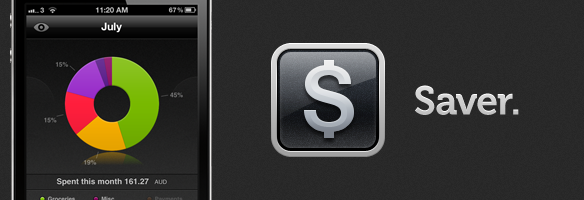
Just like flashlight apps, GTD apps and games, there are a slew of personal finance and budgeting apps within the App Store — navigating the ocean of similar apps to find a good one can be difficult. Today I am here to shine the spotlight on one such app that has just launched, which I suspect will be perfect for many of you. The app in question is Saver and it is available for the iPhone and iPod Touch — developed by Alex Solonsky and ‘Redmadrobot’. Jump the break for a full review Saver.

Read more

Access Extra Content and Perks

Founded in 2015, Club MacStories has delivered exclusive content every week for nearly a decade.

What started with weekly and monthly email newsletters has blossomed into a family of memberships designed for every MacStories fan.

Learn more here and from our Club FAQs.

Club MacStories: Weekly and monthly newsletters via email and the web that are brimming with apps, tips, automation workflows, longform writing, early access to the MacStories Unwind podcast, periodic giveaways, and more;

Club MacStories+: Everything that Club MacStories offers, plus an active Discord community, advanced search and custom RSS features for exploring the Club’s entire back catalog, bonus columns, and dozens of app discounts;

Club Premier: All of the above and AppStories+, an extended version of our flagship podcast that’s delivered early, ad-free, and in high-bitrate audio.

Learn more here and from our Club FAQs.