Posts in Featured

App Journal, Episode 4: Moom, 4Eyes, Quotes Plus, Easy Timeline

App Journal is a weekly series aimed at showcasing apps we have enjoyed using on our iPhones, iPads, and Macs, but decided not to feature in a standalone, lengthy review here on MacStories. App Journal is a mix of classic reviews, weekly app recommendations, and a diary of our experiences with apps that still deserve a proper mention.

For this week’s App Journal episode, I asked my fellow writers Don, Chris, and Graham to come up with iOS and Mac apps to highlight in our weekly roundup. The result has turned out to be “quite a team effort” and, as I was reminded in our internal chat group, I still needed to come up with a proper introduction for the episode. So there you have it: window utilities, text-based search tools for iOS, timelines and famous quotes – there’s a variety of apps in App Journal Episode 4, and we’re increasingly looking forward to the updates and new apps the release of iOS 5 with iCloud support will bring.

Stay tuned for more App Journal episodes in the next weeks.

Don: Moom

Moom is a utility for moving, resizing, and manipulating application windows. It uses a mixture of pre-defined and user-defined window settings which are accessible by hovering over the green zoom button or through customizable keyboard commands. This is one of those apps that I didn’t think I needed until I gave it a chance. I was happy using a set of AppleScripts to move the front window to pre-defined locations but the problem was it only worked with applications that supported window bounds in AppleScript. This left Twitterrific and Preview out in the cold. Thankfully Moom has no issue working with these applications.

When using Moom there are two types of controls: Mouse and Keyboard. The keyboard controls are undeniably more powerful because of their speed and plethora of alterable configurations. Despite that I still found that the mouse features were treated with equal attention. Hovering over the green zoom button displays a beautiful transparent popover that has five pre-defined and extremely useful shortcuts.
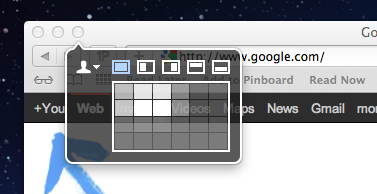
Below the five icons lies a grid that can be used to dynamically draw out where you want the window to be located. The grid must be enabled under Mooms Mouse preferences. There you will find options to adjust the size of the grid as well as an option to enable access to your custom keyboard controls. Another great mouse feature is the ability to move windows across displays with nothing more than a gesture (clicking down on an icon and dragging it towards the second display).
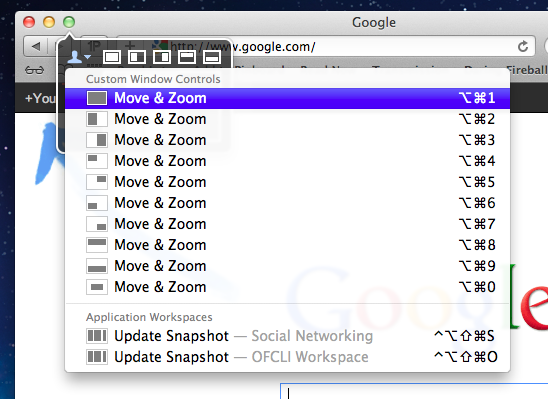
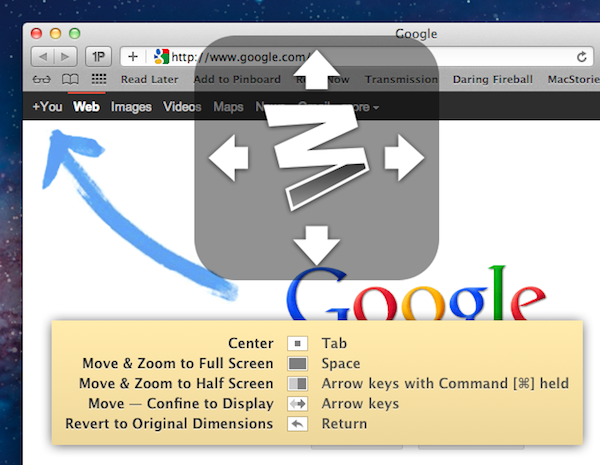
The keyboard functions are also quite interesting. There are basically two types. The first type allows you to define window positions and set them to a keyboard shortcut. It is the reason I bought the program and it did not disappoint. The ability to use a keyboard shortcut to resize a window to fill half the screen or even just a quarter of it depending on the situation is invaluable. The second type is a keyboard mode which is triggered by a hotkey and allows you to move a window around with your arrow keys for more granular on-the-fly positioning.
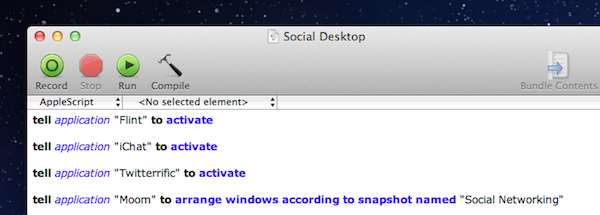
The real gem of this program is its ability to save window layouts. It basically memorizes the current positions of your windows and it saves a snapshot of them so it can restore those windows to their exact locations by way of a keyboard shortcut or from the mouse-based pop-over menu. If that wasn’t cool enough, they even added AppleScript support so you can call those saved layouts from a script!

Example: I like to keep a Desktop just for social networking applications. Now with Moom I can automate the process of opening all of my social apps and then arranging them instantly by calling the saved layout I created called “Social Networking” from an AppleScript.
The last feature I wanted to mention was its ability to run in what Moom refers to as Faceless mode. This is a mode with no dock icon and no menubar icon. Moom can also be set to show the settings panel on launch which is perfect when calling Moom from a program like Alfred. No icons to stare at and quick access to Moom’s settings from a launch bar, what could be better?

Overall this app has great functionality and a very pleasant interface, all for a conservative price. $4.99 on the Mac App Store. Read more

Access Extra Content and Perks

Founded in 2015, Club MacStories has delivered exclusive content every week for nearly a decade.

What started with weekly and monthly email newsletters has blossomed into a family of memberships designed for every MacStories fan.

Learn more here and from our Club FAQs.

Club MacStories: Weekly and monthly newsletters via email and the web that are brimming with apps, tips, automation workflows, longform writing, early access to the MacStories Unwind podcast, periodic giveaways, and more;

Club MacStories+: Everything that Club MacStories offers, plus an active Discord community, advanced search and custom RSS features for exploring the Club’s entire back catalog, bonus columns, and dozens of app discounts;

Club Premier: All of the above and AppStories+, an extended version of our flagship podcast that’s delivered early, ad-free, and in high-bitrate audio.

Learn more here and from our Club FAQs.


Apple’s Next Keynote Scheduled for October 4?

According to AllThingsD, Apple’s next media event – where the company is set to officially unveil the next-generation iPhone – will be held on Tuesday, October 4th.

That’s the day Apple is currently expected to hold its next big media event, according to sources close to the situation, where the tech giant will unveil the next iteration of its popular iPhone.

AllThingsD previously claimed the new iPhone would be announced in mid-October, and whilst Apple hasn’t publicly disclosed plans of any new iPhone or device in any time frame, the timeline seems likely at this point. Apple usually sends invites to the press a week ahead of the event, and multiple rumors are suggesting iOS 5 – which the iPhone 5 will likely run out of the box, like new Macs come with Lion pre-installed – is approaching the GM status by the end of this week.

AllThingsD also claims newly-appointed CEO Tim Cook will preside over the event, and that the plan is to release the iPhone 5 a few weeks after the announcement. Previous rumors pointed at the next iPhone being available on AT&T, Verizon, and Sprint in the United States in mid-October.

Update: The Loop’s Jim Dalrymple, who has a solid track record when it comes to Apple news and rumors, has commented on AllThingsD’s article with a single “Yep”, suggesting that the original report is indeed accurate.

Access Extra Content and Perks

Founded in 2015, Club MacStories has delivered exclusive content every week for nearly a decade.

What started with weekly and monthly email newsletters has blossomed into a family of memberships designed for every MacStories fan.

Learn more here and from our Club FAQs.

Club MacStories: Weekly and monthly newsletters via email and the web that are brimming with apps, tips, automation workflows, longform writing, early access to the MacStories Unwind podcast, periodic giveaways, and more;

Club MacStories+: Everything that Club MacStories offers, plus an active Discord community, advanced search and custom RSS features for exploring the Club’s entire back catalog, bonus columns, and dozens of app discounts;

Club Premier: All of the above and AppStories+, an extended version of our flagship podcast that’s delivered early, ad-free, and in high-bitrate audio.

Learn more here and from our Club FAQs.


Instagram 2.0 Now Available: Live Filters, New Camera UI, Faster Engine

Instagram, the iPhone-only social network for sharing photos with your friends, has released a major new version of their app today, which reaches version 2.0 and adds a number of new features, updated interface design, and a new icon.

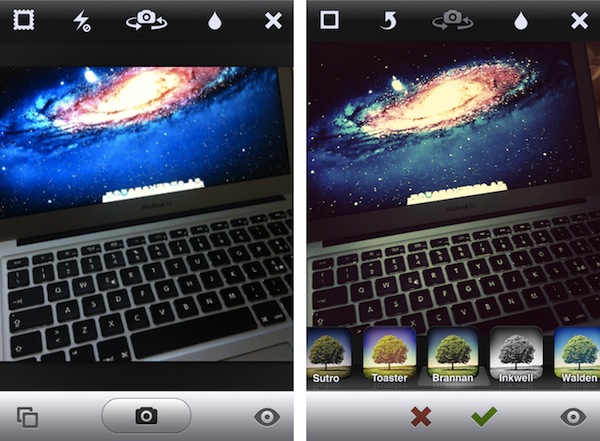
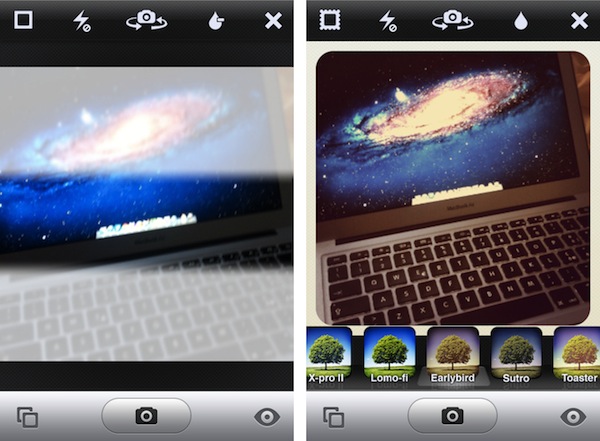
The most notable change in Instagram 2.0 is the implementation of live filters. In previous versions of Instagram, every time you took a new photo with the app’s dedicated camera UI you had to apply a filter after the photo was taken, and if the filter was not okay for the photo, you were obviously forced to go back to main screen and re-shoot. Having to retake a photo to make it play nice with a selected filter could lead to several problems – your favorite “moment” may be gone forever, and you’d end up with multiple shots to choose from. In Instagram 2.0, the camera screen has been completely re-imagined to accomodate live filters and tilt shift – meaning, you can see how a filtered photo will look like before you take it.

Thanks to iOS’ powerful live image editing and photo-taking functionalities, the developers have been able to develop a solution that lets you instantly see how filters will apply to your photos – no need to shoot and apply separately.

From this new camera view, you can scroll filters at the bottom, or play with a series of buttons along the top. These buttons let you snap a photo without borders, activate/disable flash, swap cameras, or tweak live tilt-shift. The latter option is particularly amazing when seen in action, as it updates the camera view in real-time with different types of tilt-shift as you tap on the screen.

Alongside being able to see how filters will look like before taking a photo, Instagram version 2.0 comes with four new effects (Amaro, Rise, Hudson, and Valencia). Users can still decide to take a photo without effects and apply them later (simply don’t tap on the filters icon in the toolbar), but from what I’ve seen so far, performances of this update on the latest iPhone hardware really make for a fast and smooth experience when playing with live filters. We tested the feature on an old iPhone 3GS and the transition between effects was very smooth on that device, too. The Instagram developers say the new filter engine is up to 200 time faster than before.

Since the day we launched, one core part of the app has remain largely unchanged: the camera. In the past, we’ve added filters & tilt-shift, but the base technology has never evolved. Today that all changes as we introduce a complete upgrade to Instagram’s camera with a brand new technology layer.

See the world through Instagram’s stunning effects before you even snap a photo. Simply select a filter, hold the camera up to the scene and see the world through Instagram’s visual effects. We’ve re-written your favorite Instagram filters to be over 200x faster so even after having taken a photo, switching between them takes no time at all.

The new Instagram is also geared towards giving users more control over how their photos are snapped, and shared with the world. Besides being able to remove borders and rotate a photo after it’s taken, photos are now saved at much higher resolution in a device’s library – photo size has been increased from 612x612 to 1936x1936 on the iPhone 4 (1536x1536 on the iPhone 3GS). This was one of the biggest complaints with the original Instagram, and the developers are surely on the right path to deliver an app that’s equally fast at sharing photos, and saving them at high quality.

As the service is now nearing 10 million users, it’s interesting to look back at my initial review of Instagram last year and see how much has changed. In spite of the new features introduced today – a refreshed interface, live filters, higher photo sizes – Instagram is still the same app that allows users to share photos with a new “social paradigm”. Instagram has reinvented the way photos can be “beautified” and shared on mobile devices to multiple social networks, ultimately building a social network on its own that’s now attracting millions of users and popular brands.

You can find Instagram 2.0 on the App Store.

Access Extra Content and Perks

Founded in 2015, Club MacStories has delivered exclusive content every week for nearly a decade.

What started with weekly and monthly email newsletters has blossomed into a family of memberships designed for every MacStories fan.

Learn more here and from our Club FAQs.

Club MacStories: Weekly and monthly newsletters via email and the web that are brimming with apps, tips, automation workflows, longform writing, early access to the MacStories Unwind podcast, periodic giveaways, and more;

Club MacStories+: Everything that Club MacStories offers, plus an active Discord community, advanced search and custom RSS features for exploring the Club’s entire back catalog, bonus columns, and dozens of app discounts;

Club Premier: All of the above and AppStories+, an extended version of our flagship podcast that’s delivered early, ad-free, and in high-bitrate audio.

Learn more here and from our Club FAQs.


My Must-Have Mac Apps, 2011 Edition

One year after my “Must Have 25 Mac Apps” article, I believe it’s time to revisit that list of software I said I would install every time on a new Mac.

A lot of things have changed since September 2010. For one, Mac apps can now be distributed through the Mac App Store, which has proven to be a feasible and reliable platform for developers to showcase their apps to OS X users. The Mac App Store comes built into Snow Leopard since version 10.6.6, and over the past months we’ve taken a look at different numbers and stats showing how Apple’s youngest storefront is set to fundamentally revolutionize app distribution on desktop computers. But the Mac App Store’s release leads to another change happened in the last 12 months, and that’s Lion.

Originally previewed at the “Back to the Mac” event in October 2010, Lion was publicly released in late July after a round of betas that started becoming available to Mac developers since February. Lion has enabled Apple to bring new features to the Mac App Store such as delta updates for apps and in-app purchases, not to mention the fact that all new Macs sold since July 20 have Lion pre-installed, and thus the Mac App Store. At a developer level, Lion is allowing Objective-C coders and OS X designers to come up with new solutions that take advantage of Apple’s latest technologies such as natural scrolling, push notifications, popover controls, full-screen mode, and Versions. Lion has spawned a new breed of Mac software that it’s just starting to leave a sign in the average consumers’ minds, who are increasingly demanding and looking forward to applications that have been properly enhanced for Lion.

And last, there are new Macs in Apple’s line-up. Since September 2010, Apple has updated all its Mac models (except the Mac Pro) and discontinued the white MacBook, the most obvious victim of Apple’s new crown jewel – the MacBook Air. New Macs come with trackpads specifically geared towards Lion’ multi-touch support, and the new Sandy Bridge CPUs by Intel make the process of booting a Mac, and even switching between applications faster than ever.

In a way, the “September 2011” Apple is both identical and different from the company we were covering last year. But title changes and cloud strategies aside – how does the new Mac ecosystem affect the apps I listed on this site a year ago? Read more

Access Extra Content and Perks

Founded in 2015, Club MacStories has delivered exclusive content every week for nearly a decade.

What started with weekly and monthly email newsletters has blossomed into a family of memberships designed for every MacStories fan.

Learn more here and from our Club FAQs.

Club MacStories: Weekly and monthly newsletters via email and the web that are brimming with apps, tips, automation workflows, longform writing, early access to the MacStories Unwind podcast, periodic giveaways, and more;

Club MacStories+: Everything that Club MacStories offers, plus an active Discord community, advanced search and custom RSS features for exploring the Club’s entire back catalog, bonus columns, and dozens of app discounts;

Club Premier: All of the above and AppStories+, an extended version of our flagship podcast that’s delivered early, ad-free, and in high-bitrate audio.

Learn more here and from our Club FAQs.


Keep it Memorable, Stupid!

Image credit: Done by Emily Carlin on Flickr

KIMS, unlike KISS (Keep it simple, Stupid!), is removing the notion that we have to toss out our complicated, but memorable systems in favor of simple workflows. I think throwing away what works is the wrong way to go about changing your workflow or lifestyle for the better.

In looking for a simpler way to do something you’ll be presented with tools, pitched ideas, and told that your quality of life will be better if you take this system you have now and simplify it. I think the big problem is that people tend to confuse the words simple and minimalism. To say I should simplify my workflow is to say I should throw out my system because it’s inefficient. That might be true if I was to compare how productive I am to how productive you are. However, our jobs are likely different and even if they were the same, it’s like comparing how well I run to a guy who’s been running in marathons for the last twenty years. You can only accurately measure and reference yourself!

Where I make my case is that you shouldn’t toss a memorable system for the sake of minimalism. Text files for example are extremely minimal, but not many people want to go commando and start setting up areas of focus in Dropbox, when tags and journals in Evernote are much easier to manage for lots of people. You’re told you should do this thing because you’ll ultimately be more productive or you’ll remove a point of stress and clutter in your life, but I have a feeling that the transition and “attempt” (because you’ll never really stick with this minimal system) is going to be a point of stress itself.

Read more

Access Extra Content and Perks

Founded in 2015, Club MacStories has delivered exclusive content every week for nearly a decade.

What started with weekly and monthly email newsletters has blossomed into a family of memberships designed for every MacStories fan.

Learn more here and from our Club FAQs.

Club MacStories: Weekly and monthly newsletters via email and the web that are brimming with apps, tips, automation workflows, longform writing, early access to the MacStories Unwind podcast, periodic giveaways, and more;

Club MacStories+: Everything that Club MacStories offers, plus an active Discord community, advanced search and custom RSS features for exploring the Club’s entire back catalog, bonus columns, and dozens of app discounts;

Club Premier: All of the above and AppStories+, an extended version of our flagship podcast that’s delivered early, ad-free, and in high-bitrate audio.

Learn more here and from our Club FAQs.


Extending Evernote: AppleScripts for Chrome, Safari, Instapaper and Alfred

Evernote is a cross-platform note taking solution that is adored by many for its ability to not just store snippets of information but also serve as an external brain. Among the many reasons users are drawn to this product is its extensibility. You may not realize this but Evernote has a very in-depth AppleScript dictionary that you can use to extend the feature set and make it do some pretty neat things you can’t do with it out of the box. I am going to show you how simple AppleScripting can add a few cool features to your Evernote workflow.

Note: These scripts work best when called with a global keyboard shortcut using an app like Keyboard Maestro, FastScripts, or Alfred.

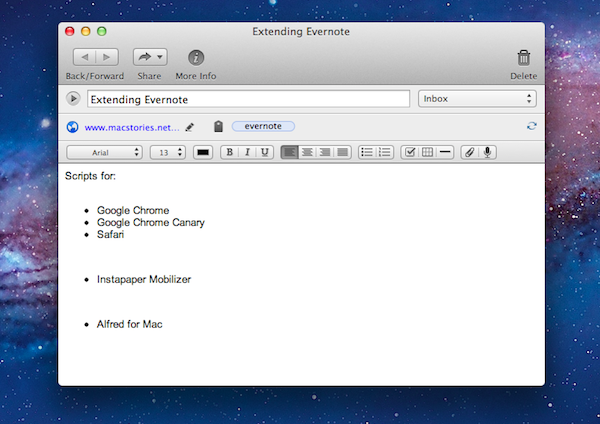
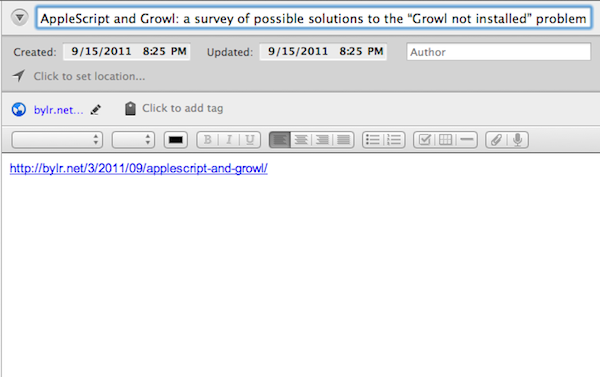
This first AppleScript is used for storing a URL to whatever webpage you are currently viewing and it works with Safari, Chrome, and Chrome Canary. By default Evernote stores the entire webpage including images, navigational menus, and even advertising links. Having a snapshot of a page is great for some situations, but most of the time you just want to grab a link to the site and safely store it in Evernote so it can be easily retrieved. This script will check to see which browsers are running and it will grab the frontmost tab from the browser that is currently active; it’ll then neatly format the information into a note with the proper title and source url, and automatically sync Evernote.

Here is an example of a page I enjoyed and wanted to be able to find again at a later time. Everything is neatly formatted with no extra fluff.

URL to Evernote

URL to Evernote

Here is an example macro to launch it from Keyboard Maestro:

Download the script: Webpage Link to Evernote AppleScript Read more

Access Extra Content and Perks

Founded in 2015, Club MacStories has delivered exclusive content every week for nearly a decade.

What started with weekly and monthly email newsletters has blossomed into a family of memberships designed for every MacStories fan.

Learn more here and from our Club FAQs.

Club MacStories: Weekly and monthly newsletters via email and the web that are brimming with apps, tips, automation workflows, longform writing, early access to the MacStories Unwind podcast, periodic giveaways, and more;

Club MacStories+: Everything that Club MacStories offers, plus an active Discord community, advanced search and custom RSS features for exploring the Club’s entire back catalog, bonus columns, and dozens of app discounts;

Club Premier: All of the above and AppStories+, an extended version of our flagship podcast that’s delivered early, ad-free, and in high-bitrate audio.

Learn more here and from our Club FAQs.


“Fairly Different” iPhone 5 with 8 MP Camera, A5 Processor “Just Weeks Away”

In reporting about today’s allegedly “leaked” iPhone 5 design per Case-Mate’s product pages (later pulled), The New York Times’ Nick Bilton says an announcement of Apple’s next iPhone is “just weeks away”.

We’re just weeks away from the announcement of the new Apple iPhone 5, according to an Apple employee who asked not to be named because he was not allowed to speak publicly for the company.

Bilton then reports that according to descriptions he’s heard from Apple employees, the images posted today by Case-Mate looked “potentially authentic”. The cases indeed seemed to show an iPhone 5 in line with recent speculation surrounding the new device such as tapered edges, and thinner form factor. In the same article, Bilton mentions “an engineer familiar with the new iPhone” said the iPhone 5 would look “fairly different” from the previous-gen model. According to the engineer the iPhone 5 will feature an 8-megapixel camera as previously rumored, the faster A5 processor also seen on the iPad 2, and possibly NFC functionalities for mobile payments. NFC on the iPhone 5 was rumored before, too, but most recent speculation indicated Apple might save the feature for a future “iPhone 6” next year.

As I’ve written in the past, two people with knowledge of the inner workings of Apple’s next-generation iPhones say either the iPhone 5 or iPhone 6 will include a new chip that is made by Qualcomm.

Plenty of rumors posted in the past months failed to indicate whether Apple will soon announce a completely redesigned iPhone 5, and iPhone 4-like device with slightly improved specs, or both to address different market segments. You can read more on this in our iPhone 5/4S rumor roundup and retrospective. [image via]

Access Extra Content and Perks

Founded in 2015, Club MacStories has delivered exclusive content every week for nearly a decade.

What started with weekly and monthly email newsletters has blossomed into a family of memberships designed for every MacStories fan.

Learn more here and from our Club FAQs.

Club MacStories: Weekly and monthly newsletters via email and the web that are brimming with apps, tips, automation workflows, longform writing, early access to the MacStories Unwind podcast, periodic giveaways, and more;

Club MacStories+: Everything that Club MacStories offers, plus an active Discord community, advanced search and custom RSS features for exploring the Club’s entire back catalog, bonus columns, and dozens of app discounts;

Club Premier: All of the above and AppStories+, an extended version of our flagship podcast that’s delivered early, ad-free, and in high-bitrate audio.

Learn more here and from our Club FAQs.


Twitterrific 4.4 Improves Tweet Marker Support, Adds Fixes

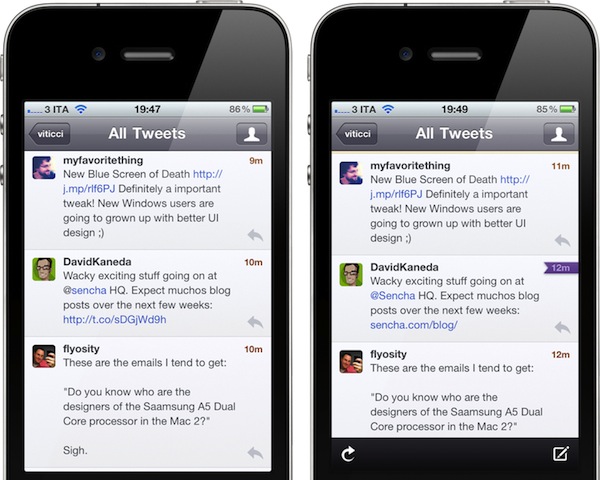
The Iconfactory’s Twitterrific, a Twitter client for iOS and OS X, was updated earlier today to version 4.4, adding better integration with Tweet Marker, and a number of bug fixes and improvements. Following Twitter’s recent changes to how links are wrapped inside its own t.co shortening system and displayed in third-party clients, The Iconfactory tuned Twitterrific to display unwrapped t.co links whenever possible, as the API currently allows. This means Twitterrific shouldn’t show anonymous t.co links in the timeline anymore, fetching the original shortened link or domain (example: mcstr.net or apple.com) instead. You can see a comparison between Twitterrific 4.3 Vs. 4.4 in the screenshots below.

Twitterrific 4.4 with an unwrapped t.co link on the right

Twitterrific 4.4 improves and unifies support for Tweet Marker across its Mac and iOS versions, as well as other third-party iOS apps that have implemented the service. Notably, Twitterrific 4.4 can sync Twitter lists with Tweetbot, which recently introduced such functionality through Tweet Marker. This update also brings Tweet Marker sync to saved searches (both lists and saved searches will have a separate “saved status”, outside the main timeline) and it greatly improves how the OS X version handles sync when a computer goes to sleep, or a link is clicked. For instance, Twitterrific 4.4 will sync back to Tweet Marker (if enabled in the Preferences) when a Mac goes into sleep mode, wakes up, or goes into power saver mode. Marked tweets are synced when the app is quit or links are clicked – the latter is true when links aren’t set to open in the background.

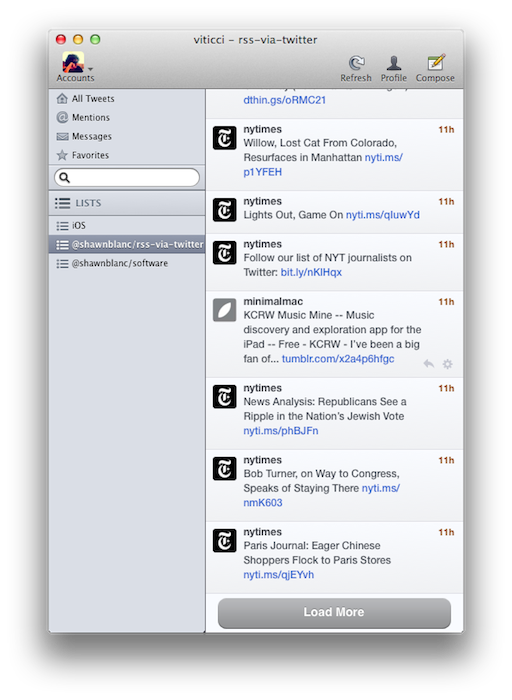
Twitter lists have seen some enhancements in Twitterrific 4.4 as well. For one, they now have a Load More button to fetch missing tweets. They are now sorted by type and then alphabetically, they show retweets alongside regular tweets, and a bug that would make a list “un-selected” in the Finder has been fixed. The same Load More button has been improved throughout the entire app, as it now loads missing tweets in timeline gaps, and generally keeps Twitterrific scrolled to bottom while loading more tweets. These are minor changes, but important ones if you, like me, wake up every morning willing to “catch up” on Twitter, and see what people have posted overnight. The improved Load More behavior certainly helps in making timeline gaps more reliable.

Other features include improved handling of non-image Camera+ URL’s (such as user profiles), and a new Shift-spacebar shortcut to manually navigate to a previous tweet, as opposed to spacebar for “next tweet”.

Both on the Mac and iOS, Twitterrific keeps unifying the Twitter experience and its own app ecosystem on each update. You can download Twitterrific 4.4 on the App Store now at $4.99 for the Mac version, or upgrade the free iOS app for $4.99 through in-app purchase.

Access Extra Content and Perks

Founded in 2015, Club MacStories has delivered exclusive content every week for nearly a decade.

What started with weekly and monthly email newsletters has blossomed into a family of memberships designed for every MacStories fan.

Learn more here and from our Club FAQs.

Club MacStories: Weekly and monthly newsletters via email and the web that are brimming with apps, tips, automation workflows, longform writing, early access to the MacStories Unwind podcast, periodic giveaways, and more;

Club MacStories+: Everything that Club MacStories offers, plus an active Discord community, advanced search and custom RSS features for exploring the Club’s entire back catalog, bonus columns, and dozens of app discounts;

Club Premier: All of the above and AppStories+, an extended version of our flagship podcast that’s delivered early, ad-free, and in high-bitrate audio.

Learn more here and from our Club FAQs.


Skype for Mac Beta Gets Facebook Integration

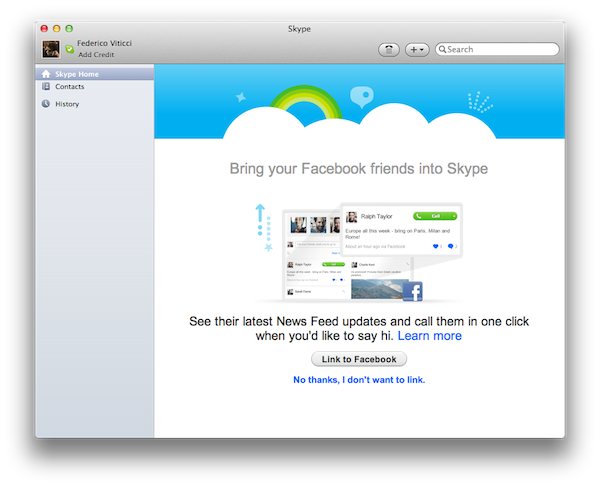
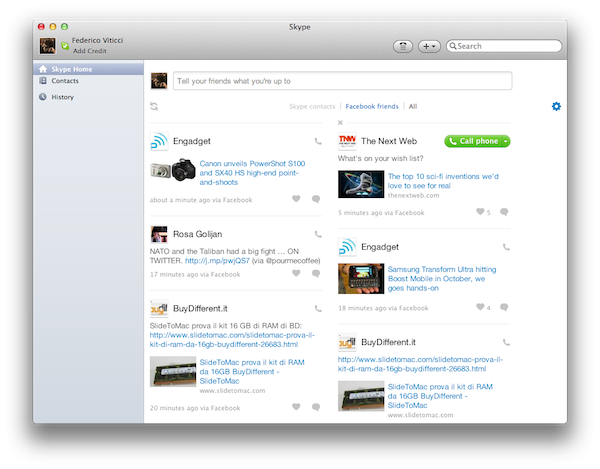
With a blog post published a few minutes ago, Skype has announced a new beta version of its desktop client for OS X, which adds Facebook integration for chat, news feed, and friends’ posts. The new Skype for Mac 5.4, available for download here, allows users to connect with Facebook directly within the app – without having to open Facebook’s website – to start chatting with Facebook friends, like their posts, or read and update the News Feed.

Once authenticated with Facebook in-app, Skype 5.4 will display an additional Facebook tab in the Contacts view, enabling you to filter the buddy list down to only people who are available for IM through Facebook. The cross-platform IM solution seems pretty reliable in this regard, in that I was able to easily find a Facebook friend, and start chatting with her while I was using Skype 5.4 for Mac. She received my messages correctly on Facebook’s website. When another friend tried to contact me on Facebook via chat, a new message showed up in Skype’s sidebar next to his name (the Mac version of Skype also supports Growl notifications).

Similarly, I was able to read posts from my news feed, like them, and even post a status update using Skype 5.4.

Skype has also confirmed this release brings a new advertising platform to the app, although I haven’t been able to personally verify this yet:

We are also introducing an advertising platform in this new release, but if you are a paying Skype consumer or have Skype Credit, you won’t see any display ads; similar to the model that is currently being used in our Skype for Windows client.

Skype 5.4 beta for Mac can be downloaded here. After Microsoft’s acquisition, the company recently brought HD video calling to the Mac with version 5.3, and released a native client for the iPad.

Access Extra Content and Perks

Founded in 2015, Club MacStories has delivered exclusive content every week for nearly a decade.

What started with weekly and monthly email newsletters has blossomed into a family of memberships designed for every MacStories fan.

Learn more here and from our Club FAQs.

Club MacStories: Weekly and monthly newsletters via email and the web that are brimming with apps, tips, automation workflows, longform writing, early access to the MacStories Unwind podcast, periodic giveaways, and more;

Club MacStories+: Everything that Club MacStories offers, plus an active Discord community, advanced search and custom RSS features for exploring the Club’s entire back catalog, bonus columns, and dozens of app discounts;

Club Premier: All of the above and AppStories+, an extended version of our flagship podcast that’s delivered early, ad-free, and in high-bitrate audio.

Learn more here and from our Club FAQs.