Posts in Featured

Plex Gets iOS 7 Update

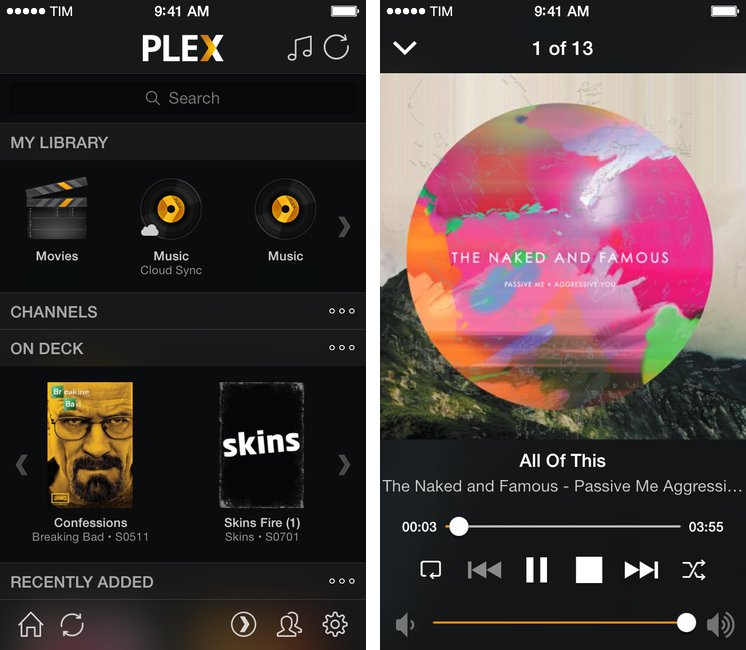
Plex for iOS, a native client for the company’s media manager, has been updated today with support for iOS 7. Version 3.3, available on the App Store, introduces a tweaked look to match Apple’s new OS, as well as bug fixes and changes to the media player.

The app hasn’t been revolutionized in its transition to iOS 7: the main screen has stayed the same, with sections to access your library, channels, and media that is either on deck or has been recently added to your Plex. There are no new options in the Settings, which still allow you to log into your myPlex account and configure playback preferences for synced and remote media.

There’s been, however, a general clean-up of the UI: gone are iOS 6 toolbars and buttons, leaving room for translucencies, redesigned icons, and simplified navigation bars. Translucencies are especially fitting as they make colorful media artwork show through the interface, but it still feels like Plex could use a major redesign (particularly on the iPad) as it has remained largely unchanged since 2011. According to the developers, “lots more user interface improvements” are coming.

The media player (pictured above) has been updated, and the app is now capable of recognizing URLs in the clipboard upon launch, so that you’ll have a shortcut to quickly put content from the web in your Plex queue.

You can get Plex 3.3 on the App Store. Last week, the company released (after a long beta period) version 1.0 of Plex Home Theater, a Mac app to access your Plex content without having to use Plex/Web.
Access Extra Content and Perks

Founded in 2015, Club MacStories has delivered exclusive content every week for nearly a decade.

What started with weekly and monthly email newsletters has blossomed into a family of memberships designed for every MacStories fan.

Learn more here and from our Club FAQs.

Club MacStories: Weekly and monthly newsletters via email and the web that are brimming with apps, tips, automation workflows, longform writing, early access to the MacStories Unwind podcast, periodic giveaways, and more;

Club MacStories+: Everything that Club MacStories offers, plus an active Discord community, advanced search and custom RSS features for exploring the Club’s entire back catalog, bonus columns, and dozens of app discounts;

Club Premier: All of the above and AppStories+, an extended version of our flagship podcast that’s delivered early, ad-free, and in high-bitrate audio.

Learn more here and from our Club FAQs.


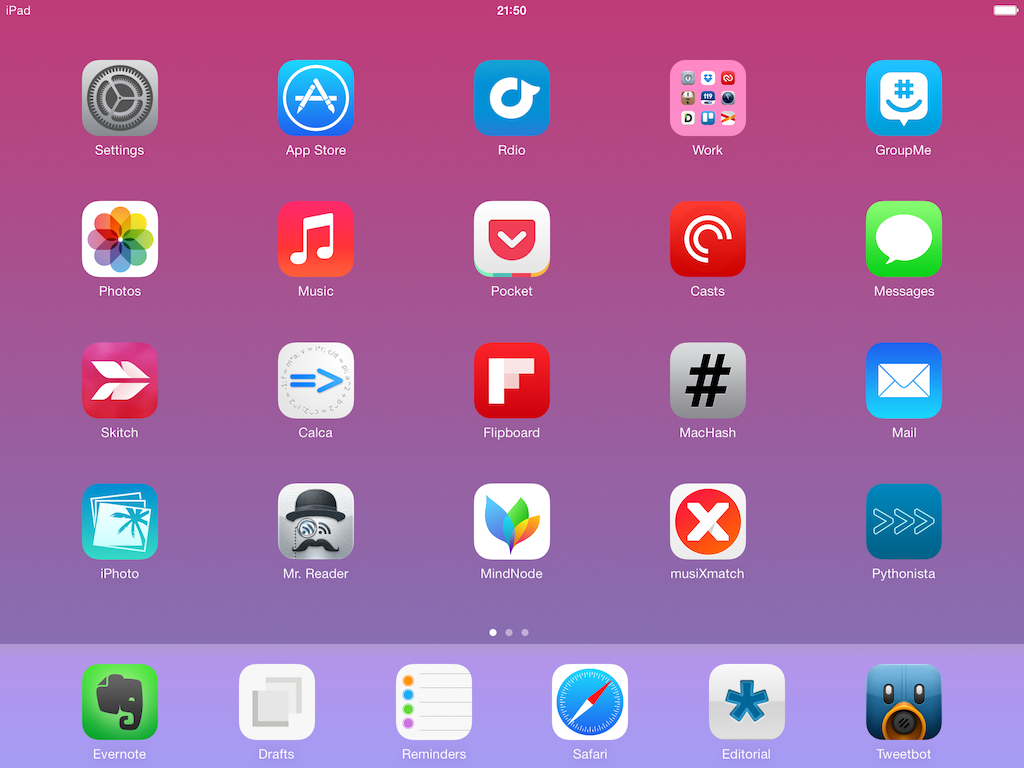
My Must-Have iPad Apps, 2013 Edition

Must Have iPad Apps 2013

Must Have iPad Apps 2013

For the past three years, I’ve been running a series called “My Must-Have Mac Apps” that, once a year, would list the apps that I found indispensable on my Mac. This year, considering the changes that I went through from a workflow perspective, I thought it would be appropriate to start focusing on iOS as well. I’d like to start with the iPad.

I’ve been working primarily from my iPad for the past 15 months. For a variety of personal reasons that I’ve discussed before, I found myself unable to work from my Mac every day, so I decided to try and see whether the iPad and iOS could be viable OS X replacements – not just companions. I ended up enjoying the iPad as a work device and, eventually, as a primary device powered by terrific apps that allow me to be more efficient on iOS.

From a high-level, conceptual standpoint, this isn’t a new topic for MacStories readers or listeners of The Prompt. In the end, though, it all comes down to the apps – the software that I use on my iPad for work and play, for productivity and entertainment.

Hence, “My Must-Have iPad Apps”. I consider this the first installment, even though it technically isn’t: I published similar articles in 2010 and 2011, but I skipped 2012 – the year when I really got serious about working from the iPad. This year’s installment is a reboot of the iPad series, which I’m going to publish regularly from now on; if you want, you can check back on the old articles linked above to see if there are apps that I’ve been using for three years (spoiler: yes).

The list below is organized in four sections: Main, for apps that I use several times every day; News, for discovering links and staying on top of RSS; Entertainment, for media consumption; and Utilities, for single-purpose apps that I use often but not heavily every day. Each app is listed with its App Store link and, at the end of the article, you’ll find my iPad app of the year. Read more

Access Extra Content and Perks

Founded in 2015, Club MacStories has delivered exclusive content every week for nearly a decade.

What started with weekly and monthly email newsletters has blossomed into a family of memberships designed for every MacStories fan.

Learn more here and from our Club FAQs.

Club MacStories: Weekly and monthly newsletters via email and the web that are brimming with apps, tips, automation workflows, longform writing, early access to the MacStories Unwind podcast, periodic giveaways, and more;

Club MacStories+: Everything that Club MacStories offers, plus an active Discord community, advanced search and custom RSS features for exploring the Club’s entire back catalog, bonus columns, and dozens of app discounts;

Club Premier: All of the above and AppStories+, an extended version of our flagship podcast that’s delivered early, ad-free, and in high-bitrate audio.

Learn more here and from our Club FAQs.


Reeder 2.1 Released with Themes, Reading List Support, Fixes

On the same day that Tapbots launched Tweetbot 3.2 with a dark theme, developer Silvio Rizzi released Reeder 2.1, which brings several fixes and changes to the app introduced in September, plus themes – including two dark ones.

The new theme switcher in Reeder 2.1, located in the style menu of the article viewer, allows you to switch between four themes: White, Light (the original one), Dark, and Gray. Choosing a theme is a manual operation, and the dark ones should help users who have been asking for a background easier on the eye while reading at night. I’m especially a fan of the Dark theme, as it’s not completely black – it’s a darker version of the original Reeder sepia hue. Read more

Access Extra Content and Perks

Founded in 2015, Club MacStories has delivered exclusive content every week for nearly a decade.

What started with weekly and monthly email newsletters has blossomed into a family of memberships designed for every MacStories fan.

Learn more here and from our Club FAQs.

Club MacStories: Weekly and monthly newsletters via email and the web that are brimming with apps, tips, automation workflows, longform writing, early access to the MacStories Unwind podcast, periodic giveaways, and more;

Club MacStories+: Everything that Club MacStories offers, plus an active Discord community, advanced search and custom RSS features for exploring the Club’s entire back catalog, bonus columns, and dozens of app discounts;

Club Premier: All of the above and AppStories+, an extended version of our flagship podcast that’s delivered early, ad-free, and in high-bitrate audio.

Learn more here and from our Club FAQs.


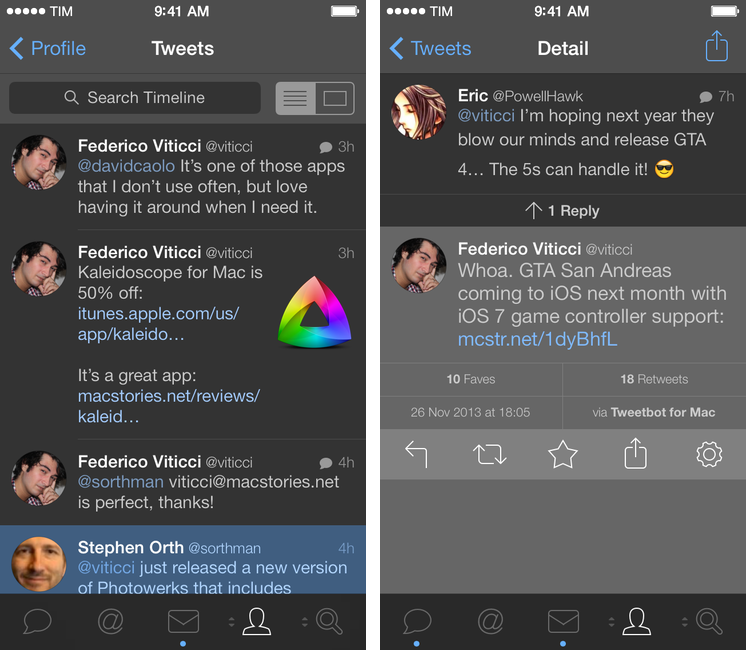
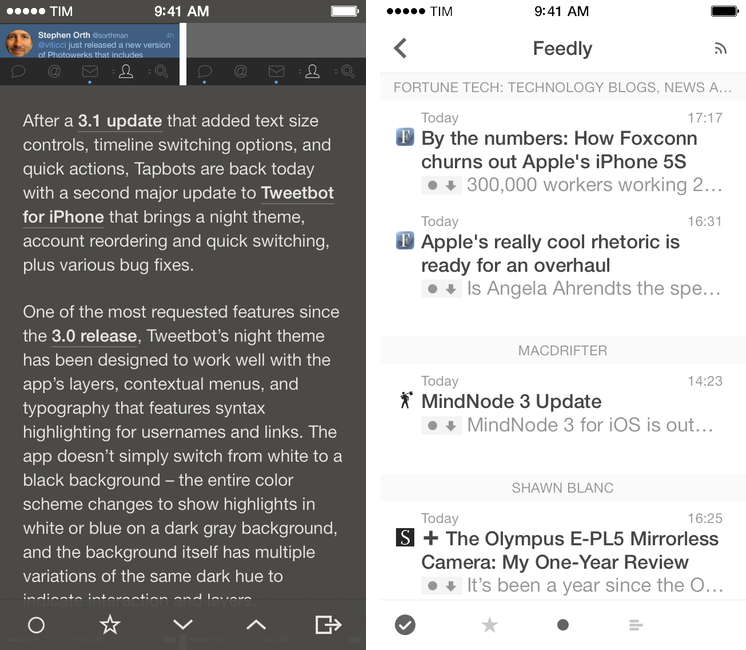
Tweetbot 3.2 Brings Night Theme, Account Reordering and Quick Switching

Tweetbot 3.2

Tweetbot 3.2

After a 3.1 update that added text size controls, timeline switching options, and quick actions, Tapbots are back today with a second major update to Tweetbot for iPhone that brings a night theme, account reordering and quick switching, plus various bug fixes. Read more

Access Extra Content and Perks

Founded in 2015, Club MacStories has delivered exclusive content every week for nearly a decade.

What started with weekly and monthly email newsletters has blossomed into a family of memberships designed for every MacStories fan.

Learn more here and from our Club FAQs.

Club MacStories: Weekly and monthly newsletters via email and the web that are brimming with apps, tips, automation workflows, longform writing, early access to the MacStories Unwind podcast, periodic giveaways, and more;

Club MacStories+: Everything that Club MacStories offers, plus an active Discord community, advanced search and custom RSS features for exploring the Club’s entire back catalog, bonus columns, and dozens of app discounts;

Club Premier: All of the above and AppStories+, an extended version of our flagship podcast that’s delivered early, ad-free, and in high-bitrate audio.

Learn more here and from our Club FAQs.


MindNode 3

MindNode 3

MindNode 3

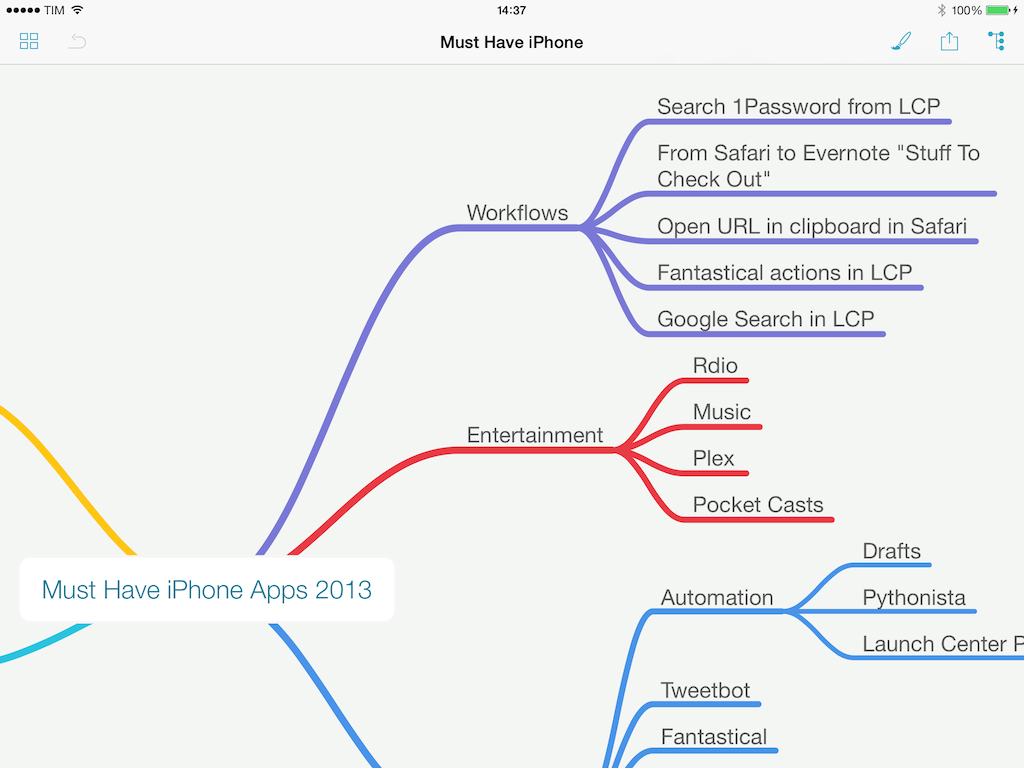
When I’m writing for MacStories, I tend to prepare articles as outlines in Evernote, where I’ll also throw in some images and hyperlinks. For pieces that are focused on a single subject (like an app review, a tutorial, or an opinion piece), the simple outline system works well because Evernote can keep everything in one place and show inline previews.

For longer articles that require deeper research and span a variety of topics, however, I like mind maps. Since I was in middle school and especially in high school, I got used to remember topics by creating mind maps (“concept maps”, as our teachers called them) with pen and paper for classes like History, Ancient Greek, English Literature, or Philosophy. Back then I had no iPhone or iPad and the school’s computers were some cheap Pentium 4s that the school administration couldn’t upgrade due to lack of regional funds, so I spent hours drawing little boxes and coloring them with highlighters. I made hundreds of them over the years.

When my brain has to jump from point to point several times and a text outline isn’t enough, I like the visual approach of mind maps. And in the modern age, unless I need specific advanced features of iThoughts, I usually open MindNode – IdeasOnCanvas’ app for the iPhone, iPad, and Mac. MindNode for iOS gets the 3.0 treatment today with a major update that redesigns the app, makes it iOS 7-only, adds new features, and cleans up some old ones while staying free for existing customers. Read more

Access Extra Content and Perks

Founded in 2015, Club MacStories has delivered exclusive content every week for nearly a decade.

What started with weekly and monthly email newsletters has blossomed into a family of memberships designed for every MacStories fan.

Learn more here and from our Club FAQs.

Club MacStories: Weekly and monthly newsletters via email and the web that are brimming with apps, tips, automation workflows, longform writing, early access to the MacStories Unwind podcast, periodic giveaways, and more;

Club MacStories+: Everything that Club MacStories offers, plus an active Discord community, advanced search and custom RSS features for exploring the Club’s entire back catalog, bonus columns, and dozens of app discounts;

Club Premier: All of the above and AppStories+, an extended version of our flagship podcast that’s delivered early, ad-free, and in high-bitrate audio.

Learn more here and from our Club FAQs.


Video Trailers Debut On The App Store With ‘Clumsy Ninja’

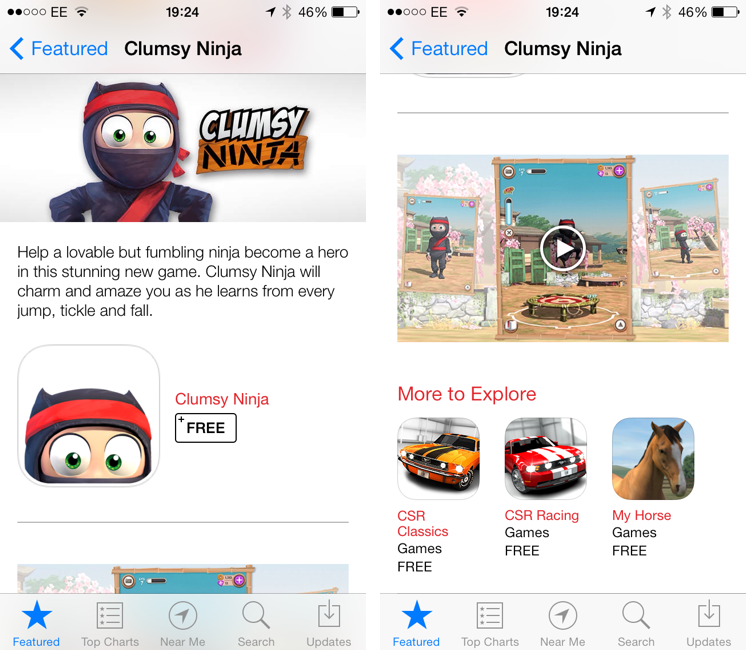
Apple is featuring Clumsy Ninja, an iOS game that was first announced at the iPhone 5 keynote in 2012, with a custom page on the App Store that, alongside a description, features a 1-minute trailer for the game. The custom “Featured” page is live on the UK App Store at the moment and it features Clumsy Ninja as Editor’s Choice for the week; it’s likely that the game will also be featured on the US App Store and other international stores later today.

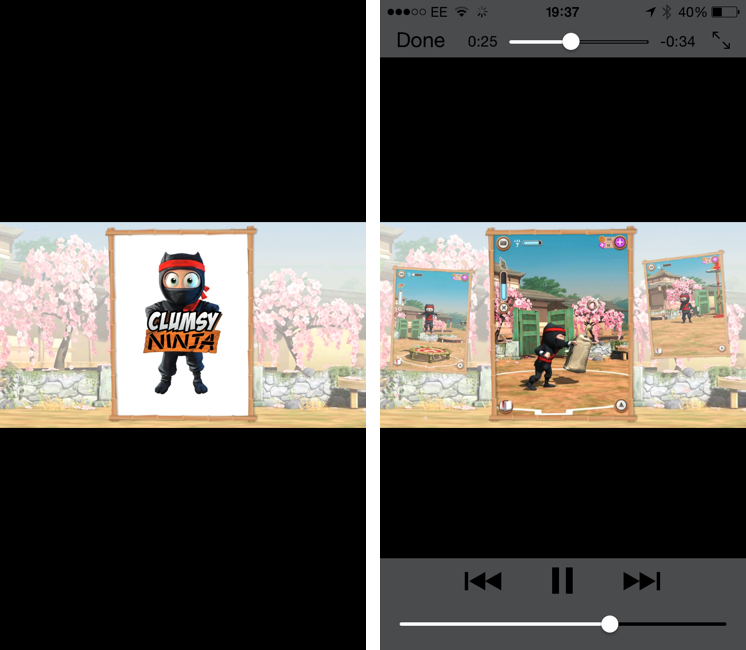
The big news is, of course, the fact that Apple is embedding a video in the App Store, which has historically only allowed developers to include up to five static screenshots for their apps. Clumsy Ninja’s video opens the built-in iOS media player in portrait mode, and it features music playing in the background with no voiceover or custom App Store branding. It is, effectively, a game trailer on the App Store; right now, it’s only available in the special Featured page for the app, as the app’s regular App Store page doesn’t show the trailer.

The possibility of including videos alongside screenshots on the App Store has long been one of the most requested features by third-party developers who, over the years, have struggled to explain App Store customers the purpose of their app or game with just text and images. With iOS 7’s focus on motion and animations, the lack of videos on the App Store was particularly surprising, and it led many to wonder as to whether Apple would soon add support for videos besides screenshots. When iOS 7 was first announced in June, even Apple produced a series of short videos for the OS’ official website, where they showcased the new features and design through animations and quick demonstrations of Messages and other apps.

It’s unclear at this point if Clumsy Ninja will remain an isolated case or become the norm for the App Store going forward. It’s also not clear whether any developer will be able to add a video for their app on the App Store, or if trailers will be limited to Editor’s Choice and managed by Apple’s curation team on a weekly basis. Developers have traditionally resorted to creating videos and screencasts of their apps for their websites or YouTube channels, and an integrated solution available in the App Store alongside screenshots, description, and buy buttons would be a fantastic addition to better illustrate an app’s feature set, flow, and user experience.

Access Extra Content and Perks

Founded in 2015, Club MacStories has delivered exclusive content every week for nearly a decade.

What started with weekly and monthly email newsletters has blossomed into a family of memberships designed for every MacStories fan.

Learn more here and from our Club FAQs.

Club MacStories: Weekly and monthly newsletters via email and the web that are brimming with apps, tips, automation workflows, longform writing, early access to the MacStories Unwind podcast, periodic giveaways, and more;

Club MacStories+: Everything that Club MacStories offers, plus an active Discord community, advanced search and custom RSS features for exploring the Club’s entire back catalog, bonus columns, and dozens of app discounts;

Club Premier: All of the above and AppStories+, an extended version of our flagship podcast that’s delivered early, ad-free, and in high-bitrate audio.

Learn more here and from our Club FAQs.


Leaving Google Chrome: Why I’ve Returned To Safari

Safari

Safari

I guess you could say that I was quite the fan of Google Chrome.

Before switching to Chrome last year, I didn’t have a “favorite” browser or “browser of choice”: I just kept jumping between Safari, Chrome, and Firefox, trying out all the features that the three major players had to offer on OS X. I’m pretty sure that, at one point, I even tried to go a full week with using Opera. My browser requirements have always been fairly standard (several open tabs; a lot of reading; sync with mobile devices), so I could afford to change browsers without having to worry about setting up a complex environment from scratch.[1]

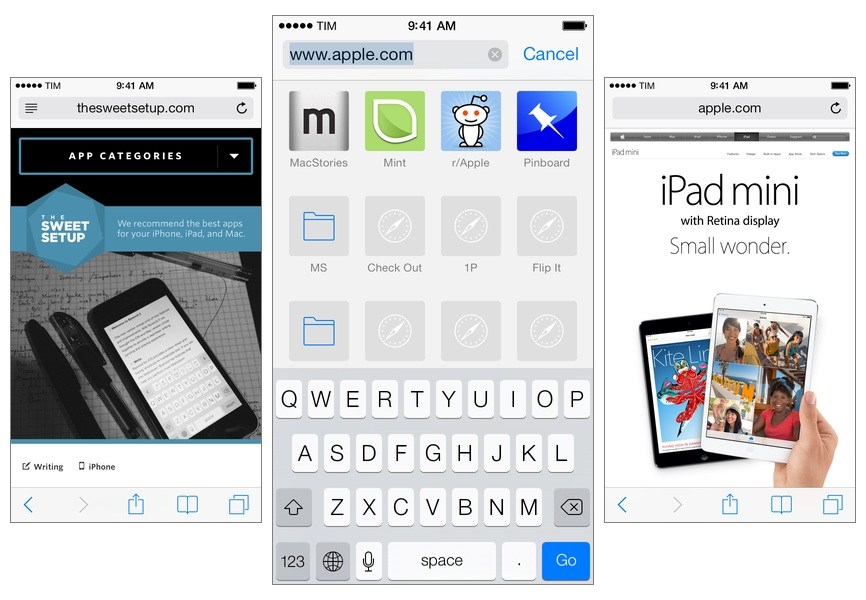
As I started using my iPad as my primary computer last year, I was growing increasingly annoyed with the state of iCloud sync in Safari and lack of major overhaul to a design that originally shipped with iPhone OS 1. I don’t frequently abandon systems that work for me due to stagnation, but iOS 6’s Safari exhibited a certain staleness on top of issues with bookmark and tab sync that, for me, were becoming an annoying problem. I liked Safari’s speed and native integrations with iOS, but it was prone to errors and boring.

On the other hand, Google Chrome for iOS was promising, familiar, and power user-friendly. I fell in love with Google’s support for x-callback-url, which I integrated in several workflows of mine as it allowed me to save time when switching between apps on my iPad; sync was nearly perfect; I praised Google’s superior implementation of voice dictation and feedback, although I noted how their Voice Search couldn’t exactly compete with Siri. Google kept pushing updates to Chrome for iOS, making it a capable browser for average and power users alike.

A few weeks after publishing my review of iOS 7, I decided to uninstall Chrome from all my devices and move back to Safari as my main and only browser on my iPhone, iPad, and two Macs.

I’m not looking back. I’m happy with the new Safari – so much, in fact, that I’m even considering Reading List as my “read later” service going forward.

Read more

Access Extra Content and Perks

Founded in 2015, Club MacStories has delivered exclusive content every week for nearly a decade.

What started with weekly and monthly email newsletters has blossomed into a family of memberships designed for every MacStories fan.

Learn more here and from our Club FAQs.

Club MacStories: Weekly and monthly newsletters via email and the web that are brimming with apps, tips, automation workflows, longform writing, early access to the MacStories Unwind podcast, periodic giveaways, and more;

Club MacStories+: Everything that Club MacStories offers, plus an active Discord community, advanced search and custom RSS features for exploring the Club’s entire back catalog, bonus columns, and dozens of app discounts;

Club Premier: All of the above and AppStories+, an extended version of our flagship podcast that’s delivered early, ad-free, and in high-bitrate audio.

Learn more here and from our Club FAQs.


Retina iPad mini: First Impressions

After a surprising and unexpected launch, I made a reservation for a Retina iPad mini earlier today at my local Apple store, waited five hours, then drove to the store and bought it. I got a 32 GB, LTE, Silver iPad because, when I made the reservation, that model wasn’t available in Space Gray and, as an Apple store employee later told me, reservations cannot be modified after the fact (not that it really matters – the store didn’t have it in stock today). I don’t care about the color of my iPad, and I prioritized getting one as soon as possible over looks. I think that Silver looks great.

As I’ve already discussed, I’ve been working from my iPad mini for the past year, and I couldn’t wait to get an upgrade to enjoy the higher resolution of the Retina display. I was forced to get used to the old iPad mini’s display, but that doesn’t mean I liked it. The form factor was more important than the display in the end, but, this year, I can have both: the iPad mini’s lighter body and the Retina display. I was, to use an euphemism, “fairly” excited about the Retina iPad mini.

Don’t consider this post a “review”. Rather, this is a collection of my first impressions with the device after less than five hours spent working with it. I am posting this list of points primarily for myself, so I can solidify my thoughts by making them public and getting the opportunity to reference them later. Secondly, I am publishing this post for readers who asked me questions about device and still don’t know whether they should buy an iPad mini or an iPad Air. This is not a buyers recommendation guide, but I’ll try to my best to collect everything that I thought of in the past five hours. Read more

Access Extra Content and Perks

Founded in 2015, Club MacStories has delivered exclusive content every week for nearly a decade.

What started with weekly and monthly email newsletters has blossomed into a family of memberships designed for every MacStories fan.

Learn more here and from our Club FAQs.

Club MacStories: Weekly and monthly newsletters via email and the web that are brimming with apps, tips, automation workflows, longform writing, early access to the MacStories Unwind podcast, periodic giveaways, and more;

Club MacStories+: Everything that Club MacStories offers, plus an active Discord community, advanced search and custom RSS features for exploring the Club’s entire back catalog, bonus columns, and dozens of app discounts;

Club Premier: All of the above and AppStories+, an extended version of our flagship podcast that’s delivered early, ad-free, and in high-bitrate audio.

Learn more here and from our Club FAQs.


iPad mini with Retina Display Available Today

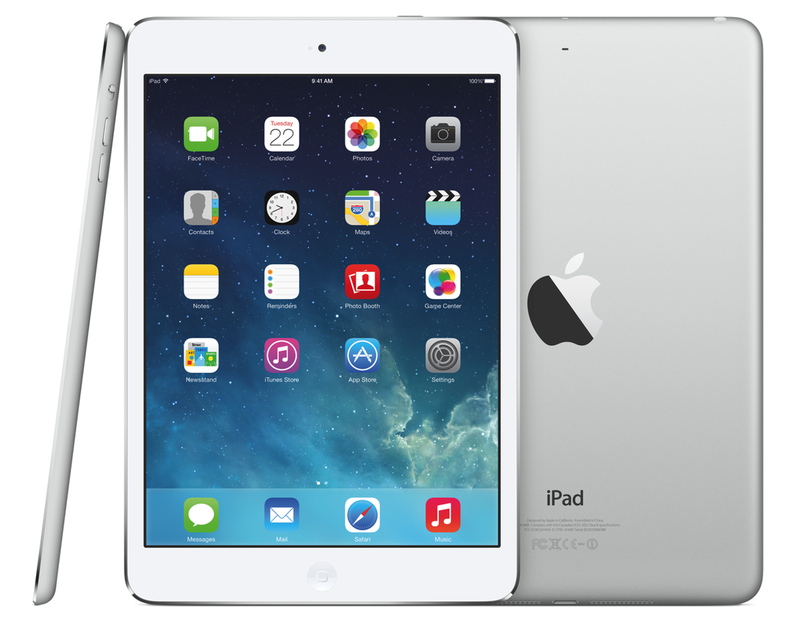
Following an update posted on the GSX website last night, Apple today launched the iPad mini with Retina display on its online store. The launch came as a surprise due to the lack of press releases to pre-announce the launch and product reviews from journalists who received a unit in advance. The launch followed rumors of a “delay” for the iPad mini due to supply constraints for the new Retina display.

As of this morning, the iPad mini with Retina display is available through the Apple online store with shipping times of 5-10 business days for both WiFi and WiFi + Cellular models. In a press release published a few minutes ago, Apple mentioned that it will also be available with Personal Pickup at Apple retail stores (in the United States at least):

iPad mini with Retina display is available to order through the Apple Online Store (www.apple.com) to ship or through Personal Pickup at Apple’s retail stores, and through AT&T, Sprint, T-Mobile, Verizon Wireless and select Apple Authorized Resellers.

From the press release:

The response to iPad Air has been incredible, and we’re excited for customers to experience the new iPad mini with Retina display,” said Philip Schiller, Apple’s senior vice president of Worldwide Marketing. “We think customers will love both of these thin, light, powerful new iPads, and we’re working hard to get as many as we can in the hands of our customers.

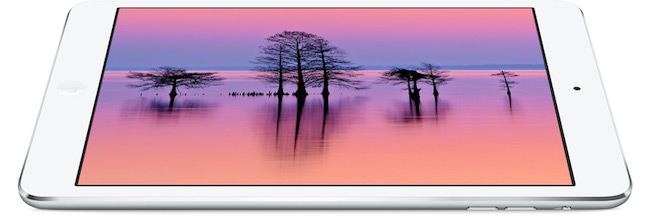
The iPad mini with Retina is Apple’s new 7.9-inch tablet that comes with a high-resolution display, A7 processor with 64-bit CPU, and all the other features of the larger iPad Air, in a lighter and smaller body.

Access Extra Content and Perks

Founded in 2015, Club MacStories has delivered exclusive content every week for nearly a decade.

What started with weekly and monthly email newsletters has blossomed into a family of memberships designed for every MacStories fan.

Learn more here and from our Club FAQs.

Club MacStories: Weekly and monthly newsletters via email and the web that are brimming with apps, tips, automation workflows, longform writing, early access to the MacStories Unwind podcast, periodic giveaways, and more;

Club MacStories+: Everything that Club MacStories offers, plus an active Discord community, advanced search and custom RSS features for exploring the Club’s entire back catalog, bonus columns, and dozens of app discounts;

Club Premier: All of the above and AppStories+, an extended version of our flagship podcast that’s delivered early, ad-free, and in high-bitrate audio.

Learn more here and from our Club FAQs.