

Here are today’s @MacStoriesDeals on iOS, Mac, and Mac App Store apps that are on sale for a limited time, so get them before they end!
Read more
Posts in Featured
#MacStoriesDeals - Friday

Access Extra Content and Perks
Founded in 2015, Club MacStories has delivered exclusive content every week for nearly a decade.
What started with weekly and monthly email newsletters has blossomed into a family of memberships designed for every MacStories fan.
Club MacStories: Weekly and monthly newsletters via email and the web that are brimming with apps, tips, automation workflows, longform writing, early access to the MacStories Unwind podcast, periodic giveaways, and more;
Club MacStories+: Everything that Club MacStories offers, plus an active Discord community, advanced search and custom RSS features for exploring the Club’s entire back catalog, bonus columns, and dozens of app discounts;
Club Premier: All of the above and AppStories+, an extended version of our flagship podcast that’s delivered early, ad-free, and in high-bitrate audio.
Apple Preps Yerba Buena For Next Week’s iPad 3 Event
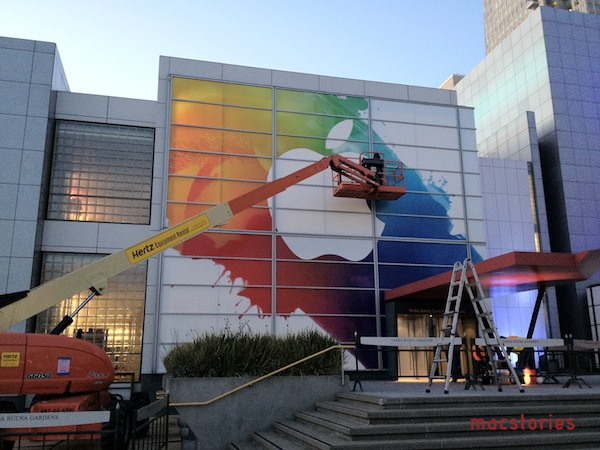
Apple has begun preparations at the Yerba Buena Center for the Arts ahead of next week’s media event, where the next-generation iPad is rumored to be announced. Earlier this week, Apple sent invitations to the press for the event they will hold in San Francisco on March 7th, starting at 10 AM PST.
We are updating this post with more photos of Apple’s banners at the Yerba Buena Center – these banners are typically of little indication of what the company will announce, but they’re still cool enough to check out, if only for the design alone. Based on what we’ve seen so far, the white Apple logo on top of splashes of color is reminiscent of Apple’s banner for the original iPad event in 2010.
More below. We’d like to thank Read It Later’s Steve Streza for providing the photos. Read more
Access Extra Content and Perks
Founded in 2015, Club MacStories has delivered exclusive content every week for nearly a decade.
What started with weekly and monthly email newsletters has blossomed into a family of memberships designed for every MacStories fan.
Club MacStories: Weekly and monthly newsletters via email and the web that are brimming with apps, tips, automation workflows, longform writing, early access to the MacStories Unwind podcast, periodic giveaways, and more;
Club MacStories+: Everything that Club MacStories offers, plus an active Discord community, advanced search and custom RSS features for exploring the Club’s entire back catalog, bonus columns, and dozens of app discounts;
Club Premier: All of the above and AppStories+, an extended version of our flagship podcast that’s delivered early, ad-free, and in high-bitrate audio.
February 2012 In Review
February sure went by quickly, but that certainly doesn’t mean there was a shortage of news, reviews and editorials - in fact it was quite the opposite. After a pretty big January with their education announcement and financial earnings, Apple didn’t slow down in February. They released new ads, previewed Mountain Lion, continued the PR battle over supplier responsibility and confirmed the (presumed iPad keynote) media event for March 7th. February was also a big month for Apps with an updated Tweetbot for iPhone and new Tweetbot for iPad, Clear, Photoshop, Vimeo 2.0 and VLC amongst others. Whilst we continued to focus on providing you, our readers, with great editorial content we discussed topics such as the iPad as a PC, supplier responsibility, greed and iOS 6 wishes amongst others.
Jump the break to view the full review of February 2012. You can also view January 2012 in Review here.
Access Extra Content and Perks
Founded in 2015, Club MacStories has delivered exclusive content every week for nearly a decade.
What started with weekly and monthly email newsletters has blossomed into a family of memberships designed for every MacStories fan.
Club MacStories: Weekly and monthly newsletters via email and the web that are brimming with apps, tips, automation workflows, longform writing, early access to the MacStories Unwind podcast, periodic giveaways, and more;
Club MacStories+: Everything that Club MacStories offers, plus an active Discord community, advanced search and custom RSS features for exploring the Club’s entire back catalog, bonus columns, and dozens of app discounts;
Club Premier: All of the above and AppStories+, an extended version of our flagship podcast that’s delivered early, ad-free, and in high-bitrate audio.
Readability for iOS Review
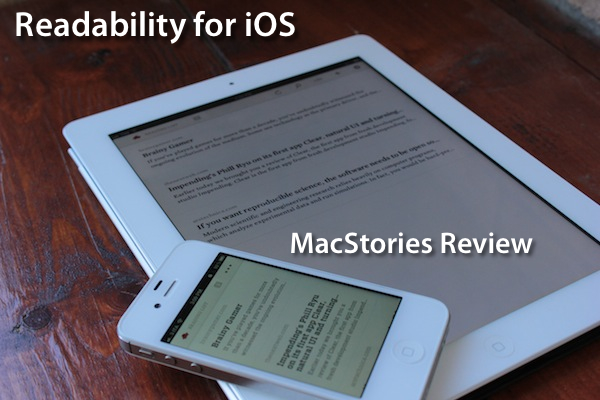
The official Readability app for iOS, available today on the App Store, had a complicated history with Apple and its approval process. Since Readability relaunched last year with an ambitious focus on publishers and “read anywhere”, the service struggled to get its native app for iPhone and iPad approved by Apple due to an initial controversy with iTunes app subscriptions, which were seemingly reserved to “publishing apps” only, and weren’t meant to be accessed by any third-party developer. With the app stuck in a limbo, Readability went back to the drawing board and developed a full-featured HTML5 web app for mobile devices, whilst releasing additional tools for the web and Kindle at the same time. Months passed, and Readability – which in the meantime put together a quite impressive list of advisors and supporting developers – announced an updated strategy with free access for everyone, and a paid option for users willing to actively and directly contribute to the sites they are reading the most in Readability. With the new free plan, Readability also announced they had submitted a new version of their iOS app to Apple. Three months later, the app is now live on the App Store.
I have been able to test the app – a collaboration between Readability and development and design studio Teehan + Lax – for the past week, and I’m fairly impressed by this first version. But let’s go back to the main point: what’s Readability? And how does the native iOS app complement the ecosystem the developers have built in the past 12 months?
Much like Instapaper, Read It Later, or recent entrants in this scene like Evernote Clearly, Readability’s goal is to declutter webpages to offer an elegant, comfortable reading view on any device. Meant for web articles, Readability can fetch a webpage’s text and images, strip out unnecessary elements like ads, and reformat everything with a focus on beautiful typography, a clean layout, and the possibility of syncing this reformatted content to mobile devices like an iPhone, iPad, or Android handset. Like the services mentioned above, Readability works in any web browser thanks to a bookmarklet or extension, as well as compatible third-party apps that have been updated to include a “mobilizer” functionality or a “send to” action to forward URLs directly to a Readability account. As you can see from Readability’s website, the list of apps supporting the service includes excellent names like Tweetbot (our review) and The Early Edition 2.
With the proliferation of read-later tools and apps we’ve witnessed throughout 2011, why would anyone switch from, say, Instapaper or Read It Later to Readability, which is a rather new player in the field? Well, for one, Readability isn’t exactly new to this market, as the company behind it, arc90, licensed the original codebase for its reading technology to Apple for the Safari Reader feature seen on the Mac and iOS. Second, to differentiate its product from the plethora of available read-later browser companions and mobile apps, Readability spiced up its offering with a unique “support the publishers” spin that, as we detailed, allows users to pay for Readability and give 70% of their subscriptions back to the websites they read.
Readability explains:
Here’s how it works: Every time you use Readability to read an article, a portion of your monthly contribution is earmarked for that publisher or writer. For example, if half of the stories you read in a given month come from The New York Review of Books, half of your earmarked funds will be allocated to The New York Review of Books.
With these differences in mind, I was excited to try the finally-approved Readability iOS app, and see how it would compare to Instapaper, which is my go-to app and service when it comes to saving articles for later, as I wrote in my review of version 4.0. From an Instapaper lover’s perspective, let me get this out of the way right now: if you’re used to all the features Instapaper offers – especially on the iPhone and iPad – you’ll be disappointed to find in Readability for iOS a “simple” app to read the articles you’ve saved from a browser. There is no discovery, no Friends integration, no support for forwarding liked items to Pinboard or Evernote. On the other hand, Readability’s simplicity and focused approach might just be what you’ve been looking for, so let’s dive in. Read more
Access Extra Content and Perks
Founded in 2015, Club MacStories has delivered exclusive content every week for nearly a decade.
What started with weekly and monthly email newsletters has blossomed into a family of memberships designed for every MacStories fan.
Club MacStories: Weekly and monthly newsletters via email and the web that are brimming with apps, tips, automation workflows, longform writing, early access to the MacStories Unwind podcast, periodic giveaways, and more;
Club MacStories+: Everything that Club MacStories offers, plus an active Discord community, advanced search and custom RSS features for exploring the Club’s entire back catalog, bonus columns, and dozens of app discounts;
Club Premier: All of the above and AppStories+, an extended version of our flagship podcast that’s delivered early, ad-free, and in high-bitrate audio.
Apple Confirms: Media Event on March 7
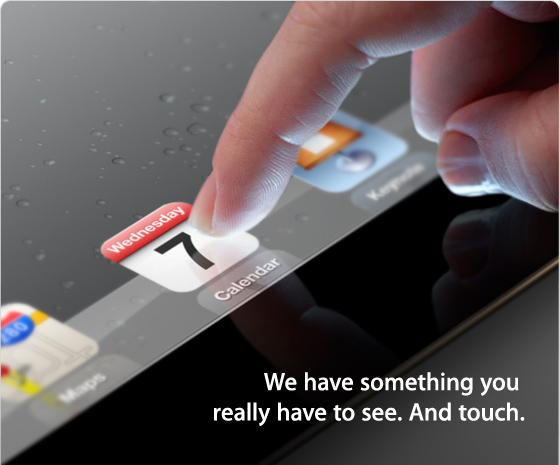
According to The Loop, Apple has just sent out invitations for a media event in San Francisco on Wednesday, March 7th. The event will be held at the Yerba Buena Center for the Arts in San Francisco, starting at 10 AM PDT (1 PM EST).
Earlier this month, it was reported Apple would hold an event in the first week of March to formally introduce the next-generation iPad, so far unofficially dubbed iPad 3, to a selected press audience in San Francisco. The new iPad, reportedly set to launch later this month, has been rumored to carry a high-resolution Retina Display; MacRumors even posted photos of what they claimed to be a production unit of the display, showing an increased number of pixels when put under a microscope. The device has also been widely rumored to share the same design aesthetics of the iPad 2, with tapered edges and a flat aluminum back. Back in January, Bloomberg reported the iPad 3 would come with a faster processor, presumably quad-core, and LTE connectivity, which was also confirmed in a separate article by The Wall Street Journal. Similarly, Rene Ritchie at iMore claimed Apple would hold an event on March 7th to announce an A6-powered, LTE-enabled iPad 3.
We have collected a series of iPad 3 rumors and theories here.
We’ll cover Apple’s media event on March 7th on MacStories’ homepage.
Access Extra Content and Perks
Founded in 2015, Club MacStories has delivered exclusive content every week for nearly a decade.
What started with weekly and monthly email newsletters has blossomed into a family of memberships designed for every MacStories fan.
Club MacStories: Weekly and monthly newsletters via email and the web that are brimming with apps, tips, automation workflows, longform writing, early access to the MacStories Unwind podcast, periodic giveaways, and more;
Club MacStories+: Everything that Club MacStories offers, plus an active Discord community, advanced search and custom RSS features for exploring the Club’s entire back catalog, bonus columns, and dozens of app discounts;
Club Premier: All of the above and AppStories+, an extended version of our flagship podcast that’s delivered early, ad-free, and in high-bitrate audio.
Adobe Photoshop Touch Review

When I first heard that Adobe was bringing Photoshop to the iPad sometime last year, I was sceptical. I presumed it would be a very limited app compared to the powerful desktop app, or maybe just a slightly improved version of Photoshop Express. At best I thought it might give you some good editing tools to fix and correct photographs, perhaps with some layer support and effects. I didn’t think Adobe could pull off creating a great tablet version of Photoshop, and I wasn’t sure the iPad would be a good fit for the tasks in Photoshop.
So when I finally got to try out Adobe Photoshop Touch, I was intrigued to see what Adobe had accomplished. After a couple of hours playing around in the app (it accidentally went live yesterday, then Adobe pulled it) I’ve come away very impressed with what Adobe has accomplished. Photoshop Touch is a powerful and capable version of Photoshop for the iPad, without a doubt. To me, it is the latest iPad app that has demonstrated that the iPad is for more than “content consumption” — that’s just an old myth now.
It’s the apps that make the iPad great and Photoshop Touch is perhaps the prime example of the potential of the device and how flexible it is at becoming a great machine for a whole slew of different tasks, from reading, to writing, to viewing to editing and now, to using Photoshop for more than just basic photo edits. Sure, Photoshop Touch is still not as powerful as the desktop version, in fact it’s quite a distance away from reaching such parity — but it all comes down to the car Vs. truck analogy that Steve Jobs rather famously explained. Photoshop on your Mac or PC is still available for when you need to do complicated and advanced tasks, but for a lot of other tasks, you could probably migrate to the iPad and Photoshop Touch.
Enough with the introduction, let’s dive into our review of Photoshop Touch.
Access Extra Content and Perks
Founded in 2015, Club MacStories has delivered exclusive content every week for nearly a decade.
What started with weekly and monthly email newsletters has blossomed into a family of memberships designed for every MacStories fan.
Club MacStories: Weekly and monthly newsletters via email and the web that are brimming with apps, tips, automation workflows, longform writing, early access to the MacStories Unwind podcast, periodic giveaways, and more;
Club MacStories+: Everything that Club MacStories offers, plus an active Discord community, advanced search and custom RSS features for exploring the Club’s entire back catalog, bonus columns, and dozens of app discounts;
Club Premier: All of the above and AppStories+, an extended version of our flagship podcast that’s delivered early, ad-free, and in high-bitrate audio.
iOS 6 Wishes
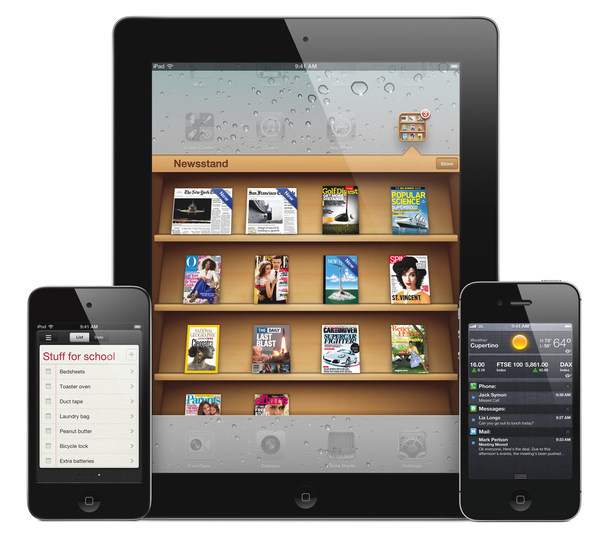
I read two great articles over the past few days detailing how Apple could improve iOS by taking a page from its competitors’ book (specifically, Android and Windows Phone 7) to enhance the way apps communicate with each other, and by looking at the way webOS handles multitasking and application windows on the TouchPad. They are good articles with some clever ideas, so make sure to check them out.
I have been writing a lot about ecosystems, file sharing and inter-app communication in the past months. After the public launch of iCloud last October, I’ve argued that Apple’s cloud solution is the platform for the next decade that might as well become the “operating system” itself, although it (and, by reflection, iOS) still lacks document-oriented functionalities to facilitate the process of creating and moving documents between apps. I have also made the case for a “universal save” option for iOS apps that might take advantage of iCloud, and, fortunately, it seems Apple is listening.
Today I’d like to go on the record with a list of features and options I’d like to see in a future version of iOS. I’m not typically huge on lists or “feature request” (last one was a series of predictions for WWDC ‘11), but I believe it’s worth discussing the direction where Apple is headed with its mobile operating system and, while we’re at it, propose solutions to improve existing apps and system utilities. I’ll check back on this list after WWDC ‘12. Read more
Access Extra Content and Perks
Founded in 2015, Club MacStories has delivered exclusive content every week for nearly a decade.
What started with weekly and monthly email newsletters has blossomed into a family of memberships designed for every MacStories fan.
Club MacStories: Weekly and monthly newsletters via email and the web that are brimming with apps, tips, automation workflows, longform writing, early access to the MacStories Unwind podcast, periodic giveaways, and more;
Club MacStories+: Everything that Club MacStories offers, plus an active Discord community, advanced search and custom RSS features for exploring the Club’s entire back catalog, bonus columns, and dozens of app discounts;
Club Premier: All of the above and AppStories+, an extended version of our flagship podcast that’s delivered early, ad-free, and in high-bitrate audio.
Storify for iPad Review
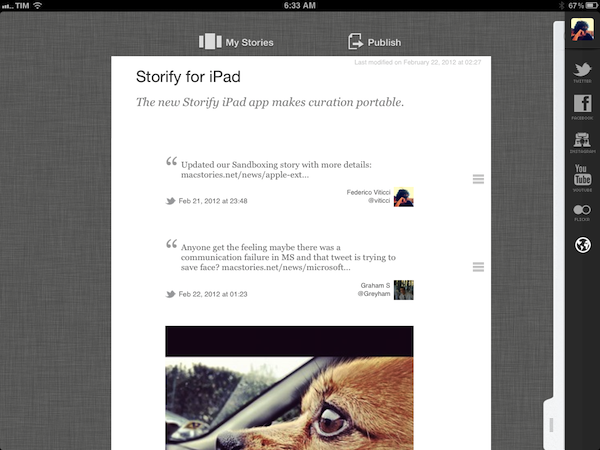
Since its release in April 2010, the iPad has been widely regarded as a “consumption device” not really suited for “content creation”. Whilst we have already examined the issue with dismissing the iPad as a device that’s not capable of doing the same things a computer can – and my friend Shawn has a good take on why “content” generally is an awful marketing umbrella – the Storify iPad app, coming today for free on the App Store, is yet another example of how the iPad is changing the way we create through unique interfaces built around touch and the strengths of iOS.
Storify is an interesting service. Per se, Storify isn’t strictly focused on allowing you to create original content (images, text, or a combination of both) that you can share with your friends; rather, Storify is a curation tool that, among other services, leverages Twitter and the openness of the web to let you create “social stories” based off elements shared by people you follow, or just about anyone else on the Internet. Storify wants to tell stories by “curating social media”. I have covered the topic of curation – especially Twitter curation – several times on MacStories, and I recently mentioned Storify in my review of Tweet Library, an iOS app by Manton Reece that enables you to create collections of tweets for future reference. As I detailed in the article, Storify integration in Tweet Library means you can easily collect tweets from a variety of sources (people you follow, Twitter lists, favorite tweets – Tweet Library does a great job at breaking up Twitter sections in neatly organized “sources” panels) and publish them online as a bundle on Storify. The first official Storify iPad app, however, brings the full feature set of Storify (or at least the majority of its online functionalities) to the tablet, mirroring the web counterpart available at storify.com to allow you to create visually rich social stories that go beyond collecting data from Twitter.
I have been able to test Storify for iPad in the past weeks, using it to create and edit stories that I’ve embedded on MacStories such as this one, or this one. When I first talked to Storify CEO Xavier Damman about their upcoming iPad client, I wondered how well the team had managed to port the desktop user interface and experience of Storify, which is largely based on drag & drop, to the iPad. Furthermore, the Storify web app benefits from the desktop nature of the web browser, which makes it easy to switch between dozens of tabs, collect links, snippets of text, and images, or simply open links from other applications without having to worry about “switching back” using a multitasking tray, such as the one we have on iOS. These are all problems a native iPad app should somehow address, I thought, as it’s not just as easy and quick to switch between the browser and multiple sources on an iPad, and I wouldn’t want the Storify creation process to become slow or, worse, cumbersome. It turns out, the Storify team solved the problem with converting mouse interaction to multitouch, and quite beautifully. Read more
Access Extra Content and Perks
Founded in 2015, Club MacStories has delivered exclusive content every week for nearly a decade.
What started with weekly and monthly email newsletters has blossomed into a family of memberships designed for every MacStories fan.
Club MacStories: Weekly and monthly newsletters via email and the web that are brimming with apps, tips, automation workflows, longform writing, early access to the MacStories Unwind podcast, periodic giveaways, and more;
Club MacStories+: Everything that Club MacStories offers, plus an active Discord community, advanced search and custom RSS features for exploring the Club’s entire back catalog, bonus columns, and dozens of app discounts;
Club Premier: All of the above and AppStories+, an extended version of our flagship podcast that’s delivered early, ad-free, and in high-bitrate audio.
Apple Extends Mac App Store Sandboxing Deadline to June 1
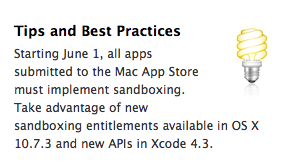
With a notice posted on the Mac Dev Center’s App Sandboxing webpage, Apple has informed developers that the sandboxing deadline, previously delayed to March 1, has been extended to June 1.
Starting June 1, all apps submitted to the Mac App Store must implement sandboxing. Take advantage of new sandboxing entitlements available in OS X 10.7.3 and new APIs in Xcode 4.3.
We have extended the deadline for sandboxing your apps on the Mac App Store from March 1st to June 1st to provide you with enough time to take advantage of new sandboxing entitlements available in OS X 10.7.3 and new APIs in Xcode 4.3.
Starting June 1, if you have an existing app on the Mac App Store that is not sandboxed, you may still submit bug fix updates without sandboxing your app. In addition, if you have technical issues that prevent you from sandboxing your app by June 1, let us know.
Sandboxing is a new technology in OS X Lion that limits the functionalities of Mac App Store applications to a list of “entitlements” that cover various areas of the operating system an app can access, such as networking, printing, or a user’s files. A sandboxed application would be unable to harm the system outside of its operational scope (managed by the entitlements), and this has caused some concerns as apps would lose access to the Mac’s entire filesystem, which is required by some functionalities of certain applications that aren’t necessary malicious or “compromised”. Similarly, inter-app communication would be a technical issue with sandboxing, as apps like TextExpander, Keyboard Maestro and CoverSutra – utilities that perform actions in the background without asking for user’s interaction in some cases (user-initiated actions can override the sandbox) – couldn’t get past the sandboxing requirement for the Mac App Store.
Since the release of Lion last summer, Apple has been touting the advantages of sandboxing as a way to increase security on OS X, whilst third-party developers began asking for more clarity from Apple in regards to the list of entitlements made available to them. For instance, sandboxing has been heavily criticized in the past months as it would theoretically prevent apps that rely on system-level technologies such as AppleScript from working, as they would require an entitlement that Apple isn’t providing. Similarly, apps that would require access to an entire user’s filesystem would be problematic with sandboxing fully enforced (think backup utilities such as SuperDuper).
Sandboxing recently became a topic of discussion again as Apple announced the next version of OS X, Mountain Lion, featuring a new security measure called Gatekeeper, while claiming that sandboxing would still be enforced starting March 1. With Gatekeeper and Sandboxing seemingly aimed at fixing different problems with OS X security, a number of third-party developers asked Apple (again) to reconsider the list of entitlements for the sandbox and figure out a way to work with longtime Mac developers to keep their apps in the Mac App Store.
Notably, Daniel Jalkut of Red Sweater Software wrote:
Apple should embrace the utility of sandboxing by shifting their focus away from sandboxing only Mac App Store titles, to a strategy that would sandbox virtually every Mac app, inside the store or out. Given the current limitations of sandboxing, a significant number of developers will not adopt the technology, so its usefulness to users and to the security of the platform will be diminished. Apple can turn that around so that sandboxing is a worthy counterpart to Gatekeeper, and a technology that any developer in his or her right mind would feel foolish not to incorporate.
To increase adoption, Apple should expand the current list of entitlements until it covers every reasonable behavior that users expect from Mac apps.
As a result of the uncertainty surrounding the sandboxing deadline prior to today’s announcement, some developers have decided to stop supporting the Mac App Store, keeping their applications available for purchase on their website – something that Mountain Lion will continue to support thanks to Gatekeeper. A notable example is Riverfold’s Manton Reece, who wrote a blog post explaining the reasons behind his decision to remove Clipstart from the Mac App Store:
Clipstart also falls into the same “needs to access the whole file system” category as Transmit. It’s not just one feature; the whole app is based on the fact that it can point to video files anywhere on the system, or manage your video library in a central location on any hard drive. These are things that are difficult to do in the sandbox, but even worse, I don’t see a clear path forward for existing customers to move into such a restrictive environment.
Maybe I could file bugs with Apple for exemptions, and reduce the functionality of my app to fit within the limits of the sandbox, but I’ve made the decision that it is just not worth it. I would much rather spend 100% of the time I have for Clipstart on new features only, not playing catch-up with Apple.
Following today’s notice sent to developers, Reece told us: “The delay is great news for developers who have been scrambling to meet the deadline. With brand new sandboxing APIs in 10.7.3, it just wasn’t realistic to expect developers to be ready. And for some apps, there are still areas where the current entitlements fall short.” As for Clipstart, Reece says he’s still planning to remove his app from Apple’s storefront: “I still expect to transition away from the Mac App Store. These delays show that Apple is listening, but also that sandboxing isn’t a stable environment yet. I want to focus my time on adding new features for users instead.”
With Apple extending the Sandboxing deadline, the company will hopefully have time to come up with a broader selection of entitlements developers can use in their apps. As a side note, Apple is expected to hold its annual WWDC in June, and Mountain Lion is set to become available this summer on the Mac App Store. Apple seems to be very flexible with the new June 1 deadline, too, promising developers that they will be able to submit bug fixes without implementing sandboxing, and asking them to “get in touch” if technical issues are preventing them from implementing the new technology.
Access Extra Content and Perks
Founded in 2015, Club MacStories has delivered exclusive content every week for nearly a decade.
What started with weekly and monthly email newsletters has blossomed into a family of memberships designed for every MacStories fan.
Club MacStories: Weekly and monthly newsletters via email and the web that are brimming with apps, tips, automation workflows, longform writing, early access to the MacStories Unwind podcast, periodic giveaways, and more;
Club MacStories+: Everything that Club MacStories offers, plus an active Discord community, advanced search and custom RSS features for exploring the Club’s entire back catalog, bonus columns, and dozens of app discounts;
Club Premier: All of the above and AppStories+, an extended version of our flagship podcast that’s delivered early, ad-free, and in high-bitrate audio.