Posts in Featured

Instacast 2.0: Still the Best Podcatcher, with Pro Features

It’s not hard to talk about the latest and greatest features of Instacast 2.0 when the developer has dutifully written his own epic walkthrough of his app’s new features. Instead of having to decipher release notes and a summary of bullet point features, Martin Hering of Vemedio has already published an in-depth write-up of everything “version two” has to offer, which includes a couple pro-tips here and there for those who aren’t skimming paragraphs and looking for bolded words. The mini-manual will be a handy reference for getting adjusted to Instacast’s tap-and-hold friendly UI and advanced features.

With the features already explained in great detail, I don’t feel the need to recap everything Instacast 2.0 has to offer or explain how it works, but I do want to share some of my experiences with the app post-upgrade. There are lots of little changes that have been made and thus lots of little habits that had to be relearned. While some of the changes take some getting used to, others have been improved upon so well that I could not think of going back to an older Instacast. Upgraded player controls, playlists, and bookmarks add a new pro-layer of control without dampening the player’s aesthetic or user experience. Additional sharing features strive to strengthen online discussion around podcasts thanks to commenting and an HTML5 audio player.

Read more

Access Extra Content and Perks

Founded in 2015, Club MacStories has delivered exclusive content every week for nearly a decade.

What started with weekly and monthly email newsletters has blossomed into a family of memberships designed for every MacStories fan.

Learn more here and from our Club FAQs.

Club MacStories: Weekly and monthly newsletters via email and the web that are brimming with apps, tips, automation workflows, longform writing, early access to the MacStories Unwind podcast, periodic giveaways, and more;

Club MacStories+: Everything that Club MacStories offers, plus an active Discord community, advanced search and custom RSS features for exploring the Club’s entire back catalog, bonus columns, and dozens of app discounts;

Club Premier: All of the above and AppStories+, an extended version of our flagship podcast that’s delivered early, ad-free, and in high-bitrate audio.

Learn more here and from our Club FAQs.


Slow Feeds Brings A Simple, Unique Innovation To RSS Apps

In the oft-abused Death of RSS debate, a common and universal truth is typically forgone: RSS is a standard, not a single entity, and as such its survival or presumed “death” should be related to the services that use it, not the standard itself.

The problem many people have with RSS is roughly the same others have with email: it’s not as real-time as Twitter, and if you don’t keep on tabs on it you can easily get overwhelmed by the onslaught of unread items demanding your constant attention. While in the past few years some amazing apps and technologies have leveraged RSS as a foundation to provide new experiences, little has been done to address the simple problem behind the possible frustration caused by RSS: that RSS can be useful for sites with fewer but focused items, but it can get annoying (like email) with hundreds of unread items. Is it possible to retain the usefulness of RSS, while ensuring its catch-all nature is relegated to a level that avoids frustration?

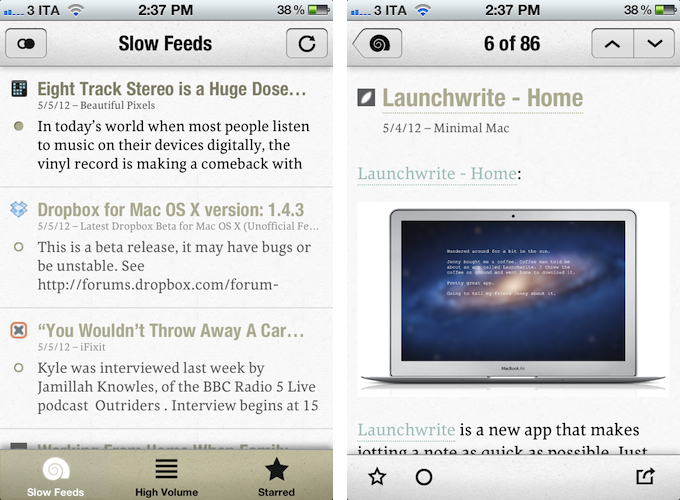
Slow Feeds by Stefan Pauwels is an iPhone app that does one thing well: it separates “slow” from high-volume feeds, and it lets you check out both within a single interface. It fixes a simple problem with a unique, yet totally obvious approach: it understands the convenience of RSS for either “low” and “high” volume websites, and doesn’t treat them equally.

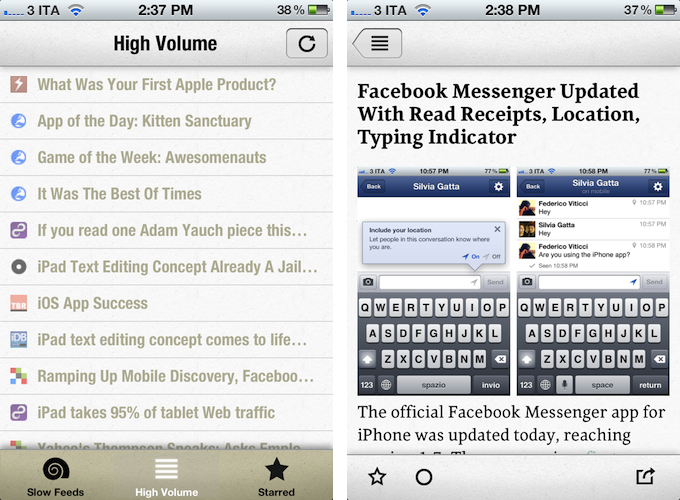
Once logged in with your Google Reader account, Slow Feeds (whose icon is very appropriate) will take a couple of minutes on first launch to “understand” which feeds are usually slow, which ones have many posts per day, then it will break them up into two categories: Slow Feeds and High Volume. A third tab in the bottom bar is also dedicated to Starred items.

The first tab, Slow Feeds, lets you switch between All or Unread items for sites with few content every day: for instance, this is where I can find things like the iFixit Blog, Minimal Mac, or Beautiful Pixels. These are sites that I am interested in, but that because of their low-volume nature could sometimes easily get lost in the plethora of unread items (ever wondered why these sites usually don’t publish on Apple keynote day?). The app has been very accurate at picking “slow feeds” for me, going back a few months to older items it knew I might have missed – indeed, thanks to Slow Feeds I rediscovered many articles that I had unintentionally ignored.

The High Volume tab, on the other hand, displays a list of all items from all sites that publish a lot of items every day. In here, I can find MacStories, MacRumors, Daring Fireball, The Loop, and all those other publications that are very active in terms of post frequency. The results have been accurate in here as well, but I think there are some things the app could do better. For one, when compared to “regular” RSS apps like Reeder or Mr. Reader, the High Volume tab is obviously lacking: there are no sorting options, no folders, and the list of items isn’t organized by date. Slow Feeds isn’t meant for this kind of consumption – the app’s purpose is to keep “slowly updated feeds from getting lost in the fast river of news” – but I think some more options wouldn’t hurt.

Similarly, it’d be nice to be able to manually specify feeds that are “low volume”. By default, Slow Feeds automatically calculates the frequency for each feed based on the number of items per feed and time interval, but a manual option could be useful for, say, those sites that don’t typically publish a lot items, but may have exceptions (such as several Apple blogs on a keynote day). Being one of the first releases of the app, I wasn’t expecting to find the same amount of configurable options and settings as in Mr. Reader, but nevertheless, I am looking forward to having more sharing features in the article reading view (which right now only supports Twitter, email, and Instapaper).

Slow Feeds won’t replace your daily RSS app (it doesn’t want to), yet at the same time, I believe it really has a chance of becoming an app many will use alongside their RSS client on a daily basis. Slow Feeds’ core concept is so clever, and so naturally implemented, I am now wondering why, in retrospective, others didn’t come up with it first.

Slow Feeds is $2.99 on the App Store.

Access Extra Content and Perks

Founded in 2015, Club MacStories has delivered exclusive content every week for nearly a decade.

What started with weekly and monthly email newsletters has blossomed into a family of memberships designed for every MacStories fan.

Learn more here and from our Club FAQs.

Club MacStories: Weekly and monthly newsletters via email and the web that are brimming with apps, tips, automation workflows, longform writing, early access to the MacStories Unwind podcast, periodic giveaways, and more;

Club MacStories+: Everything that Club MacStories offers, plus an active Discord community, advanced search and custom RSS features for exploring the Club’s entire back catalog, bonus columns, and dozens of app discounts;

Club Premier: All of the above and AppStories+, an extended version of our flagship podcast that’s delivered early, ad-free, and in high-bitrate audio.

Learn more here and from our Club FAQs.


Concept Video Shows New Text Selection Method for iPad

Remember how, before the iPad was unveiled in January 2010, speculation was running wild as to whether Apple would simply use a larger virtual keyboard on the device? Back then, some rumors claimed the bigger nature of the device would force Apple to come up with some crazy and revolutionary way to type text on screen. As it turned out, Apple simply replicated the iPhone’s soft keyboard on the initial version of iPhone OS 3.2, making it almost laptop-size. In fact, the biggest change to the iPad’s software keyboard only happened with iOS 5.0 last year with the introduction of the split keyboard.

That’s not to say everything related to the iOS keyboard is perfect and Apple should stop improving on it. As the plethora of Dropbox text editors have showed, there is a need for different, possibly customizable keyboards that give better access to text selection tools.

In my list of wishes for iOS 6, I forgot to mention I really would like to see easier, faster text selection coming to the iPhone and iPad. I believe iOS’ text selection method is one of the best around, yet Apple could do better. For writers, selecting text – not typing it – simply isn’t nearly as fast as on a laptop. And the problem is not the keyboard – the issue persists with external Bluetooth keyboards – it’s the design of iOS itself that forces you to get your hands off the keyboard to manipulate text.

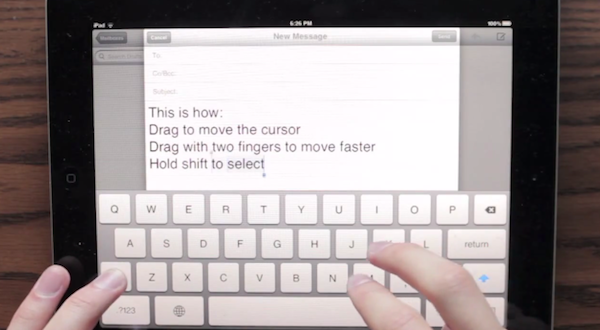
iDownloadBlog has posted an interesting concept video by YouTube user “danielchasehooper”, showing an interesting possible take on text selection on the iPad. By allowing users to tap and swipe on the keyboard, this system could, in theory, allow for faster selection, also in combination with keys like Shift. Almost every area of iOS now supports taps and swipes: why not the keyboard?

Concepts are what they are – ideas – but sometimes Apple seems to consider them. I don’t know if this video will turn out to be a feature Apple will evaluate – albeit it really makes a lot of sense in my opinion, design-wise – but I sure hope something’s cooking for iOS 6 in regards to text selection.

Access Extra Content and Perks

Founded in 2015, Club MacStories has delivered exclusive content every week for nearly a decade.

What started with weekly and monthly email newsletters has blossomed into a family of memberships designed for every MacStories fan.

Learn more here and from our Club FAQs.

Club MacStories: Weekly and monthly newsletters via email and the web that are brimming with apps, tips, automation workflows, longform writing, early access to the MacStories Unwind podcast, periodic giveaways, and more;

Club MacStories+: Everything that Club MacStories offers, plus an active Discord community, advanced search and custom RSS features for exploring the Club’s entire back catalog, bonus columns, and dozens of app discounts;

Club Premier: All of the above and AppStories+, an extended version of our flagship podcast that’s delivered early, ad-free, and in high-bitrate audio.

Learn more here and from our Club FAQs.


Playing Devil’s Advocate, Arguing Apple Should Change Their IAP Policy

There’s been a lot of discussion in the past few days over Apple, its In-App Purchase (IAP) policy, and Dropbox after it rejected a few apps that employed Dropbox functionality because they offered links to the Dropbox website for signing up and logging in. At issue was that the option to buy a higher level of storage was also visible, and this contravened one of the App Store Review Guidelines. Some viewed this as Apple trying to kill (or at the very least, target) Dropbox – but as Federico explained, this was just Apple enforcing one of their existing policies.

After thinking about it for a while, I’ve come to the position that perhaps that policy isn’t the right one. So I decided to play the devil’s advocate, and try to argue the case for Apple adjusting their policy. Specifically my argument focuses on Apple’s policy going something like:

Apps may use external mechanisms for purchases or subscriptions to be used in an app, but only when those purchase mechanisms are undertaken in a web view within the app.

That could probably be further clarified in more simplistic language, but you get the general idea of what I’m proposing. The current policy prohibits any link to purchases or subscriptions that are undertaken through external mechanisms (ie. not IAP); I suggest that this should be allowed. So let’s quickly go through the benefits of the current policy and arguments for relaxing the policy. Read more

Access Extra Content and Perks

Founded in 2015, Club MacStories has delivered exclusive content every week for nearly a decade.

What started with weekly and monthly email newsletters has blossomed into a family of memberships designed for every MacStories fan.

Learn more here and from our Club FAQs.

Club MacStories: Weekly and monthly newsletters via email and the web that are brimming with apps, tips, automation workflows, longform writing, early access to the MacStories Unwind podcast, periodic giveaways, and more;

Club MacStories+: Everything that Club MacStories offers, plus an active Discord community, advanced search and custom RSS features for exploring the Club’s entire back catalog, bonus columns, and dozens of app discounts;

Club Premier: All of the above and AppStories+, an extended version of our flagship podcast that’s delivered early, ad-free, and in high-bitrate audio.

Learn more here and from our Club FAQs.


Spotify for iPad Now Available

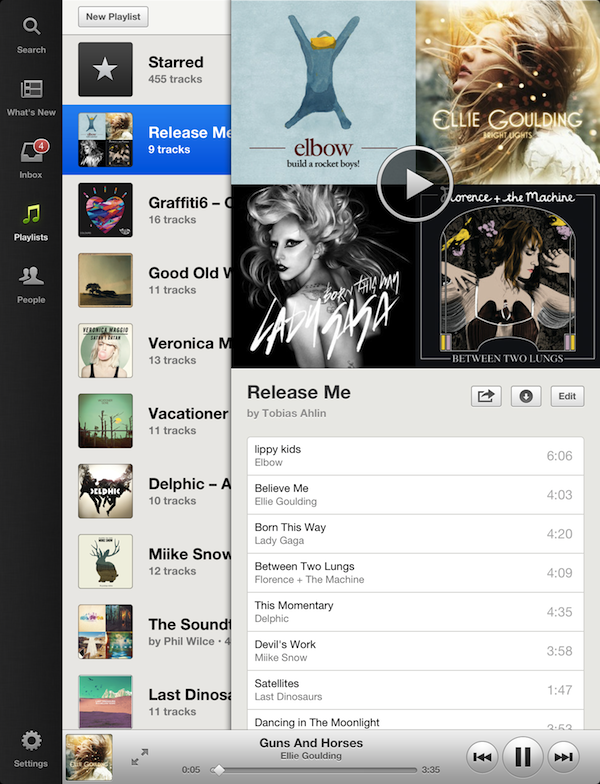
After years of speculations and subtle hints, music streaming service Spotify is today unveiling its official app for the iPad. The Next Web has the first details on the app; you can find Spotify for iPad on the App Store.

Fully optimized for the Retina display and taking advantage of Apple’s AirPlay technology to stream audio to other sources, the official Spotify app has been completely re-imagined to use the device’s larger screen, and give users more space to browse music, access their playlists, and inbox. The app uses a Twitter-like panel navigation to load playlists and artists, with music controls available at the bottom alongside an option to enlarge the album view. Relying on linen and sepia tones reminiscent of apps like Reeder, Spotify for iPad doesn’t simply look like a bigger version of its iPhone version – something the company is even joking about in the promo video. For instance, the larger screen has allowed Spotify to introduce features like instant, unified search for artists, albums, and playlists, or a full-screen cover art view that users can swipe on to change songs.

Spotify for iPad requires a Premium subscription. We will update this post with more information and our first impressions during the day, as the app is propagating now in iTunes. In the meantime, you can find more screenshots and a video after the break.

Update: Here’s our look at Spotify for iPad.

Read more

Access Extra Content and Perks

Founded in 2015, Club MacStories has delivered exclusive content every week for nearly a decade.

What started with weekly and monthly email newsletters has blossomed into a family of memberships designed for every MacStories fan.

Learn more here and from our Club FAQs.

Club MacStories: Weekly and monthly newsletters via email and the web that are brimming with apps, tips, automation workflows, longform writing, early access to the MacStories Unwind podcast, periodic giveaways, and more;

Club MacStories+: Everything that Club MacStories offers, plus an active Discord community, advanced search and custom RSS features for exploring the Club’s entire back catalog, bonus columns, and dozens of app discounts;

Club Premier: All of the above and AppStories+, an extended version of our flagship podcast that’s delivered early, ad-free, and in high-bitrate audio.

Learn more here and from our Club FAQs.


11.13 and The Dropbox SDK

Apparently, Apple has been rejecting some iOS apps with Dropbox integration lately (at least during the past week) for linking to the Dropbox website through the login/sign up process. The Next Web has a rundown of the “issue”.

Apps that integrate with Dropbox, in fact, can either authenticate through the installed Dropbox app, or, if not installed, open a web view to let users log in with the browser. The alleged problem with Apple is that the Dropbox mobile login page contains a link to go back to Dropbox’s main website/account creation page, and possibly purchase a subscription bypassing Apple’s App Store (and thus 70/30 revenue split).

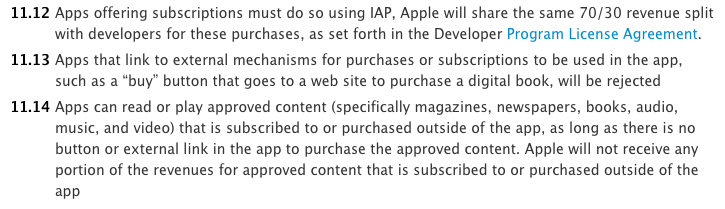
Of course, this isn’t new. In its App Store Review Guidelines, Apple has been enforcing for years a policy that doesn’t allow developers to visibly link to external websites that contain links to subscriptions sold outside of iTunes

Apps that link to external mechanisms for purchases or subscriptions to be used in the app, such as a “buy” button that goes to a web site to purchase a digital book, will be rejected.

In the past, a number of developers and services that included buttons/links to external websites containing subscription options were forced to update their apps to remove such functionalities. The most notable example to date has probably been the official Kindle app, which removed a button that linked to Amazon’s Kindle Store (where books can be purchased with an Amazon login, and saved into Amazon’s cloud locker). The list goes on, and the core issue at hand seems to be just how visibly developers are linking to external websites featuring ”external mechanisms for purchases or subscriptions”. There doesn’t seem to be a “visible” link to purchase additional Drive storage on Google.com, but you get the possible irony of this scenario. In the past few days, if these forum posters are to be believed, Apple decided to reject some apps that offered “an external link to Safari to create a Dropbox account”.

Before we march to Infinite Loop with our community pitchforks and torches, there are some necessary notes to be made about these rejections. First, the latest public version of the Dropbox iOS SDK is 1.2.1, available here, and I know at least two apps – Ultimate Password Manager and Drafts – that use it, and were approved today. Dropbox integration isn’t a central feature in these two apps, but they do have the Dropbox SDK built-in. On the forums – thus, not on the public developer page – the Dropbox team has already released a “beta” version of the 1.2.2 SDK, which removes the option to create an account on Dropbox.com. The beta SDK was seeded a few hours ago, and there’s the possibility Apple will reverse its decision on those rejections once they see the removal of the incriminated links. Right now, we don’t know.

Perhaps more interestingly, Dustin Curtis notes how some developers had also trouble linking to Rdio content inside their apps. It’s interesting, because Rdio came up with its own way to comply with Apple’s terms without losing money: they are offering subscriptions at a higher price through in-app purchase. But then again, the issue isn’t that Rdio does offer IAPs in its iOS app (the restriction on different prices was relaxed last year): it’s that the Rdio website still displays links to subscriptions users may potentially purchase through Safari (or any iOS web view).

As iOS apps become increasingly connected with third-party services and APIs, it’s going to be difficult for developers to keep track of websites and login pages that may or may not contain purchase mechanisms Apple doesn’t like. Sometimes, these mechanisms go unnoticed for months; other times, Apple decides to take action, such as in the (reportedly few) cases of Dropbox rejections this week.

Does this signal a change in Apple’s stance on Dropbox-enabled apps? We don’t know, though developers are naturally asking for clarifications and expressing their doubts. It may well be that Apple decided to simply start enforcing its old existing rule, and that they will be perfectly fine with the new SDK for newly-submitted apps. More importantly, while these few rejections are being talked about now, it’s important to note how, this week, other apps with the old Dropbox SDK have been approved.

Apple’s 11.13 rule isn’t new, and before we dabble in speculation about Apple wanting to “kill Dropbox”, I suggest we wait.

Access Extra Content and Perks

Founded in 2015, Club MacStories has delivered exclusive content every week for nearly a decade.

What started with weekly and monthly email newsletters has blossomed into a family of memberships designed for every MacStories fan.

Learn more here and from our Club FAQs.

Club MacStories: Weekly and monthly newsletters via email and the web that are brimming with apps, tips, automation workflows, longform writing, early access to the MacStories Unwind podcast, periodic giveaways, and more;

Club MacStories+: Everything that Club MacStories offers, plus an active Discord community, advanced search and custom RSS features for exploring the Club’s entire back catalog, bonus columns, and dozens of app discounts;

Club Premier: All of the above and AppStories+, an extended version of our flagship podcast that’s delivered early, ad-free, and in high-bitrate audio.

Learn more here and from our Club FAQs.


My New Dropbox “Quick Note-Taking” App: Drafts 1.1

In my review of Drafts 1.0, I wrote:

Drafts is neither a text editor nor a minimal Twitter client. Drafts is a frictionless way to capture and save ideas that also happens to be integrated with system functions and applications you may be already using to elaborate on those ideas. Drafts can be used as an inspirational notepad to store the genius idea you have while you’re brewing coffee, or when you’re busy writing something else (just fire up Drafts, and quickly dictate your text if you have an iPhone 4S). I would like to see an even faster way to email text (like Captio or Note 2 Self do) as well as support for Evernote and more text-based iOS apps in a future update, so here’s to hoping the feedback on this initial version will be strong enough to encourage Greg Pierce, the developer of Drafts and Terminology (which the app also supports for definitions), to consider more functionalities and an iPad counterpart.

And from my Dropbox Writing Workflow, about the service I use to save “quick snippets of text” into Dropbox:

I am not always writing long form content. In fact, most of the time I am simply saving ideas and short sentences in Dropbox. The web service I use to quickly get bits of text as .txt files into Dropbox is Send To Dropbox. Using my “Attachments” folder, Send To Dropbox connects via OAuth to my Dropbox account and gives me a unique email address I can email stuff to.

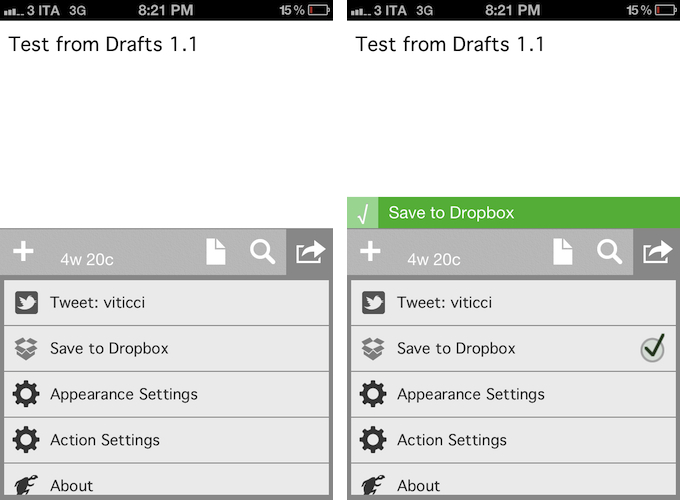
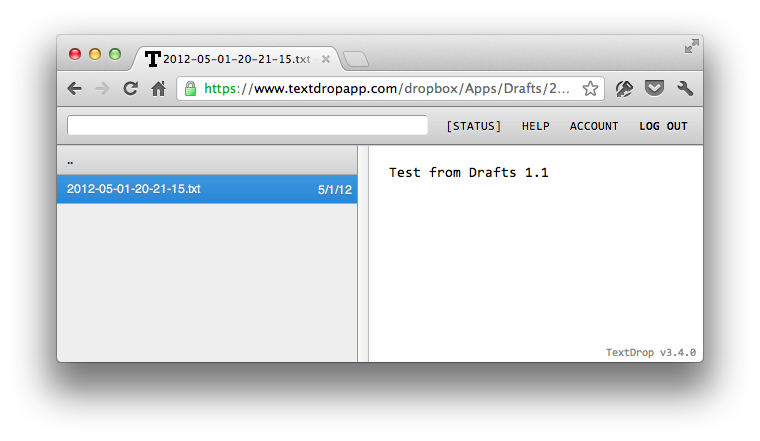
Drafts 1.1, released today, delivers in the two areas I used to find myself dabbling in: quick notes and Dropbox. Aside from a new icon by Wet Frog Studios, some minor UI refinements, and better feedback for executed actions, Drafts 1.1 comes with direct Dropbox integration to let you easily save a draft with one tap into your Dropbox account. Drafts will save notes as timestamped .txt files, meaning that, if you’re clever enough and want to automate your quick note-taking workflow, you could build rules in Hazel to look for specific timestamps and content inside the Apps/Drafts folder in Dropbox.

Personally, Drafts 1.1 fills a particular void in my workflow – a native iPhone app whose sole purpose is to save quick bits of text as single .txt files in Dropbox. With Drafts 1.1 and TextDrop, I can reclaim control of my drafts without being forced to use Send To Dropbox (which still has the obvious advantage of working anywhere). I like how I can type text into Drafts 1.1, hit the Dropbox sharing button, forget about it, and then access my text snippets with TextDrop, iOS file managers like ReaddleDocs and GoodReader (which allow you to directly edit text or “open in” other apps), or my OS X Dropbox folder.

Drafts 1.1, however, doesn’t just bring a few enhancements, bug fixes, and Dropbox support. For instance, third-party app integration has been supercharged with direct support for Sparrow (text will be passed along as email body, and the cursor will be automatically placed in the Subject field), Messages, and Simplenote. Even better, Drafts now lets you configure the apps and actions you want to keep visible in the sharing list with a dedicated menu; installed apps are automatically recognized, whilst supported-but-not-installed ones have a link back to the App Store (the App Store link button could use the same fresh coat of UI paint the icon received). You can enable and disable actions with a double tap.

Typically, 1.1 updates don’t fundamentally change the nature of an app, as they improve on existing features and fix glaring omissions of the first release. For me, Drafts 1.1, with the addition of Dropbox and more stability, feels like an all-new app that now sits in my iPhone dock to quickly save .txt into Dropbox. If you liked the functionalities of Drafts 1.0 and were waiting for more, I highly recommend Drafts 1.1, available on the App Store today at $0.99.

Access Extra Content and Perks

Founded in 2015, Club MacStories has delivered exclusive content every week for nearly a decade.

What started with weekly and monthly email newsletters has blossomed into a family of memberships designed for every MacStories fan.

Learn more here and from our Club FAQs.

Club MacStories: Weekly and monthly newsletters via email and the web that are brimming with apps, tips, automation workflows, longform writing, early access to the MacStories Unwind podcast, periodic giveaways, and more;

Club MacStories+: Everything that Club MacStories offers, plus an active Discord community, advanced search and custom RSS features for exploring the Club’s entire back catalog, bonus columns, and dozens of app discounts;

Club Premier: All of the above and AppStories+, an extended version of our flagship podcast that’s delivered early, ad-free, and in high-bitrate audio.

Learn more here and from our Club FAQs.


Alfred 1.2 Adds 1Password Support, New Themes, Improved Matching Algorithm

Alfred – the productivity tool for Mac OS X that started off as a simple application launcher – has now evolved in to a tool that has literally changed the way so many people now use their computers. The team at Running With Crayons has been hard at work preparing the next release of Alfred, and today they are happy to make version 1.2 available to everyone. It has taken months of hard work, but their software development team has managed to integrate some outstanding new features and general improvements in both the free Mac App Store version as well as the Powerpack version available on their website.

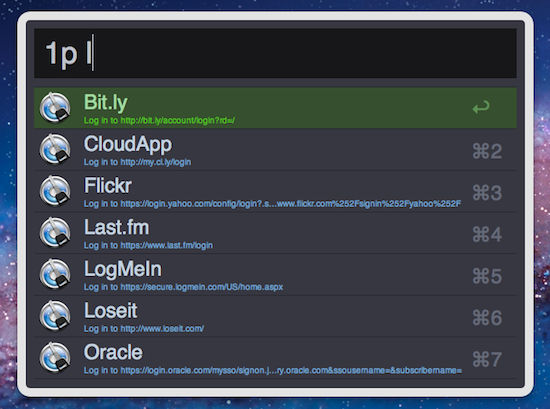
Without a doubt, the single greatest feature added to the latest version of Alfred is one reserved exclusively for paid Powerpack customers which gives users access to the their 1Password 1Click Bookmarks. There has already been a lot of buzz around the web after the developer preview of this feature rolled out, but to see it in action is truly amazing. There is very little to configure and Alfred will attempt to find your 1Password keychain, then store your bookmarks automatically. I was quite impressed because my 1Password keychain is in an obscure spot in my Dropbox folder; however, Alfred had no troubles finding it and accessing my bookmarks. From there, it is a simple command ‘1p’ to begin searching the 1Click bookmarks. In typical Alfred fashion, it searches as much of the criteria as possible including the name and URL of the bookmark to ensure it finds the right one.

I am certain that this feature was a popular request among users, and I love when developers take the time to not only listen to what their customers have to say, but actually deliver updates that reflect that actual desires of those using the software.

In both the paid and the free MAS version, Alfred 1.2 has brought tremendous improvements to the matching algorithm it uses to find files as the developer noted on his blog last week. Sometimes these performance enhancements are hard to visualize when you actually get your hands on the software, but I am confident you will see improved search results in this latest version.

Let me tell you a quick story to illustrate just how great the matching algorithm is in version 1.2. One of my fellow MacStories writers had sent me an iMessage consisting of only a quote that, judging by his continued conversation, it was one he expected me to be familiar with, yet I had no idea. I copied the text from Messages and pasted it in to Alfred intending to search Google in hopes of finding out whom he was quoting. Before I could hit enter, Alfred had found that quote inside a PDF that my fellow constituent had dropped in our shared Dropbox folder. I had no idea this file was even on my computer let alone the quote he had sent was apart of its contents. In the time it took me to type Command+V and hit Enter, Alfred had found the file and opened it for me. Expecting Safari to open with a Google search completed, it took a few seconds for my brain to comprehend what had just happened. Alfred knew exactly what I was searching for despite the fact I had no idea. That is great software.

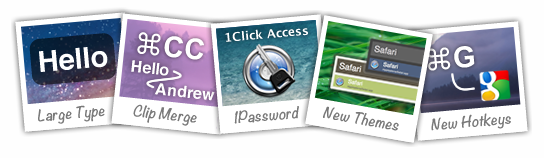
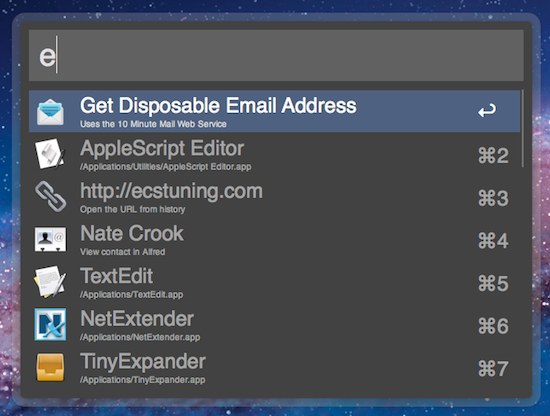
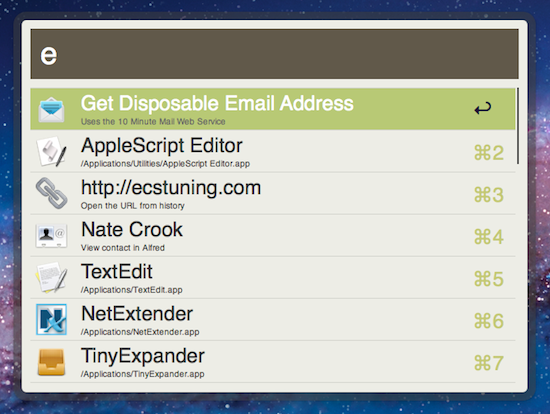
Other new features in both the paid and free versions of Alfred include two new themes as well as large type support. The two new themes called “Dark and Smooth” and “Pistachio” are a couple of great looking themes that were created by actual Alfred users and then voted on for a the opportunity to become default themes in the application. There are more details about these new themes available on the Alfred website.

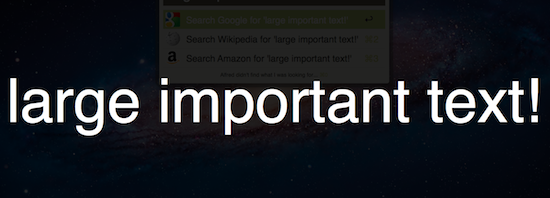
Now, not every new feature is going to appeal to everyone. This Large Type support was apparently highly requested among users but I have yet to find a reasonable use for it in my day to day workflow. The basics of this feature are as such – you type any bit of text in to Alfred and then hit Command+L. Alfred will then fill the screen with that text in an extremely large font. According to the release notes, this is great for phone numbers and email address; I have only found it useful for showing dirty words to my wife from across the living room.

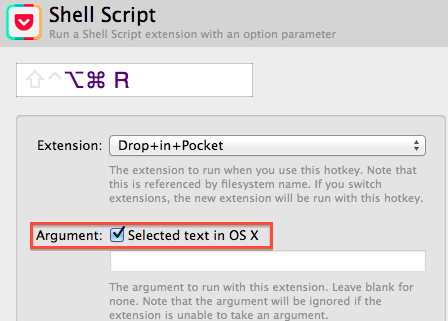
I also wanted to briefly mention some of the improvements on Global Hotkeys because it was partly a request of mine. Powerpack users will find a new check box option under Global Hotkey extensions that will allow any selected text to be passed to an extension when the Global Hotkey is triggered. It is hard to comprehend the usability added by this one small feature through simply reading about it so be sure to also check out David Ferguson’s video on how to use the new feature as he also demonstrates his “Drop in Pocket” extension.

Also added to Global Hotkeys was the option to paste the latest history item as plain text and the ability to assign a Global Hotkey to a text snippet. I have already started using the latter to manage my different email signatures with single keystrokes.

As with most general releases of Alfred, these are not the only new features and improvements, but they are some of my favorites. The release notes are quite exhaustive and contain all the additions in great detail. If you have the Mac App Store version then there is an update waiting you in the App Store so go ahead and grab it. If you have the Powerpack version then be even more excited because you also have an update waiting, but with even more awesome features!

Access Extra Content and Perks

Founded in 2015, Club MacStories has delivered exclusive content every week for nearly a decade.

What started with weekly and monthly email newsletters has blossomed into a family of memberships designed for every MacStories fan.

Learn more here and from our Club FAQs.

Club MacStories: Weekly and monthly newsletters via email and the web that are brimming with apps, tips, automation workflows, longform writing, early access to the MacStories Unwind podcast, periodic giveaways, and more;

Club MacStories+: Everything that Club MacStories offers, plus an active Discord community, advanced search and custom RSS features for exploring the Club’s entire back catalog, bonus columns, and dozens of app discounts;

Club Premier: All of the above and AppStories+, an extended version of our flagship podcast that’s delivered early, ad-free, and in high-bitrate audio.

Learn more here and from our Club FAQs.


iTunes Match Launches In Italy [Update: Coming To Greece, Portugal, Austria and Slovenia Too]

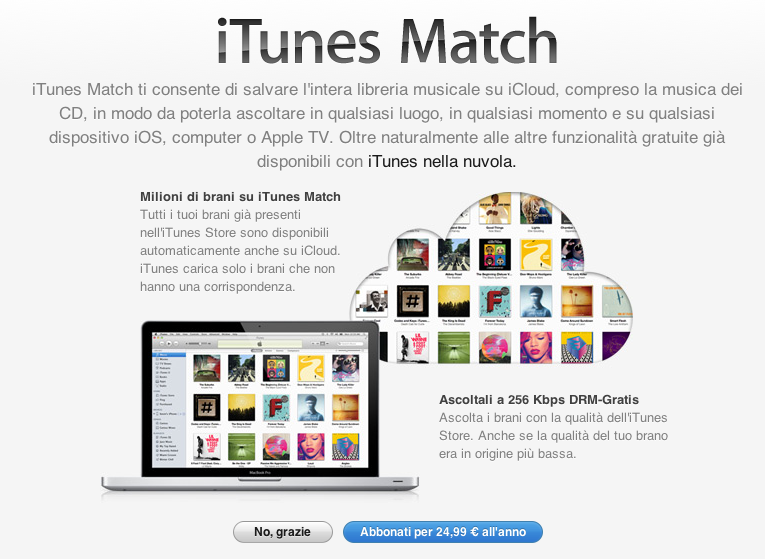
Earlier today, Apple updated its Terms and Conditions for the Italian iTunes Store to include information about iTunes Match, the company’s music service powered by iCloud. Launched in November 2011 in the United States (here’s our original hands-on), the service was later brought to more countries on December 15 and January 17, including South America, the UK, and other European countries.

Lei può abbonarsi a iTunes Match pagando un canone annuale. Per abbonarsi Lei deve aver registrato una carta di credito valida nell’archivio di iTunes. L’abbonamento non è rimborsabile (salvo richiesto dalla legge applicabile), e si rinnoverà automaticamente per periodi di un anno finché Lei non lo cancellerà. Il Suo account sarà addebitato non più di 24 ore prima della scadenza del periodo di abbonamento corrente. Lei può annullare il rinnovo automatico modificando le impostazioni dell’account iTunes Store sul Suo computer. Lei non sarà più in grado di accedere ai Suoi Contenuti iTunes Match su iTunes Match dopo la scadenza del Suo periodo di abbonamento.

Back in March, it was reported that Apple was holding a series of meetings with SIAE – the Italian association that represents “artists and editors” – to get the green light on launching iTunes Match in Italy.

According to Apple’s official support document about iTunes Match and iTunes in the Cloud availability, Italy still isn’t listed among the countries with support for Match and iTunes in the Cloud; as of today, iTunes Match is available in 37 countries worldwide.

Whilst the update of iTunes’ terms and conditions to include additional iTunes Match certainly confirms the company has made progress on obtaining rights to launch the service, it should also be noted that, back in February, Japan was rumored to be getting support for iTunes Match soon. In the case of Japan, however, only support for iTunes in the Cloud was spotted (and was eventually launched), whilst today’s updated agreement specifically mentions iTunes Match in Italy. Read more

Access Extra Content and Perks

Founded in 2015, Club MacStories has delivered exclusive content every week for nearly a decade.

What started with weekly and monthly email newsletters has blossomed into a family of memberships designed for every MacStories fan.

Learn more here and from our Club FAQs.

Club MacStories: Weekly and monthly newsletters via email and the web that are brimming with apps, tips, automation workflows, longform writing, early access to the MacStories Unwind podcast, periodic giveaways, and more;

Club MacStories+: Everything that Club MacStories offers, plus an active Discord community, advanced search and custom RSS features for exploring the Club’s entire back catalog, bonus columns, and dozens of app discounts;

Club Premier: All of the above and AppStories+, an extended version of our flagship podcast that’s delivered early, ad-free, and in high-bitrate audio.

Learn more here and from our Club FAQs.