Posts in Featured

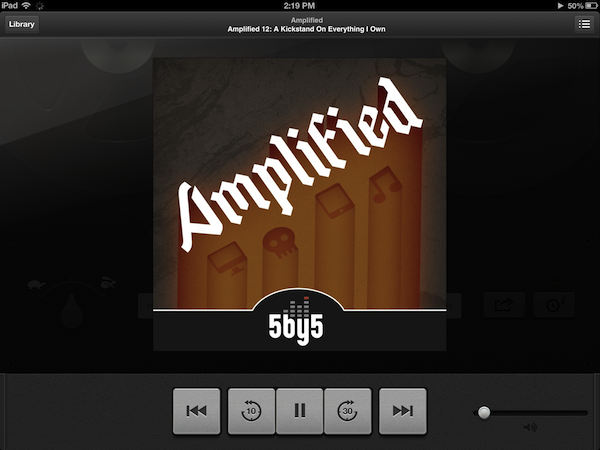
A Fine Impression of Apple’s Modernized Podcasts App

Apple’s Podcasts app is an acknowledgment that podcasts make up a substantial part of entertainment on iOS devices — more people than ever are subscribing to, learning from, and taking part in conversations around the topics that interest them. Long neglected with basic playback controls and mediocre syncing in the Music app, Podcasts is now its own standalone application. You couldn’t miss the news either — the Music app notifies you of this change on your iPhone or iPad when you open it.

With large and indie media networks recording weekly, if not daily, audio and video content, listeners who want “radio on their own time” can subscribe to and take part in discussions that they otherwise can’t be a part of through traditional radio or broadcast TV (i.e. time slots). Podcasts, while not a new concept, give listeners the opportunity to stream and download often short, consumable chunks of content that that’s more accessible than written text — it’s the way to catch up on news if you’re sitting in rush hour traffic, taking the dog for a walk, or doing the dishes.

Over the years, consuming podcasts becomes an incredibly intimate experience. Because people choose to listen on their own time, and often when they’re doing specific activities where they otherwise can’t read or listen to an available live stream, people look for specific features tailored to provide a custom listening experience. Being able to increase the playback rate of podcasts, set sleep timers, create playlists, add bookmarks, and stream podcasts over wireless networks has become increasingly important. Features, more-so than fancy user interfaces, are often preferred by users who regularly listen to podcasts.

Apple’s Podcasts application on iOS is their new central hub for finding, subscribing to, and listening to podcasts on your own terms. In consideration of how Apple’s podcast directory (their Catalogue) and podcatcher intermingle, it’s a pretty typical Apple experience. And in places where I thought Apple would fall short, I’m actually impressed at the amount of stuff they’ve added to their once featureless podcatcher. While Apple has certainly gone above and beyond my expectations in what they’ve provided, I think there can be some room for improvement.
Read more

Access Extra Content and Perks

Founded in 2015, Club MacStories has delivered exclusive content every week for nearly a decade.

What started with weekly and monthly email newsletters has blossomed into a family of memberships designed for every MacStories fan.

Learn more here and from our Club FAQs.

Club MacStories: Weekly and monthly newsletters via email and the web that are brimming with apps, tips, automation workflows, longform writing, early access to the MacStories Unwind podcast, periodic giveaways, and more;

Club MacStories+: Everything that Club MacStories offers, plus an active Discord community, advanced search and custom RSS features for exploring the Club’s entire back catalog, bonus columns, and dozens of app discounts;

Club Premier: All of the above and AppStories+, an extended version of our flagship podcast that’s delivered early, ad-free, and in high-bitrate audio.

Learn more here and from our Club FAQs.


Review of WTHR - A Simpler, More Beautiful Weather App

I admit it, I have a bit of a fetish for weather apps. My taste in them is a bit different than all the other categories because I am a data geek when it comes to what’s happening outside. Apps like WeatherSnitch do a great job showing you a lot of info on a small screen but many don’t present them to the user very effectively. Until Dark Sky for iPhone came out, I didn’t think I could use a weather app that focused on the important details instead of all of them. Since then I have changed the way I use weather apps and rely on Dark Sky for short forecasts / radar and iOS’ built-in Weather app for extended forecasts until today.

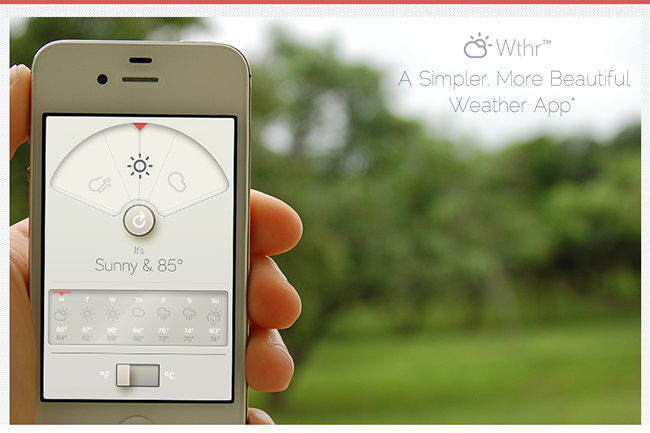
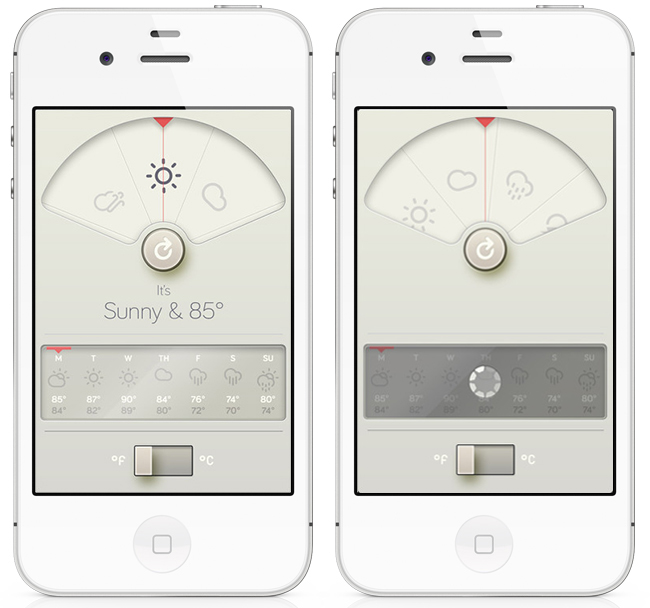
WTHR is a brand new weather app from David Elgena. He wanted to build a weather app based on Dieter Rams’ 10 principles of design so the user could stop wasting time staring at weather radars and atmospheric pressure readings and spend more time enjoying what’s happening outside. WTHR started as a mockup on Dribbble about a month ago and received a lot of attention there. More mockups and a programmer later, WTHR was submitted to Apple and is available today.

WTHR is one of the best looking weather apps available — I love the style and simplicity of it. I appreciate that it hides the status bar to give your entire iPhone the look of being a handheld weather device with zero distraction. Launch the app, watch the animations, get your forecast and go. Some people may not like the color scheme but if you know Dieter Rams’ designs you understand where the colors come from. When you launch the app, it asks for your location then the UI presents the weather data in a retro-futuristic style. There’s only 2 buttons to interact with, one to refresh the forecast and the other to flip from Celcius to Fahrenheit. The refresh animation is great and the spinning notification in the 7-day forecast almost looks like a Rams dial. Underneath the current forecast is a 7 day extended forecast. All the weather icons are Adam Whitcroft’s wonderful Climacons which look perfect to the stylings of WTHR.

David Elgena told me that they are already working on future updates to include, but not complicate, more features and data like multiple locations and a dark mode. “My intentions with WTHR was really to create something as beautiful as the device that hosts them… and I do believe that even UI designers and app developers could gain inspiration from Dieter Ram’s product designs. Too often we load digital products with features and hidden or hard to use interfaces because we are suddenly given this almost infinitely layered product, the real discipline is control. There is no difference from when Dieter Rams was designing his first clock face…to an app on the iPhone. I look forward to creating more apps in the future…and continually improving upon WTHR.”

The lack of contrast in the 7-day forecast can make you squint a bit — an option to switch to a 5-day forecast could help. I’m glad the app icon wasn’t designed with the same skeuomorphism in mind, as I am not a fan of doing this in iOS because it clashes too much with most other icons. International iOS users – don’t worry, WTHR uses a global geo-location weather API so no one is exempt from using this great app. The weather data is a little different than what iOS uses but only a few degrees at times as Federico noticed in Italy. WTHR has gained a spot on my home screen with its beautiful, focused purpose. WTHR is available for 99¢ via the App Store.

Access Extra Content and Perks

Founded in 2015, Club MacStories has delivered exclusive content every week for nearly a decade.

What started with weekly and monthly email newsletters has blossomed into a family of memberships designed for every MacStories fan.

Learn more here and from our Club FAQs.

Club MacStories: Weekly and monthly newsletters via email and the web that are brimming with apps, tips, automation workflows, longform writing, early access to the MacStories Unwind podcast, periodic giveaways, and more;

Club MacStories+: Everything that Club MacStories offers, plus an active Discord community, advanced search and custom RSS features for exploring the Club’s entire back catalog, bonus columns, and dozens of app discounts;

Club Premier: All of the above and AppStories+, an extended version of our flagship podcast that’s delivered early, ad-free, and in high-bitrate audio.

Learn more here and from our Club FAQs.


Launch Center Pro Review

Launch Center Pro has become my second SpringBoard. I have been testing the app for the past month, and it’s a fantastic upgrade over Launch Center, which we have covered on multiple occasions on MacStories. If you were a Launch Center user before, you’ll most definitely want to check out the new, separate Pro version.

For many, it’s difficult to see the appeal of software like Launch Center. Originally conceived as a Notification Center-based launcher for common actions such as toggling Bluetooth settings and custom URLs supported by third-party apps, Launch Center turned into a powerful hub to collect shortcuts for system actions and app-specific URLs. The discontinuation of Settings shortcuts in iOS 5.1 didn’t diminish Launch Center’s functionality, which gained support for several third-party applications and a nicer interface with support for icons and even more actions.

What started as an interesting hack to put shortcuts in Notification Center eventually became a utility that, in its niche, is redefining the concept of “launching actions”, rather than apps. This goes back to a fundamental issue behind the nature of the iOS Home screen – as I have previously written – and Launch Center Pro, while retaining the basic functionality of Launch Center, doubles down on this very distinction between finding apps and launching actions.

Read more

Access Extra Content and Perks

Founded in 2015, Club MacStories has delivered exclusive content every week for nearly a decade.

What started with weekly and monthly email newsletters has blossomed into a family of memberships designed for every MacStories fan.

Learn more here and from our Club FAQs.

Club MacStories: Weekly and monthly newsletters via email and the web that are brimming with apps, tips, automation workflows, longform writing, early access to the MacStories Unwind podcast, periodic giveaways, and more;

Club MacStories+: Everything that Club MacStories offers, plus an active Discord community, advanced search and custom RSS features for exploring the Club’s entire back catalog, bonus columns, and dozens of app discounts;

Club Premier: All of the above and AppStories+, an extended version of our flagship podcast that’s delivered early, ad-free, and in high-bitrate audio.

Learn more here and from our Club FAQs.


TextExpander 4 First Casualty of Mac App Store Sandboxing

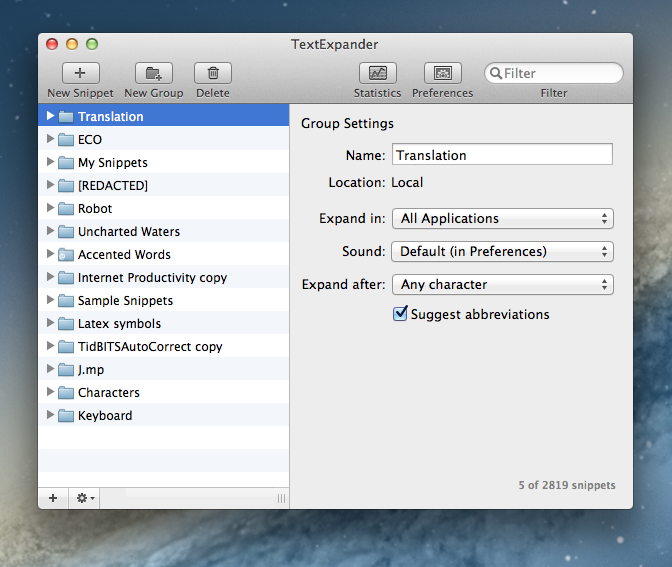
Today Smile Software released TextExpander 4, the latest version of its typing shortcut app for OS X. The new version contains several new types of fill-in snippets, including support for multi-line text fields, pop-up menus, expanding snippets while filling in text fields, and more. In addition, the UI has been slightly updated to match the monochromatic style of Lion and Mountain Lion, and snippet groups for French and German autocorrection are now part of TextExpander’s predefined group options. And in news that is sure to please anyone who has tried and failed to get their friends and family to understand the benefits of typing shortcuts, TextExpander 4 now includes a tutorial called the Snippet Creation Assistant, which will launch upon a fresh install of the app and guide new users through the process of making their own snippets.

TextExpander 4 also marks Smile’s break from the Mac App Store due to the sandboxing rules that went into effect on June 1st, making it the first major casualty of the new restrictions. Fortunately for Mac App Store customers, Smile has gone the extra step to ensure a smooth upgrade from the MAS version to their direct sale version. Once TextExpander 4 has been downloaded and launched, it will recognize existing MAS versions of TextExpander 3 and offer users the same discounted upgrade price as direct customers. As of this writing, TextExpander 3 is still on the Mac App Store and has not been updated with information about TE4 or the upgrade process.

TextExpander has been one of my most valuable apps for years and I highly recommend anyone who has yet to try it to download the demo from Smile’s website. TextExpander 4 costs $34.95 for a single license and $15 to upgrade from a previous version, with additional options for family packs and businesses. Any customer who purchased Text Expander 3 after January 15, 2012 can upgrade to TE4 for free.

TextExpander 4 is available for purchase from Smile Software’s website here. The company’s official press release, which includes the full list of new features and changes, can be found here.

Access Extra Content and Perks

Founded in 2015, Club MacStories has delivered exclusive content every week for nearly a decade.

What started with weekly and monthly email newsletters has blossomed into a family of memberships designed for every MacStories fan.

Learn more here and from our Club FAQs.

Club MacStories: Weekly and monthly newsletters via email and the web that are brimming with apps, tips, automation workflows, longform writing, early access to the MacStories Unwind podcast, periodic giveaways, and more;

Club MacStories+: Everything that Club MacStories offers, plus an active Discord community, advanced search and custom RSS features for exploring the Club’s entire back catalog, bonus columns, and dozens of app discounts;

Club Premier: All of the above and AppStories+, an extended version of our flagship podcast that’s delivered early, ad-free, and in high-bitrate audio.

Learn more here and from our Club FAQs.


Reeder 3.0 Review

In 2009, reading news on the iPhone was different. The App Store was only one year old; Twitter wasn’t the information network adopted by mass media and millions of users we interact with today; there was no iPad, no universal apps, and no Flipboard. In 2009, reading news on an iPhone meant having to choose between few decent Google Reader clients, some Twitter apps, and lots of “mobile optimized” web apps.

Then in late 2009, Reeder came around. Created by Swiss developer Silvio Rizzi, I remember writing one of the first public reviews of Reeder for iPhone, which unlike the majority of contestants in the space at the time, sported a highly custom “sepia” interface that would later went on to define Reeder as a brand. Crafted with care and an eye for speed, Reeder not only stood out because it was beautiful to look at – the app was fast, visibly more responsive than Byline and NetNewsWire, easy to navigate in spite of its new UI paradigms, and focused on letting the user easily share links on other networks and services. Reeder 1.0 wasn’t perfect; version 2.0, released a few months later, fixed some glaring omissions of its predecessor (namely, lack of saved state), and introduced an even faster syncing engine and more link sharing options.

Reeder took off. The success of the iPhone app allowed Rizzi to become one of the most well-known names in the indie iOS developer community, redefining iPad RSS readers with a brand new version of Reeder, and then again capturing a large portion of the OS X market with the highly-anticipated Reeder for Mac.

In spite of its obvious merits, it is hard to pinpoint the exact reason behind Reeder’s rise to the top of Google Reader clients. There are hundreds, if not thousands, of Google Reader apps on Apple’s App Store now. Rizzi isn’t the “fastest” developer around (Reeder for iPhone was last updated in November 2011), and many valid RSS clients have been released in the past two years, some of them combining traditional RSS functionalities with deeper social integration to offer more compelling, modern alternatives to standard Google Reader syncing and browsing. Yet Reeder has managed to maintain its top position as the go-to Google Reader client for millions of iPhone users.

That’s not to say, however, that Reeder’s constant success and popularity don’t have to account for the profound change in news reading habits that occurred in the past two years. Sometime around 2010 – and I tend to associate this shift with the release of the iPad – a new breed of apps begin grazing the surface of established mobile news reading trends and conventions. Flipboard turned the world of RSS aggregators upside down with embedded discovery and direct integration with social feeds; Twitter clients got more capable, leveraging mobilizers and read-later services to provide a better experience with URLs; Zite brought automatic and intelligent curation to a platform based on RSS, while popular news organizations like CNN and NYTimes kept improving their own iOS apps.

In 2012, people don’t find their news exclusively through Google Reader anymore. That wasn’t true in 2009 either, but the growth of the App Store has certainly catalyzed the process: news travel fast, on a variety of channels, on multiple aggregators, in real-time and in multiple forms. We have become news gatherers.

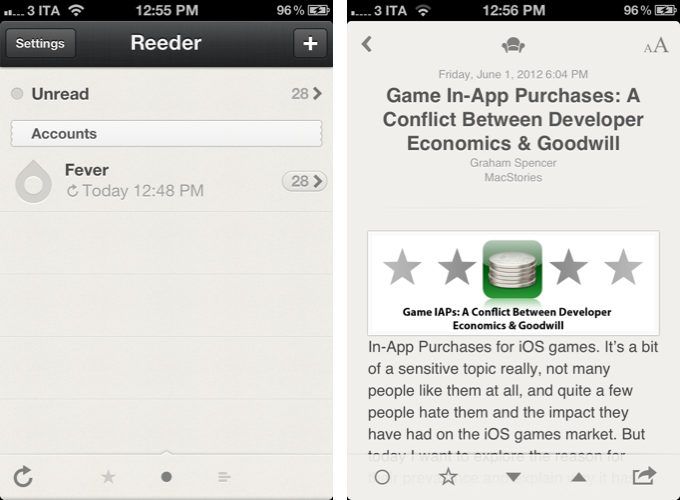
Reeder 3.0, released today, holds true to its roots of a Google Reader client, but tries to modernize the overall approach and feature set with support for a new service, improved Readability syncing, more sharing options, and a refreshed look. In the first major rewrite of the app since 2010, is Reeder still relevant? Read more

Access Extra Content and Perks

Founded in 2015, Club MacStories has delivered exclusive content every week for nearly a decade.

What started with weekly and monthly email newsletters has blossomed into a family of memberships designed for every MacStories fan.

Learn more here and from our Club FAQs.

Club MacStories: Weekly and monthly newsletters via email and the web that are brimming with apps, tips, automation workflows, longform writing, early access to the MacStories Unwind podcast, periodic giveaways, and more;

Club MacStories+: Everything that Club MacStories offers, plus an active Discord community, advanced search and custom RSS features for exploring the Club’s entire back catalog, bonus columns, and dozens of app discounts;

Club Premier: All of the above and AppStories+, an extended version of our flagship podcast that’s delivered early, ad-free, and in high-bitrate audio.

Learn more here and from our Club FAQs.


WWDC 2012: Tidbits & Links

Yesterday’s WWDC keynote was packed with new information on Apple’s latest product releases. From updates to its notebook lineup to new developer seeds of Mountain Lion and iOS 6, Apple delivered to the goods to a rightfully excited Moscone West audience, as well as the entire Apple community online – and in the process, it also refreshed its online Store with quite a few “stealth updates” that, however, didn’t go unnoticed.

In this post, we have collected some miscellaneous tidbits and interesting links that we missed or only briefly mentioned in our coverage of the event. Read more

Access Extra Content and Perks

Founded in 2015, Club MacStories has delivered exclusive content every week for nearly a decade.

What started with weekly and monthly email newsletters has blossomed into a family of memberships designed for every MacStories fan.

Learn more here and from our Club FAQs.

Club MacStories: Weekly and monthly newsletters via email and the web that are brimming with apps, tips, automation workflows, longform writing, early access to the MacStories Unwind podcast, periodic giveaways, and more;

Club MacStories+: Everything that Club MacStories offers, plus an active Discord community, advanced search and custom RSS features for exploring the Club’s entire back catalog, bonus columns, and dozens of app discounts;

Club Premier: All of the above and AppStories+, an extended version of our flagship podcast that’s delivered early, ad-free, and in high-bitrate audio.

Learn more here and from our Club FAQs.


iOS 6: Our Complete Overview

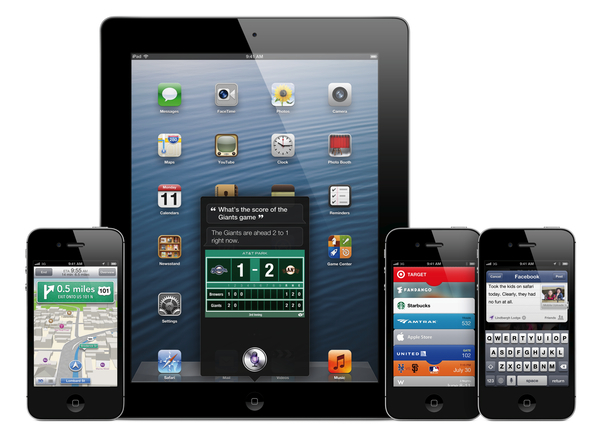
Taking the stage at WWDC, Apple’s head of mobile software Scott Forstall kicked off his iOS 6 presentation noting how, with over 365 million iOS devices sold through March, Apple’s mobile software is doing very well in the market. The latest publicly available version, iOS 5, has been installed on over 80% of available devices. Released in October 2011, iOS 5 has seen exceptional adoption: over 140 million iMessage users have sent over 150 billion iMessages to date, making it over 1 billion on average every day. Directly integrated into iOS 5, Twitter saw a 3x growth increase, with over 10 billion tweets sent from iOS 5. The numbers go on and on.

There’s no denying on Apple’s part that iOS 5 has been a success for developers, the companies involved, and, ultimately, the users. iOS 6, previewed and released to developers as beta today, is a major new release that, with over 200 new features, will take iOS devices in “entirely new directions”.

Jump past the break for our complete overview of the next major release of iOS, shipping this Fall. Read more

Access Extra Content and Perks

Founded in 2015, Club MacStories has delivered exclusive content every week for nearly a decade.

What started with weekly and monthly email newsletters has blossomed into a family of memberships designed for every MacStories fan.

Learn more here and from our Club FAQs.

Club MacStories: Weekly and monthly newsletters via email and the web that are brimming with apps, tips, automation workflows, longform writing, early access to the MacStories Unwind podcast, periodic giveaways, and more;

Club MacStories+: Everything that Club MacStories offers, plus an active Discord community, advanced search and custom RSS features for exploring the Club’s entire back catalog, bonus columns, and dozens of app discounts;

Club Premier: All of the above and AppStories+, an extended version of our flagship podcast that’s delivered early, ad-free, and in high-bitrate audio.

Learn more here and from our Club FAQs.


The 2012 Apple Design Award Winners

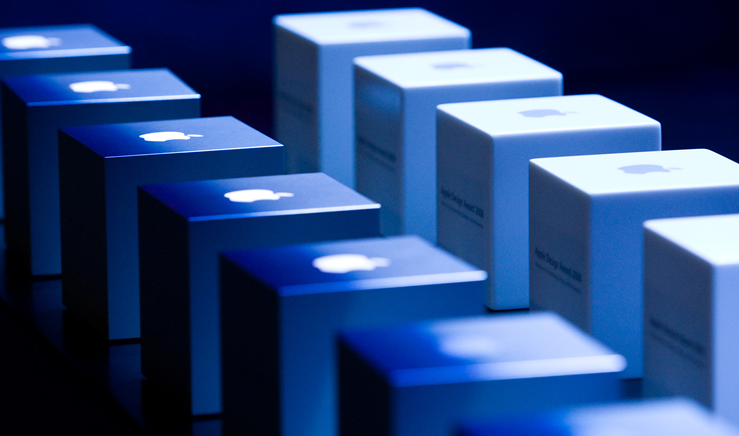
The Apple Design Awards have come to pass, recognizing outstanding achievement and excellence for well designed, state of the art, and innovative applications. This year’s ADAs at Moscone West during the opening day of WWDC 2012 will recognize and award developers for both iOS and OS X applications. Starting with student applications, Apple will showcase the best Mac, iPhone, and iPad applications and award developers with a cache of prizes. Developers, if chosen, will take home a special ADA lanyard, a new MacBook Air, a new iPad, an iPod touch, and the infamous ADA cube trophy. For the full list of 2011 ADA winners, check out our previous coverage here.

2012 ADA Winners:

Student Winners:

Mac Winners:

iPhone Winners:

iPad Winners:

Access Extra Content and Perks

Founded in 2015, Club MacStories has delivered exclusive content every week for nearly a decade.

What started with weekly and monthly email newsletters has blossomed into a family of memberships designed for every MacStories fan.

Learn more here and from our Club FAQs.

Club MacStories: Weekly and monthly newsletters via email and the web that are brimming with apps, tips, automation workflows, longform writing, early access to the MacStories Unwind podcast, periodic giveaways, and more;

Club MacStories+: Everything that Club MacStories offers, plus an active Discord community, advanced search and custom RSS features for exploring the Club’s entire back catalog, bonus columns, and dozens of app discounts;

Club Premier: All of the above and AppStories+, an extended version of our flagship podcast that’s delivered early, ad-free, and in high-bitrate audio.

Learn more here and from our Club FAQs.


The Stealth Updates: New AirPort Express, New iPad Smart Case, Updated USB SuperDrive, and More!

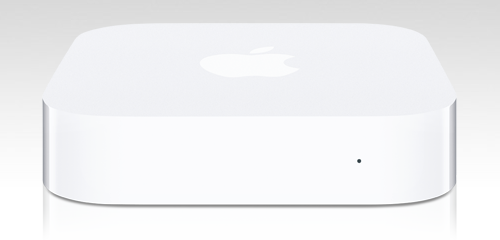
WWDC 2012 is being good to us this year, bringing us new MacBook Airs, MacBook Pros, a brand new MacBook Pro with Retina Display, an updated Mac Pro, and major software updates with Mountain Lion and iOS 6. While we couldn’t ask for anything more under the tree, we still have plenty of unmentioned stocking stuffers to go through, such as a brand new AirPort Express, a completely new iPad Smart Case, an updated Apple USB SuperDrive, and some other goodies including a Thunderbolt to Ethernet adapter and some new MagSafes.

Read more

Access Extra Content and Perks

Founded in 2015, Club MacStories has delivered exclusive content every week for nearly a decade.

What started with weekly and monthly email newsletters has blossomed into a family of memberships designed for every MacStories fan.

Learn more here and from our Club FAQs.

Club MacStories: Weekly and monthly newsletters via email and the web that are brimming with apps, tips, automation workflows, longform writing, early access to the MacStories Unwind podcast, periodic giveaways, and more;

Club MacStories+: Everything that Club MacStories offers, plus an active Discord community, advanced search and custom RSS features for exploring the Club’s entire back catalog, bonus columns, and dozens of app discounts;

Club Premier: All of the above and AppStories+, an extended version of our flagship podcast that’s delivered early, ad-free, and in high-bitrate audio.

Learn more here and from our Club FAQs.