Federico Viticci

10876 posts on MacStories since April 2009

Federico is the founder and Editor-in-Chief of MacStories, where he writes about Apple with a focus on apps, developers, iPad, and iOS productivity. He founded MacStories in April 2009 and has been writing about Apple since. Federico is also the co-host of AppStories, a weekly podcast exploring the world of apps, Unwind, a fun exploration of media and more, and NPC: Next Portable Console, a show about portable gaming and the handheld revolution.

This Week's Sponsor:

Inoreader

Build your own newsfeed and cut through the noise


Mac App Store Gets Purchase Confirmation Warning

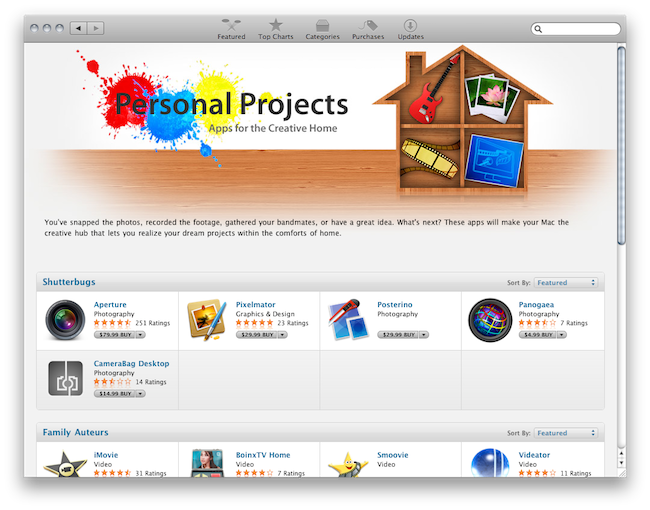
When Apple launched the Mac App Store on January 6, one of the most notable missing features was the “purchase confirmation warning” when buying apps. We’re talking about the dialogue box that usually pops up in the iOS App Store when you’re logged in with your Apple ID and you hit the “Buy” button; the confirmation warning is an effective way to help users prevent accidental downloads (and thus credit card charges) when browsing the Store. It happened a few times in the past that I was scrolling a list of apps (usually the Top Paid chart) and accidentally clicked on the button to download a (paid) app.

The Mac App Store now displays an additional pop-up menu after clicking the “Buy” button in the Store. It appears that there is no option to disable the warning for now, unlike the iOS App Store. As you can see in the screenshot above, you’ll have to click on a second “Buy” button before start downloading an application.

The feature is a nice addition, although we would like to have it as an option, rather than enabled by default. Other features we’re still waiting for include a better uninstallation process (would be great to have an Uninstall tab in the Mac App Store’s window), possibility to gift apps and a Wish List, which is still surprisingly missing from the Mac App Store.


Turn Off Ping’s Annoying Email Notifications

Last week, I noticed Apple started sending me emails about people following me on Ping. Yes, Ping: remember it? Apple’s “interesting” attempt at doing social networking within the iTunes Store. Something that has received awards like worst product of 2010. Still, back to email notifications. It looks like Apple turned these on by default recently, without asking for user’s confirmation, apparently. Another little trick to remind us Ping exists, I guess. Indeed, the Ping homepage features these new notifications as “What’s New In Ping”. Read more


Verizon iPhone Teardown: Dual GSM-CDMA Chip, iPhone 5 Likely To Be Worldphone

The folks over at iFixyouri and 9to5mac have taken a look at the internals of the Verizon iPhone and found out the device is running a dual-mode GSM-CDMA-capable Qualcomm Gobi chip. This Qualcomm’s chip enables worldphone capabilities with GSM and CDMA support on all carriers, but of course the Verizon iPhone won’t be able to accomplish this due to the lack of a SIM slot.

The Qualcomm Gobi MDM6600 modem supports GSM, GPRS, EDGE, CDMA, HSDPA, HSPA (up to 14.4 Mbps) and EV-DO (up to 14.7 Mbps), as well as GPS.

Rumors about integrated dual-mode Qualcomm chipsets in the next-generation iPhones and iPads have been floating around for a while now; at this point, it seems very likely that, at least the iPhone 5, will support multiple networks in a single device capable of switching from GSM to CDMA. Read more


Verizon iPhone Jailbroken

Well, that was fast. The Verizon iPhone has started arriving today to some people who pre-ordered it and it looks like the device has already been jailbroken. As you can see from the photo above, the iPhone is running Cydia and it clearly says “Verizon 3G” in the status bar. We guess the special iOS 4.2.6 version the iPhone is running was jailbroken through Greenpois0n, and a new version of the jailbreak tool with official CDMA iPhone support should come out soon.

So fear not, Verizon iPhone owners: you too can have Cydia. And by the way, here are some apps and tweaks you should install. [via]


Apple: No More iPad Cutting Board

When Apple’s lawyers give you a call, perhaps you’d like to re-consider what you’re doing and, you know, just stop it altogether. That’s what happened to Dean Kaplan, creator of the iPad cutting board (not the one we featured here, which looked more like a giant iPhone).

From his personal blog:

A few months back we received a call from Apple lawyers and we were told to stop selling them. The reason given was based on “likeness” issues. A Wood cutting board. Lord have mercy on my soul.

Is Apple evil, or they just trying to protect a trademark? It was just a cutting board after all… [via AppAdvice]


Why I Started Using Hazel for Mac

Over the weekend, I have started using an application several MacStories readers and friends of mine suggested for a very long time: Hazel. Following Ben Brooks’ excellent roundup of what can be accomplished with Noodlesoft’s Hazel and a series of great tips I’ve found on the Internet, I decided it was about time to take what many call “the most precious time-saving utility for the Mac” for a spin. The results, even in a short 3-day testing timeframe, are quite impressive.

This is not meant to be a review of Hazel, as I believe the app can go really in-depth with its feature set and I need a few more weeks before writing a proper article. Still, I think I should share my thoughts on why I started using it, especially considering how it’s difficult to find on blogs the reasons why you need Hazel, rather than a list of all the things this utility can do. Last week, when I was not a “Hazel user”, I couldn’t find a single post about getting started with Hazel, and why you should give it a try. So here it is. Read more


Gmail’s Priority Inbox Comes To The iPhone

Great news from the Google Mobile team today: the Gmail webapp for iPhone has now Priority Inbox support built-in. Priority Inbox for mobile will import all the sections you have created on the desktop and it will also display the “important and read” or “important and unread” markers you’ve got used to see in Gmail.

Now, once you set up Priority Inbox in the desktop version of Gmail, you’ll see Priority Inbox sections when you visit gmail.com from your phone’s browser and click on the ‘Menu’ screen. You’ll also see importance markers in your inbox, so you can quickly identify which messages are important.

The new feature is available to Android and iOS devices. iOS 3 or later is required.


Angry Birds “Valentine’s Day Edition” Now Available

Angry Birds Seasons “Valentine’s Edition” Now Available

The much anticipated Valentine’s Day update for Angry Birds Seasons just went live in the App Store. It includes 15 “lovely” new levels, a Valentine’s Day theme, new achievements. Oh, and a new icon featuring a sexy female Angry Bird.

Get ready for the most heartfelt episode in Angry Birds Seasons so far: the Valentine’s Day edition! After the shenanigans of Halloween and Christmas, Angry Birds Seasons continue in the spirit of Love! As usual, Angry Birds gives the most generous updates of any app!

Go download the update here. Seasons HD for iPad is also available.

Permalink

Fake iPhones and iPods Worth $10 Million Seized By L.A. Police

The Los Angeles Port police has seized thousands of fake iPhones and iPods coming from China in an operation that prevented these counterfeit models from ending up on the U.S. market and generate $10 million in revenue. The models, shipped from China as “replacement parts” and re-assembled to look like old Apple devices, were so similar to the original ones buyers could recognize the scam only when trying to sync them with iTunes.

Two brothers were charged for the sale of counterfeit goods and bank account records also revealed the operation had already generated $7 million in revenue. That’s quite a business for fake Chinese iPods. Apparently, the guys behind these devices thought it might be a good idea to replicate older iPods and iPhones rather than the most recent iterations.

We have seen lots of fake Apple products in the past, and it’s good to know police is always working to prevent them from ending up on customers’ hands. With the iPad 2 coming soon, I guess we’ll see several fake “used iPad 1” in 2012. [via Cult of Mac]