


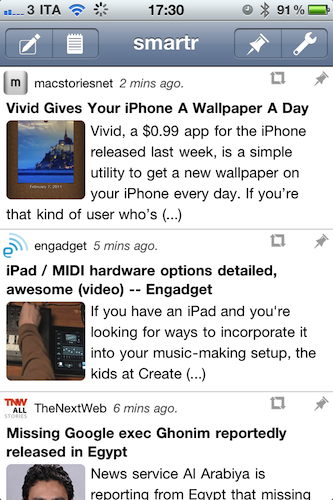
I was surprised when I found this app in the App Store last week. Smartr, a free app by Factyle, is a full-featured Twitter client that, unlike the usual Twitterrific or other Twitter apps, is entirely aimed at letting you read in an uncluttered and mobile-friendly view all the links shared in your timeline or lists. In fact, Smartr might just be the closest thing to a “Flipboard for iPhone” we’ve seen yet. Read more
Vivid Gives Your iPhone A Wallpaper A Day

Vivid, a $0.99 app for the iPhone released last week, is a simple utility to get a new wallpaper on your iPhone every day. If you’re that kind of user who’s always searching for new backgrounds and lockscreen walls to make your iPhone a little more personalized, Vivid might just be what you’ve been looking for. Once you fire up the app you’re given a preview of the daily wallpaper, usually a photograph from an internet database the app connects to, which you can save to your Camera Roll, email, send via MMS and print. An archive button in the bottom toolbar lets you see previous images, and you can hit the “Today” button to make sure you’re staying up to date with Vivid’s daily offerings.
Vivid is a simple app that accomplishes the simple task of pushing new wallpapers to your iPhone every day. Go download it here.
A Typographic Review Of The Daily→
A Typographic Review Of The Daily
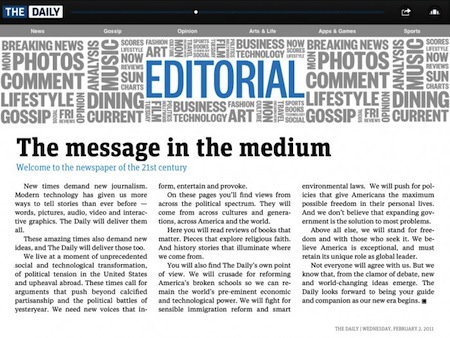
Fonts In Use shares our same views on the problems with text in The Daily:
Text typography is still the weakness of nearly every iPad publication. Presented with a device that echoes the dimensions of a printed page, designers — especially those in the news world — feel obligated to stick with print conventions: static text set in justified columns. The Daily suffers the same shortcomings. When the columns are wide enough (see above) full justification works. When columns are any narrower (see below), letter- and word-spacing stretches to distraction, even with hyphenation. I admire the way text layouts change when switching between vertical and horizontal orientation — pull quotes often pop in when appropriate — but the typesetting requires more attention. Articles rarely scroll, but when they do, it works just fine. It makes one wonder whether the very short story lengths are a preference of the design staff or an editorial staff unwilling to put more meat on the table.
It also makes me wonder: will we ever see an iPad newspaper / magazine with proper text manipulation? Does’t that fall under the “interactivity” promised by many publications? [via]
Analysts Share Predictions of Apple’s 2011 Sales and Shipments
If analysts’s predictions are to be believed, the numbers shared this morning by Needham’s Charlie Wolf and Susquehanna’s Jeff Fidacaro are surely interesting. With 16.24 million iPhones and 7.33 million iPads sold in the last quarter, Wolf notes that 300 millions smartphones were sold last year, and Apple’s sales trajectory appears to be “higher than expected”. Wolf estimates 75 million iPhone units will be sold in 2011; last year, he predicted 40 million sales and Apple actually sold more, 47.5 million iPhones. Read more
Last.fm Radio for Mobile Apps To Become Subscription-based Service

Earlier today music streaming service Last.fm announced that, starting February 15th, the radio functionality built into mobile apps (for iPhone and Android) and home entertainment systems will become a subscription-based service with a $3 monthly fee. The service is currently free in various countries but ad-supported; next week, Last.fm Radio for mobile will become ad-free and offer users the possibility to create personalized stations basing on their music preferences.
The service will, however, remain free in some countries and platforms:
Last.fm Radio will remain free on the Last.fm website in the US, UK and Germany and for the US and UK users of Xbox Live and Windows Mobile 7 phones. We’ll also continue to offer radio for free via the Last.fm desktop app.
The mobile music streaming landscape has become very competitive over the past months thanks to services like Spotify and MOG that provide access to large music libraries either for free or through a Premium subscription, like Spotify – which is still struggling to find its way in the U.S. market. And always in the United States, Rdio has recently revamped its website with lots of different features and social functionalities, many of them accessible from the companion iPhone app.
Last.fm Radio won’t provide users a choice to pick tracks on demand, but the offer is attractive if you’re a heavy Last.fm user who has built a music library over the years worth connecting to the Radio service.
Best Buy Tag Suggests White iPhone Coming Within Weeks

It’s pretty clear at this point that the white iPhone 4 is launching in the next few weeks. Engadget just got a picture of a Best Buy tag spotted in Houston over the weekend, and it points at an AT&T white iPhone sold at $599 off contract.
This Best Buy tag adds speculation to several reports surfaced in the past weeks, such as production issues fixed by a new Japanese paint and the unit spotted on various international carrier websites.
The mythical white iPhone really seems to be coming now, indeed in Spring 2011.
“The Daily” Super Bowl Commercial [Video]
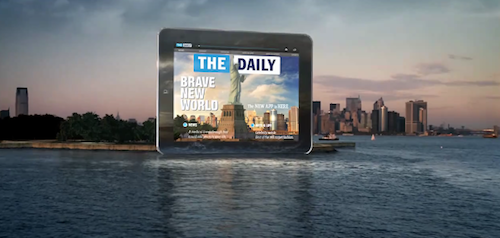
In case you missed it a few minutes ago, here’s the commercial News Corp. ran during the XLV Super Bowl to promote its iPad-only newspaper, The Daily. The ad is admittedly cool and nicely animated, too bad we’ve seen the app is nowhere near the fluidness from the video below. If The Daily was as fast and stable and snappy as the app from this ad, it would be perfect.
Nice commercial, but we’re still waiting for a better app. Read more
Hacker Brings FaceTime to iPad

In spite of the iPad lacking a camera (that should change very soon with the iPad 2), hackers have managed to port the FaceTime application for the iPod touch 4th gen to the tablet and make it work even without access to any kind of camera. The hack, called Intell, requires a pretty laborious installation process you can check out here, and involves changing permissions and values to a series of files inside the iPad’s filesystem.
The FaceTime app has been resized to scale nicely on the iPad’s larger screen, although it’s very clear that is an iPhone / iPod touch app running on a screen that’s not meant for it. The hack works from iPad to any other FaceTime device and, of course, iPhone users calling iPad owners will only receive audio. The app works over WiFi as required by FaceTime.
With the next-generation iPad coming in a few months with FaceTime capabilities it shouldn’t be so hard to wait for video calling on the tablet, but if you really want to try it now, follow the instructions and check out the demo video below. [via 9to5mac] Read more
AT&T’s New iPhone Commercial Is About Old Tricks
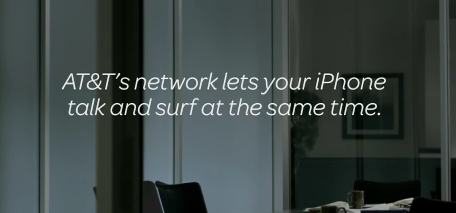
With Verizon airing minimal yet emotionally powerful iPhone commercials to feature the product (they don’t even have to mention the name “iPhone” in the ads) that’s launching on their network on February 10th, you’d think AT&T would come up with something of a little more impact than the usual “talk and surf the web at the same time” story.
Well, apparently they still think that’s all they can have in their commercials. Personally, I think that while it’s incredibly cool to be able to have a phone call and use a browser at the same time, I can’t remember a single situation where I found myself needing to do that. It’s cool and it’s there, but it’s old stuff we know and, quite possibly, never used as much as AT&T wants us to.
As 9to5mac says, maybe it’s too late. Read more