Federico Viticci

10767 posts on MacStories since April 2009

Federico is the founder and Editor-in-Chief of MacStories, where he writes about Apple with a focus on apps, developers, iPad, and iOS productivity. He founded MacStories in April 2009 and has been writing about Apple since. Federico is also the co-host of AppStories, a weekly podcast exploring the world of apps, Unwind, a fun exploration of media and more, and NPC: Next Portable Console, a show about portable gaming and the handheld revolution.

DaisyDisk Update Brings Gestures, Faster Volume Scans

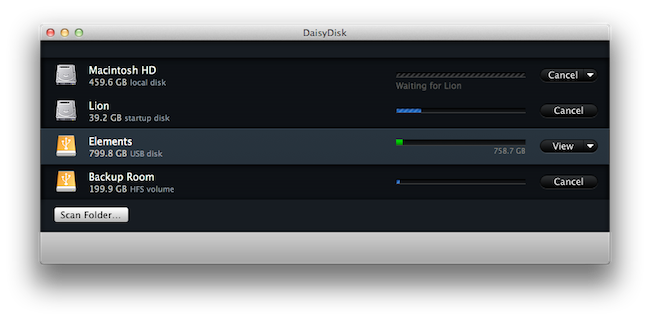
DaisyDisk, the beautiful disk analyzer tool for Mac we’ve reviewed a couple of times here on MacStories, received a minor version number update today (2.0.7) that, however, brings some welcome new functionalities to the app, making it an even better solution for those users in need of a simple yet powerful way to see what’s eating space on a Mac. For those who missed our previous DaisyDisk coverage, this app allows you to generate a visual map for your Mac’s drives and partitions, enabling you to explore the contents of your filesystem with ease to see what folders and files are consuming space. The bigger the section, the bigger the file. DaisyDisk lets you collect items to delete, open enclosing folders in the Finder for a manual deletion process, or simply browse around to get some knowledge on, say, those iTunes backup files that are wasting 10 GBs.

Among the new features in today’s update, the possibility of starring folders (marking them as favorites) should ease the process of navigating to a recurring location. But what I’ve noticed on my iMac with multiple volumes and partitions is another feature: DaisyDisk now comes with improved support for multiple scans at once, reducing hardware load and improving scan speeds. It’s really, really fast even on a non-SSD machine. When you’re done scanning and you want to open a map, but then you want to go back to the volume list, a new 3-finger swipe gesture lets you do just that in seconds. Other new features include:

  • Hidden disk space detector
  • Volumes of the same disk are now visually grouped together
  • Improved disk/volume descriptions
  • Eject volumes, not disks
  • Fixed UI lag on directories with tens of thousand files
  • For terabyte disks, free and used space is displayed in GB

Daisy Disk 2.0.7 is available now on the developers’ website, and the new version has been submitted ti Apple for App Store approval. You can download the app here and receive the update for free once it comes out.
Final Cut Pro X Hands-On Video and Software Updates

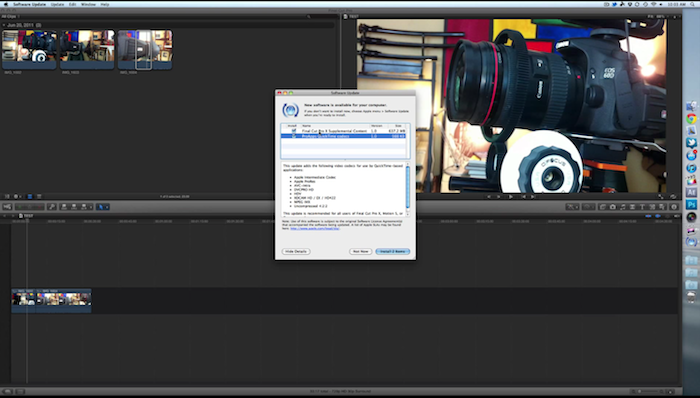
Following this morning’s release of Final Cut Pro X, Motion 5 and Compressor 4 in the Mac App Store,  YouTube user Matt’s Macintosh has posted a first 10-minute video hands-on with FCP X, available at $299 as digital-only download. The video, which we’re embedding after the break, highlights some of Final Cut Pro’s new functionalities such as the revamped iMovie-like UI, magnetic timeline, new effects, as well as the additional content Apple has already made available for FCP X users via Software Update. Furthermore, the author of the video notes how real-time rendering allows to import, edit and play clips in seconds without any waiting as in the previous versions, and how text effects look like a combination of iMovie (undoubtedly a source of inspiration for the FCP X team) and Motion.

Check out the video below.

Update: direct links to the additional content download mentioned in the video:

Final Cut Pro X Content

  • Sound Effects: Over 1300 rights-free sound effects installed into the Audio Browser of Final Cut Pro X.
  • Audio Effect Presets: Additional preset effects for the Space Designer plug-in.

Motion 5 Content

  • Motion Templates: A variety of professionally-designed, customizable templates.
  • Motion Library Content: Animated vector graphics, backgrounds, template media, sample Motion projects, and royalty-free still images.
  • Motion Sample Media: Clips and images for use with Motion Help examples and tutorials.

ProApps QuickTime Codecs

  • Apple Intermediate Codec
  • Apple ProRes
  • AVC-Intra
  • DVCPRO HD
  • HDV
  • XDCAM HD / EX / HD422
  • MPEG IMX
  • Uncompressed 4:2:2

Apple has also published a database of cameras compatible with Final Cut Pro X here with the following notes:

  • Final Cut Pro X is compatible with iPhone 3GS, iPhone 4, iPad 2, and iPod touch (4th generation).
  • Final Cut Pro X is compatible with most MiniDV tape-based camcorders using DV and HDV formats, which use a FireWire (also known as IEEE 1394 or i.LINK) cable to transfer video.
  • If you have imported video into iPhoto or Aperture from a digital still camera, you can drag compatible video clips from iPhoto or Aperture directly to an Event in the Final Cut Pro X Event Library or a project in the Timeline.

Read more


Terminology 2.0 Released, Improves UI and App Integration

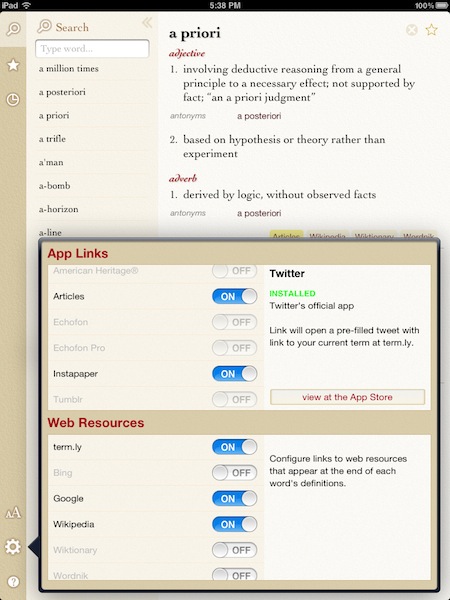
Terminology, the dictionary & thesaurus app for iPhone and iPad that was recently integrated with Mr. Reader and Instapaper, got a major update on both platforms earlier today, reaching version 2.0 and adding a number of features aimed at enhancing and better integrating the Terminology experience with third-party apps, and online services. First off, Terminology 2.0 comes with a rewritten user interface that doesn’t look different from the previous version, but brings performance improvements and faster response times that should make browsing through words and definitions even faster than before. Terminology has always been a lightweight app with an elegant UI and very little clutter, yet this new update wants to make things more stable and streamlined.

For example, the rewritten user interface allows you to pick different font and choose different font sizes. The selection includes Baskerville, Cochin, Georgia, Palatino and Helvetica Neue fonts, and can be made from a little popover menu in the bottom left corner. Alongside other minor improvements and the possibility of automatically getting results for clipboard contents, Terminology 2.0 shines when it comes to integration with apps and web services: for instance, you can activate links that will bring you to Twitterrific or Wikipedia client Articles (if installed), or open the selected word in Terminology’s companion website term.ly, which, by the way, looks really neat.

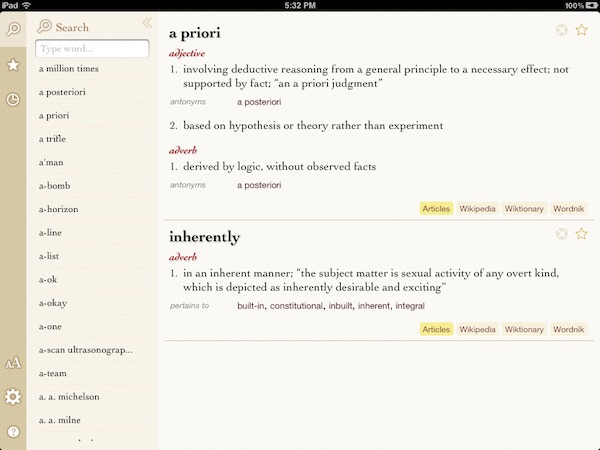
Articles support is very useful as well in the way it looks up the closest word to Terminology’s definition – example: “inherently” looked up as “inherence” on Wikipedia.

Terminology 2.0 is a free update for existing customers and can be downloaded at $2.99 here in its iPad version, or here if you prefer the smaller iPhone counterpart. Highly recommended – read our original Terminology review here.


iPhone 5 Major Design Change? Announcement in August?

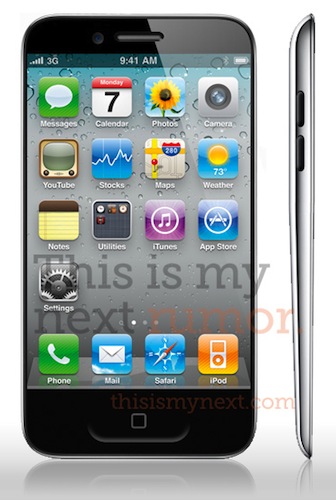
According to BGR – which has a good track record with Apple rumors – the next-generation iPhone, dubbed iPhone 5, won’t be a minor hardware refresh as many have speculated and reported until today. According to the website, in fact, a source close to Apple’s operations has confirmed the new iPhone will bring major changes especially in case design, which BGR calls a ”radical” change. No other details have been posted on the alleged iPhone 5 specifications, though it needs to be mentioned that, among rumors of minor hardware updates and spec bumps, This is my next reported months ago the iPhone 5 would be a major update with a completely new design and a “tear drop” case / screen. The same report also detailed how Apple could implement a thinner design and an update Home button, capable of doubling as “gesture area”.

BGR also claims an iPhone 5 announcement could come in August, with a release a few weeks later, although it’s not clear how this would play out with Apple’s usual music event in the first week of September:

According to our source, Apple may hold an event in the beginning or middle of August to announce the new iPhone, with availability to follow in the last week of August. We’re not sure if that means the iPod event will be moved up slightly, or if this will be an iPhone-specific event.

Speculation is running wild at this point as to whether the iPhone 5 will be similar to the iPhone 4 and only feature a faster processor (likely A5) and better cameras, or be a major change from the existing iPhone hardware with a bigger screen, different Home button, and perhaps NFC capabilities. Several rumors in the past claimed Apple would announce and release a new iPhone in September, shifting its usual release cycle from summer to the fall. As for recent rumors, whilst many publications reported the iPhone 5 (or “iPhone 4S” due to the rumored nature of minor update) wouldn’t be a significant upgrade spec-wise, others claimed a curved glass screen and GSM/CDMA dual-mode could be part of Apple’s announcements. Other noteworthy reports from the past months also indicated the “iPhone 4S” would go into mass production in August (thus backing up BGR’s theory of a late August release) and that Apple was testing an A5-powered iPhone 4 prototype running on T-Mobile network.

Last week, it was reported the iPhone 5 reached the final testing stage, for a September 2011 launch.

Update: Aside from BGR’s speculation, it’s worth considering that Apple might want to ship the new iPhone model with iOS 5 already pre-installed, rather than forcing users to manually update to iOS 5 when it comes out a few weeks later, likely in September. In fact, Apple confirmed that iOS 5 is coming out “this Fall” after a beta period for developers this Summer. As several bloggers and tech pundits were already claiming months ago iOS 5 would come out in September, that might be the reason why many believe the iPhone 5 is set for a Fall release too, shortly after iOS 5 comes out. For example, when Apple released the iPhone 4 on June 24 last year, the device was running iOS 4 out of the box – the OS was publicly released on June 21.


Apple Releases New Time Capsule with 3 TB Storage, $499

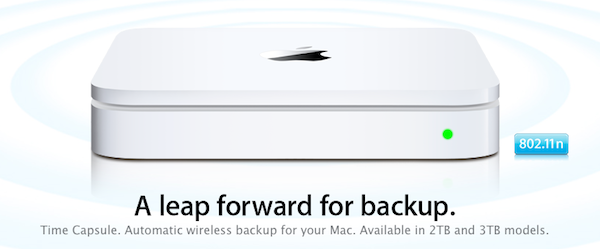
As the rumors correctly suggested, Apple has just launched a new Time Capsule model with 3 TB of storage. At the moment of writing this a press release isn’t out yet and the Apple website seems to be going under an update, and from what we can see right now there’s no mention of additional caching capabilities for software updates or iCloud integration.

The Time Capsule retains the same 802.11n wireless features of the previous models with simultaneous dual-band operation and Mac / PC compatibility. The device now comes in 2 TB and 3 TB configurations and Apple’s product page states it “starts at $299”, though the retail website hasn’t been updated yet with the new models’ pricing.

The AirPort Extreme, also rumored for an update, doesn’t look like will be getting a refresh today.

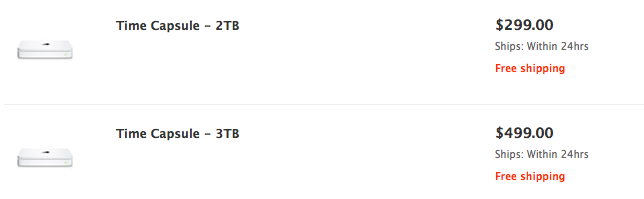
Update: The new Time Capsule models are now available on the Apple online Store. The 2 TB version is priced at $299, whilst the new 3 TB one is available at $499. From the search results:


Apple Planning New Store in Sydney, Grand Opening in Reading This Saturday

According to two separate reports from the well-sourced ifoAppleStore.com, Apple is about to open a new retail location in Reading, UK, on Saturday. The grand opening, scheduled for June 25 at 9.30 AM, comes after a five-year wait that saw rumors constantly pinpointing the new Reading Apple Store about an hour west of London. Located in The Oracle Shopping Centre, the store is said to occupy spaces of two former stores on the upper level of the mall. Rumors of a new Apple Store in Reading go back to 2007.

The Westfield Hornsby shopping centre.

Meanwhile, the website also claims Apple is considering another store in Sydney’s suburban area, at the Westfield Hornsby shopping mall about 17 miles northwest of Sydney. Early rumors suggest a 2012 grand opening in this location that already has 305 retailers, a cinema, and a restaurant across its 1 million square feet space.

Update: screenshot of an Apple email about the Reading grand opening this weekend, courtesy of @HabibCham.

[The Oracle photo via]


New Time Capsule and AirPort Extreme Launching Today?

Speculation around a Time Capsule and AirPort Extreme refresh has been intensifying lately and it looks like the new models are ready to go as model numbers have surfaced and an FCC filing discovered by Engadget confirms Apple is about to launch at least a new AirPort Extreme device, model A1408. Little is known from the FCC documents, but in a separate report 9to5mac shares the new model numbers and indicates the AirPort Extreme will keep a single configuration, with the Time Capsule adding a 3 TB option in addition to the existing 2 TB one.

  • MD031LL/A – AIRPORT EXTREME 802.11N (5TH GEN)- USA
  • MD032LL/A – TIME CAPSULE 2TB (4TH GENERATION) – USA
  • MD033LL/A – TIME CAPSULE 3TB (4TH GENERATION) – USA

The new Time Capsules are rumored to be getting a new functionality to cache software updates for iOS and OS X devices, in order to speed up the process of downloading and installing new software. This feature was also confirmed by some code strings found in the latest AirPort Utility update. As Apple usually likes to time its hardware refreshes with FCC document releases, there’s the possibility the new AirPort Extreme and Time Capsule will come out later today.


Apple Releases iTunes Festival 2011 App with Live Shows and AirPlay

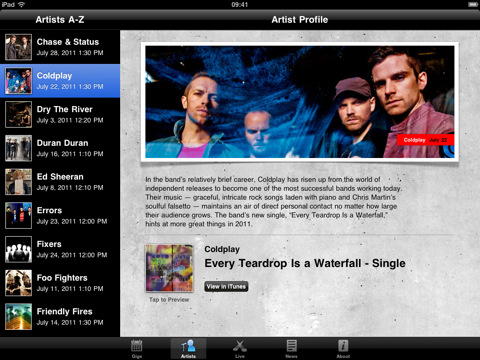
Kicking off on July 1 at the Roundhouse in London for 31 nights of consecutive live performances from 62 bands, the iTunes Festival 2011 has seen Coldplay, Beady Eye, Arctic Monkeys, Foo Fighters and Mogwai signing up for Apple’s annual initiative, among others. Today Apple released an official app for the iTunes Festival 2011 which, besides letting you check on the schedule for the venue and check out more information about the performing bands, will enable you to follow shows live or on demand “for a limited period from wherever you are in the world”, as well as beam video contents from your iPhone or iPad to an Apple TV or unofficial third-party receiver like MacStories staff favorite AirServer. This is the first time Apple is supporting both the iPhone and iPad with options for live streaming, AirPlay and Apple TV. Apple’s recent experiments with live streaming events include special media events and WWDC keynotes, though they have seemed to refrain from streaming announcements as of lately. It’ll be interesting to see how the app will allow users to watch live concerts come July 1.

You can download the iTunes Festival London 2011 app for free here.


Intel Confirms Sandy Bridge ULV Processors, Likely For New MacBook Airs

As noted by Cnet, Intel has updated its official processor price list to include new Sandy Bridge-based Corei5 and Corei7 processors with ultra-low voltage power specifications that will make them suitable for future ultra-thin laptops like the upcoming MacBook Air refresh, set for a June or July release. The new processors, as included in the list:

  • i5-2557M (3M cache, 2 Cores, 4 Threads, 1.70 GHz 32nm) - $250
  • i7-2677M (4M cache, 2 Cores, 4 Threads, 1.80 Ghz, 32nm) - $317
  • i7-2637M (4M cache, 2 Cores, 4 Threads, 1.70 Ghz, 32nm) - $289

As reported back in May, these new power-frugal processors make for a great option when it comes to powering thin machines like Apple’s MacBook Airs or other devices called “ultrabooks” by Intel. By increasing clock speed from 1.4 GHz and 1.6 GHz to 1.7 GHz and 1.8 GHz from the previous-gen Arrandale CPUs, and with turbo boost frequencies set at 2.8 GHz and 2.9 GHz, Intel’s new ULV chips seem to fall in line with Apple’s requirements for low power consumption and speed. More importantly, the new Sandy Bridge processors dissipate only 17 watts, unlike standard laptop-oriented processors from Intel that with 35-watt dissipation would be too much for the MacBook Air’s thin and slim design.

The new MacBook Airs were initially rumored to be receiving an update in June, though recent speculation claims Apple will refresh the line in July – also holding out for new Mac releases until Lion comes out, so the new OS will come pre-installed on new Mac models. Many have indicated the MacBook Air as Apple’s new “crown jewel”, the most popular new MacBook model that will be perfectly capable of running OS X Lion thanks to its fast SSD, instant-on feature, high portability and multitouch trackpad.