Federico Viticci

10767 posts on MacStories since April 2009

Federico is the founder and Editor-in-Chief of MacStories, where he writes about Apple with a focus on apps, developers, iPad, and iOS productivity. He founded MacStories in April 2009 and has been writing about Apple since. Federico is also the co-host of AppStories, a weekly podcast exploring the world of apps, Unwind, a fun exploration of media and more, and NPC: Next Portable Console, a show about portable gaming and the handheld revolution.

About This iPad 2 HD

According to a new report published today by Joshua Topolsky at This is my next, Apple is gearing up to release an “iPad 2 HD” this Fall alongside a new model of the iPhone, as previous speculation has largely confirmed with different reports about an “iPhone 5” or slightly redesigned “iPhone 4S”. According to Topolsky, the contradicting reports of a major redesign for the next iPhone and a slight hardware refresh using the existing iPhone 4 design have generated from the fact that Apple has been secretly testing the iPhone 5 components inside an iPhone 4 case – thus leading to reports from several media outlets about a new iPhone that could either feature a thinner, radically different design, or something along the lines of the iPhone 4, only faster and with better cameras. This is my next had previously claimed the iPhone 5 would feature a new “tear drop” case design, as well as a 3.7-inch screen (versus the current 3.5-inch display), a different Home button and worldphone capabilities for CDMA/GSM compatibility. This last tidbit has also been hinted by Verizon’s CFO back in April. Topolsky says Apple is likely to abandon the iPhone 4’s industrial design as it’s “out of favor” with the company’s executives.

Our sources tell us that the company has been testing the new components in old iPhone cases, for obvious reasons. Some of those reports we’ve heard about a larger screen for the old design would make sense too, as a slight tweak of the size (say, to a 3.7-inch display), would be barely noticeable to the eye, but obvious in internal component design. So if you’ve been wondering why the rumors about the iPhone 4S rose to such a din, now you know.

Read more


Apple Promises Software Update To Fix iOS PDF Vulnerability

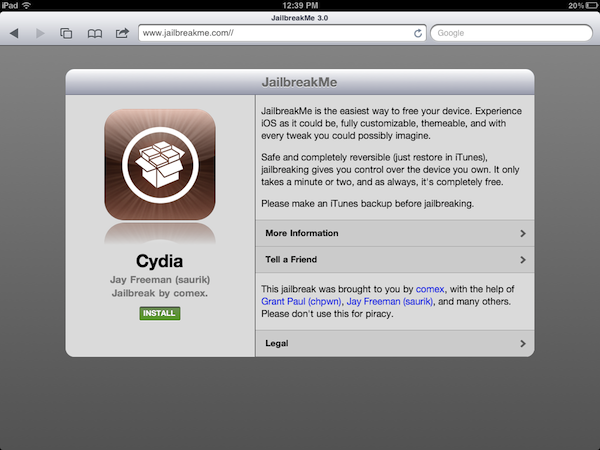
Following the release of @comex’s latest jailbreak tool yesterday, JailbreakMe 3.0, many wondered how long it would take for Apple to take action and patch the security hole that allows special PDF documents opened through Mobile Safari to give admin privileges to code hidden inside them. The method, discovered and developed by comex, enables JailbreakMe to install Cydia on devices running iOS 4.3 and above with a simple click, making it the easiest jailbreak ever developed for a variety of devices including the iPad 2. The exploit works on various versions of iOS after 4.3, but the iPad 2 is only being targeted on iOS 4.3.3. As a preliminary version of the exploit leaked online before the official jailbreak was released, comex had already warned users that Apple would soon issue a software update to patch the vulnerability.

The Associated Press reports [via The Next Web] Apple Inc. spokeswoman Bethan Lloyd has confirmed the company is aware of the issue and is developing a fix that will be available via Software Update. A group of German researchers took a look at comex’s exploit yesterday, and warned Apple that any maliciously crafted PDF could take advantage of the Safari hole to install code on a device without a user’s consent.

Apple Inc. spokeswoman Bethan Lloyd said Thursday the company is “aware of this reported issue and developing a fix that will be available to customers in an upcoming software update.”

She declined to specify when the update would be available.

In the past, Apple closed another PDF vulnerability that allowed the installation of Cydia through JailbreakMe 2.0 in roughly a week. Whilst Cydia developers are relying on an exploit that could also be used by malware creators, they’re also taking the necessary steps to prevent the vulnerability from working again after the jailbreak is done and Cydia is installed. In fact, they have released a “PDF Patcher” tool that, once installed from Cydia, will make the exploit used to jailbreak a device unusable. For this reason, Apple will soon issue a software update to officially close the hole, but it’s very likely that several users who don’t want to lose their jailbreaks, yet want to stay secure, will install the unofficial patcher from Cydia.


Growl 1.3 To Be Released on Mac App Store, Introduce Lion Support and Drop GrowlMail Support

The developers of Growl, a popular notification system for OS X that’s been around for years and it’s completely free to use, have announced that the plugin is going to become a Mac App Store application through a complete rewrite with OS X Lion in mind, dropping support for older frameworks and “hacks” like GrowlMail and GrowlSafari that wouldn’t probably make it past Apple’s approval. For those not familiar with Growl, the notification system became popular among Mac users because of its highly customizable nature that enabled almost anyone with basic coding and design knowledge to create “themes” for it that changed the appearance and animations of the notification tickets displayed on screen. Growl is supported by hundreds of different applications for the Mac, including big names like Twitter and Dropbox. We have covered a handful of beautiful themes for Growl in the past, and the success of this plugin also inspired several iOS developers to create mobile apps capable of plugging into the desktop system to fetch or send remote notifications. Growl is the undiscussed king of notifications for OS X apps.

Yet the developers are willing to change everything about Growl to get it ready for the Mac App Store and turn it into an app as requested by Apple to developers submitting software to iTunes. In a post on Growl’s official Google Group [via Steve Streza], developer Christopher Forsythe has announced that the upcoming 1.3 release will bring important changes such as the aforementioned Store availability, as well as full support for Lion and a new “app” form that has the obvious advantage of allowing users to easily upgrade to new versions by simply checking on their Mac App Store purchase page. One of the common complaints about Growl, in fact, is that the app often requires the user to download and perform an upgrade. As the existing version comes with a .DMG file that contains an installer for a System Preferences panel, the current Growl 1.2.2 forces users to manually upgrade every time a new version is out. With the Mac App Store and Growl becoming “an app”, the developers want to eliminate the convoluted process of opening and mounting a disk image file, running an installer, and manually upgrading from System Preferences. Read more


Airfoil 4.5 Released: Extended AirPlay Support & Enhanced Remote Controls

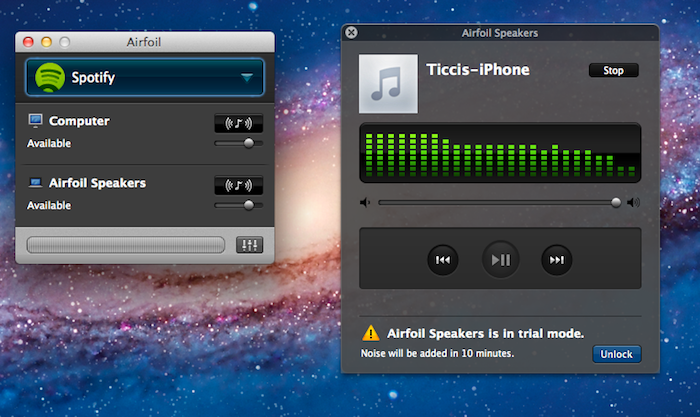
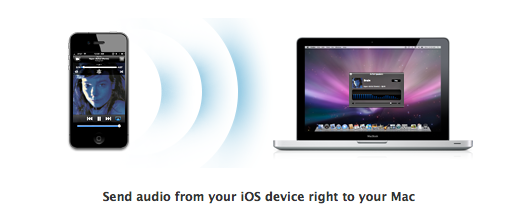
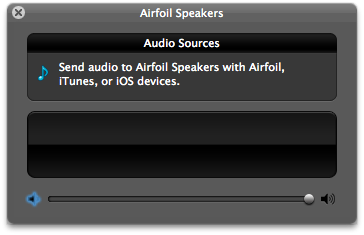
Back in December we reviewed Airfoil 4, an update to Rogue Amoeba’s powerful audio tool for OS X that streamlined the process of sending audio content from various applications to external speakers, computers or Apple TVs, also using the new AirPlay technology. Airfoil 4.5, a major update released today and free for existing customers, builds upon the excellent feature set of version 4 to deliver an even easier AirPlay integration that will allow iOS users to beam any kind of audio from any iOS app to the Airfoil Speakers app running on a Mac. This new functionality may sound very similar to other desktop AirPlay receivers like AirServer, and indeed it is, with the exception that Airfoil Speakers runs in its (beautiful) standalone window that, among other things, visualizes music controls and album artworks even during a wireless AirPlay session.

Rogue Amoeba explains:

First and foremost, Airfoil Speakers for Mac can now receive audio from your iOS device! Launch Airfoil Speakers, and it will appear in the list of AirPlay devices on iOS. When you play audio in an app on your iPhone, iPod Touch, or iPad, you can select Airfoil Speakers from the AirPlay list, and you’ll hear the audio right on your Mac.

The new, powerful Airfoil Speakers are now compatible with iTunes on any Mac or PC and MacStories favorite Radium as well. Similarly to The Iconfactory’s latest update to Take Five for Mac, Airfoil 4.5 can now control apps like Spotify, Rdio and Radium so you’ll see control buttons alongside album artworks and track titles when grabbing audio from these sources. This change is welcome as you won’t be forced to switch to the original application to see what’s playing anymore.

Last, Rogue Amoeba says they’ve added support for AirPlay devices “from companies like iHome, JBL, and many more”, and that AirPlay-enabled hardware will work with Airfoil out of the box with no further configuration needed.

Airfoil 4.5 is a free update for licensed owners of Airfoil 4, and a license key can be purchased here at $25 to unlock the full app (free trial is available). With the much improved Airfoil Speakers utility, at this point we can’t help but recommend Airfoil if you’re looking for a simple, good-looking and powerful solution to manage audio in your house, room or office, and integrate it with Apple’s AirPlay.


3 Column Reader Safari Extension Makes Google Reader Beautiful

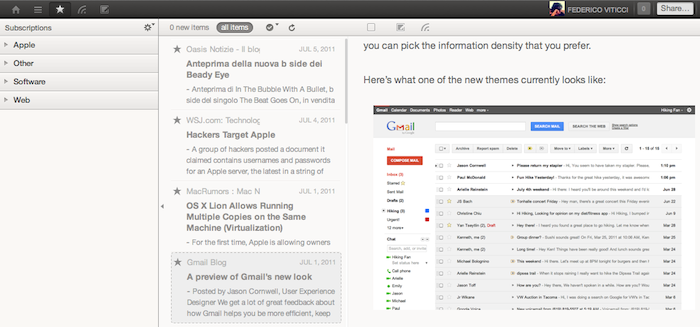
Based on the Pure Reader mod for Google Reader we covered back in December, 3 Column Reader is a new Safari extension released in June and updated last week that enables you to turn the Google Reader website into a beautiful, three-column reading experience for your RSS feeds. Developed by Zackary Corbett, 3 Column Reader is only compatible with Safari for now, and it’s got a minor glitch with the settings icon from Google’s new sharing toolbar launched alongside the Plus social network. However, the extension is being actively developed so we wouldn’t be surprised to see a fix for users logged into Google+ soon.

For everything else, 3 Column Reader looks great: the extension takes Pure Reader’s color scheme (which reminds us of Reeder’s sepia background and monochrome icons) to lay out a three-column setup perfect for widescreen monitors: folders and feeds are listed on the left, a mid panel visualizes the feeds’ titles and excerpts, and the full articles with images are displayed on the right. You can hide the source list by hitting an icon in the mid panel, and most of Google Reader’s web app functionalities are retained, such as popup menus to sort articles, or buttons to mark items as favorite. I didn’t encounter any other compatibility issues when using 3 Column Reader on Safari 5.1 for Lion GM. Read more


Capture: The Fastest App To Record Video On Your iPhone

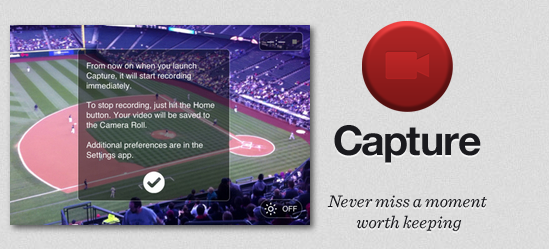
Released today at $0.99 on the App Store and created by the same developers of Canned, Capture is a minimal and simple utility for the iPhone that addresses a common issue with the iPhone’s Camera app: sometimes you need to capture a moment quickly, but the app takes too long to launch or switch to video recording. Brought to my attention by Ben Brooks, Capture is simply great at what it does: the developers describe it as “a record button for your home screen” and, really, that’s not too far from the truth. Capture starts recording a video as soon as you tap on its (beautiful) icon. You launch the app, and it starts recording after one second. No need to switch to the “video” tab as in Apple’s Camera, no need to wait because, and I don’t know how exactly, Capture is immediately available after you tap on it.

I can see why Capture could become an essential tool for many: by placing the app on the iPhone’s dock, you have quick access to video recording by pressing an icon. This is certainly useful for people who want to “capture” a particular moment in their kids’ life or, overall, users frustrated by the general slowness of Apple’s Camera when it comes to recording a video quickly. For reporters and citizen journalists, Capture might be exactly what they were looking for.

Capture is fast, elegant, lets you activate the iPhone’s Flash but has no support for switching between rear and front facing cameras yet. If you need an app to record video in seconds without waiting, get Capture at $0.99 on the App Store.


The WSJ iPhone App and Negative App Store Reviews

The WSJ iPhone App and App Store Reviews

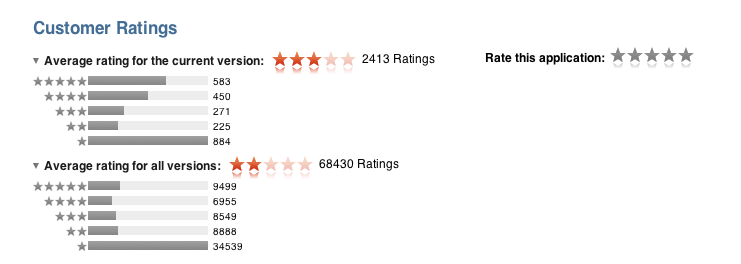
Jakob Nielsen at UseIt.com offers an interesting breakdown of the issues behind the design of the WSJ iPhone app’s initial login screen, which is causing customers to leave negative iTunes reviews as they think the newspaper is forcing existing subscribers to pay again to read content on the iPhone. That is not true (subscribers of wsj.com can access the app for free), but according to Nielsen a poorly designed login screen that puts the focus on new subscriptions and registrations, rather than login, is tricking users to believe that existing subscriptions don’t count against iPhone access.

Wildly persistent users might notice the much smaller Log In area at the bottom of the startup screen. However, they’re unlikely to press this button because their experience with the app so far has taught them that they must register (and pay extra) before being allowed to log in.

Those few users who do press Log In will finally see that they can use their existing www.wsj.com credentials to access the app. However, as the many negative App Store reviews attest, few users ever make it this far.

The full report with screenshots of the WSJ iPhone app and proposed mockups to address the issue is available here. Subscriptions and logins for existing subscribers have always presented usability problems for developers of mobile newspapers and magazine apps, struggling to find the best way to promote both new subscriptions and free access for existing, paying customers. Apple wants to improve the process with its native subscription system based on iTunes accounts, and indeed several publications are experimenting with the new APIs provided by Apple to offer web-based login screens that allow for new registrations and iTunes subscriptions, like The New York Times did in its latest app update.

Permalink

Ahead Of “Awesome” Launch, Screenshots Show Facebook’s Project Spartan

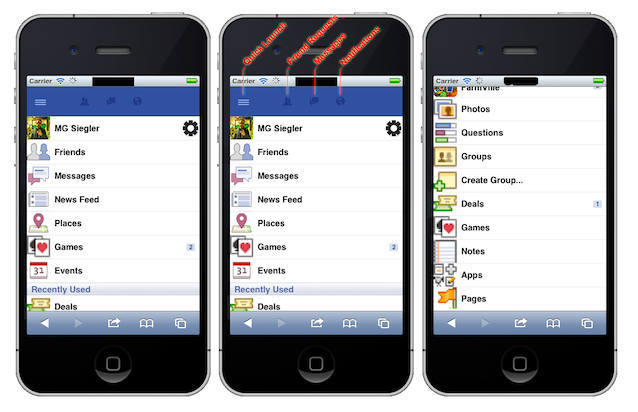
Last week, Facebook’s Mark Zuckerberg revealed the company was preparing for an “awesome” launch this week. A formal announcement is expected today at a media event at Facebook HQ, but several blogs in the past few days have claimed Facebook is set unveil a partnership with communication giant Skype (recently acquired by Microsoft) to bring video chats to the social network, an interesting possibility at the light of Google’s new Plus foray into the social sphere, which among other things features a Hangout functionality to start group video chats with multiple contacts at once. TechCrunch, however, seems to believe that Project Spartan, an HTML5-based development and distribution platform that’s being built with Mobile Safari for iOS in mind, won’t be part of the announcements today, which may or may not also include the long-awaited official iPad app, supposedly nearing a public release. Read more


Fluid App Adds Lion Compatibility and Full Screen Mode

With OS X Lion expected to make its public debut on the Mac App Store in the next few weeks, it is no surprise developers are starting to release updates to their applications to support the new OS and introduce features built upon the new APIs created by Apple. Last night, Panic released four updates to bring Lion support to Coda, Candybar, Transmit and Unison. Fluid App, the popular tool to create native applications for OS X off any website or web app, has also been updated to bring proper Lion compatibility, a few bug fixes and, more importantly, support for Lion’s full screen mode.

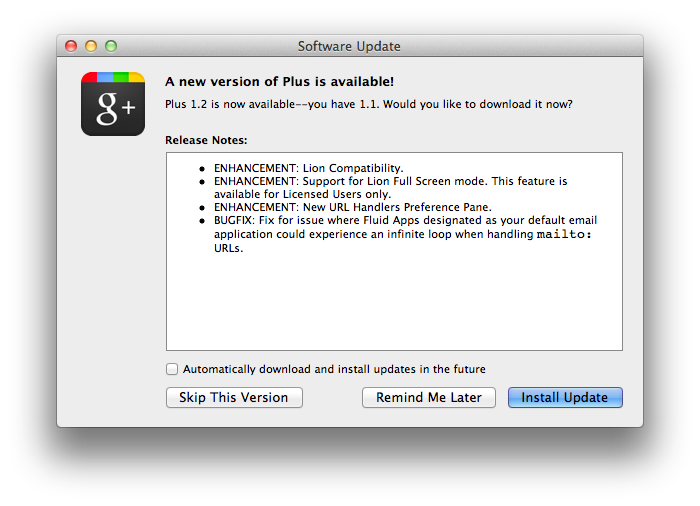
Whilst Lion compatibility can be seen in the Fluid changelog here, full screen support is listed under changes to Fluid apps. Indeed,when I opened the Google Plus Fluid app I created earlier this week, I was prompted to perform an update in-app to enable Lion and full screen support, as well as new URL handlers in the Preferences. As with most Apple apps on Lion, full screen mode can be entered by hitting a keyboard shortcut, or pressing an icon in the upper right corner. To return to the standard window view, you’ll have to click the (blue) full screen icon in the menubar again. Animations for my Fluid app on my late-2008 MacBook Pro with SSD were fast and smooth.

Fluid App is available for free, but you can purchase a license at $4.99 via Paypal to unlock additional features like the aforementioned full screen on Lion, separate cookie storage and possibility of pinning apps to the OS X status bar.