Federico Viticci

10766 posts on MacStories since April 2009

Federico is the founder and Editor-in-Chief of MacStories, where he writes about Apple with a focus on apps, developers, iPad, and iOS productivity. He founded MacStories in April 2009 and has been writing about Apple since. Federico is also the co-host of AppStories, a weekly podcast exploring the world of apps, Unwind, a fun exploration of media and more, and NPC: Next Portable Console, a show about portable gaming and the handheld revolution.

Apple’s Bold Move: iTunes Match and Streaming

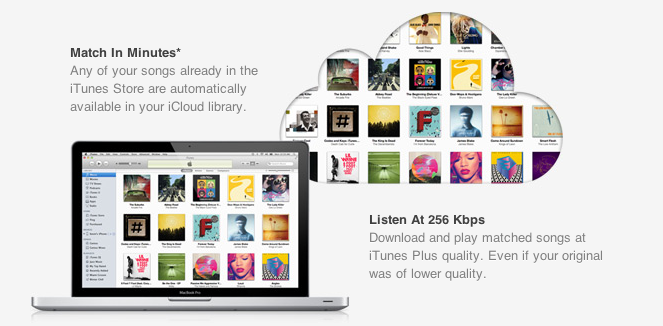
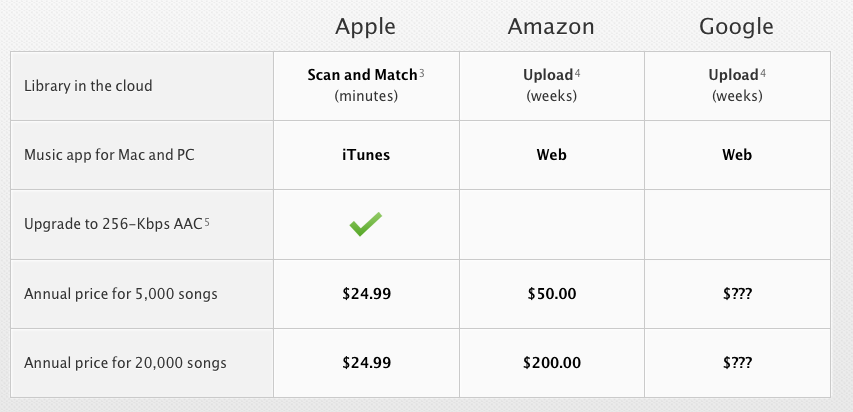
With the launch of the first iTunes Match beta for developers last night, Apple unveiled the last piece of the iCloud puzzle that was originally previewed at the WWDC in June, when Steve Jobs announced that iTunes Match would be available this Fall at $24.99 per year for 25,000 songs, allowing customers to download songs stored in their iCloud accounts. Because iTunes Match scans a user’s iTunes library before uploading files, songs compatible with Apple’s iTunes Store catalogue are automatically upgraded to 256 Kbps (even if the original copy was of lower quality) and “matched” with the copy on the server, whilst the ones not found on Apple’s servers are manually uploaded to iCloud. This happens for two reasons: first, Apple cut deals with several music labels and publishers to enable this “scan & match” technology that compares songs on a computer versus the higher quality copy on the servers, and doesn’t upload the original file; second, Apple wanted to eliminate the need of having to wait days for large uploads to finish – something that has affected “cloud locker” services from Google, Amazon, and many others.

The iTunes Match that was announced back in June, however, and promoted on Apple’s website up until today, made no specific mention of “streaming” songs matched/uploaded to iCloud; the way Apple originally explained it, Match was a clever way to fill an iCloud account with songs and albums to later download on iOS devices or a Mac. For as much as the technology behind it seemed intriguing, many were disappointed to find out that Apple couldn’t find a way around streaming songs without having to download the full copy first. Other services like Rdio and Spotify allow users to stream songs they don’t own by hitting “play” and waiting a few seconds for the stream to start (depending on the Internet connection’s speed). iTunes Match is actually a service for songs users own and decide to store in iCloud at $24.99 per year, so many assumed streaming required a different kind of licensing deal that Apple couldn’t make in time for WWDC.

Last night, as developers started subscribing to the first beta of iTunes Match, it turned out that, even in this first version, Apple is allowing for both downloading and streaming of songs, both on the Mac and iOS devices. The interface makes it easy to match and listen: once a music collection is built in iCloud (e.g. iTunes has scanned, matched, and uploaded songs to your account), music will be available on the Mac in iTunes’ Music tab, and on iOS 5 in the new Music app. Once iTunes Match is enabled on iOS it replaces the local music library, and you can tell the difference by a small iCloud icon next to each song.

Whereas Apple’s announcement at WWDC implied users would have to push a button to download songs, and build a music library off a master collection in the cloud, this first beta actually delivers more: users can still hit the button and download songs locally, but they can also tap on songs and start streaming them without a download.

The process is detailed in two videos posted by Insanely Great Mac. Streaming can occur both on the desktop and iOS, and it doesn’t look any different from a local iTunes library except for the aforementioned iCloud library. With this first beta, Apple isn’t accepting iTunes LPs and Extras, some file types aren’t supported and, for testing purposes, Apple will periodically delete developers’ iCloud music libraries to increase iTunes’ performances and reliability.

Streaming is a big deal for Apple, and not just because it increases iTunes’ functionalities to avoid manual downloads and waiting times. With iTunes Match streaming, Apple could directly compete with services like Spotify (recently landed in the U.S.) and Rdio, which let users stream songs over WiFi and 3G and even cache them for offline access. However, as of this beta, Apple’s iTunes Match comes with a unique spin on streaming: it doesn’t need downloads, and it’s based on music libraries made from songs users own. With the combination of local copies (the library), scan & match, iCloud, downloads and streaming, Apple could build a music service like no other in that it’s a combination of “owning your music”, and paying a yearly fee to get online access to it. Spotify is often criticized for being a streaming service that doesn’t let you “own” your library; most recently, the company added the possibility of importing local files and playing them in Spotify, but it’s not the same of being able to take local files and mirror them to the cloud. Reports citing streaming with “iTunes in the cloud” from May are now starting to make more sense, and let’s not forget Apple has patented a technology to make streaming effortless and faster by syncing small bits of data locally.

Still, many questions are left unanswered with this week’s iTunes Match beta. Was iTunes Match supposed to get only song downloads, with the current streaming implementation being just a glitch? Or are we in for a streaming surprise come Apple’s next keynote? Moreover, will Apple further tweak iTunes and iOS 5 to put the focus on streaming, allowing for advanced iCloud-based playlist creation? And how will music labels react to the news that iTunes Match is capable of streaming, too? Perhaps this is already part of Apple’s grand iCloud plan, and music labels knew all along that iTunes Match would stream songs, as Businessweek suggested in May. Or, streaming came unexpected to them as it did to everyone else in this first beta. But more importantly, will iTunes Match be available outside the U.S. once iOS 5 and iCloud are publicly released? Early signs pointed to “no”, with sources claiming the UK wouldn’t see iTunes Match until 2012. Currently, iTunes Match is a developer-only beta (closed at the moment with more openings “over the next days”) that requires a U.S. credit card (not just regular iTunes credit – e.g. promo codes and gift cards) for automatic billing. It’s unclear whether or not Apple will open the final version of iTunes Match to any kind of U.S. iTunes account, or if they’ll keep it exclusive for U.S. iTunes customers with a credit card on file.

As usual with betas, things can change before the final release. There’s a fragmented market out there, and Apple has a chance to disrupt it with iCloud and iOS 5. As it stands now, iTunes Match looks like Apple’s boldest move in the online music space since 2003.

Update: AllThingsD now weighs in writing that, according to an Apple spokesperson, iTunes Match still isn’t streaming. What looks like a stream is actually a simultaneous listen and download, although Apple isn’t providing additional details on the technology behind iTunes Match. AllThingsD speculates that Apple may be using some sort of caching mechanism for when users don’t “download” songs from iCloud, though that’s just an “educated guess”. From the videos posted this morning, indeed it looked like an iPhone was capable of streaming songs off iCloud.

AllThingsD also reports that Apple has the licensing rights to streaming, but they’re not implementing it due to a design choice – Apple apparently doesn’t believe mobile networks are advanced enough to allow for streaming of large music libraries. Check out the full report here.
Read more


Apple Releases New iTunes Beta with iTunes Match

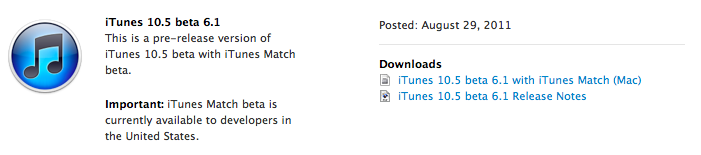
Apple just seeded a new version of iTunes 10.5 to developers, enabling the iTunes Match functionality that will allow users to upload songs to Apple’s iCloud directly from their iTunes libraries this Fall. Unlike other “cloud locker” services from Google and Amazon, Apple’s iTunes Match uses a “scan & match” technology that will try to match songs from a user’s library to the ones found on Apple’s iTunes Store servers, thus avoiding to upload a library in its entirety. The iTunes Match beta is currently available to developers in the United States, and as Apple explains in the release notes the music libraries added during this beta period may be subject to deletion, thus leading to additional re-scans and uploads.

As Apple also mentions in the release notes, iTunes Match beta subscribers “will receive the beta period and an additional 3 months of service with their 12 month subscription”, which as previously announced it’s set at $24.99 per year for 25,000 songs. iTunes LP and Extras are currently unsupported by Match, which is available as a subscription from iTunes’ new interface. From Apple’s official iTunes Match webpage:

Here’s how it works: iTunes determines which songs in your collection are available in the iTunes Store. Any music with a match is automatically added to your iCloud library for you to listen to anytime, on any device. Since there are more than 18 million songs in the iTunes Store, most of your music is probably already in iCloud. All you have to upload is what iTunes can’t match. Which is much faster than starting from scratch. And all the music iTunes matches plays back at 256-Kbps iTunes Plus quality — even if your original copy was of lower quality.

The first beta of iTunes Match comes with a few known issues such as impossibility to add music to iCloud from more than one computer at a time, or some playback issues on iOS. Apple is suggesting developers to backup their iTunes music libraries before installing and subscribing.

More information about iTunes Match is available on Apple’s website. Ars Technica also had a good write-up about this new service back in June.

Read more


Snow Leopard To Get Basic iCloud Compatibility with 10.6.9

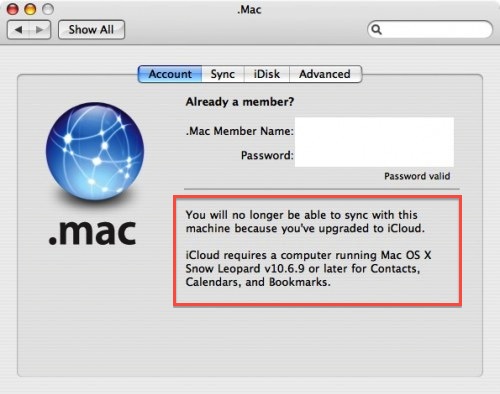
In a somewhat expected turn of events, a notice appeared on an old Mac running Tiger seems to confirm Apple will provide basic support for iCloud sync on Snow Leopard machines. As reported by MacRumors, a developer testing the MobileMe to iCloud transition with Tiger’s .Mac preference pane noticed a message about a 10.6.9 requirement for calendar, bookmark and contact sync.

You will no longer be able to sync with this machine because you’ve upgraded to iCloud.

iCloud requires a computer running Mac OS X Snow Leopard v10.6.9 or later for Contacts, Calendars, and Bookmarks.

Whilst Apple made no mention of Snow Leopard compatibility when detailing iCloud and the transition from MobileMe (actually indicating “some features of iCloud” will require iOS 5 and OS X Lion), it would certainly make sense to provide an additional 10.6 upgrade to ensure basic former MobileMe functionalities under the new iCloud brand. Apple has already started migrating MobileMe developer accounts to the new iCloud ecosystem, providing a desktop add-on for testing on the 10.7.2 developer seed. iCloud is expected to go public this Fall alongside the aforementioned 10.7.2 and iOS 5, whereas MobileMe will be officially discontinued on June 30, 2012.

Developer accounts that are being transitioned from MobileMe are automatically given free storage regardless of the previous subscription until next year, and considering Lion is still touted as an “upgrade to Snow Leopard” (which is required to purchase Lion from the Mac App Store) and that Snow Leopard is still available on Apple’s website, it would be an optimal solution to provide 10.6 users with one last software update to migrate from old MobileMe services to some new iCloud free offerings. There’s one caveat, however: assuming the MobileMe to iCloud transition goes as planned and Apple will really push 10.6.9 to enable iCloud sync, some old MobileMe features like syncing of Mac Dashboard widgets, keychains, Dock items, and System Preferences won’t be available on OS X anymore, as Apple explains here.


Quotebook: Save Your Favorite Quotes

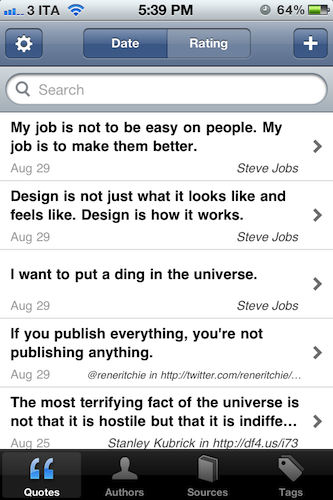
“I want to put a ding in the universe.”

“We will be as big as the Beatles, if not bigger.”

“Life is what happens to you while you’re busy making other plans.”

What do these three sentences have in common? First off, they’re all quotes – hit your favorite search engine to find out where they come from. But as far as the iPhone tech-savvy user is concerned, these quotes can be neatly organized in Quotebook, an iPhone app I’ve recently stumbled upon thanks to a friend’s recommendation.

Quotebook is a very simple and straightforward, albeit the goal it aspires to accomplish is perhaps greater than the average iPhone app’s underlying concept. Quotebook is a lovely and safe place for your quotes, regardless of their relationship with life, design, sports, achievements, love, or whatever you feel inspired by to save in a digital notebook. Personally, I’m that kind of tag junkie that keeps quotes and other digital memorabilia stored in his Evernote account – I can see, however, Quotebook’s appeal to someone who prefers to keep inspirational quotes in a separate place other than the default archiving system, be it Evernote or other solutions like Yojimbo.

Quotebook’s greatest strength is that it’s built for quotes, and nothing else. It doesn’t want or need to be a replacement for your notes and daily thoughts. The interface has been designed to make it easy to jot down a quote, and set correct attribution like author and source, or perhaps fiddle with ratings. The app goes one step further and makes it super-simple to import quotes found in your iPhone’s clipboard, and plays nicely with @author names, automatically opening a Twitter profile within a web view. That’s very nice of the developers – this got me started on saving some tweets I find inspiring. Quotes can be searched and filtered, shared on Twitter, Facebook and Tumblr, or browsed by author and tag using the buttons in the bottom toolbar. Pretty standard stuff for an iPhone app.

Quotebook, though, had me at the auto-suggest feature, which looks up on the Internet for incomplete quotes or attribution details. The app will give you its best recommendation for an incomplete quote you’ve inserted, guessing the author as well if an entry is found.

I like Quotebook. It’s simple. The latest version comes with a handy option to export and import notes (plain text is fully supported), and you can even find out more about an author or source using Wikipedia and Wikiquote. If you have an iPhone and you want to keep your quotes organized in a dedicated place, I strongly recommend Quotebook.


Macworld Lab Tests The 2011 BTO Mac mini

Macworld Lab Tests The 2011 BTO Mac mini

Macworld takes a look at a build-to-order (BTO) Mac mini with a 2.7GHz dual-core Core i7 processor, and 256 GB solid state drive. At $300 more than a standard 21.5-inch 2.5GHz Core i5 iMac (both machines come equipped with 4 GB of RAM), the maxed-out Mac mini was faster than the iMac at disk-intensive tests like file duplication, whereas performances on Apple’s recently updated small desktop box started to take a hit with graphic-intensive tasks such as playing Portal 2 or running Cinebench tests.

Not surprisingly, the BTO Mac mini with its SSD blazed past the iMac in disk-intensive tests such as the 2GB folder duplication (31 percent faster) and 4GB file unzip (42 percent faster). The BTO Mac mini also beat the iMac in our 4GB zip test (5 percent faster), our Pages import Word doc test (20 percent faster), and our Parallels WorldBench multitask test (4 percent faster).

Macworld concludes that the BTO Mac mini is a “pricey proposition” and the iMac is still faster at most tasks, though some users would prefer the Mac mini’s simple configuration in that they won’t end up with an additional screen, trackpad, and so forth.

Considering that you don’t get several important items with the Mac mini that you do get with the iMac—a keyboard, mouse/trackpad, display—the BTO Mac mini we tested is a pricey proposition. However, some people may not want a new display (or don’t like the iMac’s glass-covered displays) and new input devices, and the Mac mini’s small case is preferable than the Mac Pro’s bulky tower. For general use, the BTO Mac mini can keep up with the 21.5-inch 2.5GHz Core i5 iMac. But the iMac fares better with software that can take advantage of multiple cores or graphic-intensive tasks.

By getting rid of the optical drive and making room for an additional hard drive in the aluminum enclosure, Apple has turned the 2011 Mac mini into the most lightweight and configurable consumer-oriented Mac ever made. Check out Macworld’s full tests here.

Permalink

Watchlater 2.0 Improves Video Collection and Adds iPhone App

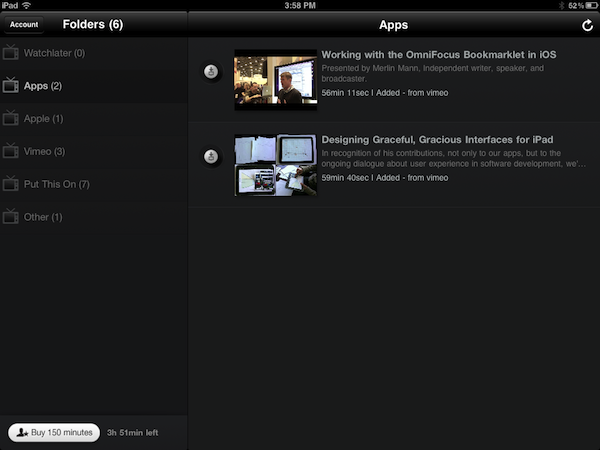
Back in March I reviewed Watchlater, an iPad app that I described as “an Instapaper for video” in the way it allowed users to save videos for later viewing using a simple browser bookmarklet. Whereas nothing has changed concept-wise since the original release, the much-improved version 2.0 of Watchlater addresses pretty much every issue I had with 1.0, adding support for more video providers, a better interface, as well as a redesigned web app and iPhone version.

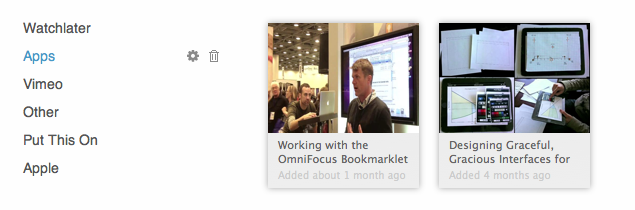
First off, Watchlater slashed the price of in-app credits (used as “minutes” to cache offline videos) to $0.99 for 150 minutes, and $2.99 to have an additional 300 minutes to cache videos from Vimeo, TED, FunnyOrDie, and many others (you can check out the full list here). Unfortunately, as I noted in my first review, YouTube videos still can’t be saved offline due to copyright issues, however the developers have worked on improving the way these videos are loaded in a new window, so that YouTube’s mobile player scales gracefully both on the iPhone or iPad. This is also true for Vimeo material, and I’ve noticed a general trend towards polishing the overall UI which includes folder icons on iOS, and a completely revamped web app that turns your video queue into something” nice” to look at.

Videos from iOS devices can now be moved around folders, shared on Facebook and Twitter or forwarded to Safari, whilst the web app allows you to edit and manage folders, “search the web and add instantly”,  or switch from list to grid view.

Perhaps the biggest change in version 2.0, iPhone app aside, is the inclusion of Twitter, Facebook and Google Reader as sources for your videos. The new “connect & collect” feature lets you automatically build a video queue based on videos found in your Twitter and Facebook timelines or Google Reader feeds – whereas the “normal” Watchlater experience requires you to manually use a bookmarklet to “curate” videos you want to save for later, this new functionality will aggregate all videos related to your accounts, with the downside being that perhaps you don’t want any kind of video to show up in Watchlater. You can delete these videos, obviously, but it’d be nice to have filtering options to make sure that only some videos get forwarded to Watchlater. Speaking of the bookmarklet, it now works much better with videos embedded on web pages, and it supports more providers.

Watchlater is my favorite app to collect and organize videos I don’t have time to check out right away. You can get the app for free on the App Store, and unlock minutes through in-app purchases. Read more


Adobe Releases CreatePDF for iOS

Earlier today Adobe added another application to its iOS portfolio with the release of CreatePDF for iOS, a $9.99 universal app aimed at letting users easily create PDFs on their iPhones or iPads. According to Adobe, “CreatePDF brings the same high-quality PDF creation as Adobe Acrobat” to iOS devices, with PDF documents that look “exactly” like the original files they were generated from; the app uses Adobe’s online services for performance and quality, creating PDFs that preserve quality and accessibility standards with the inclusion of links, images, footnotes, and more.

The app supports the following formats:

  • MS Word (docx, doc), Excel(xlsx, xls), PowerPoint (pptx, ppt)
  • Adobe Illustrator (ai), Photoshop (psd) and InDesign (indd)
  • Images – JPEG, BMP, PNG, GIF, TIFF
  • RTF, Text and WordPerfect
  • OpenOffice and StarOffice documents

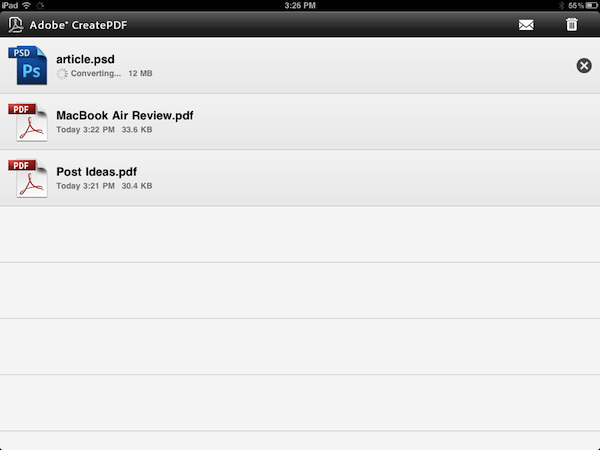
CreatePDF works through iOS’s default “Open In…” menu, which allows third party apps to communicate with each other by sending documents to other applications that support specific file types, such as PDF, .doc, or plain text. For instance, the feature was recently introduced in the Omni Group’s OmniOutliner, letting the app export outlines as plain text or OPML to other iOS software installed on device. CreatePDF registers as an app capable of opening (and converting) the file types listed above, and in my first tests it’s proven to be a fast and reliable solution to convert plain text documents, images and PSDs to the PDF format. From any app that supports sending files, you can choose CreatePDF from the “Open In…” menu, and wait for the app to finish the conversion process to PDF. For reference, the app took a few minutes to convert a 12 MB PSD to PDF, with good results. Similarly, a .docx document forwarded to me via email and sent from the iPad’s Mail app to CreatePDF took less than 30 seconds to become a PDF.

CreatePDF looks like a solid solution to convert files to PDFs, although I wouldn’t mind having more sharing options inside the app itself. Currently, CreatePDF can only “open in” other apps, send via email, or print. It’d be nice to have, say, direct Dropbox integration or more online exporting options in the future. The $9.99 price tag might be a little steep for the average iOS users, but quality of converted documents looked superior to me than other apps I tried in the past, and support for Illustrator, Photoshop and InDesign documents is also very welcome.

You can get CreatePDF at $9.99 on the App Store. Read more


Apple Removes TV Rentals from iTunes - Customers “Overwhelmingly Prefer Buying TV Shows”

Apple Removes TV Rentals from iTunes - Customers “Overwhelmingly Prefer Buying TV Shows”

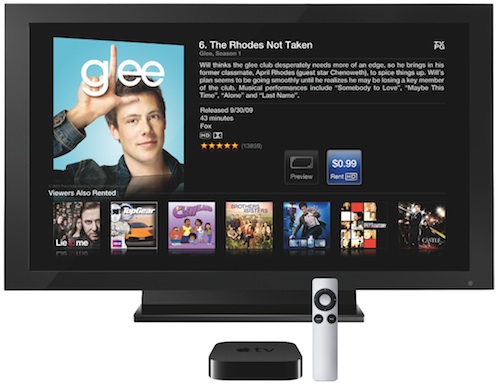
As first noted by AppleInsider, Apple has removed all options related to TV show rentals on iTunes, the Apple TV’s dedicated interface and its website, deleting a support document that detailed how users could rent episodes using credit in their iTunes accounts. .99-cent TV show rentals were unveiled last September as part of the Apple TV 2nd gen announcement, and touted as a big new feature from Apple with both ABC and Fox on board with their shows. Others, however, dismissed the initiative as a threat to the TV business model – prices were too low according to TV studios. TV shows could be rented from the iTunes Store and watched on a Mac or Windows PC, iPhone, iPad, iPod touch, or Apple TV. Users had 30 days to begin watching a TV show, and 48 hours to complete it.

Today, Apple confirmed to AllThingsD that, as customers prefer buying TV shows, they’ve canceled the rental program entirely. Instead, Apple is now recommending iTunes in the Cloud, an iCloud functionality already live for customers that allows for re-watching and streaming of any previously purchased content on any device. The option was introduced with the latest Apple TV software update.

iTunes customers have shown they overwhelmingly prefer buying TV shows,” Apple spokesman Tom Neumayr said. “iTunes in the Cloud lets customers download and watch their past TV purchases from their iOS devices, Apple TV, Mac or PC allowing them to enjoy their programming whenever and however they choose.

Apple is rumored to be working on a new technology to deliver video to televisions, but right now, the only option for purchasing, streaming and re-downloading TV shows remains iTunes in the Cloud.

Permalink

Sparrow Developers Working on “Sparrow for iPhone”

As revealed by Dominique Leca to Business Insider, the company he co-founded is now working on an iPhone version of Sparrow, which is in the very early stages of development and simply known as “Sparrow for iPhone” at the moment. For those not familiar with the Mac app, Sparrow is an alternative email client for OS that started out as a mix between classic email and Tweetie-like UI to deliver a fresh Gmail experience on the desktop, and eventually evolved into a powerful solution to access Gmail (including features like shortcuts, stars, and labels) as well as classic IMAP. The app got more social and better integrated with Lion, adding full-screen mode and a completely redesigned sidebar for navigating through your inboxes. Some people say Sparrow’s success is due to the fact that the app does email, but it doesn’t feel like email; Sparrow is sold at $9.99 on the Mac App Store with a lite version available, and a licensed version also up on the devs’ website.

We previously reported on Sparrow adding Twitter’s Loren Brichter to the team of advisors, raising $250,000 in funding over the last months; according to Leca, Sparrow has made more than half a million dollars since the Mac App Store release, although they don’t like the fact that Apple’s store for OS X apps lists both indie software and applications from Apple such as Final Cut Pro X, iWork, or OS X Lion.

In the interview, Leca also reveals they’ve started working on an iPhone version of Sparrow, aimed at enhancing Apple’s Mail experience with a different and faster UI, attachments from the compose view, and lots more. If we had to speculate on Sparrow’s focus for iOS, we’d say porting the Gmail integration that has characterized the desktop app to iOS would be a good idea.

Still, the problem for Sparrow is that Apple has always been reluctant in accepting apps that “duplicate functionality”, such as email applications. That’s why Google hasn’t released an official Gmail app for iOS yet, whilst Android has one. Apple does, however, accept third-party browsers for iOS, albeit they’re based on the same engine of Safari – they can’t use their own interpreters. This is the reason behind the lack of a real Firefox version for the iPhone – the Firefox Home that Mozilla ships is actually based on WebKit, like any other alternative browser for iOS. They’re basically skins on top of Safari’s engine, with different functions and interfaces. Same applies to photo album management apps, which are simply connected to the Camera Roll (and Apple’s Photos app) through an API. An API or similar technique doesn’t exist for email messages, thus the lack of third-party email apps for iOS. Much has changed since 2008 (for instance, Apple now accepts web app wrappers such as MailWrangler), but native third-party email apps still haven’t made it to the App Store.

Leca seems somewhat confident in Apple’s intention to start opening up iOS soon to approve apps like Sparrow for iPhone, which in order to work would have to feature its own email assets in order to directly work with Gmail, out of Mail app, with a different UI and compose view. From the interview:

BI: So do you think they’ll approve it?

DL: I think they will. They’re accepting third party browsers, so why not mail? This would be really inconsistent. Opera has a browser out there, and I think Mozilla has one coming too.

BI: So you think it’s only a matter of time until Apple loosens the chains?

DL: Yeah, I guess so. In regards to apps that compete with their own apps, I think iOS is sufficiently settled and I think people have been evangelized enough now so Apple will feel more secure opening it up.

The current iPhone mail app is just about perfect, but we’re just making things faster in terms of UI, and we’re adding a lot of small details for power users, like attaching images straight from the compose window.

We’re looking forward to Sparrow’s upcoming features on the Mac and mobile version, although I’m personally not sure as to whether Apple could really decide to let others sell email apps or real browsers in the App Store. Sure, the platform is mature enough to let users easily differentiate between Apple’s default solutions and standalone apps, but that would mean giving up a bit of control on the ecosystem, something that Apple has carefully nurtured in the past three years. I believe Sparrow would also be a great addition to the iPad – which I use regularly to manage and respond to emails – but, again, I don’t know why and how could Apple free developers from the ties of Safari and Mail in the near future. [Business Insider via MacRumors]