When the original iPad came out last year, it was immediately clear the device would be great for reading. As I outlined in my Instapaper 4.0 review, those who followed the launch of the device in April 2010 may recall that there was little doubt the iPad was going to change our reading habits: from the comfort of a couch or during a daily commute, the iPad’s bigger screen would provide a better alternative to web articles, RSS feeds and eBooks than the iPhone’s 3.5-inch display. How reading was meant to be changed and enhanced, exactly, wasn’t really clear from the start.
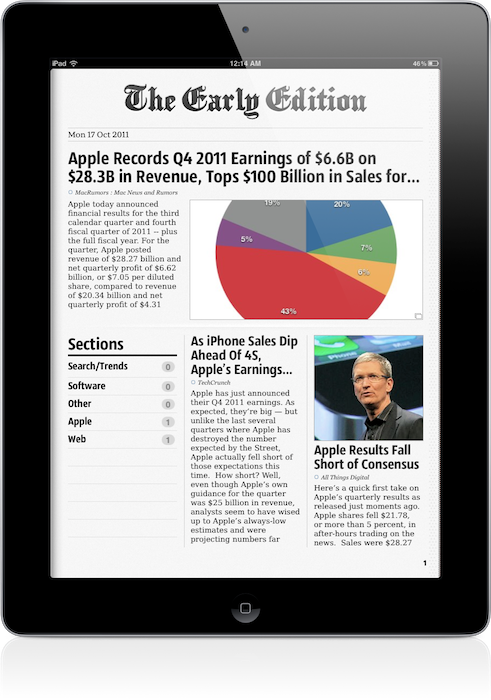
The following months saw the rise of “social magazines” like Flipboard and Zite, a plethora of RSS apps – most of them abandoned now – and variations on the theme of “visual news” that would see developers building apps with a unique, at least initially, spin on the classic visualization of headlines. Among the pioneers of “iPad reading” was Glasshouse Apps, makers of some fine software for iOS devices like Barista and Gift Plan. Last year, Glasshouse Apps released The Early Edition, possibly the first popular app to take on the concept of RSS feeds rendered as a newspaper on the iPad’s screen. Whilst many would later try to copy Flipboard and come up with similar ways to build “social magazines” off your Twitter and Facebook streams, I remember The Early Edition was among the first apps to deliver a fresh RSS experience that turned RSS items into visually-appealing headlines with page layouts, subtitles, bold headlines and summaries. The Early Edition was capable of importing feeds from your Google Reader account and manually managing them inside the app, but it couldn’t sync with Google’s RSS service. The fact that, without any major feature or UI updates, The Early Edition is still in the Top Paid iPad News chart as of this morning is telling of the app’s quality. Overall, The Early Edition was a nice way to read RSS feeds in a different format; perhaps it was overshadowed by Flipboard (which also gained Google Reader capabilities later on), but it’s still a fine piece of software.
The Early Edition 2, released today as a separate app, improves on every aspect of the original application. The interface has been redesigned, the sharing menu completely rebuilt; the app can now sync back to Google Reader (while still offering you an option to manually manage feeds out of Google’s system) and it’s incredibly fun to use, as before.
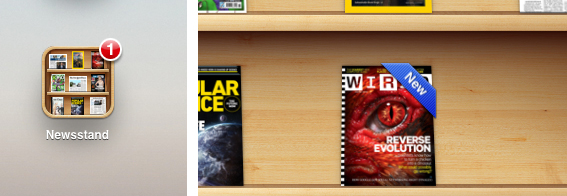
One of the big advantages of TEE 1 over its many competitors, in fact, was that it was fun. As the iPad as a platform, TEE relied heavily on swipes and taps to let you navigate between articles and sites, with beautifully crafted graphical elements and page turning animations to help convey the feeling of a “real” newspaper on your iPad. The Early Edition 2 builds on the skeuomorphic guidance of the previous version: the sharing menu is a yellow envelope you send out to the world; a wooden background adorns the newspaper’s pages and columns and becomes your coffee table as the newspaper rolls back, revealing its sections. Pages turn faster, and the new Featured Feeds section resembles a newsstand you’d pick your favorite newspaper from while holding your morning coffee on the way to work. Even the Clippings section – the one that holds your “favorite” (starred) items – has been designed as an inbox that sits on your desk, right below your personal newspaper.
Some might say that The Early Edition 2 is over-designed and that it’s blindly following Apple’s trend towards real-life interfaces with textures and materials and physical metaphors – but I like it. Unlike, say, Lion’s iCal or Address Book, I think The Early Edition’s design is functional to what the app does and, ultimately, it’s got personality.
An obvious feature of digital newspapers is that, unlike physical ones, you can customize them. In The Early Edition 2, you can browse All feeds, Unread ones and Today’s only, and note that if Google Reader sync is active, unread items will change their status on all your connected Reader clients, such as Reeder for Mac or Mr. Reader for iPad. In this regard, The Early Edition has proved to have reliable sync: as soon as I scrolled past an article, that was marked as read and changes were synced back to the cloud. Sync is relatively fast, but the app will need a few extra seconds to “assemble your newspaper”, which includes deciding to preload pictures, finding Trending Words in article, and picking a position for Favorite items (which you can choose to display in the newspaper’s Front Page). Search and Trending words in particular provide a nice way to quickly skim through a freshly built newspaper, see what’s most talked about in your sections, or simply find something specific you’re looking for (you can save searches for future usage as well). Another way to customize the newspaper is to browse recent items from single sources: from the Feeds sidebar, the app will let you tap on a website to read its latest entries, but this screen won’t share the same interface design of the “regular” newspaper. It is, however, a nice option to have. You can filter feeds or browse by section, too.
Article reading view has been redesigned from version 1.0. Typographic choices look better on the eye, and the overall page design feels cleaner and more elegant. The app will fetch article information such as publishing date, author and website’s name when refreshing feeds, and as you read an article the page “disappears” underneath the main header – it’s a very nice effect. Along the top of the page, there are buttons to open an article’s web view, share it, increase font size, and email the link or open it in Safari. The reading view is extremely simple, and you can swipe between pages without going back to the main newspaper view.
The Early Edition 2 has also been enhanced with gestures to simplify navigation and provide quick access to often-used sections. Besides swiping to turn pages and navigating image galleries, you can swipe with two fingers to reveal the Browse sidebar, or swipe with three fingers horizontally to skip a section you don’t want to read. A rotate gesture with two fingers gives you access to the Featured Feeds at any time, whilst the Clippings can be accessed with a swipe up from the main view. The app offers a quick recap of available gestures through the Help menu in the toolbar (which you can reveal by swiping down), and I believe that if you’re going to spend a lot of time reading in TEE, gestures will make you save a lot taps (and thus, precious seconds).
Other miscellaneous notes about The Early Edition 2:
- You can subscribe to feeds, manage your subscriptions, reorder items, and move them around between Google Reader folders
- Font size controls
- Hardware brightness controls
- Double-tap images to enter gallery view (perfect for photography and design blogs)
- You can “star” items and mark them as unread on Google Reader
- You can customize Google Reader sync and how items are marked as read
- OPML import
Overall, The Early Edition 2 is a good app – but the question is, why would you use this over your regular RSS reader or Flipboard? I think there are a few aspects to consider before dismissing The Early Edition or quickly hitting the Buy button. First, unlike Flipboard, The Early Edition bets heavily on the concept of “digital newspaper delivered to you every morning”, whilst Flipboard is more of a social-media powerhouse with support for Twitter, Facebook, Instagram and Google Reader items all displayed through a “magazine view”. Whereas Flipboard is deeply social both in the way it gets content and allows you to share it, The Early Edition feels to me more like an app you’d use once a day to read what’s new and relevant in the feeds you curate. Flipboard, too, enables you to subscribe to sections and feeds, but clearly its focus is on items shared by your friends, displayed through a better view than a web browser. And this is where the difference between The Early Edition and a regular Google Reader client kicks in: assuming that you’re an RSS “geek” with at least 50 subscriptions and hundreds of unread items per day, The Early Edition 2 positions itself as a nice way to read, and not skim, articles from your sources. I don’t know about you, but I use my main Google Reader clients to see what’s up, and other apps to read the good stuff that I missed while I was skimming through. With dynamic page layouts, The Early Edition 2 is also smarter than a normal RSS client, as it’s got an algorithm that decides which stories are more important than others and how they should be displayed. So here’s a first difference between the digital newspaper and a list of unread items. But the opposite is also true: what if you only subscribe to a few feeds, and you get your news via Twitter all day? In that case, you’re likely to use a Twitter client or, again, Flipboard. But when it’s time to read those few feeds, why use a client (which I believe is normally meant for heavy RSS users) when you can have a beautiful app like The Early Edition deliver them for you? It’s an interesting scenario that once again proves how the selection of iPad apps for reading web articles is changing our reading habits and empowering us to choose how we read. There’s one more possible usage scenario: assuming you use your “social magazine” for your “social news” and you don’t have a Google Reader account or even know what RSS is, The Early Edition’s standalone mode (no sync, no Google Reader integration) offers another way to manage the websites you like, not the ones recommended by your friends.
I believe RSS clients and apps like Flipboard and The Early Edition can coexist, but it depends on how you choose to read your news and feeds you care about. The Early Edition 2 is a beautifully designed app, which takes advantage of iOS 5 and nicely integrates with Google Reader.
The Early Edition 2 is propagating in the App Store right now. You will find the app here. Check out a gallery of screenshots and a promo video after the break. Read more