Federico Viticci

10765 posts on MacStories since April 2009

Federico is the founder and Editor-in-Chief of MacStories, where he writes about Apple with a focus on apps, developers, iPad, and iOS productivity. He founded MacStories in April 2009 and has been writing about Apple since. Federico is also the co-host of AppStories, a weekly podcast exploring the world of apps, Unwind, a fun exploration of media and more, and NPC: Next Portable Console, a show about portable gaming and the handheld revolution.

Flipboard 1.8 Brings Cover Stories to iPad

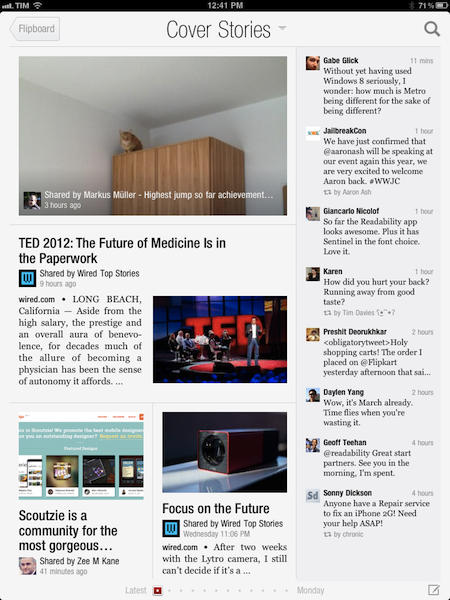
When Flipboard introduced its long awaited iPhone version back in December, the company rolled out a new functionality called “Cover Stories” that allowed iPhone owners to quickly catch up on the most interesting news, photos, and status updates shared by their friends and people they followed with a brand new, easy to use interface that took advantage of the iPhone’s smaller display and unique design of Flipboard. In the past months, Flipboard’s Cover Stories have become a fantastic way to get a quick overview of what’s happening online, with “curated results” that take into account a link’s popularity based on the number of retweets, comments, and social engagement. Cover Stories weren’t enabled on the iPad version of Flipboard – admittedly still superior to the iPhone app as a lean-back experience for relaxed reading and discovery – but this is changing today with version 1.8 of the app, which brings Cover Stories to the iPad, alongside a number of other improvements and new international content guides.

The new Cover Stories tile in the Flipboard start page doesn’t need an introduction – it’s really just a bigger version of the iPhone’s counterpart, beautifully laid out on the iPad’s screen. Whilst it’s unclear what kind of algorithm and process Flipboard uses to aggregate and build this personalized feed, the section undoubtedly works in fetching interesting stories based on the content that is being shared with you. The iPad edition of Cover Stories collects both articles and status updates, which are neatly organized in a column on the right.

With new typography, and improved photo layout and a third page of tiles, Flipboard for iPad now allows for more content, displayed in a more elegant way. The new International Content Guides are becoming to the go-to place to get started with Flipboard and great content, but I’d recommend adding sources like Instagram and 500px first to get an overview of the new photo layout – this will surely contribute to enhancing the “visual” aspect of Flipboard, which was already pretty remarkable.

For the past months, I’ve been using Zite to let “news come to me” thanks to the service’s fantastic discovery-based functionalities and system that learns from my reading habits and tastes over time. Flipboard’s Cover Stories seem like a great opportunity for the company to strengthen their offerings in smart news discovery and in surfacing relevant content for their users, and I’ll make sure to give the feature a try on a daily basis now that it’s available on the iPad.

You can get Flipboard 1.8 on the App Store. Read more

Apple Confirms: Media Event on March 7

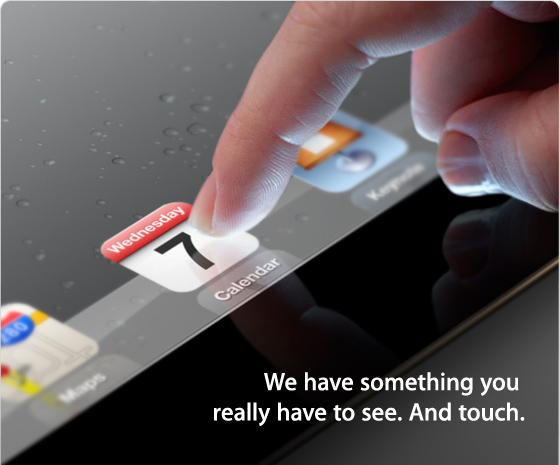
According to The Loop, Apple has just sent out invitations for a media event in San Francisco on Wednesday, March 7th. The event will be held at the Yerba Buena Center for the Arts in San Francisco, starting at 10 AM PDT (1 PM EST).

Earlier this month, it was reported Apple would hold an event in the first week of March to formally introduce the next-generation iPad, so far unofficially dubbed iPad 3, to a selected press audience in San Francisco. The new iPad, reportedly set to launch later this month, has been rumored to carry a high-resolution Retina Display; MacRumors even posted photos of what they claimed to be a production unit of the display, showing an increased number of pixels when put under a microscope. The device has also been widely rumored to share the same design aesthetics of the iPad 2, with tapered edges and a flat aluminum back. Back in January, Bloomberg reported the iPad 3 would come with a faster processor, presumably quad-core, and LTE connectivity, which was also confirmed in a separate article by The Wall Street Journal. Similarly, Rene Ritchie at iMore claimed Apple would hold an event on March 7th to announce an A6-powered, LTE-enabled iPad 3.

We have collected a series of iPad 3 rumors and theories here.

We’ll cover Apple’s media event on March 7th on MacStories’ homepage.


The Guardian: Apple Working On New Audio Format with “Adaptive Streaming”

The Guardian: Apple Working On New Audio Format with “Adaptive Streaming”

According to The Guardian, Apple is working on a new audio format for iTunes to offer higher-quality content and what they call “adaptive streaming” for iOS devices.

The new format could mean that users can get “high-definition” audio by downloading to an iPhone, iPad or iPod Touch. Alternatively, it could offer a streaming service – like that of Lala.com, the music streaming and online storage company, which Apple acquired late in 2009.

The new system would adjust itself to the bandwidth and storage available on the receiving device.

The Guardian doesn’t know whether this supposed new format would be offered alongside the recent Mastered for iTunes initiative, as an upgrade to iTunes Match, or if Apple is planning on launching a streaming service that would serve audio depending on a user’s available bandwidth. In fact, The Guardian reports it’s unclear whether a streaming service could be tied to iTunes Match in the future, and the publication even mentions “storage” – streaming services typically only use local storage for cache. Last, The Guardian says this new format could be unveiled at Apple’s upcoming iPad 3 event, rumored for March 7.

Here’s what we know: recently, artist Neil Young claimed Steve Jobs was in contact with him to brainstorm on some ideas for a higher-quality iTunes audio format, but nothing was completed at the time. Apple’s iTunes Match service, launched last year, was long rumored to be the company’s response to streaming services like Rdio and Spotify although, in the end, iTunes Match turned out to be based on online and local storage, rather than streaming.

Two more interesting points. Apple has this to say about Mastered for iTunes:

It’s our job to faithfully and accurately deliver your songs and albums to fans around the world exactly as you intend them to be heard. To achieve this transparency, you need tools and technologies from us to ensure delivery of the highest quality master recordings possible into our ecosystem. With over 250 million iOS devices capable of playing your music, there’s never been a better time than now for us to communicate, codify, and distribute updated information to you about the best tools and processes used to produce the millions of AAC files delivered daily to our mutual customers in over 50 countries around the world.

And, you may remember Apple patented a technology to offer some sort of music streaming service that also leveraged a device’s local storage for “snippets of music”.

The Guardian’s report is short on exact details of this new format, but “HD content” and “streaming” would sure play well with an iPad capable of offering higher speeds thanks to LTE.

Permalink

New Turin Apple Store To Become Italy’s “Most Important” One

According to a report by Italian website Macity [Google Translation], Apple’s upcoming retail store in Via Roma, Turin, will become Italy’s “most important” one as it debuts later this year, with an opening date apparently set for September 2012. Citing “sources with access to information about the new store”, Macity claims the store in Via Roma will cover an approximate area of 1000 square meters (10763 square feet, possibly including warehouse and back of the store) on two floors. Previously owned by Mondadori, the empty store is now being completely emptied so to let Apple rebuild it to fit the store’s style, which will be “different” from the current retail stores in Italy (9 out of 10 are located in shopping malls, with the exception of Via Rizzoli). Last, according to Macity, once open, the new store will be as “prestigious” as other Apple retail stores in Europe, specifically in France and the United Kingdom.

Apple was long rumored to be on the verge of launching a new flagship store in Milan, although the company didn’t manage to get permissions from the city, losing an auction for the Galleria space to fashion firm Prada. The new store in Via Roma will join Apple’s other store in Turin, at Le Gru. [via GGD Milano]


Vimeo 2.0 for iOS Review

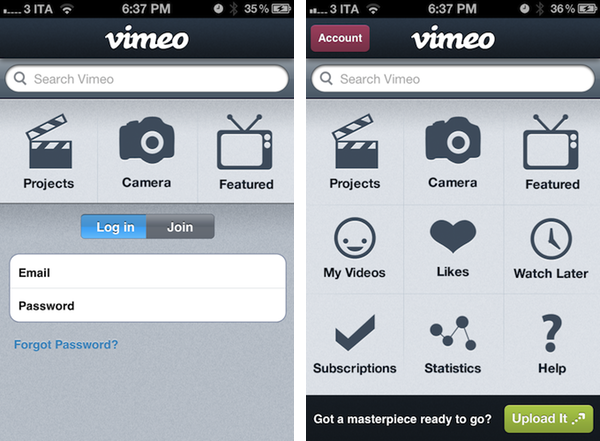
Released earlier today for free on the App Store, version 2.0 of Vimeo’s iOS app aims at making video discovering and editing more intuitive and accessible on the iPhone and iPad. With a brand new interface that was originally previewed in January, Vimeo 2.0 for iOS packs a new grid design on the iPhone that makes it easy to navigate the various sections of the site whilst retaining all the functionalities of the previous version (our review) and also adding new ones, but more importantly, it now allows iPad owners to completely manage their Vimeo accounts with options to browse videos, load subscriptions, check on the Watch Later queue, and even shoot, edit, and upload new videos straight from the device.

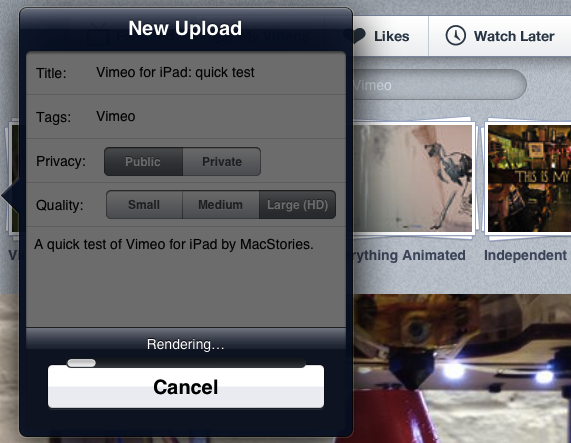
I took the app for a quick test this morning, uploading a video you can check out after the break. The (very) quick video was shot with a Canon EOS 550D, imported on the iPad through the Camera Connection Kit at 720p as .MOV file, edited in Avid Studio, then passed to Vimeo for upload. Interestingly enough, the Vimeo app couldn’t recognize my .MOV file in the Camera Roll, whilst Avid Studio successfully found it, allowed me to edit it, and exported it again at 720p to the iPad’s library. iMore has a good comparison of Avid Studio Vs. iMovie for the iPad. I prefer Avid Studio as well.

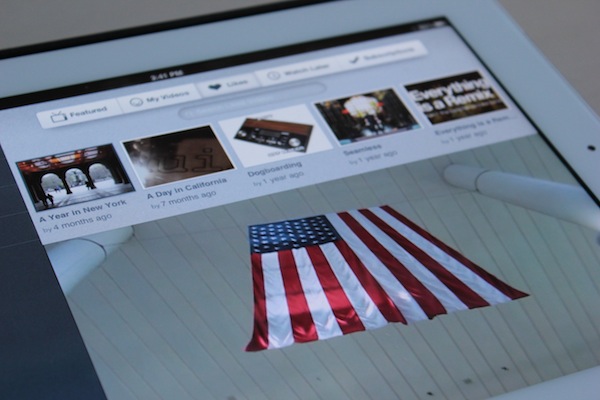
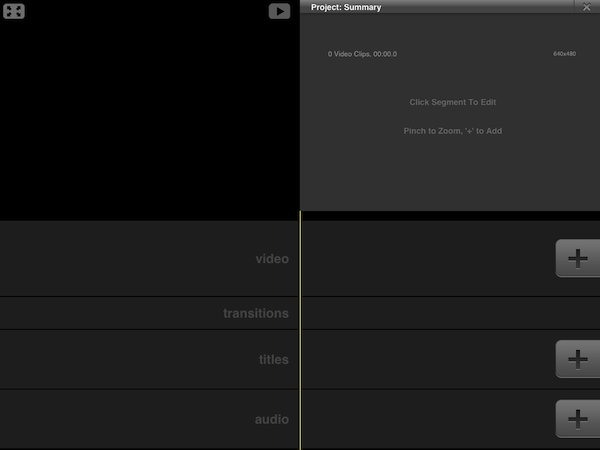
Vimeo for iOS puts great focus on discovery, sharing, and uploading of your own videos. Whereas the editing interface of the iPad is largely similar to its iPhone counterpart (meaning you’ll be able to easily drop media onto the editing timeline, add effects and transitions – but don’t expect the complexity of other apps like iMovie and Avid) with options to shoot new videos or load existing ones off the device’s Library, the remaining sections of the app have been reworked to fit better on the iPad’s larger screen. Upon firing up the app, you’ll be brought to the main Featured area, which lists featured videos and Vimeo staff picks, enabling you to start playing a video in the lower portion of the screen – all whilst being able to read descriptions, like a video, or save it for later. My Videos and Likes are also available in this page’s tab bar at the top.

The app works both in landscape and portrait modes, albeit I’ve found to enjoy it more in landscape given the additional screen real-estate. Videos can be played in standard definition or HD, just like on Vimeo’s website. Most of the functionalities of Vimeo.com have been ported over to the app, including comments, sharing options (for Facebook, Twitter, Tumblr, WordPress, and email), Creative Commons information, and stats. Overall, I thoroughly enjoyed the way Vimeo designers converted the design of Vimeo.com to a native client – I also found the iPhone’s grid UI scheme to be particularly easy to navigate.

There are a couple of interesting things about this app. For one, Vimeo has embedded a link to purchase a Vimeo Plus subscription into the app’s Settings, but this link simply points to Vimeo.com and not, say, Vimeo’s own Upgrade page. It’s still a curious choice given Apple’s history with Amazon and links pointing to external stores (which, apparently, Vimeo isn’t doing here as they simply redirect users to the website’s homepage). In the same Settings UI, you can check on your weekly upload limit, remaining HD uploads, and overall stats. You can allow only WiFi uploads, clear the file cache, and reset the app from a sub-menu in the Settings.

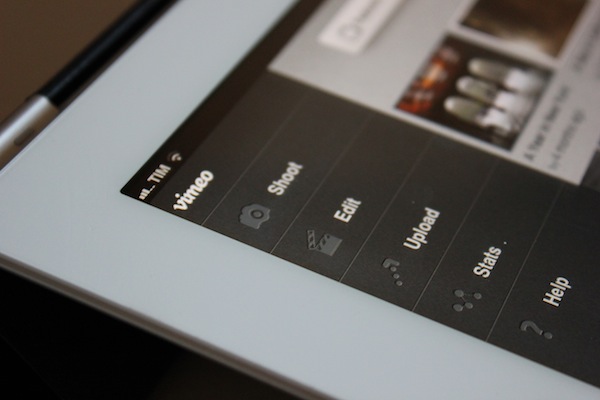
Whilst the Help section opens an awkwardly small Help Center webpage inside a popover menu, much better is the functionality offered by the Stats tab, which lists your Top Plays by number of views, date, and country. The Edit section, which is project-based, mirrors the feature set of the iPhone app, allowing you to import videos from your Camera Roll, edit them, then upload them to Vimeo. From this area, you can also delete projects, render and export, or simply add new projects by hitting the + button in the top right corner.

I think Vimeo’s second attempt at delivering a rich iOS experience is a good one. The iPad app still has some rough edges, and its editing capabilities aren’t obviously on par with more powerful offerings from the App Store, but it’s sufficiently good for quick edits, and pretty great at browsing and discovering new videos. It also makes for a sweet “catch-up solution” thanks to its lean back Watch Later feature integrated right into the app. The updated iPhone app, on the other hand, is cleaner, easier to use, although it could be deemed as slightly unoriginal after all the apps that have adopted a grid design in the past years. Still, the even-so-less-innovative Home screen grid implementation works fairly well for this kind of app.

Vimeo 2.0 is a great update, and an overall good app. Give it a try for free on the App Store, and check out an extremely quick attempt at capturing the essence of the app after the break. Read more


Apple Airs New iCloud Commercial: Harmony

Earlier today Apple posted a new TV ad on its website and YouTube channel, this time about iCloud. Carrying a new tag line “Automatic. Everywhere. iCloud.”, the commercial focuses on practically every functionality of Apple’s cloud service, from Photo Stream and Calendar sync to app downloads, Address Book sync, and iBooks. In particular, the ad shows the kind of integration that’s possible with iCloud – the video briefly touches upon Automatic Downloads from one device to another, and more prominently features Photo Stream for photos and calendar events synced across devices.

The YouTube description of the ad reads:

With iCloud, the stuff you love is everywhere you need it. Automatically.

It’ll be interesting to see whether Apple will start using this new “Automatic. Everywhere.” marketing slogan elsewhere. In the meantime, check out the video below.
Read more


MacStories Reading List: February 19 – February 26

In our longest Reading List collection to date, we’ve curated some great articles about Mountain Lion (which is still a hot topic among bloggers), Apple’s renewed “scamming apps” problem, and a variety of other subjects, including iOS-ification, the Home Screen, and third-party developers. It’s not just about quantity (more than 15 entries this week) – we think this week’s Reading List is the one with the highest quality material so far. So grab a good cup of coffee (albeit we have nothing against tea, as some of you have asked), your favorite chair, and let’s dive in. Read more


Apple Acquires “Search Engine for Apps” Chomp

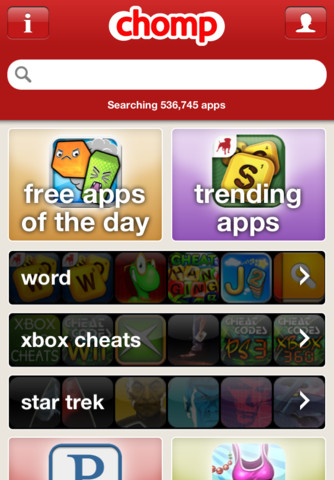
According to MG Siegler at TechCrunch, Apple has acquired Chomp, app search and recommendation engine that has an iPhone app available in the App Store. Siegler reports that the Chomp team and product will be transitioned over to Apple, although details of the deal aren’t clear:

My understanding is that such deals will remain intact for now but are likely to end once the Chomp team and product transitions over to Apple. The same is likely true for Chomp’s stand-alone products.

I haven’t been able to learn the exact terms of the deal, but I hear that all the investors should be very pleased with the outcome. This is not a cheap “acqui-hire”, Apple has bought the Chomp team and technology and plans to use both to completely revamp App Store search and recommendations, I hear.

With Apple’s Tim Cook famously saying he’s not religious about holding or not holding the cash (nearly $100 billion) at Apple’s disposal, the acquisition of Chomp should be a clear sign of the company’s willingness to invest in talent and technologies from startups that have proved to care about quality of their products. Chomp in particular is an interesting choice for Apple, as it might signal important changes coming relatively soon to the App Store, especially on the side of discovery of apps with recommendations targeting a user’s tastes and behaviors. With over 700,000 apps available (per AppShopper) and thousands getting approved every day, the issue with discovery is a real one: most developers struggle to get their apps noticed and the best chance for popularity still remains Apple’s own feature in the App Store’s homepage with the “App of the week” and “New & Noteworthy” sections. Furthermore, the existing App Store infrastructure doesn’t have integrated sharing features for Twitter and Facebook, which Chomp has.

It’s obviously not clear what Apple has in store for Chomp yet, but here’s a couple of wild guesses based on the app’s existing functionalities:

Improve app discovery learning what an app does, rather than just its name. Currently, Apple seems to be basing its algorithm for discovery (part available in the Genius UI, part in iTunes under an app’s description) on categories and “what other customers also bought”. Chomp is capable of learning an app’s core functions, and find similar or complimentary apps.

Build sharing of apps for Twitter and Facebook right within the App Store. This would be a nice feature in iOS 6 – alongside a mobile wish list.

Improve search with suggestions, tags, and a cleaner layout similar to what Chomp already does.

Let App Store users create profiles and revamp the whole review system, as developers have been asking for years now. The profile option would be an interesting possibility, and it could easily work in conjunction with Ping, which has failed to gain traction. This has also been experimented by other apps that have tried to compete in the app recommendation space in the past years.

As with the recent Anobit acquisition, it’s likely Apple will confirm the acquisition of Chomp soon. It will be interesting to see if and how Chomp’s technologies will be integrated with a future version of the App Store, which keeps on growing at a tremendous pace but needs a better system to discover apps and filter out less important results.

Update: Apple has confirmed the acquisition to AllThingsD without providing further details on how the service will be integrated with the App Store.


iOS 6 Wishes

I read two great articles over the past few days detailing how Apple could improve iOS by taking a page from its competitors’ book (specifically, Android and Windows Phone 7) to enhance the way apps communicate with each other, and by looking at the way webOS handles multitasking and application windows on the TouchPad. They are good articles with some clever ideas, so make sure to check them out.

I have been writing a lot about ecosystems, file sharing and inter-app communication in the past months. After the public launch of iCloud last October, I’ve argued that Apple’s cloud solution is the platform for the next decade that might as well become the “operating system” itself, although it (and, by reflection, iOS) still lacks document-oriented functionalities to facilitate the process of creating and moving documents between apps. I have also made the case for a “universal save” option for iOS apps that might take advantage of iCloud, and, fortunately, it seems Apple is listening.

Today I’d like to go on the record with a list of features and options I’d like to see in a future version of iOS. I’m not typically huge on lists or “feature request” (last one was a series of predictions for WWDC ‘11), but I believe it’s worth discussing the direction where Apple is headed with its mobile operating system and, while we’re at it, propose solutions to improve existing apps and system utilities. I’ll check back on this list after WWDC ‘12. Read more