Federico Viticci

10765 posts on MacStories since April 2009

Federico is the founder and Editor-in-Chief of MacStories, where he writes about Apple with a focus on apps, developers, iPad, and iOS productivity. He founded MacStories in April 2009 and has been writing about Apple since. Federico is also the co-host of AppStories, a weekly podcast exploring the world of apps, Unwind, a fun exploration of media and more, and NPC: Next Portable Console, a show about portable gaming and the handheld revolution.

TestFlight Acquired By Burstly, Launches TestFlight Live

TestFlight, a popular over-the-air testing platform for developers, has been acquired by app monetization service Burstly, the company wrote in a blog post today. Based off Apple’s OTA install technology for beta applications and iOS’ certificate system, TestFlight has been used by thousands of developers in the past year to provide an easy and intuitive way to their users to install beta versions of iPhone and iPad apps without going into the manual process of managing .ipa files with iTunes on a Mac or PC. With a web app that works on desktop computers and mobile devices, TestFlight has powered ”over 70,000 developers sharing more than 130,000 apps with a group of 280,000 testers”. The acquisition, explained here, is meant to extend TestFlight’s capabilities as a platform to enable developers to offer beta apps, track revenue and monetization with Burstly, and collect other sets of data and user engagement with a new product launched today, TestFlight Live.

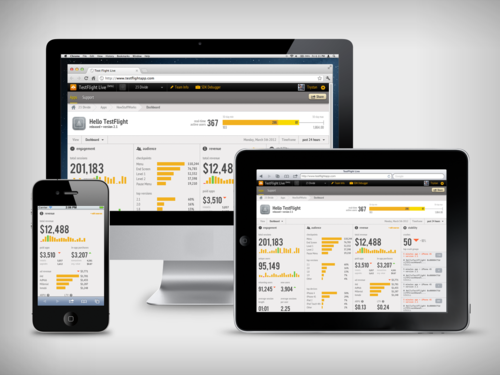
We always planned on launching a production version of TestFlight, but we wanted to push ourselves to start solving production problems and not simply copy the beta feature set. Along with help from the Burstly team, we think we have taken a great first step with TestFlight Live. Our goal with TestFlight Live is to provide a real-time dashboard that displays actions, symbolicated crash reports, and revenue. For the first time, developers will have a single dashboard that provides enough information to derive insights into Revenue Per User (RPU) and Customer Lifetime Value (CLV) to better understand your app business. Previously, this level of information would be from multiple sources and there was no easy way to collect it.

Burstly was the key contributor to the revenue portion of TestFlight Live, in addition to the concept they actually developed the APIs that make it possible. The revenue source options in TestFlight Live enable developers to include app sales data, in-app purchase data, and ad network revenue from multiple partners. You do not need to work with Burstly to pull in any of this data. If you do not want the revenue segment in your dashboard, we have provided a way for you to hide it.

The real-time, mobile-friendly TestFlight Live can be checked out here, and, apparently, developers willing to implement it in their App Store apps will simply have to add one line of code to their existing software to start getting reports from TestFlight Live, which is a free service. TestFlight Live can track things such as crash reports – allowing developers to instantly understand what’s causing an app to crash, thus enabling them to start working on a fix right away – and user engagement in the form of “checkpoints” (milestones that users unlock using an app, such as “launched the Settings screen”), in-app purchases, device types, and OS versions. This system works in real-time, any minute of any day, as long as a TestFlight-enabled app can connect to the Internet. TestFlight Live has a separate dashboard from regular TestFlight, which will continue to be available as a free service to manage over-the-air beta apps.

Burstly integration, on the other hand, opens the door to a bunch of different functionalities, most of them aimed at data gathering in relation to ads and monetization. Burstly can mediate ads from different networks, cross-promote and track installs, provide ads of different shapes and sizes, and offer “criteria” to developers to control what kind of ads are displayed on screen. The service comes with a series of features that are being used by partners such as Rovio, EA, and Zynga. More details are available here.

TestFlight, meanwhile, says that their products and Burstly will remain separate. TestFlight services will remain free, but the developers are looking at paid options for the future. New features on the roadmap (and on track for a March launch) include better performances, a desktop app for developers, and a new UI.

TestFlight, which launched an enhanced SDK back in September, has become one of the most popular options available to developers to manage apps in their testing stages without forcing users to manually install them with a Mac or PC. Another similar service is HockeyApp, which we covered in May of last year (and has improved a lot since). To read more TestFlight’s new owners and the new services, check out the company’s blog post.
Gallery: Amsterdam Apple Store Grand Opening

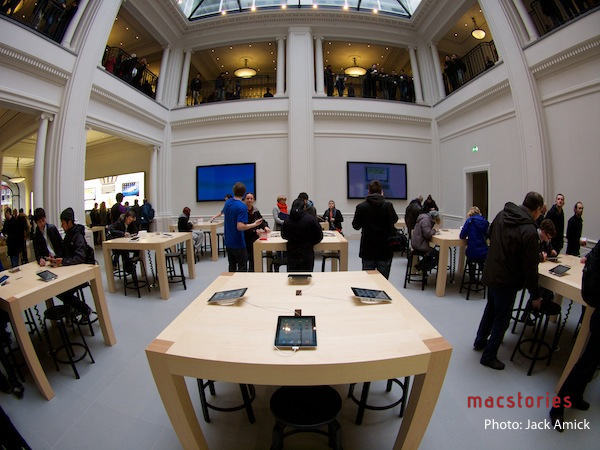
On Saturday, Apple officially opened its first retail store in Amsterdam. Located at Hirschgebouw, Leidseplein 25, the first store in the city blends historical architectural elements with Apple’s unique style and approach to retail presentation. Gary Allen of ifoAppleStore has a great recount of the opening day:

In typical Apple fashion, construction of the interior was a labor of love, taken from history. Everything is a recreation, although it is impossible to tell even from a close examination. The employees are still in awe of the store, since they had their first view of the interior just nine days ago. Steve Jobs signed off on the project before the project before he died last year, and Apple has taken great care within the company to credit the artisans, craftsman and construction team who created the store.

The superlatives are many: most number of Apple products on display of any store in the chain, second-largest store in square-footage, and largest volume of any store in the chain. But those are just numbers, when a store should really be judged by its appearance.

Whilst you’ll be able to find more information about the store on Apple’s dedicated retail webpage, we wanted to share a series of photos our friend Jack Amick took last Saturday and sent us. You can find them after the break. Also make sure to check out Jack’s Flickr photostream for some full-size shots, and a video.

Update: We’ve posted a full-size version of the photo showing Senior Director of International Retail Steve Cano at the Amsterdam Apple Store.

Read more


Studio Neat, Makers of The Glif, Release Their First iOS App, Frames

When Thomas Gerhardt and Dan Provost set out to reinvent the market for tripod mounts and stands for iPhone in 2010 with The Glif, little did they know their idea would spur a new generation of creators and designers that seek out resources and funds for innovative iPhone-related projects through crowd-sourcing funding platform Kickstarter. Back when Kickstarter was still relatively “small” – the quotes are necessary here, as the site was already well known among creatives, but clearly not as popular as the service that’s now backing projects exceeding $2 million in funding – Studio Neat became an example in the tech and Apple communities of a great idea (tripod mounts for iPhone) combined with a fantastic everyday product (the iPhone’s camera) for a successful funding campaign. And Studio Neat, unlike others, even gave the whole fund-through-Kickstarter thing a second shot, coming back with an equally popular campaign – this time for an iPad stylus, The Cosmonaut. Both The Glif and The Cosmonaut turned from ideas and funding campaigns into commercially available products and feasible businesses, allowing Tom and Dan of Studio Neat to revamp their website and offer their iOS accessories directly to customers, tweaking The Glif’s package along the way with a Plus version that builds on the original vision, adding more iPhone camera-related goodness to the mix. Today, Studio Neat decides to try something new – not another Kickstarter campaign for a new iOS accessory, but a brand new iOS app available on the App Store called Frames.

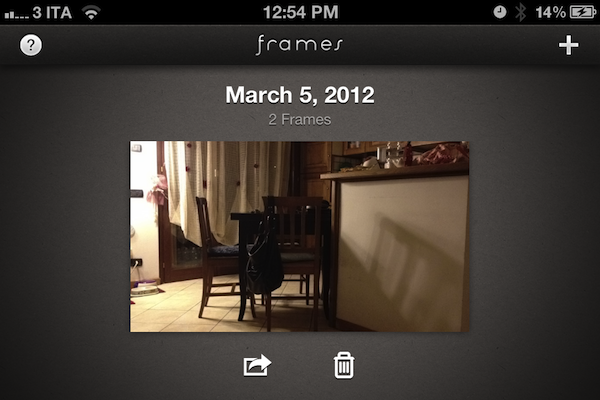
Clearly meant to work best in conjunction with The Glif, Frames is an iPhone app to create stop motion and time-lapse movies with an intuitive interface. With a beautiful icon and an elegant dark design with thumbnail-based navigation, Frames makes it extremely easy to capture various “frames” – a sequence of still images – to play them back at a certain speed to achieve the effect seen in stop motion movies.

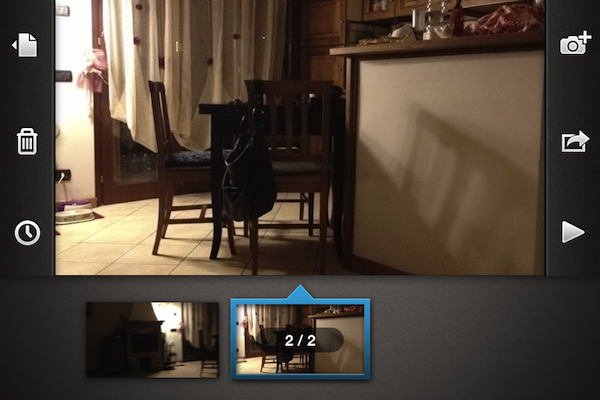
The app itself is fairly simple, and anyone will be able to pick it up immediately without necessarily being an expert in stop motion animations and editing. A main Projects view lets you create new videos and export them to the Camera Roll at 720p in a native format that can later be recognized by apps like iMovie (something you might want to consider as Frames can’t add music or text to your videos). Once in a project, you can scroll through frames at the bottom, and adjust the number of frames per second with a slider – you can go from 1 FPS up to 120 FPS. A Play button lets you roll the video so you can get an instant preview of what you’ve accomplished, whilst tapping on a + button opens the camera interface to add new stills to a project, choosing between stop motion mode (manual shutter) and time-lapse (automatic shutter: you set a time to lapse between stills, and the camera takes care of the rest).

The camera of Frames comes with a grid view, onion skinning, possibility of switching between rear and front-facing camera, AE/AF lock, and overall clear design that explains how many frames you’ve taken in a given amount of time very well.

I’ve been using Frames on my iPhone 4S, and I’m thoroughly impressed by how Studio Neat managed to turn stop motion into a streamlined process that takes advantage of the iPhone’s hardware to produce great results. Whilst you’d be able to achieve similar results with a video editing application if you know where to look and what to tweak, the focused approach of Frames (something that apps generally share) and its $2.99 price tag more than justify the purchase – personally, I can say I’ve been having fun making time lapse movies using Frames’ easy-to-understand menus and options, whereas a full-featured video editing app or manual process would have probably turned me away in frustration.

Frames is a “neat” utility to create stop motion movies without the complexity of regular video editing. You can get the app at $2.99 on the App Store.
Read more


MacStories Reading List: February 26 – March 4

It’s been a transitional week for the Apple community, with pundits busy on arguing whether a Retina Display in the upcoming iPad 3 could mean Apple is getting ready to enable Retina resolutions on Macs as well, and just about everyone else being simply excited about Apple’s media event, scheduled for March 7th. And in between talks of new displays, Mountain Lion (again), and features we should see in iOS 6, Apple still managed to hit 25 billion downloads from the App Store with an updated list of all-time top apps.

A note on the system we’re now using to track and collect our Reading List archives. When we started the Reading List in January, we wrote ”there’s some great writing on the Internet that we often can’t link to in our daily coverage, if only because there isn’t much we can add to an already excellent article”. On top of that, I’d like to add that there are some great authors on the Internet, and in particular in the Apple community, that we’d like to directly support with our weekly collections of links and excerpts. That is why, starting today, you’ll find an archive of every article ever appeared on MacStories’ Reading Lists on Readability.

With a paid option that gives back 70% of users’ contributions to the sites they read the most, we hope to make it easier than ever to find articles we have liked and collected, and to actively, economically contribute to the people behind those articles. You can find the official Readability iOS app in the App Store (with the aforementioned paid option available as in-app purchase), and our review here.

Obviously, you’ll still be able to use your favorite read-later or browser app of choice to consume our weekly Reading List. And as usual, on behalf of the entire MacStories team, I wish you a good reading. Read more


Apple Reveals New “All-Time Top Apps” Following 25 Billion Downloads

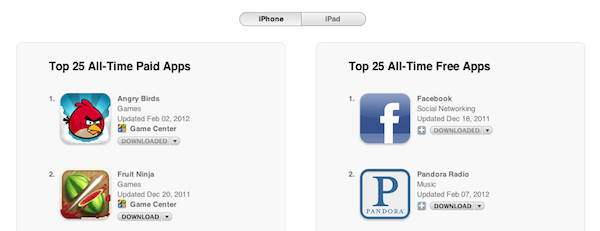
Last night, Apple reached the expected milestone of 25 billion apps downloaded from the App Store since the official opening in 2008. Whilst we’re waiting for the company to announce the winner of a $10,000 App Store gift card, Apple has updated its App Store page that lists the all-time top paid and free apps to reflect the changes occurred in the past 12 months. You may remember Apple posted a similar page in January of last year ahead of 10 billion downloads, and has been tweaking the entries ever since, keeping track of overall downloads in the App Store. We’ve compiled the charts (which include 25 apps each) below. Read more


Apple Preps Yerba Buena For Next Week’s iPad 3 Event

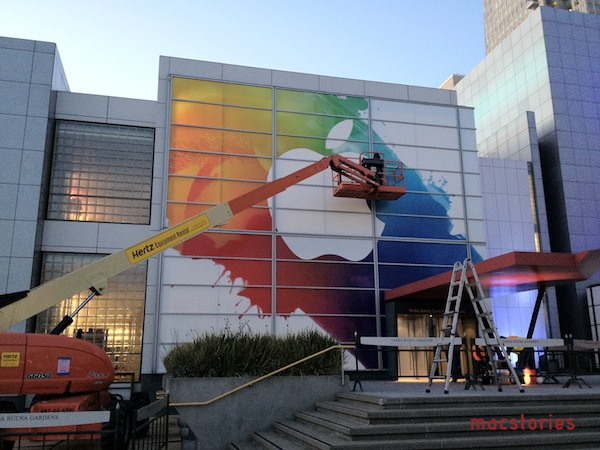
Apple has begun preparations at the Yerba Buena Center for the Arts ahead of next week’s media event, where the next-generation iPad is rumored to be announced. Earlier this week, Apple sent invitations to the press for the event they will hold in San Francisco on March 7th, starting at 10 AM PST.

We are updating this post with more photos of Apple’s banners at the Yerba Buena Center – these banners are typically of little indication of what the company will announce, but they’re still cool enough to check out, if only for the design alone. Based on what we’ve seen so far, the white Apple logo on top of splashes of color is reminiscent of Apple’s banner for the original iPad event in 2010.

More below. We’d like to thank Read It Later’s Steve Streza for providing the photos. Read more


Retina & Universal

Matthew Panzarino at The Next Web has a good overview of a possible issue with the rumored iPad 3’s Retina Display and universal apps: download sizes and 3G. He explains:

Apple’s iPad 3 is set to launch next week and all signs point to it having a Retina display running at 2048×1536 pixels. This should provide a clearer, sharper image to most users and will display many applications in a fantastic new light, as long as developers have prepared them properly.

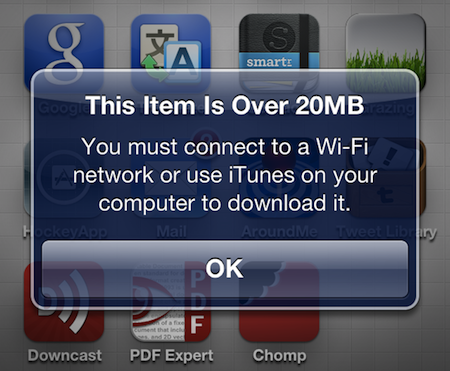
But the necessity to include these images may present a problem with the mandatory 20MB file size limit that Apple has imposed on 3G downloads.

The problem being: if the iPad really goes Retina, then developers of apps using custom graphics will have to use new images, which will likely be heavy and bump the download size of an app. For universal apps, already carrying Retina and non-Retina images (the latter both for iPhone and iPad), this can become a serious issue if we assume that most users who will see the “Over 20 MB” alert will be scared away or simply forget to buy an app. And developers (and Apple) want to make the process of buying apps as frictionless and immediate as possible.

I see two solutions. Either Apple gets the carriers to agree to larger download sizes, establishing a new “average” that should work for most apps (let’s say 60 MB as Panzarino suggests), or they rebuild the download mechanism completely by allowing devices to “ignore” resources they don’t need. The second solution would be a “cleaner” approach, in that it would address the root of this likely scenario – that is, devices downloading apps containing all kinds of images and resources for Retina and non-Retina displays.

By “localizing” images in a way languages are localized on the OS, Apple could find a way to know if an image is destined to an iPad or not. And if so, if it’s also destined to a Retina iPad, or old-generation iPad. Furthermore, in theory, this would also allow Apple to differentiate between images used by an iPhone and iPad which, right now, are always downloaded within the same, single .app package. Paul Haddad, who tweeted about the issue today, confirms my suspicion that this method would require a fundamental change to apps – I can only assume it would require different naming conventions or new APIs to let devices be “smarter” in understanding the resources they need to look for when downloading a new app. But the issue is real – always assuming the iPad 3 will feature a Retina Display, which seems like a pretty good bet at this point – and I think this is something Apple has surely considered.

The other way, of course, is to get carriers on board with larger downloads while on 3G – but the issue of universal apps bumping downloads (and thus 3G usage) would still remain for the users, and Apple would still need to somehow address the core of the issue, which is the existence of Retina and non-Retina devices downloading universal apps containing multiple custom graphics at the same time. I agree with Matthew, this issue will be an interesting one to watch.


Quick Review: Reflection

I was reminded by this TUAW article last night that a simple solution to enable AirPlay Mirroring from iOS to OS X didn’t exist – this is something I’ve been fantasizing about since the original iOS 5 came out and the iPhone 4S further cemented my belief that AirPlay Mirroring is an amazing solution to project apps and games on a bigger screen. Fortunately, in the same article TUAW’s Erica Sadun pointed to Reflection, a new app by developer David Stanfill (the same guy behind AirParrot), which enables just that: it turns your Mac into an AirPlay receiver for Mirroring, not just audio and video playback as other tools (like AirServer) do.

I bought Reflection right away because, like I said, this is something I’ve been looking forward to, and whilst I don’t think this method can replace higher quality HDMI connections just yet, it sure provides a handy way of getting an iOS device’s screen onto your Mac. Sort of the opposite of apps like Skala Preview, only working natively with iOS 5 and a desktop app that handles the incoming video stream.

Speaking of which, quality of WiFi and video can obviously become a major deal-breaker for many – especially developers or bloggers who are looking at Reflection as a way to record iOS screencasts and demoes with the comfort of a Mac and the tools it makes available for video recording and editing. Now, I’m no video expert, but I’m fairly certain some sort of lossy compression is applied when mirroring an iOS device to the Mac through Reflection – but I’ve only spotted this loss in quality (example) a few times. Once installed, Reflection allows you to set some default settings for all incoming connections: you can set a receiver’s name, force full-screen mode (Lion’s native one) on all new Mirroring sessions, and optimize the app for different device types. These include standard iPhone resolution (320x480), Retina iPhone (640x960), iPad (1024x768), Hi-Res (1920x1080) and Any Device (1280x720). Similarly, devices can be mirrored inside a “frame”, and you’re also given the option to force orientations with keyboard shortcuts – unfortunately, the frames provided in Reflection don’t look nearly as great as ScreenTaker’s, so here’s to hoping for better graphics in a future update.

As I mentioned above, performances haven’t really been an issue with Reflection and my iPhone 4S/iPad 2 on the two local networks I tested the app with (powered by an AirPort Extreme and AirPort Express), but I have some points to make in regards to usage and why you should try or avoid Reflection.

  • If you’re looking for pixel-perfect reproductions of your iOS display on your Mac, consider something else. Reflection may experience the occasional drop in quality (or simply crash – it happened to me only twice though), and you don’t want to record your screencasts and promo videos over and over.
  • If you just need a quick way to demo iOS apps on your Mac, buy Reflection.
  • If you create your presentations on an iPad and have always looked for a way to easily mirror them on the Mac with no cables, get Reflection.
  • I have been using Reflection to play Temple Run and Whale Trail (iPhone versions, because I like the controls better) on the Mac’s screen, and performances have been pretty great. Games are playable, there are some minor slowdowns here and there but nothing that truly impacts the experience. Reflection crashed once while mirroring Temple Run.
  • Generally speaking, iPhone games at Retina size to a Mac in full-screen mode can be a good alternative to buying Mac versions of the same games again. I’d recommend playing puzzle/adventure or more relaxed games this way, avoiding more frenetic games (action, sports) due to the possibility of slowdowns and crashes. But: I can confirm GTA III for iOS mirrored to the Mac seems like the future.
  • I have also tested the Plex app (for iPad) mirrored to the Mac with content from a Mac mini in the US with basically zero lag. Keep in mind Reflection supports the full AirPlay Mirroring experience, which includes audio.
  • Reflection is a great way to keep often-used or dashboard-like apps for iOS on the Mac’s screen – but you’ll want to click on them, so remember this is AirPlay Mirroring, not VNC.

As you can tell, I’m impressed by Reflection. It is already a very stable and responsive “hack” to get AirPlay Mirroring on the Mac, and I’m sure the few bugs I’ve encountered will be addressed soon with an update (as well as performances in general). Reflection won’t give you 100% reliable color reproduction and pixel state-of-the-art, but if you’ve been looking for a way to “just get” Mirroring on OS X, I can’t think of a single reason why you shouldn’t (at least) try Reflection.


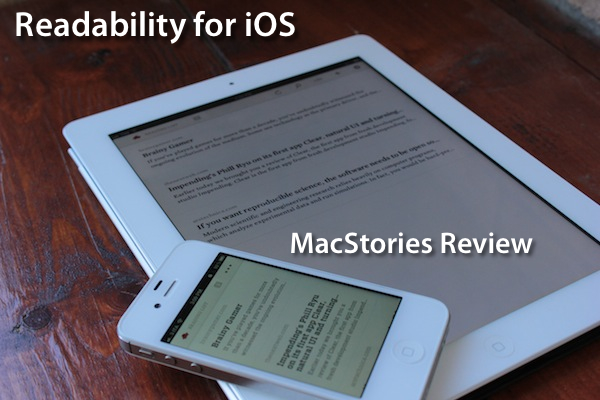
Readability for iOS Review

The official Readability app for iOS, available today on the App Store, had a complicated history with Apple and its approval process. Since Readability relaunched last year with an ambitious focus on publishers and “read anywhere”, the service struggled to get its native app for iPhone and iPad approved by Apple due to an initial controversy with iTunes app subscriptions, which were seemingly reserved to “publishing apps” only, and weren’t meant to be accessed by any third-party developer. With the app stuck in a limbo, Readability went back to the drawing board and developed a full-featured HTML5 web app for mobile devices, whilst releasing additional tools for the web and Kindle at the same time. Months passed, and Readability – which in the meantime put together a quite impressive list of advisors and supporting developers – announced an updated strategy with free access for everyone, and a paid option for users willing to actively and directly contribute to the sites they are reading the most in Readability. With the new free plan, Readability also announced they had submitted a new version of their iOS app to Apple. Three months later, the app is now live on the App Store.

I have been able to test the app – a collaboration between Readability and development and design studio Teehan + Lax – for the past week, and I’m fairly impressed by this first version. But let’s go back to the main point: what’s Readability? And how does the native iOS app complement the ecosystem the developers have built in the past 12 months?

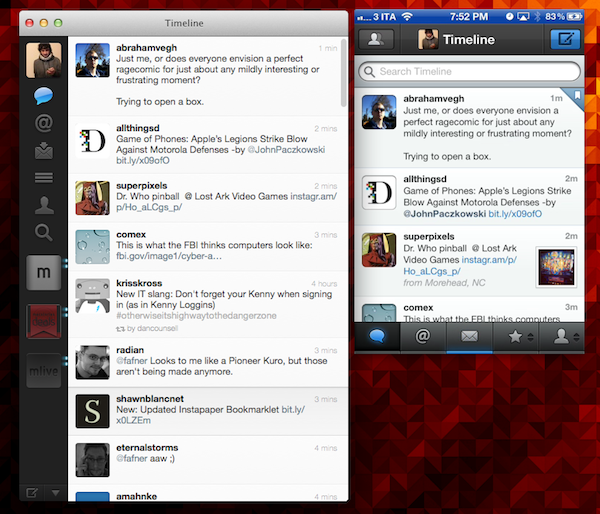
Much like Instapaper, Read It Later, or recent entrants in this scene like Evernote Clearly, Readability’s goal is to declutter webpages to offer an elegant, comfortable reading view on any device. Meant for web articles, Readability can fetch a webpage’s text and images, strip out unnecessary elements like ads, and reformat everything with a focus on beautiful typography, a clean layout, and the possibility of syncing this reformatted content to mobile devices like an iPhone, iPad, or Android handset. Like the services mentioned above, Readability works in any web browser thanks to a bookmarklet or extension, as well as compatible third-party apps that have been updated to include a “mobilizer” functionality or a “send to” action to forward URLs directly to a Readability account. As you can see from Readability’s website, the list of apps supporting the service includes excellent names like Tweetbot (our review) and The Early Edition 2.

With the proliferation of read-later tools and apps we’ve witnessed throughout 2011, why would anyone switch from, say, Instapaper or Read It Later to Readability, which is a rather new player in the field? Well, for one, Readability isn’t exactly new to this market, as the company behind it, arc90, licensed the original codebase for its reading technology to Apple for the Safari Reader feature seen on the Mac and iOS. Second, to differentiate its product from the plethora of available read-later browser companions and mobile apps, Readability spiced up its offering with a unique “support the publishers” spin that, as we detailed, allows users to pay for Readability and give 70% of their subscriptions back to the websites they read.

Readability explains:

Here’s how it works: Every time you use Readability to read an article, a portion of your monthly contribution is earmarked for that publisher or writer. For example, if half of the stories you read in a given month come from The New York Review of Books, half of your earmarked funds will be allocated to The New York Review of Books.

With these differences in mind, I was excited to try the finally-approved Readability iOS app, and see how it would compare to Instapaper, which is my go-to app and service when it comes to saving articles for later, as I wrote in my review of version 4.0. From an Instapaper lover’s perspective, let me get this out of the way right now: if you’re used to all the features Instapaper offers – especially on the iPhone and iPad – you’ll be disappointed to find in Readability for iOS a “simple” app to read the articles you’ve saved from a browser. There is no discovery, no Friends integration, no support for forwarding liked items to Pinboard or Evernote. On the other hand, Readability’s simplicity and focused approach might just be what you’ve been looking for, so let’s dive in. Read more