Federico Viticci

10763 posts on MacStories since April 2009

Federico is the founder and Editor-in-Chief of MacStories, where he writes about Apple with a focus on apps, developers, iPad, and iOS productivity. He founded MacStories in April 2009 and has been writing about Apple since. Federico is also the co-host of AppStories, a weekly podcast exploring the world of apps, Unwind, a fun exploration of media and more, and NPC: Next Portable Console, a show about portable gaming and the handheld revolution.

New iPad Launches In 30 Additional Countries This Week

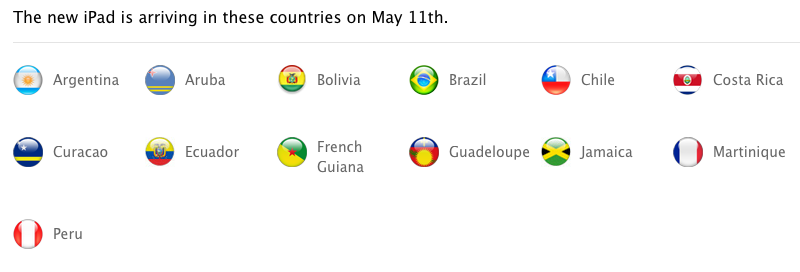
Off to a “tremendous start”, Apple’s new iPad has also become the company’s fastest rollout to date, adding 56 launch countries in 42 days, and, later this week, 30 additional countries with two separate rollouts during the weekend. As confirmed by Apple’s Latin America website (via MacRumors), the new iPad will launch in 23 countries on Friday, May 11; MacRumors also examined other international Apple websites in the Middle East, and confirmed Apple will also roll out the new iPad in 7 countries (including Egypt and United Arab Emirates) on Saturday, May 12.

As usual, here’s a recap of the iPad’s launch dates, plus units sold until Q2 2012.

March 16 (10 countries): United States, Australia, Canada, France, Germany, Hong Kong, Japan, Singapore, Switzerland and the UK.

March 23 (25 countries): Austria, Belgium, Bulgaria, Czech Republic, Denmark, Finland, Greece, Hungary, Iceland, Ireland, Italy, Liechtenstein, Luxembourg, Macau, Mexico, The Netherlands, New Zealand, Norway, Poland, Portugal, Romania, Slovakia, Slovenia, Spain and Sweden.

April 20 (12 countries): South Korea, Brunei, Croatia, Cyprus, Dominican Republic, El Salvador, Guatemala, Malaysia, Panama, St Maarten, Uruguay and Venezuela.

April 27 (9 countries): Colombia, Estonia, India, Israel, Latvia, Lithuania, Montenegro, South Africa and Thailand.

May 5: Turkey (quiet launch).

May 11 (23 countries): Argentina, Aruba, Bolivia, Botswana, Brazil, Cambodia, Chile, Costa Rica, Curaçao, Ecuador, French Guiana, Guadeloupe, Jamaica, Kenya, Madagascar, Malta, Martinique, Mauritius, Morocco, Peru, Taiwan, Tunisia and Vietnam.

May 12 (7 countries): Bahrain, Egypt, Jordan, Kuwait, Qatar, Saudi Arabia and United Arab Emirates.
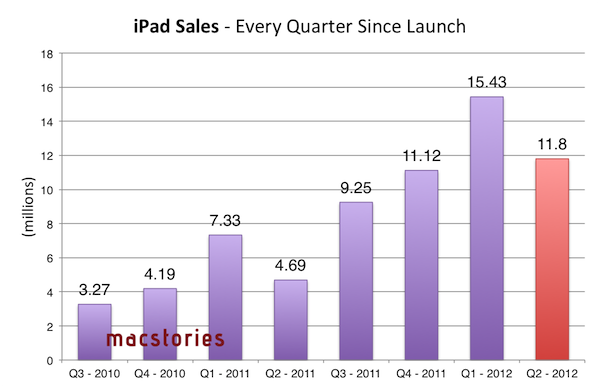
With this week’s launches, the new iPad will be available in 87 countries worldwide (including Turkey) after 57 days. With 12 million units sold in the past quarter, Apple said the new iPad is “off to a great start”.

10 Ideas for iCloud.com Notifications

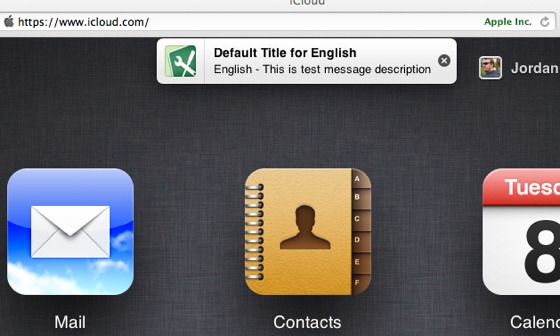
As noted by MacRumors earlier today, Apple appears to be testing a new browser-based notification system for iCloud.com. Judging from the screenshot that clearly shows a testing environment being accidentally brought to a user’s attention, the system appears to be similar in terms of design to what Apple introduced with iOS 5 last year.

While it’s not clear whether Apple may be planning to revamp iCloud.com completely to include notifications or if today’s spotted banner is the sign of something else, with WWDC ‘12 approaching I thought it might be interesting to run down some possible implementations.

iCloud.com is an option, and not a central part of the experience Apple is envisioning with iCloud and devices going forward. Mobile devices and computers are integrated with iCloud in a way that iCloud itself becomes the operating system. The browser-based, neatly-designed iCloud.com is a way to access some of iCloud’s content through the open web (as long as you have a modern browser). While not fundamental to the experience, I believe there are some additions Apple could make to improve iCloud.com and turn it into a viable substitute to native iCloud interfaces. Specifically, web notifications could play very well in various scenarios.

iMessage on the web: The first beta of Messages for OS X left many disappointed, and an iMessage web app could obviate the need of a unified iChat/iMessage desktop app, while providing a great solution for browser notifications.

Email and calendar alerts: An obvious one, yet a possibly great system to receive notifications while browsing other sections of iCloud.com.

App-free notifications: Assuming Apple is really testing notifications for iCloud.com, I’d be interested in knowing whether their idea is to display notifications exclusively on iCloud.com while open. In fact, while I always forget to visit iCloud.com on my Mac, a notification system for (not from) iCloud.com would be perfect to remind me to visit and use the web app. I don’t think this is going to happen, as I see such system being more a way to simply display alerts inside iCloud.com.

Jump-to-section: And if such system is being built to notify users of changes while on iCloud.com, I would expect to be able to click on a notification, and have iCloud automatically open the associated section of the site.

Document changes: Right now, we don’t know why Apple is building a notification system for iCloud.com. We don’t even know whether the “leaked” banner could be linked to a future public feature, or an internal use-only functionality. However, it would be nice if a notification system for iCloud.com could inform users of changes to documents stored on iCloud.com. This plays well with the next point…

Sharing and collaborative features: Apple is discontinuing iWork.com, and the company hasn’t announced any plans for a possible revamped sharing system for documents. iCloud.com notifications could inform users of changes to a document edited by someone else, and they wouldn’t necessarily require a web-based editing interface to go with (though a Google Docs-like solution for iCloud users would be an amazing addition to my workflow).

Find My iPhone and Find My Friends: Notifications could tell users about a found device, or a family member nearby, though I assume those would only be a nice extra compared to the functionality already enabled in the respective native apps.

Game Center: Apple’s social gaming service is getting a dedicated app with Mountain Lion, but for the sake of options, iCloud.com could gain a web counterpart – with notifications to stay on top of friend requests and more.

Twitter: on iOS 5, users can configure their Twitter accounts at a system level to tweet and log into other apps. On Mountain Lion, desktop users will enjoy support for Twitter notifications directly into Notification Center. It would be nice if everyone else got nice little banners for Twitter replies and DMs on iCloud.com – clicking on them could take you directly to Twitter’s website, and it would offer a way to stay on top of Twitter even when using iCloud.com.

Presence: I have written about this idea in my iOS 6 wish list. If Apple is extending notifications to iCloud.com, the issue of notification overload could potentially increase again. Regardless of what kind of notifications for iCloud.com Apple is working on, there should be a way for iCloud to understand whether you are actively using an iPhone, iPad, Mac, or web browser.

Wildcard: App updates: This is my wildcard, and I do hope Apple will consider such functionality someday. Right now, I use AppShopper to get notifications for updates to the apps I already own. With complete access to my purchase history and iTunes on the desktop, Apple could easily notify my iCloud account of updates available on the App Store, and provide an easy way to click through and start a download.

Once again when it comes to iCloud, I’m just speculating on the direction Apple may be taking with its cloud service, admittedly the most promising platform the company is building for the next decade. Having thrown my two cents at this other side of the discussion, I look forward to seeing whether today’s alleged notification system will materialize in a finished product on June 11.


The Story Behind The “Steve Jobs as Franklin Delano Roosevelt” Video

The Story Behind The “Steve Jobs as Franklin Delano Roosevelt” Video

Michael Markman has published an interesting blog post detailing the backstory behind the rare Apple video featuring Steve Jobs as President Franklin Delano Roosevelt.

I called Chris in L.A. to outline what we were thinking. War movie. Stock footage from the D-day landings. Chaplin as Adenoid Hynkel hanging on the wall. Mac marketing team in cameo roles. And the topper: Steve as FDR. He said he’d start looking for a director (or maybe he had one in mind).

Glenn, Mike, and I marched into Steve’s office to give him the pitch. Pretty much the way I outlined it in the previous paragraph. Steve’s eyes were sparkling through it all. By the time I got to, “and you as FDR,” I had made the sale. In the binary universe of Steve Jobs, something is either a zero or a one. This was a one. Instantly. Definitively.

The “1944″ video was aimed at rallying Apple’s sales troops and the Mac division against IBM, which was taking the majority of PC market shares back at the time. Check out the full story here, and the video on YouTube.

Permalink

Ivy Bridge Macs

Ivy Bridge Macs

Alex Brooks at World Of Apple has published an interesting and detailed analysis of Intel’s Ivy Bridge processors and Apple’s possible timeframe for Mac refreshes this year.

In 2012 Intel’s new architecture is named Ivy Bridge, on a technical level the architecture marks a huge leap from the previous Sandy Bridge taking advantage of a 22 nm die shrink process. Some other headline improvements over Sandy Bridge include PCI Express 3.0 support, integrated USB 3.0 and the use of tri-gate transistors (sometimes known as 3D transistors) which offer the same performance as their “2D” counterparts but are said to offer up to 50% less power consumption. Apple may choose not to be cutting edge with all the technologies available in Ivy Bridge as the company tends to enjoy setting its own trends.

Brooks’ post includes a list of candidates for the new CPUs in the Mac mini, iMac, Mac Pro, MacBook Air, and MacBook Pro product lines. Check it out here.

This year’s much rumored Mac hardware upgrade would be, according to ongoing speculation, a thinner, completely redesigned 15-inch MacBook Pro that was originally reported last year ahead of the iPad 2’s launch. The rumor of a 15-inch MacBook Air/redesigned MacBook Pro has constantly surfaced throughout 2011, with most recent rumors indicating such machine carrying an Ivy Bridge CPU was “inbound” for April. Meanwhile, tests performed on the Ivy Bridge processor likely to be used in the MacBook Pro family showed significant improvements.

For first impressions on Ivy Bridge, check out AnandTech’s review of Intel’s Core i7 3770K CPU.

Permalink

Twitpic Releases iPhone App

Twitpic Releases iPhone App

Popular Twitter photo sharing service Twitpic announced today the release of its first official iPhone app, available for free on the App Store. Unsurprisingly, the app comes with a dedicated “editing” interface to apply filters to photos.

The built-in photo editor allows you to craft your perfect photo with simple editing tools and photo filters.

I have tried the app, and it is very streamlined. Because a number of Twitter apps in the past used Twitpic by default, it is likely you already have several photos uploaded to Twitpic (which automatically connects to Twitter). In accessing Twitpic with iOS’ Twitter integration, Twitpic automatically pulled old photos I used to upload to the service years ago. Photos come with captions, comments (as tweets), and views. From the Timeline view, you can check out Twitpics from the people you follow on Twitter.

The shooting process is also simple, but somewhat custom in the way Twitpic implemented camera controls on screen. An “add effects” button hidden in the upper right corner of a photo (you can take photos or videos, or import them from the Camera Roll) lets you quickly crop, rotate, or enhance an image before posting, and it’s powered by Aviary.

Twitpic for iPhone is free on the App Store. [via The Next Web]

Permalink

Apple Releases iOS 5.1.1 [Direct Links]

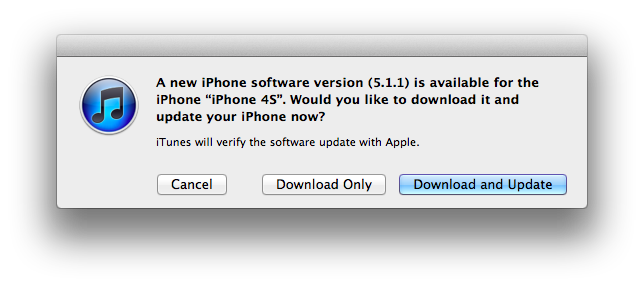
Apple has just released a new version of iOS, 5.1.1. The new version is showing up now on iTunes, and should be propagating shortly to Apple’s servers. iOS 5.1.1 includes “improvements and bug fixes”; as reported from the official changelog:

  • Improves reliability of using HDR option for photos taken using the Lock Screen shortcut
  • Addresses bugs that could prevent the new iPad from switching between 2G and 3G networks
  • Fixes bugs that affected AirPlay video playback in some circumstances
  • Improved reliability for syncing Safari bookmarks and Reading List
  • Fixes an issue where ‘Unable to purchase’ alert could be displayed after successful purchase

Apple’s last major update to iOS, version 5.1, was released in March.

iOS 5.1.1 direct download links below (build number 9B206).


Adobe CS6 Available Today, Creative Cloud Coming This Friday

Adobe CS6 Available Today, Creative Cloud Coming This Friday

Adobe today announced the release of Creative Suite 6, the latest iteration of the company’s design and publishing product line. As previously detailed, CS6 includes updated versions of Photoshop, InDesign, lllustrator, Dreamweaver, Adobe Premiere Pro, After Effects, Flash Professional and other products. Adobe also launched four suite versions: Creative Suite 6 Design & Web Premium; Creative Suite 6 Design Standard; Creative Suite 6 Production Premium; and Creative Suite 6 Master Collection. CS6 apps are also available as one-year or month-to-month subscriptions.

Estimated price for the suites is $2,599 for CS6 Master Collection, $1,899 for CS6 Production Premium, $1,899 for CS6 Design & Web Premium, and $1,299 for CS6 Design Standard, with upgrade, education pricing, and volume licensing available as well.

In officially announcing CS6 back in April, Adobe wrote:

Creatives get a ton of innovation across CS6, with milestone releases of all our flagship products,” said David Wadhwani, senior vice president, Digital Media Business, Adobe. “With CS6 and Creative Cloud, we’re also introducing new products, new mobile workflows and advanced publishing capabilities that show we are laser-focused on ensuring design, Web and video pros have everything they need for the delivery of high-impact content and apps.

Adobe’s new service Creative Cloud, also officially announced in the company’s press release today, will launch on Friday, May 11, as a $49.99 monthly subscription. The “digital hub” is aimed at “making, sharing and delivering creative work” by connecting Adobe’s CS apps with the company’s Touch Apps and other online services.

Check out Creative Cloud’s Tech Specs page for details on supported languages and services, the Buying Guide for a comparison table, and visit Adobe’s “Switch to the cloud” page to save $20/month on the first year of Creative Cloud (offer available to all registered users with CS3 or later). A demo video of Creative Cloud is available here.

Permalink

Rovio’s 2011 Numbers

Rovio’s 2011 Numbers

In a statement published today, game developer Rovio reported its official financial results for the full calendar year 2011. The company reported revenue of €75.4 million ($106,3 million), with earnings before tax of €48,0 million ($67.6 million) or 64% of total revenue in 2011.

Rovio CEO Mikael Hed said:

The heavy investments made in 2011 to all business areas will be seen in future products. To ensure continuous success we need to be creative and stay focused on entertaining our millions of fans by continuously developing new and innovative products and services.

This is the first time Rovio, maker of multi-platform hit Angry Birds, is reporting annual results, with speculation already suggesting the company may be considering an IPO in its future. At the end of April, Rovio announced the latest entry in the Angry Birds franchise, Space, had become the fastest growing mobile game ever with over 50 million downloads in 35 days. Besides raw numbers, Angry Birds gained the appreciation of several key figures of the gaming industry, including Nintendo’s game design guru Shigeru Miyamoto.

Other interesting tidbits have been revealed in today’s statement: for instance, Rovio hired 196 people in 2011, and the total number of game downloads reached 648 million by the end of the year, with over 200 million monthly active users (Rovio publishes for a variety of platforms including iOS, Android, OS X, Windows, and Sony PSP). These numbers, however, were generated by three games (Angry Birds, Angry Birds Rio, Angry Birds Seasons), whilst other revenue came from Merchandising and Licensing, as Rovio is working with over 200 partners to develop new products for the Angry Birds franchise.

Permalink

Evernote Acquires Penultimate, Will Remain A Separate App

With a blog post published this morning, Evernote has announced the acquisition of Penultimate, a digital handwriting app for iPad developed by independent studio Cocoa Box. Penultimate, which we have covered on several occasions on MacStories in the past, is one of the richest – and best selling – handwriting apps for iPad, featuring smooth virtual ink to create notes users can send to a variety of services including Dropbox and Evernote. The latter was only added in January, and clearly caught Evernote’s attention as the company, after raising another funding round last week, is now focused on expanding its ecosystem of connected apps and services to new areas and platforms.

The acquisition will let Penultimate live on as a separate app, but more connected to Evernote, similarly to how Skitch – also part of the Evernote family – works now. It appears Penultimate will soon come to more devices, and gain deep Evernote search capabilities as well as a new synchronization option.

From Penultimate’s blog post:

Importantly, Penultimate is not going away: it remains an independent application, and will continue to espouse the virtues of ease of use, elegance, and “that special something” that have kept you coming back. But I also think you’ll be thrilled, and even surprised, by how much more the app will be able to do for you as we work together to improve it and connect more profoundly with Evernote’s capabilities.

Evernote, on the other hand, writes:

Penultimate is hugely popular. In fact, according to Apple, it’s the #4 best-selling paid iPad app of all time. When you have such a great product, the last thing you want to do is mess with it. That’s why Penultimate creator, Ben Zotto, is joining Evernote to head up future app development. Penultimate will stay a separate, elegant application and will get many much-requested Evernote-y improvements including full search and synchronization. Ben will also lead the effort to put handwriting and digital ink functionality into other Evernote products and platforms, so you’ll see handwriting cross-pollination popping up everywhere.

Penultimate isn’t the only handwriting and note-taking app for iPad to feature Evernote integration – others like Noteshelf and Notability also have basic support for Evernote – yet due to its elegant interface and simple approach to handwriting, Penultimate has always managed to maintain its top position in the App Store’s charts.

In its goal to build a “company for the next 100 years”, Evernote has been spending the past year revamping its ecosystem of services and apps that connect to Evernote accounts to bring together text, audio, images, and documents to help people “remember things”. The company acquired Skitch and iOS text editor Essay, launched two new iOS apps (Hello and Food), a browser extension (Clearly), and recently announced it is working on a task-management application following the acquisition of another iOS app, Egretlist. With the acquisition of Penultimate, it’ll be interesting to see whether Evernote will also make changes to its own iPad app to include deeper integration with the standalone handwriting software, and if the main Evernote interface will gain new filtering tools to better organize text notes and handwritten ones (which already support optical character recognition for search when saved to Evernote).

Check out a video featuring Evernote’s Phil Libin and Penultimate’s Ben Zotto after the break.
Read more