Posts tagged with "mac"

Skype 5.2 Released, Brings Group Video Calls, Screen And Document Sharing

Just a little while ago, Skype 5.2 for Mac was made available and makes further improvements upon version 5.1, which had tried to appease complaints from the version 5 Skype relaunch that saw significant backlash from users. With this new version, group video calls are now out of beta and available for the general public and users can share their screens or documents in a group call. Unfortunately, group video calling, screen sharing as well as document sharing all require a Skype Premium subscription, which costs between $4.49 and $8.99 per month.

While screen sharing is already available for free on a one-to-one Skype call, group screen sharing makes communication and collaboration on group calls even richer by enabling people to view presentations, photos and documents on a participant’s screen, perfect for presenting a document to colleagues knowing they can’t skip slides in advance or for sharing holiday photos with friends and family.

There are also some UI modifications, for example in the sidebar there is now a ‘Recents’ region, which displays a list of the most active conversations, a history section also shows less active users. The call control bar now also features a video feed so that when you are multi-tasking during a video call you can still see the person as well as mute or hang up directly from that bar.

Meanwhile, there hasn’t been any movement on the release of the Skype iPad app, which had been expected to launch last week. However, Skype will apparently be making its way into some kind of Facebook video chat service which is rumoured to launch this week.

You can download Skype 5.2 for Mac OS X here.

[Via TechCrunch]



Apple Highlights Why Macs, iPads and iPhones Are For College

Apple has promoted the best features of the Mac, iPad, iPhone and iPod Touch for students in three new web pages on Apple.com. The three pages, found on the Student portal on Apple’s website all start with premise of “Why Mac for College” or “Why iPad for College” and proceed to list some of the features that will appeal to students such as the Mac’s compatibility with Windows and Office, or watching iTunes U videos on the iPad, or recording audio memos on the iPhone or iPod Touch. 

It’s interesting to note how Apple continues to put significant effort into marketing their products to students in College - despite their success in recent years in attracting more of the mainstream community. Whether it is the continued education discounts, Back to School promotions or this refresh of the student portal, Apple sure doesn’t want to let go of the student market.

If you want to have a look for yourself at how Apple is marketing their products to students, you can jump through to the student portal or go straight to the new pages for Mac, iPad and iPhone and iPod Touch.

[Via AppAdvice]


Postbox 2.5 Released: New UI, Faster, Lots Of New Features

Earlier today, we published an article detailing some of the interface changes set to be introduced in Postbox 2.5, a major update for the popular alternative email application for Mac and Windows that, among other things, was teased by the developers as one of the biggest rewrites of the app to date. With a series of blog posts, the Postbox team had in fact already announced that the client would get an overall improved interface, new toolbar icons on the Mac, a completely re-imagined message view, and a vertical pane view to take advantage of widescreen monitors – admittedly one of the glaring omissions from the previous versions of Postbox. Read more


Designing GitHub for Mac

Designing GitHub for Mac

It blows my mind that no one tried to do anything special. Git (and it’s DVCS cousins like Mercurial & Bazaar) provide an amazing platform to build next generation clients — and it’s like the entire OS X ecosystem left their imagination at home.

Eventually, I (well, many of us) decided that better native clients (OSX, Windows, Linux, Eclipse, Visual Studio, etc) was the best way to grow GitHub. And since we all use Macs — we should start off with an OS X application.

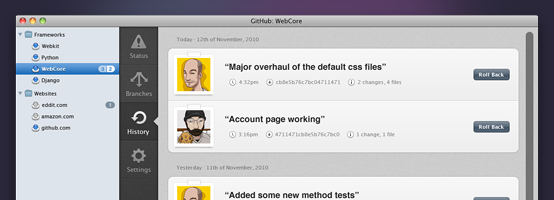
Kyle Neath has posted an excellent overview of what designing the official GitHub Mac app was like, the challenges he and his team had to face when dealing with Apple’s recent interface changes coming in Lion, and the overall “new trend” of Mac apps inspired by their counterparts.

Check out the whole story and screenshot gallery here.

Permalink

Postbox 2.5 Will Bring A Completely New Mac Interface

Postbox, the “first-class” email application that shipped a major 2.0 release last year with features such as unified inboxes and quick reply, will have a completely redesigned user interface once the 2.5 version ships this summer on the Mac App Store. Currently in private beta for lifetime Postbox users only, the upcoming 2.5 update has been teased several times by the company in the past weeks, showing off new functionalities like vertical view, a redesigned message view that’s cleaner, elegant and more readable, as well as new toolbar icons also in monochrome variations to get ready for OS X Lion’s new UI paradigms.

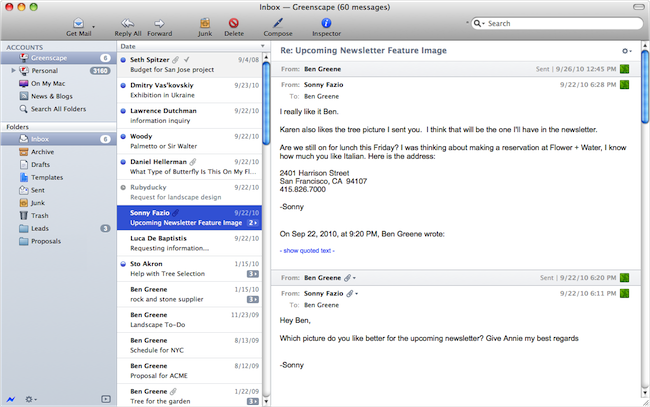
Earlier today, the Postbox team has posted a series of screenshots of the UI overhaul they’ve been busy working on with the help of Belgian designer Benjamin De Cock. As you can see from the screenshots in this post and the full gallery here, Postbox 2.5 looks like a massive update design-wise that will be aimed at cleaning the overall experience on OS X which, quite frankly, kind of resembled a Windows program in its previous iterations. With the final goal of “reducing clutter and complexity” in mind, the Postbox team has set out to create an email client that’s just as beautiful as a native Apple app would be, with the addition of unique features like attachment browser, topics, file sidebar, and much more.

There are a lot features and a lot of different ways to use Postbox. It was important for us to account for those different needs, but we also wanted to keep the interface as clean as possible. Mac OS is a huge inspiration for this, as they’re doing a terrific job in reaching people who are less tech-savvy and hardcore geeks. It has been a real benchmark for me for Postbox 2.5.

Postbox 2.5 is a terrific design milestone, and more design improvements are on the way to make Postbox even more user-friendly and accessible for everyone.

The new version of Postbox looks really promising and we can’t wait to get our hands on it to see what’s improved, changed, and refined. Postbox 2.5 will be a free upgrade for existing 2.x customers, so if you haven’t yet, go get Postbox from the Mac App Store at $19.99. Check out more screenshots of the app after the break. Read more


Carousel Instagram Client Gets Gestures, Search, Refined UI

Back in May I reviewed the first version of Carousel, a beautiful Instagram client for Mac that, thanks to the Chameleon framework built by The Iconfactory, brought Instagram’s photo streams and profiles to the desktop with a gorgeous iOS-like user interface. Whilst in the past month, with Lion nearing its final release and the WWDC, we’ve seen several examples of iOS apps making the big leap to the Mac, Carousel was one of the first apps to try the iPhone-inspired approach with a vertical layout, tabs, and popover menus. Together with Twitterrific, Carousel is a fine example of iOS interface schemes coexisting with more standard Mac applications.

Carousel 1.1, released today, adds a number of new features and refinements to make the Instagram experience on OS X even more beautiful and easy to use. First off, search: you can now search for specific @users or #keywords on Instagram, pin your searches as you would in Twitter for Mac, or click on tags and usernames in photo comments, which now are better styled to indicate the original author’s caption. Saved searches sit below the search bar, but to perform a search you’ll have to choose an element from a popover menu. The app has gained a new “likes” tab to see all the photos you’ve liked and a fetch separator to start where you left off in the stream, but more importantly gestures are now supported to easily open a photo in Quick Look (pinch and zoom) or check out a profile (swipe on the photo). It feels very natural and smooth using a Magic Trackpad.

Among the little fixes and refinements, the developers have updated the iOS-like toolbar to make sure the selector is draggable (try it, neat animation in there) and the comment form remains visible even if you click outside of Carousel’s main window.

Carousel 1.1 is a solid update for the most beautiful and intuitive Instagram client currently available on the Mac. You can buy Carousel at $4.99 on the Mac App Store.