Posts tagged with "iPhone"

Ben the Bodyguard Finally Released, Keeps Data Safe On Your iPhone

Teased a few months ago with an impressive website that made great use of scrolling and animations, Ben the Bodyguard for iPhone has managed to gain the interest of everyone who’s closely watching the iOS development scene and is always looking for well-designed and innovative apps. In spite of the fact that little was known about the actual purpose of the app and how it would compare against other “secure data managers” like 1Password and Wallet, Ben the Bodyguard was intriguing because of the attention to detail and design, the character himself (a French bodyguard, indeed, called Benoit – Ben) and, again, the amazing website.

After months of silence (as it seems appropriate for a good spy / secret agent / whatever it is Ben does), the app came out last night on the iPhone at $4.99 and I decided to take it for a spin. Unfortunately Ben the Bodyguard can’t be compared with full-featured solutions like 1Password, but thanks to its cool design and adventure-like nature, I believe the app still has a chance to attract casual users looking for something to keep their data safe and private.

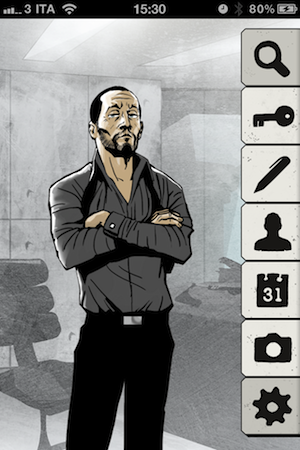
In case you haven’t heard of it, Ben the Bodyguard is an app that, like 1Password, can keep a variety of data safe & private in its database. The app uses a master password and 256-bit AES encryption to secure your data, which consists of photos, contacts, reminders, notes, and passwords. The password tab is particularly interesting, as it allows you to choose between different templates like web login, credit card, driver’s license and bank account, or create your own template if the categories above don’t fit the password you want to protect. The most interesting aspect of the app however (and what I believe will be the main selling point for the developers and users), is how the entire interface and menu options revolve around the character of Ben. For instance, once you fire up the app for the very first time you’re greeted with an intro sequence describing the life of Ben before he became a bodyguard – you can skip this intro, but it’s so well realized you might end up watching it anyway. Just like the website (which made the rounds of the Internet months ago) puts the focus on Ben – and not the features – as a man you can trust to protect your data, the app doesn’t present itself as a software capable of encrypting and securing notes and password: instead, the general feeling you get is that there’s this man on your iPhone’s screen telling you with a French-English accent that your stuff is safe with him. Character and story-wise, Ben the Bodyguard is a winner: graphics are beautiful, voice over is fun, animations are fluid – you can see the effort that went into designing the application and giving Ben an “identity” to make it stand out from the App Store ecosystem. Read more


Chirpy 2.0 Released, Unifies Twitter DMs In A Single Inbox

Following Twitter’s recent changes to the API for direct messages that will force developers of third-party clients to implement the web-based OAuth authorization scheme instead of the xauth scheme in all apps that want to display DMs, it’s no surprise to see app updates coming out in iTunes sporting “updated to support Twitter DM changes” bullet points in their changelogs. Chirpy 2.0, released earlier today and available now in the App Store, however, doesn’t simply comply to Twitter’s latest rules to display and interact with DMs outside of Twitter’s official software and website: in fact, Chirpy 2.0 is a major rewrite of the original application that I reviewed here, still aimed at providing a standalone, unified inbox for all your Twitter DMs and conversations.

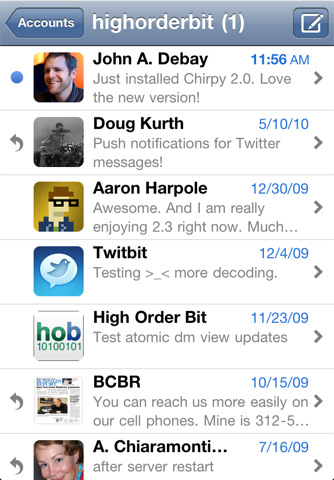
Chirpy is not an app for everyone – if you send a very few DMs a day your default Twitter client will probably be fine. Chirpy is meant for those Twitter users that usually send as many DMs as email messages – I’ve talked about the importance of instant, private communication in my workflow before, and since I exchange around 30-50 DMs with my coworkers and friends every day, having a Twitter client with a great DM interface it’s a fundamental requirement for me. However, if you’re serious about direct messages, Chirpy offers the same choice you would have when dealing with a web browser that can send emails Vs. an actual email client: will you be fine managing DMs in your client that already does everything else, or would you prefer a separate solution to send, read, manage and share DMs? Chirpy 2.0 builds on the strong foundation of the first version to provide a single inbox for all your conversations, with the possibility to add multiple accounts and receive push notifications without installing a dedicated app like Boxcar. Chirpy 2.0 brings support for the iPhone 4’s Retina Display, alongside profile pictures in the inbox and conversation views. In the settings, you can now customize the colors of the app’s chat bubbles – I’m fine with the default color set but I can see why some users would like to tweak it a little.

Together with several “small refinements and improvements”, Chirpy 2.0 features two new important functionalities: Dropbox image sharing and inbox search. The latter is pretty obvious (it lets you search for keywords in all your conversations), whilst Dropbox uploads will require you to log in with your account, and create a sub-folder in your Public directory. After this you’ll be able to upload pictures, share them with your contacts and even preview them inline in the conversation view. Other minor additions include email sharing for entire conversations (nicely formatted for the iPhone’s screen, too), possibility to delete DMs from your account, and copy & paste. In my tests, I’ve noticed Chirpy’s push notifications were a few seconds slower than Boxcar – which remains the fastest way of being notified of new Twitter DMs on the iPhone and iPad.

Overall, Chirpy 2.0 is a solid and stable update for an app that targets Twitter power-users who spend a lot of time DM’ing people on a daily basis. For those who need a “Twitter DM client” living outside the main “timeline client”, Chirpy is the best option available on the App Store.



Kickstarter Project: Red Pop - A Big, Red, Juicy Camera Button For Your iPhone

We love iPhoneography at MacStories. Accessories, apps, pictures of our pets, you name it, we’ve probably seen it or tried it. Until now. Beep Industries was created in early 2011 by Brendan Dawes and Lou Cordwell in Manchester, UK. Lou and Bren decided to form this new product focused company, along with 2 others, and they design their own original products which they make and sell.

Their newest product is called Red Pop, an iPhone accessory that adds a physical shutter button and grip to your iPhone 4 - simply plug the iPhone 4 into the 30-pin dock connector. Beep created the Red Pop because they believe the experience of using the iPhone 4 as a camera could be improved. It’s not perfect: it’s very flat and there’s no physical shutter button to give you that feel of a traditional camera. Sometimes it’s nearly impossible to tap the on screen button without looking so Beep thought they would bring the button back.

See the promo video and more pictures after the break. Read more


MindManager 9 for Mac Coming June 23, iOS Versions Due Mid-June

What is “Mind Mapping?” Well, if you want to take your analog thoughts and put them into the digital world, Wikipedia tells us that “a mind map is a diagram used to represent words, ideas, tasks, or other items linked to and arranged around a central key word or idea. Mind maps are used to generate, visualize, structure, and classify ideas, and as an aid to studying and organizing information, solving problems, making decisions, and writing.”

MindJet, who makes MindManager, one of the premiere apps in the market selling 1.8 million copies worldwide,  is scheduled to ship MindManager 9 next month. It will cost $249 for new customers and $149 for current users wanting to upgrade. New features will include a presentation mode, “quick entry,” WYSIWYG priting, dynamic content like schedules and web links, offline import/export for iWork and Office, plus project management mode. For more info, read the Mac press release here. Read more


Potion Factory’s The Hit List 1.0 Now Available

A unicorn has been born at the Potion Factory because The Hit List just went 1.0 and is ready for download via Potion Factory’s site (with a 15 day free trial) or the Mac App Store for $49.99. Back in 2009, people who purchased the MacHeist bundle got a license for the app when it was in beta and that license will still work today.

Many people doubted that it would ever see an official 1.0 release, but Andy Kim said “This, its iPhone companion app, and its sync service were the single most difficult undertaking of my life so far bar none. I hope that it won’t dissappoint and I hope that it will help you become more productive by taking the chore out of keeping track of what to do.”

More screens and iPhone news after the break.

Read more