Posts tagged with "apple"

Link Your Computer And iOS Device With myPhoneDesktop: Double Pass Giveaway!

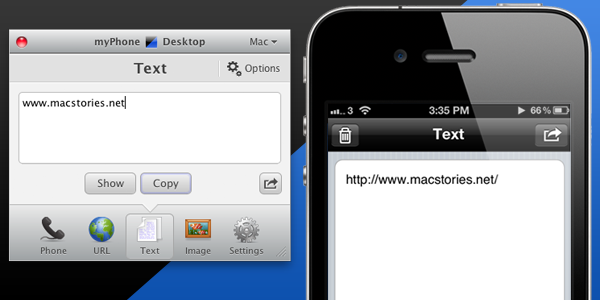
We’ve talked about myPhoneDesktop before on MacStories but we thought it deserved a short ‘re-review’ to accompany today’s giveaway. Keeping it simple, the premise of myPhoneDesktop is that it provides a portal through which you can easily transfer data and information from your desktop computer to your iPhone or iPad.

Broadly speaking the app transfers four types of data including phone data (both numbers and text messages), website URLs, text and images. When you send any of that data from your computer, and there is both a desktop and web client, it will be pushed straight to your device with a notification.

But where I think the app becomes most powerful is when you have the data on your iPhone or iPad. In the corner of the app it has the “Open in” icon where it literally has a wealth of options for your data. There is everything from the obligatory search with Google, to send by email, add to contact, send SMS or launching another app with that data. Importantly, the developers aren’t resting on their laurels, since we last talked about myPhoneDesktop there have been a few updates that continue to add more app integrations including Navigon and InstaTodo.

In reality I have only just scraped the surface of what this app can do, for example it also integrates with Google Voice and Skype, so make sure to check out the myPhoneDesktop website to learn more and get your own copy. Today we’re giving away 5 ‘double passes’ of myPhone desktop – in other words the five winners will receive two promo codes, perfect to give one copy to a iPhone-toting friend or family member, or (god forbid) use it as a belated Father’s Day gift. Details of the give away are past the break.
Read more


Wacom Launches Bamboo Paper, Promotes iPad Note-Taking With A Stylus

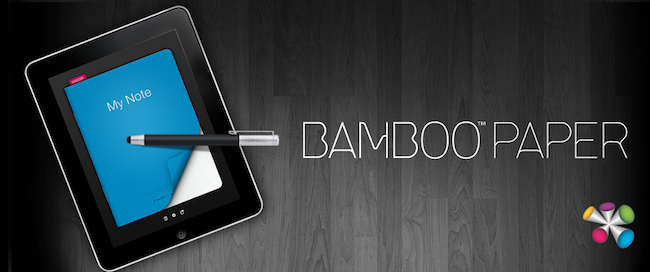
Wacom may have been fairly well known for its stylus based displays that many digital artists used, but in recent years it has started to shift its focus towards the consumer market with its Bamboo range of products. A few months ago it launched the Bamboo Stylus, a high-end stylus designed for the iPad and just a few days ago it released Bamboo Paper – an app for the iPad designed for note-taking with the Bamboo Stylus.

Whilst it isn’t the most fully featured note taking app, it offers a strong set of features and although Wacom recommends their stylus when using the app, it still works with just a finger. Your notebook can have an unlimited number of pages and there is also the option to add ruled lines or a graphing grid to the pages.  Where the app falls a little short compared to some other similar apps is that it only offers 3 options for the brush thickness and 6 brush colors.

Some of the other features of Bamboo Paper include the ability to bookmark pages, mirror the display to a TV or projector, as well as print, email or save note pages or even entire notebooks.  Whilst the app works well with just a finger, the Wacom video demonstrating Bamboo Paper with a Bamboo Stylus does look really interesting – jump the break to view it.

Bamboo Paper for the iPad is available in the App Store for free until July, at which point it will cost $1.99.

Read more


iOS 5 Will Apparently Support Nitro In Web Apps That Are Pinned To The Home Screen

Safari received quite a substantial speed bump with iOS 4.3 when Apple added the Nitro engine, a powerful JavaScript engine. However, some were left disappointed when it was revealed that the engine didn’t work with web apps that had been pinned to the home screen.

It seems that iOS 5 will eventually fix this inconsistency and bring those web apps up to speed. It comes after a user on Hacker News answered a question asking whether Nitro was included for those web apps pinned to the home screen.

This is probably breaking my NDA to say this, but yes, they did. Web.app now has the ‘dynamic-codesigning’ entitlement, which enables Nitro.

Apps that use the UIWebView alternative to Safari apparently won’t be getting Nitro, though the same user says that this is a security restriction rather than an inconsistency.

[Via CNet]


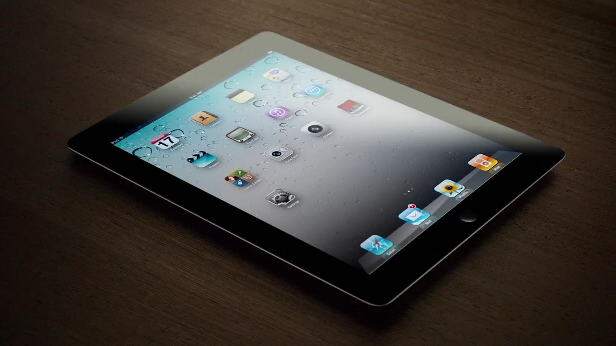
Apple Posts New iPad 2 Commercial: “Now”

Apple has posted a new iPad 2 commercial on its website and official YouTube channel entitled “Now”. Similarly to previous commercials, “Now” puts the focus on what is possible to do with an iPad 2, things like holding a book store in your hands, “listen to a magazine” or “touch the stars”. Apple’s short, elegant and concise iPad commercials want to capture the essence of the iPad as a personal device to do things that were impossible before.

Now, we can watch a newspaper; listen to a magazine; curl up with a movie; and see a phone call. Now, we can take a classroom anywhere; hold an entire book store; and touch the stars.

Because now, there’s this.

Among the featured apps, FaceTime, Spin Magazine, iBooks and the award-winning Star Walk. Apple’s previous iPad 2 commercials were called “We Believe” and “If You Asked”. Check out the new video below.
Read more


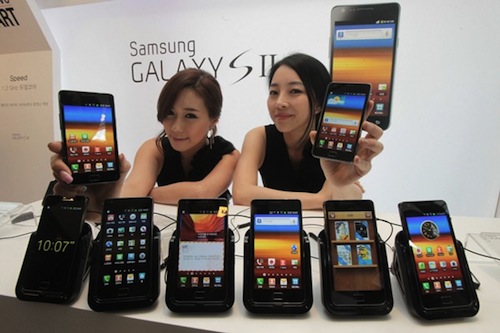
Apple and Samsung Execs In Talks Over Lawsuits, U.S. Judge Asks Them “To Get Along”

The patent litigation between Apple and Samsung revealed interesting details at a hearing on Friday in a San Jose, Calif. federal court, where U.S. Judge Lucy Koh asked representatives of the two companies if it was possible to “get along”, ironically promising to send them a box of chocolate, Reuters reports. In mentioning the relationship between the two companies (Samsung provides electronic components for some of Apple devices including the iPhone and iPad), Judge Koh also asked if there was a chance to get executives from Apple and Samsung in a meeting, with Apple attorney Harold McElhinn effectively confirming that the case got the attention of high-level executives, who have been meeting and talking over the lawsuits filed against each other in Europe, Asia, and the United States.

At a hearing on Friday in a San Jose, Calif. federal court, U.S. District Judge Lucy Koh referenced the close business relationship between the two companies. ”Can’t we all just get along here?” asked Koh, who suggested the companies try to resolve the case through alternative dispute resolution outside of court.

“I will send you with box of chocolates, whatever,” Koh said.

Additional details weren’t provided by Apple or Samsung attorneys. The patent litigation between the two companies started back in April, when Apple sued Samsung over the look and feel of the Galaxy devices running the Android operating system with Samsung’s custom graphical skin. As Samsung began filing countersuits in Asia, Europe and later the United States, Apple then asked the court Samsung should hand over prototypes of the Droid Charge, Galaxy Tab 8.9, Galaxy Tab 10.1, Infuse 4G and Galaxy S 2 to Apple’s external legal team for evaluation in regards to the lawsuit. Samsung fired back by asking to see production units of the unannounced and unreleased iPhone 5 and iPad 3. Most recently, Apple extended the patent infringement claims to other Samsung devices and said the company (described as “the copyist”) is trying to harass Apple by demanding production of trade secrets.


Kickstarter: iBamboo Speaker Is A Really Cool Eco-Friendly iPhone Speaker

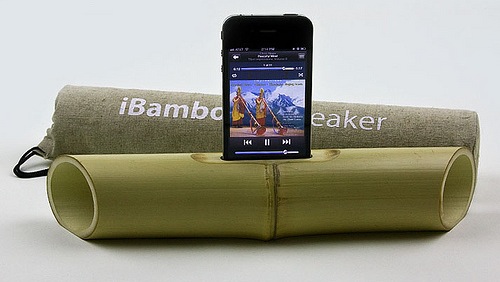
We’ve talked about a number of really cool Kickstarter projects over the past few months and today we’ve found another one; iBamboo speaker. Using just a foot of bamboo it uses the natural resonance to amplify the sound coming from an iPhone to create an ‘electricity-free’ speaker.

Merging the latest high tech with the simple beauty of nature, iBamboo is a100% eco-friendly speaker made from a whole length of bamboo.

Brilliant in simplicity, the iBamboo speaker is literally a foot of bamboo that has only had minor modifications; a slot for the iPhone, a flattened out base (so it sits flat on a surface) and the two edges of the bamboo tapered to direct the sound forward.

These speakers combine the high-tech of the modern day with the simplicity and aesthetics of nature. Since bamboo is a natural material, no two iBamboos are alike. Every piece has the same functional parameters, but each one is unique in its appearance and beauty.

You can support the project on Kickstarter from $5 and if you pledge $25 or more you’ll be pre-ordering your own iBamboo speaker.  Jump the break for a video demonstration of the iBamboo speaker in action.

[Via Tree Hugger]
Read more


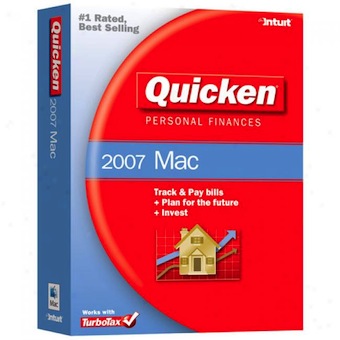
Intuit And Apple Working To Try And Get Quicken 2007 Working On Lion

With Lion launching next month, some users who rely on Quicken for Mac 2007 may want to hold off updating for a while. As it stands it Quicken relies on Rosetta, an engine that allows PowerPC code to run on Intel Macs, but Lion removes support for Rosetta – rendering Quicken for Mac unable to run on Lion.

The Mac Observer talked to the Aaron Patzer of Quicken to find out a bit more about the situation and found that PowerPC codebase is the foundation for Quicken for Mac 2007. Patzer says it “has many intricacies – including its own custom-built database engine that are very much PowerPC specific”. He explains that porting the code over would take a significant amount of work, which is why they recently decided to develop Quicken Essentials, a brand new app developed on the Intel code.

For many Quicken Essentials or perhaps another Intuit owned service, Mint.com, would suffice in replacing Quicken for Mac 2007. However because of its lack of some features, most critically bill pay and detailed investment tracking, it may not be enough. Well there is some, potentially, good news for those users. Patzer said that Intuit has been working “closely with Apple” to potentially get Rosetta (or parts of it) running in Lion.

The project has been underway for the past few months, with Intuit working to possibly embed specific Rosetta libraries into Quicken For Mac 2007 to get it to run. This, too, is not a simple project and may never come to fruition.

Patzer says they will know by the end of summer where the project stands and whether or not the old Quicken for Mac will run in Lion. However in somewhat more positive news, Intuit is on their way to deliver an iPad app for Mint.com within the next few months.

[Via The Mac Observer]


Why the $100 gift card is better than an iPod

This year, Apple isn’t offering an iPod touch with the purchase of a new Mac. Instead, Apple is handing out a $100 gift card, advertising that the extra money is best spent on apps from the Mac App Store. You could argue that a $229 iPod touch is more valuable since you can resell it, but that ends up being a hassle as you have to buy the device upfront, mail in a rebate, and receive a check from Apple at a later date. Some might want the free iPod touch, but you could argue that a majority of senior high and college students already have one (or an iPhone), and wouldn’t benefit from an additional model. Apple no longer needs to make the iPod touch popular. By giving students a $100 gift card instead of offering a physical device, Apple is getting students to invest in the future. While the past decade was primarily about the iPod, this decade’s focus is shifting towards apps and Apple’s iCloud.

Apple is leveraging this year’s Back to School promotion to make the Mac App Store popular. While the credit can be spent in the App Store, iTunes Store, or the iBookstore, Apple wants you to load up your Mac with new software. In a matter of minutes, students can open their Macs, create an Apple ID, and download the entire iWork suite with little effort. Developers should be incredibly happy about this: Apple is giving potential customers money to spend on their applications. I would be coming out of my socks right now if I was the developer of Smartr or iStudiez Pro. This is a huge win-win for everyone involved. By handing out a $100 gift card, Apple accomplishes three things:

  1. Students have the opportunity to load up their Macs with paid software at no cost from the Mac App Store.
  2. Apple is aiding developers in the sales of their apps.
  3. Apple takes a 30% cut of each app downloaded.

By teaching students to purchase apps from the Mac App Store, Apple can lock new customers into their ecosystem, and get people used to the idea that software doesn’t come on a disc. Developers will be getting a lot of exposure during the duration of this program, although I think Apple will benefit again when the iWork suite will likely be the first thing students download. The beauty of handing students $100 worth of credit for apps, music, and books is that Apple will eventually make thirty percent of that credit back if students spend the entirety their cards in the Mac App Store or otherwise. Apple is investing in students to use their products, in developers to develop new apps on the Mac, and in their own ecosystem in one fell swoop. This is a great marketing strategy by Apple.


Patent Details Potential Future Find My iPhone Features

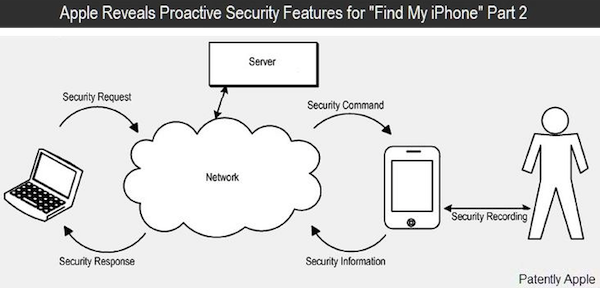
If features presented in a patent application from Apple this morning come to fruition, the ‘Find My iPhone’ service will become far more powerful in keeping your data secure. The primary feature described in the patent is one where the device would be able to detect a potential ‘intrusion’ by an unauthorised user of the device when an incorrect passcode is entered multiple times. It would proactively raise the security risk and then take steps to secure a users data.

When a raised security level is reached, certain files and content would be selectively protected. This data could be scrambled instead of wiped out – meaning that if a user does get the device back they still have the data and just have to unscramble it. The raised security level could also transition the device into a surveillance mode where the device records certain actions taken by a user including their actions, the ambient sounds, location of the device and then sends that data out, presumably to iCloud.

If a device is lost or stolen, it could become purposively limited from making calls, text messages and using mobile data so that the user doesn’t face costs from their mobile provider. Similarly, if the device has access to a corporate VPN, that VPN data could be altered when the device faces a raised security risk.

The patent also describes a system of how if a device is or presumed to be lost or stolen that it could request the location of the device. A pop-up would appear on the device, warning that location data is about to be sent, a user could then over-ride it with the correct passcode, or alternatively, contact the owner. Presumably this would be helpful if someone who found the device is trying to return the device.

[Via Patently Apple]