Posts tagged with "app store"

A Trusted System

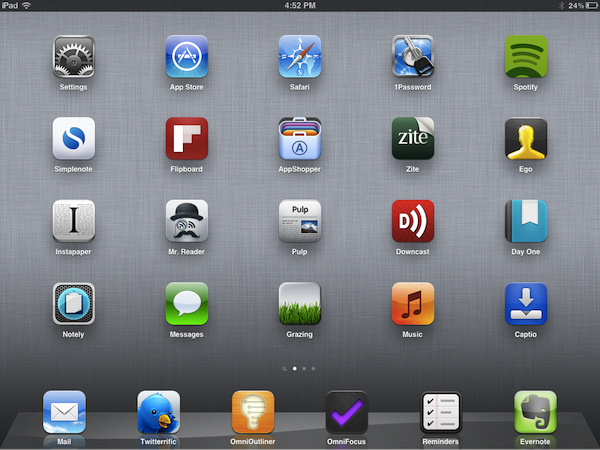
Over the past few months, I’ve noticed a trend emerging in my daily app consumption and workflow: as the App Store gets populated by thousands of new applications every day and developers struggle to get noticed in the sea of iPhone and iPad releases and “promotions”, I increasingly tend to rely on “a trusted system”, rather than constantly tweaking my home screen or dock to accommodate new apps from “indie devs” to try out, and perhaps replace with something else entirely the week after.

More than a trend, people who know me well might argue that I have a problem: I switch between apps less, and thus I am becoming that kind of guy that doesn’t care about what’s new in spite of my professed interest for innovation and good software.

But that’s my point exactly, and there’s an important difference between caring about new apps and trusting only a few selected ones for my work that I’d like to point out in this article.

Why should I buy the latest to-do app for iPhone or the next RSS reader for the iPad? Why should I constantly tweak and fiddle when the trusted system I’ve built is serving me so well? Some people, including me, are big advocates of App Store discovery and innovation: you never know what hidden gem the Productivity category might hide beneath hundreds of “wallpaper customizers”, and therefore it is an app lover’s job to navigate the App Store with the sole purpose of discovery in mind. With half a million apps to choose from, those who set out to explore the intricate App Store maze are the Magellans of the digital distribution era. Yet, I believe app discovery should be the reason behind good information and curiosity, not the ultimate goal towards getting things done or simply enjoying iOS devices.

We, as geeks, want to be – or at least “feel” – productive with our iPhones and iPads. Whereas we look at “the average user” and justify our expenses saying that unlike those people, we actually do stuff with Apple devices, the other end of the spectrum is equally true in my opinion, but we often don’t see it: all kinds of people (“the users”) are now serious about iOS, and whilst for some buying an iPhone will always be related to the status symbol, more customers than we, as geeks, usually think of are starting to look at iPhones and iPads as productivity platforms. It’s not just for the nerds or the fashion victims anymore. And as people get serious about iOS, they develop the “trusted system awareness” in that they start looking for apps to rely on without hesitation on a daily basis.

For me, the trusted system has become a synonym of great software developed by people that are serious about the bits and Xcodes they work with. Software from people that have something to lose if things go south. Apps from developers that are deeply invested in the platform – apps from people that often do this for a living but that are also users of their own creations. And this synonym has led me to trust the smaller, indie devs less, because I always fear the app I’m showing interest in will be discontinued tomorrow and never come back to support my needs.

It’s not like this hasn’t happened before. Too many times I’ve decided to fit an app in my workflow, only to find out months later the developer had no willingness whatsoever to maintain it or at least come clean and say “look, it was just an experiment”. And I can understand that point of view, really. I’m not saying garage developers and seven year-olds shouldn’t take their first steps in iOS development and see what’s like to gain popularity in the App Store. Not at all. I’m looking at us, the users who are serious about iOS, and deconstructing the difference between being curious, which is legitimate, and not getting anything done because of the constant tweaking, which is poisonous.

We need to separate work from leisure and app discovery. If we’re really committed to proving that iOS devices can be fantastic replacements for trucks, we need to get serious and understand that switching between apps and feverishly mining for the latest productivity goldmine won’t make you smarter or “more productive”. On the other hand, developers need to understand that just because they’ve released a new Google Reader client or GTD app, they shouldn’t expect thousands of users to jump on board and hit Buy.

iOS users have come to the point where the trusted system is more important. They know what developers and “names” to follow in the long term, and they’re happier when said developers provide an ecosystem for their apps that will make spending money on three different platforms less painful.

From personal experience, I see myself “trusting” people like The Omni Group, Evernote, The Iconfactory, Agile Bits, Edovia, Smile, Acrylic Apps or Tapbots more and more every day. I know I can get actual work done by using their apps, I know I can look forward to great customer support and shoot them a tweet when I’ve got a question – I can spend $50 bucks knowing that the work and enjoyment I’ll get in return will be greater.

But that’s not to say I’ve stopped giving the benefit of the doubt to “new kids on the block”, or that I’ve given up on trying to find the hidden gems in the App Store caves. Those who read this site know that I’ve started using Mr. Reader and Grazing Browser on my iPad and iPhone – apps from two relatively less-known developers that, however, have showed outstanding support, commitment to their software and a steady flow of software updates in the past weeks. To me, these seem like people who are serious about what they do. And I’m willing to trust them even if they haven’t been around for 10 years like others in this industry. More apps like Prowl, Notesy and Notely also come to mind.

iOS devices are now playing an important role in our lives, and we shouldn’t stop exploring all the ways to make them better with new apps, and different workflows. But I believe no one can blame us for choosing the trusted system when it’s time to work, and stop tinkering.
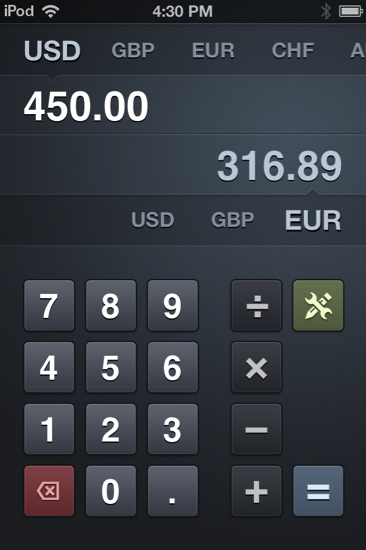

Banca: Convert Currencies Swiftly With this Beautiful iPhone App

With the US economy in flux, it’s a good idea to keep a close eye on your dollar. As world travelers we find ourselves spending a good dime overseas, and international friendships online can lead to an occasional penny dropped in each other’s PayPal bucket. As foreign currency plays a big role in today’s lifestyles and businesses — boundaries are practically absent — knowing how the USD compares to the Euro or the Australian dollar at the press of the button becomes very useful. Radiant Tap’s Banca for the iPhone isn’t just a calculator, but a currency converter (it supports all of the world’s currencies) that’s both beautiful and incredibly elegant in design.

Read more


HypnoBlocks: A Fast Paced Game Where Racking up Combos is Competitive and Addictive

I’m a big fan Ambrosia Software’s titles (Multiwinia is still a blast and they have an excellent solitaire game), and now they’re expanding the lineup with yet another addictive title for the iPad called HypnoBlocks. I’d bet you it was created for the sole purpose to take advantage of my short attention span and drive to be competitive. Two hours later after much cursing and ranting and raving, I found myself hitting the 2nd spot in the global leader boards on Game Center. So HypnoBlocks, you’ve succeeded in bringing out the sweaty yet competitive gamer in me. I was hooked!

Read more


Skyfire VideoQ for iOS Queues Up Flash Video

Skyfire has a new Flash player on iOS that queues up video you want to play on your iOS device by sending the video request through email! Yeah it’s old technology meets… old technology, but lets not dwell on the fact that we do want to watch Flash videos, and that iOS can’t play them. You have your YouTube and your Hulu, but those Funimation videos aren’t gonna play themselves. So whether you see a Flash video on the latest startup from TechCrunch, or you want to watch a segment of The Daily Show, VideoQ is there to convert your Flash video to a format compatible with your iPhone or iPad.

I gave VideoQ a chance on my iPod touch, and the first thing Skyfire asks is for you to send an email from an address you want to register with the company. Also sent in the email is your devices unique ID, which I find somewhat odd. I think that’s a bit skeevy, and I don’t know why Skyfire needs a device identifier, but it’s whatever right? With the email sent, you wait a few seconds to be registered, then VideoQ presents you with a tutorial you can watch to learn about the app.

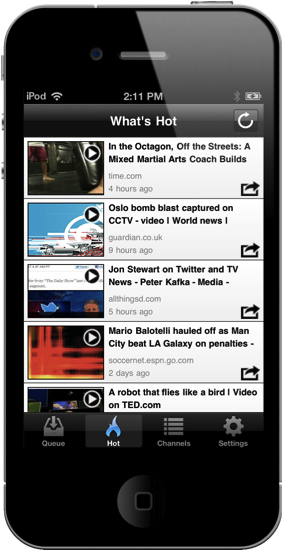
So it breaks down like this: whether you use Safari or another web browser on iOS, you can email that webpage to Skyfire so you can playback that Flash video in VideoQ. VideoQ will show you the videos you’ve queued up (and you can also casually browse hot videos via the appropriate tab). Video playback isn’t spectacular: video is grainy, audio is muffled, and sometimes Skyfire can’t find the video, but in a pinch you can get your Jon Stewart fix on your iOS device. It’s not a replacement for a Mac or PC that can run Flash well, but it can give you some relief while traveling or when mobile. It works most of the time — it’s not perfect — but video is passable despite whatever conversion process Skyfire processes on their servers before serving the content back up to you on demand. I’d say if you watch a lot of flash video (and especially if you want to do it on the iPad), give VideoQ a try.

Skyfire’s VideoQ is $1.99 as a universal app in the App Store.

[found via Reuters]


Twitter and Google+ Polls: The iPad’s “Must-Have” & Top Productivity Apps

Over the past two months, I’ve run what I consider an interesting experiment with my Twitter and Google+ followers: I’ve asked them what their favorite iPad apps were, and noted down the results. More specifically, back in May I asked my Twitter followers what their “5 must-have” iPad apps were. That question included all the possible categories of the App Store, free and paid apps, universal and iPad-only apps – literally anything that could run natively on the iPad. I received dozens of replies, saved the results as “votes” in Evernote, and filed the note away for future usage. Then on July 13th, I asked about “top productivity apps” on Google+. This second poll was more specific: whereas the first one was just a matter of personal preference for any category and app type, the Google+ poll implied that people had to decide what they considered “productive” on the iPad. And because I was asking people, and not a computer-generated algorithm, the results of what people considered as “productive” were noteworthy. I waited a few days, saved the replies as votes, and created another note in Evernote.

The results are listed below but before you jump after the break, a disclaimer: by no means this is an official “poll” or “survey” – it’s just the results of two questions I asked with my personal accounts on Twitter and Google+. I don’t know each person that follows me on these social networks, but if I had to guess – I’d say they’re mostly geeks passionate about great apps and new software. For this reason the demographic of these polls is pretty much restricted to a certain category of App Store users – those who spend time browsing for new apps, care about the quality of design and, when possible, like solutions that are available cross-platform on the Mac and iOS.

That said, check out the Top Productivity Apps and Must-Have iPad Apps after the break. Read more


Those Living In Taiwan Now Have A Seven-Day Return Period For App Store Purchases

Following new regulations in Taiwan, Apple last month began offering those living in the country a seven-day period in which they could “return” any purchases from the App Store. As discovered by IDG News, Apple has now formalized that policy and has updated their terms and conditions for the Mac App Store, App Store and iBookstore.

You may cancel your purchase within seven (7) days from the date of delivery and iTunes will reimburse you for the amount paid, provided you inform iTunes that you have deleted all copies of the product. Upon cancellation you will no longer be licensed to use the product. This right cannot be waived.

Whilst Apple has on occasion refunded purchases when customers contact support, this move allows any customer in Taiwan to get a reimbursement for any app and without any grounds within the first seven days. Some may recall with the recent uproar over the new Final Cut Pro X, Apple actually publicly offered anyone who had purchased FCP X a refund but they made sure to note that it was only a “one time exception”. However as the above snippet from the terms and conditions note, the process for those in Taiwan is still fairly tedious with consumers having to email the iTunes support team and manually delete the apps.

[Via MacRumors]


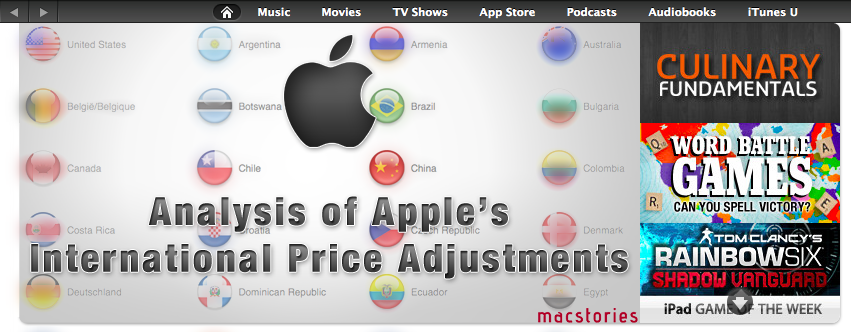
An Analysis Of Apple’s Adjustment Of International App Store Prices

UPDATED: Included a discussion on various sales taxes to clarify some of sections of the analysis, also corrected a mistake regarding Denmark prices.

For those of you who aren’t located in the United States, Wednesday’s news of Apple re-adjusting their prices in the App Store for international stores might have been pretty big news. For many the headline was welcome news, indeed when I woke up Thursday morning and saw they had finally re-calibrated the iTunes ‘exchange-rate’ I was pretty happy about it. We first discussed the great disparity in global iTunes prices back in January and I was pleased to see Apple eventually act and restore some fairness for international consumers.

Unfortunately I soon figured out it wasn’t all good news; Apple had only adjusted the iTunes ‘exchange-rate’ for apps. For their other stores such as for music, movies, TV shows and books the prices remained unchanged. Nonetheless I have revisited my January analysis, updating that data and doing some further analysis of what the price changes actually bring, what it means for individual countries and who is better or worse off.

Read more


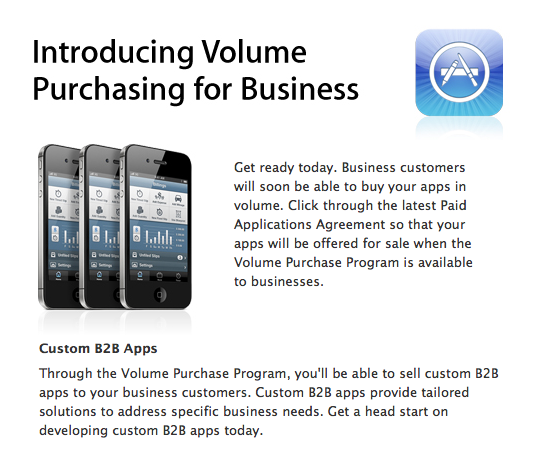
App Store Volume Purchasing Program Coming To Businesses Soon

In an email to developers, Apple has revealed that it is implementing an App Store Volume Purchasing Program (ASVPP) for Businesses, following a similar system that has existed for educational institutions. This system, which Apple claims is “coming soon” will vastly simplify the process in which businesses can offer their employees the apps they need. The program will initially be US-only and will require a valid Dun & Bradstreet Number (D-U-N-S) and a valid physical address.

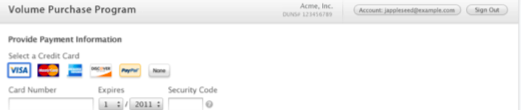
Once enrolled, the ASVPP can be accessed from the Apple website. This website is where businesses can purchase their apps in volume. The following screenshots highlight the process of doing so, which includes: searching for the app, setting the quantity and completing the transaction with either a corporate credit card, PCard or PayPal.

All volume purchases will result in an email from Apple and they are then added to a particular institutions purchase history which is located on the ASVPP website. Once purchased, an institution gets a redemption code for each app.

The program website delivers these redemption codes in a spreadsheet format that contains multiple codes, one for each app in the quantity purchased. Each time a code is redeemed, the spreadsheet is updated on the program website so you can track the number of codes that have been redeemed by your users.

Apple offers three ways in which institutions can quickly and easily distribute the app to their employees/users. The first is just a simple redemption URL which includes redemption code so that users do need to manually enter it into iTunes. Secondly they suggest posting the codes or URLs to a company portal or intranet page. The third option is to use a “third-party Mobile Device Management (MDM) solution” which offers an easily manageable system of centrally managing and distributing the apps.

Read more


Apple users buying 61% more apps, paying 14% more per app

Apple users buying 61% more apps, paying 14% more per app

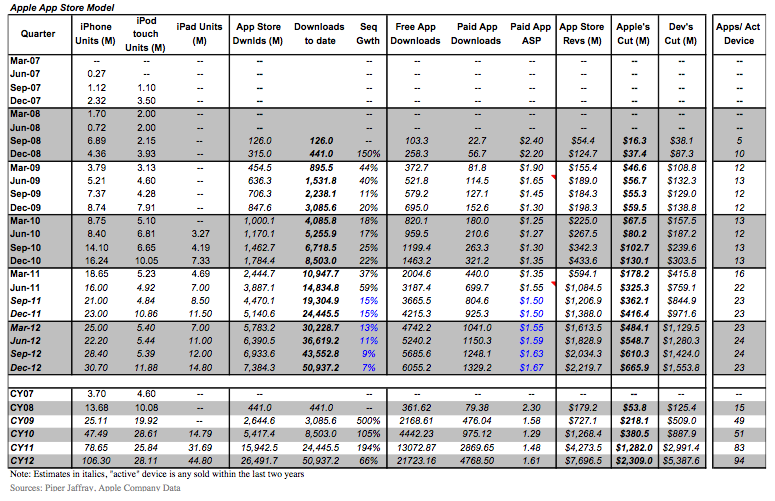
The average iOS device owner will download 83 apps in 2011 vs. 51 in 2010, a 61% increase year over year. “Smartphone users are showing an increasing appetite to use apps to add features to their phones,” Munster writes,” and iOS has the leading app ecosystem.”

While the title is somewhat misleading (are we comparing iOS against Android again?), Piper Jaffray’s Gene Munster looks at the at the trend of app sales and ‘average selling price’ per app since September 2008, charting a nice graph that shows the App Store’s steady increase in downloads for free and paid applications. So far in 2011, the average selling price per app is up 14% year-over-year, versus a decrease of 18% in 2010. ”After the initial race to the bottom in App Store pricing, we are seeing users pay up to add features and games to their iOS devices”, Munster writes.

I think we can attribute the recent uptick to in-app subscriptions. Magazines and newspaper subscriptions sold in the App Store can cost anywhere from $20 to $60 a year, and Apple has been aggressive in advertising digital publications via ‘featured’ and ‘what’s hot’ banners. Too, there’s been a recent trend with games like Tiny Tower that can rack up a lot of money by selling in-game currency which vastly improves the experience once players are hooked. The in-app purchase and subscription models are working out very well for developers that implement them.

Philip Elmer-DeWitt writes,

82% of the apps in Apple’s store are free. The 18% that users have to pay for have an ASP of $1.44. According to Munster, the increase in ASP is driven by the more-expensive iPad apps that represent a growing percentage of app downloads.

Again, a lot of these new iPad apps are digital magazines. While we have seen some great apps hit the App Store for $19.99 (OmniOutliner for iPad) and $9.99 (The Hit List for iPhone), unfortunately I think developers that are willing to price their apps high are still few and far between. I must admit, however, that I have seen more $2.99 and $3.99 dollar apps this year than the $.99 and $1.99 I’ve seen in the past. Then again, perhaps my inbox is just being pitched with more expensive apps than usual. Regardless, selling apps at higher price (more representative of an app’s value) is a good thing for developers, and it’s especially important on the iPad where quality software dictates how well it can replace a laptop. With iOS 5 around the corner, I wonder if users would be willing to spend more if the iPad was their only computer?

The App Store still has some kinks to work out, but it’s currently looking pretty healthy. Consumers are buying lots of apps (and in-app purchases), while developers are raking in just a little more money than before if we’re to believe Munster’s findings.

Permalink