
 MacStories Weekly: Issue 199
Apple Renews ‘The Morning Show’, ‘See’, ‘For All Mankind’, and ‘Dickinson’ for Second Seasons→
Cynthia Littleton, reporting for Variety:
Apple TV Plus has given second season orders to the four scripted drama series that launched the streaming service last week.
Dramas “See,” “For All Mankind,” “Dickinson” and “The Morning Show” have been greenlit for sophomore seasons. “Morning Show,” led by Reese Witherspoon and Jennifer Aniston, already had a two-season order and is already at work on its next season of 10 episodes.
Apple has yet to release any specific details about subscribers or viewership activity on the service, which bowed Nov. 1. Sources close to Apple say the service to date has drawn millions of users who are spending on average more than an hour on the Apple TV Plus platform. It’s unclear how many of those are paying subscribers rather than those taking advantage of the service’s seven-day free trial. A knowledgeable source said Apple insiders were impressed by the volume of activity on the platform, which spiked by triple digits this past weekend after the fanfare for the Nov. 1 debut.
Worth keeping in mind that, as part of Apple’s launch promotion for Apple TV+, it’s very likely that the majority of early viewers aren’t paid for the service yet.
As I noted last week (and elaborated on this week’s episode of Connected), I’ve been pleasantly surprised by The Morning Show, despite its less-than-stellar reviews. I’m currently watching For All Mankind and I’m captivated by its fascinating premise as well. As always with new series, it’s good to know second seasons are already in the works.
How I Keep Track of New Music Releases
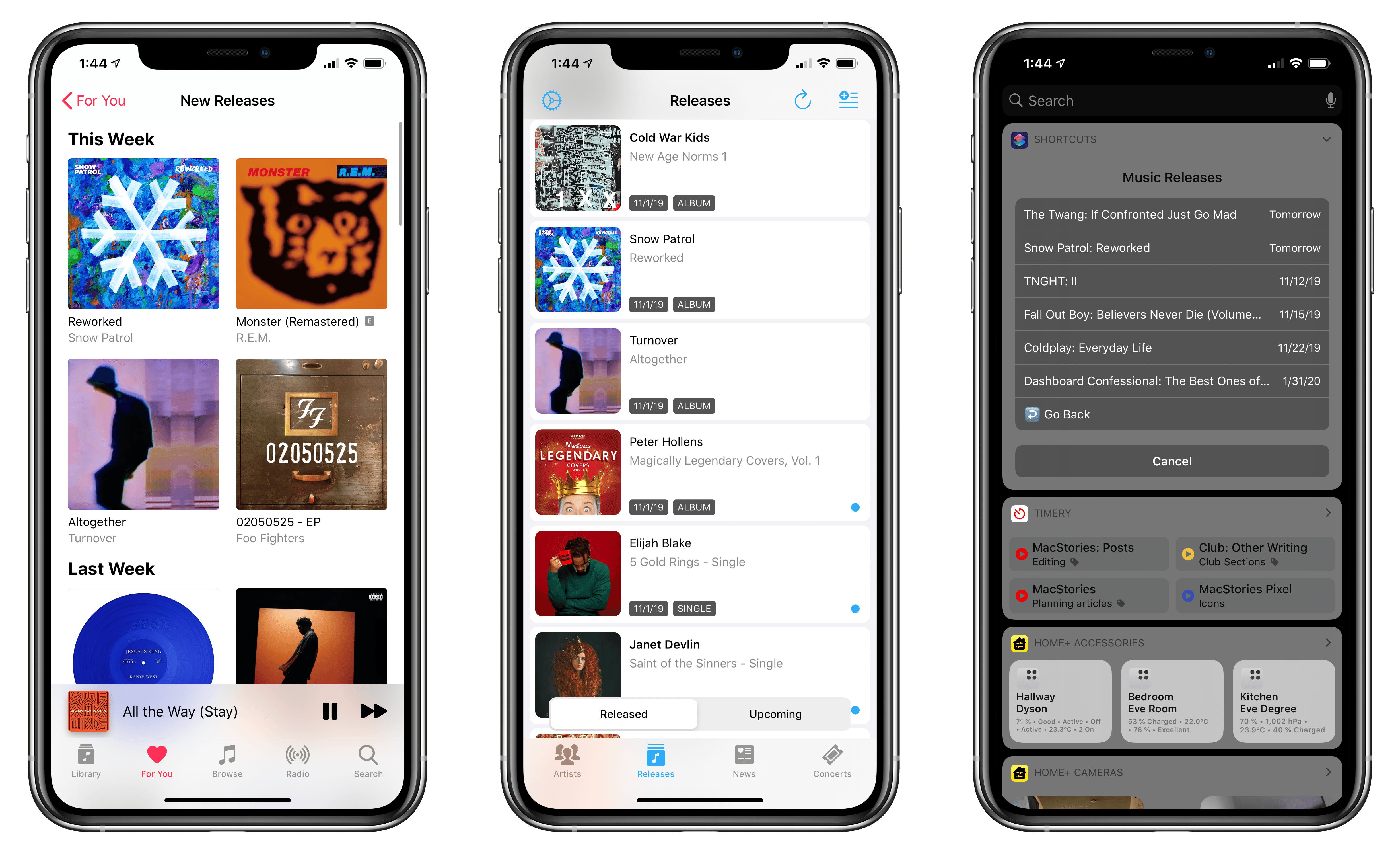
I was reading Jason Tate’s (as always, excellent) Liner Notes column at Chorus over the weekend, and his comments on Apple Music’s approach to highlighting new releases resonated with me:
Every Friday I open up the Music app, go to the For You section, scroll all the way down to the bottom and look at the “New Releases” section. This section looks at your library and shows you new albums from the artists you have in your collection. It’s a quick way to see if I’ve missed anything big that I need to post about or want to listen to, as I prepare for this newsletter. There are a few things about this section that drive me nuts: it’s very hidden and hard to get to, it’s laid out weirdly and often misses artists I have in my collection, and it doesn’t have any way to show me singles from artists I like that were released or songs that are on upcoming albums from artists I like that were released over the past week. This entire section could be designed so much better and be so informative. They have all of the information needed to put together an incredibly useful page of new music that I’ve already signaled I’d like to know about, but don’t. The weekly New Music Playlists are nice, and often do include some things I want to know about, but they also are usually full of stuff I’ve already heard and have played multiple times. This missing feature is the single most frustrating part of Apple Music for me.
As much as I like using Apple Music (especially now that it offers time-synced lyrics), I’ve always been disappointed by its treatment of new music releases. I agree with every single issue mentioned by Tate: the ‘New Releases’ section is tucked at the very end of the For You page and laid out as a horizontal carousel that requires a lot of swiping; you can view the ‘New Releases’ page as a grid, which has sections for different weeks, but, in my experience, it only aggregates highlights for new releases from some of my favorite artists. The ‘New Music Mix’ playlist is not terrible, but it often comes loaded with stale data – songs I’ve already listened to multiple times and which shouldn’t qualify as “new” weeks after their original release date. Furthermore, I’ve found notifications for new releases for artists in my library unreliable at best: I occasionally get notifications for new albums, but never for new singles or EPs.
For people who want to stay on top of every new music release from their favorite artists, the tools available in Apple Music alone aren’t enough. And I understand why Apple doesn’t want to invest in this aspect of the service: not everyone runs a music-focused publication or needs to know about every single release for hundreds of artists every week. Since the unfortunate demise of Record Bird – the app that encapsulated my ideal new music release discovery tool – I’ve been building a new system to stay on top of music releases, and I’d like to explain how.
Connected, Episode 268: Executive Spaghetti→
On this week’s episode of Connected:
Federico is joined by a better Hackett to talk about Apple’s range of earbuds, then Stephen butts in to discuss Adobe’s big week and what Apple should do in the wake of iOS 13 and macOS Catalina’s buggy releases. Then, they fire the spoiler horn and review “The Morning Show” and “For All Mankind.”
You can listen below (and find the show notes here).




Sponsored by:
- Moo: Custom business printing and design. Save 15%.
- Freshbooks: Online invoicing made easy.
- Hover: Make a name for yourself. Get 10% off any domain name.
- Away: Thoughtful luggage for modern travel. Get $20 off a suitcase with promo code connected.
Twitter Launching Topics Feature Soon→

Casey Newton reports for The Verge on a new Twitter feature coming soon:
Recently, a friend told me he wanted to spend more time using Twitter, but he didn’t quite know how. His primary interest is comedy, he told me, and he hoped to find a way to see comedians’ best jokes on Twitter as they were posted. But when he followed comedians, he mostly saw a lot of self-promotion — tour dates, late-night appearances, and that sort of thing. No matter your personal interests, there are countless good and relevant tweets on Twitter. But where are they?
Topics, a new feature from Twitter that is starting to roll out this week, represents a significant effort to answer that question. You will be able to follow more than 300 “topics” across sports, entertainment, and gaming, just as you are currently able to follow individual accounts. In return, you’ll see tweets from accounts that you don’t follow that have credibility on these subjects.
Topics represent a major new addition to the Twitter timeline, easily one of the most significant changes the service has ever introduced. Though topics have the potential to improve a person’s timeline, they could also have the opposite effect if not done well. Based on this report, it sounds like Twitter’s team has all the right checks in place to ensure tweets from topics are things you’ll actually care about. Here’s Newton on how the process works:
First, Twitter scans incoming tweets for keywords like “WWE,” “pro wrestling,” and so on. (It can’t search for those terms in images and videos, at least not yet.) Second, Twitter searches to see if the tweet is from someone who normally tweets about that topic as a measure of credibility. Finally, Twitter looks at engagement: how many other people who care about this topic liked, retweeted, or replied to a tweet? The more people are interacting with the tweet, the more likely it is to make the cut.
I’m eager to try following a few topics to see whether they have a positive or negative impact on my timeline. I think the feature will be a clear win for users who are new to Twitter, and don’t already have a well-curated collection of follows; for those who have used the service for years, though, it may not be as appealing. And there’s no word on whether topics you follow will appear in your timeline in third-party clients like Tweetbot and Twitterrific.
We won’t have to wait long to find out: topics are starting to roll out this week with a full global launch next Wednesday, November 13th.
Arcade Highlights: Sayonara Wild Hearts
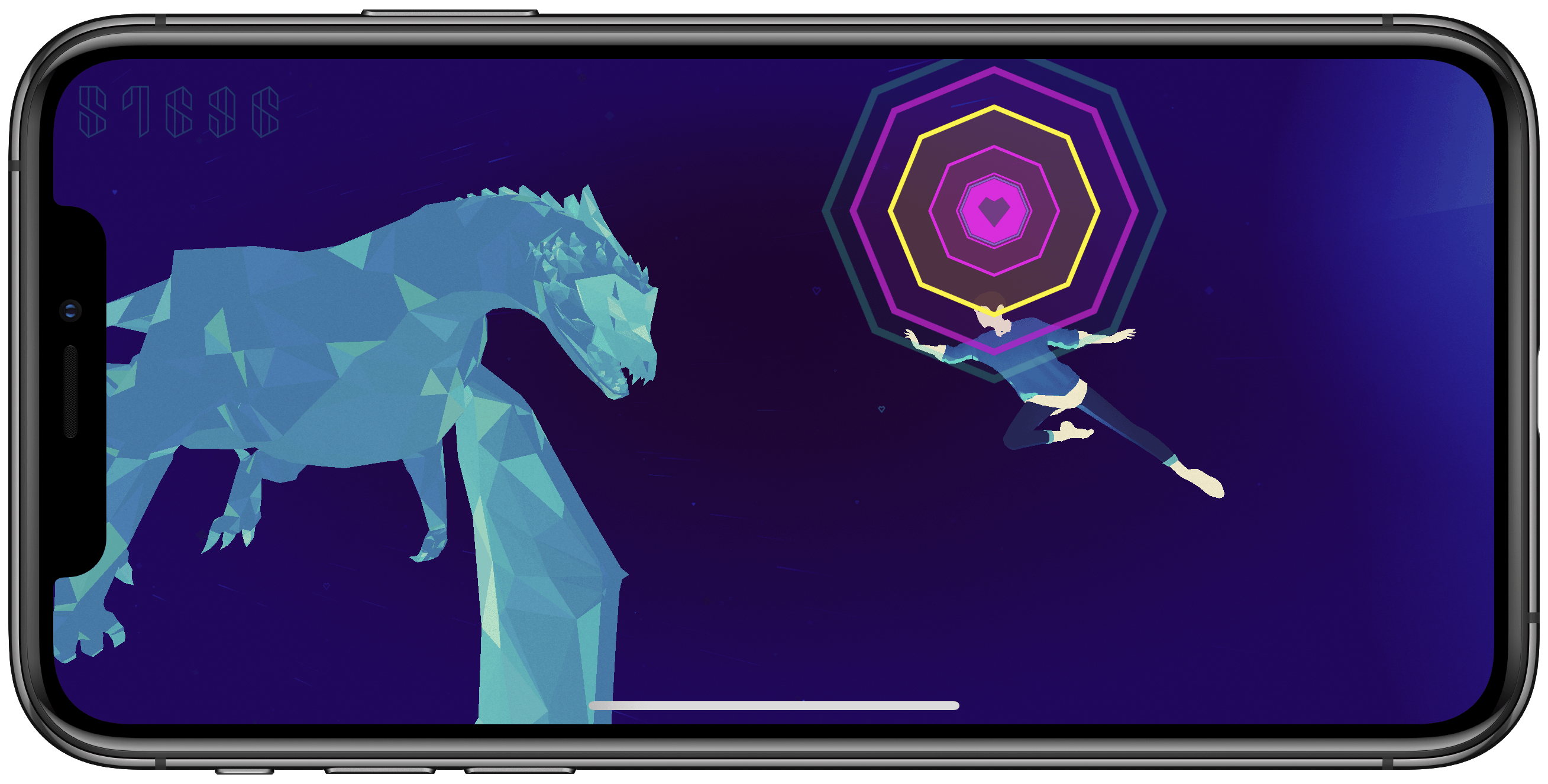
How can I best describe Sayonara Wild Hearts? It’s an on-rails music-driven game, but that feels like an inadequate description. Yes it’s a game, but combining the gameplay with Sayonara Wild Hearts’ blend of immersive levels, gorgeous visuals, and incredible soundtrack, it feels more fitting to call it an experience.
Sayonara Wild Hearts was an Apple Arcade launch title, one of the few demoed on-stage at Apple’s September event. And as one of Arcade’s premiere titles, it’s a brilliant representation of what Apple’s new service represents: off-the-walls originality. Arcade aims to fund and promote a variety of creative titles, freeing developers from the restraints commonly associated with the App Store’s In-App Purchase-dominated gaming fare. Sayonara Wild Hearts offers an experience that’s so unique and, dare I say, trippy, that it clearly represents its makers’ unfiltered vision.
Apple Reveals Major Update to Its Privacy Webpage
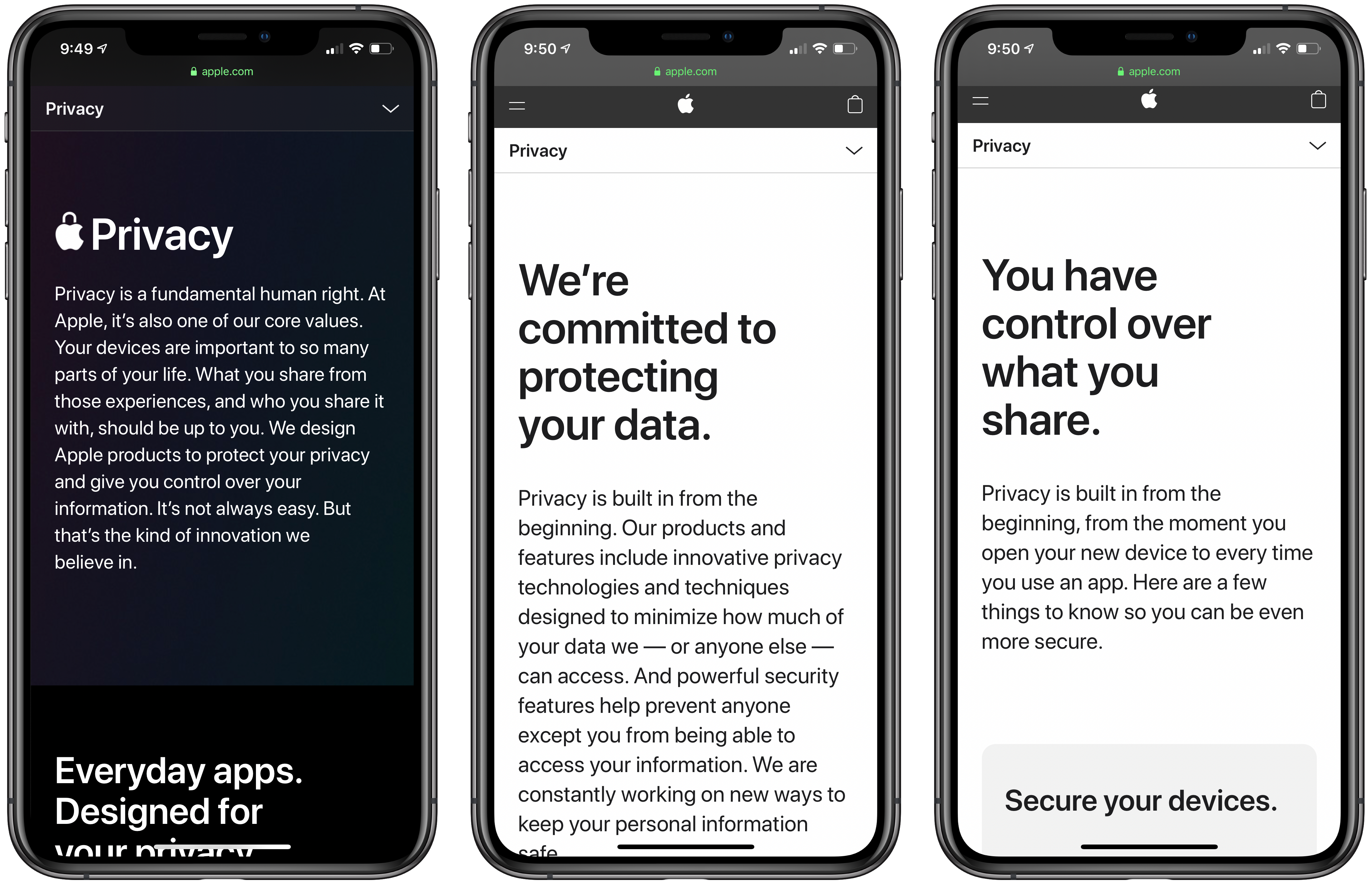
Privacy and everything it entails is not easy to explain. Under the hood, it’s driven by complex mathematics and code. However, in practice, app privacy starts with how apps are designed. Some are designed to collect information about you, and others aren’t. With Apple’s update to its privacy page today, the company has created a site that explains how privacy drives the design of its apps in clear, concise language. However, for anyone who wants to understand the nitty-gritty details, Apple has also published white papers and linked to other materials that provide a closer look at the issues that the main page addresses.
Apple’s Privacy webpage starts with a declaration of the company’s position on privacy:
Privacy is a fundamental human right. At Apple, it’s also one of our core values. Your devices are important to so many parts of your life. What you share from those experiences, and who you share it with, should be up to you. We design Apple products to protect your privacy and give you control over your information. It’s not always easy. But that’s the kind of innovation we believe in.
What follows is an app-by-app explanation of how each is designed to give users control over what they share and limit what Apple collects. Safari, Maps, Photos, Messages, Siri, News, Wallet, Health, Sign On with Apple, and the App Store are all covered with playful animations and a short explanation of what they do to protect your privacy.
Additional information about each app, their underlying technologies, plus iCloud, CarPlay, Home, education and children’s privacy, and other features follow under the Features tab. Included among the more detailed materials are white papers that go even deeper on Safari, Location Services, differential privacy, iOS security, and Face ID security. There is also a tech brief on Photos and links to additional materials about Ask Siri, Siri Suggestions, Apple Pay, ResearchKit and CareKit, Apple News, Apple Music, the Apple TV app, Apple Arcade, iCloud, Screen Time, Family Sharing, security in education, Apple’s student privacy pledge, and your data and privacy page. That’s a lot of information, but it’s presented in a thoughtful, compelling way that lets you go deeper if you want without being confusing or difficult to navigate.
The final new tab is called Control. Some of these tips and guides were available before, but the page has been updated with new practical suggestions on how you can make your Apple devices more secure. The page covers passcodes, Touch ID and Face ID, two-factor authentication, Find My, the alerts that explain the information third-party apps request, using your data and privacy page, advertising, analytics, and more. It’s an excellent place for users looking for ways to take command of the security of their devices.
I know that a lot of MacStories readers care strongly about their privacy and the security of their devices, and many are aware of at least some of what’s covered on Apple’s privacy page. However, it’s still worth a visit because privacy and security are part of so much of what Apple does now, that I expect there are at least a few tidbits on this new page that will be new to everyone. It’s also a great page to share with family members and friends who may not be as aware of the privacy issues related to their devices.
How To Open the Apple TV+ Front Page and Individual Shows Directly in the TV App
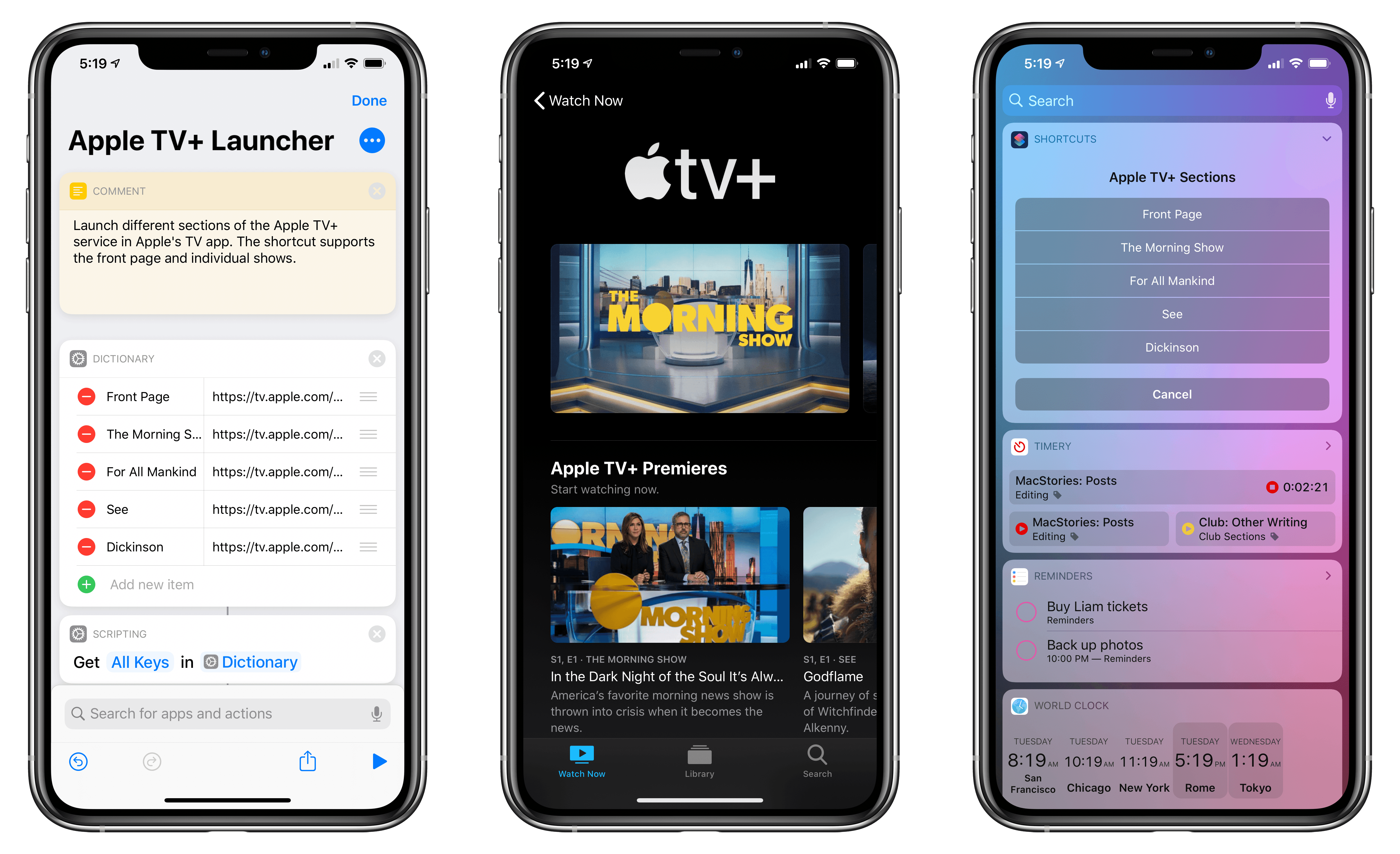
Update, November 7: The shortcut has been updated with links to all currently announced Apple TV+ shows. You can find the updated download link below and in the MacStories Shortcuts Archive.
I was listening to the latest episode of Upgrade, and, among several fair points about the shortcomings of Apple’s TV app for iPhone and iPad, Jason Snell mentioned an issue that stood out to me: if you don’t know where to look, it can be hard to tell where exactly the Apple TV+ service lives inside the Apple TV app. This sentiment was echoed earlier today in this article by Benjamin Mayo at 9to5Mac:
Apple has made very few changes to the TV app design and feature set to accommodate the TV+ launch. TV+ is shoehorned in as just another source of content with very little consideration. With other streaming services, if you want to commit to their world and explore everything they have to offer, you can just open the dedicated app and never touch the TV app. With TV+, that’s simply not possible.
There is a channel section of the TV app that is dedicated to TV+ content — but it’s far from perfect. Finding the TV+ section requires a lot of scrolling, meandering past several screens worth of Watch Now recommendations for everything in the iTunes catalog.
I’ve been watching The Morning Show over the weekend (which I surprisingly liked a lot; I’m going to start For All Mankind and See next), and even though I’m used to the TV app’s quirks by now, I recognize that its navigation should be improved. And in particular regarding the new Apple TV+ service, I do believe that it’s somewhat buried in the TV app experience – by default, Apple doesn’t offer a single, easy way to open a “page” with Apple TV+’s complete catalog. So, I had to figure out a solution on my own.
AppStories, Episode 137 – Our Third Annual Apple Watch Check-In→
On this week’s episode of AppStories, in what has become an annual tradition, we talk about how how we’ve set up our Apple Watches, including the complications we use, the third-party apps on which we rely, and what’s in our Watch docks.
Sponsored by:
- Kolide – User focused security for teams that Slack. Try it free for 30 days.
- Direct Mail – Create and send great looking email newsletters with Direct Mail, an easy-to-use email marketing app designed exclusively for the Mac.
- Kensington – The Professionals Choice. Find the right docking solutions for your organization today.

AppStories Episode 137 - Our Third Annual Apple Watch Check-In
0:00
47:25
47:25

