

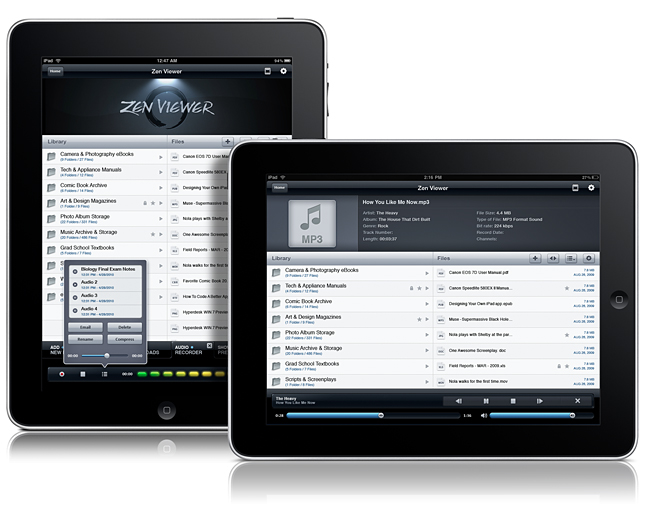
File managers on the iPad need not be boring nor unintuitive. Zen Viewer HD for iPad wrangles documents and media into a stylish file viewer that plays back audio, movies, pictures, PDFs, and gives you the ability to organize documents. You also have the cloud at your fingertips, thanks to Dropbox, Box.net, and MobileMe integration so you can pull files from just about anywhere. Record audio on the fly, manage files and folders (easily get files into Zen Viewer HD by drag & drop while in Manage Mode), and compress & decompress files to save storage space on your iPad. If you want to carry your Windows or Mac files around with you, Zen Viewer shouldn’t disappoint. Currently on sale for $2.99 in the App Store (with some additional artist themes costing $.99 in app), who says managing files shouldn’t be both easy and beautiful? Your new iPad should have a proper system in place for handling all of the documents stored on your home system, so we’re giving away five copies past the break.
We Have Five Copies Of Zen Viewer HD For iPad Up For Grabs
Microphone In iPad 2 WiFi Offers Better Quality Than 3G Model
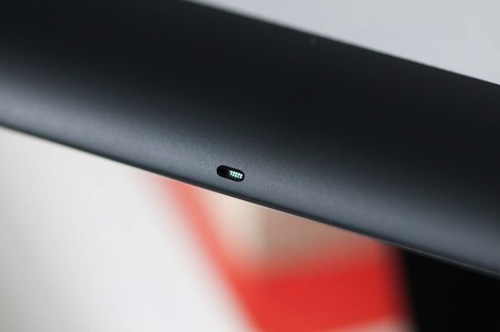
If you’ve recently bought an iPad 2 WiFi + 3G (good luck finding one now with a 4-5 weeks wait on the Apple Store) and your friends have told you they can’t really hear you on FaceTime, that might be a problem with the microphone in your 3G model. According to iLounge, the iPad 2 WiFi offers clearer microphone quality as the microphone has been placed in the top metal housing, whilst it sits in the plastic antenna band on the iPad WiFi + 3G.
Perhaps due to this change in materials, the Wi-Fi model offers markedly cleaner audio than that of the 3G, which sounds slightly muffled and echo-prone as a result. Curiously, we found the GSM 3G model’s audio to be slightly preferable to that of the CDMA model, which seemed to suffer the issues more severely.
The iPad 2 saw a change in size and shape of the microphone, and iLounge reports the differences in sonic qualities can be clearly spotted in apps like FaceTime with the iPad’s screen facing the user. If you have a 3G iPad 2 and you’ve spotted these differences, too, please let us know in the comments below.
[image via]
Disk Drill Out Of Beta, Adds S.M.A.R.T Disk Monitoring
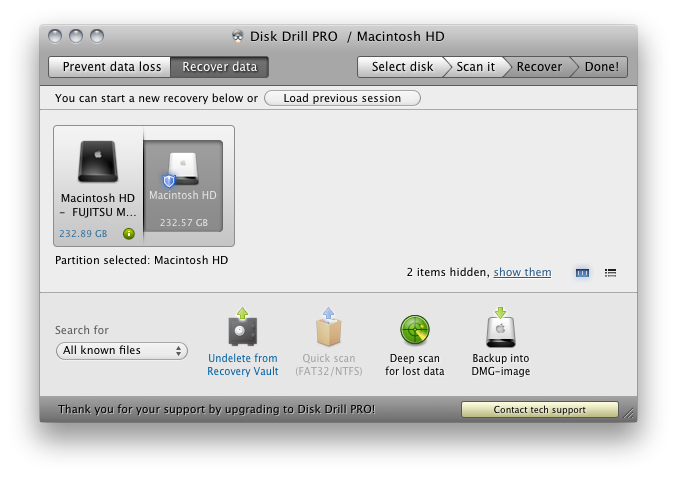
While Disk Drill was in beta, we had it thoroughly reviewed as an excellent file recovery solution for the Mac, helping prevent disaster from unavoidable data loss thanks to power failure, hard drive crash, or accidental file deletion. Not only does the Recovery Vault watch what files you delete and keep a tab on them in case of recovery, you can also have Disk Drill scan external HFS/HFS+ or FAT drives and flash media to possibly undelete pictures, music, and documents. Disk Drill comes in free and Pro versions, with the free version supports files protected Recovery Vault, you’ll gain the ability to recovery anything thanks to a new deep scan algorithm in the Pro version, which will attempt to recover files that haven’t yet been overwritten by the operating system. Included in both versions is now a menubar utility that monitors your hard disk for errors, and will allow you to back up failing partitions to a disk image at the first sign of trouble.
Disk Drill is user friendly, and I recommend you check out our initial review before checking out the free version. The Pro version costs $89, but if you already own a competitor’s product that you’re unsatisfied with, you can send Disk Drill a proof of purchase for a 50% discount. Students and non-profit organizations also qualify for a 20% discount.
Doodle Jump Closes Hollywood Deal, Movie Tie-In Version Now Available

Back in January we reported Lima Sky, the developers of popular iPhone game Doodle Jump, closed a deal with Hollywood studio Universal to develop a special version of Doodle Jump featuring the main character from the upcoming animation movie Hop, from the creators of Despicable Me.
The movie tie-in is now available in the App Store, and it’s a free universal app for iPhone and iPad. In 25 levels featuring the usual disappearing and breakable platforms, you’ll have to control E.B., the Easter Bunny’s son, in his quest to become the best jumper before taking over “family’s business” and becoming the Easter Bunny himself. Sounds like a terrible plot but at least the app is free and the cute little monsters from the classic Doodle Jump seem to be there, too.
If you like the idea of Doodle Jump mixed with a Hollywood movie about a bunny (perhaps your kids will), the app can be downloaded here.
The Daily Launching in the UK by June 2011

Are you iPad owners still using the over-hyped and very criticized iPad newspaper, The Daily? Well, Rupert Murdoch’s News Corporation is going to launch The Daily in the UK by June 2011. You can read MacStories’ thoughts on The Daily here.
Jonathan Miller, the chief digital officer at News Corporation, said “Western Europe is up first in not too long from now,” saying that a launch will be in the first half of 2011.
The European version of The Daily is dependant on the geographical roll-out of Apple’s subscription model, which is only US based right now.
Mr. Miller said that charging for The Daily in the US will begin next week. “We will charge for it but we haven’t started yet. We have our beginning moment of truth next week when we start to ask people to get out their wallets,” he said.
The Daily, which will be begin charging next week in the US, is aimed at a younger, mobile audience. He added that there are hundreds of thousands of people reading The Daily, I think that number will drop significantly once the trial period ends this week.
It does skew younger. If you follow what’s happening with news consumption around the world, it’s aging. And younger people as a generalisation are not consuming news at least in the ways they used to. So we want to make a product that has broad appeal and that means it has liveliness to it, its very graphic and is very pictoral - a lot of video on it, all media in the same place. It is skewing much younger than newspapers.
For anyone that doesn’t already know, The Daily brings users more than 100 pages of daily content, including news, opinion and sports. It also has video, 360 degree photography, 3D technology, interactive charts and read-later functionality all built into the app. If you’re interested in checking it out or subscribing, here’s a direct link.
[via The Telegraph]
Google Adds A Bar to Gmail iOS Webapp
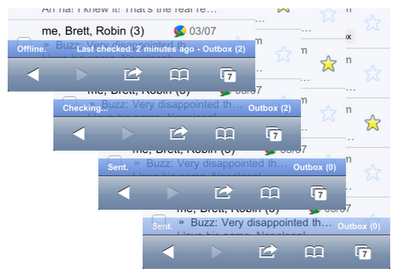
Fear not, Google didn’t add a #dickbar to Gmail for iPhone. What the Gmail did is actually pretty smart: to better communicate the status of their inboxes to iPhone users, Google recently tweaked the Gmail webapp for iOS devices to include a “connection bar” that displays information for outgoing and sent mail, internet connection, and so forth. It doesn’t appear all the time, it only shows up when a certain activity is triggered – like an email you’re sending from your phone.
It also appears when your phone is offline, back online and sending, and then again when it finishes sending all messages.
You can see the connection bar in action by visiting mail.google.com from your iPhone or iPod touch now, running iOS 4 or later. If you don’t see it, try clearing Safari’s cache in the Settings app. Too bad Retina Display support in the Gmail webapp is still nowhere to be seen.
Pano for iPhone Adds Tap-to-Focus
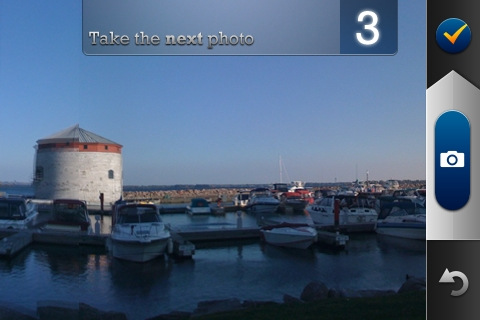
Pano, the popular application to take panoramic shots with your iPhone, has been updated to include support for tap-to-focus and exposure points. Even though the developers of Pano are promising a huge update is coming soon (perhaps with iPad 2 support and a revamped user interface?), this new version is worth mentioning as it adds a functionality requested by several Pano users in the past. As you take your pano shots, you can tap on screen to set the squares for exposure and focus. It works like in Camera+ or the default Camera app, and it’s a great addition to Pano.
Many users still prefer Pano to most recent alternatives like Occipital’s 360 to take panoramic photographs with their iPhones. While Occipital’s app lets you create your pano shot by just waving the iPhone around, Pano works by snapping a series of pictures and then blending them together in the processing section.
Pano is available at $1.99 in the App Store.
#MacStoriesDeals - Wednesday

Here are today’s deals on iOS, Mac, and Mac App Store apps that are on sale for a limited time, so get ‘em while they’re hot!
HazeOver Lets You Concentrate By Fading Inactive Apps

Sometimes it’s hard to concentrate on a Mac and get things done. With all those open windows – the Twitter client, the browser, music from iTunes, Google Reader – it’s easy to get lost in the information stream and distractions and lose focus on what you were doing. HazeOver, a free Mac app by Maxim Ananov, wants to provide a solution to this problem by offering a simple way to eliminate the visual clutter: fading the background application windows you’re not looking at.
The idea is very simple: the app in the foreground stays untouched, the inactive windows are slightly dimmed to create an effect that will let you concentrate on a single app. So say I have to get an article done in the browser but tweets keep coming in the background through the Twitter app, chances are I won’t look at it like I always do because HazeOver generates this “dimmed background” that will help me stay focused on Chrome.
I don’t know how well the system will work for you, but the app certainly behaves as advertised. Once installed and opened, it will automatically fade inactive windows as an app comes in the foreground. But what if you’re that kind of user who keeps multiple apps running side-by-side for multitasking? You might be out of luck due to HazeOver’s lack of customization settings.
Still, the app is a free download and you can try it out here. Check out the demo video below. Read more