Apple’s developer betas this cycle have been packed with more features than usual and today’s second developer beta for 27.3 is no different. Let’s dig in.
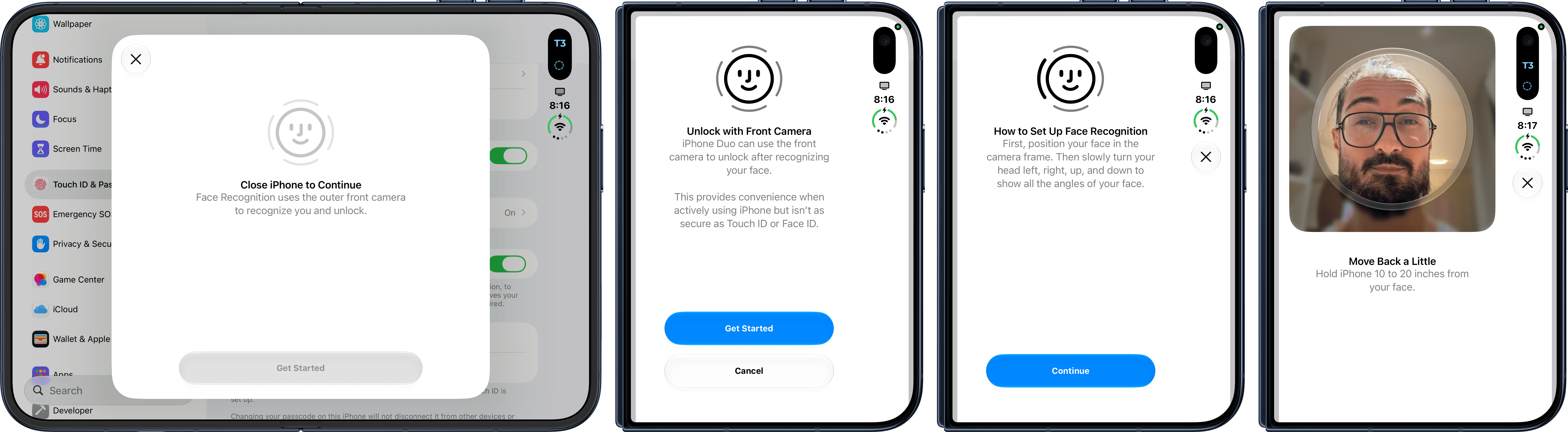
The iPhone Duo gets a pair of changes in the latest developer beta that are likely to be crowd pleasers when 27.3 is released to the public. First, the Duo will be able to unlock quickly using the front-facing camera when it has been recently unlocked with Touch ID or a user’s passcode. The feature can be found in Settings -> Touch ID & Passcode and according to Max Weinbach, it uses the Secure Exclave to process the image used, which is how the HomeView works, too.
Touch ID will still be needed to use Apple Pay and access passwords. Additionally, Touch ID will be needed after roughly 45 minutes.
Second, if you want your iPhone Duo to lock when you fold it, like an iPad or Mac laptop, you’ll be able to turn that on, too, under Settings -> Display & Brightness. This isn’t something I expect I’ll turn on myself, but I know a lot of MacStories readers have wanted this, so I’m glad to see it added as an option.
Also, you may recall that Apple gave developers a vague heads-up about changes coming to Full Disk Access, which I wrote about at the time, and we discussed on AppStories recently. Today we got more information on what that means on Apple’s developer website:
In macOS 27.3 beta 2 today, we’re introducing increased transparency and more granular options for two of the APIs: Device Control and Data Access, and Full Disk Access. Before granting an app such extraordinary access, users should understand that it puts all of the data on their Mac at risk. These changes are designed to help them do that and to empower them to make informed decisions about their own data and privacy.
In practice, this means that macOS 27.3 will split “Device Control and Data Access” in Settings into a two-part system that divides the world into Accessibility features for assistive technologies and “System & App Protection Override,” which lets users pick which apps an overriding app can control. In addition, Apple says the changes will include:
- A single method for granting permissions by selecting the requesting app from a list
- Guidance to encourage users to grant access to just the specific apps (for System & App Protection Override) or folders (for Full Disk Access) that are required for their workflows
- Increased visibility into the wide range of data apps will receive access to or control over if full permissions are granted
- The option for users to configure apps to ask every time they require access
- A transparency indicator when a requesting app is controlling another app using System & App Protection Override
Also, it’s worth noting that Chance Miller of 9to5Mac says that Full Disk Access will remain available but that users will be steered toward using the new system.
I haven’t had a chance to try this yet, but it sounds like a reasonable solution that divides permissions into more sensible categories with better control and understanding over what privileges are being granted.
Siri is gaining the ability to see beyond the part of a webpage that is visible in Safari. Whatever’s below the fold of the page will be accessible whether you’re asking for a summary or requesting specific information at the end of a long page.
The Apple TV app is adding support for video podcast episodes, too. The feature will be available on the Apple TV 4K and supported iPhones, iPads, Macs, CarPlay-enabled vehicles, and smart TVs. I know you’ve always wanted to watch AppStories on your 90-inch TV, and soon, you can. Technology is incredible!
The puzzles in Apple News+ are popular in my household, and they’re coming to more countries. Apple News’ crosswords, Sudoku, Emoji Game, and more are coming to the Australian, UK, and French-Canadian editions of Apple News+ when 27.3 is released.
Of these, the Face Unlock feature is the one I’m most eager to try, but I’m also glad to see that Apple doesn’t appear to have made granting app and data privileges to apps too onerous. One thing’s for sure, beta season isn’t so much a season these days as it is a revolving door, and I love it.

