Google Brings “Undo” Bar To Gmail iOS Web App

With a post on the company’s official Mobile blog, Google announced a few minutes ago that they’re bringing the popular “Undo” action to the Gmail web app for iOS and Android devices. You can check out the new feature by opening mail.google.com on your iPhone now.

Sometimes when I’m using Gmail on my phone, I delete a message by mistake or label it incorrectly. Sure I can fish the message out of my Trash or remove the label and apply the correct one, but that takes several steps. Even just a few seconds is usually enough time to catch those annoying mistakes.

The new Undo feature works with labels, archived and deleted messages, as well as moved messages or conversations. Undo appears in the same bottom bar that Google added a few weeks ago to display the status of a mobile connection. It all works fairly well, and the bar stays on screen for a few seconds even if you move to another section of Gmail – like starred items from the Inbox. Google also recently brought Priority Inbox to mobile devices through Safari, although support for Retina Display graphics is still nowhere to be seen.


iTunes 10.2.2 Released with Bug Fixes

A few minutes ago Apple released an update for iTunes, which reaches version 10.2.2 and adds a number of stability enhancements and bug fixes to improve the overall performances of the app. From the changelog:

  • Addresses an issue where iTunes may become unresponsive when syncing an iPad.
  • Resolves an issue which may cause syncing photos with iPhone, iPad, or iPod touch to take longer than necessary.
  • Fixes a problem where video previews on the iTunes Store may skip while playing.
  • Addresses other issues that improve stability and performance.

You can find the update here, on Apple’s iTunes webpage or through Software Update on your desktop.


Apple Sues Samsung Over Galaxy “Look & Feel”

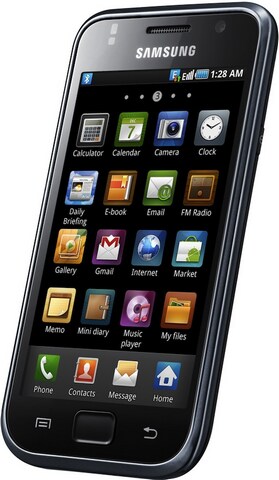
As reported by the Wall Street Journal, Apple has filed a lawsuit against Samsung on April 15 in the Northern District of California claiming that the South Korean company copied the “look and feel” of iPhones and iPads with its Galaxy devices – smartphones, tablets and media players.  A very few details are provided in the original report, but the WSJ claims the lawsuit indicates products like the “Galaxy S 4G,” “Epic 4G,” “Nexus S” and “Galaxy Tab” are violating Apple’s intellectual property.

Rather than innovate and develop its own technology and a unique Samsung style for its smart phone products and computer tablets, Samsung chose to copy Apple’s technology, user interface and innovative style in these infringing products,” the lawsuit said.

Representatives of Apple and Samsung didn’t immediately respond to requests for comment.

Samsung is one of the big players in the current Android landscape – the company came out last year with a 7-inch tablet and recently announced two new models (Galaxy Tab 8.9 and 10.1) that will also support Android’s Honeycomb 3.0 update. The relationship between Apple and Samsung is quite complex, as the South Korean tech giant makes the processors that go into iPhones and iPads sold by Apple. Several rumors in the past pointed to Apple willing to move the production of A4 and A5 CPUs away from Samsung (the iPad 2’s A5 CPU comes from Samsung), and this lawsuit might be a sign of things changing between the two companies. This lawsuit could also imply Apple is targeting Android indirectly by suing OEMs instead of Google itself – manufacturers like HTC, Samsung and Motorola are free to use Android, but they usually apply their custom graphical skins to differentiate their products. Apple is suing Samsung, a manufacturer of Android-based devices which applied its custom TouchWiz user interface to Android. TouchWiz, however, was also used on proprietary and Bada-based devices, but Apple is suing over the “look & feel” of the Android Galaxy line. The Wall Street Journal doesn’t specify whether or not TouchWiz was mentioned in the lawsuit.

A few weeks ago, Apple also sued online retailer Amazon over the usage of the term “App Store” in its new Android digital marketplace. Read more


Mac Sales Up 27% In First Quarter of 2011

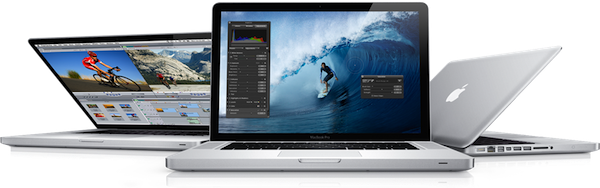
Quoting a research note issued by Piper Jaffray’s Gene Munster to clients this morning, BusinessInsider reports the Mac platform has seen a terrific rise in sales during the first quarter of 2011 in the United States. By summarizing data from NPD, the report details how the release of the new MacBook Pros in late February drove a 47% increase in sales year-over-year in the month of March, with an average 27% growth in the first quarter.

That 47% uptick followed growth of 20% in January and 12% in February, for average of 27% over the first quarter of 2011. That stands in stark contrast to the 3.2% drop in worldwide sales reported last week by IDC.

Bottom line: Munster expects Apple (AAPL) to report Mac unit sales in the range of 3.6 to 3.7 million, ahead of the Street’s consensus of 3.6 million.

So while the worldwide PC industry was seeing a serious decrease in sales in Q1 2011, Apple apparently managed to achieve a 27% growth with (allegedly) high Mac sales in the US. Like previous reports suggested, however, overall iPod sales should be down from last year – quite possibly because of the media playback capabilities of iPhones and iPads.

Analysts polled by Fortune two weeks ago claimed Apple could have sold nearly 4 million Macs in the second fiscal quarter of 2011 (which ended on March 26). Apple is set to announce the Q2 2011 financial results on April 20th.


Microsoft Releases New iPhone App To Create Panoramic Photos

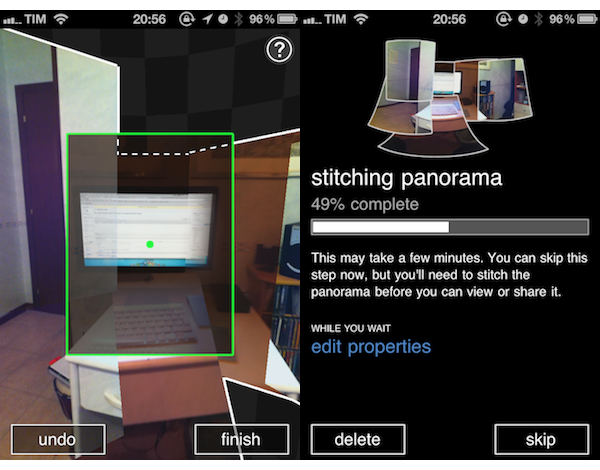
In its ongoing effort to support the iOS platform with a steady flow of new releases and updates, Microsoft released earlier today a new app for iPhone called Photosynth which is aimed at letting you create panoramic, 360-degree photos with your device’s camera. The concept and overall execution are very similar to Occipital’s 360 Panorama for iPhone: you hold your iPhone, and rotate it to capture what’s around you. The app will then “stitch” the panorama to offer a zoomable image that you can pan with your fingers to see the complete result. Unlike Occipital’s software, Microsoft’s application comes with sound effects for each photo (in fact, Photosynth does nothing but capturing a series of photos and making a collage after processing them) and simpler on-screen guides. I’ve used the app for a couple of hours now and, lack of gyroscope aside, it seems to me that Occipital’s app still produces better panoramas both in direct sunlight and low-light conditions. There’s some serious overlapping of photos in Photosynth, and the underlying processing algorithm doesn’t look very smart to me.

However, if you’re a fan of Microsoft’s new Metro style, the Photosynth app will please you with Windows Phone 7-like menus and buttons. The animations are quite nice, but not exactly “iOS native.” Photosynth also comes with several sharing functionalities: you can send panoramas to the Photosynth.net service (requires a Windows Live ID login), Facebook and even Bing Maps. Microsoft actually encourages you to share through Bing Maps, as “millions of people could see your panoramas on maps and in search results for locations you’ve captured.”

Photosynth is an interesting experiment, and I look forward to future updates. Get the app here.


Your Twitter Stream on Your Desk: The Trickle and Piolo Giveaway

Your iPhone provides ample opportunity for information feedback alongside your Mac, which is why the makers of Twitter app Trickle and the Piolo stand for your iPhone have joined forces to prop your Twitter stream underneath or next to your workhorse Macintosh. While Trickle streams Twitter at a readable pace in high-contrast glory, Piolo gives your iPhone the leverage it needs to reveal all sorts of juicy details without breaking your neck. Trickle gives you everything you need and nothing more, provided you want a miniature picture frame solely to display tweets from the smart, funny, and sometimes bullheaded people you find yourself enlightened by on Twitter. Piolo is a sturdy kickstand that can be easily carried with the iPhone 4 in a bag or purse, taking up zero room with its simple design and clever implementation. Together, you have yourself a the perfect combination of form and function: simplicity in Twitter at its finest, sans all the extra UI or lost desktop space. We’re going to give away ten (count ‘em) pairs of Trickle and Piolo to our readers, and all you have to do is follow the rules post break.

Read more


#MacStoriesDeals - Monday

We’ll tweet the daily deals at @MacStoriesDeals as well as exclusive weekend deals too, so please follow! Here are today’s deals on iOS, Mac, and Mac App Store apps that are on sale for a limited time, so get ‘em while they’re hot!

Read more


Presence Puts Your Mac In The Cloud, Lets You Connect from iOS

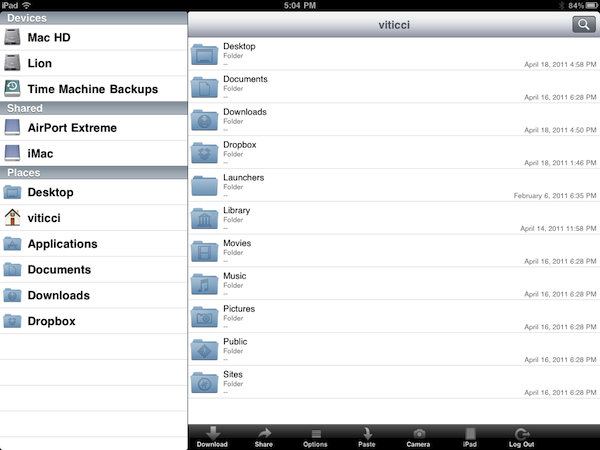
Over the past few months, I have tried several iOS apps to access my Mac’s filesystem and screen while away from my home office. These apps, either standalone VNC clients like Screens or all-in-one solutions like Cloud Connect Pro, usually relied on a Mac’s built-in sharing and remote login capabilities to create a secure connection between the machine and iOS devices trying to access its contents. To work with these apps, I simply had to set up a global DynDns hostname or a VPN server so that I could log into my Mac, view files, and control its screen. The VPN method, for instance, was actually based on the same DynDns hostname I had already configured in Edovia’s Screens, Cloud Connect Pro, Plex, FileBrowser and many others. For as much as I loved being able to remotely connect to my OS  X machines with a standard web address (DynDns allows you to create a custom URL), now I can’t use it anymore. We have recently upgraded our Internet connection to a new ISP, and whilst the speed bump is noticeable and generally useful when it comes to downloading large files, the new router provided by the ISP doesn’t offer a public IP address (without entering all the details, it’s based on NAT), thus preventing me from using all those neat Mac and iOS apps that needed DynDns to be working correctly. I can access my Mac’s content locally, but as soon as I go out DynDns becomes useless thanks to the new router. This means Here, File File doesn’t work anymore in 3G, as well as Screens (through DynDns), Plex and Cloud Connect. I may have a faster Internet connection now, but the lack of DynDns support changed the way I can access my machines from outside my home network.

So I tried to come up with new solutions to work from anywhere in these past weeks. Screens comes with an optional Screens Connect option that lets you set up a hostname that works through Edovia’s servers (and it’s not blocked by my router) and LogMeIn comes with its own Mac application that handles connections independently. From what I’ve seen so far, apps that provide their own connections through a “server” Mac app and don’t require me to enter a global DynDns hostname are working just fine. But this also means that apps based on OS X sharing features and lacking proprietary remote access capabilities won’t work unless I change my ISP again. Presence, a new version of the popular FarFinder tool by FlyingMac, allows me to access my Mac – all its files, folders, and drives – through a web service that puts the computer in the cloud and makes it accessible from any web browser, iPhone, or iPad. Read more



iHub: A USB Hub with Apple Appeal

M.I.C. Gadget is now selling the second revision of their iHub; a small, 4-port USB hub with a bit of Apple branding on it. The iHub has a light-up Apple logo on top that’s reminscent of many Apple laptops. Version 2 of their iHub looks very nice and could almost pass for a legitimate Apple accessory, even the packaging looks familiar.

Video and another picture after the break. Read more