Rovio’s 2011 Numbers

Rovio’s 2011 Numbers

In a statement published today, game developer Rovio reported its official financial results for the full calendar year 2011. The company reported revenue of €75.4 million ($106,3 million), with earnings before tax of €48,0 million ($67.6 million) or 64% of total revenue in 2011.

Rovio CEO Mikael Hed said:

The heavy investments made in 2011 to all business areas will be seen in future products. To ensure continuous success we need to be creative and stay focused on entertaining our millions of fans by continuously developing new and innovative products and services.

This is the first time Rovio, maker of multi-platform hit Angry Birds, is reporting annual results, with speculation already suggesting the company may be considering an IPO in its future. At the end of April, Rovio announced the latest entry in the Angry Birds franchise, Space, had become the fastest growing mobile game ever with over 50 million downloads in 35 days. Besides raw numbers, Angry Birds gained the appreciation of several key figures of the gaming industry, including Nintendo’s game design guru Shigeru Miyamoto.

Other interesting tidbits have been revealed in today’s statement: for instance, Rovio hired 196 people in 2011, and the total number of game downloads reached 648 million by the end of the year, with over 200 million monthly active users (Rovio publishes for a variety of platforms including iOS, Android, OS X, Windows, and Sony PSP). These numbers, however, were generated by three games (Angry Birds, Angry Birds Rio, Angry Birds Seasons), whilst other revenue came from Merchandising and Licensing, as Rovio is working with over 200 partners to develop new products for the Angry Birds franchise.

Permalink

Evernote Acquires Penultimate, Will Remain A Separate App

With a blog post published this morning, Evernote has announced the acquisition of Penultimate, a digital handwriting app for iPad developed by independent studio Cocoa Box. Penultimate, which we have covered on several occasions on MacStories in the past, is one of the richest – and best selling – handwriting apps for iPad, featuring smooth virtual ink to create notes users can send to a variety of services including Dropbox and Evernote. The latter was only added in January, and clearly caught Evernote’s attention as the company, after raising another funding round last week, is now focused on expanding its ecosystem of connected apps and services to new areas and platforms.

The acquisition will let Penultimate live on as a separate app, but more connected to Evernote, similarly to how Skitch – also part of the Evernote family – works now. It appears Penultimate will soon come to more devices, and gain deep Evernote search capabilities as well as a new synchronization option.

From Penultimate’s blog post:

Importantly, Penultimate is not going away: it remains an independent application, and will continue to espouse the virtues of ease of use, elegance, and “that special something” that have kept you coming back. But I also think you’ll be thrilled, and even surprised, by how much more the app will be able to do for you as we work together to improve it and connect more profoundly with Evernote’s capabilities.

Evernote, on the other hand, writes:

Penultimate is hugely popular. In fact, according to Apple, it’s the #4 best-selling paid iPad app of all time. When you have such a great product, the last thing you want to do is mess with it. That’s why Penultimate creator, Ben Zotto, is joining Evernote to head up future app development. Penultimate will stay a separate, elegant application and will get many much-requested Evernote-y improvements including full search and synchronization. Ben will also lead the effort to put handwriting and digital ink functionality into other Evernote products and platforms, so you’ll see handwriting cross-pollination popping up everywhere.

Penultimate isn’t the only handwriting and note-taking app for iPad to feature Evernote integration – others like Noteshelf and Notability also have basic support for Evernote – yet due to its elegant interface and simple approach to handwriting, Penultimate has always managed to maintain its top position in the App Store’s charts.

In its goal to build a “company for the next 100 years”, Evernote has been spending the past year revamping its ecosystem of services and apps that connect to Evernote accounts to bring together text, audio, images, and documents to help people “remember things”. The company acquired Skitch and iOS text editor Essay, launched two new iOS apps (Hello and Food), a browser extension (Clearly), and recently announced it is working on a task-management application following the acquisition of another iOS app, Egretlist. With the acquisition of Penultimate, it’ll be interesting to see whether Evernote will also make changes to its own iPad app to include deeper integration with the standalone handwriting software, and if the main Evernote interface will gain new filtering tools to better organize text notes and handwritten ones (which already support optical character recognition for search when saved to Evernote).

Check out a video featuring Evernote’s Phil Libin and Penultimate’s Ben Zotto after the break.
Read more


Mirroring Multiple iOS Devices To A Mac: Comparing AirServer and Reflection

In my review of AirFoil Speakers Touch 3.0, I wrote about AirPlay:

Ever since developers started reverse-engineering the AirPlay protocol that Apple introduced with iOS 4.2 in November 2010, we have seen all kinds of possible implementations of Apple’s streaming technology being ported to a variety of devices, for multiple purposes and scenarios. From tools to turn Macs into AirPlay receivers for audio, video, iOS Mirroring sessions, then a combination of all them, to more or less Apple-approved “AirPlay audio receivers” sold in the App Store, then pulled, then released in Cydia, the past two years have surely been interesting for AirPlay.

The past few months have indeed seen a surge of AirPlay-compatible desktop utilities and apps that take advantage of Apple’s technology for audio and video streaming. From games enhanced with AirPlay to enable new controls and interactions, to several desktop utilities that are now connecting Macs and Apple TVs with AirPlay, there’s plenty of options out there to beam images and audio to devices running iOS or OS X.

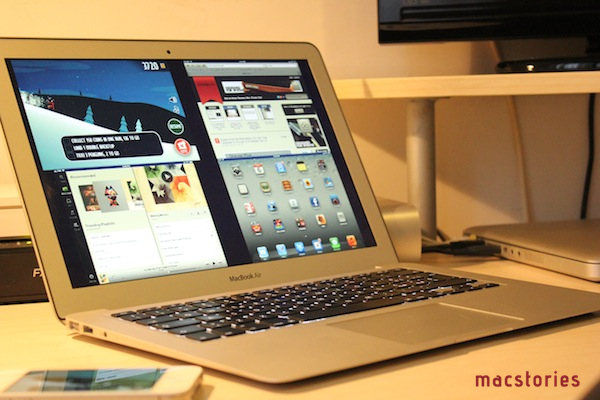
AirServer was one of the first applications to bring proper AirPlay support to the Mac, initially only with audio and video, then iOS 5 and Lion, and, around the time Reflection also came out, AirPlay Mirroring. Recently, the AirServer team made some major changes to the way AirServer handles AirPlay Mirroring (our overview) on OS X with multiple iOS devices, so I thought it’d be appropriate to give the app a second try. At the same time, I figured I hadn’t used Reflection much since it came out two months ago; I installed both the latest AirServer and Reflection on my iMac and MacBook Air, and tested multiple iOS devices with AirPlay Mirroring enabled at the same time. Read more


Apple Extends MobileMe’s 20 GB Free Upgrade to iCloud Until September 30

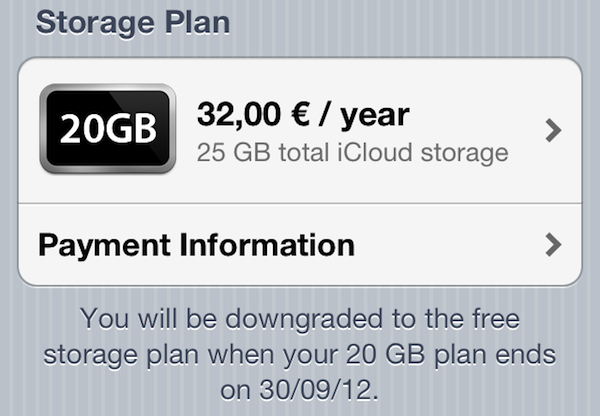
As noted by Macotakara (via AppleInsider), Apple has quietly extended the free period of 20 GB of iCloud storage given to previous MobileMe subscribers until September 30, 2012. When Apple started transitioning customers from MobileMe to iCloud last year, they noted MobileMe services would stop functioning on June 30, 2012, providing detailed instructions for users to migrate accounts and data to the new platform. In the same MobileMe Transition Q&A webpage, Apple confirmed former MobileMe subscribers would get access to 20 GB of iCloud storage for free until June 30, 2012.

Whilst MobileMe services are still set to go offline on June 30, it appears Apple recently made changes to extend the free storage period until the end of September. Apple’s website now reports:

MobileMe members with 20GB of purchased storage receive a complimentary iCloud storage upgrade of 20GB, and accounts with additional purchased storage (40GB to 60GB) receive a complimentary upgrade of 50GB after moving to iCloud. These free upgrades are good through September 30th, 2012. After that date, you can continue the upgrade at the regular price or let it expire and use the free 5GB plan.

On iOS devices, as pictured above, the free storage plan is now reporting a downgrade date of September 30, 2012.

Recently, Apple began offering free copies of OS X Snow Leopard to old MobileMe subscribers still on Leopard in order to let them upgrade to Lion (which is available on the Mac App Store for 10.6), and thus iCloud. The company also started reminding iWork.com users of the impending closure of the service, and featured banners on the me.com webmail to remind users about the June 30 MobileMe deadline.

More details on iCloud storage and international pricing for new customers are available in our overview from last year.


Slow Feeds Brings A Simple, Unique Innovation To RSS Apps

In the oft-abused Death of RSS debate, a common and universal truth is typically forgone: RSS is a standard, not a single entity, and as such its survival or presumed “death” should be related to the services that use it, not the standard itself.

The problem many people have with RSS is roughly the same others have with email: it’s not as real-time as Twitter, and if you don’t keep on tabs on it you can easily get overwhelmed by the onslaught of unread items demanding your constant attention. While in the past few years some amazing apps and technologies have leveraged RSS as a foundation to provide new experiences, little has been done to address the simple problem behind the possible frustration caused by RSS: that RSS can be useful for sites with fewer but focused items, but it can get annoying (like email) with hundreds of unread items. Is it possible to retain the usefulness of RSS, while ensuring its catch-all nature is relegated to a level that avoids frustration?

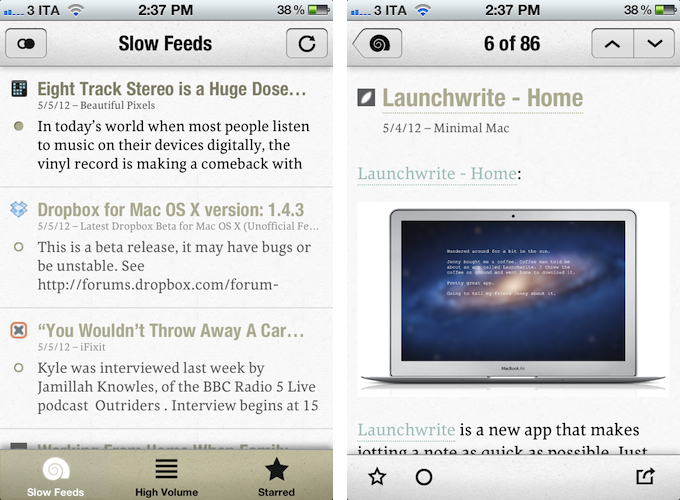
Slow Feeds by Stefan Pauwels is an iPhone app that does one thing well: it separates “slow” from high-volume feeds, and it lets you check out both within a single interface. It fixes a simple problem with a unique, yet totally obvious approach: it understands the convenience of RSS for either “low” and “high” volume websites, and doesn’t treat them equally.

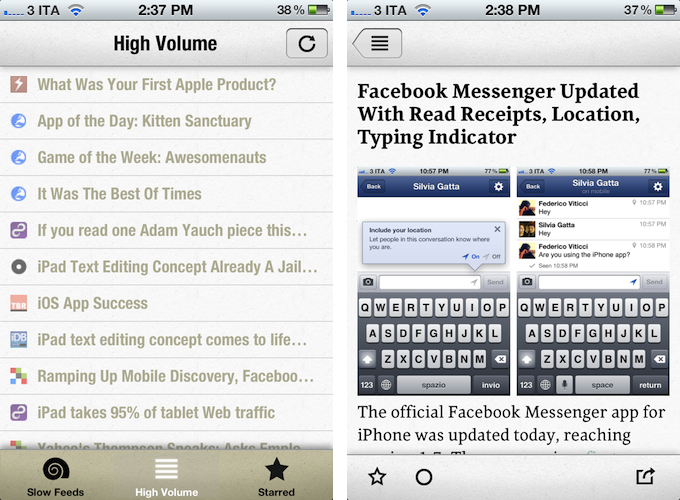
Once logged in with your Google Reader account, Slow Feeds (whose icon is very appropriate) will take a couple of minutes on first launch to “understand” which feeds are usually slow, which ones have many posts per day, then it will break them up into two categories: Slow Feeds and High Volume. A third tab in the bottom bar is also dedicated to Starred items.

The first tab, Slow Feeds, lets you switch between All or Unread items for sites with few content every day: for instance, this is where I can find things like the iFixit Blog, Minimal Mac, or Beautiful Pixels. These are sites that I am interested in, but that because of their low-volume nature could sometimes easily get lost in the plethora of unread items (ever wondered why these sites usually don’t publish on Apple keynote day?). The app has been very accurate at picking “slow feeds” for me, going back a few months to older items it knew I might have missed – indeed, thanks to Slow Feeds I rediscovered many articles that I had unintentionally ignored.

The High Volume tab, on the other hand, displays a list of all items from all sites that publish a lot of items every day. In here, I can find MacStories, MacRumors, Daring Fireball, The Loop, and all those other publications that are very active in terms of post frequency. The results have been accurate in here as well, but I think there are some things the app could do better. For one, when compared to “regular” RSS apps like Reeder or Mr. Reader, the High Volume tab is obviously lacking: there are no sorting options, no folders, and the list of items isn’t organized by date. Slow Feeds isn’t meant for this kind of consumption – the app’s purpose is to keep “slowly updated feeds from getting lost in the fast river of news” – but I think some more options wouldn’t hurt.

Similarly, it’d be nice to be able to manually specify feeds that are “low volume”. By default, Slow Feeds automatically calculates the frequency for each feed based on the number of items per feed and time interval, but a manual option could be useful for, say, those sites that don’t typically publish a lot items, but may have exceptions (such as several Apple blogs on a keynote day). Being one of the first releases of the app, I wasn’t expecting to find the same amount of configurable options and settings as in Mr. Reader, but nevertheless, I am looking forward to having more sharing features in the article reading view (which right now only supports Twitter, email, and Instapaper).

Slow Feeds won’t replace your daily RSS app (it doesn’t want to), yet at the same time, I believe it really has a chance of becoming an app many will use alongside their RSS client on a daily basis. Slow Feeds’ core concept is so clever, and so naturally implemented, I am now wondering why, in retrospective, others didn’t come up with it first.

Slow Feeds is $2.99 on the App Store.


Facebook Messenger Updated With Read Receipts, Location, Typing Indicator

Facebook Messenger Updated With Read Receipts, Location, Typing Indicator

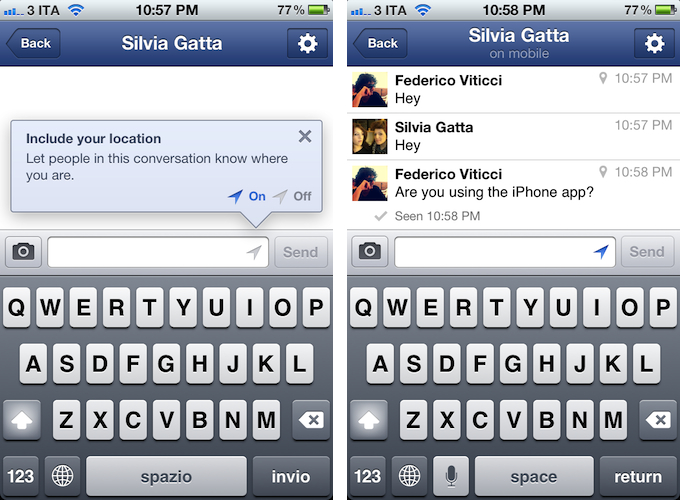
The official Facebook Messenger app for iPhone was updated today, reaching version 1.7. The new version, first reported by 9to5mac earlier this week, adds a number of optimizations and new features to the standalone messaging client, including read receipts, location information for messages, and a typing indicator.

Similarly to Apple’s iMessage, the app now displays a read receipt under each message to indicate whether the person you have written to has “seen” or ignored a message. But unlike Apple’s solution, Facebook Messenger now attaches location data to single messages as well, associating each text – with the user’s consent regulated through the standard iOS location controls – with a city or area. This, combined with read receipts and a typing indicator (that, however, did not work in our tests) should contribute to making Facebook Messenger more “personal” and “contextual” than standard SMS. To further showcase the interconnected and multi-platform nature of Facebook – which now boasts over 480 million monthly mobile users – the company is now also showing the device that generated a message within the conversation: for instance, a message sent from an iPhone will have a mobile device icon next to it.

Facebook Messenger is capable of sending messages anywhere – web, desktop, mobile – as long as the recipient has a Facebook account, although according to the company today’s updates are “mobile first”.

Facebook Messenger 1.7 is out now on the App Store.

Permalink

Toggler

Toggler

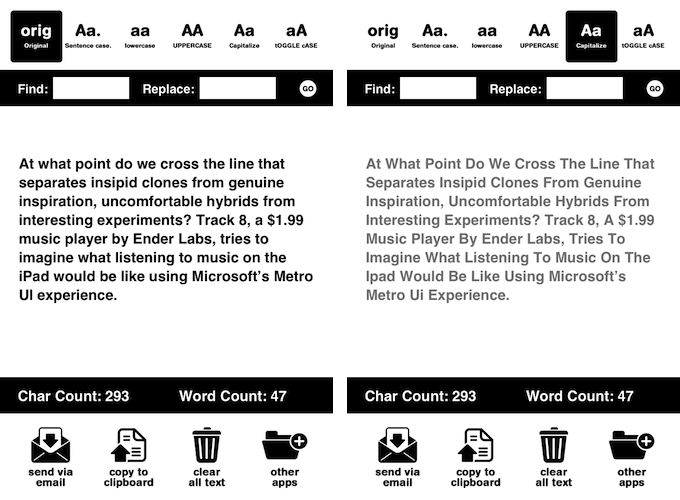
I don’t always manipulate chunks of text on iOS, but when I do, I use Toggler. Available for free on the App Store, Toggler lets you easily convert text to Sentence case, lowercase, UPPERCASE, Capitalize, and tOGGLE cASE. It lets you paste the original text you want to modify in the first tab, which is the only one that brings up the iOS keyboard to edit text. With one tap, you can manipulate text and copy it to the clipboard, send it via email, or clear it. The app also displays character and word counts, and it lets you find & replace.

I mainly use Toggler to convert sentences to headlines for MacStories, and to quickly find and replace words for my articles. Free on the App Store.

Permalink

Reading News With Hacker News ∗

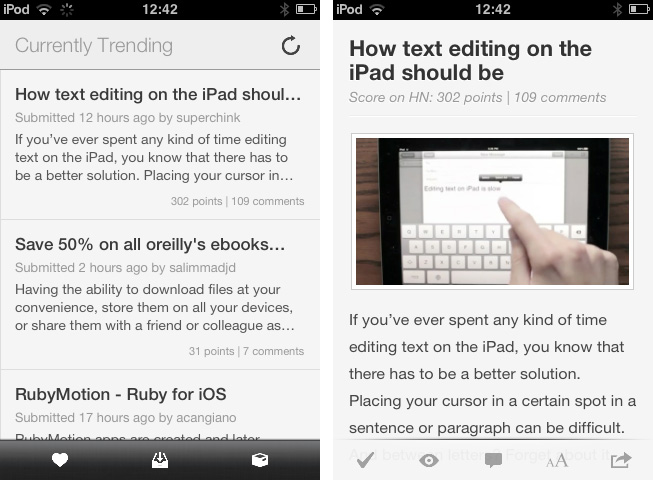
Hacker News from YCombinator is a reliable and very active source of information for all things geeky. Users collect noteworthy technology news articles from all over the web, comment and discuss on them, and vote to create a top list sorted by popularity. Following the trends of the community by joining the network or just regularly visiting the site and clicking through new articles is interesting for anyone who wants to know a bit more about the latest web technologies and how to help enhancing them, from entrepreneurs to developers. In my opinion though, the HN website is cluttered, and the typography is a mess. Maximilian Mackh solved many of these issues by recently publishing his iPhone client for Hacker News. Read more


Track 8 Brings The Metro Experience To An iPad Music Player

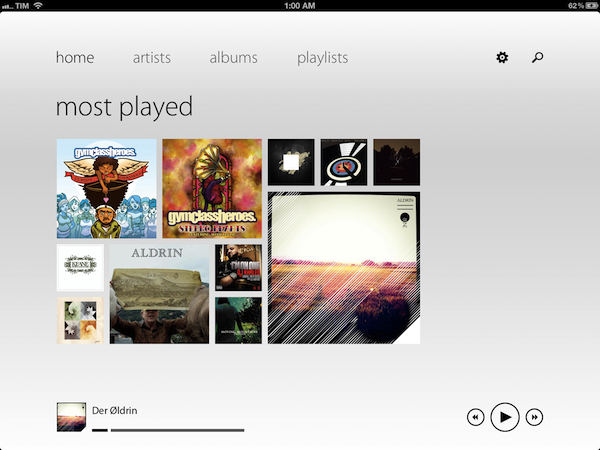
At what point do we cross the line that separates insipid clones from genuine inspiration, uncomfortable hybrids from interesting experiments? Track 8, a $1.99 music player by Ender Labs, tries to imagine what listening to music on the iPad would be like using Microsoft’s Metro UI experience.

Following the basic principles of Swiss graphic design, the Metro design language is focused on getting rid of “superfluous” design elements such as buttons and toolbars to turn the content – words, pictures, videos – into the user interface to manipulate on screen. Originally conceived on Windows Phone 7 and being updated as the foundation of the future Windows 8 OS, Metro has struck a chord with the design community thanks to its elegant approach to modern typography, dynamic layouts, and intrinsic originality compared to other mobile platforms. But does Metro make sense as an app running on iOS, the polar opposite of Microsoft’s studies in terms of UI design and experience?

Ender Labs isn’t afraid to say that they wanted to see how Metro would work on the iPad, without excuses. So while I’ll leave the task of determining whether this is right to someone else – I sure hope Microsoft doesn’t come knocking at Ender Labs’ door for any reason – I want to to focus on Track 8 the app for iPad you’d probably interested in checking out.

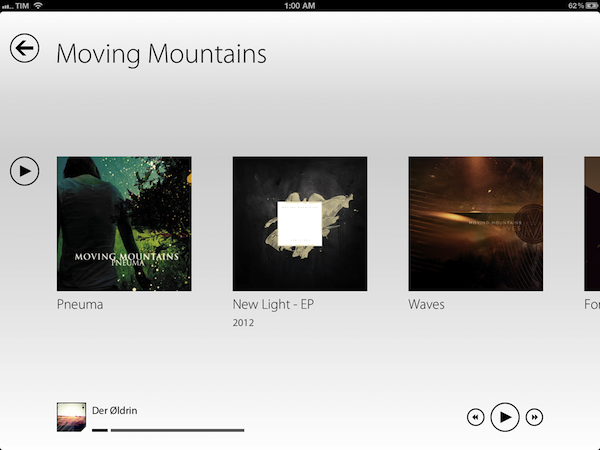
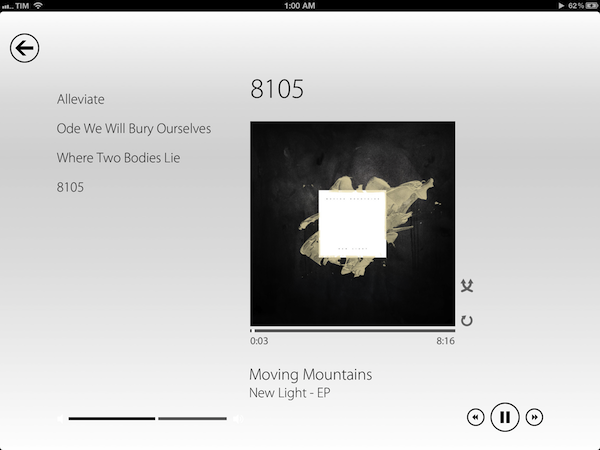
Fetching music directly from the native iOS music app, Track 8 displays four tabs (home, artists, albums, playlists) on a clean canvas that emphasizes typography, solid colors, and album artworks instead of icons, buttons, and scrollbars. In pure Metro fashion, the content becomes the interface you are manipulating: tapping on an album will advance a level “into” the content of that album, and tapping again on a song will bring up the now playing view with a larger cover art, and only some basic buttons to play, pause, shuffle, and repeat. Everything is kept as minimal as possible: the volume and progress controls are two simple flat, solid bars you can slide; to go back to a previous view, you tap on a large back button in the upper left corner that “snaps back” with a nice fading animation. To move horizontally between content, you swipe.

Track 8 comes with some appearance settings to customize the look of the Metro experience on iOS. The background color can be set to light or dark, and 10 additional options are provided to set the “accent color” for selected content and UI items. The app has some wallpapers (including linen), and you can also opt to display artist backgrounds, which are pulled from Last.fm and saved in the app’s local cache for when you won’t have an Internet connection. To keep the app in line with Metro’s elegant and uncluttered paradigm, I turned artist backgrounds off and chose a simple light wallpaper.

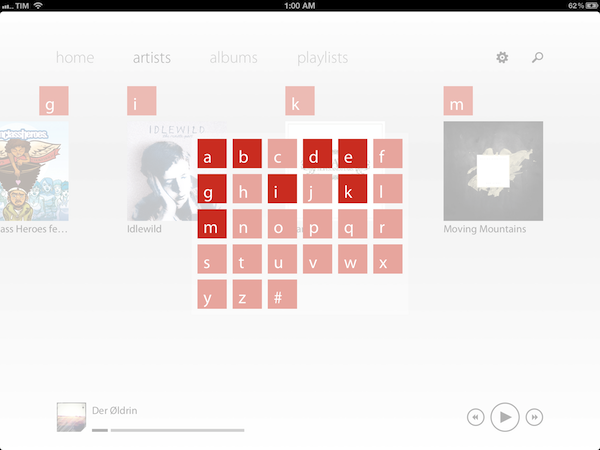
Track 8 works and it looks gorgeous, but it is undeniable that is an app that’s not meant to be on this platform. Not just for mere aesthetics – as an iPad app, Track 8 contradicts the very underlying principles of iOS interaction and navigation. The fact that tapping on sections at the top, for instance, gets you into a single level of interface is the antithesis of the iOS tab bar, which always allows you to switch with one tap between multiple, even nested sections. Or again, alphabetical lists: on iOS, letters are placed on the right side of a scrollable view, allowing you to quickly jump to a specific letter. With Track 8, artists and albums are grouped alphabetically, sorted horizontally in a grid, and tapping on a specific letter will display a popup grid to quickly jump to any other letter.

Track 8 doesn’t want to be an iOS app by design, and whilst this can be an advantage as long as loyalty to the Metro design language goes, it is also the app’s biggest shortcoming when it comes to expecting certain elements and patterns that are standards on iOS.

Track 8 won’t win an Apple Design Award. It won’t revolutionize the market of third-party music players for iPad, and it sure is an experiment that doesn’t aim at pushing the limits of iOS forward. But that’s not to say Track 8 doesn’t look great and work well on the iPad: if you’re a fan of Metro and would like to see that kind of experience in app that also happens to have a real functionality, Track 8 is your best option. You can get it at $1.99 on the App Store.