Posts in reviews

More Great Shelf Apps to Boost iPad Productivity

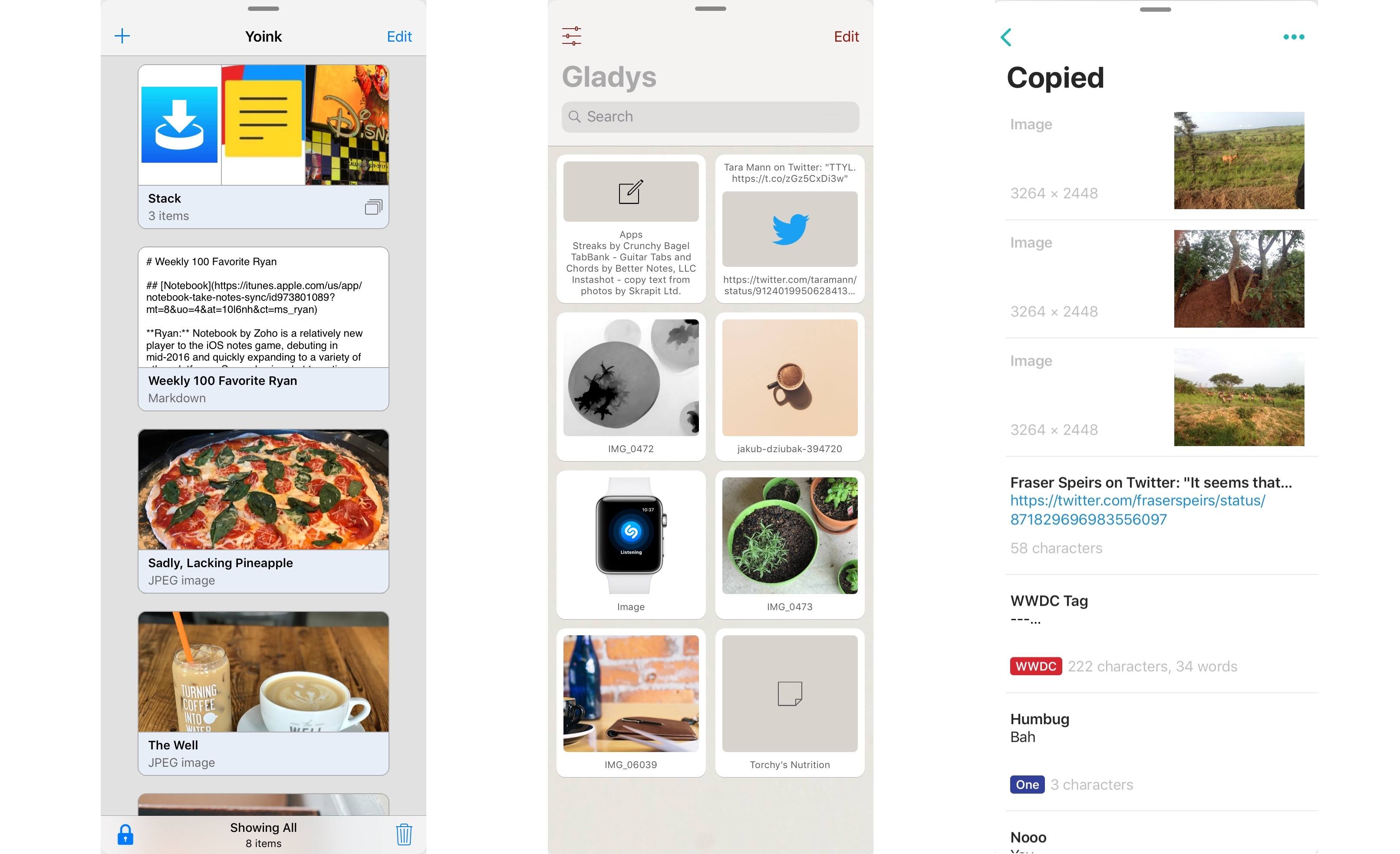
Left to right: Yoink, Gladys, Copied

Left to right: Yoink, Gladys, Copied

Last month after iOS 11’s launch I pulled together a roundup of iPad apps belonging to a whole new category of apps. Dropped, Workshelf, The Shelf, and Scrawl Pouch all launched as manifestations of Federico’s dream for a drag and drop-powered temporary holding place for content on the iPad. If you’re unfamiliar with this concept, here’s how I described it in my last shelf roundup:

The need for a shelf springs from the addition of drag and drop to iOS 11. It’s not always practical to drag content directly from one app to another; sometimes you know you’ll need that content soon, but you’re not ready to drop it elsewhere yet. Additionally, in some situations you may wish to drop the same data into multiple places over a short period of time, and it can be cumbersome to re-open the data’s source app to pull it out multiple times. A shelf can solve these problems: it serves as a temporary resting place for anything you know you’ll need quick access to soon. In this way it can serve a role similar to the macOS desktop, which is commonly used as a temporary holding zone.

While all the apps I originally highlighted continue to fill this role well, several additional quality apps have launched that bring new things to the table in this young category of apps.
Read more

Access Extra Content and Perks

Founded in 2015, Club MacStories has delivered exclusive content every week for nearly a decade.

What started with weekly and monthly email newsletters has blossomed into a family of memberships designed for every MacStories fan.

Learn more here and from our Club FAQs.

Club MacStories: Weekly and monthly newsletters via email and the web that are brimming with apps, tips, automation workflows, longform writing, early access to the MacStories Unwind podcast, periodic giveaways, and more;

Club MacStories+: Everything that Club MacStories offers, plus an active Discord community, advanced search and custom RSS features for exploring the Club’s entire back catalog, bonus columns, and dozens of app discounts;

Club Premier: All of the above and AppStories+, an extended version of our flagship podcast that’s delivered early, ad-free, and in high-bitrate audio.

Learn more here and from our Club FAQs.


CARROT Weather Adds New CARROT Voices, Weather Underground Improvements, and More

Within a matter of a few months, CARROT Weather has launched a major new version, then followed up with a fun AR mode, and now with version 4.2, it’s adding several key refinements to improve the overall experience.

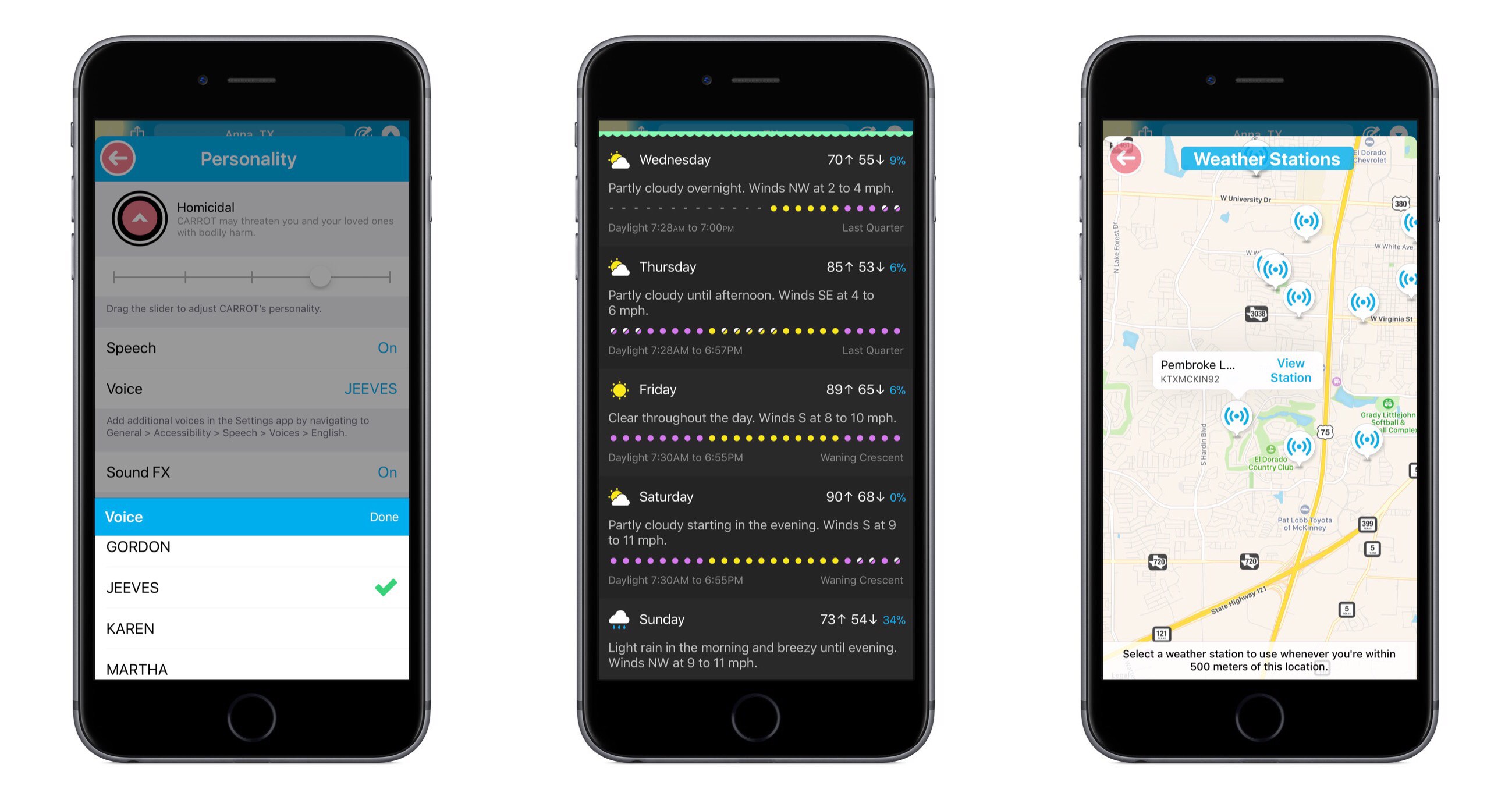
CARROT’s snarky personality is the defining characteristic of the app, yet recent updates have seen that personality gain customization options – both for users wanting more snark, and those begging for less. With today’s update, CARROT goes through perhaps an even more drastic transformation. From the Personality screen in Settings, there are now a variety of new voices that can be set for CARROT, including both female and male options. Among these is FRED, the voice used for the original Mac. My personal favorite is JEEVES, whose smug butler tone makes me feel inferior in a way I thought only the original CARROT could.

Users of CARROT Weather’s alternative data source, Weather Underground, get a couple nice updates in this release. Now, available weather stations can be seen and selected from a map view, making it much easier to get the absolute most accurate data for your current location. Also, severe weather alerts are now available for all of Europe so you’ll be kept in the know regarding official hazards.

If you prefer your weather app to provide a little more business, a little less party, CARROT’s Professional mode has been enhanced in a couple ways. Not only will the maniacal A.I. be de-snarked when set to Professional, but now the little characters and animals in illustrations will be hidden by default as well, AR mode will present a more civilized CARROT, and secret locations can now be turned on.

Premium subscribers have a new vertical view option for daily weather info, which can be accessed from Settings ⇾ iPhone/iPad ⇾ Daily ⇾ Details. I’ve found that I prefer the vertical view over the default horizontal, and I enjoy how it still fits right in with the setting of a landscape – when details slide up from the bottom, it feels like you’re simply delving deeper below the surface.


CARROT Weather keeps getting better. The additions in version 4.2 aren’t blockbuster features, but they make for an overall more complete package. Now users with all kinds of weather and personality preferences can benefit from this top-notch app and customize it to their liking. Without losing its distinct sense of flare, CARROT Weather is quickly becoming a weather app for everyone.

CARROT Weather is available on the App Store.

Access Extra Content and Perks

Founded in 2015, Club MacStories has delivered exclusive content every week for nearly a decade.

What started with weekly and monthly email newsletters has blossomed into a family of memberships designed for every MacStories fan.

Learn more here and from our Club FAQs.

Club MacStories: Weekly and monthly newsletters via email and the web that are brimming with apps, tips, automation workflows, longform writing, early access to the MacStories Unwind podcast, periodic giveaways, and more;

Club MacStories+: Everything that Club MacStories offers, plus an active Discord community, advanced search and custom RSS features for exploring the Club’s entire back catalog, bonus columns, and dozens of app discounts;

Club Premier: All of the above and AppStories+, an extended version of our flagship podcast that’s delivered early, ad-free, and in high-bitrate audio.

Learn more here and from our Club FAQs.


Twitterrific for macOS Review

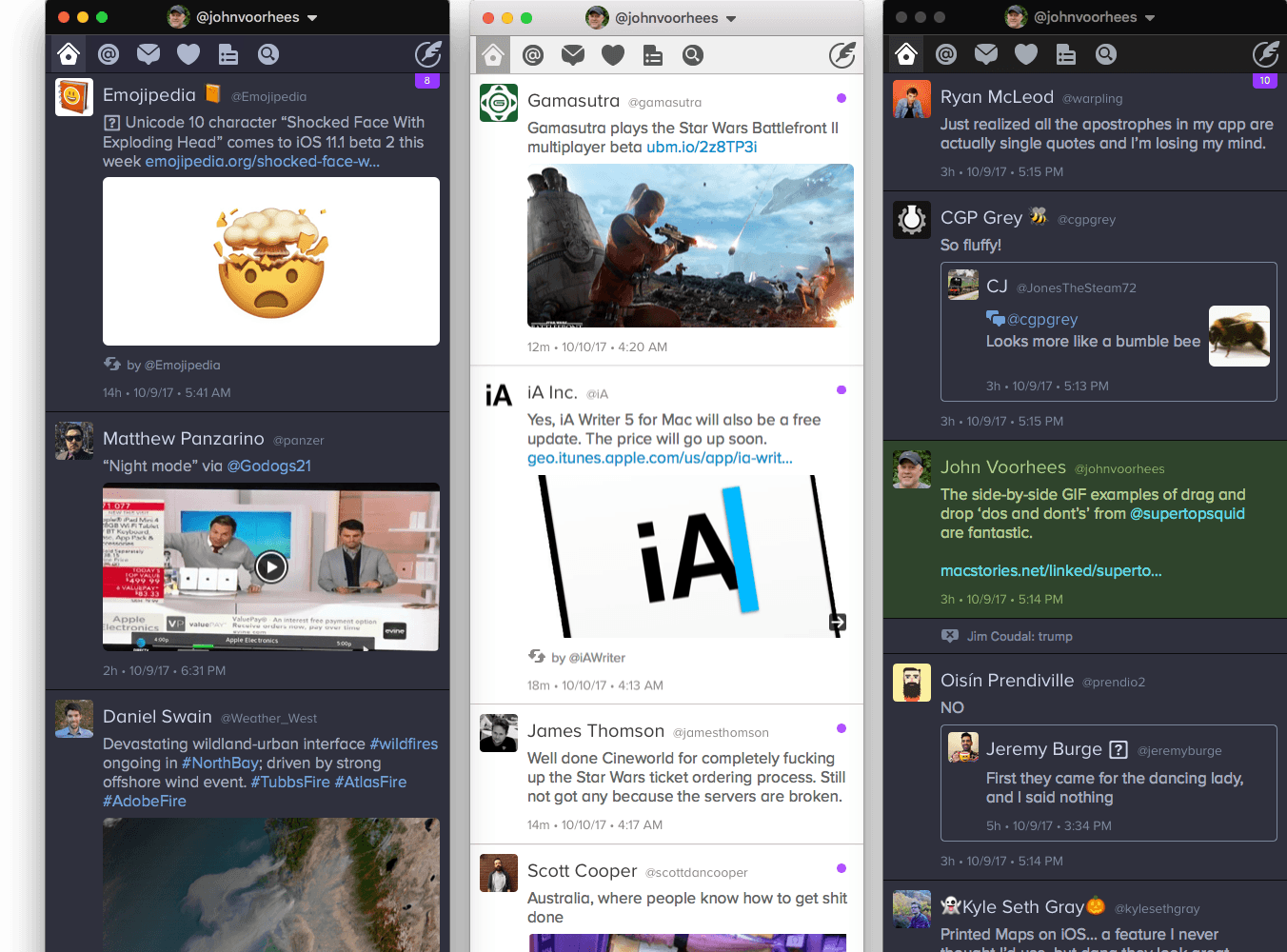
For years, Twitterrific for iOS and macOS were developed side-by-side, each matching the other feature for feature. But around 2013, development of the macOS version of Twitterrific slowed, while the iOS version continued to push forward with innovative features like Center Stage, the app’s media browser. Sticking with Twitterrific for macOS meant forgoing features supported by competing Twitter clients and Twitterrific’s iOS version.

With the relaunch of Twitterrific for macOS today, The Iconfactory has begun to change that. Funded by Kickstarter and codenamed Project Phoenix, the relaunched app is a solid 1.0 release that brings Twitterrific as close to parity with its iOS sibling as the two apps have been in years. There are still features that the iOS version of Twitterrific has that the macOS version doesn’t and that I’d like to see added, but for many people who move between Mac and iOS devices each day, today’s release makes Twitterrific a viable option for the first time in a while.

Read more

Access Extra Content and Perks

Founded in 2015, Club MacStories has delivered exclusive content every week for nearly a decade.

What started with weekly and monthly email newsletters has blossomed into a family of memberships designed for every MacStories fan.

Learn more here and from our Club FAQs.

Club MacStories: Weekly and monthly newsletters via email and the web that are brimming with apps, tips, automation workflows, longform writing, early access to the MacStories Unwind podcast, periodic giveaways, and more;

Club MacStories+: Everything that Club MacStories offers, plus an active Discord community, advanced search and custom RSS features for exploring the Club’s entire back catalog, bonus columns, and dozens of app discounts;

Club Premier: All of the above and AppStories+, an extended version of our flagship podcast that’s delivered early, ad-free, and in high-bitrate audio.

Learn more here and from our Club FAQs.


Bobby: Subscription Tracking Made Easy

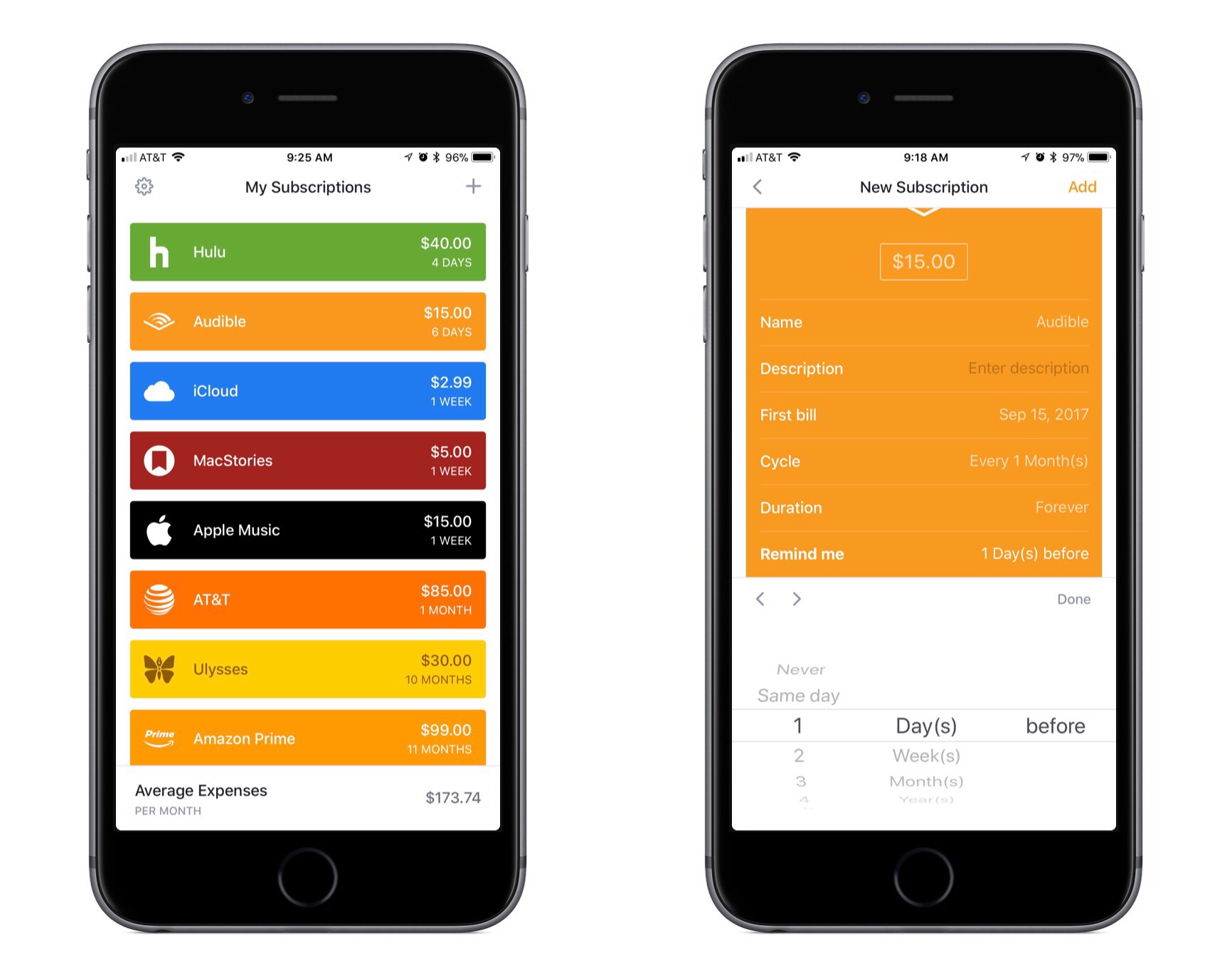
We live in a world where media and apps are increasingly available only through recurring subscriptions. Besides the common Netflix or Spotify subscriptions, we may have subscriptions for our favorite apps, for iCloud Drive storage, for news publications, and more.

Last year Bobby launched on the App Store as an easy way to keep track of this growing mess of subscriptions, but in version 1.0 the lack of a few key features – such as iCloud sync – hindered the app’s overall value. The recently released Bobby 2 remedies those few initial drawbacks, and presents one of the best App Store options for keeping on top of where your money goes each month.

Read more

Access Extra Content and Perks

Founded in 2015, Club MacStories has delivered exclusive content every week for nearly a decade.

What started with weekly and monthly email newsletters has blossomed into a family of memberships designed for every MacStories fan.

Learn more here and from our Club FAQs.

Club MacStories: Weekly and monthly newsletters via email and the web that are brimming with apps, tips, automation workflows, longform writing, early access to the MacStories Unwind podcast, periodic giveaways, and more;

Club MacStories+: Everything that Club MacStories offers, plus an active Discord community, advanced search and custom RSS features for exploring the Club’s entire back catalog, bonus columns, and dozens of app discounts;

Club Premier: All of the above and AppStories+, an extended version of our flagship podcast that’s delivered early, ad-free, and in high-bitrate audio.

Learn more here and from our Club FAQs.


GoodNotes Adds Drag and Drop Flexibility

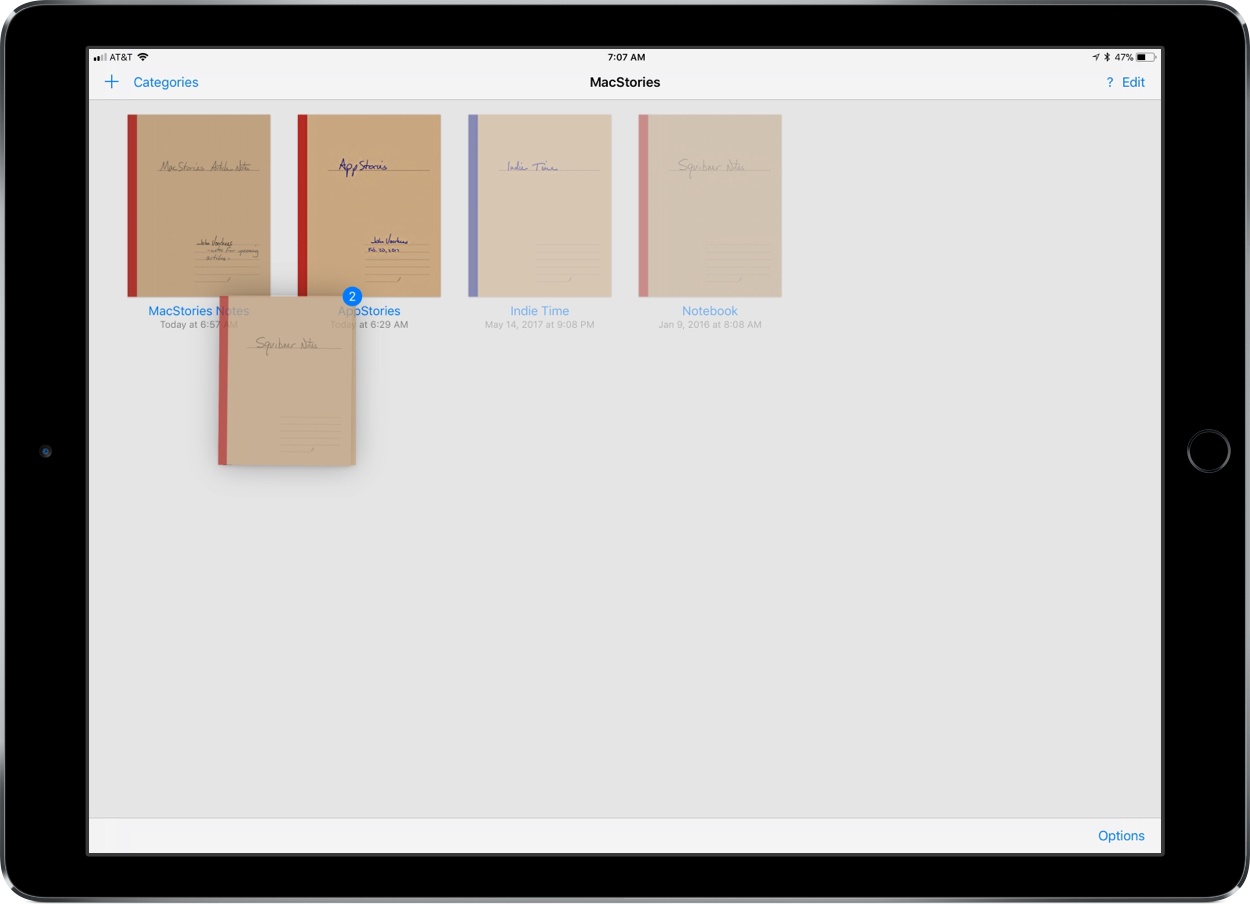
Drag and drop is a natural fit for a note taking app like GoodNotes. The app excels as a way to capture handwritten or typed notes, but one of its greatest strengths is the ability to combine notes with other media, which drag and drop makes easier than ever.

GoodNotes has one of the best ink engines of any note taking app I’ve used. You can choose from a preset selection of ink colors and line widths or customize them to suit your taste. There’s a highlighter tool for marking up your notes or other documents too. The lasso tool lets you select notes and other on-screen elements to move them on the page or, in the case of handwritten notes, convert them to text.

Read more

Access Extra Content and Perks

Founded in 2015, Club MacStories has delivered exclusive content every week for nearly a decade.

What started with weekly and monthly email newsletters has blossomed into a family of memberships designed for every MacStories fan.

Learn more here and from our Club FAQs.

Club MacStories: Weekly and monthly newsletters via email and the web that are brimming with apps, tips, automation workflows, longform writing, early access to the MacStories Unwind podcast, periodic giveaways, and more;

Club MacStories+: Everything that Club MacStories offers, plus an active Discord community, advanced search and custom RSS features for exploring the Club’s entire back catalog, bonus columns, and dozens of app discounts;

Club Premier: All of the above and AppStories+, an extended version of our flagship podcast that’s delivered early, ad-free, and in high-bitrate audio.

Learn more here and from our Club FAQs.


Game Day: Fowlst

Sometimes the best distraction from a frantic and chaotic day is an even more frantic and chaotic game. Fowlst, which developer CatCup Games, describes as ‘an action game about an owl that is trapped in Hell for some reason’ is perfect for just such an occasion.

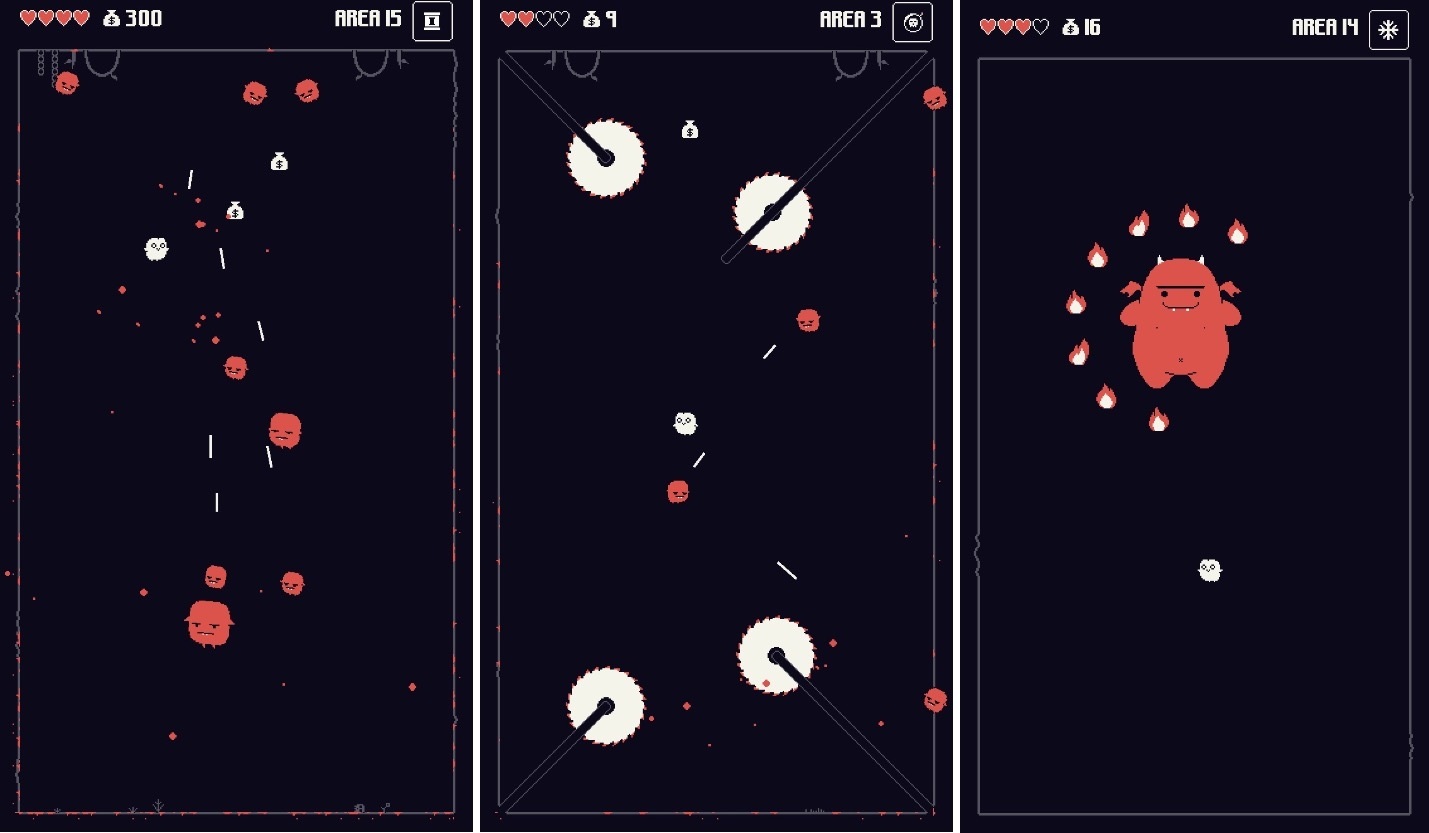
Fowlst is an arcade-style action, dodging game. You play as the owl, pursued by demons that shoot lasers at you while you try to avoid buzzsaws, fire, and other obstacles. The game gets crazy fast.

The mechanics remind me of Don’t Grind, one of my favorite arcade-style games released last year. You control your owl by tapping on the left and right-hand sides of the screen, which makes your owl fly in a bouncy kind of way in the direction of your taps. The controls purposefully require a careful coordination of left and right taps to navigate your owl. Power-ups are activated by swiping up on the screen. It’s a simple control scheme that makes Fowlst easy to pick up and start playing, but difficult to master.

Demons are defeated by colliding with them before you run out of hearts from being hit by lasers or other obstacles. Unlike Don’t Grind, you don’t have to keep your owl aloft constantly. You can rest on the bottom of any stage or a perch, but constantly moving helps make it harder for the demons to get you. There are also periodic bosses theoughout the game to mix up the pace of the action.

When you defeat a demon, it’s replaced with a floating sack of money and occasionally a heart or power-up that disappears after a few seconds. To collect items, you need to steer your owl into them while simultaneously dealing with other demons and obstacles. The cash you collect can be spent to upgrade your owl with health and weapons.

The game ends when you run out of hearts. Fowlst then tallies the money you collected, the number of levels cleared and shows how you did compared to your high score, which has the effect of making the game wonderfully-compulsive to play. Fowlst keeps things interesting by randomizing the levels you are presented each time you play through. It’s a carefully struck balance that keeps the gameplay familiar enough to avoid frustration but also avoids becoming monotonous.

Fowlst combines its arcade action with pixelated art, a complementary chiptune soundtrack, and lots of ‘pew-pew’ laser sound effects. The result is an addictive arcade game that has almost no learning curve and is easy to pick up and play for short periods of time but is difficult to master and hard to put down. It’s a perfect combination for a mobile game, making Fowlst a title I’m going to be returning to often.

Fowlst is available on the App Store.

Access Extra Content and Perks

Founded in 2015, Club MacStories has delivered exclusive content every week for nearly a decade.

What started with weekly and monthly email newsletters has blossomed into a family of memberships designed for every MacStories fan.

Learn more here and from our Club FAQs.

Club MacStories: Weekly and monthly newsletters via email and the web that are brimming with apps, tips, automation workflows, longform writing, early access to the MacStories Unwind podcast, periodic giveaways, and more;

Club MacStories+: Everything that Club MacStories offers, plus an active Discord community, advanced search and custom RSS features for exploring the Club’s entire back catalog, bonus columns, and dozens of app discounts;

Club Premier: All of the above and AppStories+, an extended version of our flagship podcast that’s delivered early, ad-free, and in high-bitrate audio.

Learn more here and from our Club FAQs.


Create a Real-World Masterpiece with Paint Space AR

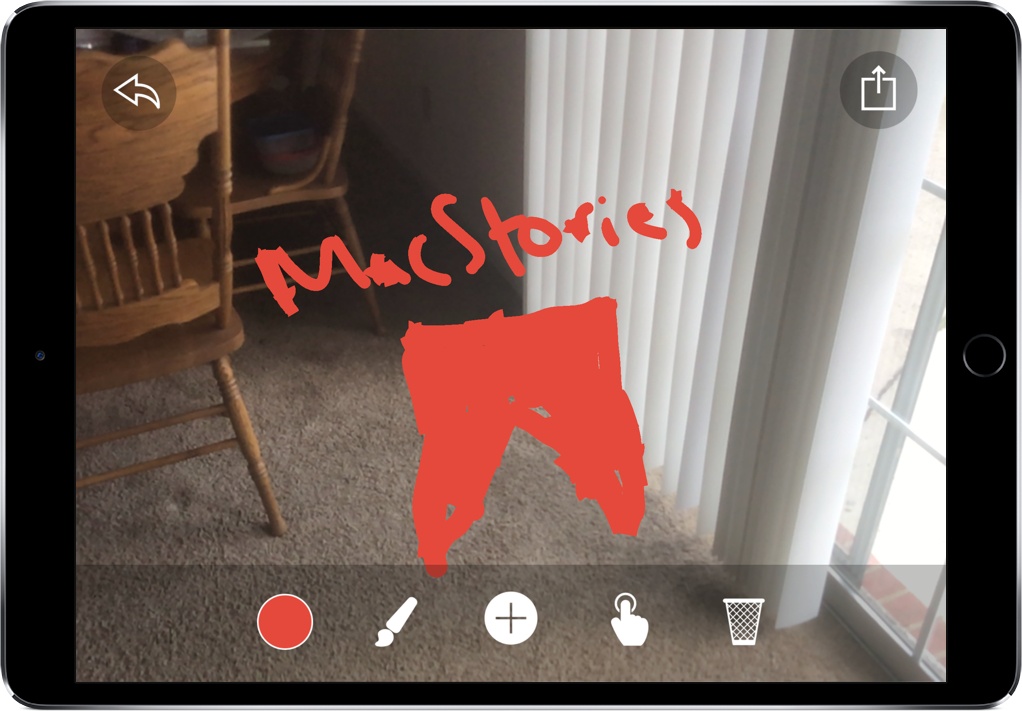
One of my all-time favorite tech demos is Tilt Brush, a VR painting experience where you can create art in 3D on the HTC Vive. Immediately, you begin seeing the potential of VR artistry, allowing artists to utilize tools not available in the real world. By creating free-floating structures with unique brushes, Tilt Brush was my first exposure to what the future of digital art could look like.

Paint Space AR is Tilt Brush for the AR world, enabling you to create interesting pieces of art right where you are. With AR, though, Paint Space has a unique advantage: instead of having to create something in a simulated space, you’re able to paint on objects right in front of you.

Read more

Access Extra Content and Perks

Founded in 2015, Club MacStories has delivered exclusive content every week for nearly a decade.

What started with weekly and monthly email newsletters has blossomed into a family of memberships designed for every MacStories fan.

Learn more here and from our Club FAQs.

Club MacStories: Weekly and monthly newsletters via email and the web that are brimming with apps, tips, automation workflows, longform writing, early access to the MacStories Unwind podcast, periodic giveaways, and more;

Club MacStories+: Everything that Club MacStories offers, plus an active Discord community, advanced search and custom RSS features for exploring the Club’s entire back catalog, bonus columns, and dozens of app discounts;

Club Premier: All of the above and AppStories+, an extended version of our flagship podcast that’s delivered early, ad-free, and in high-bitrate audio.

Learn more here and from our Club FAQs.


1Writer Update Includes Open in Place and Drag and Drop Support

Before I moved to Ulysses for most of my writing, I used 1Writer. At first, it was how I accessed my large collection of NVAlt notes when I wasn’t at my Mac because its search is exceptionally fast. Over time though, it became my primary text editor because it syncs with iCloud and Dropbox, works with Markdown files, has excellent export options, is highly customizable, and supports URL schemes and JavaScript actions. I don’t use 1Writer as often these days, but it remains one of my favorite text editors, so I was glad to see it has been updated to take advantage of new iOS 11 features.

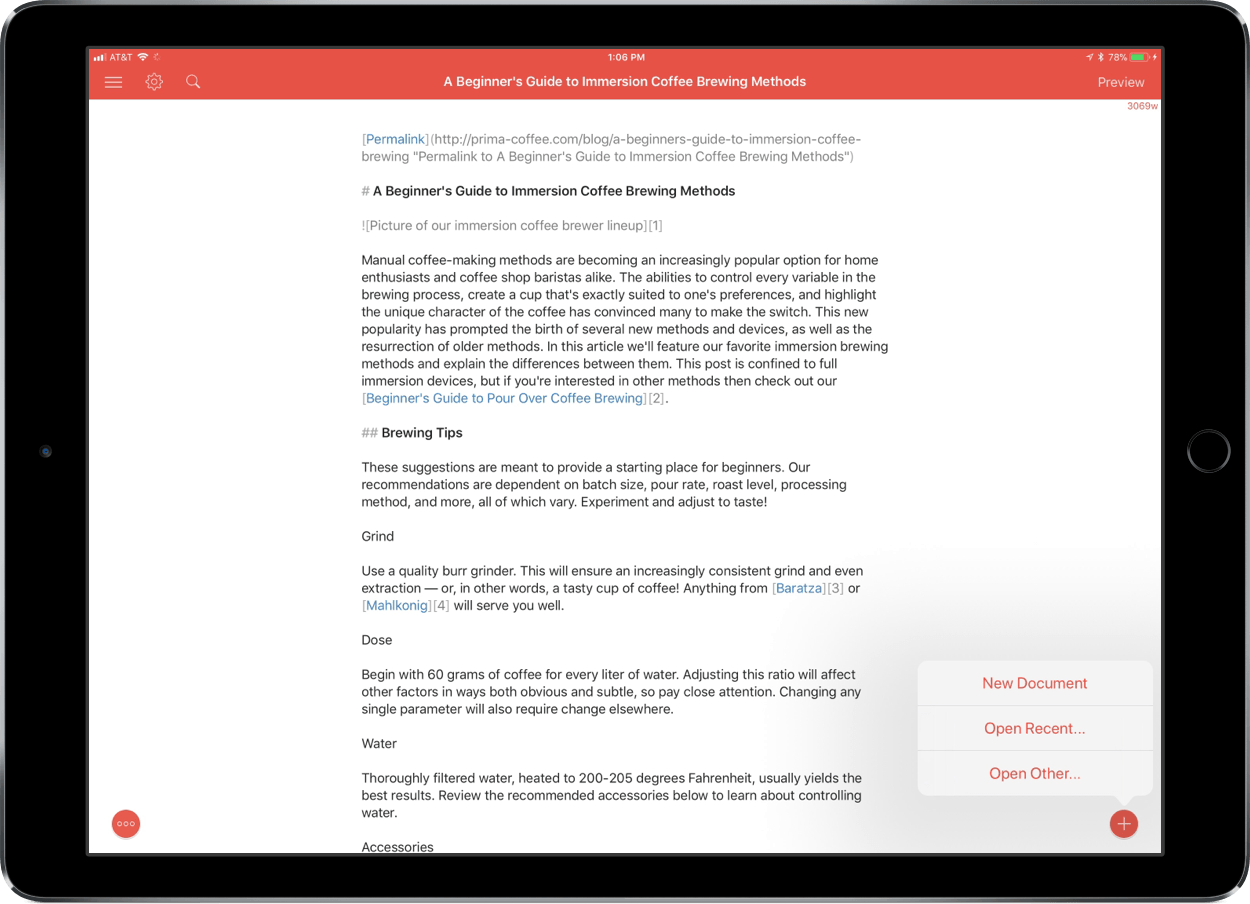
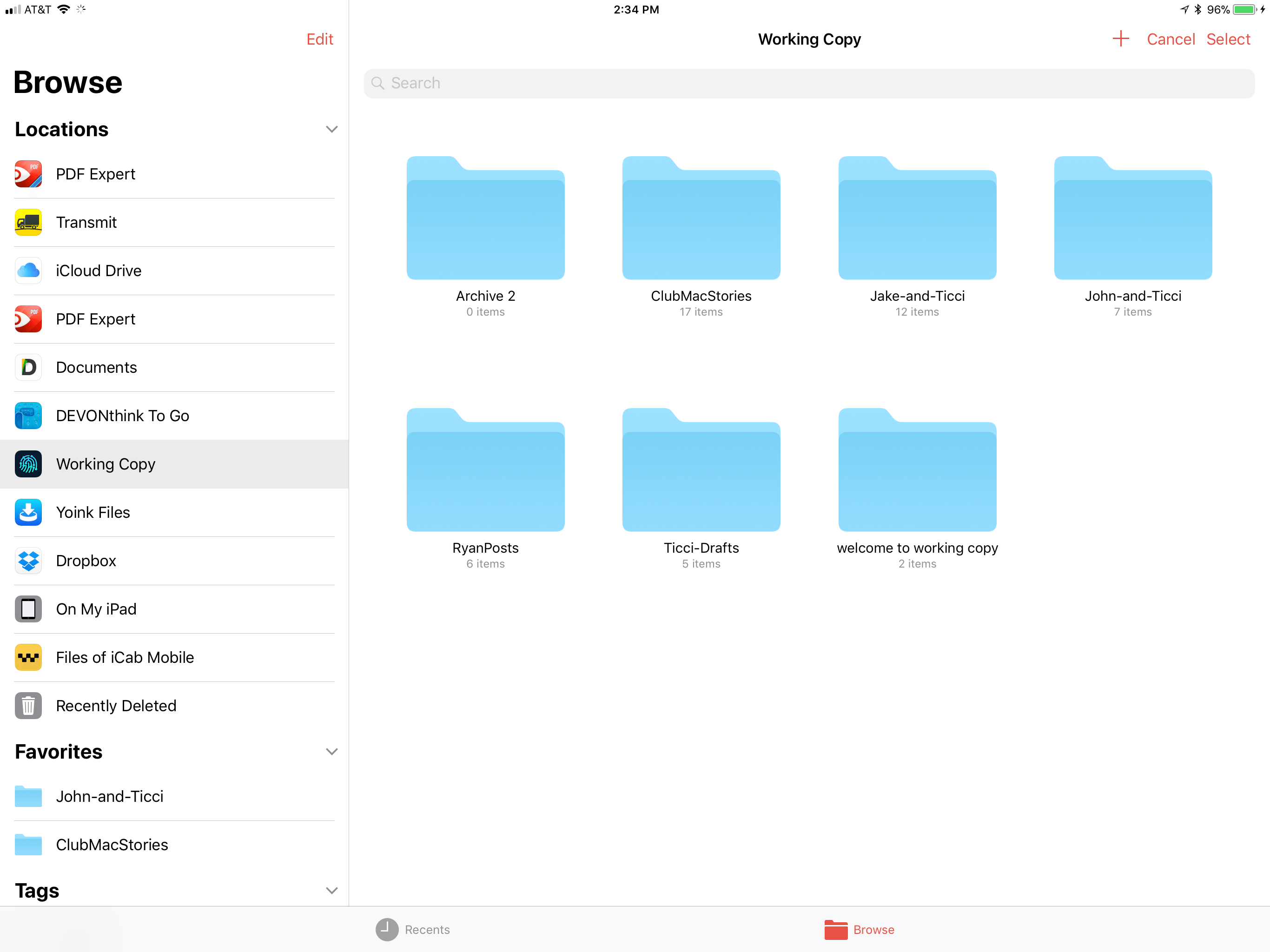
The latest version of 1Writer supports Open in Place via iOS 11’s new document browser. Tap the omnipresent plus button in the lower right-hand corner of 1Writer and choose ‘Open Other…’ to launch iOS 11’s document browser. 1Writer has tinted the navigation elements of the document browser, which helps remind users that they are still in 1Writer, which is a nice touch that not all apps bother to support. With Open in Place, 1Writer can edit the Markdown or plain-text files of any file provider. For example, that allows me to grab a draft from one of our MacStories GitHub repos via the Working Copy file provider to make edits to the original document without creating a local 1Writer copy of the file.

1Writer supports Open in Place.

1Writer supports Open in Place.

1Writer also supports two-way drag and drop. I can drag any document from 1Writer’s document browser and drop it into another compatible app that accepts text like iA Writer, Byword, or Notes. I was also able to attach a 1Writer file to a message using Apple Mail.

Dragging into 1Writer works too. 1Writer can handle text and URLs, so it disregards images included in something like a note from the Notes app, but will set up Markdown syntax for an image if you drag in just a photo. If you drag into an existing 1Writer document, the text and links are appended to the end of the document.

1Writer has also added support for smart punctuation, which, for example, replaces straight quotes with the curly variety, and is iPhone X-ready.

1Writer is one of the most versatile text editors available. The addition of Open in Place means the app can be used with a wider variety of apps than ever before and drag and drop eliminates the number of steps needed to get text into and out of 1Writer. If you’re looking for a text editor that is at the forefront of iOS 11 technologies, 1Writer is an excellent choice.

1Writer is available on the App Store.

Access Extra Content and Perks

Founded in 2015, Club MacStories has delivered exclusive content every week for nearly a decade.

What started with weekly and monthly email newsletters has blossomed into a family of memberships designed for every MacStories fan.

Learn more here and from our Club FAQs.

Club MacStories: Weekly and monthly newsletters via email and the web that are brimming with apps, tips, automation workflows, longform writing, early access to the MacStories Unwind podcast, periodic giveaways, and more;

Club MacStories+: Everything that Club MacStories offers, plus an active Discord community, advanced search and custom RSS features for exploring the Club’s entire back catalog, bonus columns, and dozens of app discounts;

Club Premier: All of the above and AppStories+, an extended version of our flagship podcast that’s delivered early, ad-free, and in high-bitrate audio.

Learn more here and from our Club FAQs.


Fantastical Gains Drag and Drop Support on iPad and iPhone

One of the most valuable advantages of digital calendars over physical ones is how much easier they are to manage. For example, the concept of a recurring event is easy for calendar apps to grasp, while adding the same event to a physical calendar can be both a time drain and a literal pain in your dominant hand. After recurring events, I’d guess that rescheduling is the next greatest pain point for physical calendar users. There’s erasing and re-writing involved when dealing with something physical, whereas with calendar apps you simply scroll the little date spinner to adjust a rescheduled event. Or if you’re using Fantastical, then thanks to the addition of drag and drop you can simply pick a task up and drop it on the new date.


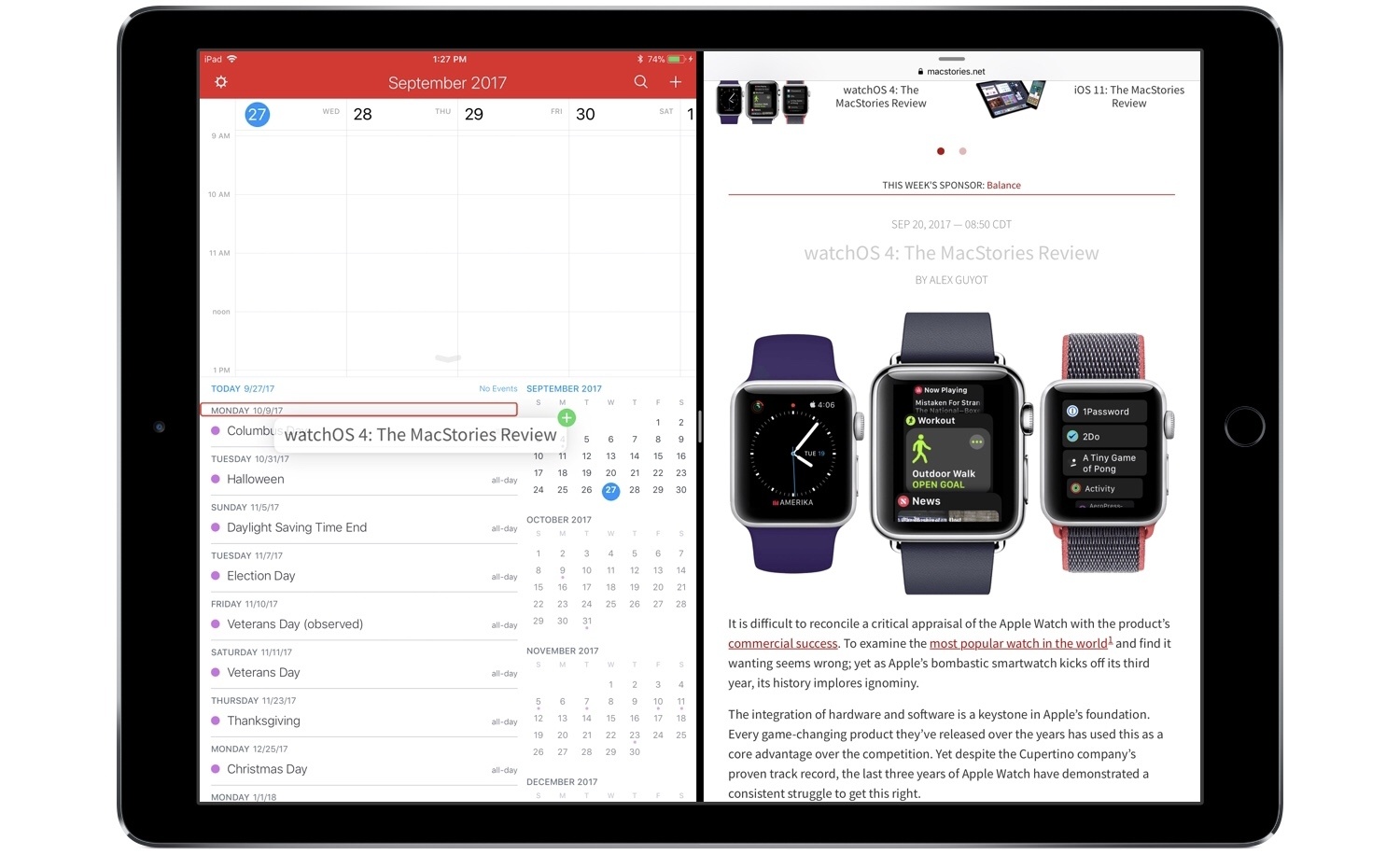
On both iPhone and iPad, drag and drop in Fantastical empowers easy event rescheduling, and it also enables you to drag and drop reminders to set new due dates for them. The drag and drop support on iPad is more extensive, of course, allowing you to bring events and reminders out of Fantastical and into the app of your choice. Drag events into a Mail.app compose field and they’ll send as ICS files. Add them to a text editor and they’ll expand to include all attached information, such as location data, notes, and more. Similarly, reminders dropped elsewhere include their additional metadata as well. You can also drop text from other apps into Fantastical to create new events: simply hold the text over the day you want to create an event on, and drop. The text will be pre-filled in a new event creation dialogue, letting you add additional details then and there, or hit the Add button to complete it.

The pace of new apps adding support for drag and drop on iOS has been encouraging. There’s still plenty of work to be done by third-party developers, but we’re moving quickly toward the day when all of the main apps we use on a daily basis will be able to send and receive information in the most natural way possible.

Fantastical is available on the App Store for iPhone and iPad.

Access Extra Content and Perks

Founded in 2015, Club MacStories has delivered exclusive content every week for nearly a decade.

What started with weekly and monthly email newsletters has blossomed into a family of memberships designed for every MacStories fan.

Learn more here and from our Club FAQs.

Club MacStories: Weekly and monthly newsletters via email and the web that are brimming with apps, tips, automation workflows, longform writing, early access to the MacStories Unwind podcast, periodic giveaways, and more;

Club MacStories+: Everything that Club MacStories offers, plus an active Discord community, advanced search and custom RSS features for exploring the Club’s entire back catalog, bonus columns, and dozens of app discounts;

Club Premier: All of the above and AppStories+, an extended version of our flagship podcast that’s delivered early, ad-free, and in high-bitrate audio.

Learn more here and from our Club FAQs.