This Week's Sponsor:

HomeSnap

A Private, Read-Only Window Into Your HomeKit Home


Posts in news

Mac OS X 10.6.7 Now Available [Direct Links]

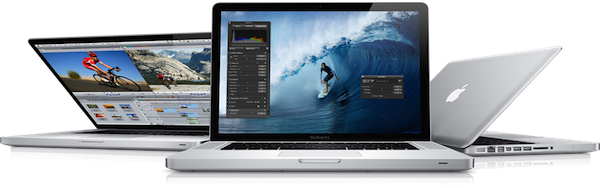
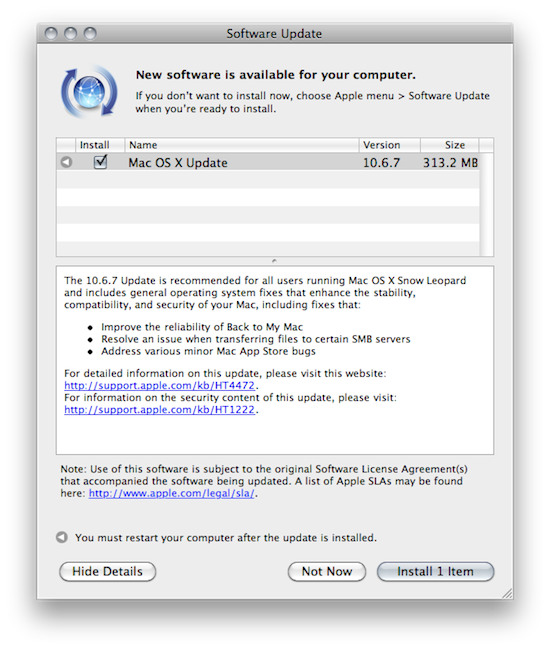
Apple just released Mac OS X 10.6.7. The new version is available now in Software Update (or through the direct links below) and weighs at around 300 MB. The new build includes a series of fixes for Back to my Mac, SMB servers and the new MacBook Pros.

The 10.6.7 Update is recommended for all users running Mac OS X Snow Leopard and includes general operating system fixes that enhance the stability, compatibility, and security of your Mac, including fixes that:

Improve the reliability of Back to My Mac

Resolve an issue when transferring files to certain SMB servers

Address various minor Mac App Store bugs

For detailed information on this update, please visit this website: http://support.apple.com/kb/HT4472.

For information on the security content of this update, please visit: http://support.apple.com/kb/HT1222.

We also appreciate this very specific Mac App Store fix:

Resolves an issue in which clicking the Updates tab in the Mac App Store could cause the Mac App Store to become unresponsive.

Additional improvements after the break. Download links:

Read more


New York Times: A Future iPhone Will Include NFC, Perhaps Not The iPhone 5

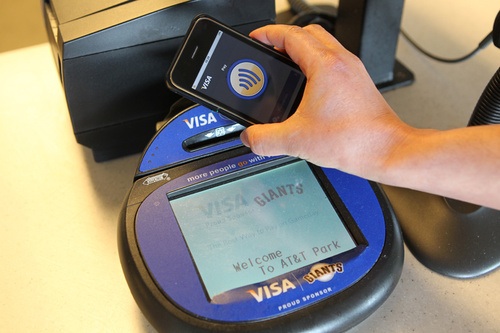
After all the recent rumors and speculation about Apple willing to implement Near Field Communication (NFC) technology into the next-generation iPhone, The New York Times weighed in earlier today to confirm that according to “two people with knowledge of the inner workings of a coming iteration of the Apple iPhone” a future version of the device will indeed include NFC.

The NYT report is rather curious as they’re not sure whether or not Apple will deploy this feature in the iPhone 5, set to debut this summer:

According to two people with knowledge of the inner workings of a coming iteration of the Apple iPhone — although not necessarily the next one — a chip made by Qualcomm for the phone’s processor will also include near-field communication technology, known as N.F.C. This technology enables short-range wireless communications between the phone and an N.F.C reader, and can be used to make mobile payments. It is unclear which version of an iPhone this technology would be built into.

The New York Times also claims that according to another person familiar with Apple’s plans the iPhone will use NFC to enable mobile payments tied to users’ iTunes credit – something that was also reported in the past months, although some people speculated Apple could also consider providing an option for billing users through their carrier, rather than iTunes. At this point, however, it seems very clear that Apple will strongly invest in the iTunes payment option to give users the possibility to “keep it all together” in iTunes. Currently Apple has more than 200 million active accounts in iTunes with credit card information stored on their servers.

In the past months, rumors suggested Apple could also rely on NFC and MobileMe to enable remote computing and usage of App Store apps. Several reports pointed to the iPhone 5 featuring / not featuring NFC, and others also reported such a feature was being considered for the iPad. An e-Wallet application for iOS also made an appearance in a patent design published last year.


Prevent Accidental Quit In Google Chrome

In my typical work day, I keep a lot of browser tabs open in the background. MacStories articles, links from Google Reader, Twitter, Reddit and many others are always sitting there in the browser, which is an essential tool in my workflow. Perhaps the most important one. So when I accidentally hit CMD+Q instead of CMD+W and I lose the contents of an article I’m writing in my online visual editor, I usually would like to smash my computer’s keyboard. It actually never happened (otherwise I wouldn’t be here typing on this keyboard), and luckily for me it looks like such a situation won’t ever take place thanks to a subtle, yet life-saving feature implemented in the Dev version of Google Chrome: quit warning.

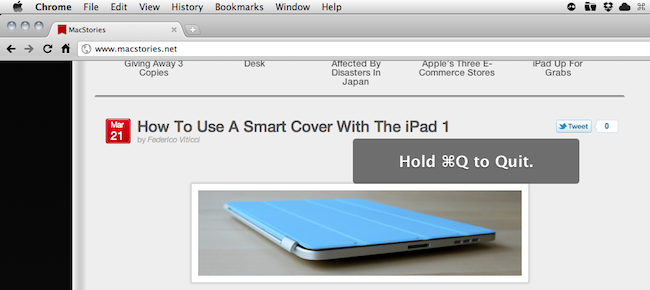
Enabled by default in the early dev versions (latest one is 11.0.696.14) and now available as an option in Chrome’s settings, the quit warning works a little bit different from what you’d expect: instead of putting a dialogue box up on the screen that asks you “if you really want to quit”, Google thought that it’d be best to implement a system that would prevent accidental clicking of CMD+Q. So instead of just hitting the shortcut to quit Chrome, you have to click & hold CMD+Q for a few seconds. Pure genius: this way, if I accidentally hit “Q” instead of “W”, my browser won’t quit.

To enable the feature, type “about:flags” (without quotes) in the Chrome Omnibox and activate “Confirm to Quit. Enjoy. [Mac OS X Hints]


How To Use A Smart Cover With The iPad 1

The Smart Cover is undoubtedly one of the reasons why people will consider upgrading to the iPad 2: it’s lightweight, it’s got magnets, it automatically attaches to the device to cover its screen and also happens to have a microfiber cloth for cleaning purposes. It doubles as a stand to prop your iPad for typing or movie watching, and thanks to the hardware implemented by Apple it can wake or put the iPad’s display to sleep. It’s genius.

Those people who don’t want to upgrade to the iPad 2 just yet, however, might be out of luck when trying to “retrofit” the Smart Cover for the iPad 1. The original iPad doesn’t have magnets, nor does it come with a system to automatically recognize whether or not a cover is lifted off the screen. Plus, it’s slightly heavier and it’s got a different design lacking tapered edges. Many thought it would be impossible to use a Smart Cover with the iPad 1.

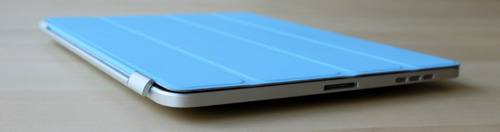
It turns out though, with a bit of hacking and custom magnets it is possible to “install” the Smart Cover on the iPad 1. By placing a series of magnets on the iPad 1’s flat side so the Smart Cover’s hinge can fit, the guys at The Russians Used A Pencil managed to make it all work together. Sure, the iPad doesn’t automatically wake from sleep and the stand functionality is a little bit off because of the old design, but it works.

To place the magnets, I stuck them first to the magnetized hinge of the Smart Cover. I slid them around until they became locked into a position. This ended being asymmetrical, but I didn’t mind. I then lined up the cover with the iPad and used masking tape to mark where the magnets should be placed. I wanted this to be a somewhat permanent solution, so I used super glue to affix the magnets to the iPad. If you are not so daring, or want to test it out to make sure you like it, just use transparent tape. Even though the super glue keeps the magnets secure and in place, they are actually pretty easy to remove by just “chipping” them off with a flathead screwdriver and a very light tap of the hammer.

You’ll need glue to attach the magnets to the iPad, and I’m pretty sure the whole “automatic aligning process” isn’t as magical as Apple’s implementation in the iPad 2. Still, check out the video below if you, too, want to have a Smart Cover on your original 2010 iPad. [via The Brooks Review]
Read more


iOS 4.3.1 Coming Within Two Weeks with iPad 2 Jailbreak Fix?

According to BGR – who has a good track record on iOS releases and rumors – Apple is preparing to launch a new version of iOS, 4.3.1, “within one to two weeks”. The release, a minor one as usual following the “point upgrade”, will contain a series of fixes for the baseband and will also patch a vulnerability in the iPad 2 that enabled hackers to jailbreak the device.

BGR reports:

  • Baseband updates for the 3GS and iPad (original)
  • Fixed memory hang that results in memory corruption when reading large files from USIM filesystem
  • Fixed problem with NTLM authentication in apps and on websites
  • Fixed issue with the Springboard and 3rd party apps not recognizing the gyroscope on the iPad 2
  • Fixed iPad 2 jailbreak vulnerability

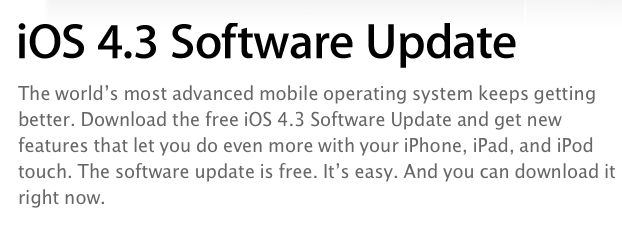
iOS 4.3 was released on March 9th ahead of the iPad 2 launch.


iPad 2 Launch Not Delayed in Czech Republic, Still Coming This Friday

Last week several blogs noted that on Apple’s Czech website the iPad 2 was set to launch on April, rather than March as Apple had previously announced at the iPad 2 media event. On the website, Apple wrote “V prodeji od 25 dubna”, which roughly translates to “Coming April 25”. That was a month after Apple’s promised release date, and many speculated it was a sign of the company delaying the launch of the iPad 2 across Europe due to supply constraints.

But it looks like it was just a translation error by Apple’s website design team. The webpage has been updated and now reports “V prodeji od 25 brezna” – which is March 25. The release date that Apple announced and, apparently, was never meant to change.

The iPad 2 will come out later this week in 25 countries (launch was delayed in Japan) and, from what we’re hearing, it’ll follow the steps of the US launch with afternoon availability on Friday and same prices of the original iPad.  [Thanks, Krystian]


Numerous Owners Reporting 2011 MacBook Pro Crashes Whilst Under Load

A considerable number of owners of the new 15” and 17” 2011 MacBook Pro’s have reported both on the Apple Discussion board and also on the MacRumors forum that their new machines are locking up and freezing when under an extensive load. For example this post by ‘brandonlive02’ is representative of what many are complaining about;

I have a 15” 2011 MacBook Pro with a 128 SSD. It has repeatedly frozen in the week I’ve had it - often at random points while using StarCraft II and also while trying to access Time Machine. When it freezes, sound continues and I can still move the cursor (which is sometimes the spinning ball and sometimes the regular cursor) but the computer is completely unresponsive – force quit does not work nor does anything else - have to do a hard reboot.

The issue is believed to be fairly widespread with one user reproducing it on three separate machines and another who reportedly managed to reproduce it on every new MacBook Pro at their local Apple store. This wiki outlines the various methods one can use to re-create the crash if they wish to check if their MacBook has this issue.

No complete fix has been found and the cause is still unknown but the wiki page suggests one fix of using some software to only use the integrated graphics chip of the MacBook Pro. A post in the MacRumors thread suggests that Apple is aware of the issue and that they believe it to be a firmware or driver related problem rather than a hardware issue, but this has yet to be confirmed and Apple have not issued any public statement.

[Via MacRumors]


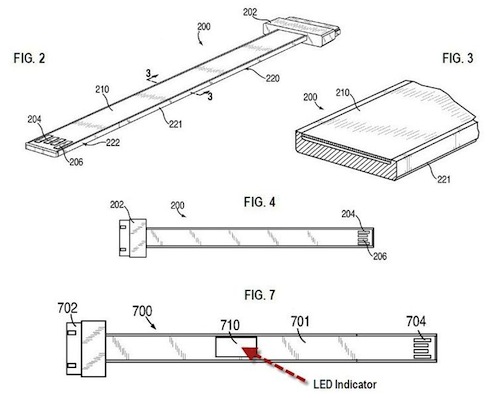
New Apple Patent: Flat USB & FireWire Cables with LEDs

Of all the designs and inventions Apple patents and trademarks every week, some are really interesting and provide good indication of things to come in Macs and iOS devices. Whilst we’ve recently seen several complex patents detailing social functionalities and smart location features coming to iOS, image editing capabilities for iPhones and a “safe deposit box” for cloud storage, a new patent design uncovered by Patently Apple last week seems to provide a simple solution to a minor, yet annoying problem: cables.

Apple sells a variety of cables on its online store: these cables are usually meant to connect Mac computers to external peripherals like monitors and hard drives, or to devices like iPhones and iPads. From HDMI connectors and FireWire 400 or 800 cables to most standard USB ones and 30-pin dock connectors (the ones that also come bundled with a new iOS device), these cables have one thing in common: they’re not flat. They tangle, they’re difficult to put away and carry around, they’ll very likely break over time as you twist them and, overall, simply use them. This happens because the standard cable circuitry used in the tech industry includes one or more wires placed within a non-conductive enclosure that result in a circular connector – the cable. The problem with a circular cable is that sometimes it’s meant to be used in a specific orientation, and if the cable bends in the opposite way (example: when you tangle it to put it away) the internal wires or external enclosure could break. Read more


Apple Store In Grand Central Not Happening After All?

Back in February, several rumors surfaced indicating Apple was planning on opening a major new retail store in Grand Central Terminal, New York in September. To celebrate the 10th anniversary of Apple Retail, reports suggested the Store in Grand Central was set to become the largest Apple Store ever built, likely meant to host thousands of customers every day because of the heavy traffic in Grand Central. Furthermore, to drive traffic away from the popular retail location in 5th Avenue, the rumored new Apple Store in Manhattan would accomplish the double functionality of better managing customers across retail stores, and being an impressive construction in Grand Central. This, on top of the Retail anniversary, lead many people to believe that September would indeed see the launch of an Apple Store, Grand Central. Read more