Posts in news

Evernote Relaunches Penultimate: Free, Evernote Sync, Search

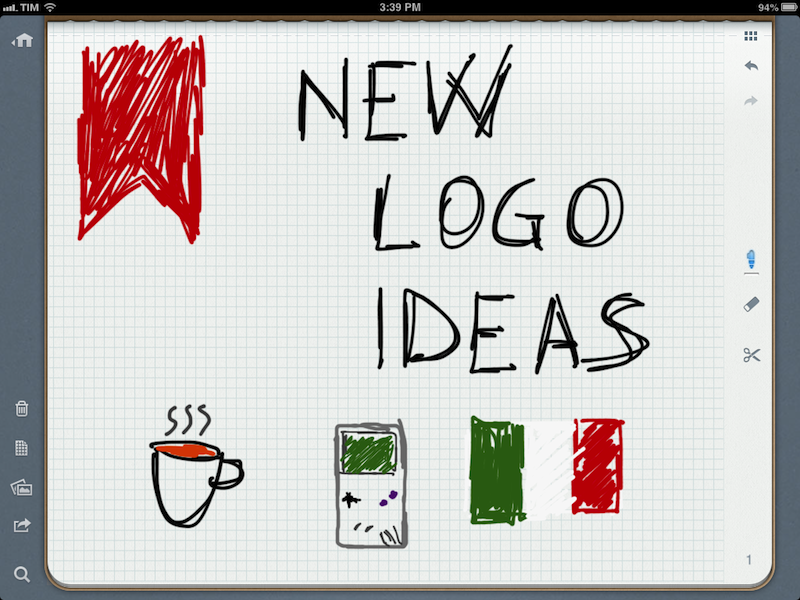
In May 2012, Evernote acquired Penultimate, one of the most popular handwriting apps for the iPad. Today, Evernote is relaunching Penultimate as a free app with built-in Evernote sync and search for handwritten notes.

I have been beta testing the new Penultimate, and, overall, I like the update. I have to admit that my usage of the application is limited to importing images into the app’s notebooks and drawing a few callouts and simple illustrations on them. I usually prefer Evernote’s other app, Skitch, for quick image annotations, but I don’t mind using Penultimate every once in a while when I need something more complex than a straight line or callout. Still, keep in mind that I don’t store hundreds of notes in Penultimate. Read more


Apple Releases iOS 6.1 [Direct Links]

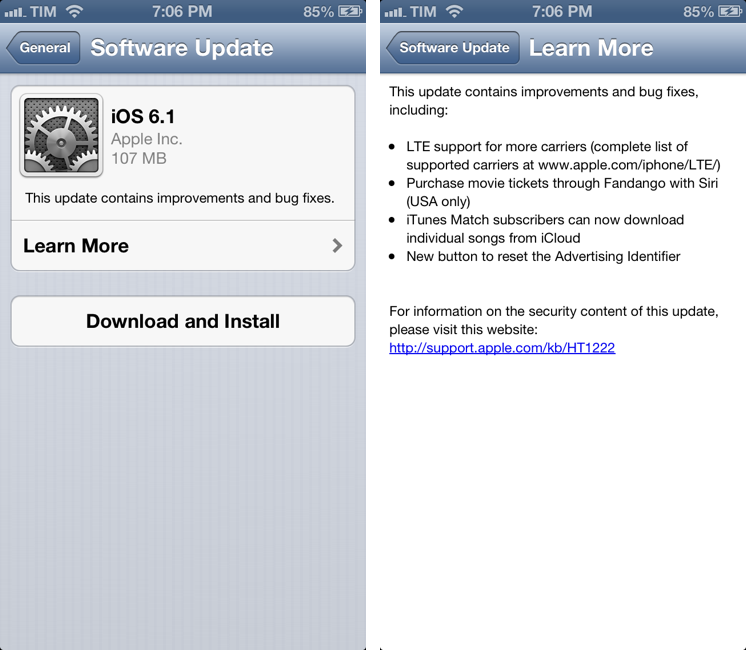
Apple has just released iOS 6.1. The software update, available in beta for the past few months, is available at the moment as over-the-air download. It should be available in iTunes soon.

iOS 6.1 brings LTE support for more carriers (as announced by Apple at the latest earnings call), possibility to purchase movie tickets in the US with Siri and Fandango, and a feature to download songs from iTunes Match individually using iCloud.

Apple details the updated list of LTE-compatible carriers here. According to a press release also posted by Apple, iOS 6.1 adds LTE capabilities to 36 iPhone carriers and 23 iPad carriers worldwide. Apple also shared more numbers:

To date, iOS users have uploaded over nine billion photos to Photo Stream, sent over 450 billion iMessages and received over four trillion notifications.

In the same press release, Apple has updated the statistics on the number of available App Store apps:

The revolutionary App Store offers more than 800,000 apps to iPhone, iPad and iPod touch users, with more than 300,000 native iPad apps. App Store customers have downloaded over 40 billion apps, and Apple has paid over seven billion dollars to its incredible developer community. Customers can choose from apps in 23 categories, including newspapers and magazines offered in Newsstand, games, business, news, sports, health & fitness and travel.

Earlier this month, Apple had announced that the App Store featured 775,000 apps with “more than 300,000 iPad apps”.

We will update this article with direct links to iOS 6.1 as soon as they’re available. Apple also released an update for the Apple TV, adding Bluetooth keyboard support, Up Next, and improvements to iTunes in the Cloud. Read more


Sponsor: Pixa

My thanks to Shiny Frog for sponsoring MacStories this week with Pixa.

Pixa is a Mac app to manage pictures that strips-away all the frivolous features: the need to manually add images to a library, and even some of the chores such as tagging images and sharing them. Pixa puts your library of images front and center in a clean and easy to use interface.

Pixa supports all the image formats you need: psd, ai, svg, jpg, png, Acorn, Sketch, and Pixelmator, among others. It comes with auto-tagging (for color, size, and web address information), and a feature called “Live Folders” that allows you to organize your images in Pixa without moving them from their original location in the Finder. I’m personally intrigued by the app’s support for OpenMeta tags and the tips the developers have been sharing on a dedicated Tumblr blog.

Find out more about Pixa here.


Apple Launches Three-Week Mac App Store Productivity Sale

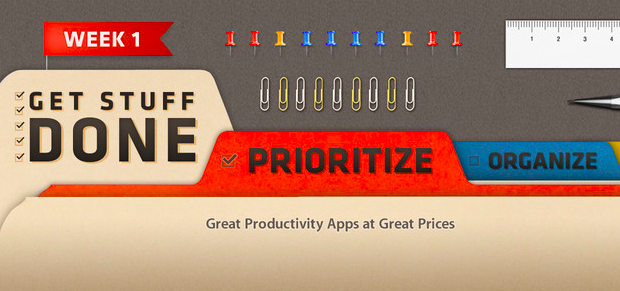
As first noted by MacRumors, in its weekly refresh of the App Store homepage Apple today launched a three-week “productivity sale” on the Mac App Store. The sale includes discounted apps from the “Get Stuff Done” section: Clear, Things, 2Do, Due, Todo, TaskPaper, The Hit List, and BreakTime. The custom Mac App Store page says “Week 1” and includes apps of the “Prioritize” kind; it’s safe to assume Week 2 will feature “Organize” apps, ending with “Utilize” apps in Week 3.

Interestingly, the old link for the Get Stuff Done section no longer displays apps that had been assigned to that section, suggesting that Apple may be picking only some apps previously collected in “Get Stuff Done”.

Both on iOS and OS X, Apple has been curating a series of custom sections for the past two years. As we’ve noticed before, after a redesign of the App Store in mid-2012 with the first iOS 6 betas, Apple started increasing its curation efforts – an area that several developers indicated as Apple’s best option for showcasing apps from the App Store. However, in spite of sections being a shared effort across the iOS and OS X App Stores, some changes remained exclusive to iOS: recent examples include App and Game collections, or redesigned categories.

The timing for this sale is interesting. The App Store turned 2 in early January, and in my look at two years of Mac App Store, I noted how many developers had progressively grown tired of Apple’s unclear Sandboxing policies and restrictions.

Sandboxing has undoubtedly left a scar that won’t go away any time soon. While the world hasn’t ended, Sandboxing – and Apple’s vague stance on some technical aspects, not the best policy when combined with multiple delays – has led to a dichotomy: in spite of Apple’s best efforts, developers are still dealing with two ways to sell their apps – the Mac App Store, and their own websites.

In the same article, I noted how – after a whole year – the Mac App Store charts were still dominated by the same number of Apple apps, and how – according to AppShopper data – growth had considerably slowed down. I offered a variety of reasons to try to motivate how developers felt in regards to the Mac App Store, and what users should expect going forward.

A sale is interesting for two reasons: it highlights great software and it helps third-party developers. Apple can only benefit from letting users know that great apps for a simple, immediate concept such as “Get Stuff Done” are available on the Mac App Store. The obvious consequence is that promotions typically help sales: developers can still make a fair amount of money even at 50% off; users are happy because they can buy at a discounted price from Apple’s own store; and – at least theoretically – the featured apps should go up in the Top Paid charts.

At the moment of writing this article the Get Stuff Done apps are still not listed in the Top 10, but they’re rising quickly (plus, the Mac App Store homepage was refreshed only a few hours ago). The Mac App Store benefits from charts that aren’t dominated by 8 Apple apps out of 10.

Effectively, Apple is now doing app promotions. There have been similar initiatives in the past – Two Dollar Tuesday comes to mind – and even “bundles” grouping multiple apps together, but they weren’t Apple-sanctioned promotions. (Update: there were some apps on sale for Apple’s Back to School promotion in the summer of 2012. However, we can’t dig up any screenshots or links. Apple is also doing a similar “Back to Uni” initiative in Australia now, but there are no apps on sale.)

It’s easy to imagine how, in the future, if this will also be extended to the iOS App Store, developers will look forward to being included in Apple’s official promotions. Developers will get the exposure of the front page, the benefits of built-in social sharing on the App Store, and, possibly, a tweet from the @AppStore account – which has been posting links to apps on a daily basis. Apple is mixing the editorial aspect of the App Store (only apps “chosen by Apple” – therefore synonym of “quality” – end up in a section) with the universal appeal of discounts to generate word of mouth, sales, more variegate charts, and, ultimately, a nice 30% cut for the company.

Right now, this is just the first week of a first promotion Apple is only doing on the Mac App Store. It might as well be an isolated experiment that Apple won’t repeat again. Perhaps they will simply return to launching some promotions for Back to School in the summer. But considering the popularity of their Free App of the Week initiative, I wouldn’t be surprised to see more frequent Apple-approved promotions in the future. Apple needs a healthy, thriving third-party ecosystem, and third-party developers need Apple’s promotional and marketing machine. Old-fashioned sales might just be what (some) developers needed.


Apple Q1 2013 Results: $54.5 Billion Revenue, 47.8 Million iPhones, 22.9 Million iPads, 4.1 Million Macs Sold

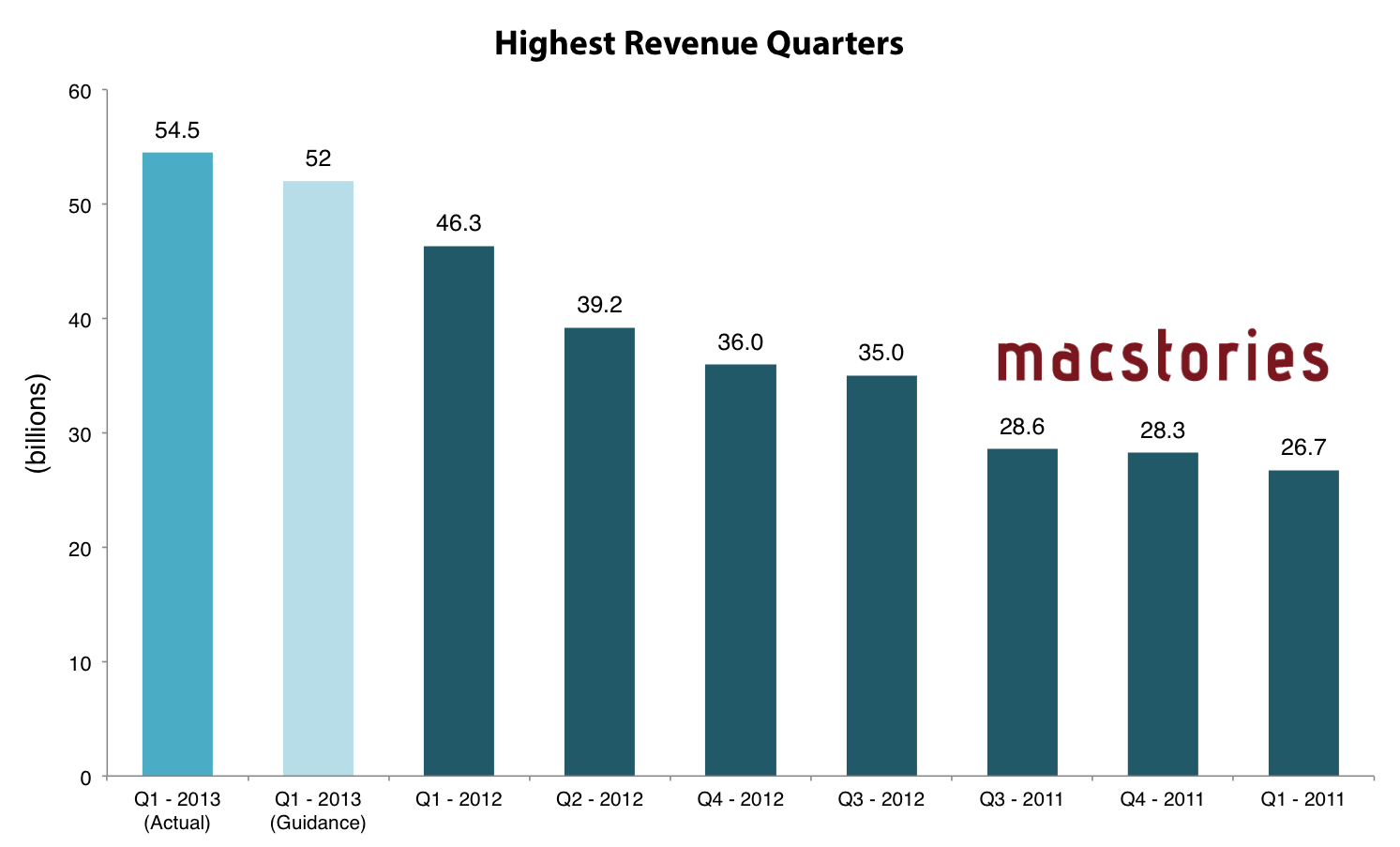
Apple has just posted their Q1 2013 financial results for the quarter that ended in December 2012. The company posted revenue of $54.5 billion ($13.81 per diluted share), with 22.9 million iPads, 47.8 million iPhones and million 4.1 Macs sold. Apple sold 12.7 million iPods. The company reported quarterly net profit of $13.1 billion.

We’re thrilled with record revenue of over $54 billion and sales of over 75 million iOS devices in a single quarter,” said Tim Cook, Apple’s CEO. “We’re very confident in our product pipeline as we continue to focus on innovation and making the best products in the world.”

“We’re pleased to have generated over $23 billion in cash flow from operations during the quarter,” said Peter Oppenheimer, Apple’s CFO. “We established new all-time quarterly records for iPhone and iPad sales, significantly broadened our ecosystem, and generated Apple’s highest quarterly revenue ever.

Compared to last year’s Q1 – which had an extra week – Apple made $8.2 billion more revenue, but the same profit. Read more


Sponsor: Newer Technology NuGuard KX

My thanks to Newer Technology for sponsoring MacStories this week with NuGuard KX.

The NuGuard KX is a protective case for the iPhone 4/4S and iPhone 5. The KX offers protection against accidental drops, impacts, and scratches without sacrificing looks or adding bulk. It’s been certified by Quanta Laboratories to withstand Shock Test Method of the MIL-STD-810G (U.S. Military Standard). And, unlike common military-impact test grade iPhone case materials, the NuGuard KX uses “X-Orbing gel” technology to absorb and evenly distribute kinetic energy. In one piece, the NuGuard KX offers access to all ports and buttons while offering an advanced protection.

Find out more about NuGuard KX here.


ReaddleDocs Relaunches As Documents

ReaddleDocs, Readdle’s file manager and document viewer for the iPad, has relaunched today as Documents, a free update for existing customers that introduces a refreshed interface and some new features.

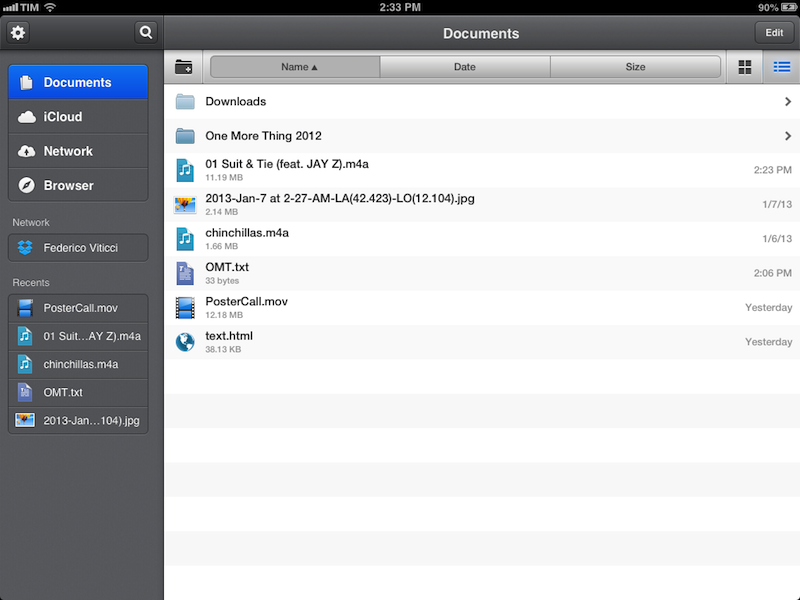
In terms of functionalities, Documents basically shares the same capabilities of ReaddleDocs. The app can open the same file types, it can organize items in folders, sort them, and display them in icon view or list view. Unlike the OS X Finder, sub-folders in List view aren’t opened in the same column, but they’ll require you to open a different view that will display a Back button with the name of first level. As with ReaddleDocs, buttons to create a new folder, sort by name/date/size, and change views are displayed in a bar at the top that you can reveal by swiping down. A shortcut to create a new text file has been placed in a sidebar that you can reveal by hitting the Edit button.

To understand what Documents does, you can read our original review of ReaddleDocs 3 for the iPad. There are a series of web services supported by the app (including Dropbox) that you can access in the Network tab on the left. In the sidebar, the app also offers access to iCloud storage (which doesn’t come with List view), a built-in browser (to download webpages or part of them just like ReaddleDocs 3), and “Recents”. This last section provides quick access to the last five opened documents: as you re-open one, it will go to the top of the list again. Read more


Poster 2.0

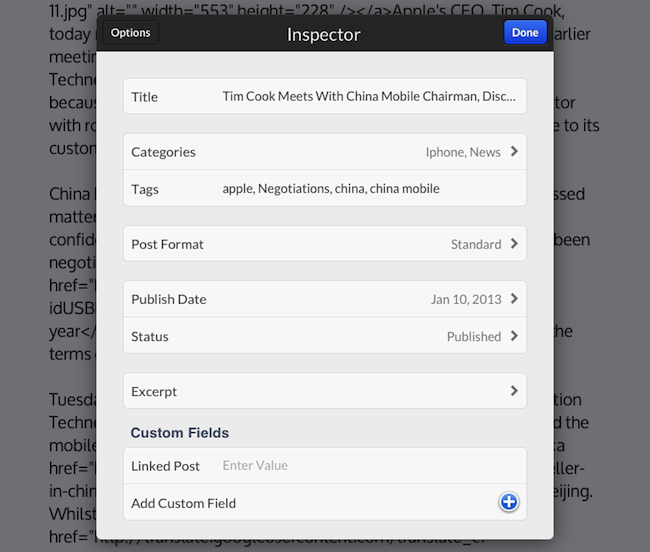
Tom Witkin’s Poster is my favorite WordPress blog editor for iOS. Poster comes with a clean interface, support for Markdown (the app can convert plain text Markdown to HTML before publishing), and full WordPress integration. The app’s excellent support for WordPress features like custom fields, drafts, slugs, and images means I don’t have to write on the iPad and later “adjust everything” on a Mac before publishing. Poster is, in fact, a core aspect of my iOS automation workflow.

Poster 2.0 is out today, and it’s another fantastic update that reassures me Tom is committed to making this app the best WordPress editor for iOS. The interface has been further refined, and it’s now easier on the eye with an even deeper focus on content rather than UI chrome. I don’t use these for MacStories, but Poster now supports WordPress custom post types and excerpts, alongside the “sticky” functionality that we use every once in a while to pin a post to the top of the site.

What I like about Poster 2.0 are the “minor” additions that make for a much better workflow. Custom fields can now be given a local label so that a friendlier name will be displayed in Poster instead of the actual name (e.g. “URLCustom_linked” becomes “Linked post”); the Markdown preview and HTML conversion now handles en and em dashes (something that annoyed me in the previous version of the app); if you edit a published post (as we usually do when we catch typos or make corrections), you can now save the edited draft locally before publishing. I also appreciate how the “Copy to Clipboard” action now only received a post’s URL (Poster 2.0 builds on the solid foundation of Poster 1.0 for post sharing), and the app is noticeably faster at syncing multiple posts at once.

There are two more changes I want to mention. You can now insert images at any point in the editor by tapping & holding and selecting the “Insert Image” option from the popup menu; I tend to do all my image insertion beforehand, but this is a welcome addition for those times when I may forget about an image. And last, Poster now supports Greg Pierce’s x-callback-url to return to a specific URL after completion. Poster already had support for a URL scheme that allowed post creation from other apps, but now you’ll also be able to create a post and return to another app.

Here’s a bookmarklet I made to grab a browser’s selection and use it as text in Poster, get a webpage’s title and use it as post title, open Poster, and return to the browser. This kind of URL callback enables a streamlined workflow for, say, discovering links in Safari, quickly posting them to WordPress, and going back to Safari again.

javascript:window.location='posterapp:///create?text='+encodeURIComponent(window.getSelection())+'&title='+encodeURIComponent(document.title)+'&callback_url='+encodeURIComponent(location.href);

I also made a quick video showing the process in action. Unfortunately, getting the browser’s selection only works on the iPad.

Poster is a great app, and while not revolutionary, the 2.0 update refines several aspects of the previous version and adds more powerful functionality for WordPress users and iOS automation geeks. I highly recommend it.


Measuring iPhone 5 vs. iPhone 4S availability

Measuring iPhone 5 vs. iPhone 4S availability

Horace Dediu of Asymco today wrote and shared data on the availability of the iPhone 5 and iPhone 4S by potential buyers - measured by the subscriber counts of the carriers that sell the iPhone. It’s an important and valuable extension of an article I wrote last week, discussing the international rollout of each generation of iPhone and iPad. That analysis had a weakness in that I treated all countries as equal which isn’t necessarily true (depending on why you’re looking at the data).

Announcing availability in Mauritius is not nearly as important as announcing Madagascar. A better measure would be to track the countries’ populations being added, or, better still, the populations which subscribe to operators who have a distribution contract with Apple.

So instead, Dediu looked at which carriers held the iPhone in each country and what their approximate subscriber count was. By calculating the availability this way, you can now see the potential number of iPhone buyers, as seen in Horace’s graph here.

That’s a handy measure: the iPhone 5 was 30% more available than the iPhone 4S. The big contribution was having China and Indonesia available during the fourth quarter rather than in January 2011.

Make sure to head over to Asymco to read the full article and all of Horace’s observations, it’s an interesting read. If you didn’t catch my article last week, it’s also available to read here. Just note that if you are trying to compare Dediu’s graph with the one in my article (shown here), Dediu went with actual dates whereas I went with relative time. This is because I wanted to look at the first 110 days of every iPhone, Dediu was specifically looking at the fourth quarter availability.

Permalink