

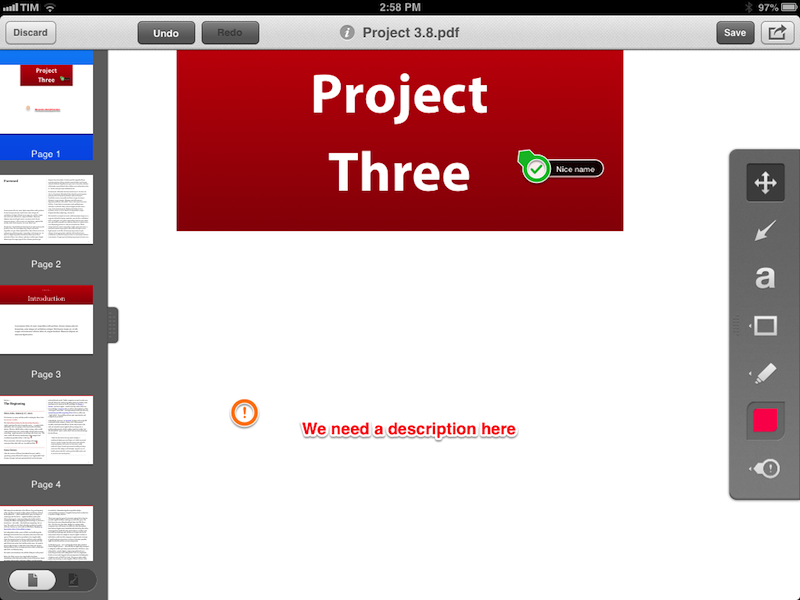
Skitch, the image annotation and sharing tool that Evernote acquired in the summer of 2011, has today been updated on iOS to include support for PDF annotations. I have been testing the new feature for the past few months, and, while not as full-featured as a dedicated PDF annotation app, I believe it is a solid addition to Skitch. Read more
Posts in news
Skitch 2.5 Adds PDF Annotations
Pocket Introduces “Send to Friend” on First Year Anniversary
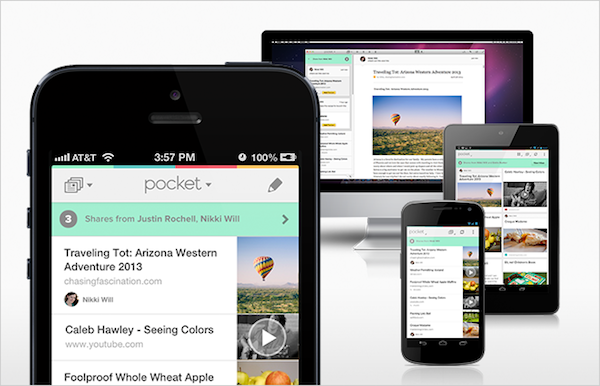
One year ago today, Read It Later was reborn as Pocket, transforming into a service that emphasized saving anything, not just articles, for later. For the past year, Pocket has rapidly iterated while landing on numerous devices between Android and iOS, even arriving on Apple’s desktops and laptops with a native Mac app. Recently, Pocket made it even easier to save stuff for later thanks to Feedly, WordPress, and HootSuite integration. With more than 8.5 million users who’ve saved more than 300 million articles in the past year, Pocket has also launched Pocket for Publishers, giving creators on the web an easy way to gain insights on the lifespan of their content.

To celebrate their one year anniversary, Pocket is launching Send to Friend, a brand new feature that goes beyond sharing to Facebook, Tumblr, and Twitter. Send to Friend improves upon email sharing, which Pocket found people used more than twice as often as sharing to social networks. Send to Friend allows for better interpersonal sharing between friends and family. Content can be shared with a comment and a highlighted quote, and if the person receiving the shared link also uses Pocket, they’ll receive a Push Notification and the content in their inbox. Anyone who receives a link can save it to their list of stuff to view later, or simply ignore it.

Lastly, Pocket improves upon their Share Menu by automatically bubbling up icons and making more convenient shortcuts to often used services and friends that you share to. If you find yourself sharing to Twitter and to a couple of particular friends more often, the Share Menu will place shortcuts to them first. Of course, you can always get to seldom used services at any time.
Pocket with Send to Friend is available as a free download in the App Store.
Rdio Brings New Sharing Interface To iOS App
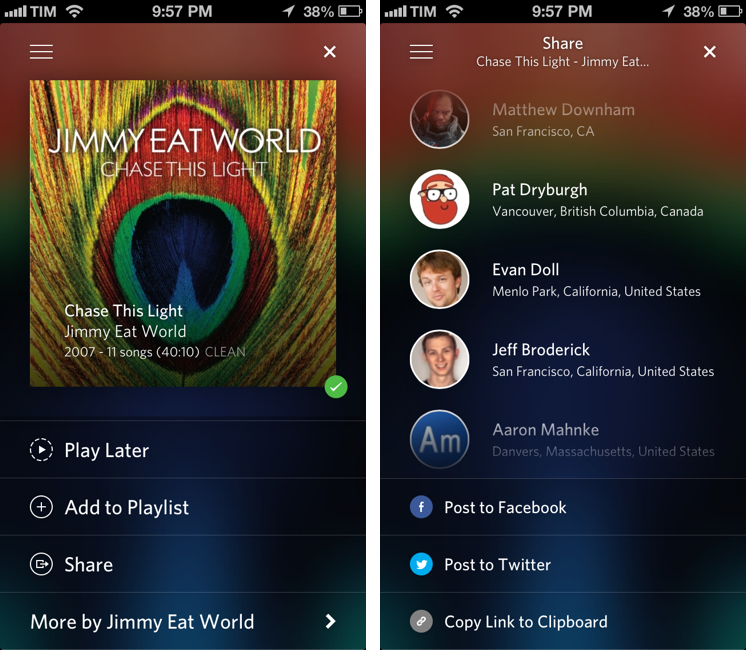
Earlier today, music streaming service Rdio updated its iOS app with a new sharing interface. Alongside the existing Facebook and Twitter options, the new sharing UI includes an updated menu to send a song or album directly to a Rdio user that you’re following: from the Share view (which was introduced two months ago), you can now tap on profile pictures of your friends, or you can use the old Twitter and Facebook sharing features, which have also been given a fresh coat of paint in this new release.
Interestingly enough, while previous design changes were made exclusively on the iPhone, this time Rdio for iPad has received the new Sharing interface in the form of a modal window (but it still lacks the full-screen album art view of the iPhone app). Items shared by your friends will appear in the notifications area on the Rdio website and desktop app, and you’ll also receive an email notification (if you have allowed the service to notify you via email); the iOS apps can share items, but they still can’t access notifications from other users.
I previously took a look at Rdio’s major 2.0 release and 2.1 update. Version 2.1.7 is out now on the App Store.
Update: this new version also restores visibility of the iOS status bar. Personally, this is a very welcome change.
MacHeist nanoBundle 3: 8 Top Mac Apps for $9.99
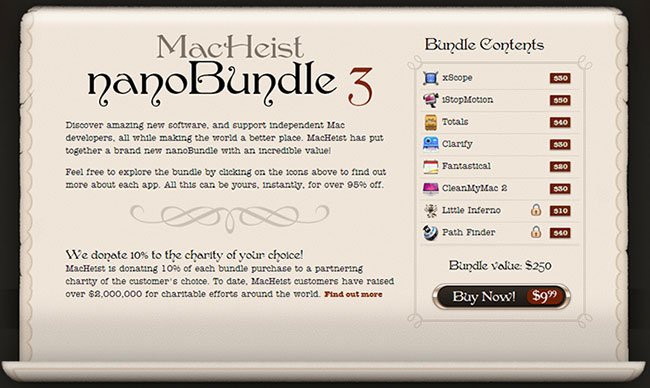
Bundle deals come and go, but MacHeist has always killed it when it comes to selling and promoting their own bundles. Today, MacHeist has resurrected the nanoBundle which they haven’t offered in 3 years. The MacHeist nanoBundle 3 is a set of excellent applications worth $250 that can be purchased for $9.99, with 10% of the proceeds going towards a reputable charity of your choice. So is it worth your hard earned cash? I’d instantly tell you yes - Fantastical is one of the best Mac apps to own and if you still haven’t purchased it, now is the time. Also, if you do ANY designing and/or developing, xScope (MSRP $30) is a great app to have in your arsenal of weapons.
Sponsor: PDFpenPro 6
Our thanks to Smile for sponsoring MacStories this week with PDFpenPro 6.
PDFpenPro is the advanced version of PDFpen. PDFpenPro does everything that PDFpen does, such as add signatures, edit text and images, perform OCR on scanned documents and export Microsoft Word documents. It also has the ability to create a PDF form, build a table of contents, and convert HTML files to PDF.
The new PDFpenPro 6 adds document permission settings. When you share a PDF, you can restrict printing, copying, and editing of your PDFs. You can also use the new automatic form field creation tool to convert a non-interactive form into an interactive PDF form with text fields and checkboxes automatically added. PDFpenPro 6 is optimized for the Retina Display and now takes advantage of Versions and Auto Save available in Lion and Mountain Lion, which better saves your edits from accidental loss.
PDFpenPro 6 is available on the Smile Store and the Mac App Store for $100. A free demo can be downloaded on the Smile site. Find out why Macworld calls PDFpenPro “the crème de la crème of PDF editing and annotating applications.”
Introducing Better Linked Posts
You may have noticed that I haven’t written much lately. In mid-March, I decided I needed to take some time off the site to rest and focus on some ideas and changes for MacStories that I’ve been thinking about for quite a while. I came to the conclusion that I need to be able to share more links to interesting news, apps, and articles here on MacStories. I want MacStories to be the place where readers can find our own articles as well as cool stuff produced by others. Read more
Sponsor: MacPaw
Our thanks to MacPaw for sponsoring MacStories this week with CleanMyMac 2.
CleanMyMac 2 is the successor to MacPaw’s award winning system utility, rebuilt and redesigned from the ground up to make it easier than ever to remove the cruft that’s taking up unnecessary storage space on your Mac. CleanMyMac 2 scans your hard drive, looking for unneeded temporary files, unused caches, forgotten files, and even cleans up application-specific trash in applications like iPhoto. It can also optimize your iPhoto library, removing original versions of images that you’ve since modified while editing. CleanMyMac 2 even helps you take care of plug-ins and widgets, while ensuring applications are completely uninstalled.
CleanMyMac 2 is free to try, and a single license is available for only $39.95. A license for up to five Macs is only $89.95.
For families with PCs in addition to Macs there’s also CleanMyPC, which brings the same easy-to-use interface to the Windows desktop.
Sponsor: CrashPlan
My thanks to CrashPlan for sponsoring MacStories this week.
–
CrashPlan lets you backup your data to your own computers and hard drives or friends & family with no storage limits. CrashPlan gives you the peace-of-mind that only comes with continuous, minute-to-minute backup. CrashPlan has been a favorite of the Mac community for years because of its “set it and forget it” ease of use and ability to provide continuous, minute-by-minute backup without interfering with normal Mac operations. Using sophisticated byte pattern analysis and data de-duplication to detect file changes, CrashPlan preserves multiple versions of files; if you don’t want to always use your Mac, the files you were just working on minutes ago can be accessed from our phone or tablet using CrashPlan’s free mobile apps.
Find out more about CrashPlan here.
Sponsor: Doxie
My thanks to Apparent for sponsoring MacStories this week with Doxie.
Doxie is an award-winning scanner that works anywhere – no computer required – and then syncs to your Mac, iPad, and various cloud services. Doxie’s small and portable hardware comes in two models: Doxie One and Doxie Go. The Doxie’s scanning process is simple: just push a button and insert your sheet of paper to save it thanks to the Doxie’s built-in battery and memory chip.
I have been using a Doxie Go since January 2012. My paperless workflow consists of scanning quick receipts with the iPhone’s Camera and larger documents with the Doxie Go. The Doxie provides high-quality scans that I import with the Doxie Mac app, which provides an option to save PDFs with or without OCR; on the Mac, I then save everything to Evernote directly from the Doxie app. The Doxie Go is the only scanner I’ve ever owned and I’m very happy with it.
Learn more about Doxie here.