

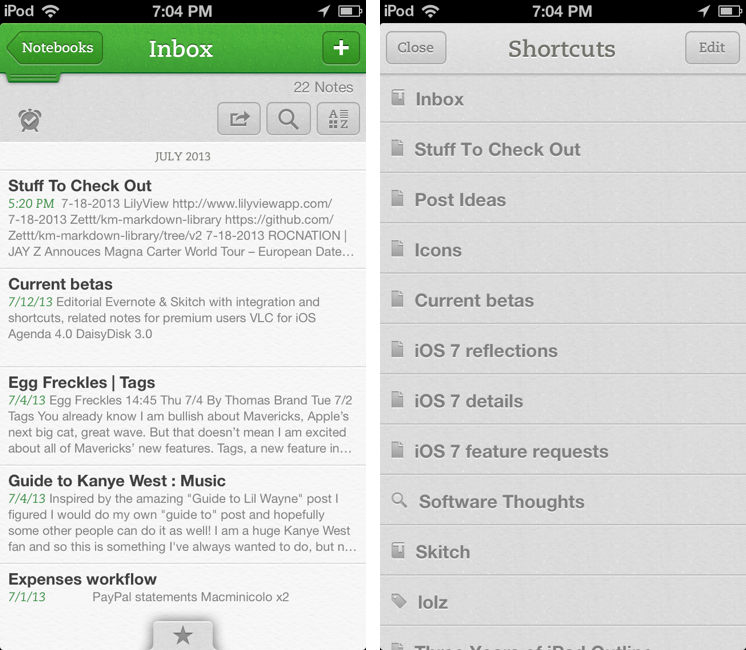
Following an update to the Mac version released two weeks ago, Evernote updated its iOS app last night to include direct Skitch integration, support for shortcuts, access to recent notes for improved multitasking, and new premium features. Read more
Posts in news
Evernote for iOS Gets Shortcuts, Recent Notes, and Skitch Integration
QuickRadar for Apple Radar
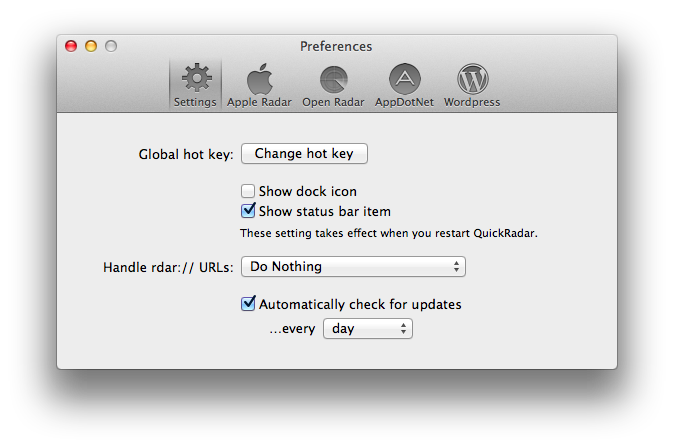
Since iOS 7’s release, I have been submitting entries to Apple’s Radar, the company’s bug tracking system. The problem with Radar is that, for some reason, it comes with an outdated and slow interface that’s prone to errors and random logouts, making the process of filing radars tedious and unpleasant. A number of apps to “fix” Radar have surfaced over the years, but lately I’ve been trying an enjoying QuickRadar. I remembered it deserved a mention here thanks to Clark’s link two days ago.
QuickRadar is a menubar app for the Mac that signs you into Apple’s Radar and that can be activated with a keyboard shortcut. Instead of redirecting you to Radar’s web UI, it lets you write your bug report in a window on your Mac, and when you click “Submit” it’ll take care of uploading the report for you without launching the website. The app can also file duplicates, handle rdar:// URLs to launch them in OpenRadar or filing them as duplicates, and it comes with sharing options for WordPress and App.net if you want to share your radar’s number with the world. Like Tokens (another app made out of frustration with an Apple-made web UI), QuickRadar uses web scraping to communicate with Apple’s bug reporter.
QuickRadar is still in the alpha stages and has some rough edges. For instance, it doesn’t support file uploads for attachments, although the developer says they’re on the roadmap. Version 0.7 was released earlier this week with improved Preferences and support for Mountain Lion’s Notification Center.
You can download QuickRadar here.
VLC for iOS Returns To The App Store
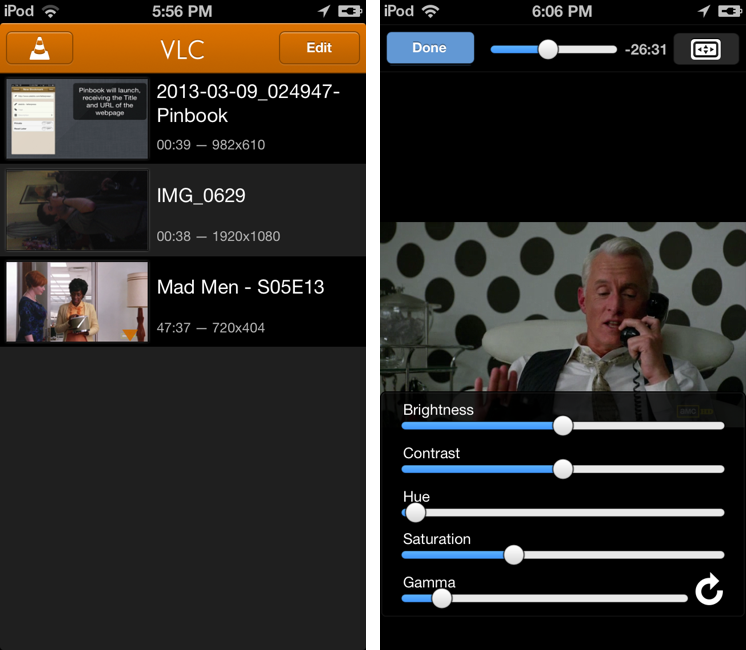
After a two-year absence, popular video player VLC is returning to the App Store with a new app for the iPhone and iPad. The new VLC for iOS will be available later today (it will start propagating at midnight in the various international App Stores) as a free download.
I’ve been able to test the new VLC for iOS for the past few weeks, and, in terms of visual appearances, the app isn’t too dissimilar from the old version that was available on the App Store in 2010. A main screen lists all your media with thumbnail previews, and you can tap on an item to start playback in a full-screen media player. However, in spite of a UI reminiscent of the old version, VLC has been completely rewritten to use modern audio and video output modules, multi-core decoding, and support for any file type supported by VLC on the desktop. In my tests, the app was able to quickly start playing any video file that I threw at it, such as .mp4 and .mkv files. Read more
Google Maps for iPad Now Available

With a 2.0 update released today on the App Store, Google has brought Google Maps to the iPad, adding the enhancements and new features that the company announced last week.
Google Maps, first released in December 2012 following Apple’s apology for issues with their own iOS 6 Maps service, can now take advantage of improved navigation with accident information and live traffic reports whenever available; using Zagat and Offers, Google Maps can now recommend the best places around you with reviews and exclusive deals; for selected areas, Google Maps features indoor mapping for malls, train stations, and airports.
Results for businesses are displayed on a grid that shows inline photo previews, distance from your current location, and total amount of available reviews; tapping on a result brings up a dedicated page with buttons to save, share (via Message, Mail, or Clipboard), get directions, see Street View, and view photos.
The app now puts more focus on discovering places to “eat, drink, sleep, and shop” with a new card-based layout that aims at simplifying the process of finding nearby businesses. As we expected, Maps for iPad follows Google’s relaunched web app and client for Android tablets in the way it displays large, full-screen map views with search boxes and “cards” on the left side of the screen to find places, see suggestions, and preview directions. A list button in the top left corner of the app allows you to view Traffic and Public Transit information (if available for your area); directions are displayed in a floating card with alternate routes stacked directly below it. Overall, the iPad app is consistent with the design language and animations of the iPhone app and redesigned web experience.
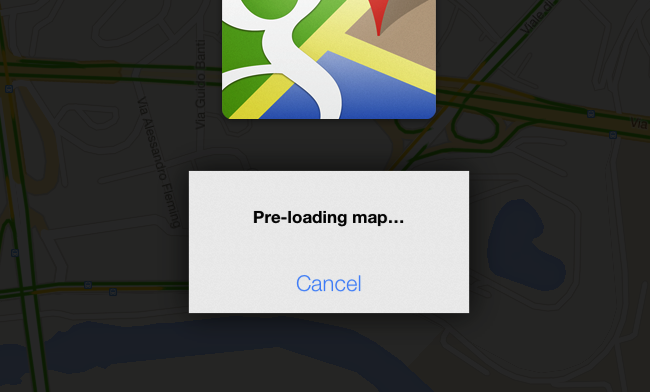
It’s also possible to cache a portion of a map for offline usage (what Google calls “pre-loading”). Simply zoom into an area, and search for “OK Maps” to activate the command that will tell the app to save a cache of the currently displayed area. In my tests, this indeed enabled me to load cached areas with no Internet connection available – without, however, being able to use search or anything else. Also, if you try to save larger areas with the “OK Maps” command, Google will warn you that the map is too large for pre-loading.
Google Maps 2.0 is available on the App Store.
Apple Launches Logic Pro X with Logic Remote iPad Companion App
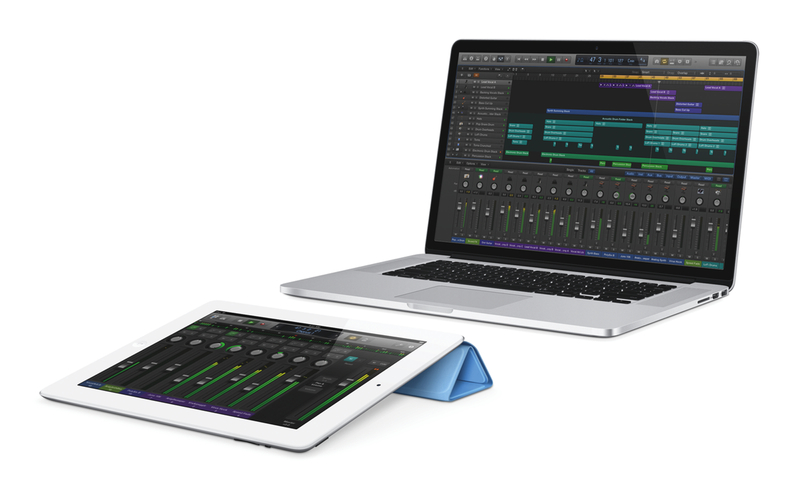
Apple today launched Logic Pro X, a major new version of Logic Pro that includes hundreds of new features, new instruments and effects, and a free iPad companion app called Logic Remote that takes advantage of multi-touch to integrate with Logic Pro X.
The standout features of Logic Pro X are Drummer (a virtual session player that automatically plays along a song in a variety of styles), Flex Pitch (an editor for individual notes in a waveform to fix out-of-tune vocals or recorded audio), Track Stacks (organize multiple tracks into one), Smart Controls, and Arpeggiator.
Apple is detailing the new functionalities in a press release and will launch later today a webpage for Logic Pro X.
Logic Pro X provides a collection of new creative tools for songwriting and music production. Drummer delivers professionally produced, realistic drum tracks that respond to your direction and can perform millions of unique grooves in rock, alternative, songwriter and R&B genres. Drummer is powered by the performances and sounds of some of the industry’s top session players and recording engineers, including legendary mixer/producer Bob Clearmountain, who has worked with the Rolling Stones, Bruce Springsteen and David Bowie. Designed to work with Drummer, the new Drum Kit Designer plug-in lets you build your own custom kit using a diverse collection of professionally recorded snare drums, toms, hi-hats and cymbals that you can mix, match and fine tune to get the right drum sound for your song.
Logic Remote, available for free on the App Store, allows users to record, mix, and even play Logic’s instruments directly on the iPad using multi-touch. Compatible with the iPad 2, iPad mini and later and requiring iOS 6 and Logic Pro X, Logic Remote can navigate inside Logic projects, control recordings remotely, act as a second screen for the Logic’s documentation (Smart Help) on the Mac, and also remotely trigger Logic Pro X key commands with customizable buttons. Users can mix Logic sessions from the iPad, or play instruments such as a piano keyboard, guitar fretboard, drum pads and drum kit, adding the Arpeggiator plugin to any instrument.
Logic Pro X is now available on the Mac App Store for $199.99. Logic Remote is free on the App Store, and Apple has also released MainStage 3, a live performance companion app for Logic Pro X, on the Mac App Store for $29.99.
Google Announces Google Maps App Coming to iPad “Soon”

In a a blog post published today to detail the new features of Google Maps for Android devices, Google has announced that the app will also be released for iPad “soon”. Following the removal of the native, Google-based Maps app in iOS 6 (replaced with a new Maps app using Apple data), Google released a native iPhone app last December.
In describing the tablet version of Maps for Android, Google says that the larger screen makes “exploring the world from the comfort of your living room much more fluid, smooth and fun”. Based on the Android screenshot shown on Google’s blog, it appears the Maps app for iPad may be somewhat influenced by the new Google Maps for the web with fullscreen map views and floating cards for menus and discovery.
The updated Google Maps app will focus on exploration to browse and discover new places through a new cards interface that shows “great places to eat, drink, sleep and shop”. Alongside improvements to navigation and reporting of traffic conditions, Google will also bring Zagat and Offers integration, retire Latitude and My Maps, and release new location sharing and check-in options for Google+ (coming soon to iOS). According to Google, the My Maps functionality will return to future versions of the app.
You can read Google’s blog post (with screenshots of the new Google Maps app for Android) here.
Sponsor: Smile
Our thanks goes out to Smile for sponsoring MacStories with TextExpander.
TextExpander takes the pain out of typing the same mundane things over and over again. If you work in customer support, respond to inquiries, work with various signatures, or find yourself typing the same boilerplate text, TextExpander saves you time. On the Mac, TextExpander lets you create short phrases and keywords that can expand into dates, addresses, and paragraphs of text with just a few keystrokes. You can even create pre-formatted forms that let you add in things like a person’s name. For those who want to take TextExpander to the next level, TextExpander even lets you perform custom actions on text that you might regularly copy and paste from somewhere else, like a technical support guide. If you work with words, TextExpander will prove to be an invaluable tool for your Mac.
TextExpander touch 2.0 on iOS devices now comes with the same great features that are found on the Mac, such as formatted text and fill-ins. If you’re working on the go, it’s a great way to get the same benefits from of the desktop onto your iPhone or iPad.
Try TextExpander for your Mac today by downloading a free trial. If you like it, be sure to try TextExpander touch, which can be downloaded from the App Store.
Evernote for Mac Gets Direct Skitch Integration
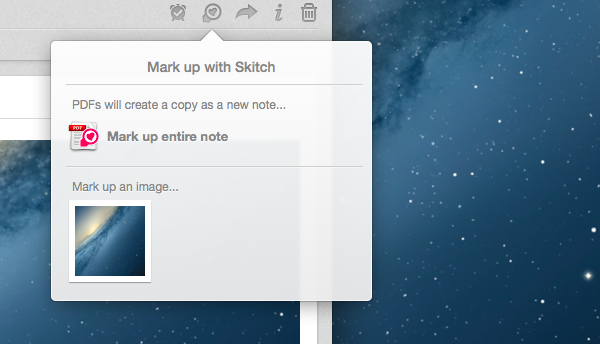
With a new version released today, Evernote has updated its Mac app to include a brand new communication layer with Skitch, the company’s image/document annotation and sharing tool.
When Evernote acquired Skitch in the summer of 2011, I wondered how they would manage to deeply integrate the two apps in a way that would make storing a note and annotating it a seamless experience. In the past two years, Evernote focused on revamping its desktop and iOS clients and on launching a new version of Skitch with Evernote integration – meaning that Skitch could sync notes to Evernote, and those notes would show up inside an Evernote notebook with inline previews and changes, but Evernote couldn’t direct plug into Skitch for further editing. Here’s what I wrote in 2011:
According to Evernote, the engineers at the two companies will be working closely in the coming months to deeply integrate Skitch and Evernote with each other, as right now the only way to let the apps communicate on a Mac is by annotating an image in Skitch, and manually drag it into Evernote. It wouldn’t be a surprise if the app gained a feature to push annotations to Evernote’s cloud to avoid drag & drop — considering the app is coming to mobile devices, this has been certainly considered by the Evernote team.
Users could drag and drop images between Evernote and Skitch, but that would result in duplicate files and wasted storage space – an issue that was exacerbated by iOS’ inferior sharing capabilities and limited “Open In” menu. In short, it always struck me as unusual that Evernote couldn’t figure out a way to let its apps “talk” to each other, avoiding manual interaction in favor of simple, intuitive inter-app communication that treated Evernote as a storage space and browser, and Skitch as an editor.
Today’s Evernote 5.2 for Mac does exactly this, and quite admirably as well. I have been testing the new version, which has gained a new Skitch button in the note editor that allows you to send any note – either as text, image, or combination of both – directly to Skitch for editing. When you’re done annotating in Skitch, you can send a file back to Evernote – and not just back to Evernote’s cloud, but back to the Evernote app itself, which will automatically come in the foreground again, showing the new version of an image/document already inside a note. Read more
Some Thoughts on an Entry Level iPhone
This could have been a footnote in my comments on OS X adoption, but I wanted to return to iOS adoption and elaborate on one comment I made about being able to upgrade easily since people likely have a recent iPhone. Apple is seeing some interesting things happening with their most affordable iPhone.
Tim Cook noted that the iPhone 4 was in constraint for the entire quarter during Apple’s first fiscal conference call for 2013. Again, during the second conference call, Tim Cook talked about the popularity of the iPhone 4 in China, Apple’s biggest emerging market with the most potential for revenue.
China has an unusually high number of first time smartphone buyers. We’ve seen significant interest in iPhone 4 there and recently made it even more affordable to make it more attractive to those first time buyers.
It turns out that the free iPhone 4 is still popular. Not only as a free phone on contract, but also as a first phone for customers in emerging markets. In developed markets, it seems that early adopters and people who love their iPhones tend to get the latest new thing, while people who just want a nice phone or can’t justify the upfront expense end up getting an iPhone that’s more affordable, but otherwise still workable and current as it supports the latest version of iOS. How many other phone makers have a free phone that has luxury materials like steel and glass, has the latest operating system, and has a great quality camera? You’re guaranteed a quality product that just works, for free, even though the phone is a few years old. That’s remarkable.
Every year, Apple reduces the price of last year’s entry iPhones by a hundred dollars, meaning that this year’s free iPhone would end up as the iPhone 4S if Apple follows the same pattern. It’s a great phone with a great camera and good all around battery life, and iOS 7 will be available for it. But I wouldn’t be surprised if that wasn’t the case this year.
I don’t know anything about what Apple has in store for their next iPhone announcement, but there’s currently a lot of speculation surrounding a cheap plastic iPhone. I think it’s certainly plausible that Apple would not only release a new flagship iPhone, but a new entry level iPhone as well. But why?
I wouldn’t correlate Apple’s entry level iPhone as cheap, but rather as more affordable, as I imagine it costs significantly less to produce a high quality build not dissimilar from the iPhone 3GS than a phone made of glass. In emerging markets, and even here in the United States, I can’t imagine that the iPhone 4 is a cost effect phone to produce at the prices Apple wants to sell it for. The press talks about there being demand for phones with bigger screens, but there’s clear and evident demand for a free iPhone and Apple wants to capture the attention of the markets that are asking for it. A CIRP survey notes that about half of total worldwide iPhone sales consisted of the iPhone 4 and iPhone 4S as of March, thanks in part to the success of the iPhone 4 in China and possibly related to Apple’s 25% price reduction in markets like Brazil.
The iPhone 3GS was a phone that kept receiving the latest iOS updates for a long time, but didn’t always have all of the features. The iPhone 4 and 4S are going to end up in the same boat, where they’ll run iOS 7, but will lack some of its more commendable features since the phones aren’t powerful enough. Part of me thinks that an entry level iPhone will be very much like an iPod touch with an antenna, with hardware that’s capable enough to run all of iOS 7’s features, is better than the any last generation iPhone, but won’t compare to what’s inside Apple’s flagship offering. This is a good thing — it means more and more people will have access to Apple’s latest software and the latest apps from the App Store.
Talking about iPods, it’s a market that’s still there but isn’t as prevalent as it used to be. The iPod isn’t as relevant since more and more people are listening to music on their iPhones and on demand, and I think young people in particular aren’t finding them as attractive or necessary. iPods will stick around, but Apple can better tailor an entry level iPhone to come in fun colors with fun marketing for people who are looking to have the coolest and latest thing that might not be a flagship, but is free[1] compared to an iPod touch and would fit well within a family plan.
Apple is also currently in the process of making three big transitions. The first is the move to the 4-inch Retina display, which started with the iPhone 5. The second is the move to the Lightning port which also started with the iPhone 5, the Lightning cable being skinnier and much easier to use than the previous 30-pin connector found on today’s iPad 2, iPhone 4, and iPhone 4S. The third is the transition to LTE. If Apple is looking to phase in their latest technologies, the best way to do it would be to phase out the glass iPhones by introducing a new entry level model that would give the low end phone the same advantages of the flagship phone. Having a new screen size phased in means good things for developers, and phasing in the Lightning connector at a faster pace means good things for Apple since they only have to produce one cable, and it’s also good for accessory makers targeting the latest iPhone owners. As of right now, the only phone that supports LTE is the iPhone 5. A new flagship phone would have it, but that would leave the iPhone 4S stuck on 3G and HSPDA unless Apple does a quiet internal update.
The press will try to spin the launch of an entry level iPhone as Apple’s way of fighting back against cheaper Android phones, as a way to gain ground over a competitor that’s supposedly winning the smartphone market. I think Apple isn’t interested in this, but rather in making an affordable phone that meets people’s expectations of quality in an Apple product. And if Apple can give you something that’s even better than an iPhone 4 or 4S at the same price, in addition to becoming possibly even more affordable in emerging markets, then that only means good things for consumers.
- I would expect the phone to be free, but I also wouldn’t be surprised if you could buy it unsubsidized. The United States is a huge market for Apple, though I don’t know how it’d be an attractive option over a subsidized flagship phone if you were on a carrier that wasn’t T-Mobile. It could be a much more popular option in European markets where it’s more common to buy the phone outright. ↩