Posts in Linked

GIF Finder for iOS 7

GIF Finder already was one of the most powerful tools in my arsenal of GIF discovery tools:

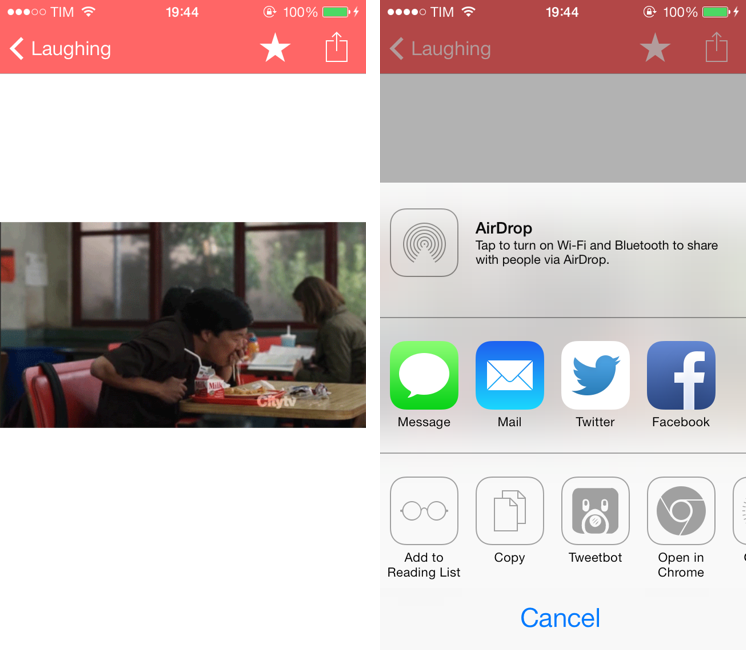
The app is free and it can search for GIFs on Tumblr; you can search for GIFs matching queries like “excited” or “sports fail” and tap on a thumbnail to view a GIF in full-screen. Tap the share button, and the app brings up a menu with options to Copy URL (which doesn’t work for me), share on iMessage and Twitter, but also open in Google Chrome and Tweetbot. The app is universal for iPhone and iPad.

With iOS 7, the app has been relaunched to have a tweaked UI, a new icon, and the same price tag of Free. You can still search for GIFs matching a specific keyword, but the great addition of this version is that imgur’s reactiongifsarchive is now supported within the app, allowing you to browse GIFs by standalone categories. So if you’ve been looking for a way to quickly find Not Bad or Didn’t read lol GIFs, you can now do that with the Categories tab in GIF Finder.

I like the app’s new interface and possibility to save favorite GIFs in a dedicated area, but I’d like to see improved performance, especially on the iPad mini. The app always takes several seconds to load GIF screens, and it’s been crashing frequently on my iPad. That’s a nope.

I’m looking forward to future updates, but, overall, GIF Finder gets my thumbs up as a great free tool for finding GIFs. I approve.
Permalink


Velocity

I never got into the idea of catching up on my read later queue through speed reading, but, for those who did, Velocity is a great choice.

I have been testing Velocity for the past month, and it comes with a clean, elegant UI made for iOS 7, Pocket and Instapaper integration, and even a built-in browser to add articles without leaving the app. In the speed reading view, you can tweak words per minute, switch themes (black is my favorite), and see how many minutes you have left in the title bar. It’s an extremely well-considered and functional app, which isn’t a surprise considering that the Quotebook guys made it.

If you like speed reading, Velocity is $2.99 on the App Store.

Permalink

Layer Cake

Justin Williams:

What we see today isn’t what we’ll see six months from now. Everyone is still learning to speak the modern iOS design language: Apple included. The folks in Cupertino built a completely new foundation for their mobile operating system in just a few months and are still working out how to best adapt their applications to speak the new language that foundation affords. It should be no surprise that many of Apple’s apps that are distributed through the App Store aren’t updated to take advantage of iOS 7 to its fullest. They’re trying to find the answers to the same questions designers outside of Cupertino are.

A great response to a shortsighted observation by Topolsky. iOS 7 – as also confirmed by Matthew Panzarino’s interviews with developers such as the NYT team and Evernote – will make conversions to Android extremely difficult and unlikely (unless you want to end up with poor interface decisions on both platforms, which is another problem).

Permalink


iOS 7 For Keyboard Power Users

Rui Carmo (via Michael Tsai) on iOS 7 and the new support for shortcuts with external keyboards:

Furthermore, to add insult to injury, the Spotlight key on my Logitech keyboard also stopped working. It takes me back to the home screen without toggling the search field, so I am now without any truly quick way to launch apps solely from the keyboard.

Finally, something happened to Bluetooth support in general — I’ve had three separate instances where my keyboard did not work at all, all solved by toggling Bluetooth off and on again, in the classic spirit of The IT Crowd.

The new Safari shortcuts that Rui mentions are welcome, and I wish that Google added that kind of keyboard support to Chrome (which is ready for iOS 7, but doesn’t have substantial new features yet). I have experienced the same issues that Rui brings up with my Logitech keyboard, and I wonder if this is a problem of iOS 7.0 that will be fixed soon or a real incompatibility of old Logitech keyboards with the new OS. I hope it’s not the latter, because I really like this keyboard.

In general, I’m not surprised that Apple hasn’t added many keyboard shortcuts to their apps yet. iOS 7 for iPad is rough in some spots, and power user stuff is the one that gets easily cut when you have to meet a deadline. The fact that third-party developers jumped on external keyboard integration gives me hope though, and I’m looking forward to seeing more shortcuts popping up in my favorite apps soon.

For iOS 7.1, it’d be awesome to see new multitasking shortcuts on the iPad.

Permalink

USA Today Interviews Jony Ive and Craig Federighi

I found USA Today’s interview to be a much better read than Businessweek’s. Only Ive and Federighi spoke with USA Today’s Marco della Cava, but the interview is full of interesting tidbits, such as the fact that Apple’s teams “sat down” to work on iOS 7 in November 2012, or how Federighi describes the thinking behind the new OS:

“This is the first post-Retina (Display) UI (user interface), with amazing graphics processing thanks to tremendous GPU (graphics processing unit) power growth, so we had a different set of tools to bring to bear on the problem as compared to seven years ago (when the iPhone first launched),” he says. “Before, the shadowing effect we used was a great way to distract from the limitations of the display. But with a display that’s this precise, there’s nowhere to hide. So we wanted a clear typography.”

Naturally, Federighi omitted that iOS 7 was also released for the iPad 2 and iPad mini, which don’t have Retina displays.

A personal favorite of mine: what Jony Ive drinks during interviews.

Ive rocks excitedly, then leans forward. Could be the espresso he’s just set down.

Permalink