Posts in news

MacStories Unwind: HomeKit App and Camera Reviews, Maps Gets New Features, and Using Siri to Change Your Default Music Service

0:00
23:46


Sponsored by: BetterTouchTool – Customize your Input Devices

This week on MacStories Unwind:

MacStories

Club MacStories

  • MacStories Weekly
    • GameTrack
      • Screenshot and screen recording apps
      • An Opener app tip
      • Federico’s ongoing widget experiments
  • MacStories Unplugged
    • A productivity parable
    • Boston slang
    • Regional Italian accents

AppStories

Unwind


Maps Adds Accident, Hazard, and Speed Check Reporting Using the iPhone, CarPlay, and Siri to the iOS 14.5 Beta

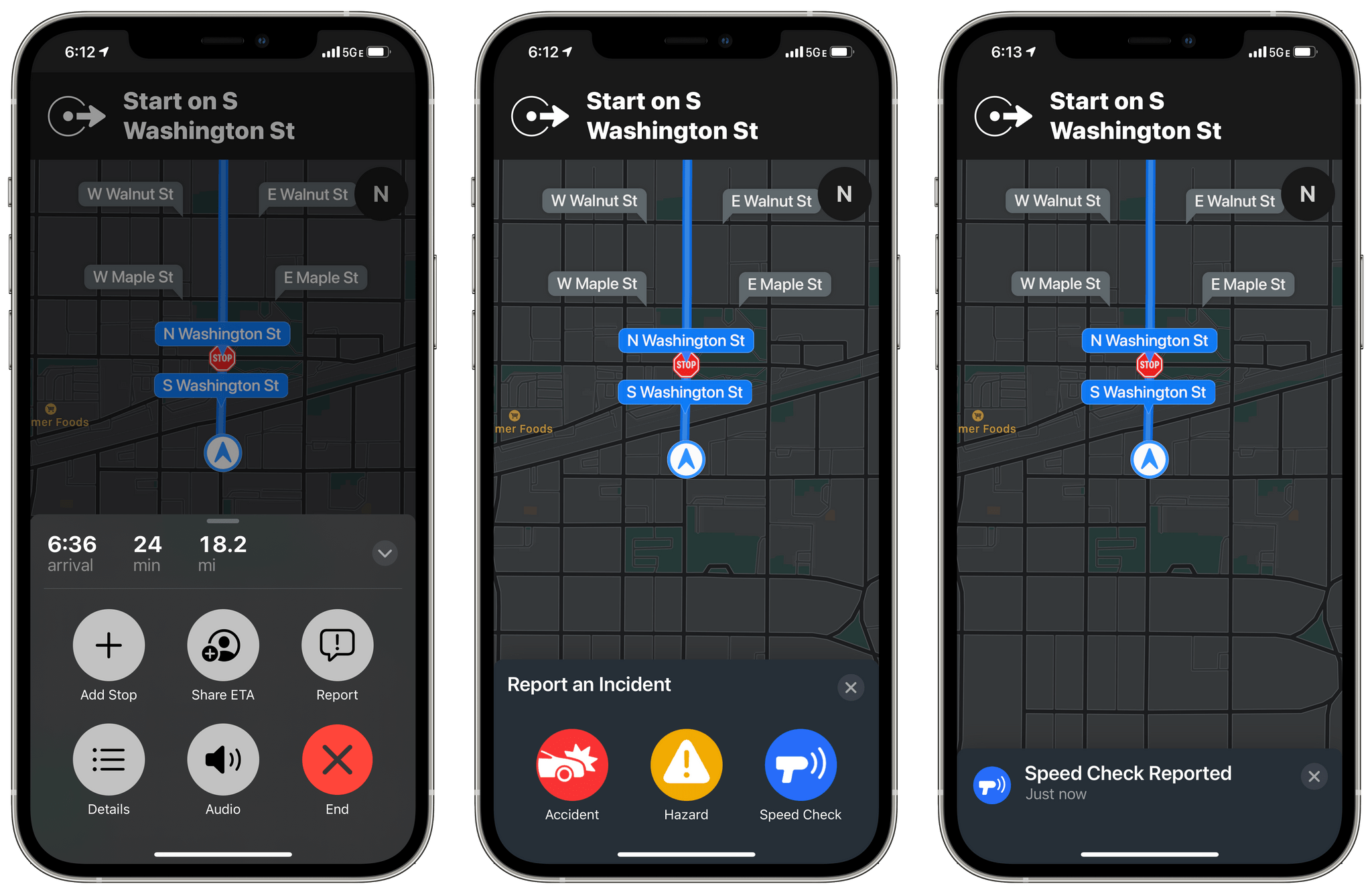
Apple has rolled out another new feature to iOS 14.5 beta testers in the US: accident, hazard, and speed check reporting in Maps.

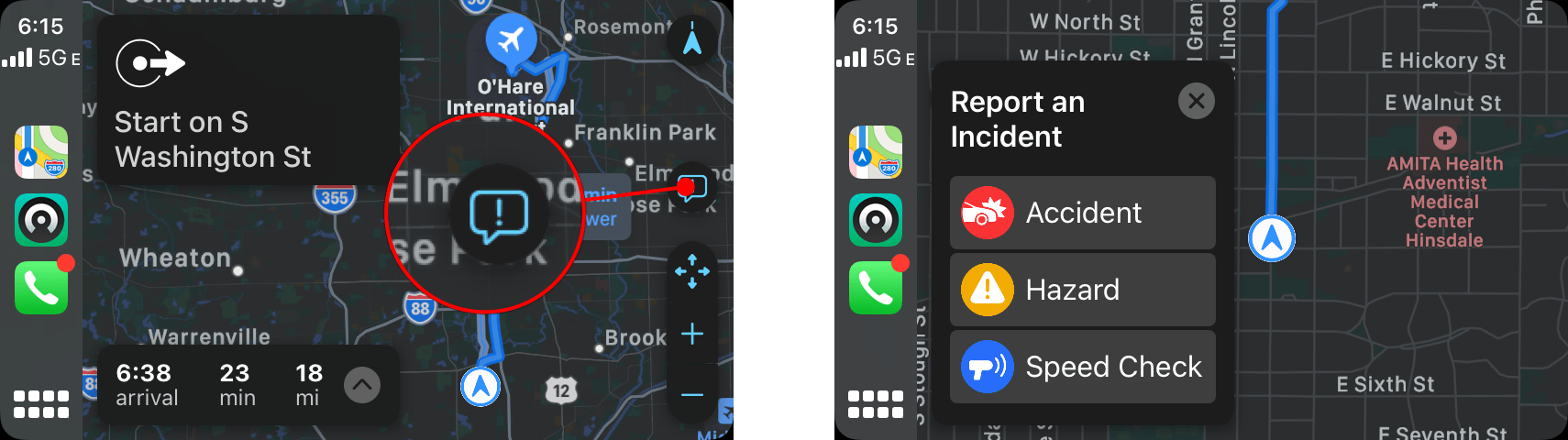
The new feature, which appeared today, is available once you begin navigating to a destination using Maps on your iPhone or via CarPlay. After you tap the ‘Go’ button, you can tap or swipe up from the bottom of the Maps app on your iPhone or tap the new ‘Report’ button on the right side of the CarPlay UI to reveal options to report traffic accidents, road hazards, or speed checks. All three alerts can be reported and cleared using Siri too.

Submitting a report using CarPlay

Submitting a report using CarPlay

I did some preliminary testing of the feature using Maps with my iPhone, CarPlay, and Siri, and it worked well without any issues. My one quibble is with the placement of the Report button in CarPlay. It’s quite small and on the far side of the screen from the driver. You can use Siri to send a report instead, but I expected the Report button to be revealed when I tapped on the strip along the bottom of CarPlay’s Maps view that lists information like the estimated arrival time at your destination.

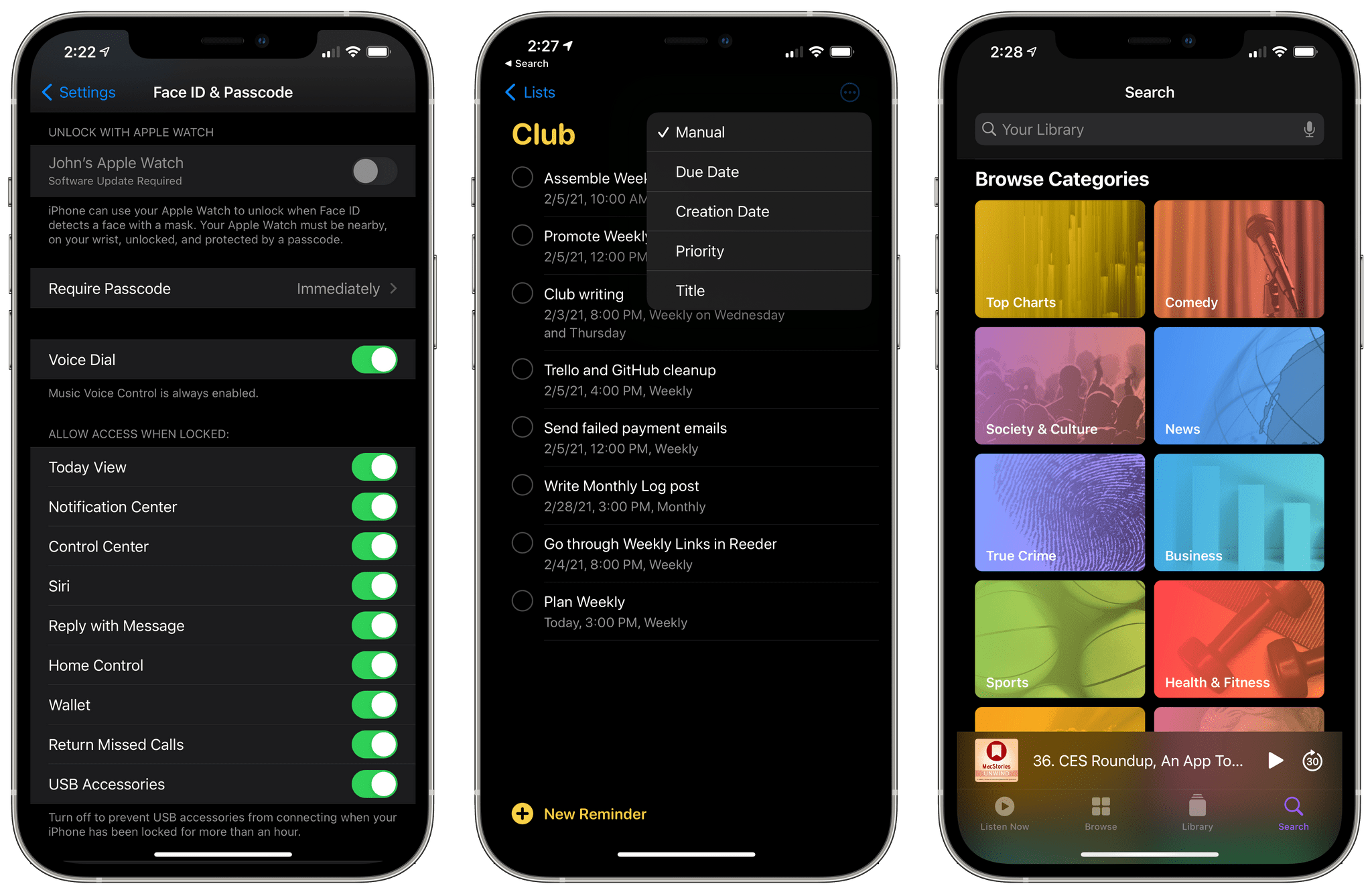
It will probably be a while before enough people are using iOS 14.5 for accident, hazard, and speed check alerts to begin popping up as I drive somewhere. However, there are enough other big features coming in 14.5, like the Face ID plus Apple Watch iPhone unlocking when you’re wearing a face mask, that I expect we’ll begin to see notifications pop up in Maps once iOS 14.5 is officially released.


MacStories Unwind: M1 Macs, GoodTask, and Text Case Reviewed, OS Betas, and CARROT Weather 5

0:00
29:49


Sponsored by: SaneBox – Organize Your Inbox, and Never Waste Time on Email Again

This week on MacStories Unwind:

MacStories

Club MacStories

  • MacStories Weekly
    • Downie
    • John’s updates his over-the-air TV setup with a new antenna and Channels

AppStories

Unwind


Apple Releases macOS 11.3 Beta with New Safari Features, Reminders Sorting, Music Updates, and Improvements to iOS and iPadOS Apps Running on M1 Macs

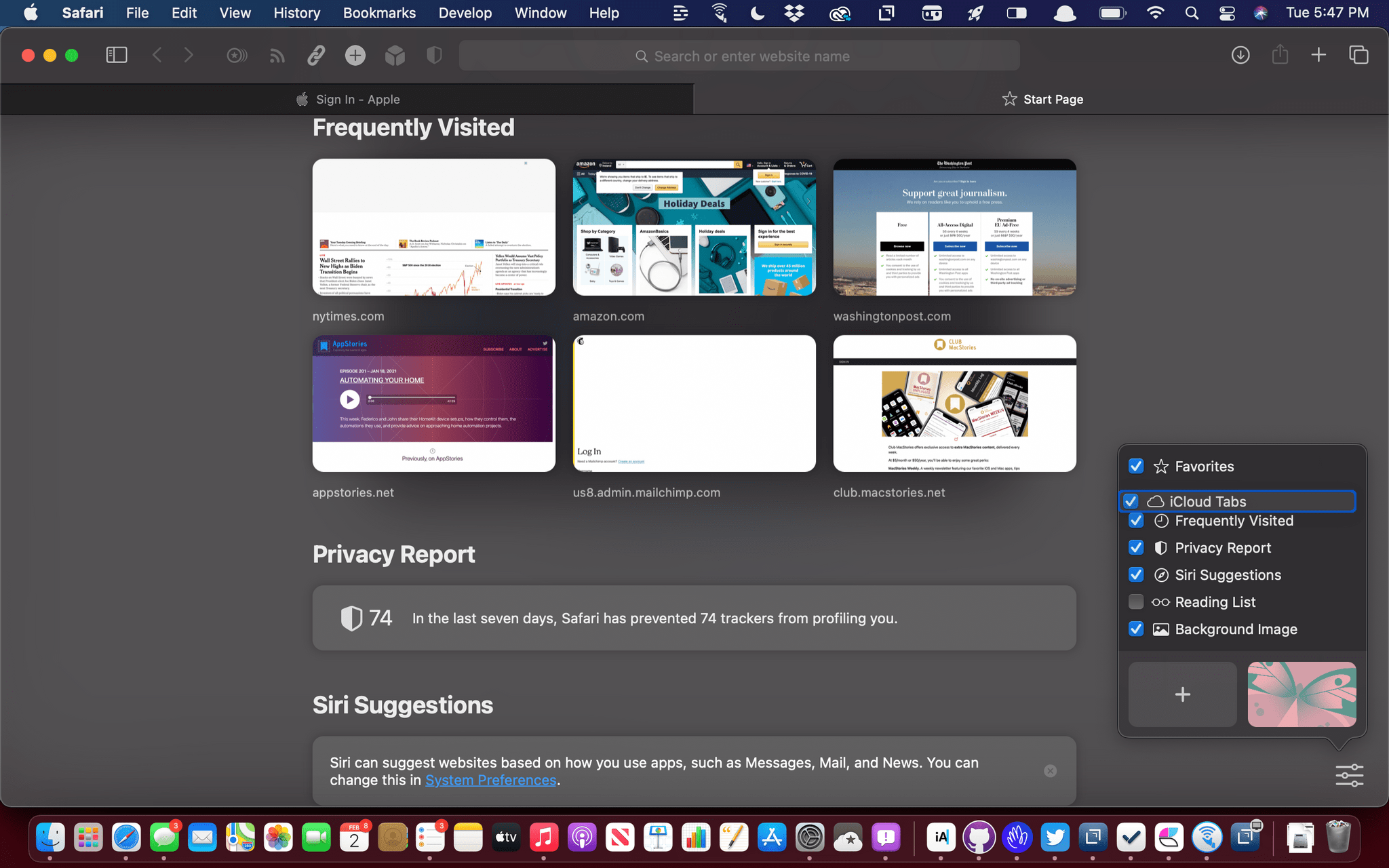
Start page items can be reordered.

Start page items can be reordered.

Apple has released the first beta for macOS 11.3 Big Sur, which includes new Safari features, changes that parallel yesterday’s updates to iOS and iPadOS, and more.

Some of the most interesting features of the latest Big Sur beta are in Safari. As I wrote in my Big Sur review, I like most of the changes made to Safari’s start page but wished I could reorder the default sections. That’s now possible, which is terrific, but there’s also a new third-party extension point for developers to build start page integrations, which is very interesting. We’ll have to see what developers do with the new feature, but I expect it will allow RSS clients to list recent articles on the start page that could be opened directly in Safari, for example. There’s a new Web Speech API that allows speech recognition functionality to be built into a webpage too.

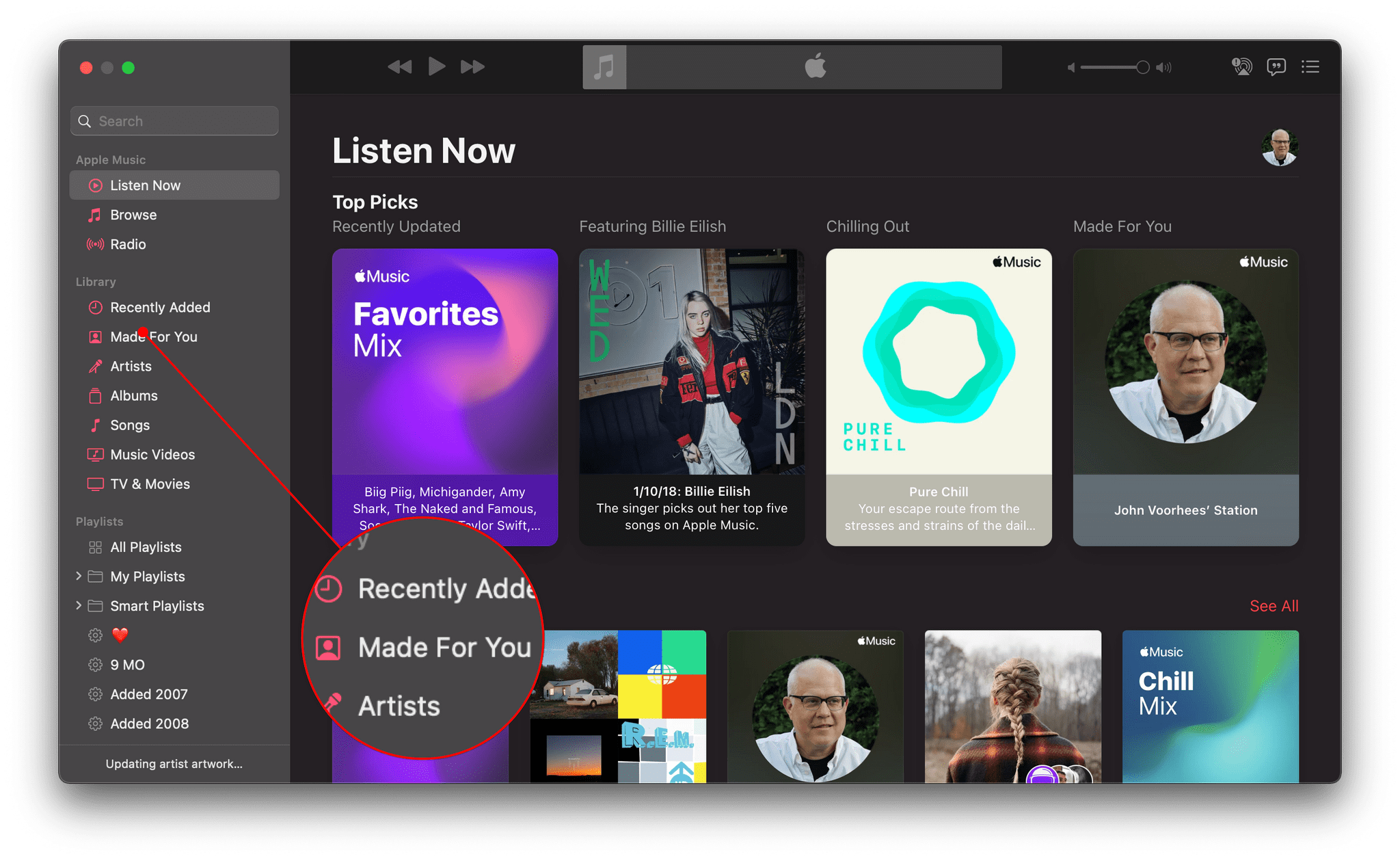
Music's new Made for You tab

Music’s new Made for You tab

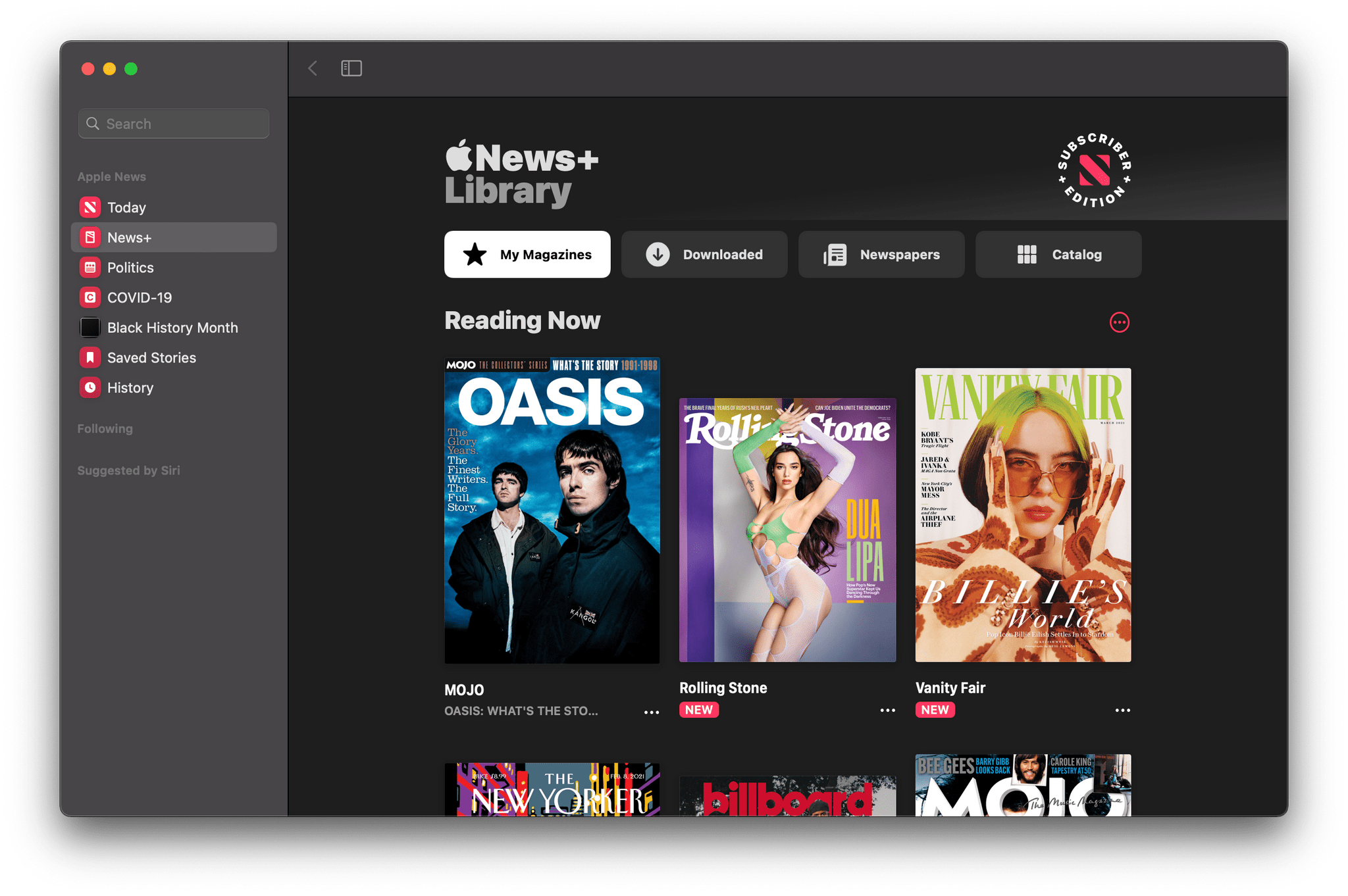
Similar to iOS and iPadOS, Reminders is gaining the option to print lists. Music adds a dedicated ‘Made For You’ section in the sidebar that includes your annual Replay playlists and Apple’s personalized algorithmic playlists. The Listen Now tab will also suggest upcoming live events tuned to your music tastes. There’s an enhanced News+ tab in Apple News designed to make it easier to access magazines and newspapers and manage downloaded issues. Sony PS5 DualSense and Xbox Series X/S controllers are supported too.

The News+ tab has been redesigned.

The News+ tab has been redesigned.

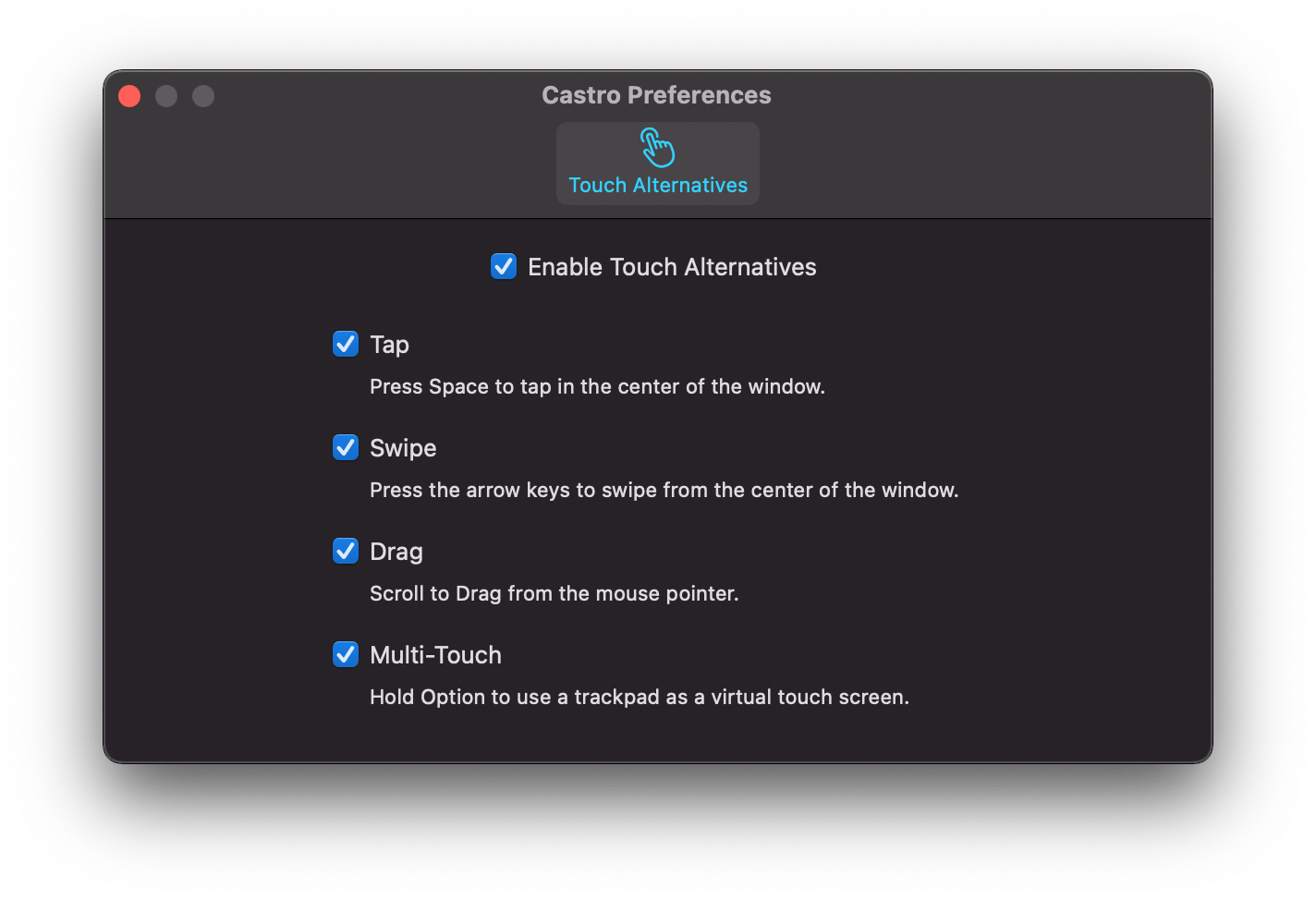
Finally, the experience of using iOS and iPadOS apps on the Mac got a boost too. There’s a brand new Preference pane in iPhone and iPads running on an M1 Mac that provides more keyboard control over touch commands. Apps can also be opened in larger windows.

The new iOS and iPadOS app Preferences window.

The new iOS and iPadOS app Preferences window.


Apple Releases Betas with Face ID Plus Apple Watch iPhone Unlocking, App Tracking Transparency, and Other New Features

Betas of iOS, iPadOS, tvOS, and watchOS are out today with some interesting features. Last week on World Privacy Day, Apple announced that App Tracking Transparency is coming in the spring, so it’s no surprise that iOS and iPadOS 14.5 include the feature. However, there are several other features coming in the next round of OS releases, as summarized by Rene Ritchie in this tweet:

https://twitter.com/reneritchie/status/1356309325820665857?s=20

Read more


MacStories Unwind: Data Privacy Day, Black History Month, Executive Changes, Tweetbot 6, and Record-Breaking Financial Results

0:00
29:10


Sponsored by: Re:Schedule – Meetings Made Easy

This week on MacStories Unwind:

MacStories

Club MacStories

AppStories

Unwind


CARROT Weather 5 Introduces New Design Elements, Custom Interface Builder, and More

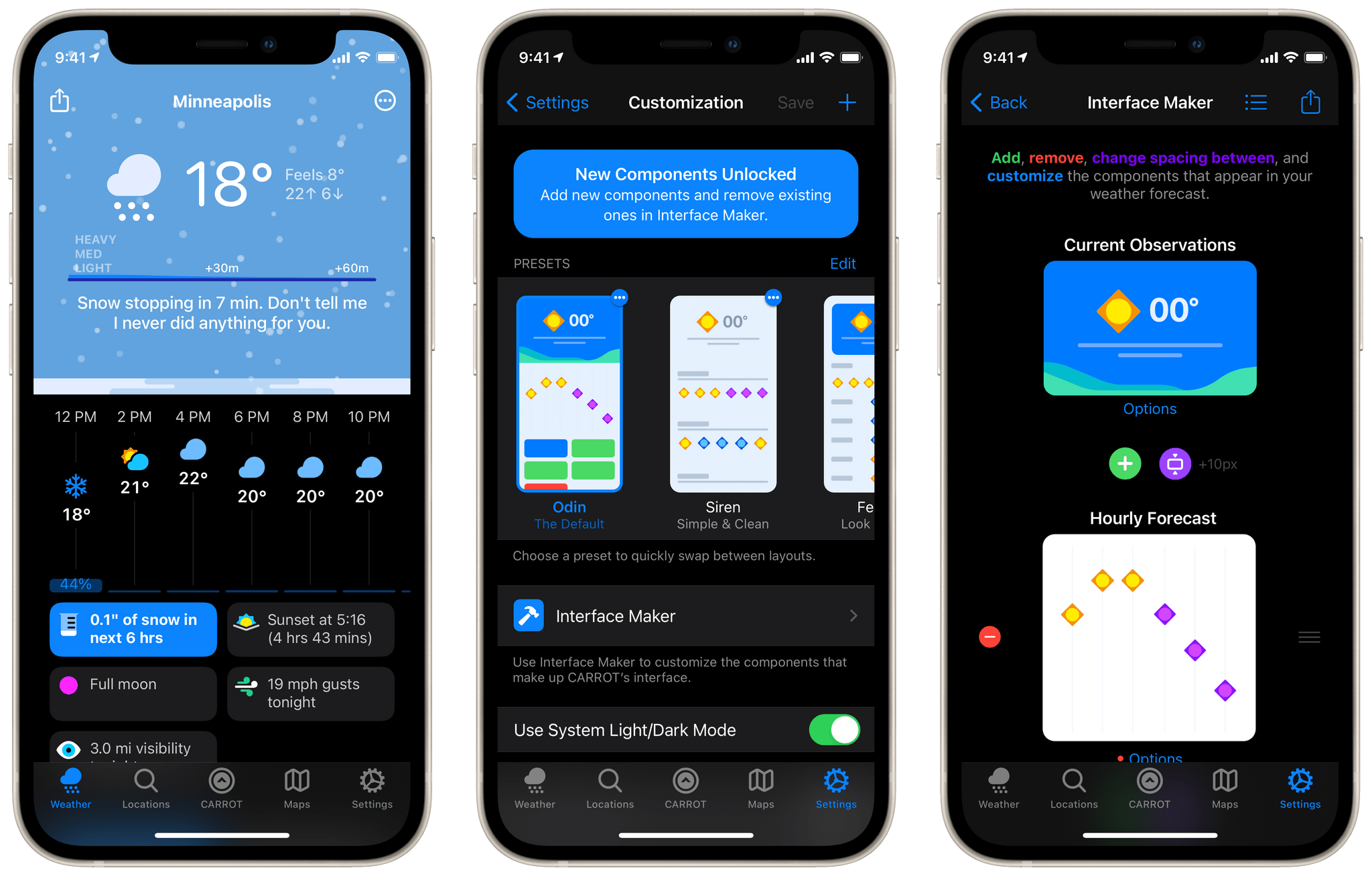
CARROT Weather has been a MacStories favorite for years now. Just last month we named it the Best Watch App of 2020 in our annual MacStories Selects awards. One of the impressive features in CARROT’s Apple Watch app is the ability to customize the interface to display exactly the weather data that you’re interested in. With today’s release of CARROT Weather 5, developer Brian Mueller has brought that same concept to the iOS and iPadOS versions of the app. The major update also includes a host of new icon designs, snarky weather responses, achievements, and fun Easter eggs.

Read more


Apple Publishes ‘A Day in the Life of Your Data’ Case Study and Reveals That App Tracking Transparency is Coming in the Spring

Today is Data Privacy Day, and to mark the occasion, Apple has published a case study titled ‘A Day in the Life of Your Data.’ In the accompanying press release, Craig Federighi, Apple’s senior vice president of Software Engineering explains the company’s approach to privacy:

Privacy means peace of mind, it means security, and it means you are in the driver’s seat when it comes to your own data. Our goal is to create technology that keeps people’s information safe and protected. We believe privacy is a fundamental human right, and our teams work every day to embed it in everything we make.

Apple’s efforts to put its customers in control of their data are not new, but as they evolve and expand, so have tensions with other tech industry titans like Facebook. Part of the lastest tensions stems from the fact that as part of the next iOS and iPadOS beta, Apple will begin testing a system that alerts users when an app wants to share data it collects with other apps, websites, and companies. The most common way apps do this is with the Identifier for Advertisers or IDFA, a unique code that identifies your device.

Users can already go into the Privacy section of the Settings app to turn off IDFA-based tracking under ‘Tracking,’ but that requires people to know about the setting and find it. Apple’s new system is similar to other privacy flows throughout iOS in that it displays an alert when an app that wants to use tracking is launched, asking the user to grant it permission.

Facebook and others, whose advertising relies on aggregating data about users from multiple apps and websites and then tying it back to a specific individual, see this as a threat to their business models. Attempting to reframe the issue as one of economics, Facebook argues that the change will hurt small businesses who purchase targeted ads because those ads will no longer be as effective.

The new privacy feature, which Apple calls App Tracking Transparency, comes on the heels of the standardized privacy disclosures the company began requiring from developers with its Fall 2020 OS updates. For apps like Facebook, the disclosures are extensive, but to its credit, Facebook published its disclosures late last year, while Google still hasn’t.

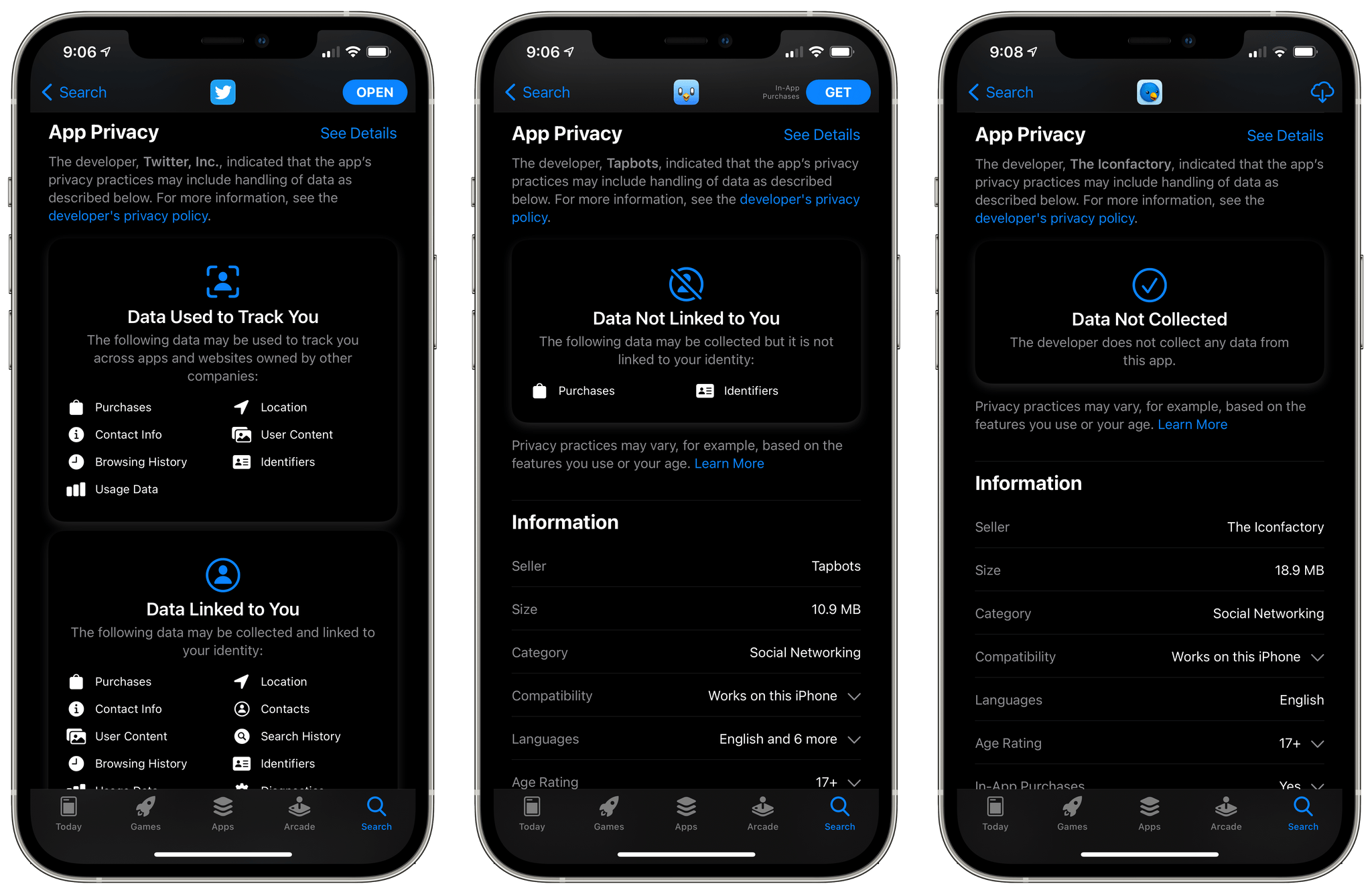
Apple's App Store privacy labels make it clear to users that third-party Twitter clients collect far less data than the official app, for example.

Apple’s App Store privacy labels make it clear to users that third-party Twitter clients collect far less data than the official app, for example.

Apple’s case study is a day-in-the-life hypothetical that follows a father and daughter throughout their day together. The document is peppered with facts about tracking and data brokers, including a citation to a study that says the average app includes six trackers. Most useful, though, is the case study’s plain-English, practical examples of the kind of tracking that can occur as you go about a typical day’s activities using apps.

It’s impossible to create a case study that users who aren’t security experts will understand without glossing over details and nuances inherent to privacy and tracking. However, the study is extensively footnoted with citations to back up the statements it makes for those who want to learn more, which I think strikes the right balance. I’ve had tracking turned off on my devices since it was possible, and personally, I’m glad to see the feature is going to be surfaced for others who may not be aware of its existence.