

The iPad 2 Dock is by far the accessory people ask about when getting a new iPad 2. Apple’s iPad Camera Connection Kit and their Digital AV Adapter are clear in purpose; both products add utility to the iPad when used with a camera or television. The iPad 2 dock, however, is a questionable purchase. What utility or benefit will it provide me, and should I pay a pricey $29.00 for a plastic stand that comes with no cable and only provides audio out? The portrait only dock is an additional expense many owners are unsure about, and today we’re taking a look at whether one of these guys can be of benefit to you now that customers are receiving the first batch of shipments in the United States.
Posts in Featured
The iPad 2 Dock Review

Access Extra Content and Perks
Founded in 2015, Club MacStories has delivered exclusive content every week for nearly a decade.
What started with weekly and monthly email newsletters has blossomed into a family of memberships designed for every MacStories fan.
Club MacStories: Weekly and monthly newsletters via email and the web that are brimming with apps, tips, automation workflows, longform writing, early access to the MacStories Unwind podcast, periodic giveaways, and more;
Club MacStories+: Everything that Club MacStories offers, plus an active Discord community, advanced search and custom RSS features for exploring the Club’s entire back catalog, bonus columns, and dozens of app discounts;
Club Premier: All of the above and AppStories+, an extended version of our flagship podcast that’s delivered early, ad-free, and in high-bitrate audio.
iPad 2 + Head Tracking: Glasses-free 3D

Jeremie Francone and Laurence Nigay from the Laboratory of Informatics of Grenoble at the EHCI Research Group have created one of the most impressive and, overall, amazing tech demoes for the iPad we’ve seen recently. By combining head-tracking technology that uses the iPad’s front facing camera with basic 3D graphics, they have developed a glasses-free 3D experience that doesn’t require the accelerometer, but it’s entirely based on the camera and the movements of a user’s head in front of the screen.
As you can see in the video after the break, graphics on screen change accordingly to the position of the user to give the illusion of tridimensional objects moving on the display. It is pretty amazing that this system only uses the camera and the effect is so well conveyed in a video.
We track the head of the user with the front facing camera in order to create a glasses-free monocular 3D display. Such spatially-aware mobile display enables to improve the possibilities of interaction. It does not use the accelerometers and relies only on the front camera.
Glasses-free 3D has been deployed by Nintendo in its latest 3DS portable gaming console, and a series of reports in the past suggested Apple could implement glasses-free 3D gaming for the next-generation iPod touch. The demo we have here today is truly impressive, so make sure to check it out below. Read more
Access Extra Content and Perks
Founded in 2015, Club MacStories has delivered exclusive content every week for nearly a decade.
What started with weekly and monthly email newsletters has blossomed into a family of memberships designed for every MacStories fan.
Club MacStories: Weekly and monthly newsletters via email and the web that are brimming with apps, tips, automation workflows, longform writing, early access to the MacStories Unwind podcast, periodic giveaways, and more;
Club MacStories+: Everything that Club MacStories offers, plus an active Discord community, advanced search and custom RSS features for exploring the Club’s entire back catalog, bonus columns, and dozens of app discounts;
Club Premier: All of the above and AppStories+, an extended version of our flagship podcast that’s delivered early, ad-free, and in high-bitrate audio.
Blogsy: A Better Blogging App for iPad
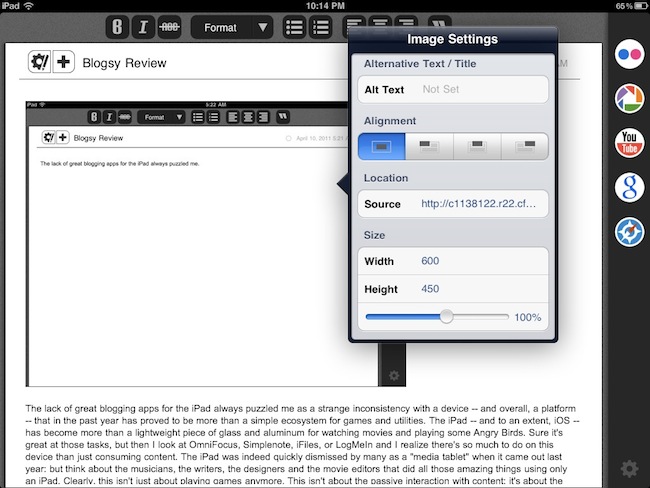
The lack of great blogging apps for the iPad always puzzled me as a strange inconsistency with a device – and overall, a platform – that in the past year has proved to be more than a simple ecosystem for games and utilities. The iPad – and to an extent, iOS – has become more than a lightweight piece of glass and aluminum for watching movies and playing some Angry Birds. Sure it’s great at those tasks, but then I look at OmniFocus, Simplenote, iFiles, or LogMeIn and I realize there’s so much to do on this device than just consuming content. The iPad was indeed quickly dismissed by many as a “media tablet” when it came out last year: but think about the musicians, the writers, the designers and the movie editors that did all those amazing things using only an iPad. Clearly, this isn’t just about playing games anymore. This isn’t about the passive interaction with content: it’s about the two-way relationship with consuming and creating content made possible by the 75,000 apps available in the App Store.
But then I look at bloggers, people like me, and I don’t understand why it is so difficult to rely on the iPad as a tool for working purposes. Let’s be honest: if you’re a geek and you happen to run a blog with lots of new posts added every day, you’ve had issues with using the iPad as your main work machine. We’ve all been there before: the soft keyboard takes a while getting used to, but it’s the lack of great blogging software designed specifically for the iPad that make us question the possibilities opened by this device as far as blogging is concerned. Getting down to my personal issues with the iPad and writing for MacStories, I identify three main problems: the official WordPress app isn’t that great (an euphemism); among the alternatives, several apps lack advanced functionalities like remote draft editing or custom fields; both 3rd party apps and the official WordPress one are terrible at allowing you to easily insert links, photos, and videos. We’re swimming in a sea of text editors, but as I said many times on Twitter in the past we need a more powerful app – something that combines the simplicity of text editors with rich features like media management and full access to the WordPress backend. I know, I’m asking for a complex solution, and quite possibly a software built for a niche rather than the Doodle Jump masses.
After months of waiting for the perfect blogging app to come around and convince us that the iPad could also be used professionally for blogging, I looked at Blogsy with a bit of skepticism. At first glance, it seemed that this new app borrowed a lot from dPad, an HTML editor I reviewed a while ago that’s aimed at quickly inserting media in documents. Considering that Blogsy, however, was touted as an app for bloggers with WordPress and Blogger integration, I decided that I could take it for a spin. Read more
Access Extra Content and Perks
Founded in 2015, Club MacStories has delivered exclusive content every week for nearly a decade.
What started with weekly and monthly email newsletters has blossomed into a family of memberships designed for every MacStories fan.
Club MacStories: Weekly and monthly newsletters via email and the web that are brimming with apps, tips, automation workflows, longform writing, early access to the MacStories Unwind podcast, periodic giveaways, and more;
Club MacStories+: Everything that Club MacStories offers, plus an active Discord community, advanced search and custom RSS features for exploring the Club’s entire back catalog, bonus columns, and dozens of app discounts;
Club Premier: All of the above and AppStories+, an extended version of our flagship podcast that’s delivered early, ad-free, and in high-bitrate audio.
Essay: The Smart, Intuitive HTML Powered Text Editor for iPhone & iPad
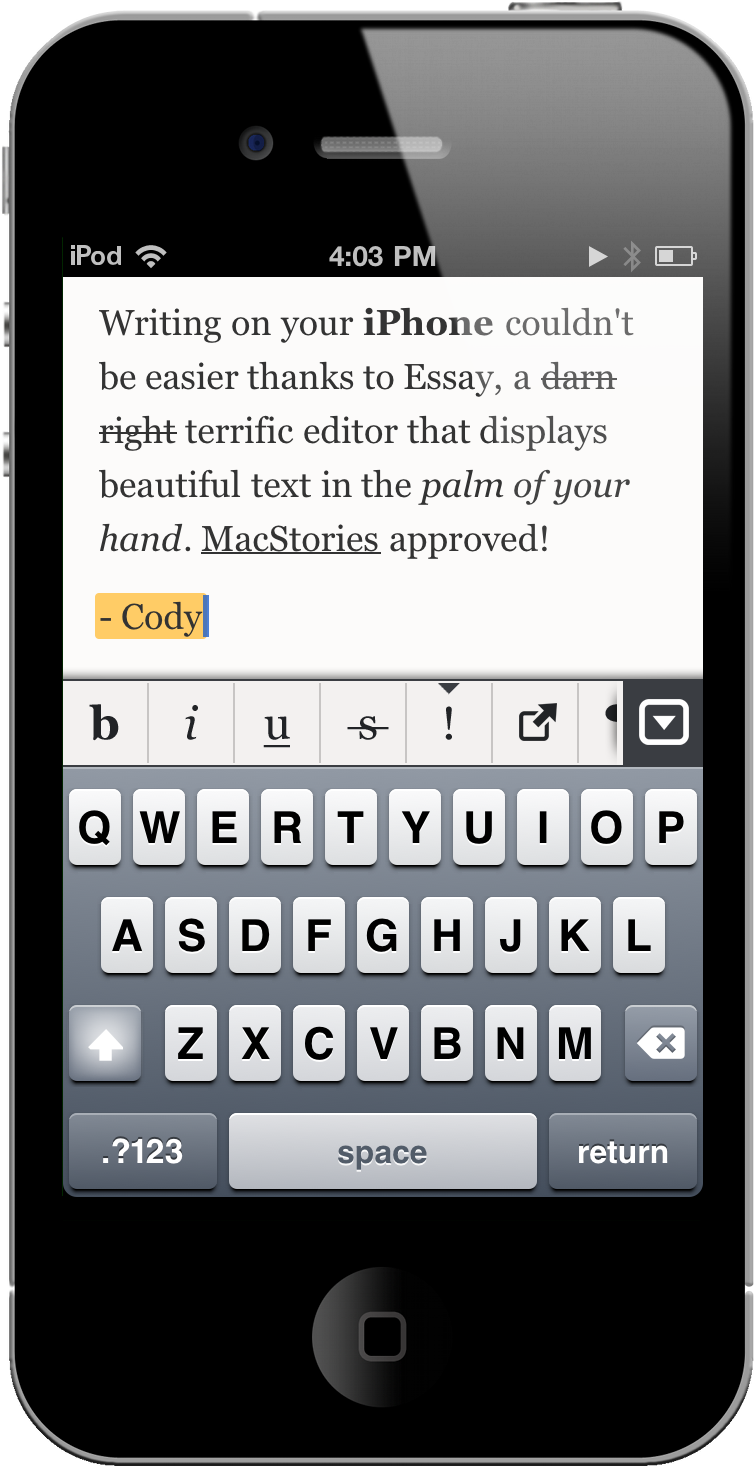
Constantly we’re bombarded or introduced to new text editors and word processors that attempt to redefine and strike a balance between what’s necessary and what isn’t. I’m personally getting to the point where enough is enough, as the focus on being new and imaginative in the iOS and Mac App Store has degraded into providing more of the same under a different name and a slightly different interface. While most of us are perfectly content with trend setters such as PlainText and Elements, Essay ended going above and beyond my expectations for an iOS text editor. Sure there’s SimpleNote, but with DropBox sync and a slew of formatting options I’ll sacrifice instant sync with Notational Velocity for HTML goodness.
Access Extra Content and Perks
Founded in 2015, Club MacStories has delivered exclusive content every week for nearly a decade.
What started with weekly and monthly email newsletters has blossomed into a family of memberships designed for every MacStories fan.
Club MacStories: Weekly and monthly newsletters via email and the web that are brimming with apps, tips, automation workflows, longform writing, early access to the MacStories Unwind podcast, periodic giveaways, and more;
Club MacStories+: Everything that Club MacStories offers, plus an active Discord community, advanced search and custom RSS features for exploring the Club’s entire back catalog, bonus columns, and dozens of app discounts;
Club Premier: All of the above and AppStories+, an extended version of our flagship podcast that’s delivered early, ad-free, and in high-bitrate audio.
Cydia Tweak Activates Multitasking Gestures On iPhone
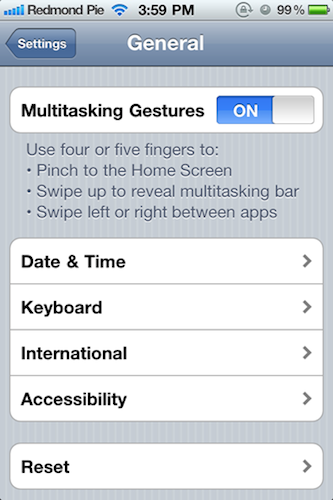
With iOS 4.3, Apple introduced the possibility for developers to activate “multitasking gestures”, a set of multitouch-based four and five-finger gestures that allow you to quickly switch between apps, go back to the homescreen, or invoke the multitasking tray. The gestures didn’t make it into the public version of iOS 4.3 (they were meant for dev test-only since the beginning), but they still can be enabled with a copy of Xcode, also sold in the Mac App Store at $4.99. Personally, I love multitasking gestures on my iPad and I use them all the time. Gestures are the future, and on the iPad they help me do things faster, in a much more intuitive process.
A new Cydia tweak called MT Gestures allows iPhone 4 and iPod touch 4g owners to turn on the multitasking gestures – with the same preference panel seen on the iPad. These settings have been there all the time, but they need to be manually enabled with an hack. This is exactly what MT Gestures does, for free. It’s available in ModMyi’s repository.
We don’t think, however, multitasking gestures are that great on the iPhone. If you want to be reminded why, check out the video below. [via Redmond Pie] Read more
Access Extra Content and Perks
Founded in 2015, Club MacStories has delivered exclusive content every week for nearly a decade.
What started with weekly and monthly email newsletters has blossomed into a family of memberships designed for every MacStories fan.
Club MacStories: Weekly and monthly newsletters via email and the web that are brimming with apps, tips, automation workflows, longform writing, early access to the MacStories Unwind podcast, periodic giveaways, and more;
Club MacStories+: Everything that Club MacStories offers, plus an active Discord community, advanced search and custom RSS features for exploring the Club’s entire back catalog, bonus columns, and dozens of app discounts;
Club Premier: All of the above and AppStories+, an extended version of our flagship podcast that’s delivered early, ad-free, and in high-bitrate audio.
Plex Releases Major 1.1 Update: The King Of iOS Media Players
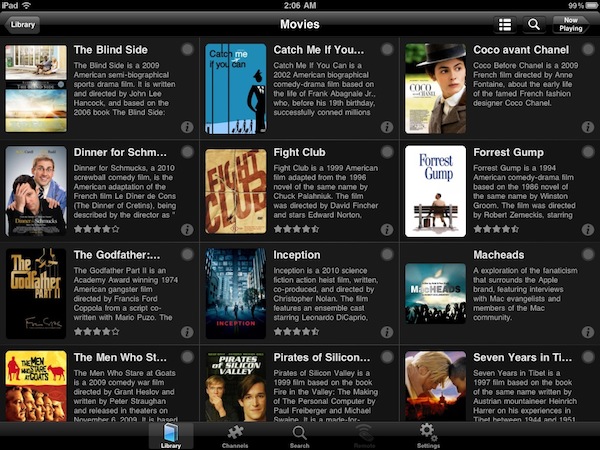
If you’re serious about your media library, you’ve probably heard of Plex: dubbed as the “solution for local and online media”, Plex is a fantastic multi-platform media center that runs on Macs and Windows PCs and has great iOS and Android clients. Once installed on your desktop machine (which becomes a “server”) Plex can fetch music, movies and TV shows stored on your computer or anywhere else on an external hard drive, organize them properly into categories by adding the correct metadata, and handle streaming to the clients (such as the iPhone or iPad apps) with live conversion of unsupported video formats. All your media can also be played locally on a computer without the need of a mobile client thanks to the desktop Plex app, which is highly customizable: you can add your own themes, install plugins (like Spotify) and connect to online content providers such as the CNN, Vimeo, Cnet TV, Youtube, Apple Movie Trailers and many others. If that’s not enough for you, Plex can also enable you to connect to your media library remotely via WiFi or 3G with a global hostname, through the iOS apps. Read more
Access Extra Content and Perks
Founded in 2015, Club MacStories has delivered exclusive content every week for nearly a decade.
What started with weekly and monthly email newsletters has blossomed into a family of memberships designed for every MacStories fan.
Club MacStories: Weekly and monthly newsletters via email and the web that are brimming with apps, tips, automation workflows, longform writing, early access to the MacStories Unwind podcast, periodic giveaways, and more;
Club MacStories+: Everything that Club MacStories offers, plus an active Discord community, advanced search and custom RSS features for exploring the Club’s entire back catalog, bonus columns, and dozens of app discounts;
Club Premier: All of the above and AppStories+, an extended version of our flagship podcast that’s delivered early, ad-free, and in high-bitrate audio.
Hamachi: A Powerful, Free Alternative to Apple’s Back to My Mac
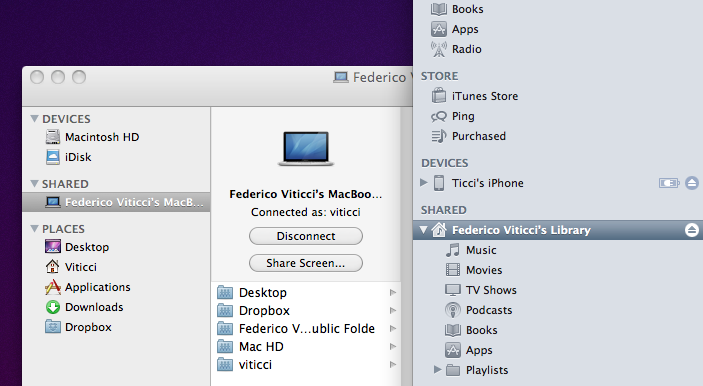
I love iTunes Home Sharing. Introduced almost two years ago with iTunes 9, Home Sharing allows you to share your music and movies, TV shows, podcasts and playlists with friends and family on a local network. With an active Internet connection and an Apple ID configured with the iTunes Store, you’ll be able to easily share your entire iTunes library and enable other users to connect to your iTunes installation to stream songs, video files, and so forth. It is a great feature of iTunes, and with the latest iOS 4.3 update for iPhone and iPad it also works exceptionally well with mobile devices: once activated on the desktop, your entire iTunes library will be sent to the iOS iPod app without the need of syncing or manually copying anything. Just make sure you’re on the same WiFi network, and you’re all set. Read more
Access Extra Content and Perks
Founded in 2015, Club MacStories has delivered exclusive content every week for nearly a decade.
What started with weekly and monthly email newsletters has blossomed into a family of memberships designed for every MacStories fan.
Club MacStories: Weekly and monthly newsletters via email and the web that are brimming with apps, tips, automation workflows, longform writing, early access to the MacStories Unwind podcast, periodic giveaways, and more;
Club MacStories+: Everything that Club MacStories offers, plus an active Discord community, advanced search and custom RSS features for exploring the Club’s entire back catalog, bonus columns, and dozens of app discounts;
Club Premier: All of the above and AppStories+, an extended version of our flagship podcast that’s delivered early, ad-free, and in high-bitrate audio.
Witness Remotely Locks Your Mac, Detects Motion, Sends You Mugshots
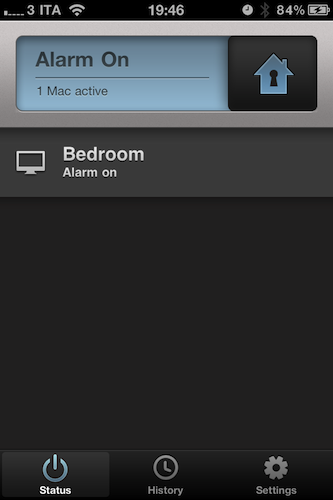
Developed by Orbicule, the creators of computer-tracking utility Undercover, Witness is a new application that’s aimed at remotely locking your Mac, and detecting motion in front of your computer’s camera. Let’s face it: every time we’re away from our Macs, we think about what could ever happen if someone broke into our house or office and stole them. Whilst data protection is essential and there many things you can do to hide critical information stored on your machine (such as disabling automatic login, choose a strong system password or keep everything safe into 1Password, possibly synced with Dropbox), knowing the identity of the person that actually took possession of your computer – or entered your office without authorization – is a whole different story. Unless you’re planning on setting up a relatively expensive home monitoring security system (even with DIY sets, you’re still going to spend a couple of hundred bucks + software to monitor everything) or just carrying your MacBook away with you all the time, there’s no easy to know what’s happening in front of your computer’s screen, and take action at the same time. Orbicule wants to provide an easy and powerful solution to remotely lock a Mac from virtually anywhere, detect motion and be notified with photos and video of who’s doing what in your house.
There are many tweaks and hacks available online to turn your iSight into a security system, as well as utilities to lock your Mac from an iPhone or iPad while on the go. I bet many of you have heard of these methods or at least tried to follow one of those tutorials once. Witness, however, does exactly what a great app has to do: it combines multiple functionalities into a beautiful, easy to use and full-featured package that requires minimal setup and just works. Witness can lock and unlock your Mac from an iPhone, an iPad or the web browser thanks to a system that’s based on an account you’ll have to create on Orbicule’s website. Once authenticated with the account on your Mac, iOS devices and browser, you’ll be ready to start using Witness and be alerted of activity in front of your Mac’s iSight. Witness also requires a desktop companion app that comes as an installer and will restart your computer upon successful installation. The Mac app handles the location of your computer, your account’s credentials, and also lets you decide whether Witness itself or the screensaver should be used to lock OS X. If you choose Witness, a panel will come in the foreground asking for your system’s password. If you don’t want to use the iSight and you have configured other cameras with your Mac, you can choose a different capturing device from the Preferences.
On the iOS side of things, Witness comes with a free remote app that runs universally on iPhones and iPads. The UI is gorgeous, and the app provides a set of functionalities to lock a Mac with a simple swipe, monitor your various machines associated with a Witness account, and browse the history of alerts you’ve received. Being heavily based on the cloud, Witness for iOS will constantly check for updates, pulling images and videos from the Internet if they’re available (meaning: you’ve locked your Mac and something’s going on). If an alert comes in via push notification, you’ll be able to see pictures and videos recorded by your iSight (audio is supported, too). You can email photos directly within the app, and delete alerts you’re no longer interested in. All these features are available on the web counterpart as well.
In my tests, Witness has been very reliable and quite fast both on WiFi and 3G. I was able to lock / unlock my iMac in seconds, receive push notifications moments after motion was detected and download full sets of photos and videos shot through my iSight. A Witness account will cost you $39 as a one-time fee (student licenses available) and gives you access to OS X, iOS and web tools. I highly recommend Witness not only because of the beautiful interface approach and usability – it’s the “just works” factor that combines a utility to lock a computer and turn it into a home alarm system that truly impressed me. You can create a Witness account here, and check out more screenshots below. Read more
Access Extra Content and Perks
Founded in 2015, Club MacStories has delivered exclusive content every week for nearly a decade.
What started with weekly and monthly email newsletters has blossomed into a family of memberships designed for every MacStories fan.
Club MacStories: Weekly and monthly newsletters via email and the web that are brimming with apps, tips, automation workflows, longform writing, early access to the MacStories Unwind podcast, periodic giveaways, and more;
Club MacStories+: Everything that Club MacStories offers, plus an active Discord community, advanced search and custom RSS features for exploring the Club’s entire back catalog, bonus columns, and dozens of app discounts;
Club Premier: All of the above and AppStories+, an extended version of our flagship podcast that’s delivered early, ad-free, and in high-bitrate audio.
Microsoft Releases Bing for iPad

Bing for iPad has just been released onto the iTunes App Store and it is Microsoft’s first app to make it onto the tablet device. Just like their Bing iPhone app and the Bing website, the daily image is the first thing you’ll notice with the app and it looks beautiful on the iPad’s screen. Furthermore the app gives you a quick glance of key information of Weather, News, Movies, Trends and more in a bar at the bottom of the screen.
The app contains a wealth of features and has been exceedingly well-designed to take advantage of the iPad’s strengths - this can definitely not be called just a search engine app. Those bottom tabs of information are a gateway into a full screen of lots more information. However probably the best feature of the app is the Trends page which gives you a very nice, almost FlipBoard-esque, page with all the top searches on Bing, along with a relevant image. Like the iPhone app it features a Voice Search (which works pretty well) and search, whether it be done via text or voice, can be for a website, news, image, video or map.
There is a lot of swiping that can be done in the app and it allows you to go back and forward from your last ‘panel’ of information, whether it be a web search, news page or weather. Bing Maps is included and fully functional letting you search for an address or business, find local business and even get directions.
The iPad app is curiously only available in the US iTunes app store which is certainly odd considering the web version does have international editions, that even have a different daily picture. However even weirder is that I downloaded it from the US store and ran it in Australia and it not only gave me the correct weather but the daily image was the Australian one and even Bing Maps showed my location and correctly showed local businesses, only the movie theatre times didn’t work. Jump the break for some more screenshots of the app.
Access Extra Content and Perks
Founded in 2015, Club MacStories has delivered exclusive content every week for nearly a decade.
What started with weekly and monthly email newsletters has blossomed into a family of memberships designed for every MacStories fan.
Club MacStories: Weekly and monthly newsletters via email and the web that are brimming with apps, tips, automation workflows, longform writing, early access to the MacStories Unwind podcast, periodic giveaways, and more;
Club MacStories+: Everything that Club MacStories offers, plus an active Discord community, advanced search and custom RSS features for exploring the Club’s entire back catalog, bonus columns, and dozens of app discounts;
Club Premier: All of the above and AppStories+, an extended version of our flagship podcast that’s delivered early, ad-free, and in high-bitrate audio.