
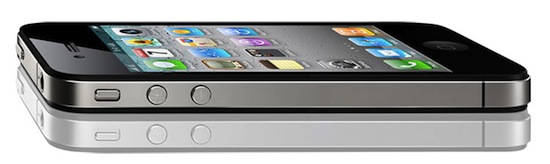
I’ve been thinking about this for a while now, but after seeing Apple’s terrific financial results for the second 2011 quarter it became clear to me: a new iPhone in September makes perfect sense, in spite of all the reports claiming it would be a bad choice for the company to “delay” the release of the next-generation to the Fall skipping the usual June / July timeframe. Of course Apple hasn’t confirmed any of this speculation, but if rumors and reports from well-sourced Apple journalists like Jim Dalrymple are of any indication, it really looks like we’re going to see a new iPhone in September, not this summer. And here’s why I think it’s a good plan. Read more
Posts in Featured
Why A New iPhone In September Makes Sense

Access Extra Content and Perks
Founded in 2015, Club MacStories has delivered exclusive content every week for nearly a decade.
What started with weekly and monthly email newsletters has blossomed into a family of memberships designed for every MacStories fan.
Club MacStories: Weekly and monthly newsletters via email and the web that are brimming with apps, tips, automation workflows, longform writing, early access to the MacStories Unwind podcast, periodic giveaways, and more;
Club MacStories+: Everything that Club MacStories offers, plus an active Discord community, advanced search and custom RSS features for exploring the Club’s entire back catalog, bonus columns, and dozens of app discounts;
Club Premier: All of the above and AppStories+, an extended version of our flagship podcast that’s delivered early, ad-free, and in high-bitrate audio.
Apple Q2 2011 Financial Results: $24.67 Billion Revenue, 4.69 Million iPads, 18.65 Million iPhones Sold

Apple has just posted their Q2 2011 financial results. The company posted revenue of $24.67 billion, with 4.69 million iPads sold, 18.65 million iPhones and 3.76 million Macs. Wall Street consensus estimate was EPS of $5.36 and revenue of $23.34B. Mac sales saw a 28% increase over the year-ago quarter, while with 9.02 million iPods sold Apple saw a 17% unit decline. Overall, the company posted quarterly revenue growth of 83% and profit growth of 95%. International sales were 59% for the quarter, with Asia and Pacific regions featuring a 182% increase year over year. The reported iPhone sales were stronger than expected by most analysts, with a 113% increase year over year. iPhone revenues, however, grew faster than sales with a 126% increase [source]. Overall, this was the biggest non-holiday quarter in Apple’s history.
With quarterly revenue growth of 83 percent and profit growth of 95 percent, we’re firing on all cylinders,” said Steve Jobs, Apple’s CEO. “We will continue to innovate on all fronts throughout the remainder of the year.
In Q1 2011, the company posted a record revenue of $26.74 billion with 7.33 million iPads sold, 16.24 million iPhones and 4.13 million Macs. In the year-ago quarter, Apple posted revenue of $13.50 billion and net quarterly profit of $3.07 billion. The company sold 2.94 million Macs, 8.75 million iPhones and 10.89 million iPods during the quarter.
Apple will provide a live streaming audio feed of its Q2 2011 financial results conference call at 2:00 PM Pacific, and we’ll update this story with the conference highlights. Read more
Access Extra Content and Perks
Founded in 2015, Club MacStories has delivered exclusive content every week for nearly a decade.
What started with weekly and monthly email newsletters has blossomed into a family of memberships designed for every MacStories fan.
Club MacStories: Weekly and monthly newsletters via email and the web that are brimming with apps, tips, automation workflows, longform writing, early access to the MacStories Unwind podcast, periodic giveaways, and more;
Club MacStories+: Everything that Club MacStories offers, plus an active Discord community, advanced search and custom RSS features for exploring the Club’s entire back catalog, bonus columns, and dozens of app discounts;
Club Premier: All of the above and AppStories+, an extended version of our flagship podcast that’s delivered early, ad-free, and in high-bitrate audio.
Researchers Discover iPhone File That Keeps Track Of Your Moves

Security researchers Alasdair Allan and Pete Warden have discovered a file in Apple’s iOS local backup system that keeps track of your entire location history, in format perfectly readable by a computer. The file, by default stored unencrypted in the iOS database that can be backed up to a computer using iTunes, keeps track of “everywhere you go” by triangulating the 3G signal against the nearest cell towers, and offers a way to private detectives or people who might get their hands on your device / computer to have access to your moves in the past. The researchers have also created an open-source app called iPhoneTracker that recognizes the file from your local iOS backup, parses the results and displays your most-visited locations on a map. The screenshot above, for instance, was taken using my iPhone’s unencrypted backup.
As the researchers note on iPhoneTracker’s webpage, it is unclear why Apple is doing this. Cellphone network providers have been allegedly tracking users’ location for years through their towers, but they never stored the location info locally on a device, nor did they provide a way to back up this information on a computer and parse it. Allan and Warden (who’s a former Apple employee) speculate this might be functional to new location features Apple is working on for future versions of iOS; the location tracking was apparently introduced with iOS 4 last year, and data collected so far might come in handy for the company to build an online location-based social service for iPhone and iPad users. The file, however, was only discovered in the past weeks, and the researchers claim it’s present both on iPhones and iPad 3G units.
Apple has made it possible for almost anybody – a jealous spouse, a private detective – with access to your phone or computer to get detailed information about where you’ve been,” said Pete Warden, one of the researchers.
Warden and Allan point out that the file is moved onto new devices when an old one is replaced: “Apple might have new features in mind that require a history of your location, but that’s our specualtion. The fact that [the file] is transferred across [to a new iPhone or iPad] when you migrate is evidence that the data-gathering isn’t accidental.” But they said it does not seem to be transmitted to Apple itself.
Apple declined to comment, but it’s very clear that the file is created and stored locally without an explicit user’s agreement. As noted by the researchers and other security / privacy experts polled by the Guardian, Apple is storing both location data and timestamps in a readable format that can be accessed from a stolen (possibly also jailbroken) device or a computer. I have tried the iPhoneTracker application personally, and while it really works with unencrypted backups generated using iTunes, choosing to encrypt a backup breaks iPhoneTracker’s functionality – thus granting users an additional level of security. The file, however, is still there – Apple doesn’t offer a way to avoid tracking of your moves.
The discovery of this location-tracking file in the iOS backup system is worrying as it raises question on Apple’s user privacy policy, and the reason why such data is collected without a user’s consent. Apple has been rumored to working on new location features for iOS 5, so the location info might be a solid data foundation for the company to build a new social location service. You can download iPhoneTracker here and try for yourself. Read more
Access Extra Content and Perks
Founded in 2015, Club MacStories has delivered exclusive content every week for nearly a decade.
What started with weekly and monthly email newsletters has blossomed into a family of memberships designed for every MacStories fan.
Club MacStories: Weekly and monthly newsletters via email and the web that are brimming with apps, tips, automation workflows, longform writing, early access to the MacStories Unwind podcast, periodic giveaways, and more;
Club MacStories+: Everything that Club MacStories offers, plus an active Discord community, advanced search and custom RSS features for exploring the Club’s entire back catalog, bonus columns, and dozens of app discounts;
Club Premier: All of the above and AppStories+, an extended version of our flagship podcast that’s delivered early, ad-free, and in high-bitrate audio.
Reuters: iPhone 5 In September, Looks Similar to iPhone 4

Following speculation and rumors in the past weeks that indicated Apple was not ready to announce and launch a new iPhone model in June, Reuters published a report last night claiming that, according to ”three people with direct knowledge of the company’s supply chain”, the next-generation iPhone will ship in September with production starting in July / August.
Apple’s next-generation iPhone will have a faster processor and will begin shipping in September, three people with direct knowledge of the company’s supply chain said.
Reports on the timeline of the new iPhone launch vary, though it is largely expected that Apple will likely refresh its iPhone 4 later this year.
The sources declined to be identified because the plans for the new iPhone were not yet public. An Apple spokeswoman in Hong Kong was not available for comment.
Whilst Reuters’ report doesn’t provide new details on the iPhone 5 – any different from what we’ve been hearing in the past months – the publication directly mentions Largan Precision, Wintek and Foxconn as key suppliers for the new device’s camera, screen and case, respectively. Reuters also reports the new iPhone will have a faster processor – presumably the Apple A5, as previously reported – and a design similar to the iPhone 4’s one – although it is not clear if Apple will adopt the same design but use different materials as a rumor suggested weeks ago. The iPhone 5 is also rumored to feature a bigger screen, as well as NFC capabilities and a new aluminum design with internal antenna.
Access Extra Content and Perks
Founded in 2015, Club MacStories has delivered exclusive content every week for nearly a decade.
What started with weekly and monthly email newsletters has blossomed into a family of memberships designed for every MacStories fan.
Club MacStories: Weekly and monthly newsletters via email and the web that are brimming with apps, tips, automation workflows, longform writing, early access to the MacStories Unwind podcast, periodic giveaways, and more;
Club MacStories+: Everything that Club MacStories offers, plus an active Discord community, advanced search and custom RSS features for exploring the Club’s entire back catalog, bonus columns, and dozens of app discounts;
Club Premier: All of the above and AppStories+, an extended version of our flagship podcast that’s delivered early, ad-free, and in high-bitrate audio.
Vietnamese Videos Show Old iOS 4 Build With Several Unreleased Features
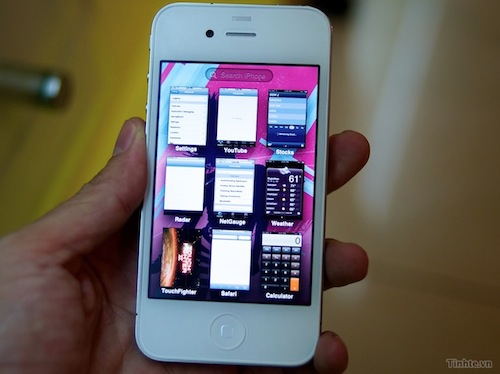
Two videos from Vietnamese website Tinhte [Google Translation] making the rounds of the Internet this morning claimed to show an internal build of the soon-to-be-announced iOS 5 running on a prototype white unit of the iPhone 5. The videos generated quite a debate on several blogs and among iOS developers on Twitter as a completely new multitasking system, folders and settings are demoed. Whilst many initially reported the iPhone shown in the videos was a 64 GB iPhone 5 running iOS 5, further inspection of the videos revealed the prototype unit (likely an iPhone 4) is running an old internal build of iOS 4.0 – carrying build number 8A216. Of course Apple might have changed the number of a “real” iOS 5 build to prevent people from leaking it, but we think that’s very unlikely. Plus, the iPhone sports old Calculator and Voice Memos icons – the Golden Master version of iOS 4.0 carried build number 8A293, so this might be an internal seed tested before the first developer betas released last year.
This build is interesting for a couple of reasons. First off, it shows Apple had been considering an alternative, Exposè-like interface for switching between applications – a UI Apple eventually discarded in the public version of iOS 4.0 for the icon-based multitasking tray. The Exposè design is very similar to jailbreak tweaks like Multifl0w in the way it displays apps in the background through a preview of their actual windows, rather than simple icons. The internal multitasking implementation features snappy and elegant animations, alongside a new placement for Spotlight search on top of running applications. The videos also showcase a different folder creation system with a smaller overlay on top of the device’s Springboard. In the settings, there are a series of preference panels like direct Facebook integration (perhaps linked to MediaStream) and “file sharing”, although no further details are provided. Update: as @chronic reminds us, File Sharing was enabled in the iOS 4 developer betas to let devs control sharing with iTunes through an on/off switch.
It is possible that these features are still being considered for iOS 5 – and especially in the case of file sharing, that would make sense as Apple is working on a Mac-to-Mac file sharing protocol called “AirDrop” for the upcoming OS X Lion.
The device shown in the videos also runs some Apple internal applications, and has a series of extra settings that suggest the build is legit and somehow leaked by Tinhte – which has a good track record when it comes to Apple rumors and products leaks. It is unclear whether this is a real white iPhone 4, an updated version of the device, or a simple mod – but the fact that it’s got 64 GB of storage seems to confirm the iPhone itself is legit, too.
Check out the videos below. [via Chronic, 9to5mac] Read more
Access Extra Content and Perks
Founded in 2015, Club MacStories has delivered exclusive content every week for nearly a decade.
What started with weekly and monthly email newsletters has blossomed into a family of memberships designed for every MacStories fan.
Club MacStories: Weekly and monthly newsletters via email and the web that are brimming with apps, tips, automation workflows, longform writing, early access to the MacStories Unwind podcast, periodic giveaways, and more;
Club MacStories+: Everything that Club MacStories offers, plus an active Discord community, advanced search and custom RSS features for exploring the Club’s entire back catalog, bonus columns, and dozens of app discounts;
Club Premier: All of the above and AppStories+, an extended version of our flagship podcast that’s delivered early, ad-free, and in high-bitrate audio.
Writings 1.2 Adds Workspaces and Custom Keyboard [Giveaway]

Since I reviewed the first version of Writings for iPad back in December, I haven’t switched to any other text editor for iOS. I don’t write much on my iPhone, so an iPad application is all I’m looking for when it comes to writing long pieces that will eventually end up on my Mac or into an app like Blogsy. Writings, beautiful user interface aside, has the features I need from an iPad text editor: Dropbox support with plain text editing so I can keep writing on my Mac (or anywhere) if I want to; unobtrusive word counter; a readable default font; a handy margin feature that won’t scroll the document when I’m holding the iPad or resting my thumbs at its sides.
Writings 1.2, released today in the App Store, builds on the excellent feature set of versions 1.0 and 1.1 (the latter brought a list view to easily navigate between dozen of documents) by introducing two new functionalities that I’ve been testing in the beta and greatly improved my workflow: Writings 1.2 adds support for Workspaces – you can decide to sync certain documents to different Dropbox folders, even on different accounts. Whilst the feature sounded a little to complex to me at first, I’ve seen that being able to create a “MacStories” workspace alongside a “Personal” one with notes syncing to multiple Dropbox folders at once helps me getting my notes and articles better organized. You can create as many workspaces as you want, and each one will retain its specific settings. On top of this, you can now manually trigger sync within a document without going back to the main screen.
Last, Writings 1.2 comes with an optional extra row of most used punctuation keys above the standard keyboard. This extra row sure makes the keyboard bigger and will let you see less text on screen, but it can dramatically speed up your typing if you think the iOS keyboard could use some customization options for writers. The tab key and quick “-” access sure help me get my writing done quicker.
Writings 1.2 is still propagating in iTunes and it’s available at $4.99. We have 5 codes to give away thanks to the Ice Cream Studios developers, so follow along past the break for a chance to win a copy of Writings 1.2 for iPad.
Access Extra Content and Perks
Founded in 2015, Club MacStories has delivered exclusive content every week for nearly a decade.
What started with weekly and monthly email newsletters has blossomed into a family of memberships designed for every MacStories fan.
Club MacStories: Weekly and monthly newsletters via email and the web that are brimming with apps, tips, automation workflows, longform writing, early access to the MacStories Unwind podcast, periodic giveaways, and more;
Club MacStories+: Everything that Club MacStories offers, plus an active Discord community, advanced search and custom RSS features for exploring the Club’s entire back catalog, bonus columns, and dozens of app discounts;
Club Premier: All of the above and AppStories+, an extended version of our flagship podcast that’s delivered early, ad-free, and in high-bitrate audio.
Apple Sues Samsung Over Galaxy “Look & Feel”
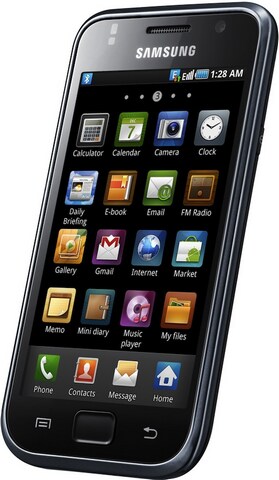
As reported by the Wall Street Journal, Apple has filed a lawsuit against Samsung on April 15 in the Northern District of California claiming that the South Korean company copied the “look and feel” of iPhones and iPads with its Galaxy devices – smartphones, tablets and media players. A very few details are provided in the original report, but the WSJ claims the lawsuit indicates products like the “Galaxy S 4G,” “Epic 4G,” “Nexus S” and “Galaxy Tab” are violating Apple’s intellectual property.
Rather than innovate and develop its own technology and a unique Samsung style for its smart phone products and computer tablets, Samsung chose to copy Apple’s technology, user interface and innovative style in these infringing products,” the lawsuit said.
Representatives of Apple and Samsung didn’t immediately respond to requests for comment.
Samsung is one of the big players in the current Android landscape – the company came out last year with a 7-inch tablet and recently announced two new models (Galaxy Tab 8.9 and 10.1) that will also support Android’s Honeycomb 3.0 update. The relationship between Apple and Samsung is quite complex, as the South Korean tech giant makes the processors that go into iPhones and iPads sold by Apple. Several rumors in the past pointed to Apple willing to move the production of A4 and A5 CPUs away from Samsung (the iPad 2’s A5 CPU comes from Samsung), and this lawsuit might be a sign of things changing between the two companies. This lawsuit could also imply Apple is targeting Android indirectly by suing OEMs instead of Google itself – manufacturers like HTC, Samsung and Motorola are free to use Android, but they usually apply their custom graphical skins to differentiate their products. Apple is suing Samsung, a manufacturer of Android-based devices which applied its custom TouchWiz user interface to Android. TouchWiz, however, was also used on proprietary and Bada-based devices, but Apple is suing over the “look & feel” of the Android Galaxy line. The Wall Street Journal doesn’t specify whether or not TouchWiz was mentioned in the lawsuit.
A few weeks ago, Apple also sued online retailer Amazon over the usage of the term “App Store” in its new Android digital marketplace. Read more
Access Extra Content and Perks
Founded in 2015, Club MacStories has delivered exclusive content every week for nearly a decade.
What started with weekly and monthly email newsletters has blossomed into a family of memberships designed for every MacStories fan.
Club MacStories: Weekly and monthly newsletters via email and the web that are brimming with apps, tips, automation workflows, longform writing, early access to the MacStories Unwind podcast, periodic giveaways, and more;
Club MacStories+: Everything that Club MacStories offers, plus an active Discord community, advanced search and custom RSS features for exploring the Club’s entire back catalog, bonus columns, and dozens of app discounts;
Club Premier: All of the above and AppStories+, an extended version of our flagship podcast that’s delivered early, ad-free, and in high-bitrate audio.
Your Twitter Stream on Your Desk: The Trickle and Piolo Giveaway

Your iPhone provides ample opportunity for information feedback alongside your Mac, which is why the makers of Twitter app Trickle and the Piolo stand for your iPhone have joined forces to prop your Twitter stream underneath or next to your workhorse Macintosh. While Trickle streams Twitter at a readable pace in high-contrast glory, Piolo gives your iPhone the leverage it needs to reveal all sorts of juicy details without breaking your neck. Trickle gives you everything you need and nothing more, provided you want a miniature picture frame solely to display tweets from the smart, funny, and sometimes bullheaded people you find yourself enlightened by on Twitter. Piolo is a sturdy kickstand that can be easily carried with the iPhone 4 in a bag or purse, taking up zero room with its simple design and clever implementation. Together, you have yourself a the perfect combination of form and function: simplicity in Twitter at its finest, sans all the extra UI or lost desktop space. We’re going to give away ten (count ‘em) pairs of Trickle and Piolo to our readers, and all you have to do is follow the rules post break.
Read more
Access Extra Content and Perks
Founded in 2015, Club MacStories has delivered exclusive content every week for nearly a decade.
What started with weekly and monthly email newsletters has blossomed into a family of memberships designed for every MacStories fan.
Club MacStories: Weekly and monthly newsletters via email and the web that are brimming with apps, tips, automation workflows, longform writing, early access to the MacStories Unwind podcast, periodic giveaways, and more;
Club MacStories+: Everything that Club MacStories offers, plus an active Discord community, advanced search and custom RSS features for exploring the Club’s entire back catalog, bonus columns, and dozens of app discounts;
Club Premier: All of the above and AppStories+, an extended version of our flagship podcast that’s delivered early, ad-free, and in high-bitrate audio.
Presence Puts Your Mac In The Cloud, Lets You Connect from iOS
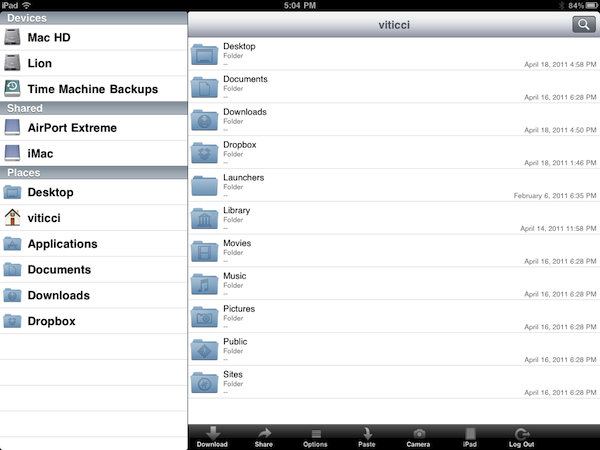
Over the past few months, I have tried several iOS apps to access my Mac’s filesystem and screen while away from my home office. These apps, either standalone VNC clients like Screens or all-in-one solutions like Cloud Connect Pro, usually relied on a Mac’s built-in sharing and remote login capabilities to create a secure connection between the machine and iOS devices trying to access its contents. To work with these apps, I simply had to set up a global DynDns hostname or a VPN server so that I could log into my Mac, view files, and control its screen. The VPN method, for instance, was actually based on the same DynDns hostname I had already configured in Edovia’s Screens, Cloud Connect Pro, Plex, FileBrowser and many others. For as much as I loved being able to remotely connect to my OS X machines with a standard web address (DynDns allows you to create a custom URL), now I can’t use it anymore. We have recently upgraded our Internet connection to a new ISP, and whilst the speed bump is noticeable and generally useful when it comes to downloading large files, the new router provided by the ISP doesn’t offer a public IP address (without entering all the details, it’s based on NAT), thus preventing me from using all those neat Mac and iOS apps that needed DynDns to be working correctly. I can access my Mac’s content locally, but as soon as I go out DynDns becomes useless thanks to the new router. This means Here, File File doesn’t work anymore in 3G, as well as Screens (through DynDns), Plex and Cloud Connect. I may have a faster Internet connection now, but the lack of DynDns support changed the way I can access my machines from outside my home network.
So I tried to come up with new solutions to work from anywhere in these past weeks. Screens comes with an optional Screens Connect option that lets you set up a hostname that works through Edovia’s servers (and it’s not blocked by my router) and LogMeIn comes with its own Mac application that handles connections independently. From what I’ve seen so far, apps that provide their own connections through a “server” Mac app and don’t require me to enter a global DynDns hostname are working just fine. But this also means that apps based on OS X sharing features and lacking proprietary remote access capabilities won’t work unless I change my ISP again. Presence, a new version of the popular FarFinder tool by FlyingMac, allows me to access my Mac – all its files, folders, and drives – through a web service that puts the computer in the cloud and makes it accessible from any web browser, iPhone, or iPad. Read more
Access Extra Content and Perks
Founded in 2015, Club MacStories has delivered exclusive content every week for nearly a decade.
What started with weekly and monthly email newsletters has blossomed into a family of memberships designed for every MacStories fan.
Club MacStories: Weekly and monthly newsletters via email and the web that are brimming with apps, tips, automation workflows, longform writing, early access to the MacStories Unwind podcast, periodic giveaways, and more;
Club MacStories+: Everything that Club MacStories offers, plus an active Discord community, advanced search and custom RSS features for exploring the Club’s entire back catalog, bonus columns, and dozens of app discounts;
Club Premier: All of the above and AppStories+, an extended version of our flagship podcast that’s delivered early, ad-free, and in high-bitrate audio.